Intercom
 Shopify
 Stripe
 Slack
Slack Notion
 Google Workspace
 Confluence

How Do You Stop Zendesk Spam Tickets and Relay Spam? (2026 Fix List)


Zendesk spam comes in two shapes: junk tickets flooding your queue, and relay spam, where strangers get ticket notifications from your domain. Relay spam stops when you replace four placeholders in the first-reply trigger with static text; the flood needs end-user access, blocklist and API settings.
Key takeaways
- Stopping Zendesk relay spam requires replacing four placeholders, ticket.title, ticket.requester.first_name, ticket.requester.last_name and ticket.requester.name, with static text in the first-reply trigger.
- The Zendesk blocklist's reject: keyword blocks a domain across every channel with no record kept, while the suspend: keyword routes it to the suspended queue for review.
- A Zendesk automation with a spam tag processes at most 1,000 tickets per hourly run, so clearing a backlog of 30,000 spam tickets takes a minimum of 30 hours.
- Zendesk rejects inbound email rated 99% or higher likely to be spam, suspends the rest for review, and deletes unreviewed suspended tickets after 14 days.
- In October 2025, KrebsOnSecurity reported thousands of relay-spam ticket notifications carrying the names of Zendesk customers including CapCom, CompTIA, Discord, NordVPN and Tinder.
To stop Zendesk spam, replace four placeholders in your first-reply trigger with static text, then tighten end-user access, add reject: entries to the blocklist and require authentication on the request and uploads APIs. The trigger fix stops relay spam, where strangers get "we got your ticket" mail from your domain; the other three cut the junk tickets flooding your queue. Every path and setting below was checked against Zendesk's documentation on September 20 and again on September 24, 2026.
| Problem | Fix | Where in Admin Center |
|---|---|---|
| Strangers receive mail from your domain (relay spam) | Static text instead of {{ticket.title}} and the three requester-name placeholders | Objects and rules > Business rules > Triggers |
| Anonymous junk tickets | Turn off anonymous submission, require verification, or allow only named domains | People > Configuration > End users |
| One domain keeps getting through | reject:domain.com (all channels) or suspend:domain.com | People > Configuration > End users |
| Spam through the API or web forms | Require authentication for request and uploads APIs | People > Configuration > End users |
| A backlog already in the queue | Bulk delete (100 per action) or an automation (1,000 per hourly run) | Views, or Objects and rules > Automations |
What are the two kinds of Zendesk spam, and which is worse?
Flooding is the obvious one: thousands of fake requests bury real customer tickets.
Relay spam is the one that damages you. An attacker submits a ticket using somebody else's email address, your auto-responder trigger fires, and that person receives a message that appears to come from your domain, carrying whatever subject line the attacker typed. The recipient sees your brand, not Zendesk's.
That is what happened in October 2025, when KrebsOnSecurity received thousands of ticket notifications in a few hours bearing the names of Zendesk customers including CapCom, CompTIA, Discord, GMAC, NordVPN, The Washington Post and Tinder. Zendesk's communications director told Krebs the mail came from accounts "that configured their Zendesk instance to allow anyone to submit support requests, including anonymous users," and that the notification "will also include the Subject added by the creator of these tickets." Their rate limits did not stop it. That full account is on KrebsOnSecurity, and it is worth reading because the reply-to address on the junk mail was the customer's own support address.
The older, separate issue was a genuine bug: CVE-2024-49193, an email-spoofing weakness in Zendesk's email collaboration handling, patched in 2024. Relay spam is not that bug. It is a configuration outcome, which is why it keeps coming back.
Zendesk's position has been consistent: anonymous ticket submission is a feature some businesses need. That is defensible, and it also means the incentive to fix your instance sits entirely with you. Nobody else pays for your domain's reputation.
Is Zendesk spam still a problem in 2026?
The wave did not end in 2025. Spam is the single most active complaint on r/Zendesk in 2026: our research surfaced 14 spam threads on the subreddit, 9 of them in the last 12 months, clustered in January and February 2026 with titles like "MORE and new spam". A second pattern showed up mid-year, where admins hit Microsoft 365 rejections such as "554 5.7.520 Access denied, Your organization does not allow..." on mail related to their Zendesk. And by August 2026, admins were solving spam with marketplace AI apps because the built-in filters were letting too much through.
The fixes below are ordered by how much they reduce, starting with the one that stops your account being used against other people.
How do I stop Zendesk sending relay spam from my domain?
This is the fix that stops strangers receiving mail from your domain, and it takes five minutes.
- In Admin Center, click Objects and rules, then Business rules, then Triggers.
- Open Notify requester and CCs of received request (the name varies; you want the trigger that fires on ticket creation).
- In the subject and body, replace these four placeholders with static text:
{{ticket.title}},{{ticket.requester.first_name}},{{ticket.requester.last_name}}and{{ticket.requester.name}}. - Check that the trigger carries the condition Current user · Is · (end user). Zendesk's standard version of this trigger ships with it, and it limits the trigger to tickets opened by end users rather than agents. It doesn't stop relay spam on its own, because an anonymous submitter becomes an end user too; the static text in step 3 does that.
- Save.
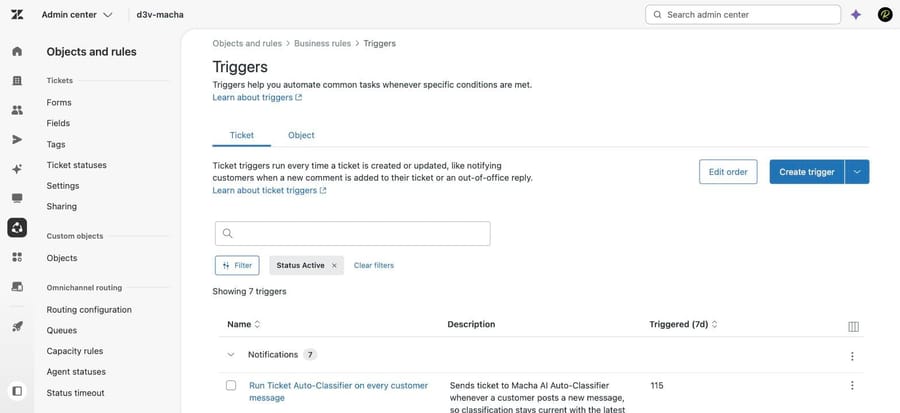
Two details the older versions of this advice get wrong. The list is those four placeholders, not {{ticket.description}}, per Zendesk's tips to combat spam. And the restriction applies to the first-reply trigger only. Using the same placeholders in later triggers is fine, because by then a real interaction is established. If you strip personalization out of every notification you have overcorrected.
Should I turn off anonymous ticket submission in Zendesk?
Relay spam needs an anonymous endpoint. Closing that endpoint ends the problem outright, at the cost of friction for customers who write in without an account.
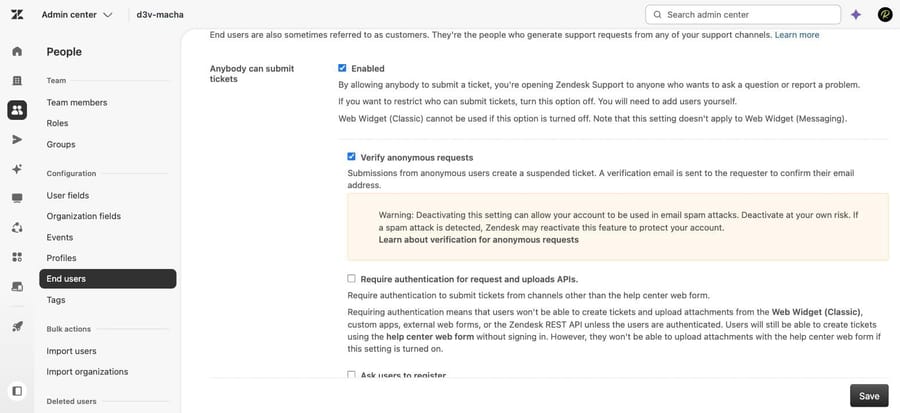
In Admin Center, click People, then Configuration, then End users. Three settings matter:
- Anybody can submit tickets. Leaving it on keeps you open. Turning it off means only users you add can submit.
- Require email verification. Keeps the endpoint open but makes an unverified sender's mail go to the suspended queue instead of the ticket queue.
- Allowed email domains. Restricts submission to the domains you name, per Zendesk's guide to permitting only approved email addresses.
Each one trades spam tickets for suspended tickets. Zendesk says so directly: tightening submission produces a bigger suspended queue, and someone has to review it before the 14-day auto-delete. Pick the trade deliberately rather than turning everything on and discovering the queue three weeks later.
Does the Zendesk blocklist block spam on every channel?
Most admins paste domains into the blocklist and assume they are blocked everywhere. They are not. Per Zendesk's allowlist and blocklist documentation, a bare entry only affects the email channel.
The keywords, entered in Admin Center under People, Configuration, End users:
reject:megaspam.comblocks ticket creation from that domain across channels. Nothing reaches the suspended queue and no record is kept.suspend:megaspam.comsends it to the suspended queue for review instead.*on its own line suspends every new user except those on your allowlist.- Domains go in without the
@. Separate entries with a space. Both fields hold up to 10,000 characters.
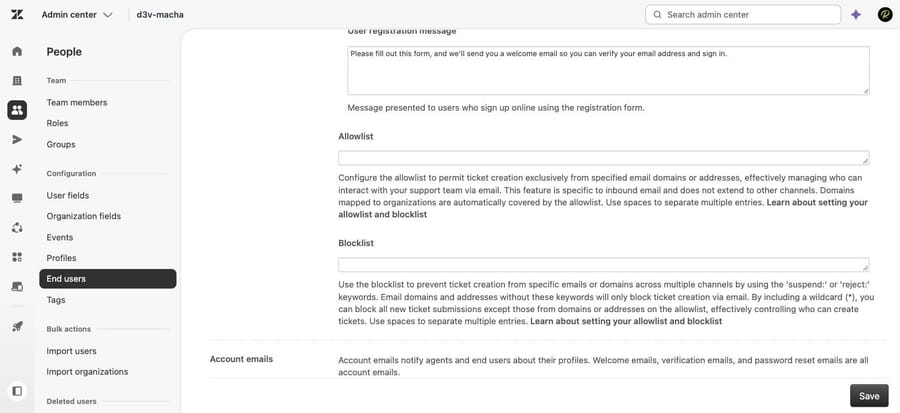
Two behaviors worth knowing before you build a wildcard strategy. If a wildcard and a reject: entry conflict, Zendesk defaults to suspension, so * reject:gmail.com suspends Gmail rather than rejecting it. And a wildcard does not catch users whose domain is mapped to an organization; blocklisting that domain explicitly does. This is exactly the wall the practitioner comment under Zendesk's own article runs into, and the answer is to reject specific domains rather than expecting the wildcard to cover them.
How do I stop spam that arrives through the API or web forms?
Spam that arrives through the API or an embedded form will not be touched by any of the above. In Admin Center, click People, select Configuration, then End users, and in the "Anybody can submit tickets" section turn on Require authentication for request and uploads APIs, then save.
Check what depends on anonymous submission first. Per Zendesk's spam prevention article, this blocks anonymous ticket creation from the Web Widget contact form, custom apps and external web forms. Turning it on without checking is how a working contact form goes quiet.
Do I need to add a CAPTCHA to Zendesk?
Older guides, including our own earlier version of this page, told you to add a CAPTCHA to your forms. That advice is out of date. Zendesk Support uses Cloudflare's bot detection, CAPTCHA is enabled by default including on the Sign Up page, and it cannot be disabled. Only traffic Cloudflare flags as suspicious gets challenged, which is why spam still arrives despite it being on.
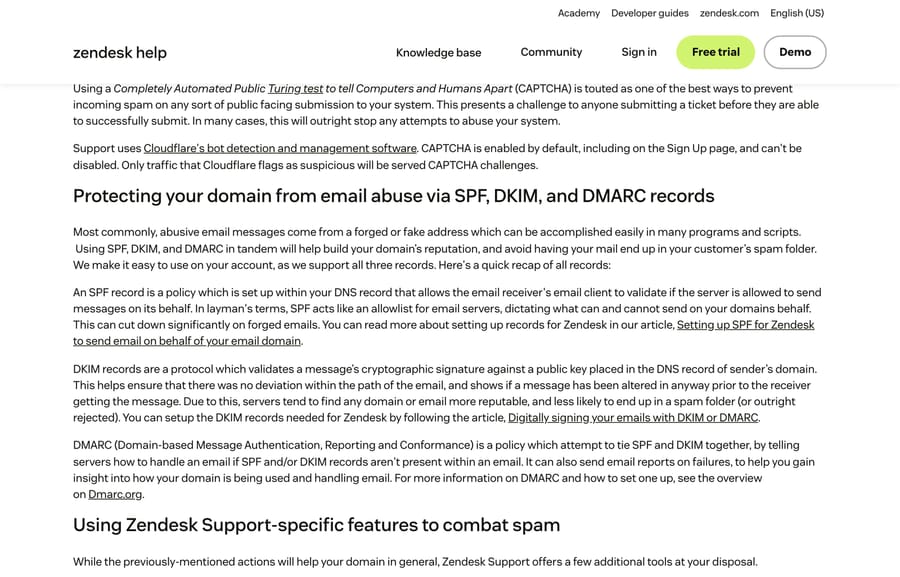
The useful second layer here is email authentication. SPF, DKIM and DMARC protect your domain's reputation outbound, and Zendesk's Sender Authentication feature, at Admin Center, Channels, Email, checks inbound DMARC and routes failures to the suspended queue.
How do I delete thousands of spam tickets already in Zendesk?
Prevention does nothing about the 12,000 junk tickets already in your account. Four routes, with their real limits:
| Method | Limit | What it does |
|---|---|---|
| Bulk delete in a view | 100 tickets per action | Deletes, selectable across pages |
| Bulk mark as spam | 100 tickets per action | Deletes permanently and suspends the requester |
| Automation with a spam tag | 1,000 tickets per hourly run | Closes and tags, leaves data in place |
| Delete through the API | Rate limits apply | Scriptable for large backlogs |
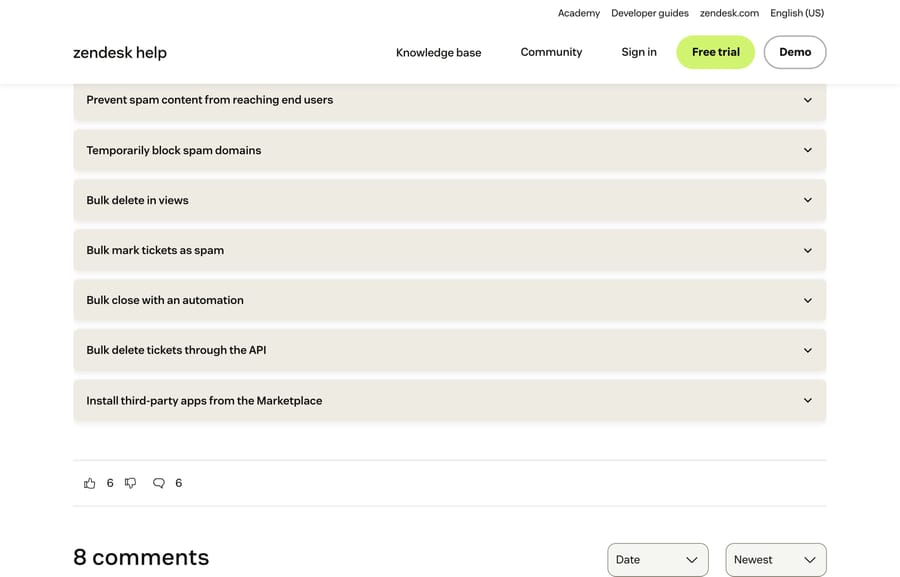
The arithmetic matters when you pick. An automation acts on at most 1,000 tickets per hourly cycle, so 30,000 spam tickets take a minimum of 30 hours to clear, and Zendesk says so in its own article. Bulk actions in views move faster per click but cap at 100.
One warning that costs people their forms: if your external contact form forwards submissions into Zendesk by email, never use Mark as spam on those tickets. You are flagging your own form rather than the spammer, which can get your sending domain blocklisted. Use bulk delete instead.
Can an AI agent help with Zendesk spam?
Nothing above is a job for AI. Trigger placeholders, blocklists and API authentication are configuration, and an agent layer has no business touching them.
What an agent layer changes is the residue: the spam that gets through the filters and still needs reading, tagging and closing, plus the real tickets buried underneath it. Macha on Zendesk reads incoming tickets in your Zendesk, classifies them against your own history, applies the tag and status you would, and answers the genuine ones. It fits teams already running Zendesk whose agents spend the first hour of every shift sorting a queue, and it is the wrong fit if your spam problem is really one misconfigured trigger, which you should fix for free with the trigger change above.
Worth naming the incentive while the subject is billing: a vendor charging per automated resolution earns on volume, including junk volume, so a noisy queue is good for them. Macha bills per ticket, one thread with one person as one charge however many replies it takes, from $299 a month for 750 tickets on published pricing, setup and monitoring by our team included, with $50 of free usage to start.
How do I stop receiving Zendesk spam from other companies?
If Zendesk relay spam is landing in your personal inbox from companies you have never dealt with, you cannot fix their configuration. What you can do is filter on the header every Zendesk notification carries. Reddit user pepppppy published a Google Apps Script that runs hourly, checks the last day of mail for an X-Mailer header containing "zendesk", and applies a zendesk label you can then archive or delete with an ordinary Gmail filter.
Two caveats. It labels every Zendesk email, including notifications from companies you actually use, so archive rather than auto-delete unless you are sure. And because it runs on a schedule, your phone still buzzes when the spam arrives; the cleanup happens on the next run.
What should a Zendesk spam checklist cover?
- First-reply trigger carries no
{{ticket.title}}or requester-name placeholders. - That trigger still has Zendesk's standard Current user · Is · (end user) condition.
- End-user access is set deliberately: open, verified, or restricted by domain.
- Blocklist entries that must apply across channels use
reject:. - Require authentication for request and uploads APIs is on, and nothing legitimate depends on anonymous submission.
- SPF, DKIM and DMARC are published, and Sender Authentication is on.
- Someone reviews the suspended queue before the 14-day auto-delete.
- Your Zendesk is not on the same domain you use for SSO-linked email verification.
If tickets are not arriving at all rather than arriving as spam, the problem is upstream of all of this, and our guide to Zendesk email not creating tickets is the right place to start. If you want to understand the rule engine before you edit it, Zendesk triggers explained covers conditions and actions.
How we researched this
The configuration steps come from Zendesk's current documentation, read on September 20, 2026 and re-checked on September 24, 2026: the spam prevention FAQ (edited August 20, 2026), tips to combat spam (May 1, 2026), the allowlist and blocklist article (May 1, 2026), the approved-email-addresses article and the suspended tickets overview. Three of the five screenshots come from our own Zendesk sandbox, d3v-macha, captured on September 20, 2026: the Triggers page, the End users settings and the allowlist and blocklist fields. The other two are of the documentation pages above, captured the same day. The 2025 incident detail and the Zendesk statement come from KrebsOnSecurity's October 17, 2025 report. We checked the link this page previously carried to Zendesk's "Important notice about recent spam emails via Zendesk" and it now returns 404, so it has been dropped. We didn't reproduce an attack, so the relay mechanism is documented rather than observed.
Frequently asked questions
Why is my company sending spam emails through Zendesk? Your account allows anonymous ticket submission and your first-reply trigger echoes user-supplied content. An attacker files a ticket using a victim's email address and your auto-responder sends that victim a message from your domain carrying the attacker's subject line. Removing {{ticket.title}} and the requester-name placeholders from that trigger stops it.
How do I stop spam tickets in Zendesk? Work down four settings in Admin Center under People, Configuration, End users: turn off anonymous submission or require email verification, restrict allowed email domains if your customers are on known domains, add reject: entries to the blocklist for the worst offenders, and turn on Require authentication for request and uploads APIs if nothing legitimate depends on anonymous submission.
Does Zendesk have a spam filter? Yes, and it runs whether or not you configure anything. Zendesk scores inbound mail, rejects anything at 99% or higher confidence of spam outright, and sends lower-confidence mail to the suspended tickets queue for review. Cloudflare bot detection also guards the web form by default.
Does the Zendesk blocklist block spam on every channel? Only if you use the reject: keyword. A bare domain in the blocklist affects the email channel alone. reject:domain.com blocks ticket creation from that domain across channels and keeps no record; suspend:domain.com sends it to the suspended queue instead.
How do I delete thousands of spam tickets in Zendesk? Bulk delete in a view handles 100 at a time. An automation that closes and tags them acts on up to 1,000 tickets per hourly run, so 30,000 tickets takes at least 30 hours. For anything larger, delete through the API. Avoid Mark as spam if the tickets came from your own external form forwarded in by email.
What does marking a ticket as spam actually do? It permanently deletes the ticket and suspends the requester, so that person cannot create further tickets. That is the right outcome for a real spammer and the wrong one for a customer whose mail was misclassified, which is why the external-form case matters.
Should I add a CAPTCHA to my Zendesk form? There is nothing to add. Zendesk Support uses Cloudflare's bot detection, CAPTCHA is enabled by default including on the Sign Up page, and it can't be turned off. Challenges are served only to traffic Cloudflare flags as suspicious.
Can I stop receiving Zendesk spam from other companies? Not at the source. You can filter it: every Zendesk notification carries an X-Mailer header naming Zendesk, and a Google Apps Script can label those threads hourly so a Gmail filter archives them. It will also catch legitimate Zendesk mail from companies you use.
Sources: How can I prevent and manage spam in Zendesk? · Tips to combat spam and protect your business · Setting your allowlist and blocklist · Permitting only users with approved email addresses to submit tickets · Understanding suspended tickets and spam · Email Bombs Exploit Lax Authentication in Zendesk (KrebsOnSecurity, October 17, 2025) · CVE-2024-49193 · Zendesk spam filtering script (GitHub gist)
Add AI agents to your Zendesk
Macha reads the ticket, drafts the reply and takes the action, inside the Zendesk you already run.