
Connecting Your Tools and Integrations
Connect your tools — Zendesk, Freshdesk, Shopify, Stripe, Slack, Google Workspace, Notion, and more. Each connector gives your agents read and write access to external services.

Connectors, Tools & Triggers Explained
What Are Connectors
Connectors are integrations that give your agents access to external tools and services. When you connect an integration like Zendesk, Freshdesk, Gorgias, Front, or Shopify, Macha creates a set of tools that agents can use to read data, perform actions, and interact with those services on your behalf.
Each connector exposes a specific set of tools. You control which tools each agent has access to, so you can give a support agent full Zendesk access while restricting a reporting agent to read-only tools.
Read Tools vs Write Tools
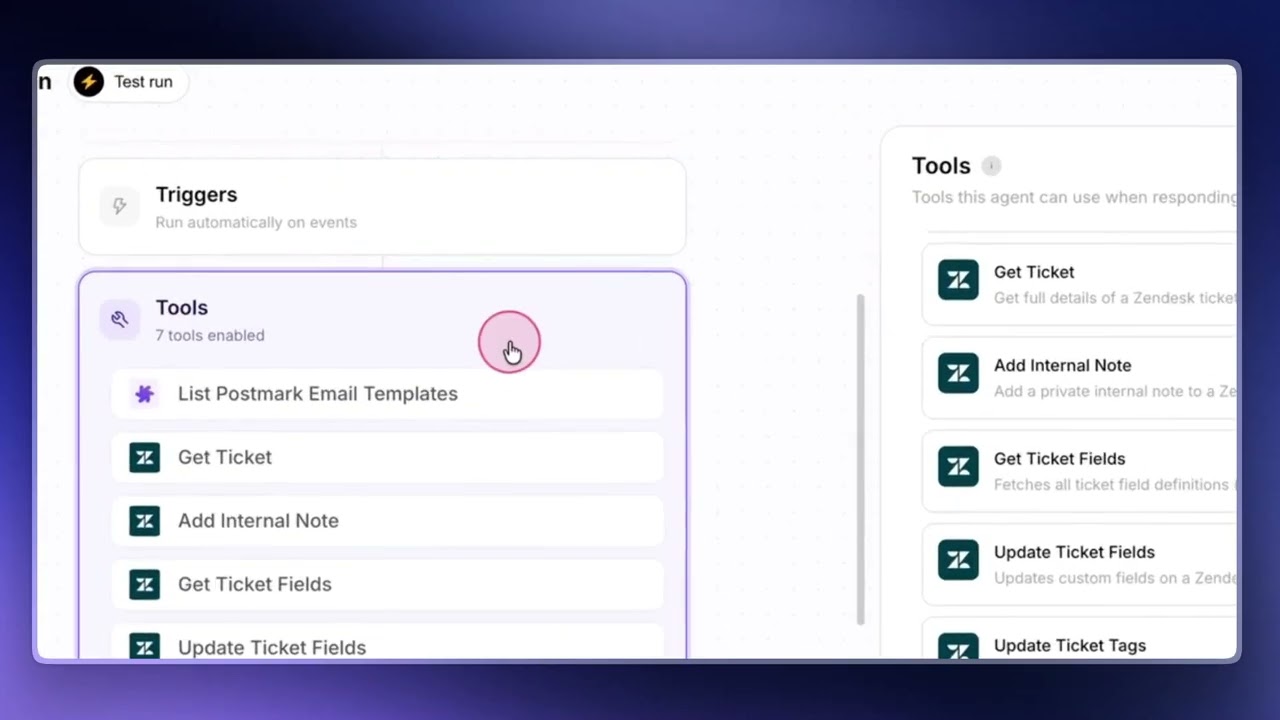
Connectors Explained — Read Tools vs Write Tools
Every tool a connector exposes is either a read tool or a write tool. The distinction matters because it changes how safe a tool is to hand to an agent — especially one running autonomously.
Read Tools
Read tools fetch information without changing anything in your connected app. Examples:
- Shopify — search products, search orders, get a customer record, look up an order
- Zendesk — get ticket, search tickets, read attachments, search help center articles
- Google Workspace — read a Doc, read a Sheet
These are safe. The agent can use them freely without needing to ask you for anything.
Write Tools
Write tools make changes in your connected app — adding a public reply, updating a ticket status, posting an internal note, editing a custom field, creating a refund. These actually mutate data on the third-party tool.
In interactive chat, the agent always pauses and asks for confirmation before running a write tool. You see the proposed action, review it, and click confirm.
In autonomous mode (when the agent is running off a trigger), there is no human in the loop. Write actions execute immediately, with no confirmation step. This is by design — but it means you need to be deliberate about which write tools an autonomous agent can access.
Tip
Tools that post public replies to customers show a clear warning when you switch them on. Don't enable customer-visible write tools on an autonomous agent unless you've thoroughly tested it in chat first.
Disabling tools at the connector level
Every connector has its own tool list inside the connector's settings modal. You can switch off any tool there to disable it across every agent in the organization, regardless of whether individual agents had it enabled. Useful when a team admin wants to ringfence what's possible at the platform level — say, blocking zendesk_update_ticket_tags for the whole org while letting one team's agents keep using everything else.
Connector-level disables are enforced at runtime: when an agent tries to use a tool that's been disabled at the connector level, Macha silently skips it — the agent never sees the tool, can't call it, and can't be tricked into thinking it has access.
What this looks like inside the agent builder
If a connector tool is disabled while an agent has it enabled, the agent builder flags it visibly in three places so nobody wastes time toggling a tool the platform won't actually run:
- Flow pill summary (the compact tool list on the left of the agent flow) — the affected pill turns amber with a dashed border and a warning icon. Hover for a tooltip explaining what's happening.
- "Add Tool" modal — the locked tool row is greyed out, the toggle is replaced by a "Manage" button, and clicking the row does nothing.
- Enabled-tools card on the right of the Tools section — the card gets an amber warning band with text explaining the agent can't actually call this tool, plus a "Manage connector" link.
Each of those "Manage" links opens the relevant connector's settings modal in place on the agent page. Re-enable the tool and save — the agent's tool list updates immediately, no reload needed.
Available Integrations
Zendesk
Full-featured integration with 17 tools for ticket management, image reading, custom fields, messaging, and help center content. Zendesk connects via OAuth or API key.
- Ticket management — Get ticket details, search tickets, update status, priority, type, subject, tags, and custom fields.
- Custom fields — Read all custom field values on a ticket with labels resolved from the field schema. Cached per connector.
- Replies and notes — Send public replies to customers or add internal notes for your team.
- Image vision — Read image attachments (JPEG, PNG, GIF, WebP) using AI vision. The agent downloads the image, encodes it, and sends it to a vision-capable model. Works with GPT-5, GPT-5.4, GPT-5.4 Mini, and Claude Sonnet.
- Attachments — Extract text from PDF, DOCX, XLSX, CSV, and TXT attachments.
- Messaging — Read and respond to Zendesk messaging (SunCo) conversations.
- Help Center — Search knowledge base articles with live webhook sync.
- Users and groups — Search Zendesk users by name, email, or role; list groups to route tickets to the right queue. Assign tickets to a specific agent, a group, or both.
Freshdesk
Comprehensive support platform integration with 15 tools. Freshdesk connects via API key and subdomain.
- Tickets — Get ticket details (including conversations and attachments), search tickets with filter-based query syntax.
- Contacts — Search and look up customer contact information.
- Knowledge Base — Search help center articles.
- Actions — Add public replies (the agent's configured Freshdesk signature is appended automatically), add internal notes, update priority, status, tags, and custom fields, assign tickets.
- Team — List agents and groups for assignment workflows.
- Attachments — Read attachment contents (supports PDF, DOCX, XLSX, CSV, and TXT text extraction).
Gorgias
E-commerce support platform integration with 15 tools. Gorgias connects via Basic auth — your account email plus the API key from Settings → REST API, along with your subdomain.
- Tickets — Get ticket details with the full message thread, search tickets by full-text query.
- Customers — Search customers by email, phone, or name.
- Macros — Search canned responses (Gorgias's pre-written reply library).
- Custom fields — List custom ticket fields defined in your Gorgias account.
- Actions — Send public replies via the ticket's channel (email, chat, etc.), add internal notes, update status (open / pending / resolved / closed), update priority (low / normal / high / urgent), set tags, update custom fields.
- Team — List users (agents) and teams for assignment workflows. Assign tickets to a specific user, team, or both.
- Attachments — Extract text from PDF, DOCX, XLSX, CSV, and TXT attachments.
- Triggers — Custom-webhook triggers for ticket created, ticket updated, and new message added. Configure in Gorgias under Settings → Integrations → HTTP integrations.
Front
Shared-inbox platform integration with 15 tools. Front connects via a Bearer API token (generated in Settings → Developers → API tokens). Note: Front's primary object is the conversation rather than the ticket — tool names and labels reflect that.
- Conversations — Get conversation details with the full message + comment thread, search conversations by full-text query.
- Contacts — Search contacts by handle (email, phone, twitter, etc.) or by name. Handle-based lookup is exact and fastest.
- Tags — List the tags available in your workspace so the agent can pick valid options.
- Custom fields — List custom fields defined across conversations, contacts, inboxes, and teammates.
- Actions — Send public replies via the conversation's channel, post internal comments with
@mentionsupport, update status (archive / reopen / trash), set tags (smart diff — add and remove computed automatically), update custom fields. - Routing — Assign or unassign a teammate. List teammates, teams, and inboxes for routing decisions.
- Attachments — Extract text from PDF, DOCX, XLSX, CSV, and TXT attachments.
- Triggers — Custom-webhook triggers for conversation created, new message added, and conversation assigned. Configure in Front under Settings → Rules with the "Send a webhook" action.
Note: Front conversations do not have a native priority field — teams typically use tags for urgency. To prioritize, use Update tags with a tag like priority-high instead of looking for a priority dropdown.
Shopify
E-commerce integration for products, orders, customers, and more. Shopify connects via OAuth through the Macha AI app.
- Products — Search your product catalog with variants, pricing, and inventory data.
- Orders — Get order details, search orders by various criteria, and view order history for specific customers.
- Customers — Look up customer profiles and their order history.
- Discounts — View active discount codes and promotions.
- Refunds — Create refunds (requires human confirmation before executing).
Slack
Messaging integration for team communication. Slack connects via OAuth.
- Messaging — Send messages to channels and respond to conversations.
- App mentions — Agents can respond when mentioned in Slack channels.
- Direct messages — Handle direct messages sent to the Macha Slack app.
Stripe
Payment and billing integration. Stripe connects via API key.
- Customers — Search and look up customer records.
- Payments — View payment history, charges, and payment methods.
- Invoices — Retrieve invoice details and payment status.
- Subscriptions — View subscription details and status.
Google Workspace
Integration with Google Docs and Sheets. Google connects via OAuth. Documents are selected using Google Picker — you choose which files your agents can access.
- Read Google Doc — Read the full content of a Google Doc.
- Read Google Sheet — Read data from a Google Sheet, all sheets or a specific range.
Confluence
Integration with Atlassian Confluence for searching and managing documentation. Confluence connects via API token.
- Search Pages — Search Confluence pages by keyword across spaces.
- Get Page — Read the full content of a Confluence page.
- List Spaces — List available Confluence spaces.
- Get Page Children — Navigate page hierarchies.
- Create Page — Create a new page in a space (with confirmation).
- Update Page — Update an existing page (with confirmation).
- Add Comment — Add a comment to a page (with confirmation).
Note: Confluence API tokens expire. When connecting, enter the expiry date you chose in Atlassian. Macha will notify you 30 days before it expires so you can regenerate it.
Notion
Knowledge management integration with 6 tools. Notion connects via OAuth.
- Pages — Read Notion page content.
- Search — Search across your Notion workspace and its databases.
- Create Page — Create a new Notion page.
- Update Page — Update an existing Notion page.
Airtable
Database and spreadsheet integration. Airtable connects via one-click OAuth (managed by Composio).
- Records — Read, search, and manage records in Airtable bases.
- Tables — Access table structure and metadata.
Gmail
Read, label, and send email from a shared or personal mailbox. Gmail connects via one-click OAuth (managed by Composio).
- Reading — Search emails with Gmail operators, fetch the full body of a message, read attachment metadata.
- Composing — Send a new email or reply into an existing thread, plain text or HTML.
- Managing — Add or remove labels to mark read, star, archive, or apply custom labels.
- Triggers — New Message Received fires on every inbound email (loop-safe). Email Sent fires on every message the mailbox sends (loop-prone — the setup flow warns before enabling on a reply-capable agent).
Outlook
Same shape as Gmail for Microsoft 365 mailboxes. Connects via one-click OAuth (managed by Composio).
- Reading & Composing — Search, read, send, and reply from the connected mailbox.
- Organising — Move messages between folders.
- Triggers — New Message Received, same loop-safe treatment as Gmail.
HubSpot
CRM and Service Hub integration covering contacts, deals, tickets, notes, and pipelines. Connects via one-click OAuth (managed by Composio).
- Contacts — Search, get, and update contact records with associations to companies and deals.
- Deals — Search, get, and move deals through pipeline stages.
- Tickets — Search, get, and update Service Hub tickets with property patches.
- Notes — Attach timeline notes to any contact, deal, or ticket.
- Pipelines — List pipelines and stage IDs — always call this before a stage move, since stage IDs are per-portal.
- Triggers — New Ticket Created, Ticket Updated (loop-prone, filter by property), New Contact Created.
Jira
Read, create, comment on, and transition Jira issues. Connects via one-click OAuth (managed by Composio).
- Issues — Search with JQL, fetch full issue details, create new issues, add comments, transition status.
- Projects & Transitions — List projects and workflow transitions so the agent picks correct IDs before writing.
- Triggers — New Issue Created, Issue Updated (filter by field to avoid loops).
Asana
Search projects and tasks, create tasks, comment, and complete work. Connects via one-click OAuth (managed by Composio).
- Tasks — Search, get, create, update, and complete tasks. Add comments to any task.
- Projects & Users — List projects and workspace users for routing and assignment.
- Triggers — New Task Added, scopable to a specific intake project.
Google Calendar
Read schedules, find free time, and book meetings. Connects via one-click OAuth (managed by Composio).
- Events — List, get, create, update, and delete events on any accessible calendar.
- Availability — Find free time across a date range for proposing meeting slots.
- Calendars — List calendars the connected account can see.
- Triggers — New Event Created, Event Updated.
OAuth vs. API Key Setup
Connectors use one of three authentication methods:
OAuth (Authorization Flow)
Used by: Zendesk, Shopify, Slack, Google Workspace, Notion.
With OAuth, you click an "Authorize" button that redirects you to the external service. You log in there (if not already), review the permissions Macha is requesting, and click "Allow" or "Approve." You are then redirected back to Macha with the connection established. No API keys or credentials to copy.
One-click OAuth (managed by Composio)
Used by: Gmail, Outlook, Google Calendar, Jira, Asana, HubSpot, Airtable, Cal.com.
Same experience as OAuth — one Connect click, one consent screen on the provider's side, then back to Macha. The difference is that our integration partner Composio handles the OAuth handshake and token storage on our behalf, so we don't ask the workspace admin to provision an OAuth app per connector. Support content never touches Composio's storage — only the API calls that reach the connected provider. Composio is SOC 2 Type II and ISO 27001:2022 certified, and is listed as a subprocessor on our security page.
API Key / Credentials
Used by: Freshdesk, Stripe, Razorpay, ElevenLabs, Document360, Tavily.
With API key authentication, you enter credentials directly in Macha. Each connector's setup form includes step-by-step instructions on where to find the required keys in the external service. For example, Freshdesk requires your API key (found in Profile Settings) and your subdomain.
Tip
When connecting via API key, follow the setup guide shown below the form fields. It tells you exactly where to find your credentials in the external service, what permissions to grant, and what format to use.
Multi-Instance Connectors
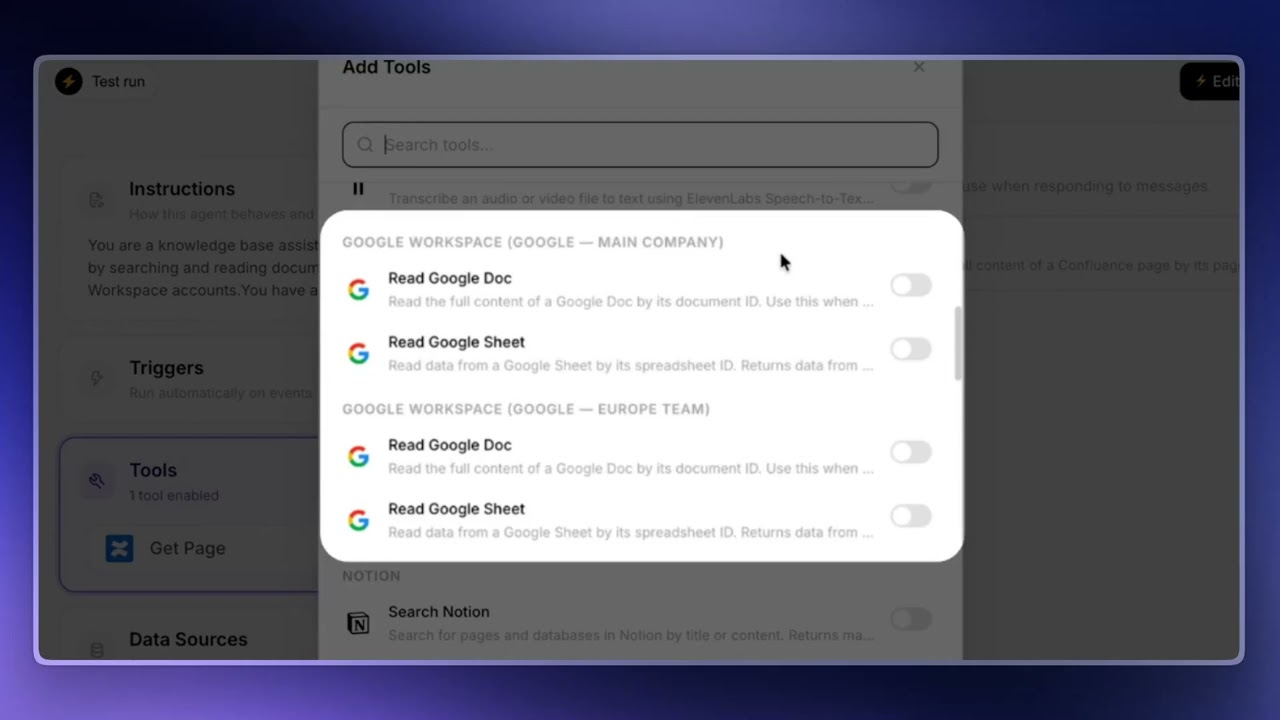
Connect Multiple Accounts of the Same App
Your organization can connect multiple instances of the same connector type. For example, you might run two Google Workspace accounts — one for the main company and one for a separate team — or two Zendesk accounts (production and sandbox), or separate accounts for different product lines. You can connect both and let your agents use either one.
How It Works
- Each connector instance has a unique name within your organization (e.g., "Production Zendesk" and "Sandbox Zendesk", or "Google Main Company" and "Google Europe Team").
- When you assign multiple instances of the same connector type to an agent, Macha automatically disambiguates the tool names. A tool like
zendesk_get_ticketbecomeszendesk_get_ticket__productionandzendesk_get_ticket__sandbox. Similarly, a singleread_google_docbecomes two distinct tools — one per connected Google account. - Tool descriptions are also prepended with the account name (e.g., "[Account: Production]") so the AI model knows which instance to use.
This disambiguation is automatic — you do not need to configure anything beyond giving each connector instance a distinct name.
Name Your Connectors Clearly
The clearer your connector names are, the more reliably your agent picks the right one. Avoid generic names like "Google Workspace 1" and "Google Workspace 2" — instead use meaningful names that describe what the account is for ("Google Main Company", "Google Europe Team", "Production Zendesk", "Sandbox Zendesk").
You can also reference these names directly in your agent's instructions. For example: "Always use Google Main Company for internal documents and Google Europe Team for anything related to that team. If unsure, search both."
Built-In Connectors
Some connectors are always available without any setup or authentication.
File Tools
The File Tools connector is built into Macha and requires no connection. It gives agents the ability to generate files on demand:
- Create Spreadsheet — Generates an Excel (.xlsx) file.
- Create CSV — Generates a CSV file.
- Create PDF — Generates a PDF document.
- Create Document — Generates a Word (.docx) document.
Each tool creates the file and returns a download URL. You will see the File Tools connector on your Connectors page with a purple "Installed" badge instead of a "Connect" button.
Connector Setup Guides
Every connector in Macha includes a built-in setup guide visible in the connection modal. Here is a brief overview of what each connector requires:
- Zendesk — OAuth authorization. Click "Connect" and authorize through your Zendesk admin account.
- Freshdesk — API key (found in your Freshdesk profile under "Your API Key") and your subdomain (e.g.,
yourcompanyfromyourcompany.freshdesk.com). - Gorgias — API key (found under Settings → REST API), the email you log in with, and your subdomain (e.g.,
yourcompanyfromyourcompany.gorgias.com). - Front — API token from Settings → Developers → API tokens. Tokens are JWTs that start with
eyJ. No subdomain needed — Front uses a single global endpoint. - Shopify — OAuth authorization via the Macha AI app. You will need to enter your store domain first (e.g.,
your-store.myshopify.com), then authorize through Shopify. - Slack — OAuth authorization. Click "Connect" and authorize through your Slack workspace.
- Stripe — Restricted API key. Create one in your Stripe Dashboard under Developers > API Keys with read-only permissions for the resources you need.
- Google Workspace — OAuth authorization. Click "Connect" and authorize with your Google account. Grant access to the services you want (Docs, Sheets, Drive, Calendar).
- Notion — OAuth authorization. Click "Connect" and select which Notion pages and databases to share with Macha.
- Airtable — Personal access token. Create one at airtable.com/account with access to the bases you need.
Tip
After connecting a connector, assign it to an agent and select the specific tools you want that agent to use. A connector on its own does not do anything until it is wired to an agent.
© 2026 AGZ Technologies Private Limited