
Multi-Agent Delegation with Sub-Agents
Let agents delegate tasks to specialist agents. Build multi-agent workflows with automatic routing and hierarchical delegation.
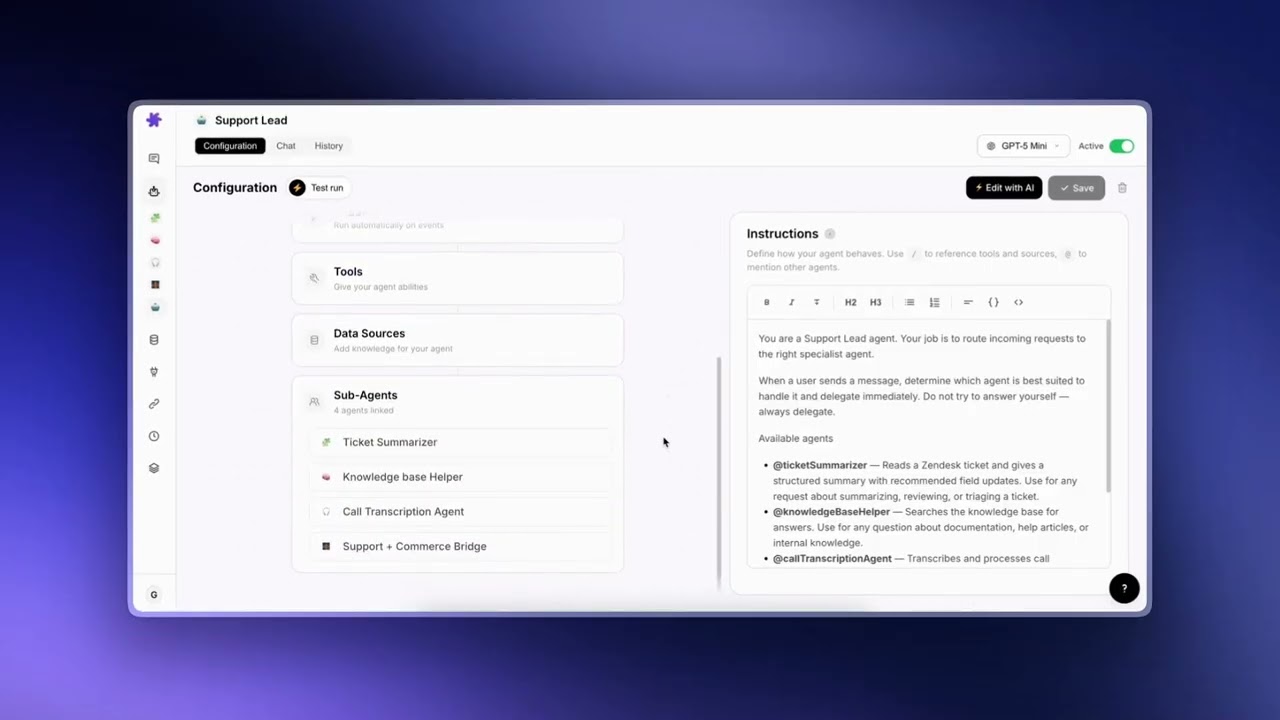
Using Sub-Agents — Multi-Agent Delegation
What Are Sub-Agents
Sub-agents let one agent delegate tasks to another agent. When you assign a sub-agent to a parent agent, the sub-agent appears as a callable tool during conversations. The parent agent can decide when to call the sub-agent, pass it a task, receive the response, and incorporate it into its own reply.
This creates a hierarchy of specialists. Instead of building one agent that tries to do everything, you can build focused agents that each handle a specific domain and let a coordinator agent route tasks between them.
When to Use Sub-Agents
Sub-agents are most useful when your workflows involve multiple distinct areas of expertise. Here are some common scenarios:
Specialist Routing
A general-purpose support agent receives all incoming questions. Instead of configuring it with every possible tool and knowledge base, you give it access to specialist sub-agents — one for billing, one for technical issues, one for account management. The parent agent reads the question, decides which specialist to call, and delegates accordingly.
Complex Multi-Step Workflows
Some tasks require actions across multiple systems. For example, processing a customer refund might involve checking the order in Shopify, issuing the refund in Stripe, and updating the support ticket in Zendesk. You can build a sub-agent for each system and have the parent agent orchestrate the full workflow.
Separation of Concerns
Different tasks may require different AI models or instruction sets. A data analysis sub-agent might use a model that excels at reasoning over numbers, while a customer-facing reply agent might use one optimized for natural, empathetic writing. Sub-agents let you mix and match.
Setting Up Sub-Agents
To configure sub-agents:
- Create the specialist agents first. Each sub-agent is a normal agent with its own instructions, model, connectors, and data sources. Build and test them individually before wiring them together.
- Open the parent agent's configuration. Navigate to the Agents page and edit the agent you want to serve as the coordinator.
- Assign sub-agents. In the agent configuration, you will find a section for sub-agents. Select the agents you want the parent to be able to call.
- Update the parent's instructions. Tell the parent agent about its sub-agents and when to use them. For example: "You have access to a Billing Specialist agent. Delegate any billing-related questions to it."
Tip
Always describe the sub-agents in the parent's instructions. The parent agent needs to know what each sub-agent does in order to route tasks correctly. Be explicit about when to delegate and when to handle things directly.
How Delegation Works
When a parent agent has sub-agents assigned, each sub-agent appears as a tool the parent can call during a conversation. Here is how the process works:
- A user sends a message to the parent agent.
- The parent agent reads the message and decides if it should handle the task itself or delegate to a sub-agent.
- If it delegates, it calls the sub-agent tool with a description of the task.
- The sub-agent processes the task using its own instructions, tools, and knowledge.
- The sub-agent returns a response to the parent agent.
- The parent agent incorporates the sub-agent's response into its own reply to the user.
From the user's perspective, this is seamless — they are chatting with one agent and receiving unified responses. The delegation happens behind the scenes.
What the Parent Agent Controls
- Whether to delegate — The parent decides if a sub-agent is needed based on its instructions and the user's message.
- What to pass — The parent formulates the task description sent to the sub-agent.
- How to use the response — The parent can use the sub-agent's response verbatim, summarize it, combine it with other information, or even discard it if it is not helpful.
What the Sub-Agent Controls
- How to execute the task — The sub-agent uses its own instructions, model, connectors, and data sources. It operates independently within the scope of the delegated task.
- Which tools to call — The sub-agent can use any tools assigned to it, including making API calls to external services.
Example: Support Agent with a Billing Specialist
Here is a concrete example of how sub-agents work in practice:
Setup
Billing Specialist Agent
- Connected to Stripe (tools: search_customers, get_invoices, get_subscription)
- Instructions: "You are a billing specialist. Look up customer billing information, explain charges, and check subscription status. Be precise with numbers and dates."
Support Agent (Parent)
- Connected to Zendesk (tools: get_ticket, search_tickets, add_public_reply)
- Sub-agent: Billing Specialist
- Instructions: "You are a frontline support agent. Handle general inquiries yourself. When a customer asks about billing, charges, invoices, or their subscription, delegate to the Billing Specialist agent."
Conversation Flow
User: "Customer on ticket #4521 is asking why they were charged twice this month."
The Support Agent reads the ticket, sees it is a billing question, and delegates to the Billing Specialist. The Billing Specialist looks up the customer in Stripe, reviews their invoices, and returns a detailed explanation. The Support Agent then drafts a customer-friendly reply combining the billing details with the appropriate support tone, and sends it via Zendesk.
Viewing Sub-Agent Runs
When a parent agent delegates to a sub-agent, the sub-agent's run is captured automatically and appears inline in the chat. You'll see a card under the parent's reply with the sub-agent's avatar, handle, model, connector logos, and tool count, plus a green "Handed off" badge so you can tell at a glance that delegation happened.
Click the card to expand it. Inside, you'll see the full sub-agent conversation rendered with the same chat styling as the main panel — the handoff message the parent sent, every tool call the sub-agent made with its arguments, every tool result, and the sub-agent's final reply. Click the card again to collapse.
What's Captured
- The handoff message — The exact text the parent's reasoning crafted to brief the sub-agent. Useful for understanding what context the sub-agent had to work with.
- Every tool call and result — Including arguments and full response bodies. You can see exactly what the sub-agent looked up and what came back.
- The sub-agent's final reply — The text the sub-agent returned to the parent. This is what the parent sees as the tool result and uses in its own response.
- Model and timing — The model the sub-agent ran on and the duration of the sub-agent's full run.
Sub-agent runs are kept for 45 days under the standard conversation retention policy. They are not counted toward your conversation count in History; they live alongside the parent run that spawned them.
Tip
Inline sub-agent cards work the same way for chat-driven and trigger-driven flows. Whether you opened a conversation with a parent agent or a webhook fired the parent automatically, the sub-agent cards appear in both places — making it easy to audit autonomous runs after the fact.
Permissions & Safety
Sub-agents have different permissions depending on how the parent agent is running:
- Interactive chat: Sub-agents are read-only. They can fetch data and search, but cannot execute write operations (like sending replies or updating records). This ensures a human is in the loop for any actions that modify external systems.
- Autonomous mode (triggers): When the parent agent is running automatically via a trigger, sub-agents can execute write operations. Since there is no human present, the sub-agent inherits the autonomous context and can take actions like replying to tickets or updating records.
Additional safety guardrails:
- Depth limit: Sub-agents can nest up to 3 levels deep (A calls B calls C). Beyond that, the call is blocked.
- Circular reference prevention: If Agent A is a sub-agent of Agent B, you cannot also make Agent B a sub-agent of Agent A. This is checked when saving and at runtime.
Using the AI Builder
The AI Agent Builder can automatically assign sub-agents when creating a new agent. If you describe a workflow that involves delegation, the builder will suggest existing agents as sub-agents and wire them up. You can also use the AI editor on an existing agent to add sub-agents through conversation.
Tip
Start simple. Begin with one parent agent and one or two sub-agents. Once you are comfortable with how delegation works, you can build more complex hierarchies.
© 2026 AGZ Technologies Private Limited