





 Shopify
 Stripe
 Slack
Slack Notion
 Google Workspace
 Confluence

How Do You Route Front Conversations With AI? Tagging, Assignment and @mentions


Front's native rules route by keyword and round-robin, and its AI Tagging is no longer available to new users. A Macha agent on Front reads the full thread, applies your tags, assigns the right teammate and posts an @mention internal comment explaining why.
Key takeaways
- Macha's Front connector routes by meaning: an agent reads the full thread, applies your existing tags, assigns a teammate and posts an internal comment with an @mention.
- Front's AI Tagging is legacy and closed to new users, works on email only, and caps each shared inbox at 50 tags with 10 example messages per tag.
- The Front connector gives a Macha agent 15 tools and four triggers: Conversation Created, New Message Added, Conversation Assigned and a Custom Webhook callable from any Front rule.
- Update Tags in Macha's Front connector diffs against the current tags, so an agent adding a refund tag never removes a vip tag a teammate applied by hand.
- Macha charges per ticket from $299 a month for 750 tickets, while Front lists Copilot at $20 a seat a month and Autopilot at $0.05 to $0.89 a conversation depending on the level it reaches (as of October 2026).

To route Front conversations by meaning rather than keyword, connect an AI agent that reads the whole thread, applies your existing tags, assigns a named teammate and posts an internal comment with an @mention. Macha's Front connector does exactly that with 15 tools and four triggers, and it has been live since June 23, 2026, when we shipped it alongside Gorgias. Front's own AI Tagging can't fill this gap for most teams: Front's help center says it is no longer available to new users.
| Option | What it routes on | Can it assign and explain? | Cost |
|---|---|---|---|
| Front rules | Keywords, sender, inbox, account; round-robin and load balancing | Assigns; no summary | Included in Front plans |
| Front AI Tagging (legacy) | Subject and body of email, 50 tags per inbox | Tags only | Closed to new users |
| Front Autopilot | AI workflows, including Branch by Autopilot | Depends on the workflow you build | $0.05 triage / $0.39 handoff / $0.89 resolution per conversation (Front help center, October 2026) |
| Macha agent on Front | The full thread including internal comments, against your real tag list | Tags, assigns, and posts an @mention comment in one run | From $299 a month for 750 tickets |
Macha doesn't replace Front. It's an AI agent layer on the inbox you already run, and the rest of this post covers how the routing works: the tools the agent uses, the triggers that fire it, what it costs, and the cases where a plain Front rule is the better choice.
Why aren't Front's native rules enough for routing?
Front's own automation handles the mechanical part well. A rule can watch an inbox, match on a keyword, sender or account, and fire an Assign to teammate action, including round-robin or load balancing across a group so work spreads evenly (Front's routing docs). If your routing logic is "anything from @acme.com goes to Dana," a rule is the right tool and you don't need AI for it.
The friction starts when routing depends on meaning. Is this a billing question or a bug? Is the customer angry enough to escalate? Which of six product areas does it touch? Keyword rules approximate this and miss on the edges. A customer who writes "I was charged but the app keeps crashing" trips both your billing rule and your bug rule, and neither rule tells the person who opens it what's going on.
Front's earlier answer was AI Tagging, and it's now legacy. Where it still runs, it works on email only, reads subject and body only, caps you at 50 tags per shared inbox, allows one AI Tagging rule per inbox, and needs 10 example messages per tag to train. Front now points new users to Topics and to Branch by Autopilot workflows instead.
A Macha agent works differently. It reads the full conversation thread including prior internal comments, you describe the routing scheme in plain language with no per-tag training set, and the same agent that tags can also assign, comment, set a custom field and draft a reply in one pass, because it has the whole Front toolset rather than a single tagging action.
Which Front tools does the routing agent use?
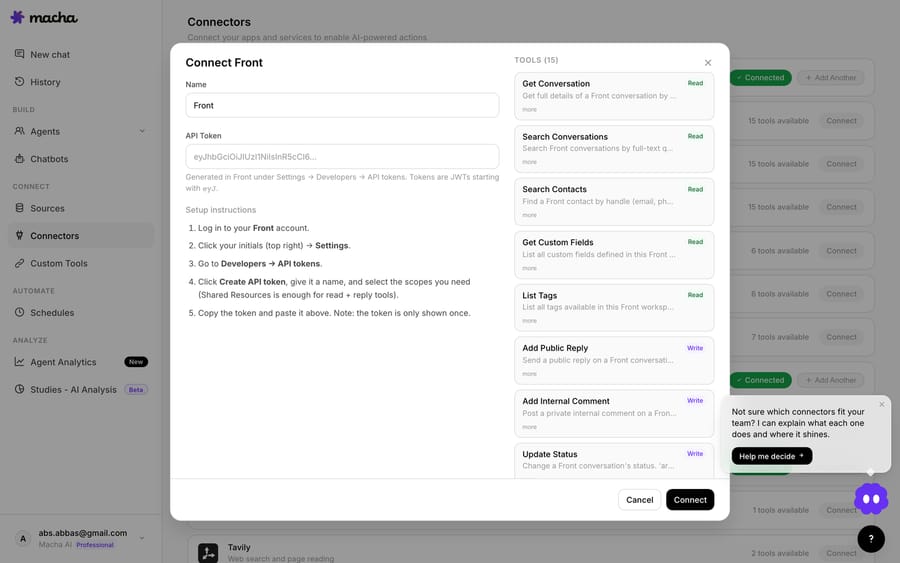
When you connect Front (it authenticates with an API token under Connectors → Support), the agent gets 15 tools. These are the ones that matter for routing:
| Tool | What it does for routing |
|---|---|
| Get Conversation | Pulls the full message thread, existing internal comments, contact, current assignee and tags: the context the agent reasons over. |
| List Tags | Reads your workspace's actual tag scheme so the agent classifies into your categories, not invented ones. |
| Update Tags | Sets the tag list on a conversation. It diffs against current tags and only adds or removes what changed, so existing tags stay. |
| List Teammates / List Teams | Sees who's on the team, their availability and team membership, so "assign to a billing specialist" resolves to a real person. |
| Assign Conversation | Assigns the conversation to a specific teammate, or unassigns it. |
| Add Internal Comment | Posts a private comment on the conversation, supporting @mentions to notify the teammate directly. |
| Update Fields / Update Status | Sets custom field values (priority, category) and changes status: archive, reopen or trash. |
The rest of the set is Search Conversations, Search Contacts (look up a customer by email, phone or social handle), Get Custom Fields, List Inboxes, Add Public Reply and Read Attachment (it extracts text from PDF, DOCX, XLSX, CSV and TXT files on the conversation). So the agent that routes can also look up history, read an attached invoice, and reply if you let it.

The design point that matters most: Update Tags is non-destructive. Routing agents run alongside humans and other rules. An agent adding a refund tag won't wipe the vip tag someone applied by hand, because it diffs and merges, the same pattern we rebuilt for Zendesk tag updates in June.
What triggers fire a routing agent in Front?
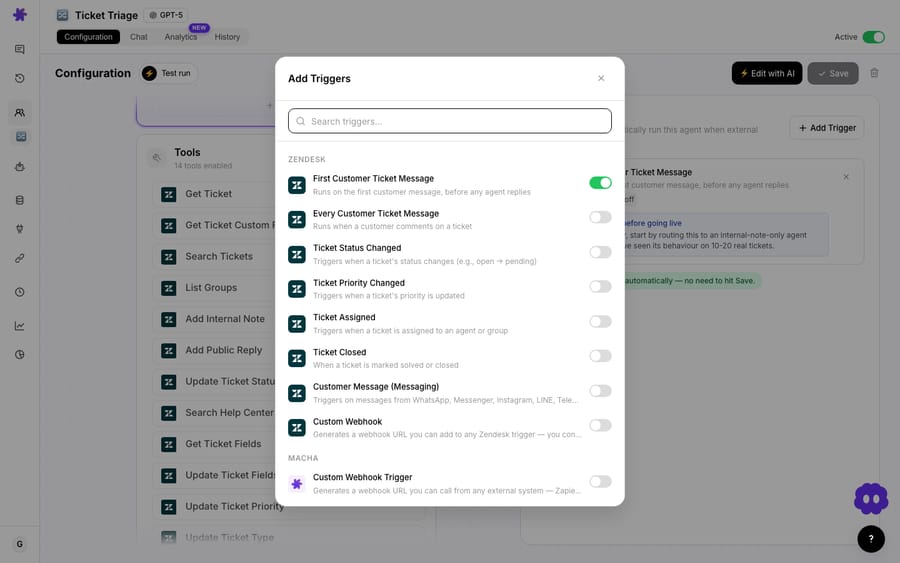
An agent only routes if something wakes it up. The Front connector ships four triggers:
- Conversation Created: fires when a brand-new conversation lands. This is the classic triage-on-arrival trigger.
- New Message Added: fires when an inbound reply lands on an existing conversation, so you can re-route when the topic shifts mid-thread.
- Conversation Assigned: fires when a conversation is assigned or reassigned, useful for "when this hits the escalations queue, summarize it."
- Custom Webhook: generates a URL you drop into any Front rule's Send a webhook action, so you control exactly which conversations call the agent.
The last one bridges Front's rules and Macha's agents. Let a Front rule do the cheap, deterministic filtering (only the Support inbox, only business hours), then hand the survivors to the agent for the reasoning. You compose the two rather than choosing between them.
What does an AI routing flow look like on a Front inbox?
The instruction you give a triage-and-route agent is plain English, something like "Read the conversation, classify it into one of our tag categories, set priority, assign it to the right teammate, and post an internal comment summarizing the issue and why you routed it there."
On a new conversation, the agent runs roughly this sequence:
- Get Conversation: reads the full thread and any existing internal notes.
- List Tags: loads your real tag scheme (for example
billing,bug,shipping,vip). - Search Contacts (optional): pulls the customer's identity and history if you want account-aware routing.
- Update Tags: applies the classification, for example adds
billingandurgentand leaves everything else intact. - List Teammates: finds who's available and who owns billing.
- Assign Conversation: routes it to that teammate.
- Add Internal Comment: posts "@dana, billing dispute, customer charged twice on order #4821, wants a refund. Tagged
billing/urgent. Full context above."
The teammate gets a notification with the summary already written. They open a conversation that's classified, prioritized and assigned to them, and one line tells them why it's theirs. A keyword rule moves the conversation. The agent moves it and explains the move.
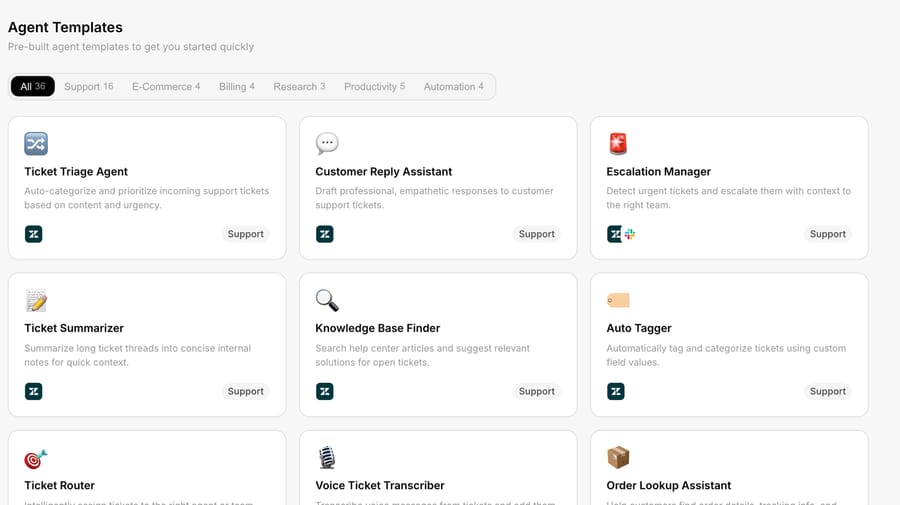
Macha ships built-in agent templates under Connectors → Support, so you start by editing a working triage agent rather than a blank page. On every plan, the Macha team also builds, tests and monitors the agents with you.
How much does AI routing in Front cost?
Macha is priced per ticket: one conversation, charged once however many messages it takes. Pricing starts at $299 a month for 750 tickets, about $0.40 each, and one plan covers every feature. A triage agent that reads, tags, assigns and comments is still one ticket, and the model you pick per agent doesn't change the price.
Front's own AI is priced two ways. Its pricing page lists Copilot at $20 a seat a month as an add-on (included on Enterprise, which is $105 a seat; Smart QA is now Enterprise-only as of October 2026), and Autopilot, its AI agent, starting at $0.05 a conversation. Front's Autopilot pricing bills each conversation once at the highest level reached: $0.05 for triage such as routing and tagging, $0.39 for a handoff and $0.89 for a resolution. Front's per-seat add-ons scale with headcount; a per-ticket agent scales with volume. A routing agent that touches 5,000 conversations costs the same on Macha whether you have 5 seats in Front or 50. The pricing page has the tiers, and the Front connector and agent builder come with unlimited agents and seats.
When should you use a Front rule instead of an AI agent?
This is an agent layer, not a replacement for good rules. Be deliberate about where it earns its keep.
- Deterministic routing belongs in Front. If the rule is "from
@acme.com, assign to the account owner," a native Front rule is faster, free, and never mis-classifies. Don't spend a ticket on a decision a keyword already makes correctly. - Round-robin and load balancing are Front's job. Front rules distribute across a group evenly. A Macha agent assigns to a reasoned teammate ("who handles billing"), not to balance load. Pick the tool that matches the goal, or compose them.
- Models can mis-tag edge cases. A genuinely ambiguous conversation can get the wrong tag. Keep a human-review view for anything the agent marks low-confidence, and have the internal comment show the agent's reasoning so a human can check the routing at a glance.
- Don't let two classifiers fight. If a legacy Front AI Tagging rule and a Macha agent both tag the same inbox, you'll get noise. Pick one classifier per inbox.
- Public replies need a tighter leash than routing. Tagging and assigning are low-risk and reversible; auto-sending a public reply isn't. Many teams run the routing agent autonomously and keep replies as drafts for human approval at first.
Does the same routing work on other help desks?
Yes. Routing in Front is one version of a pattern Macha runs on every desk it connects to: the same triage-and-route capability works on Zendesk, Freshdesk, Gorgias, Front, HubSpot or Intercom, because the agent logic is the same and only the tools change. If you already run agents on Zendesk, the Front connector is the same builder pointed at a shared inbox. The full tool reference is on the Front integration page and the setup steps are in the docs.
FAQ
Does Macha replace Front? No. Macha is an AI agent layer that runs on top of Front. Front stays your inbox, your channels and your system of record; Macha reads conversations and takes actions (tag, assign, comment, reply) through Front's API.
How does Macha route a conversation to the right teammate? The agent uses List Teammates and List Teams to see who's available and what they own, reasons over the conversation, then calls Assign Conversation. It usually posts an @mention internal comment too, so that teammate gets notified with context.
Is this the same as Front's AI Tagging? No. Front's AI Tagging is legacy and no longer available to new users; it's email-only, reads subject and body only, and needs 10 example messages per tag. A Macha agent reads the full thread including internal comments, uses your real tag scheme via List Tags, and can also assign, comment and set fields in the same run.
Will the agent overwrite tags a human already applied? No. Update Tags diffs against the current tag set, adds and removes only what changed, and keeps the rest.
What triggers an agent in Front? Four triggers: Conversation Created, New Message Added, Conversation Assigned, and a Custom Webhook you can call from any Front rule.
Can the agent reply to the customer, or only route internally? Both. Add Public Reply sends a customer-facing reply; many teams start routing-only (tag, assign, internal comment) and keep public replies as human-approved drafts.
How much does it cost? Per ticket, not per resolution: one conversation is charged once however many messages it takes. Pricing starts at $299 a month for 750 tickets, about $0.40 each. See the pricing page for tiers. The free trial gives you $50 of usage with no credit card.
How do you set it up?
Start a free trial ($50 of usage, no credit card), connect Front under Connectors → Support with an API token, and adapt the built-in triage template to your tag scheme. Or read the Front integration details first.
Written by Abbas (Customer Support & AI, Macha) · Reviewed by Ankeet Guha (Co-founder & CTO) · Published 2026-06-24 · Last updated 2026-09-24.






