




 Confluence

Zendesk
Connect Zendesk to Macha and give your AI agents full access to your support stack. Read tickets with custom fields, view image attachments using AI vision, post public replies or internal notes, update statuses and tags, and sync Help Center articles as a live knowledge source. Set up triggers to run agents autonomously on every new ticket or customer message — no human in the loop required.
What Macha can automate in Zendesk
A Macha agent reads the Zendesk ticket, looks things up in the tools you connect, then replies, adds a note, tags, routes or takes the action. These are the jobs teams hand it most often. Each one links to a step-by-step guide.
Orders, refunds and cancellations
ShopifyOrder status (WISMO)
Finds the order in Shopify by order number or the requester's email, checks the email matches, and answers with the fulfillment status and tracking, or leaves the answer as a draft note.
WISMO guideRefunds
Checks the order or charge against your refund rules, then refunds it or leaves it for an agent to approve. Shopify refunds cover the whole order, so partial amounts go through Stripe or to a person.
Refunds guideOrder cancellations
Cancels a Shopify order that hasn't shipped, refuses one that has, and passes orders above your limit to a person.
Cancellations guideBilling and payments
StripeBilling questions and refunds
Looks up the Stripe customer, payments, invoices and subscriptions to explain a charge. When your rules allow it, it refunds a payment (full or partial), cancels a subscription or sends a payment link.
Stripe billing guideTriage and routing
ZendeskRouting and tagging
Reads each new ticket, adds tags, sets type and priority, and assigns it to the right Zendesk group, or flags it when it can't tell.
Routing guideSpam and out-of-office replies
Tags sales pitches, link-building spam and auto-replies within seconds, so a Zendesk trigger can solve them before anyone opens them.
Spam guideHelp for your agents
ZendeskDraft replies for approval
Writes the full reply as an internal note for an agent to check and send. Once the drafts are reliably right, you can let it send them.
Draft replies guideTicket summaries
Posts a short internal-note summary of a long thread, for example when a ticket is escalated or reassigned.
Summaries guideTranslation
Drafts the reply in the customer's language and adds an English translation in an internal note, so agents never switch tabs.
Translation guideAnswers, escalation and your own systems
Help Center, Jira, any APIKnowledge-base answers
Syncs your Help Center articles and answers how-to questions from them. AI Knowledge Builder turns solved tickets into new articles.
AI Knowledge BuilderJira escalation
Files a Jira issue from a bug report, or links the ticket to the issue already open for the same bug.
Jira guideCustom tools for any API
Connects systems without a built-in connector, such as Recharge or Loop subscriptions, a warehouse or your own admin API. Our team builds these tools for you during setup.
Custom toolsExample: a refund request, step by step
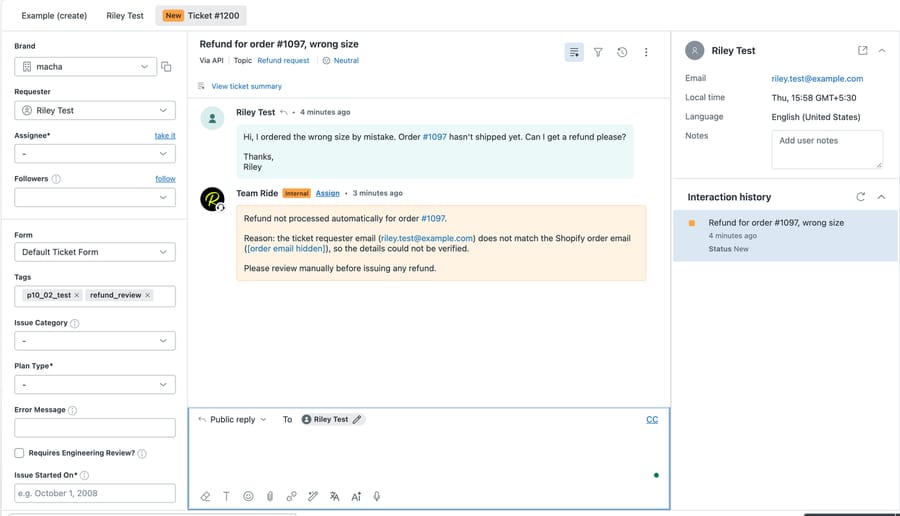
A customer writes in to say their order arrived damaged and they want their money back. This is what a refund agent does with the ticket.
- 1A Zendesk trigger hands the new ticket to the agent. It reads the message, the custom fields and any photo the customer attached.
- 2It finds the order in Shopify, or the charge in Stripe, and checks that the requester's email matches the order.
- 3It checks the request against your refund policy: time since delivery, what is still refundable, and the amount above which a person decides.
- 4If every check passes, it issues the refund. In safe mode, or when a check fails, it leaves the decision to an agent.
- 5It adds an internal note saying what it found and did, tags the ticket (for example refund_review), and replies to the customer or leaves a draft.
You don't have to build any of this yourself. Our team reads your past tickets, builds the agents and runs them in safe mode until the drafts are right, with a dedicated success manager on the trial and every plan. How done-for-you setup works.
Triggers & Actions
Action
Get Ticket
Retrieve full ticket details including conversation history, tags, brand, and requester info.
Action
Get Ticket Custom Fields
Read all custom field values on a ticket with labels resolved — order numbers, brands, languages, and more.
Action
Get Ticket Fields
List the ticket field definitions in your Zendesk account — which custom fields exist, their IDs, and their options.
Action
Read Attachment
Extract text from PDFs, DOCX, XLSX, and CSV files. Analyse image attachments using AI vision — the agent can see and describe screenshots, receipts, and product photos.
Action
Search Tickets
Search across all Zendesk tickets by keyword, status, assignee, or any search syntax.
Action
Search Users
Find Zendesk users by name, email, or role.
Action
List Groups
List all active Zendesk groups so agents can resolve a group name to an ID before routing a ticket.
Action
Add Public Reply
Post a customer-visible reply on a ticket.
Action
Add Internal Note
Post a private internal note visible only to agents.
Action
Update Status
Change a ticket's status — open, pending, hold, solved, or closed.
Action
Update Subject
Change the subject line of a ticket.
Action
Update Priority
Change a ticket's priority — urgent, high, normal, or low.
Action
Update Type
Change a ticket's type — problem, incident, question, or task.
Action
Update Tags
Add or remove tags on a ticket without overwriting existing ones.
Action
Update Fields
Update custom field values with validation — dropdown options are checked, dates are formatted.
Action
Assign Ticket
Assign a ticket to a specific agent and/or route it to a group queue.
Action
Update Requester
Change the customer the ticket is for. Pass a known Zendesk user ID, or an email + name — Zendesk finds the existing end-user or creates one on the fly. Refuses to set an admin or agent as the requester to prevent notification-email loops.
Action
Search Articles
Semantic search across Help Center articles using your knowledge base.
Action
Sync Knowledge Base
Automatically sync Help Center articles to Macha's knowledge base with live webhook updates.
Trigger
New Ticket
Fires on the first customer message, before any agent replies.
Trigger
Customer Reply
Fires on every customer comment on any ticket.
Trigger
Status Changed
Fires when a ticket's status changes — e.g. open to pending.
Trigger
Priority Changed
Fires when a ticket's priority is updated.
Trigger
Ticket Assigned
Fires when a ticket is assigned to an agent or group.
Trigger
Ticket Closed
Fires when a ticket is marked solved or closed.
Trigger
Messaging
Fires on messages from WhatsApp, Messenger, Instagram, LINE, Telegram, and web chat.
Trigger
Custom Webhook
Generates a webhook URL you attach to any Zendesk trigger — full control over which tickets fire.
Your AI agent, set up for you in under a week
Agent instructions
Help customers who can't log in by searching the knowledge base and replying with reset steps
We write the instructions
The Macha team writes your agent's instructions from how your team already answers that kind of ticket.
Get Ticket
Get Ticket Custom Fields
 Tools for the AI
We connect the tools
We choose the Zendesk actions your agent can use, search, update, reply and more, and test it on your past tickets.
It goes to work
Drafts land as private notes until they're right. Then the agent handles that category end to end, and your success manager handles changes.
Zendesk works with everything else.
Zendesk is even more powerful when connected alongside your other tools. Macha brings them all together, so your AI assistant has full context across your entire stack.
Explore all integrations







Questions about Macha on Zendesk
Can Macha process refunds in Zendesk?
Yes. A Macha agent reads the refund request, looks up the order in Shopify or the charge in Stripe, checks it against your policy and issues the refund when your rules allow it. Shopify refunds cover everything still refundable on the order, so partial Shopify refunds go to a person; Stripe refunds can be partial. Until you trust it, Macha can leave each refund for your team to approve.
Can an AI agent look up Shopify orders and reply in Zendesk?
Yes. Macha searches Shopify by order number or customer email, reads the fulfillment status and tracking, and posts a public reply or a draft internal note on the ticket. You can have it check that the requester's email matches the order before it shares any details.
Is Macha only for ecommerce support?
No. Orders and refunds are one use. Teams also run Macha in Zendesk for Stripe billing questions, triage and routing, spam, draft replies, summaries, translation, knowledge-base answers, Jira escalation and custom tools for their own APIs.
Does it reply to customers on its own?
Only when you want it to. Agents can start in safe mode, posting drafts as internal notes for your team to approve, and you choose which tools and actions each agent gets.
How much does Macha cost for Zendesk?
One plan priced on ticket volume, from $299 a month for 750 tickets, about $0.40 a ticket. Setup by our team and a dedicated success manager come with the trial and every plan, and the trial includes $50 of free usage with no card.
Ready to connect
Zendesk?
Set up in minutes. No code, no implementation team. Just connect and go.
$50 of free usage · no time limit, no credit card