




 Confluence

Zendesk
Zendesk を Macha に接続すると、AI エージェントがサポート基盤をひと通り扱えるようになります。カスタムフィールド込みでチケットを読み、AI ビジョンで画像の添付ファイルを確認し、公開返信や社内メモを投稿し、ステータスやタグを更新し、ヘルプセンターの記事を常時同期されるナレッジソースとして取り込めます。トリガーを設定すれば、新規チケットやお客様からのメッセージのたびにエージェントが自律的に動き、担当者が介在する必要はありません。
Macha が Zendesk で自動化できること
Macha のエージェントは Zendesk のチケットを読み、接続したツールで情報を調べたうえで、返信、社内メモの追加、タグ付け、振り分け、または処理そのものを行います。ここでは、チームがよく任せている業務を紹介します。それぞれに手順を追ったガイドがあります。
注文・返金・キャンセル
Shopify注文状況の確認(WISMO)
注文番号または依頼者のメールアドレスで Shopify の注文を探し、メールアドレスが注文と一致するかを確認したうえで、配送状況と追跡情報を回答します。回答を社内メモの下書きとして残すこともできます。
WISMO ガイド(英語)返金
注文または決済を返金ルールと照らし合わせ、返金するか、チームの承認待ちにします。Shopify の返金は注文全体が対象のため、一部金額の返金は Stripe で行うか担当者に回します。
返金ガイド(英語)請求・支払い
Stripe請求に関する質問と返金
Stripe の顧客、支払い、請求書、サブスクリプションを調べて請求内容を説明します。ルールで許可されていれば、支払いの返金(全額または一部)、サブスクリプションの解約、支払いリンクの送信も行います。
Stripe 請求ガイド(英語)トリアージと振り分け
Zendesk担当者の業務サポート
Zendeskナレッジ回答、エスカレーション、自社システム
ヘルプセンター、Jira、任意の APIナレッジベースからの回答
ヘルプセンターの記事を同期し、使い方に関する質問にその内容で回答します。AI Knowledge Builder は、解決済みチケットから新しい記事を作成します。
AI Knowledge Builder任意の API に対応するカスタムツール
Recharge や Loop のサブスクリプション、倉庫システム、自社の管理 API など、標準のコネクタがないシステムにも接続します。これらのツールは導入時に当社チームが構築します。
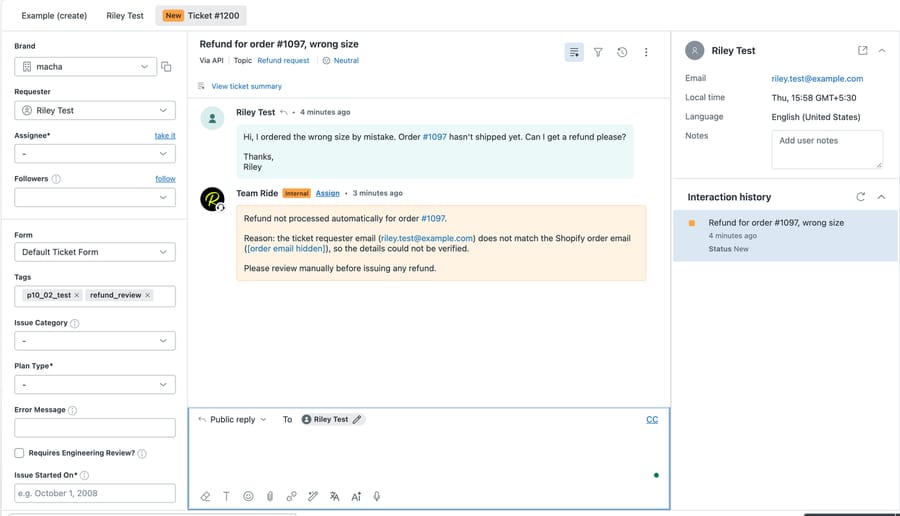
カスタムツール例:返金リクエストの処理の流れ
「注文した商品が破損して届いたので返金してほしい」というお問い合わせが届きました。返金エージェントはこのチケットを次のように処理します。
- 1Zendesk のトリガーが新しいチケットをエージェントに渡します。エージェントはメッセージ、カスタムフィールド、お客様が添付した写真を読み取ります。
- 2Shopify で注文を、または Stripe で決済を探し、依頼者のメールアドレスが注文と一致するかを確認します。
- 3配送からの経過日数、まだ返金できる範囲、担当者が判断すべき金額の基準など、返金ポリシーと照らし合わせます。
- 4すべての確認を通過すれば返金を実行します。セーフモードのとき、または確認に通らなかったときは、判断を担当者に任せます。
- 5確認した内容と実行した処理を社内メモに残し、チケットにタグ(例:refund_review)を付けて、お客様に返信するか下書きを残します。
これらをご自身で構築する必要はありません。当社チームが過去のチケットを分析してエージェントを構築し、下書きが正確になるまでセーフモードで運用します。トライアルでもどのプランでも、専任のサクセスマネージャーが付きます。 導入代行の流れを見る。
トリガーとアクション
アクション
Get Ticket
会話履歴、タグ、ブランド、リクエスター情報まで含めて、チケットの詳細をすべて取得します。
アクション
Get Ticket Custom Fields
チケット上のカスタムフィールドの値を、ラベルを解決した状態ですべて読み取ります。注文番号、ブランド、言語なども取得できます。
アクション
Get Ticket Fields
Zendesk アカウントのチケットフィールド定義を一覧表示します。どのカスタムフィールドがあるか、その ID と選択肢がわかります。
アクション
Read Attachment
PDF、DOCX、XLSX、CSV からテキストを抽出します。画像の添付ファイルは AI ビジョンで解析し、スクリーンショットやレシート、商品写真をエージェントが見て説明できます。
アクション
Search Tickets
キーワード、ステータス、担当者、任意の検索構文で Zendesk のチケット全体を検索します。
アクション
Search Users
名前、メールアドレス、ロールから Zendesk のユーザーを検索します。
アクション
List Groups
有効な Zendesk グループをすべて一覧表示します。チケットを振り分ける前に、グループ名から ID を特定できます。
アクション
Add Public Reply
お客様に表示される返信をチケットに投稿します。
アクション
Add Internal Note
担当者だけが見られる非公開の社内メモを投稿します。
アクション
Update Status
チケットのステータスを変更します。オープン、保留中、待機中、解決済み、クローズのいずれかを指定できます。
アクション
Update Subject
チケットの件名を変更します。
アクション
Update Priority
チケットの優先度を緊急、高、通常、低のいずれかに変更します。
アクション
Update Type
チケットのタイプを問題、インシデント、質問、タスクのいずれかに変更します。
アクション
Update Tags
既存のタグを上書きせずに、チケットのタグを追加・削除します。
アクション
Update Fields
検証つきでカスタムフィールドの値を更新します。ドロップダウンの選択肢は照合され、日付は書式が整えられます。
アクション
Assign Ticket
チケットを特定の担当者に割り当て、グループのキューに振り分けます。
アクション
Update Requester
チケットの対象となるお客様を変更します。既知の Zendesk ユーザー ID、またはメールアドレスと名前を渡すと、Zendesk が既存のエンドユーザーを見つけるか、その場で作成します。通知メールのループを防ぐため、管理者や担当者を依頼者に設定することはありません。
アクション
Search Articles
ナレッジベースを使って、ヘルプセンターの記事をセマンティック検索します。
アクション
Sync Knowledge Base
ヘルプセンターの記事を Macha のナレッジベースへ自動同期し、Webhook でリアルタイムに更新します。
トリガー
New Ticket
担当者が返信する前、お客様からの最初のメッセージで発火します。
トリガー
Customer Reply
どのチケットでも、お客様がコメントするたびに発火します。
トリガー
Status Changed
チケットのステータスが変わったとき (オープンから保留中など) に発火します。
トリガー
Priority Changed
チケットの優先度が更新されたときに発火します。
トリガー
Ticket Assigned
チケットが担当者またはグループに割り当てられたときに発火します。
トリガー
Ticket Closed
チケットが解決済みまたはクローズになったときに発火します。
トリガー
Messaging
WhatsApp、Messenger、Instagram、LINE、Telegram、ウェブチャットからのメッセージで発火します。
トリガー
Custom Webhook
任意の Zendesk トリガーに紐づけられる Webhook URL を発行します。どのチケットで発火させるかを細かく制御できます。
AI エージェントを、1週間以内にこちらでセットアップ
エージェント指示
ログインできないお客様には、ナレッジベースを検索してパスワード再設定の手順を返信する
指示はこちらで作成
そのチケットにチームが普段どう回答しているかをもとに、Macha チームがエージェントの指示を作成します。
Get Ticket
Get Ticket Custom Fields
 AI 用のツール
ツールはこちらで接続
エージェントが使う Zendesk のアクション(検索、更新、返信など)を私たちが選び、過去のチケットでテストします。
稼働開始
内容が正しくなるまで、下書きは社内メモとして届きます。その後、エージェントがそのカテゴリを最初から最後まで処理し、変更はサクセスマネージャーが対応します。
Zendesk は 他のすべてと連携。
Zendesk は他のツールと一緒に接続すると、さらに強力になります。Macha がそれらをまとめ、AI アシスタントがスタック全体のコンテキストを把握できます。
すべての連携を見る







Zendesk での Macha に関するよくある質問
Macha は Zendesk で返金を処理できますか?
はい。Macha のエージェントが返金リクエストを読み、Shopify で注文を、または Stripe で決済を調べ、ポリシーと照らし合わせて、ルールで許可されていれば返金を実行します。Shopify の返金は注文のうち返金可能な分すべてが対象となるため、Shopify での一部返金は担当者に回します。Stripe では一部返金も可能です。信頼できるようになるまでは、返金ごとにチームの承認を待つ設定にできます。
AI エージェントが Shopify の注文を調べて Zendesk で返信できますか?
はい。Macha は注文番号またはお客様のメールアドレスで Shopify を検索し、配送状況と追跡情報を確認して、チケットに公開返信を投稿するか、社内メモとして下書きを残します。詳細を伝える前に、依頼者のメールアドレスが注文と一致するかを確認させることもできます。
Macha は EC のサポート専用ですか?
いいえ。注文や返金は用途の一つにすぎません。Zendesk で Macha を使うチームは、Stripe の請求に関する質問、トリアージと振り分け、スパム対策、返信の下書き、要約、翻訳、ナレッジベースからの回答、Jira へのエスカレーション、自社 API 向けのカスタムツールにも活用しています。
お客様に自動で返信しますか?
ご希望の場合に限ります。エージェントはセーフモードで開始でき、下書きを社内メモとして投稿し、チームが承認してから送信します。各エージェントに使わせるツールと処理も選べます。
Zendesk で Macha を使う料金は?
チケット数で料金が決まる 1 つのプランで、750 チケットで月額 $299 から、1 チケットあたり約 $0.40 です。当社チームによる導入と専任のサクセスマネージャーは、トライアルにもすべてのプランにも含まれます。トライアルでは $50 分を無料でお使いいただけ、カードの登録は不要です。