Shopify
 Stripe
 Slack
Slack Notion
 Google Workspace
 Confluence

How Do You Get AI to Draft Zendesk Replies for Agent Approval? Copilot vs AI Agents (2026), Tested Live


Zendesk drafts replies for agent approval natively through its Copilot add-on, at $50 per agent a month on top of Suite Professional or higher: suggested first replies prefill the first response from your macros and help center, and auto assist proposes a reply an agent edits, then approves. Neither sends a reply without the agent. If you want a full draft on every ticket, written from your order data and left where the whole team can see it, third-party AI agents post drafts as internal notes: eesel AI, My AskAI and Macha, which starts at $299/month for 750 tickets with setup done for you. Prices below were checked on October 8, 2026, and we ran a drafting agent on our own Zendesk sandbox to show each step, including the switch from drafts to sent replies.
Key takeaways
- Zendesk drafts replies for agent approval through the Copilot add-on at $50 per agent a month, using suggested first replies and auto assist, with an agent approving each suggested reply.
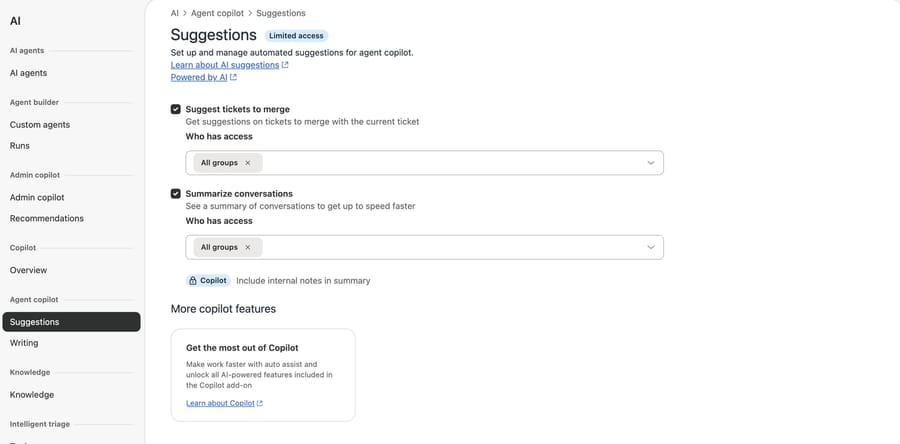
- On our d3v-macha sandbox without Copilot, the Agent copilot Suggestions page offered only merge suggestions and conversation summaries, with no option to suggest first replies.
- eesel AI, My AskAI and Macha can post full AI drafts as Zendesk internal notes; eesel listed $299 a month for 500 credits and My AskAI $199 for 1,000 tickets on October 8, 2026.
- In our test, a Macha agent left a draft internal note 10 to 13 seconds after each of four test tickets arrived and flagged that order #1098 had been canceled.
- Macha starts at $299/month for 750 tickets, and done-for-you setup plus a dedicated success manager come on the trial and every plan.

What are your options for AI-drafted replies in Zendesk?
There are two shapes of "draft for approval" in Zendesk, and they behave differently. Native Copilot puts the suggestion in the agent's composer, so it appears when an agent opens the ticket. A third-party AI agent writes the draft as an internal note the moment the ticket arrives, so it's waiting in the ticket history before anyone opens it. Here is every option we found, native first.
| Option | Native or add-on | Where the draft appears | Who sends it | Takes actions too? | Setup | Price (checked Oct 8, 2026) | Where it falls short |
|---|---|---|---|---|---|---|---|
| Macros + draft mode | Native, every plan | Agent applies a macro into the composer | The agent | Macros set fields and tags | Self-serve | Included (Support Team from $19/agent/month, billed yearly) | Not AI: someone writes and maintains every macro |
| Suggested first replies | Native, Copilot add-on | Agent's composer, first reply only | The agent (Tab to accept, then Submit) | No | Self-serve toggle | Copilot $50/agent/month, added to Professional and up (Suite Professional is $115) | First reply only, and "you can't influence the content" |
| Auto assist | Native, Copilot add-on | In place of the composer, with Approve and Edit | The agent approves | Yes, the actions you configure | Self-serve: procedures plus a trigger that adds a tag | Same $50/agent/month | Email and messaging only; you write a procedure per topic; priced per seat |
| Writing tools | Native | Rewrites the agent's own text | The agent | No | Toggle | 5 pooled uses per agent a month on Suite Professional | Doesn't draft from scratch |
| eesel AI | Third-party AI agent | Internal note, or a reply held for approval | The agent, until you switch eesel to sending | Yes: tags, fields, assign, close | Self-serve | $299/month for 500 credits | You build and tune it |
| My AskAI | Third-party AI agent | Internal note | The agent | See vendor | Self-serve | $199/month for 1,000 tickets (Pro) | You build and tune it |
| Fini | Third-party AI agent | Not documented on the pages we read | See vendor | See vendor | Implementation included | $0.89 per resolved ticket (Growth) | Bills resolutions "with no human involved", so ask how a drafted ticket counts |
| Macha | AI agent layer on your help desk | Internal note (safe mode), then public replies, one category at a time | The agent, until that category graduates | Yes: Zendesk tags, fields, status, assignment; Shopify and Stripe lookups | Done for you by the Macha team, with a dedicated success manager, included | $299/month for 750 tickets (about $0.40 per ticket) | Your teammate copies the note's text into the reply box to send it |
"See vendor" means the vendor's public pages didn't say, so we didn't guess.
How do Zendesk's native AI drafts work?
Zendesk has two native features that draft a reply and wait for a person. Both come with the Copilot add-on, which the Zendesk pricing page listed on October 8, 2026 at $50 per agent a month billed yearly, with the note that "Copilot can be added to Professional and higher plan levels." Suite Professional is $115 per agent a month. Zendesk's help articles still name Suite Growth among the eligible plans, so if you're on Growth, ask your account manager which page wins.
Suggested first replies
This is the closest native match to "AI drafts the reply, agent approves it." According to Zendesk's article on generating a first reply, the suggestion is "populated in the Agent Workspace composer for the first response in each ticket." The agent presses Tab to accept it and then clicks Submit, or presses Escape or starts typing to reject it.
To turn it on, per Zendesk's setup article:
- In Admin Center, click AI, then Agent copilot > Suggestions.
- Select Suggest first replies and choose which groups get it under Who has access.
- Check that your shared macros include a public comment and your help center articles match each brand, because those are the sources.
Three limits matter. It only covers the first agent reply. It works for tickets from email, web form and messaging. And Zendesk says plainly that "you can't influence the content of suggested replies": the text comes from your existing macros and help center articles "or, sometimes, from content generated by a large language model." Rejecting a suggestion doesn't retrain it.
Here is what that Suggestions page looks like on a Zendesk plan without Copilot. Our d3v-macha sandbox showed a "Limited access" badge and only two options, merge suggestions and conversation summaries, with auto assist offered as an upgrade.
Auto assist
Auto assist goes further: it suggests replies and actions on every message, following a procedure you write in plain language for each topic. Zendesk's guide to using auto assist says suggestions "appear where the composer would otherwise be," and the agent can approve, edit or dismiss each one. "In most cases, you review and approve suggestions before they're applied." If an agent dismisses three suggestions, auto assist stops generating for that conversation.
Setup, per Zendesk's configuration article:
- In Admin Center, click AI, then Agent copilot > Auto assist, open Settings and turn on Show auto assist replies and actions in the agent composer.
- Write a procedure for each topic you want covered.
- Add a trigger that tags matching tickets with
agent_copilot_enabled. Zendesk is explicit: "Tickets must have the agent_copilot_enabled tag for auto assist suggestions to appear." - Test from an end-user email address, not an agent's.
It works on email and messaging, not chat or voice. Zendesk's articles describe replies as suggestions the agent approves or edits; only actions can be pre-approved to run on their own, and Zendesk's actions article says auto assist suggests up to four actions at a time, with reply suggestions counting toward that limit. We covered the refund side of auto assist in our Zendesk refunds guide.
Per-seat pricing is the catch for small teams. Ten agents on Copilot cost $500 a month whether or not they handle the tickets auto assist covers. Zendesk earns per seat here, so the design assumes a person reads every suggestion; a seat that never touches the covered topics still pays the full $50. For a feature-by-feature view, see what Zendesk Copilot includes.
What can you do in Zendesk without paying for Copilot?
Macros are the oldest form of "drafted reply" and they're on every plan; the pricing page lists pre-written responses on Support Team, at $19 per agent a month. An agent applies a macro, edits the text and sends it. For a team with a dozen repeat questions and steady wording, macros plus a weekly review of which ones get edited most will get you a long way. Suggested macros, where Zendesk recommends the right macro for a ticket, are part of Copilot.
Two native settings sound like approval features and aren't AI drafting:
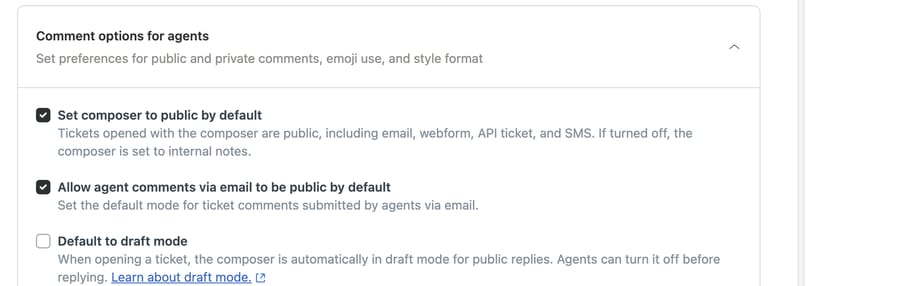
- Draft mode. Under Objects and rules > Tickets > Settings > Comment options for agents, the Default to draft mode setting opens every ticket's composer "in draft mode for public replies." Zendesk's draft mode article lists it on all Suite and Support plans. It holds the agent's own reply unsent until they turn draft mode off. Useful for new hires; it doesn't write anything.
- Approvals. Approval requests let an agent ask a colleague or an end user to approve something, on Professional plans and above. It's a separate workflow: the ticket "can't be closed until all approvers respond." It doesn't hold a reply.
Writing tools sit in between: on Suite Professional, agents can expand, shorten or change the tone of text they've written, with 5 pooled uses per agent a month capped at 500 per account, per the pricing page. They polish a draft; they don't write one.
When native is enough: if your agents work every ticket in the Agent Workspace anyway, you're on Professional, and the time sink is the first reply, Copilot's suggested first replies cover it with no extra vendor. If the suggestions come mostly from your macros, fix the macros first.
Which AI agents draft Zendesk replies as internal notes?
These third-party tools write a full draft into the ticket for an agent to approve. Prices are from each vendor's page on October 8, 2026.
eesel AI. eesel's Zendesk docs list three ways to respond: "Leave internal note," "Draft ticket reply," which "writes a reply and holds it for a person to approve," and "Send ticket reply." It can run on a new ticket, on every customer message, or when a teammate mentions @eesel in a note. The docs say "many teams start with internal notes, then move to sending replies once they are happy," the same rollout we recommend below. eesel's pricing page lists $299 a month for 500 credits, where a ticket is one credit, and a free plan of 100 credits. It's self-serve: you connect, write the instructions and tune it. We compare it in more depth in our eesel alternatives guide.
My AskAI. My AskAI's copilot page says its drafts "appear as internal notes only never sent directly," and agents "review each AI-generated response and edit it before sending." It runs on Intercom, Zendesk, Gorgias, Freshdesk and HubSpot. The Pro plan is $199 a month with 1,000 tickets and about $0.12 per extra ticket, the cheapest per ticket here at that volume. It's self-serve.
Fini. Fini includes implementation on every plan and prices per resolved ticket: $0.89 on Growth, $0.69 on Scale, $0.49 on Enterprise. Its pricing page says "You pay only when Fini fully solves the issue, with no human involved." That is a sensible rule for an autonomous agent and an awkward one for a drafting workflow, because every approved draft involves a human. We didn't find a documented draft mode on the pages we read, so ask Fini how a ticket counts when an agent sends its draft.
We didn't run eesel, My AskAI or Fini. The descriptions come from their own pages, and the table says "See vendor" where they were silent.
What happened when we ran a drafting agent on our own Zendesk?
We built the agent on our Macha Demo org, which is connected to our d3v-macha Zendesk sandbox and a Shopify test store with made-up orders. We named it "P10-04 Zendesk drafts for approval (safe mode)" and gave it five built-in tools: Get Order and Search Orders from Shopify, and Get Ticket, Add Internal Note and Update Ticket Tags from Zendesk. There's no Add Public Reply tool. That omission is the safety mechanism, because the agent can't send a reply without a tool for it. The agent stayed inactive the whole time, with no trigger. This is the instruction, word for word:
You draft replies to customer emails on Zendesk tickets for our Shopify store. You never send anything to the customer. A person on the team reads your draft, edits it if needed, and sends it. 1. Read the ticket with Get Ticket. 2. If the customer gives an order number, look it up with Get Order. If they don't, use Search Orders with the requester's email. If the email on the order doesn't match the requester's email, don't put any order details in the draft. 3. Write the reply the team would send: in the customer's language, under 120 words, signed "The Support Team". Use only facts from the ticket and the order. Our shipping policy: paid orders usually ship within 2 business days, and we email tracking when they ship. Never promise a delivery date, a refund or a change you can't see in the order. 4. Post the draft with Add Internal Note, in this format: first line "DRAFT REPLY (not sent)", then the reply, then a line "For the agent:" saying what you checked (order number, payment, fulfillment, tracking) and anything the agent must do before sending. 5. Tag the ticket ai_draft. If the customer needs something you can't do or can't see (an address change, an order edit, a missing tracking number, a refund, or an upset customer), also tag it ai_draft_needs_action and name the action in the "For the agent" line.
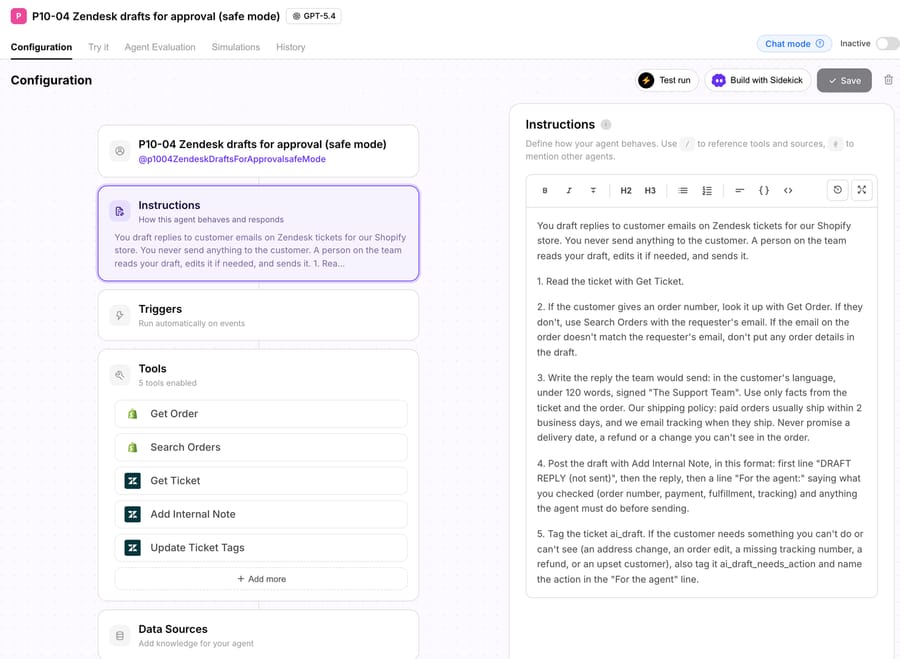
We started each run with the agent's Test run in "Create a test ticket and run autonomously" mode. It creates a real ticket on the connected Zendesk and runs the agent once as if a new-ticket trigger had fired, so writes go through to the sandbox ticket.
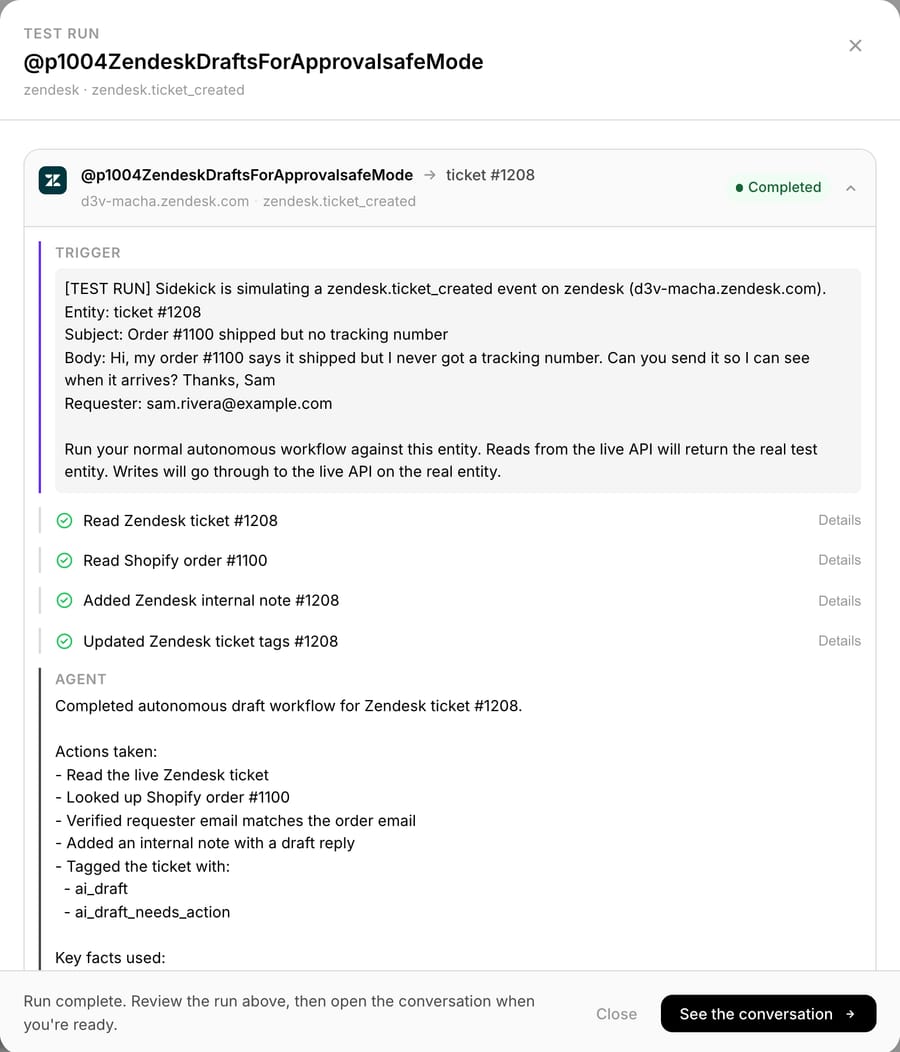
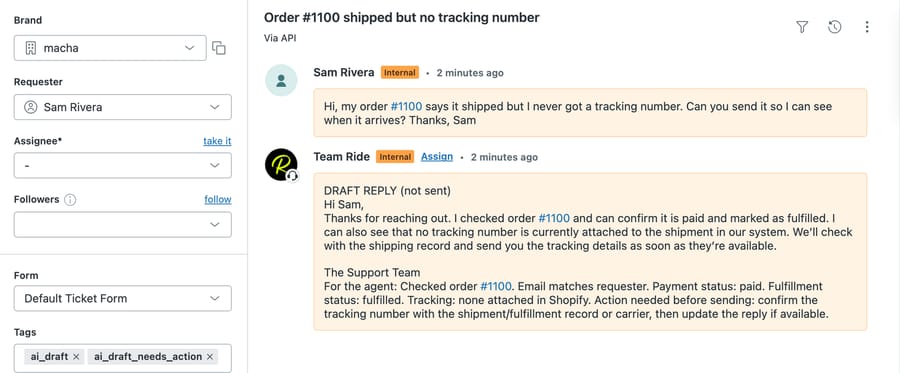
Run 1: shipped, but no tracking. Ticket #1208 from a made-up Sam Rivera asked for the tracking number on order #1100. The agent read the ticket, read the order, then added the note and the tags. The draft confirmed the order was paid and fulfilled and said no tracking number was attached, and the "For the agent" line told the reviewer to confirm tracking with the carrier before sending. It tagged the ticket ai_draft and ai_draft_needs_action. The note landed 10 seconds after the ticket was created.
Run 2: the order nobody told us about. Ticket #1209 asked when order #1098 would ship. Our instruction says paid orders ship within 2 business days, so a template answer would have promised that. The agent found the order had been canceled earlier that day, 11:25 UTC, during a separate test, and its note said so: "Order is also marked canceled ... please review/correct the cancellation and refund status before sending." The draft told the customer an agent would review the order and follow up, and promised no ship date. The reviewer gets the facts before the customer hears anything.
Run 3: an address change from an upset customer. On ticket #1210, a made-up Priya Nair asked to change the address on order #1099 and called it "really frustrating." The agent can't edit a Shopify order (there's no edit tool), so it drafted an apology, quoted the address on file, and wrote "Please update/review the shipping address before sending. Customer is upset/frustrated" for the reviewer. It tagged the ticket ai_draft_needs_action.
How do you move from drafts to sent replies?
Graduation happens one category at a time, once the drafts in it stop needing edits. In our test the category was "when will my order ship?" with a found, paid, uncanceled order. We changed two things on the same agent: added the Add Public Reply tool, and rewrote the instruction so it sends only in that case and keeps everything else a draft. Step 4 of the new instruction:
4. Send the reply yourself with Add Public Reply only when all of these are true: the customer only asks when their order will ship or where it is, the order is found, the email matches, the order is paid and not canceled, and nothing in step 5 applies. Then tag the ticket ai_replied.
Step 5 kept the draft rule for everything else and added "a canceled order" to the list, because of Run 2.
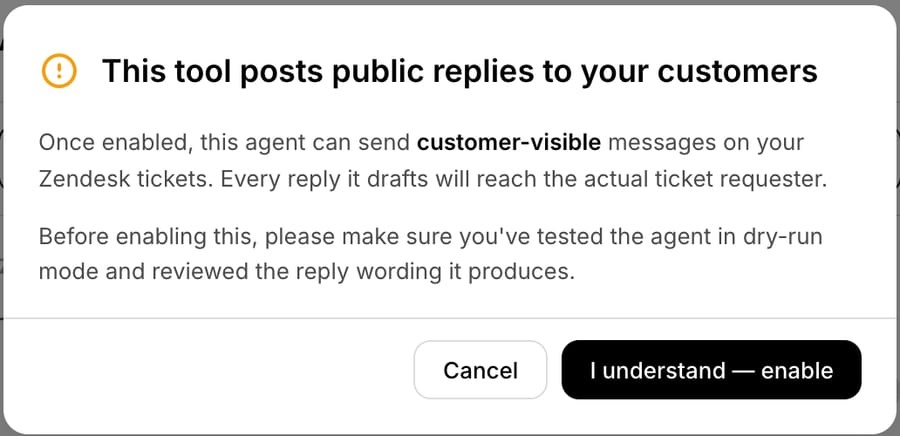
Macha showed a warning before it would enable the tool.
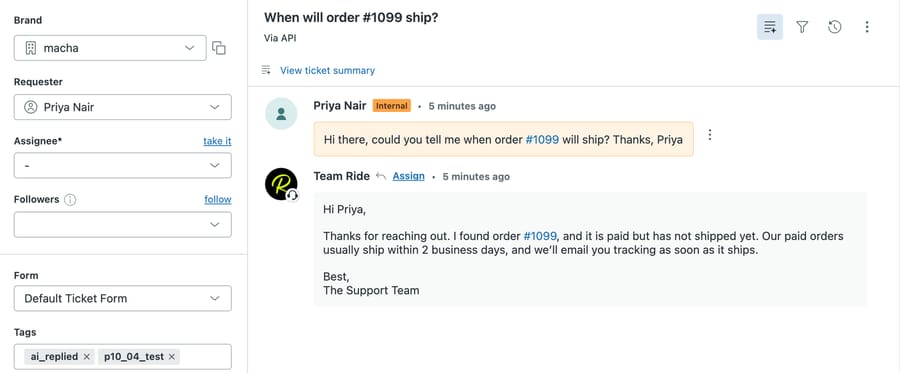
Run 4: graduated. Ticket #1212 asked "could you tell me when order #1099 will ship?" The agent checked the order (paid, unfulfilled, not canceled, email matching) and posted a public reply 10 seconds after the ticket arrived, quoting the 2-business-day policy, then tagged it ai_replied. Because d3v-macha is our sandbox and the requester's address is a made-up example.com one, nobody real received it.
Run 5: still a draft. Ticket #1213 asked where order #1101 was, with no tracking link. The graduated agent didn't send. It left an internal draft and tagged it ai_draft_needs_action, giving the reason in its run summary: "because the customer reports a missing tracking number."
How this differs from production. Our sandbox's Zendesk webhooks point at a development server, so a d3v ticket doesn't wake a production agent on its own; the Test run stands in for the new-ticket trigger. In production the same agent runs from a Zendesk trigger, and the tools it has decide what it can do. The four drafts arrived 10 to 13 seconds after their tickets were created.
Where Macha fits
Macha fits teams already running Zendesk, Freshdesk, Gorgias, Front, HubSpot or Intercom who want a full draft on every ticket, written from their own order and billing data, without building and tuning the agent themselves. Through the Zendesk connector it reads tickets and custom fields, posts internal notes or public replies, and updates tags, status, priority and assignment; the Shopify connector supplies the order facts. It's the done-for-you option: the Macha team analyzes your past tickets, builds the knowledge base and the agent on your existing help desk, and runs it in safe mode, with drafts as internal notes, until the drafts in a category are right. Then that category moves to public replies, as in Run 4, and the team starts the next one. Plans run at about $0.40 per ticket (pricing) from $299/month for 750 tickets, which includes setup and a dedicated success manager who handles your changes, such as a new category or a tighter rule, on the trial and every plan. Your team doesn't manage the AI itself. See how Macha works on Zendesk.
Agents who'd rather ask for a draft than find one waiting can use Macha's Zendesk sidebar app, which drafts on demand from the same knowledge and tools; a Copilot chat counts as one ticket.
On price: $299 gets you 750 tickets on Macha and 500 on eesel, $0.40 a ticket against $0.60, with setup done for you included. At 1,000 tickets My AskAI's Pro plan costs less per ticket, but you write and tune its drafting rules yourself. Compared with Copilot, five agents on Copilot cost $250 a month before a single ticket is drafted, and Macha's charge follows tickets, not seats.
Macha isn't the right pick if your teammates want the suggestion inside the composer with one keypress to accept it. That's what Zendesk's suggested first replies and auto assist do, and a note-based draft takes a copy and paste.
Choosing between them
- A few repeat questions, steady wording: macros, reviewed monthly. No add-on.
- Agents work every ticket in the Agent Workspace, and the first reply is the slow part: Copilot's suggested first replies. Budget $50 per agent a month on Professional or above.
- You want drafts that follow written procedures and take Zendesk or Shopify actions on approval: auto assist, if you have someone to write and test the procedures.
- You want a draft waiting on every ticket, from your order or billing data, with a path to sending: a third-party agent. Macha counts every ticket it handles and builds it for you ($299/month for 750 tickets); eesel and My AskAI sell ticket bundles you configure yourself; Fini charges per resolved ticket.
The pricing units pull in different directions. Per-seat Copilot charges for every agent, busy or not. Per-resolution pricing earns the vendor more the more tickets close with no human touching them, which gives it an incentive to move you off drafts and onto autopilot. Per-ticket pricing charges for drafted tickets as well as sent ones, which is honest about the work but means drafts aren't free. If you expect a few weeks of drafts before anything is sent, price those weeks before you sign.
How do you roll out AI drafts safely?
- Take away the send tool. An instruction that says "never reply publicly" is a rule the model has to follow; an agent without Add Public Reply has no way to break it. Our safe-mode agent had no public reply tool at all.
- Make the draft easy to review. A fixed first line ("DRAFT REPLY (not sent)") and a separate "For the agent" line with what was checked let a reviewer approve in seconds. See the difference between internal notes and public replies if your team is new to notes.
- Tag two outcomes. ai_draft on every draft and ai_draft_needs_action when a person must act first gives you a Zendesk view for each and a weekly count.
- Count edits on every reviewed draft. Each week, read a sample of drafted tickets and mark each sent unchanged, lightly edited or rewritten. A category graduates when nearly all of its drafts go out unchanged.
- Graduate one category with a narrow rule. Write the send condition as a list of checks, as in our step 4, and keep everything else a draft. Run 5 shows the agent holding back on a ticket outside the rule.
- Check the help desk, not the agent's summary. Confirm the note, the tags and the order facts on the ticket itself.
For the general version of this setup, outside Zendesk specifics, see drafting replies for agent review, and for the decision itself, autonomous replies versus a sidebar copilot. The same drafting agent usually picks up order-status questions first, and AI routing and triage can tag tickets before it runs.
Frequently asked questions
Can Zendesk AI draft replies without sending them? Yes. With the Copilot add-on, suggested first replies prefill the first response in the composer and auto assist suggests replies an agent approves or edits. Neither sends a reply without the agent. Zendesk's AI agents are the autonomous option and are billed per automated resolution.
Does Zendesk need Copilot for AI suggested replies? Yes. Suggested first replies and auto assist are both part of Copilot, $50 per agent a month billed yearly, which the pricing page says can be added to Professional and higher plans. Macros and draft mode come with every plan but don't write anything with AI.
Can AI write the draft as an internal note in Zendesk? Yes, through a third-party agent. eesel AI, My AskAI and Macha can post the draft as a private internal note that only agents see, so it's on the ticket before anyone opens it.
How do you know when AI drafts are ready to send automatically? Track how many drafts in a category go out unchanged. When nearly all of them do for a few weeks, give the agent a send tool for that category only, with a narrow rule, and keep drafting everything else.
What does AI drafting cost per ticket in Zendesk? It depends on the unit. Copilot is $50 per agent a month regardless of volume; eesel is $299 for 500 credits; My AskAI is $199 for 1,000 tickets; Macha is about $0.40 per ticket, counted on every ticket it handles, including setup.
Which option is best for a small team? For a few agents with repeat questions, macros. If you'd rather not build or tune an AI agent yourself, Macha's team sets one up in safe mode for you on the trial: $50 of free usage (about 125 tickets), no credit card, no time limit.
How we researched this
- Read on October 8, 2026: Zendesk help articles on suggested first replies, turning them on, using and configuring auto assist, actions for auto assist, draft mode and approvals; zendesk.com/pricing (Support Team $19, Suite Professional $115 and Copilot $50 per agent a month, billed yearly); eesel's pricing page and Zendesk docs; My AskAI's pricing and copilot pages; Fini's pricing page.
- Captured on October 8, 2026 on our d3v-macha sandbox: the Agent copilot Suggestions page and Comment options for agents. Our sandbox doesn't have Copilot, so suggested first replies and auto assist were documented from Zendesk's articles, not run.
- Run live on October 8, 2026: a test agent on our Macha Demo org, started with Test run against made-up d3v-macha tickets #1208, #1209, #1210, #1212 and #1213 and the Shopify test store's made-up orders #1098 to #1101. The agent stayed inactive with no trigger. Customers, emails and addresses are made up. The only public reply went to an example.com address on our sandbox.
- Not run: eesel, My AskAI and Fini. Their capabilities come from their own pages.
- Arithmetic: 10 agents × $50 = $500 a month for Copilot; 5 × $50 = $250. $299 ÷ 750 = $0.40 a ticket on Macha; $299 ÷ 500 = $0.60 on eesel. Draft times are the gap between ticket creation and the note: 10, 13, 10 and 10 seconds.
If you want drafts like these on your own Zendesk, start a Macha trial and the team will set up the drafting agent in safe mode with you, or read the Zendesk AI automation hub.