





 Shopify
 Stripe
 Slack
Slack Notion
 Google Workspace
 Confluence

How Do You Get AI to Draft Ticket Replies for Agent Review? (Human-in-the-Loop Setup)


The safest way to start with AI in support is to have it draft replies that a human approves before anything reaches the customer. Here's how to build that in Macha with a Zendesk trigger, read-only Notion lookups and an internal note.
Key takeaways
- A human-in-the-loop drafting agent reads each new ticket, searches your Notion docs, and posts a full reply as a Zendesk internal note that only agents can see until a human sends it.
- In a January 2024 study in Cognitive Research: Principles and Implications, 66.2% of people who judged before seeing a wrong AI suggestion were accurate, against 36.8% who saw it first.
- In Moffatt v. Air Canada, British Columbia's Civil Resolution Tribunal held Air Canada liable for a refund its website chatbot wrongly promised, rejecting the argument that the bot was responsible for its own actions.
- Macha bills a drafting agent per ticket, one conversation charged once however many lookups it takes, from $299 a month for 750 tickets, about $0.40 each, with setup by the Macha team and a dedicated success manager included.
- A drafting agent should get read-only knowledge tools and one write action, Add Internal Note, so it can draft replies but can't message customers unsupervised.

To have AI draft ticket responses for agent review, set up an agent that runs on every new ticket, reads it with Get Ticket, looks up the answer in your docs (here, Notion's Search Pages and Get Page), and posts the reply as a Zendesk internal note that only your team can see. A human edits, approves or rewrites it, then sends. The customer never sees a word the human didn't approve.
| Step | What you configure in Macha |
|---|---|
| Trigger | Ticket Created (optionally Customer Reply, for follow-ups) |
| Read | Zendesk Get Ticket: full thread, requester, tags, brand |
| Knowledge | Notion Search Pages and Get Page, read-only |
| Write | Add Internal Note only, behind a confirmation gate |
| Cost | One ticket charge per conversation, from $299 a month for 750 tickets, with setup and a dedicated success manager included |
The pattern is called human-in-the-loop (HITL), and it's how most teams sensibly start with AI before they ever turn on autopilot. Macha isn't a help desk. It's an AI agent layer that sits on top of the help desk you already run (Zendesk, Freshdesk, Gorgias, Front, HubSpot or Intercom; see Macha on Zendesk) and connects it to your knowledge tools (Notion, Confluence, Google Workspace) and commerce systems. You keep Zendesk. Macha gives it agents that can read, reason and draft.
What does "draft for review" mean in a support queue?
In an autonomous setup, an agent reads a ticket and replies to the customer. In a draft-for-review setup, the agent does almost exactly the same work but stops one step short: it writes the reply and parks it somewhere only your team can see, then hands control back to a human.
The trade is deliberate. You give up a few seconds of agent time per ticket, and in return you keep total control over what reaches the customer. As human-in-the-loop practitioners describe the workflow, the review step exists to catch three specific failure modes before they ship: factual errors (a wrong policy, price, or deadline), tone errors (technically correct but cold or dismissive), and context misses (a reply that ignores the customer's history). Uplift puts the review at 10 to 30 seconds per draft, far faster than writing from scratch, with a real human signing off.
How you run the human step changes the outcome. In a peer-reviewed study in Cognitive Research: Principles and Implications (Agudo and colleagues, January 2024), participants judged simulated criminal cases with support from a supposed AI system that was sometimes wrong. On the trials where the AI was wrong, 66.2% of people who judged before seeing its suggestion were accurate, against 36.8% of those who saw the AI's answer first (Springer, 2024). The takeaway for support is concrete: a draft is a genuine accelerator, but a reviewer who rubber-stamps it without first reading the ticket is likely to do worse than one who reads the customer's message and treats the draft as a second opinion. Design the workflow, and your agent's instructions, so the human still engages with the actual ticket, not just the model's guess at it.
The stakes here aren't hypothetical. In Moffatt v. Air Canada (February 2024), British Columbia's Civil Resolution Tribunal held the airline liable for a bereavement-fare refund its website chatbot wrongly promised. Air Canada argued the bot was "responsible for its own actions," and the tribunal rejected that: the chatbot is part of Air Canada's website, and the company is responsible for all the information on it (American Bar Association). That's the precise risk draft-for-review removes: a human stays between the model and the customer, so a bad answer gets caught in an internal note instead of in a courtroom.
This isn't a fringe idea. Zendesk's agent copilot add-on generates suggested first replies as editable drafts an agent reviews before sending (if you're weighing the native option, see our Zendesk Copilot explainer); tools like My AskAI and Assembled work the same way. Macha's version differs in what the draft is built from (your actual Notion docs and live ticket fields, via an agent you configure) and in an explicit confirmation gate on the action that writes back.
How does the drafting agent work, step by step?
Here's the agent we're building, taken straight from Macha's use-case library:
- Trigger: Ticket Created. A new Zendesk ticket arrives needing a response. (You can also trigger on Customer Reply if you want drafts on follow-ups, not just first contact.)
- Read the ticket. The agent uses Zendesk's Get Ticket action to pull the full conversation, requester, tags, and brand, so it's drafting from the actual message, not a summary.
- Find the answer. It runs Search Pages against your Notion workspace, opens the most relevant page with Get Page, and grounds the reply in your documented policy rather than guessing.
- Write the draft. The agent composes a complete, on-brand reply.
- Hand it to a human. It posts that reply as a Zendesk internal note (visible to agents, invisible to the customer) and stops. Your agent edits, approves, or rewrites, then sends.
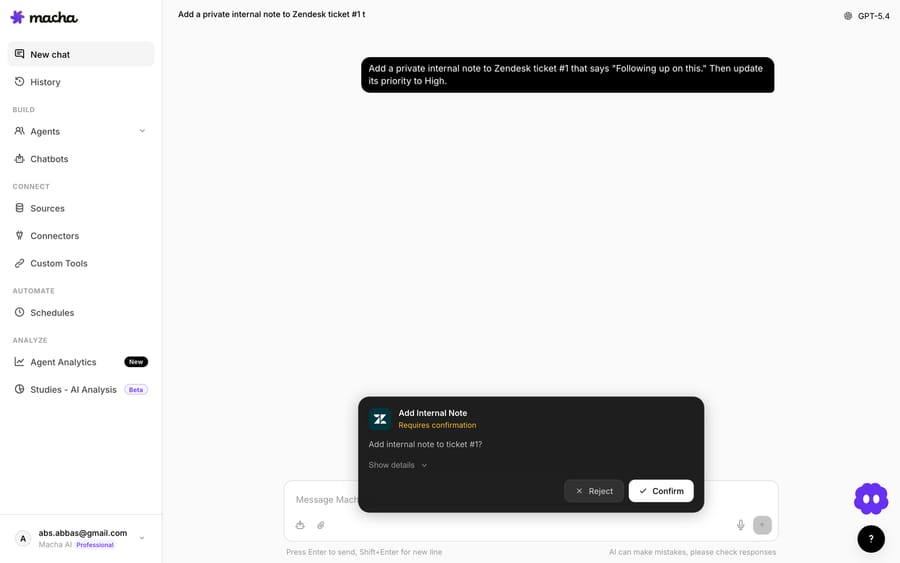
That confirmation card is the whole philosophy in one screen: any action that writes to your helpdesk can require a human to confirm it. The AI writes the draft. The decision to place it, and later to send it, is yours.
Why is a full draft better than a suggestion?
A lot of "AI assist" features give agents a vague suggestion or a canned-macro pick. A draft is different: it's a finished reply the agent can ship as-is or tweak. The difference in practice is between "here's a hint" and "here's 90% of the work, you do the last 10%."
Because Macha agents read the real ticket fields and full thread, and can read attachments too (text from PDFs, AI vision on screenshots and photos), the draft is specific to this customer, not a generic template. A UK customer asking about returning a defective item gets a draft that already knows it's an international order and a defective-item case, with the right policy pulled in.
How do you set up a drafting agent in Macha?
You build the agent in Macha's configuration view: give it instructions, pick a trigger, and switch on the tools it's allowed to use. You don't have to do it yourself. On the trial and every plan, the Macha team analyzes your past tickets, builds the knowledge base and this agent, tests it on a sample of those tickets, and runs it in safe mode, with drafts as internal notes exactly as described here, until the drafts are right. The walkthrough below shows what they configure.
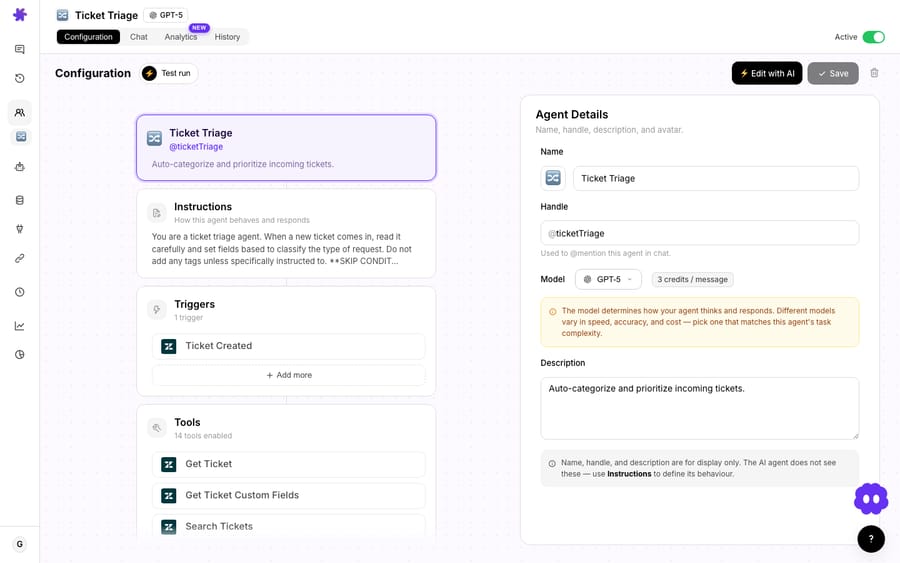
The instructions set the rules of the draft: voice, length, what to do when it can't find an answer (a good instruction: "if the docs don't cover it, draft a short holding reply and flag for a senior agent"). The trigger decides when it runs. And the tools decide what it can touch.
Keep the agent's hands read-only
This is the single most important setup choice for a draft-for-review workflow. When you connect Notion, Macha shows you each tool tagged Read or Write:
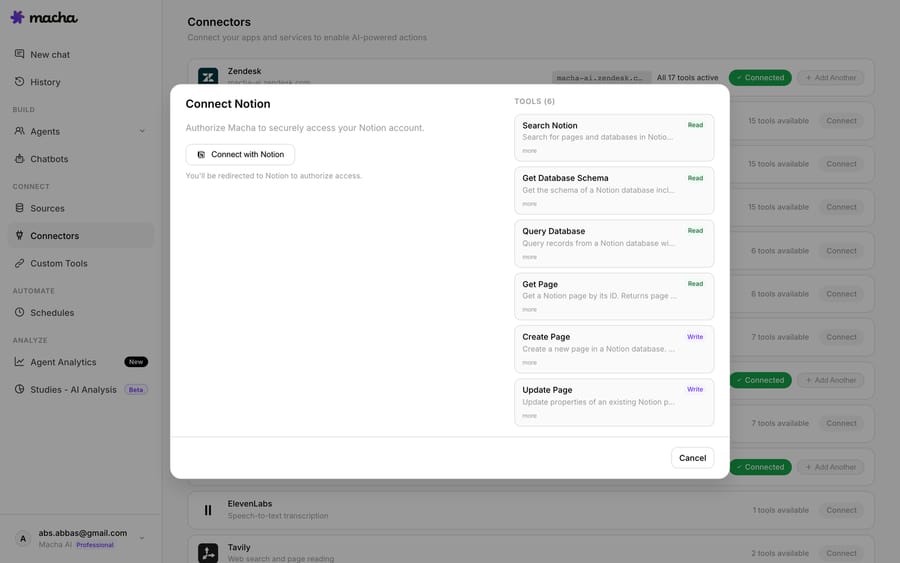
For a drafting agent you want read-only knowledge tools (Search Pages, Get Page) so it can pull policy without ever editing your wiki. Combine that with the internal-note action on the Zendesk side and the agent's only "write" is a note your team reviews. It can't send a customer-facing reply on its own. That constraint is the safety model: you've designed an agent that can think and draft but can't speak to customers unsupervised.
Where does the draft show up for the agent?
The agent posts into the ticket itself, as an internal note. Your agent opens the ticket, sees the draft sitting in the conversation, and works from there: public reply, edit, or discard.
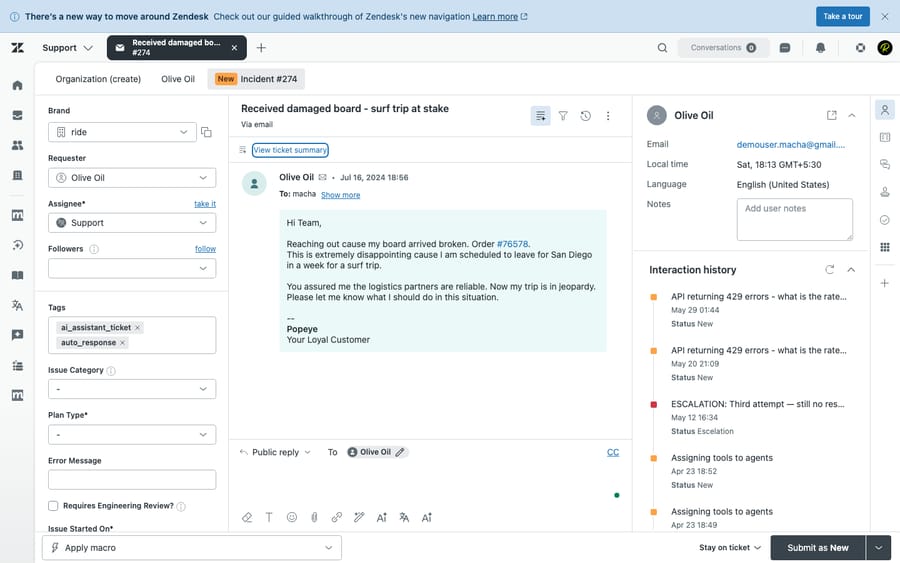
Because the draft lives natively in Zendesk, there's nothing new for agents to learn and no second tool to babysit. They keep working in the workspace they already know. The AI just got there first and did the typing.
When should you move from drafts to autopilot?
Draft-for-review isn't the destination. It's the on-ramp. The pattern most teams use:
| Stage | Mode | Who sends | When to move on |
|---|---|---|---|
| 1. Shadow | Draft to internal note | Human, every time | Drafts are consistently good with light edits |
| 2. Trusted categories | Auto-reply on a few safe topics (order status, hours) | AI on those; human on the rest | Approval rate is high and stable on those topics |
| 3. Broad automation | Auto-reply, human-reviewed exceptions | AI by default; routes edge cases to people | You trust the audit trail and escalation rules |
Start in stage one. You get the speed-up and a free quality signal: every edit an agent makes is feedback on where the agent's instructions or knowledge need work. When approval rates climb and edits shrink, you've earned the right to let specific, low-risk categories go straight to the customer. Macha supports that too, on the same agent, by relaxing the confirmation gate for the topics you trust.
When is draft-for-review the wrong choice?
Draft-for-review is the safe default, but it has trade-offs:
- It still costs an agent's attention. Drafting saves typing, not triage. If a human has to open and approve every draft, your throughput ceiling is still human. For genuinely high-volume, low-risk queries (order status, store hours), a reviewed-but-automated reply will beat draft-for-review on cost per ticket. Don't keep a person in the loop out of habit once you trust the topic.
- A bad draft can anchor a tired agent. A plausible-but-wrong draft is more dangerous than a blank box, because a busy reviewer may approve it on autopilot. Mitigate with instructions that make the agent cite its source ("Source: International Returns Policy") and say so when it's unsure, so reviewers know what to double-check.
- Garbage in, garbage out. The draft is only as good as the Notion/Confluence docs behind it. If your knowledge base is stale, fix that first, or the agent will confidently draft last year's policy.
- It's metered per ticket. Reading the ticket, searching docs, and drafting all happen inside one conversation, and that conversation is charged once. A draft your agent ends up discarding still used the ticket. See the cost note below.
What does an AI drafting agent cost?
Macha bills per ticket: one conversation, charged once, not per resolution and not per draft, so reading the ticket, searching Notion, and writing the reply all sit inside the same charge. Pricing starts at $299 a month for 750 tickets, about $0.40 each, and the model you pick does not change it. A drafting agent is one of the simplest things to budget for: one ticket in the queue is one ticket on the bill, however many lookups the draft took. You can start on a free trial ($50 of usage, no credit card required) and see your real volume before committing. The price includes the setup by the Macha team and a dedicated success manager who handles your changes afterwards, such as a new ticket category, an instruction change or a new tool. Full tiers are on the pricing page.
FAQ
Does the customer ever see the AI draft? No. The draft posts as a Zendesk internal note, visible only to your team. Nothing reaches the customer until an agent reviews it and sends a public reply.
Can the agent edit the draft, or is it all-or-nothing? Fully editable. The draft lands in the ticket and your agent can send it as-is, tweak a line, rewrite it, or discard it. The point is to save the typing, not to remove your judgment.
Which helpdesks does this work with? Macha is an agent layer on top of your existing help desk: Zendesk, Freshdesk, Gorgias, Front, HubSpot or Intercom. This use case uses Zendesk's Get Ticket and internal-note actions; the same pattern maps to the others.
Where does the draft's information come from? From your real knowledge. In this build, Notion pages via read-only Search and Get Page. You can also wire in Confluence, Google Workspace docs, or uploaded sources. The agent grounds the reply in documented policy instead of guessing.
Can I later let it reply on its own for some topics? Yes. Draft-for-review and autopilot are the same agent with a different confidence setting. Most teams start in draft mode, watch approval rates, then relax the confirmation gate for specific low-risk categories.
How is it priced? Per ticket: one conversation, charged once however many steps the agent takes, whichever model it runs on. From $299 a month for 750 tickets, about $0.40 each, which includes setup by the Macha team and a dedicated success manager who handles your changes. See pricing.
What's the first step?
If AI in your support queue feels like a leap, draft-for-review is the small first step: faster replies, no loss of control. Build the agent, point it at your Notion docs, keep its tools read-only, and let it draft into internal notes for a week. Read the edits your team makes. They're your roadmap to trusting it with more.
Spin up a free trial ($50 of usage, no credit card required), connect Zendesk and Notion (about 15 minutes), and the Macha team builds your first drafting agent and runs it in safe mode until the drafts are right. The Macha docs have the full walkthrough, and the use-case library has more agents to build next.
Written by Abbas (Customer Support & AI, Macha) · Reviewed by Ankeet Guha (Co-founder & CTO) · Published 2026-06-24 · Last updated 2026-09-24.






