





 Shopify
 Stripe
 Slack
Slack Notion
 Google Workspace
 Confluence

Freshdesk vs Front (2026): Which Should You Pick, Ticketing or Shared Inbox?


Freshdesk suits teams that want structured ticketing with SLAs from $19 per agent a month, while Front suits teams that answer customer email together and can pay $25 to $105 per seat. The choice comes down to whether your work is a queue of tickets or a set of shared conversations.
Key takeaways
- Freshdesk fits structured, high-volume support from $19 per agent a month, while Front fits collaborative email teams at $25 to $105 per seat a month, billed annually.
- Freshdesk's pricing page no longer shows a free plan; new accounts get a 14-day trial, and a separate Free program covers up to 2 agents for 6 months.
- Freddy AI Agent comes with 500 sessions as a one-time allowance per account, after which Freshdesk charges $49 per 100 sessions.
- Front caps Starter at 10 seats and Professional at 50, so a 12-person team pays $780 a month on Professional versus $660 on Freshdesk Pro.
- Front sells AI as add-ons below Enterprise, including Autopilot from $0.05 per conversation and Copilot or Smart QA at $20 per seat a month.

Pick Freshdesk if you want structured ticketing with SLAs from $19 per agent a month, and pick Front if your team works customer email together and can pay $25 to $105 per seat a month for a collaborative shared inbox (both billed annually, checked on each vendor's pricing page on 24 September 2026). Freshdesk turns every message into a ticket with a number, status, priority and assignee. Front keeps the message as an email thread that several teammates comment on, draft and hand off. That model difference decides most of what follows.
How do Freshdesk and Front compare at a glance?
| Freshdesk | Front | |
|---|---|---|
| Best for | High-volume, structured support that needs queues and SLAs | Relationship-heavy, collaborative email and customer operations |
| Model | Ticketing (ticket number, status, priority) | Shared inbox (collaborative email threads) |
| Pricing entry | Growth $19/agent/mo; no free plan on the pricing page, 14-day trial | Starter $25/seat/mo (up to 10 seats), 14-day trial |
| Top tier | Enterprise $89/agent/mo | Enterprise $105/seat/mo (unlimited seats) |
| AI / automation | Freddy AI Agent (500 sessions once, then $49 per 100), Copilot $29/agent/mo on Pro and Enterprise | Autopilot from $0.05/conversation, Copilot $20/seat/mo, Smart QA $20/seat/mo; bundled on Enterprise |
| Omnichannel | Email, portal, chat, phone, social across tiers | Email, SMS, social (from Professional up) |
| Standout strength | Mature ticketing, SLAs, reporting at scale | Internal collaboration, drafting together, quality monitoring |
Prices are annual billing as shown on each vendor's pricing page on 24 September 2026. They change often, so confirm before you buy.
How much do Freshdesk and Front cost?
Freshdesk is the cheaper entry point. Freshworks' pricing page lists Growth at $19/agent/month, Pro at $55/agent/month and Enterprise at $89/agent/month, billed annually. The page no longer shows a free plan; new accounts get a 14-day trial of Enterprise, and a separate Free program covers up to 2 agents for 6 months. Freddy AI Agent comes with 500 sessions, a one-time allowance per account rather than a monthly one, then $49 per 100 sessions. Freddy AI Copilot is a $29/agent/month add-on on Pro and Enterprise.
Front positions itself as a premium tool. Front's pricing page lists Starter at $25/seat/month (up to 10 seats), Professional at $65/seat/month (up to 50 seats) and Enterprise at $105/seat/month (unlimited seats), billed annually. Starter and Professional come with a 14-day trial; Enterprise needs a demo. AI arrives as add-ons below Enterprise: Autopilot from $0.05 per conversation, Copilot at $20/seat/month, Smart QA at $20/seat/month and Smart CSAT at $10/seat/month. Enterprise bundles Copilot, Smart QA and Smart CSAT.
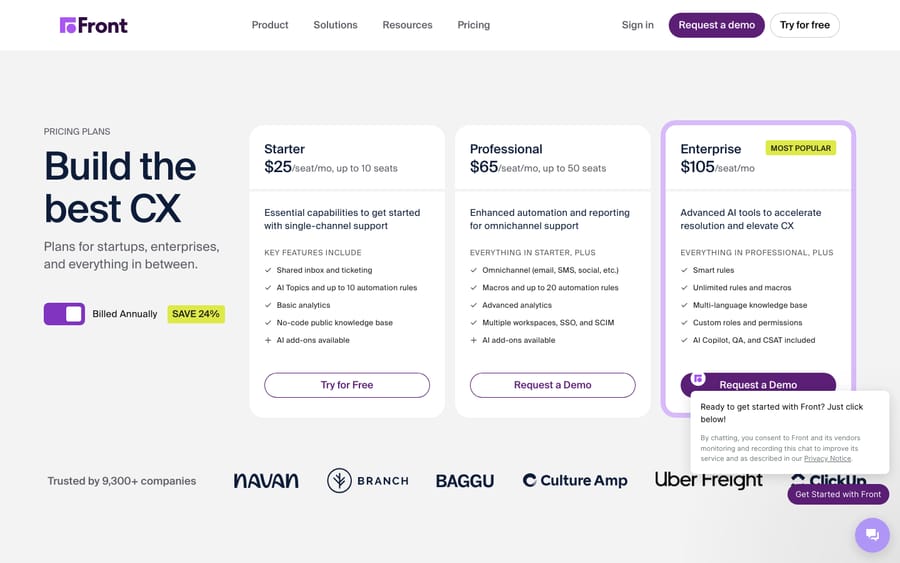
Do the arithmetic for a 12-person team: Freshdesk Pro is 12 × $55 = $660 a month, while Front can't stay on Starter past 10 seats, so Professional is 12 × $65 = $780 a month before any AI add-ons. The seat caps are the incentive at work. Front prices low to get a small team in, then the 10-seat and 50-seat ceilings move a growing team up a tier. What you pay the premium for is Front's collaboration model, and whether that's worth it depends on the next section.
Which has better features and AI, Freshdesk or Front?
The feature story is really the model story. In Freshdesk, every message becomes a ticket with a status, priority and assignee. That structure is what makes high-volume support tractable: you sort a queue by priority, apply SLAs and report on resolution metrics across thousands of tickets. Freshdesk's AI, branded Freddy, spans an AI Agent for deflection, an AI Copilot to assist agents and AI Insights for analytics.
In Front, a message stays an email thread, but a collaborative one. Teammates comment internally on a thread, draft replies together and hand conversations off without losing context. Front has invested in AI knowledge connectivity (pulling from sources like Confluence, Notion and Google Drive) and in Smart QA quality monitoring, which several reviewers consider ahead of Freshdesk on quality scoring. Front's AI Topics and Autopilot handle classification and automated resolution.
The honest split: for structured, metric-driven support at volume, Freshdesk's ticketing gives you the levers. For collaborative, relationship-driven work where several people touch the same customer thread, Front's model removes friction that a rigid ticket would add.
How do automation and workflows differ?
Freshdesk automates around ticket properties. Rules fire on ticket creation, updates and time triggers; SLA policies enforce response and resolution targets by priority; and routing (round-robin, skills-based on higher tiers) distributes work. It's deterministic and well documented, which is why ops teams trust it for escalation ladders.
Front automates around the inbox. You get rules to route, tag and assign messages, capped by tier: up to 10 automation rules on Starter and 20 on Professional, per Front's pricing page, with unlimited rules and macros on Enterprise. Front's automation is lighter and more conversation-centric. It's good at "send this kind of email to this team," and less oriented toward the formal SLA-and-escalation machinery Freshdesk ships natively.
If your workflows are about enforcing promises (first-response and resolution SLAs, tiered escalations), Freshdesk is purpose-built. If they're about getting the right person on the right thread quickly, Front's routing fits better.
Which is easier to set up and run?
Reviewers consistently praise Freshdesk for a clean, low-training UI. When we captured G2's comparison page in July 2026, Freshdesk held roughly 4.4/5 across about 3,728 reviews, with users calling it "simple," "well-organized" and easy for new hires to pick up. The trade-off is a deeper admin surface: to use its power you configure SLAs, automations and portals.
Front rated higher on G2 in the same capture, around 4.7/5 across roughly 2,407 reviews, helped by a familiar, email-like feel that new users grasp instantly. Front's UI story is more mixed than the score suggests: recent interface updates divided some long-term users. For teams that already live in email, Front's onboarding is close to frictionless; for teams that want structured queues, Freshdesk pays off after a bit more setup.
How do their support and integration ecosystems compare?
Both are mature products with large ecosystems. Freshdesk, backed by Freshworks, offers a broad marketplace of integrations, an established knowledge base and support tiers that scale with plan. Front has a strong app directory (native integrations with CRMs, ecommerce and collaboration tools) and is well regarded for its onboarding and customer success motion, which suits its higher-touch positioning. Neither will leave you short of connectors; the difference is philosophical, not a matter of ecosystem size.
What are the pros and cons of each?
Freshdesk pros: low $19 Growth entry; mature ticketing with SLAs, priorities and reporting built for scale; clean, low-training UI; strong omnichannel across tiers; Freddy AI Agent sessions included to start. Cons: the ticket model can feel heavy for teams that just want collaborative email; deeper admin configuration to unlock its power; the 500 AI Agent sessions are a one-time allowance, so steady use is metered at $49 per 100; no free plan on the pricing page.
Front pros: a strong collaborative inbox with internal comments, shared drafting and clean handoffs; ahead on quality monitoring (Smart QA) and AI knowledge connectivity; the higher G2 rating of the two in our capture; a good fit for relationship-heavy operations. Cons: higher per-seat price; seat caps on Starter and Professional push growing teams to Enterprise; lighter on formal SLA and escalation machinery; most AI is an add-on below Enterprise; recent UI changes divided some users.
Which should you choose?
- High-volume, structured support (ecommerce, SaaS with big user bases): choose Freshdesk. If a "ticket number" fits how you track, assign, escalate and close work against SLAs, its queue model is built for that.
- Relationship-heavy, collaborative teams (logistics, agencies, financial services, travel): choose Front. If a "conversation the team manages together" is your reality, Front removes friction the ticket model would add.
- Budget-first or scaling from a small team: Freshdesk, for the $19 Growth tier and the lack of seat caps.
- Quality monitoring and AI-assisted collaboration are the priority: Front, for Smart QA and its knowledge connectivity.
Neither tool is better in general. Match the line that describes your team and pick accordingly.
Can you add an AI agent on top of either one?
Yes, and it's worth separating from the Freshdesk-vs-Front decision: the AI agent layer is a different question from which help desk you run. Whichever you choose, you can put an AI agent on top of it to draft grounded replies, triage by intent and look up order or account status through your own APIs. That's the space the broader category of AI agents for customer service occupies, and it's worth weighing the build-versus-buy tradeoff before committing.
Macha is one such layer. It isn't a help desk and not an alternative to Freshdesk or Front. It runs on top of the Freshdesk you already use (or Front) as a native connector, reading and writing the same tickets, and calling your systems through a custom tool. Macha bills per ticket, from $299 a month for up to 750 tickets: one conversation, charged once however many messages it takes, never per resolution.
FAQ
What's the core difference between Freshdesk and Front? Model. Freshdesk is a ticketing help desk: every message becomes a ticket with a number, status, priority and assignee, wrapped in queues and SLAs. Front is a shared-inbox platform that keeps the email metaphor but makes threads collaborative, with internal comments and shared drafting.
Which is cheaper, Freshdesk or Front? Freshdesk, generally. On 24 September 2026 Freshdesk Growth was $19/agent/month and Pro $55, while Front started at $25/seat/month and rose to $105/seat/month on Enterprise, all billed annually. Front's seat caps also push teams over 10 seats to the $65 Professional plan. Confirm current numbers on each vendor's pricing page.
Does Freshdesk still have a free plan? Not on its pricing page as of 24 September 2026. New accounts get a 14-day trial, and Freshworks runs a separate Free program for up to 2 agents for 6 months.
Which has better AI? It depends on the job. Front is often credited as ahead on quality monitoring (Smart QA) and AI knowledge connectivity, though most of its AI is paid per seat below Enterprise. Freshdesk bundles Freddy AI Agent, Copilot and Insights, with 500 one-time AI Agent sessions and $49 per 100 after that.
Which is easier to use? Both rate well. Freshdesk is praised for a clean, low-training UI (about 4.4/5 on G2 in our July 2026 capture); Front rated higher (about 4.7/5) thanks to its familiar inbox feel, though recent UI changes divided some long-term users.
Can I add AI to Freshdesk or Front without switching? Yes. An AI agent layer like Macha connects to your existing help desk (Macha connects to Zendesk, Freshdesk, Gorgias, Front, HubSpot and Intercom) and runs on top of it, so you keep your ticketing or inbox and add drafting and triage without replacing the tool.
Ready to add an AI agent layer on top of your help desk? Start a free trial of Macha and connect it to your Freshdesk in minutes.






