



 Intercom
 Shopify
 Stripe
 Slack
Slack Notion
 Google Workspace
 Confluence

What Is an AI Customer Service Agent? A Guide to AI Agents for Customer Service (2026)


An AI customer service agent is a language model that works a support ticket the way a person would: it reads the request, checks your knowledge and systems, takes an action such as a refund or an address change, and then resolves the ticket or hands it to a human with context. Here is how agents work, what they can and can't do, what they cost, and four ways to put one on your support queue.
Key takeaways
- An AI customer service agent is a language model that uses tools, so it can look up an order, change an address or issue a refund, then resolve the ticket or escalate it with context.
- There are four ways to get one: your help desk's own AI, a standalone agent platform, an AI agent layer on the help desk you keep, or building your own.
- Deflection, resolution and automation measure different things, so ask what a vendor's rate counts before comparing, and check resolution on a sample of your own tickets.
- Fin charges $0.99 per outcome and Zendesk $1.50 to $2.00 per automated resolution, while per-ticket pricing at about $0.40 costs less than Fin once the agent resolves about 40% of tickets.
- Macha is the done-for-you option: the Macha team builds, tests and monitors your agents on your existing help desk, included on the trial and every plan, at about $0.40 a ticket.

An AI customer service agent is software that reads a customer's request, decides what to do, uses tools to look things up or take actions in your systems, and then resolves the ticket or escalates it to a human with context. The tools are what set it apart: a scripted chatbot follows a decision tree, an answer bot only answers, and an agent does the work.
| Scripted chatbot | Copilot | AI agent | |
|---|---|---|---|
| How it works | Decision tree, keywords, canned replies | A model drafts, a human approves and sends | A model in a loop with knowledge and tools |
| What it can do | Answer the FAQs it was programmed for | Draft replies, summarize threads, suggest tags | Look things up, take actions, resolve or escalate |
| Memory of the conversation | The current branch of the script | The ticket the human has open | The full thread plus customer and order data it fetches |
| At handoff | Cold transfer, the customer repeats themselves | The human is already in the loop | Passes a summary, collected fields and the reason |
| Where it fails | Any phrasing it didn't anticipate | Saves time only as fast as humans review | Thin knowledge, loose permissions, no escalation rule |
| Where it fits | Routing and the narrowest FAQs | The safe first step, and every escalated ticket | High-volume, well-scoped ticket types |
What is an AI agent for customer service?
An AI agent for customer service is a large language model (LLM) connected to your knowledge, your systems and your help desk. It reads the ticket, checks your policies and the customer's order or account, and then acts: a reply with a tracking link, an address change, a subscription pause or a refund, followed by closing the ticket or handing it to a person.
Three kinds of product get sold under the same label, and the gap between them is large:
- The scripted chatbot matches keywords to a decision tree ("Press 1 for billing"). It breaks the moment a customer phrases something it didn't expect, and it can't act outside the chat window.
- The answer bot uses an LLM grounded in your knowledge base through retrieval (RAG). It writes a fluent, specific answer instead of a link. As Alhena puts it, RAG bots "are great at answering questions, but they stop there."
- The AI agent is an answer bot that can also call tools. It plans a few steps, looks up the order, checks the result, takes the action and escalates when a rule says so. Zendesk, Cognigy and IrisAgent all draw the line in the same place.
Chatbots deflect; agents resolve when they have tools and guardrails. Plenty of products sold as agents are answer bots, useful but unable to change anything in your systems. For the longer comparison, see AI agents vs chatbots, and for the wider category, customer service AI.
A copilot is the fourth term people mix in. An agent is customer-facing and works the ticket itself; a copilot is agent-facing and drafts, summarizes and suggests for a human. Helpshift sums it up as "one works FOR you, and the other works WITH you." Many teams run both.
What is an AI agent layer?
An AI agent layer is an agent platform that runs inside the help desk you already have. It reads and writes the same tickets your team works, using the help desk's API, so replies, internal notes, tags and status changes all land where they always have. It isn't a new help desk or a separate chat widget with its own inbox, so your views, macros, reporting and SLAs stay as they are. The trade-off is one more connected tool to manage. For how this compares with a help desk's built-in AI, see Zendesk AI vs an AI agent layer. Macha is one example: an AI agent layer for Zendesk, Freshdesk, Gorgias, Front, HubSpot or Intercom.
How does an AI customer service agent work?
Under the branding, every agent runs the same loop. Here it is for one email:
- A trigger fires. A new ticket arrives or a customer replies, and the help desk sends a webhook.
- The agent reads the conversation. The full thread plus the fields around it: email, tags, channel, any order number in a custom field.
- It retrieves knowledge. It searches your help center, policies and past answers for the passages that match. This is what stops it inventing a return window.
- It decides, from written instructions. Someone wrote down how this ticket type is handled: what to check, what the agent may do alone, when it must stop.
- It calls tools. An order lookup, a carrier tracking call, a subscription change, a refund. Each tool is an API call with defined inputs and a scope.
- It acts. A public reply, an internal note for a human to approve, or the action itself, confirmed to the customer.
- It escalates with context when a rule says so. An angry customer, a refund over a limit, a missing order: it assigns a person and leaves a summary.
- Every step is logged. Retrieved passages, tool calls and results, and the final reply, so someone can audit the run.
Remove any one part and you get a familiar failure: no knowledge and it makes up policies, no tools and it talks but can't help, no escalation rule and it loops with a customer who wanted a person three messages ago.
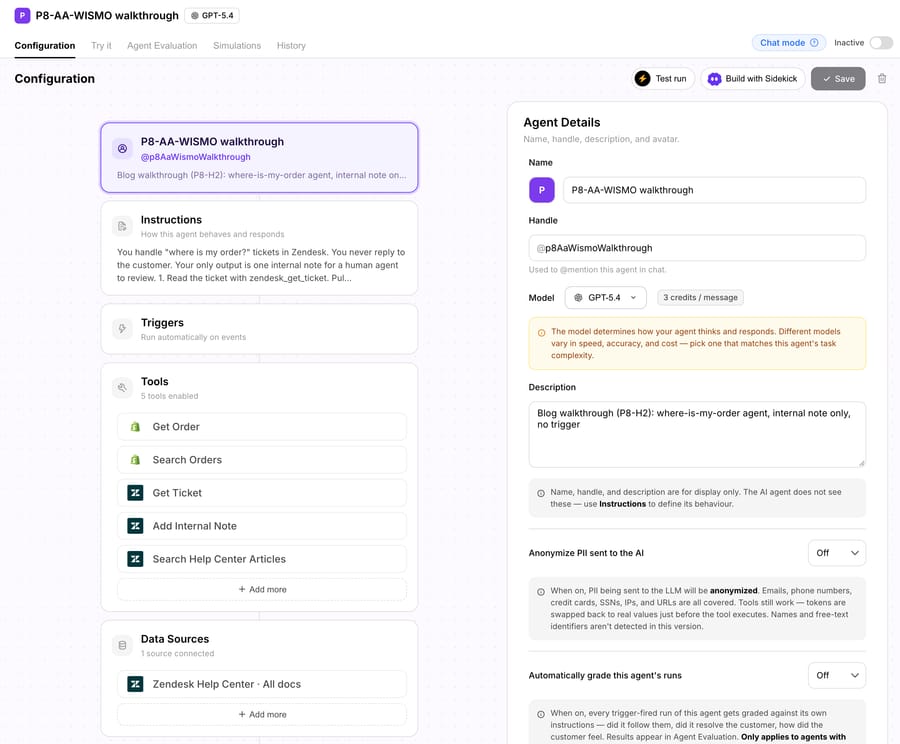
A worked example: "Where is my order?", run live. On 6 October 2026 we built this agent on Macha's demo help desk, a Zendesk sandbox connected to a Shopify test store, and ran it on one ticket. The agent, "P8-AA-WISMO walkthrough", had five tools (Get Ticket, Search Help Center Articles, Get Order, Search Orders and Add Internal Note) and the sandbox help center as its knowledge source. It had no trigger and no tool that can reply to a customer, so the most it could do was leave an internal note. This is what happened.
| Step | What the agent did | What came back |
|---|---|---|
| Trigger | We emailed the help desk: "Hi, I ordered a board last week, order #1097, and I still have not had a shipping email. Where is it?" With no trigger on the agent, we started the run by hand from the dashboard's Test run, on that ticket. | Zendesk created ticket #1193. |
| Read | zendesk_get_ticket on #1193 | Subject, channel (email), status new, and the customer's message with the order number. |
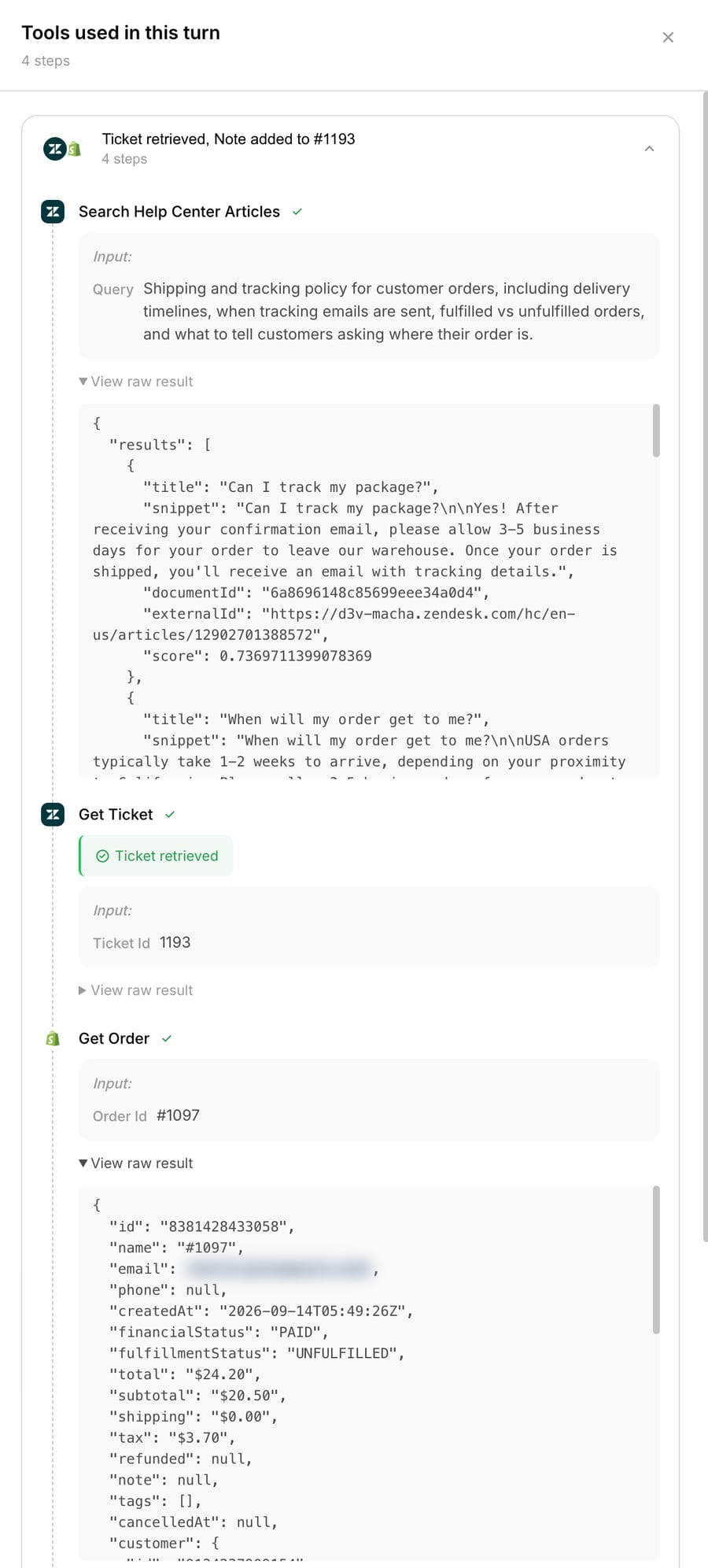
| Retrieve | zendesk_search_articles, asking for the shipping and tracking policy | Two matching articles: "Can I track my package?" (orders leave the warehouse within 3 to 5 business days, and a tracking email follows) and "When will my order get to me?" (USA orders take 1 to 2 weeks). |
| Tool call | shopify_get_order for #1097 | Paid, unfulfilled, placed on 14 September 2026, no shipments. The customer's name, email and address were in the result too; they're blurred in the screenshot below. |
| Decide | The instructions cover an unfulfilled order: draft a reply that says it hasn't shipped and quotes the delivery time. The agent also judged the order late, since it was placed 22 days earlier and the policy says 3 to 5 business days. | Draft a reply and flag the ticket for a person. |
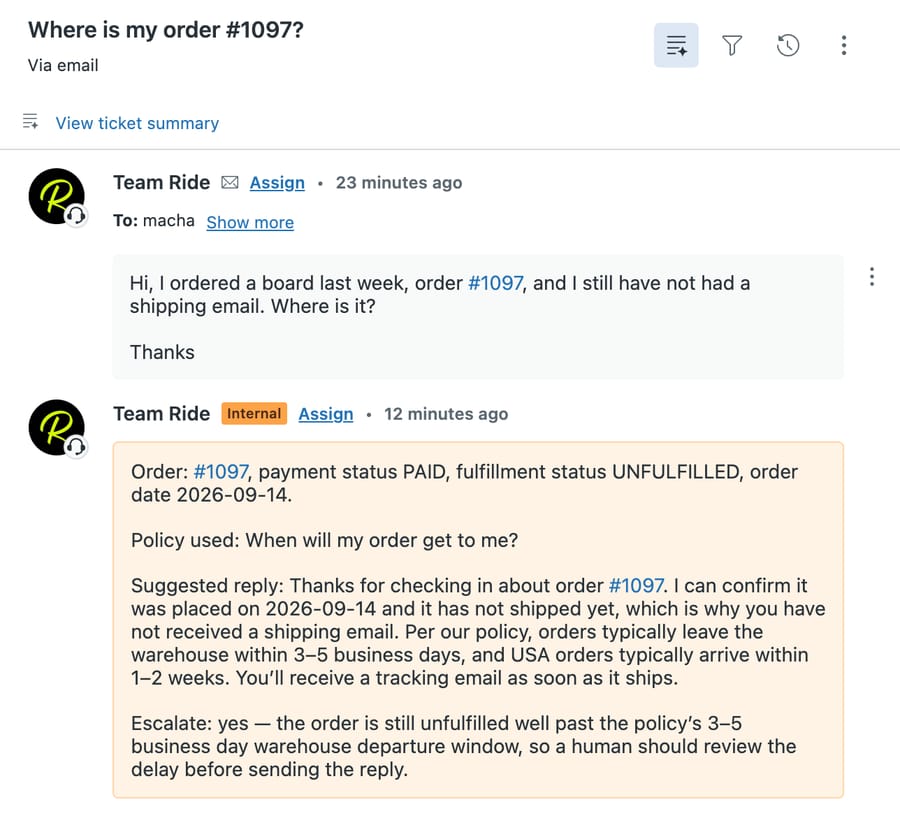
| Act | zendesk_add_internal_note. Because it's a write, Macha asked us to confirm it first. | "Note added to #1193": order status, the policy article used, a suggested reply, and "Escalate: yes". |
| Escalate | The note says the order "is still unfulfilled well past the policy's 3–5 business day warehouse departure window, so a human should review the delay before sending the reply." | Nothing reached the customer. |
| Log | The run detail records all four tool calls in order, each with its input and raw result. | A full audit trail for the ticket. |
The agent got from reading the ticket to the note in about 20 seconds, and the note was right about every fact it checked. A person reading it would still catch one thing the agent didn't: the customer said they ordered a board, but the only item on order #1097 was sunscreen. Nothing in the instructions told the agent to compare the two, so it didn't. That's the case for starting in note mode: the gaps show up in the drafts, and each one becomes a line in the instructions before the agent replies on its own.
What an AI agent needs to work
Six inputs decide whether an agent resolves tickets or creates new ones. Each line below says what breaks when that input is missing.
- Knowledge. Your help center, policies, product data and past answers, connected so the agent can retrieve them. Missing or stale knowledge is the most common reason agents give wrong answers, and most "the AI failed" stories turn out to be "our knowledge base was thin" stories. The configuration screenshot in the walkthrough below shows a help center connected as the agent's data source. See connecting a knowledge base to an AI agent.
- Tools. API connections to the systems where answers and actions live: the store, billing, subscriptions, shipping. Without them, the agent can only describe how to track an order, never fetch the tracking.
- Written instructions. One instruction per ticket type, written from how your best people already handle it. Without them, the agent's tone and decisions drift from ticket to ticket.
- Permissions and confirmation rules. Which tools are read-only, which can write, and which writes need a human to approve. A common pattern, set out by Redis, starts with reversibility: approval for irreversible actions, autonomy for reversible ones. More on scopes and confirmations.
- Help desk access. The ability to read the thread and custom fields and to write replies, notes, tags and status. Without it, the agent works in a separate inbox and your reporting splits in two.
- An escalation path. A named group or person, and the rule that sends tickets there. Without it, hard tickets bounce between the agent and the customer.
What can AI agents do in customer service?
Agents do best on high-volume, well-scoped tickets where the answer or the action is knowable from your systems. The table below lists the common ticket types with what the agent does, the tools it needs and a sensible mode to start in. "Draft" means the reply lands as an internal note for a human to send; "autonomous" means it replies directly; "note only" means it informs a human and never replies.
| Ticket type | What the agent does | Tools it needs | Starting mode |
|---|---|---|---|
| Order status (WISMO) | Finds the order, reads tracking, replies with the link and date | Store order lookup, carrier tracking | Autonomous once drafts check out |
| Returns and exchanges | Checks eligibility against the policy, creates the return, sends the label | Order lookup, returns platform | Draft |
| Subscription skip, pause or cancel | Reads the subscription, applies the change, confirms the next charge date | Subscription platform with write scope | Draft, then autonomous for skip and pause |
| Address or account changes | Verifies the customer, updates the address if the order hasn't shipped | Order or account write, fulfillment status | Draft |
| Billing questions | Explains a charge, finds the invoice, flags duplicates | Billing system read access | Draft; refunds over a limit go to a human |
| How-to and product questions | Answers from the help center and cites the article | Knowledge sources only | Autonomous |
| Triage and tagging | Classifies, sets priority and tags, routes to the right group | Help desk write (tags, fields, assignee) | Autonomous (no customer-facing text) |
| Drafting for human agents | Writes a reply a person edits and sends | Knowledge plus read tools | Note only |
Agents also answer at any hour and in the customer's language, from the same knowledge. For which vendors can actually perform the write actions above, see which help desk AI agents can take actions.
The limits are just as concrete. An agent can't answer what your knowledge doesn't contain, and when grounding is weak it can state a plausible policy you never wrote. IrisAgent says ungrounded models hallucinate in 15 to 30% of customer service responses and that its own engine cuts that to under 5%. That's a vendor measuring its own product, and the risk is managed, never zero.
What should an AI agent not handle, and how should it hand off?
Some tickets should go to a person by design, however good the agent is:
- Emotional complaints. A bereavement, a ruined event, a customer who has written three times. They need judgment and a human voice.
- Policy exceptions. A refund outside the window, a goodwill credit, an exception for a long-standing account. The agent can gather the facts; a person decides.
- Regulated or high-stakes cases. Legal threats, chargebacks, safety issues, health or financial advice, anything involving a minor.
- Anything the customer asks a human for. If someone asks for a person, the agent hands off. Arguing is how the bot everyone hates gets built.
A good handoff passes four things, so the human never has to ask the customer to repeat themselves:
- The transcript, or a short summary of it.
- The fields it collected: order number, email, product, the tool results it got.
- The reason it escalated, in one line ("refund over limit", "customer asked for a person").
- The customer's sentiment, so the right person picks it up first.
Most handoff failures come from missing one of these, or from routing to a queue nobody watches. We cover the six common causes in why handoffs fail.
What are the four ways to get an AI customer service agent?
"Add an AI agent" can mean four architecturally different things. The difference that matters most is where conversations live afterwards, and who does the work of building and tuning the agent.
| Route | Examples | Who builds and maintains it | Where conversations live | Billing unit | Best for |
|---|---|---|---|---|---|
| Your help desk's own AI | Zendesk AI agents, Fin on Intercom, Freshworks Freddy, HubSpot Customer Agent | Your support ops team, in the help desk's settings | In your existing help desk | Per resolution or outcome (Zendesk, Fin, HubSpot); per session (Freddy) | Teams that want one vendor and accept its pricing and roadmap |
| Standalone agent platform | Ada, Sierra, Decagon | The vendor's implementation team, after a sales process | In the vendor's widget or platform, handing off to your help desk; some AI-first platforms replace the help desk | Usually an annual contract quoted by sales | Large teams with budget for an enterprise rollout |
| AI agent layer on your help desk | Macha, eesel AI | Macha: the Macha team builds, tests and monitors the agents, included on every plan. eesel AI: your team, in its self-serve builder | In your existing tickets | Per ticket (Macha about $0.40); eesel AI per credit, where a ticket or chat is one credit | Teams that want to keep their help desk and don't have engineers to spare |
| Build your own | A model API plus an agent framework | Your engineers, for good | Wherever you integrate it | Model tokens plus engineering time | Companies whose product is the agent, or with unusual systems |
Your help desk's own AI is the shortest path if you're happy to stay with that vendor, but you're tied to its model, roadmap and resolution pricing, and its actions are limited to the integrations it ships. Fin sits partly in two camps, since it also runs on other help desks. Salesforce completed its acquisition of Fin, formerly Intercom, on September 10, 2026, which is worth weighing in any long-term Fin decision. For what the Zendesk option covers, see Zendesk AI explained.
A standalone agent platform brings its own conversation engine and usually its own channel. Enterprise vendors here do the implementation, through long sales cycles and annual contracts. An AI-first platform that is also the help desk means migrating your queue.
An AI agent layer keeps your help desk as the system of record. What separates layer products is who does the building: most are self-serve, so your team writes the instructions, connects the tools and tunes it. On Macha, the Macha team does that work as part of the plan.
Building your own gives maximum control, and you own integration, hosting, evaluation and every change after launch. See building your own agent. For a vendor-by-vendor list, see the best AI customer service agents, compared.
How much does an AI customer service agent cost?
Vendors bill in five different units, and the unit shapes the incentive more than the rate does.
| Billing unit | Example (checked October 6, 2026) | What you pay for |
|---|---|---|
| Per outcome or resolution | Fin: $0.99 per outcome, with a 50-outcome monthly minimum on help desks other than Intercom. Zendesk: $1.50 per committed automated resolution, $2.00 pay-as-you-go (US pricing) | Tickets the vendor counts as resolved |
| Per resolved conversation, in credits | HubSpot Customer Agent: 50 credits, or $0.50, per resolved conversation | Conversations that meet HubSpot's resolution rule |
| Per ticket | Macha: about $0.40 a ticket, from $299 a month for 750 tickets | Every ticket the agent works, whatever the outcome |
| Per credit (ticket or chat) | eesel AI: a ticket or a chat is one credit, plans from $299 a month for 500 credits | Every ticket or chat the agent handles |
| Annual contract | Enterprise standalone platforms | A negotiated volume |
The arithmetic that matters is the crossover. Per-ticket pricing charges for every ticket the agent touches; per-resolution pricing charges only for the ones it resolves, at a higher rate. A $0.40 ticket and Fin's $0.99 outcome cost the same when the agent resolves about 40% of tickets (0.40 ÷ 0.99). Above that, per-ticket is cheaper. Against Zendesk the crossover is lower: about 27% at $1.50 and 20% at $2.00. Against HubSpot's $0.50 it's 80%, so for most teams HubSpot's rate is lower on paper. Against eesel AI, $299 gets you 750 tickets on Macha and 500 on eesel: $0.40 a ticket against $0.60, with setup done for you included.
Rates aren't the whole bill. Per-resolution pricing earns the vendor more the more tickets it counts as resolved, and the vendor writes the definition. HubSpot, for example, counts a conversation as resolved when the agent shared a source or took an action and there was no qualifying handoff to a human within 72 hours, by its own documentation. Read that definition before you compare rates. The other cost is setup: with a self-serve tool, someone on your team writes the instructions, connects the tools and tunes the agent, and that time belongs in the total. Macha's per-ticket price includes that work, and a dedicated success manager who handles your changes after launch. Deeper numbers live in the AI customer support pricing index and AI agent pricing models explained.
Metrics that show an AI agent works
Vendors like a single "resolution rate", but three different things get measured, and mixing them up leads to bad decisions:
- Deflection: the customer didn't reach a human, often because a help article was shown. Easy to inflate, and a deflected customer who gave up isn't a resolved one. See what deflection rate measures.
- Resolution: the issue was solved end to end, such as the order found or the refund issued.
- Automation: the actions the agent took on your behalf. This is what the agent actually does, and the outcomes follow from it, varying by ticket type.
Every vendor number is a claim about its own definition. Salesforce's announcement cites a 76% average resolution rate for Fin, and HubSpot says its Customer Agent resolves 65% of conversations. Neither tells you what will happen on your queue. For what independent data shows, see AI customer service resolution rate statistics.
Three more measures catch what resolution rate hides:
- CSAT on AI-handled tickets, compared with human-handled tickets of the same type.
- Wrong-answer rate on a sample. Read 50 AI replies a week and count the ones a senior agent would have sent differently.
- Escalation quality. Did the human who picked up the ticket have what they needed, or did they start over?
Scoring replies with a second model as judge makes the weekly sample cheaper to run. We explain the setup in measuring AI agent quality.
How to roll out an AI agent safely
The teams that get value treat the launch as a measured rollout, not a switch. A sequence that works:
- Replay on past tickets. Run the agent against a sample of last month's tickets in a simulation and read every output before it touches a live ticket.
- Draft mode on one category. Pick the highest-volume, best-documented ticket type, often order status, and have the agent write internal notes only.
- Read the drafts. Every day for the first week or two. Fix the knowledge gaps and instruction errors they reveal.
- Turn on autonomy for that category once the drafts are consistently what your team would have sent.
- Sample weekly. Keep reading a slice of autonomous replies and watch CSAT on that ticket type.
- Widen. Start the next category in draft mode, and repeat.
Each step exists because of a specific failure: replay catches knowledge gaps before customers do, draft mode catches tone and policy errors, and the weekly sample catches drift after a policy or product change. More on step 1 in testing before go-live.
How do you choose an AI customer service agent?
Whether you build or buy, these seven questions separate a working support agent from a good sales call:
- Grounding in your own content. Does it answer from your help center, cite the source, and say it doesn't know when it doesn't?
- Real actions in your systems. Can it call your APIs (order lookup, refunds, subscription changes) and your help desk, not just chat?
- Lives on your help desk. Does it work inside the desk your team already uses, or add a second inbox?
- Safe escalation. Clear rules for when it hands off, with the four things a handoff must pass.
- Evaluation. Can you test it against real past tickets before launch, and measure it after every change?
- Control and observability. Can you see every run, with its tool calls, and widen autonomy per ticket type?
- Who maintains it after launch? Policies change, products change, and an agent nobody tunes drifts out of date. Ask who writes and tests the instructions, who watches the replies, and what that costs. With Macha, that work is done by the Macha team and included in the per-ticket price.
A vendor that tells you what its agent can't do, and what your knowledge base needs to look like first, is usually the one to trust. If the pitch is all upside, that's the warning.
Where does Macha fit?
Macha is the done-for-you way to run AI agents for customer service: the Macha team builds, tests and monitors your agents on the help desk you already use, and that work is included on the trial and every plan at about $0.40 a ticket. The price also covers a dedicated success manager who handles your changes after launch: new ticket categories, instruction updates, new tools and tuning.
You connect your help desk and the tools answers come from, which takes about 15 minutes. The Macha team analyzes your past tickets to pick the category to solve first, builds the knowledge base, and writes the agent's instructions from how your team already answers. The agent is tested on past tickets, then runs in safe mode, with drafts landing as internal notes in your help desk until you're happy with them. Monitoring continues after go-live, and you're live in under a week.
Macha runs inside Zendesk, Freshdesk, Gorgias, Front, HubSpot or Intercom (see Macha on your help desk), so agents read and reply in the same tickets your team works, with no migration and no second inbox. Custom tools connect agents to any system with an API, and you choose the model per agent.
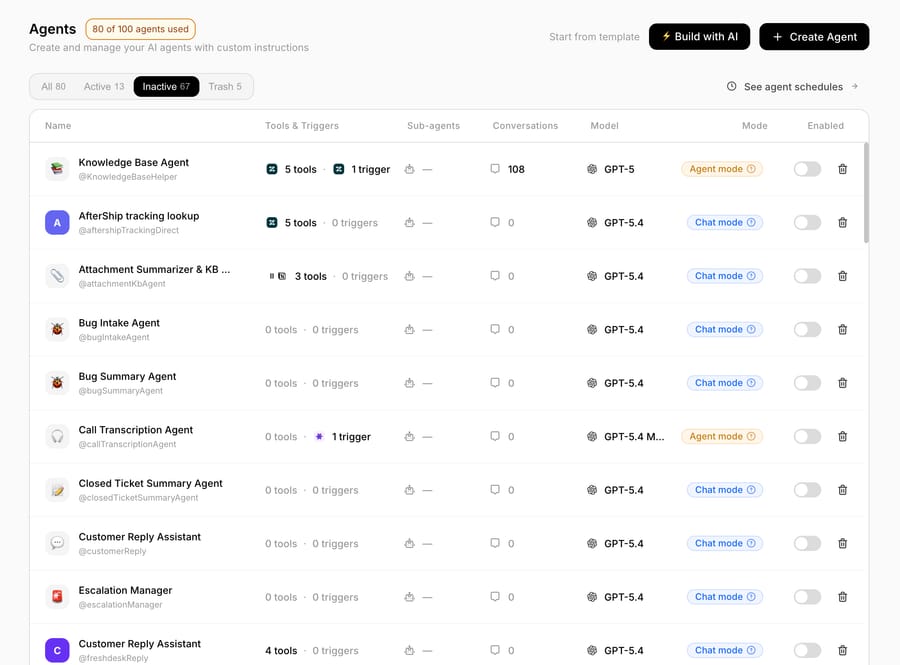
Pricing is one plan set by monthly ticket volume, from $299 a month for 750 tickets. A ticket is one thread with one person, charged once however many messages, lookups or drafts it takes, and never per resolution. There are no overages. The trial is $50 of free usage, about 125 tickets, with no card.
Macha isn't a help desk and doesn't take phone calls. Macha fits teams whose conversations are already tickets in one of those help desks; if you need voice or a brand-new help desk, look at the other routes above.
Are AI agents worth it for customer service?
For the high-volume, well-scoped share of your queue (order status, account changes, policy questions, triage), an agent grounded in your systems can resolve a real portion of tickets and give your team time back for the hard ones. The payoff depends on the discipline more than the model: good knowledge, written instructions, a draft-mode start, a weekly sample, and autonomy that widens one category at a time. Teams that aim for full automation on day one end up with the bot their customers complain about. To see it on your own tickets, start with $50 of free usage on Macha, no card needed.
FAQ
What is an AI agent in customer service? An LLM connected to your knowledge, systems and help desk. It reads a request, retrieves the policy, calls tools to look things up or act, and resolves the ticket or hands it to a human with context.
How is an AI agent different from a chatbot? A chatbot follows a script and breaks on anything it didn't anticipate. An AI agent grounds its answer in your knowledge and calls tools in your systems, so it can resolve the ticket instead of pointing to an article.
Will AI agents replace customer service agents? No. They take the repetitive, well-defined volume and leave people the novel, emotional and exception cases, with a clean handoff between them.
Do I need to replace my help desk to use an AI customer support agent? No. Your help desk's own AI and an AI agent layer both work in the help desk you already have, reading and replying in the same tickets. Only some standalone, AI-first platforms ask you to migrate.
How accurate are AI customer service agents, and how do I check before launch? It depends more on your knowledge and instructions than on the vendor. Replay the agent on past tickets, run it in draft mode on one category, and widen autonomy only where drafts are consistently right.
How are AI agents priced? Per outcome or resolution (Fin $0.99, Zendesk $1.50 to $2.00), per resolved conversation in credits (HubSpot $0.50), per ticket (Macha about $0.40, which includes setup and a dedicated success manager who handles your changes) or by annual contract. Compare total cost at your volume, including the setup time a self-serve tool leaves to your team.
What's the difference between agentic AI and an AI agent? An AI agent is the product: a system that works a ticket with tools. Agentic AI is the broader property of software that plans and acts in steps toward a goal. We cover the term in agentic AI for customer service.
Do I need engineers to run an AI agent? Not if you buy one. Help-desk-native AI is set up by your support ops team inside the help desk. With Macha, the Macha team builds, tests and monitors the agents for you, included on the trial and every plan. Building your own on a model API does need engineers, for the integration, hosting, evaluation and every change after launch.
How we researched this
We checked each vendor price on its own page on October 6, 2026: Fin's pricing page, Zendesk's pricing page (US prices), HubSpot's announcement of per-resolution pricing and its resolution definition in the HubSpot knowledge base, and eesel AI's pricing page. Salesforce's completion of the Fin acquisition comes from its own press release. Resolution rates for Fin and HubSpot are the vendors' own figures, quoted as claims. The "where is my order?" walkthrough was run live on October 6, 2026 on Macha's demo help desk, a Zendesk sandbox connected to a Shopify test store: we built the agent, emailed in a test ticket, ran the agent on it and captured its configuration, the run detail and the note it left. Customer details from the test store are blurred. The other screenshots come from Macha's dashboard on the same demo account. Earlier material on chatbot tiers, copilots and grounding was first researched in June 2026 and its sources re-checked on October 6, 2026. Macha's prices come from getmacha.com/pricing; the 15-minute connect, the past-ticket analysis and the under-a-week go-live come from Macha's done-for-you trial guide (September 2026).
Resolve tickets automatically with AI agents
Macha's AI agents work on top of the help desk you already use — no code.





