Intercom
 Shopify
 Stripe
 Slack
Slack Notion
 Google Workspace
 Confluence

AI Agent Pricing Models Explained (2026): Per-Resolution vs Per-Conversation vs Per-Action


AI customer service agents are billed per resolution, per conversation, per seat, per action, or a hybrid of a platform fee plus usage, and the unit decides how predictable your bill is. Here are current 2026 rates from Intercom Fin, Zendesk, HubSpot, Salesforce and others, with the same 5,000-conversation month costed under each model.
Key takeaways
- AI agent pricing follows five models: per-resolution, per-conversation, per-seat, per-action or credits, and a hybrid of a platform fee plus usage.
- Published per-resolution rates span roughly $0.45 to $2.00, from HubSpot Customer Agent at 50 credits per resolved conversation to Zendesk AI agents at $2.00 pay-as-you-go.
- Salesforce Agentforce Flex Credits cost $500 per 100,000 credits, with a standard action at 20 credits, about $0.10, and a voice action at 30 credits.
- In a worked example of 5,000 monthly conversations with 60% resolved, per-resolution billing at $0.99 totals about $2,970 a month, while per-conversation billing at $2.00 totals about $10,000.
- Of 32 AI support vendors in the September 2026 pricing index, 11 bill per resolution, 7 per conversation, 3 per ticket, 4 per message or credit, and 7 quote only.

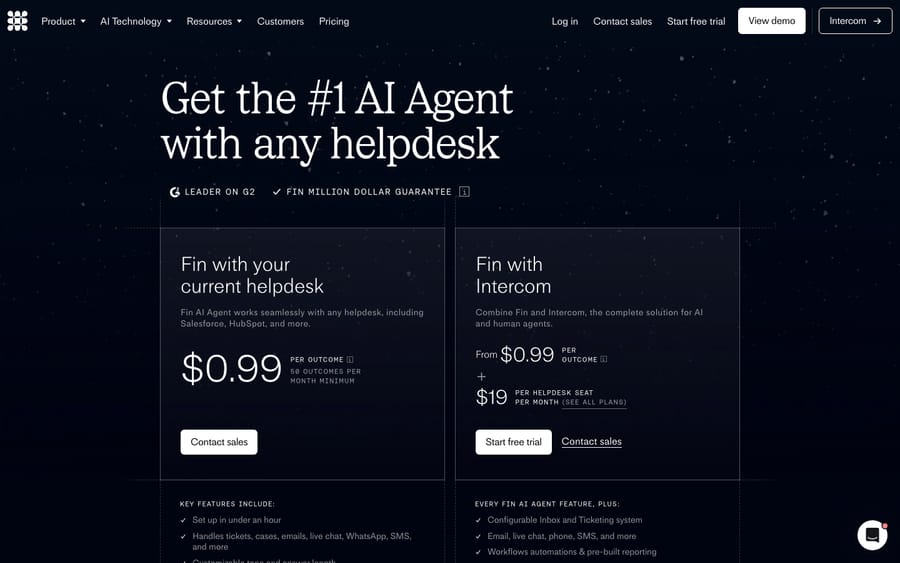
AI customer service agents are priced on one of five units: per resolution (Intercom Fin charges $0.99 per outcome), per conversation (Salesforce charges $2 per conversation), per human seat, per action (Salesforce Agentforce draws 20 Flex Credits, about $0.10, per standard action), or a hybrid of a platform fee plus usage. The unit matters more than the rate, because it decides whether your bill is predictable and whether the vendor earns more by helping you or by counting generously.
A disclosure up front: Macha, the company publishing this, sells an AI agent layer that bills per ticket. We cover that model like the others, as one option with real trade-offs.
| Model | Unit billed | Predictability | Incentive alignment | Best for | Example vendors (2026) |
|---|---|---|---|---|---|
| Per-resolution | A resolved/handled outcome | Low (volume + definition swing) | High if "resolution" is honest; can misalign | Buyers who want to pay for results and trust the definition | Intercom Fin ($0.99), Zendesk ($1.50 committed), HubSpot (~$0.45), Quickchat (from $0.50), Sierra, Decagon |
| Per-conversation | Each conversation, resolved or not | Medium to high | Neutral (paid to handle, not to solve) | Predictable budgeting; avoiding the "what's a resolution?" fight | Ada, Decagon, Salesforce ($2/conversation) |
| Per-seat | Each human user/seat | Highest | Poor for autonomous AI | Agent-assist tools augmenting humans | Zendesk Copilot, legacy helpdesks |
| Per-action / credits | Each automated step the AI takes | Medium (once usage is understood) | High (pay for work done; no win to game) | Multi-step workflows; transparency-minded buyers | Salesforce Agentforce (Flex Credits) |
| Per-ticket | One thread with one person, however long | High (a number your helpdesk already reports) | Neutral (paid to handle, not to declare a win) | Teams that want to forecast from their own volume | Macha |
| Hybrid | Platform fee + usage | Varies | Varies | Most enterprise deployments | Intercom, Zendesk, Salesforce, Microsoft |
Rates checked on each vendor's pricing page on 24 September 2026 unless marked otherwise. They change often, so confirm before budgeting. If you need the vendor-by-vendor answer (who bills per conversation, who per resolution, who per ticket), it's in the 32-vendor list below.
Why does the pricing model matter more than the price?
Two vendors can quote very different prices and cost you the same, or quote the same price and cost you triple. The pricing unit decides three things:
- Predictability. Can you forecast next month's bill, or does it swing with traffic, ticket complexity, or how the vendor defines a fuzzy event?
- Incentive alignment. Does the vendor earn more when they help you more, or when they simply do more, whether or not customers were helped?
- Where the risk sits. Usage-based models push volume risk onto you; outcome-based models push definitional risk (what counts as a "win") onto a number the vendor controls.
Keep those three lenses handy. Every model below is good at some and bad at others.
What are the five AI agent pricing models?
1. Per-resolution / per-outcome
How it works: You pay a flat fee each time the AI "resolves" an issue end to end without a human. This is the headline model of the current AI-agent wave.
Current rates (checked 24 September 2026):
- Intercom Fin: $0.99 per outcome, where an outcome is a resolution, a procedure handoff, or a disqualification; lead "qualifications" are billed at $9.99. You're charged once per conversation even if Fin takes several actions. Running Fin on a help desk other than Intercom carries a 50-outcome monthly minimum (fin.ai/pricing). Salesforce completed its acquisition of Fin on 10 September 2026, and the $0.99 rate hasn't changed since. See our complete Intercom Fin guide.
- Zendesk AI agents: $1.50 per automated resolution on a committed plan and $2.00 pay-as-you-go, after a small per-seat monthly allowance.
- HubSpot Customer Agent: 50 HubSpot credits per resolved conversation. At $9 per 1,000 credits on annual billing, that's about $0.45 a resolution, and paid Service Hub plans include 500 to 5,000 free credits a month (hubspot.com/pricing/service).
- Quickchat AI: Enterprise is from $0.50 per resolution with a 2,000-resolution monthly minimum; its smaller plans are sold in AI credits instead (quickchat.ai/pricing).
- Sierra: enterprise, outcome-based pricing tied to measurable results; Decagon offers per-resolution as one of its options. Neither publishes a rate.
Published per-resolution rates span roughly $0.45 to $2.00 for what's nominally the same unit, a 4x spread, which tells you the "unit" isn't as standardized as it looks.
Pros: Intuitive: you pay for results, not effort. In the cleanest case, the vendor only earns when the AI solves something, so incentives point the right way. If their model improves from resolving 70% to 80% of tickets, they earn more and you get more value.
Cons: The catch is the definition of "resolution." Most vendors use assumed resolution: if the customer doesn't reply or reopen within some window after the AI's last message, it's counted (and billed) as resolved. A customer who gave up in frustration looks identical to one who got a perfect answer. (This is the same trap that makes deflection rate a vanity metric if you don't watch it.) Quickchat is one of the few to publish a stricter "confirmed resolution", where the customer says the answer worked. Cost is also hard to forecast: a viral moment or an outage spikes ticket volume and your bill with it. And the incentive can misalign: a vendor paid per resolution has a quiet reason to count generously.
Who uses it: Intercom Fin, Zendesk, HubSpot, Sierra, Decagon, Quickchat. It's the dominant model for newer AI-native agents.
2. Per-conversation
How it works: You pay for every conversation the AI handles, resolved or not, usually by committing to a volume of conversations up front, with tiered economies of scale.
Who uses it / the notable convert: Ada was an early champion of outcome-based per-resolution pricing, then shifted to per-conversation as its default, according to reviews from eesel and Fin; Ada's own pricing page now only books a demo. Ada's argument, roughly: enterprises wanted predictable budgets, and "resolution" is too slippery a unit to bill on honestly. Decagon offers per-conversation as well, and Salesforce lists $2 per conversation for customer-facing agents on its Agentforce pricing page.
Pros: Far more predictable than per-resolution: conversation volume is easier to forecast than fuzzy "resolutions," and you're billed on a clean, countable event. It also sidesteps the "what counts as resolved?" fight. The vendor's incentive is neutral: they earn the same whether or not the AI did a great job, so there's no reason to game a definition.
Cons: You pay even when the AI fails and a human has to take over, so a low-quality agent costs you twice (the conversation fee and the agent's time). It rewards the vendor for handling volume, not for solving it, so quality isn't priced in at all. And a "conversation" can itself be ambiguous (does a follow-up the next day count as new?).
3. Per-seat / per-agent (legacy)
How it works: A flat monthly fee per human user, the classic SaaS helpdesk model, extended to AI as an add-on. Zendesk's Copilot (the agent-assist feature that drafts replies and suggests next steps for human agents) is sold this way, at $50 per agent a month.
Pros: Maximum predictability: you know your bill the moment you count seats, with zero usage risk. Finance likes it. It's the right fit for agent-assist tools that augment a human who occupies a seat.
Cons: It doesn't fit autonomous AI. The point of an AI agent is to handle volume without a human in a seat, so pricing it per seat is a category error. You either under-charge (the AI does the work of ten seats you're not paying for) or, more often, the vendor bolts usage fees on top, and you're back to a hybrid. Salesforce shows the split: Agentforce add-ons start at $125 per user a month for unmetered employee use, while customer-facing agents are metered separately. Per-seat also caps nothing about cost to serve; it just decouples your bill from the work being done.
Who uses it: Legacy helpdesks for human seats, and agent-assist add-ons (Zendesk Copilot). Rare as the primary model for a fully autonomous agent.
4. Per-action / usage / credits
How it works: You're billed for each automated step the AI takes (drafting a reply, calling an API, tagging, routing, looking something up, resolving), typically via a credit system where different actions or underlying models cost different amounts. Salesforce's Agentforce Flex Credits is the canonical example: a standard action costs 20 credits (about $0.10), a voice action 30 credits (about $0.15), sold at $500 per 100,000 credits, with pre-purchase, pre-commit and pay-as-you-go options (salesforce.com).
Pros: It's the most direct mapping of cost to what the AI actually did: you pay for work performed, with no "was this resolved?" judgment call in the middle. It's granular: a simple "where's my order?" lookup costs less than a multi-step workflow that touches three systems. And because the vendor bills for steps, not for declaring victory, there's no incentive to over-count resolutions.
Cons: It requires you to understand your usage. A per-action bill is only predictable once you know your actions-per-ticket pattern, and a chatty or badly configured agent can rack up actions. It's less intuitive than "$0.99 when you win," and it pushes the modeling work onto you. (For the contrast, we break down our own unit in how Macha billing works.)
Who uses it: Salesforce Agentforce (Flex Credits), and most platforms that let you build multi-step agentic workflows where "one conversation" can mean very different amounts of work.

5. Hybrid: platform fee + usage
How it works: A fixed platform or subscription fee for access (seats, features, support) plus usage-based charges on top: per resolution, per conversation, or per action. This is where most enterprise deals actually land, whatever the marketing says.
Who uses it: Nearly everyone at scale. Intercom (seats + per-outcome Fin), Zendesk (seats + per-resolution), Microsoft (seat license + Azure-metered agents), and Salesforce (which runs per-conversation, Flex Credits and per-user options side by side) all fit here.
Pros: Flexible: the platform fee covers fixed costs and the usage component scales with value. It lets a vendor serve both "predictable budget" and "pay for what you use" buyers.
Cons: It's the hardest to compare across vendors, because there are two or three dials and the headline number only shows one. Total cost of ownership is where deals get won and lost, so always model the combined bill, not the per-unit rate.
Which AI support vendors charge per conversation, per resolution or per ticket?
Of the 32 AI support vendors in our September 2026 pricing index, 11 bill per resolution or outcome (8 of them publish a rate), 7 bill per conversation or session whether or not it resolves, 3 bill per ticket, 4 bill per message, credit or token, and 7 quote without publishing a unit at all. We used each vendor's own unit definition as we checked it for the index, and the label on the pricing page doesn't always match the trigger. HubSpot sells credits but spends them only on resolved conversations, so we file it under resolution; Salesforce offers both a per-conversation price and Flex Credits.
| What triggers a charge | Vendors and published rate (pricing index, September 2026) | Charged if the AI doesn't resolve it? |
|---|---|---|
| Per resolution or outcome (11) | Zendesk $1.50 committed, $2.00 pay-as-you-go; Intercom Fin $0.99 per outcome; HubSpot Customer Agent 50 credits (about $0.45); Gorgias $1.00 monthly, $0.90 annual (plus the helpdesk ticket fee); Help Scout AI Answers $0.75; Yuma AI $1.20; Lorikeet $0.99 on top of a plan fee; Gladly's Shopify app $1.50 per AI resolution ($0.25 per assist). No published rate: Sierra, Crescendo, Forethought (platform fee plus outcomes) | Mostly no, but definitions differ: Fin counts completed Procedure handoffs, Gorgias bills the ticket fee anyway, and Gladly's app charges $0.25 per assist |
| Per conversation or session (7) | Salesforce Agentforce $2 per conversation; Freshdesk Freddy AI Agent $0.49 per session ($49 per 100); Tidio Lyro $0.70; Botpress $0.50; Alhena AI $1.20 per resolve-or-assist credit; Richpanel per AI-handled conversation (its pricing page showed conflicting rates when we read it); Front Autopilot "starting at $0.05" (sales-led) | Yes |
| Per ticket (3) | Macha about $0.40 ($299 for 750); eesel AI $0.40 per ticket or chat session; Siena AI $0.90 per automated ticket on top of a platform fee (the page doesn't say whether unresolved tickets bill) | Yes for Macha and eesel; unclear for Siena |
| Per message, credit or token (4) | Chatbase message credits (1 per response on basic models, more on premium); Voiceflow $0.005 per message plus model tokens; Microsoft Copilot Studio $0.01 per credit (2 credits a generative answer, 5 an action); Zoho Desk Zia by LLM tokens after a free pool | Yes, per step |
| Quote only, unit unpublished (7) | Ada, Decagon, Kustomer, Pylon, DigitalGenius, Zowie, Maven AGI (the last two describe automated conversations or resolutions only in their AWS Marketplace listings) | Set per contract |
Three patterns fall out of the list. The help desks with their own AI mostly bill per resolution, because it lets them sell the agent as a saving against seats they already charge for. The standalone agents built for ecommerce split between resolution (Yuma, Lorikeet) and conversation or ticket (Richpanel, Alhena, Siena, eesel, Macha). And the builder platforms (Botpress, Voiceflow, Microsoft, Chatbase) bill for activity, since they don't know what your "resolution" means. The seven quote-only vendors publish no unit at all, so the only comparable number is the one in your own quote.
When you read a contract, check four things in this order. What event creates a charge, in the vendor's words? Does a conversation that ends in a handoff cost anything? What happens to a thread that reopens after the vendor's window (Zendesk and HubSpot use 72 hours on email)? And is there a platform fee or minimum on top of the unit price? The per-vendor definitions, prerequisites and minimums are in the pricing index.
What does the same month cost under each model?
Let's run the same month through each model. Assume a mid-size support team:
- 5,000 customer conversations/month reach the AI.
- The AI resolves 60% of them autonomously (3,000 resolutions); the other 2,000 escalate to humans.
- Each resolved conversation involves, on average, 3 automated actions (understand, look up, reply).
- For per-seat comparison, say you'd otherwise need 5 agent seats at about $50/seat for the assist tooling.
| Model | Calculation | Approx. monthly cost |
|---|---|---|
| Per-resolution ($0.99) | 3,000 resolutions × $0.99 | ~$2,970 |
| Per-resolution ($1.50) | 3,000 × $1.50 | ~$4,500 |
| Per-conversation ($1.00) | 5,000 conversations × $1.00 | ~$5,000 |
| Per-conversation ($2.00) | 5,000 × $2.00 | ~$10,000 |
| Per-seat ($50) | 5 seats × $50 (assist only, does not scale resolution) | ~$250 |
| Per-action (~$0.10/action) | 3,000 resolved × 3 actions × $0.10 (+ some actions on escalated convos) | ~$900–$1,200+ |
| Per-ticket (Macha) | 5,000 tickets, resolved or escalated | $1,999 (the 5,000-ticket tier) |
A few observations from this table:
- Per-seat looks absurdly cheap because it isn't buying the same thing. It prices human assistance, not autonomous resolution, so don't compare it head to head.
- Per-conversation costs more than per-resolution here because you pay for the 2,000 that escalated too. If your AI resolved a lower share, per-conversation would look even worse, and per-resolution better.
- Per-action can be the cheapest of the autonomous models when tickets are simple (few actions each). If your workflows are complex (10+ actions per ticket), it can overtake per-resolution. It depends on your actions-per-ticket pattern, which is exactly why this model asks you to understand your usage.
- The "winner" flips with your resolution rate and complexity. There's no universally cheapest model, only the cheapest model for your traffic shape.
Why is per-resolution pricing contentious?
Per-resolution sounds like the obviously fair model ("only pay when it works!") and it's the most-marketed one for that reason. It's also the most argued-about, and the criticism is legitimate:
- "Resolution" is defined by the party who profits from it. Most vendors use assumed resolution: no reply within a window means resolved. That counts silent abandonment, "I'll just call instead," and confidently wrong answers as paid wins. The buyer cares about actually solved; the meter measures didn't come back.
- The incentive can quietly invert. A vendor paid per resolution benefits from a looser resolution definition. The clean version of the model (vendor earns only on real help) and the real-world version (vendor earns on a generously counted event) can be far apart.
- Cost is hard to predict. Tie your bill to a fuzzy event that scales with traffic and you can't forecast it. That's the reason reviewers give for Ada's move from per-resolution to per-conversation, and it's the problem Salesforce's Flex Credits and flat per-conversation rate are built around.
None of this makes per-resolution bad. When the vendor defines resolution conservatively (requires positive confirmation, excludes re-contacts) and you audit it, it's a perfectly good model, arguably the most customer-aligned one. The problem is that "resolution" is doing a lot of unverified work in most contracts. If you choose this model, make them show you exactly how a resolution is counted, and check it against your own CSAT and re-contact data.
Which model is cheapest and safest for you?
The cheapest model depends on your traffic; the safest depends on your appetite for surprise bills. A buyer's-eye summary:
- You want the most predictable bill: per-seat (for assist) or per-conversation with a committed volume. You'll trade some efficiency for a number finance can plan around.
- You're confident your AI resolves well and you'll audit the definition: per-resolution can be the most value-aligned, since you pay for wins. Just verify the wins are real.
- Your tickets are simple and high-volume, and you want cost to track actual work: per-action/credits usually comes out cheapest and most transparent, provided you model your actions per ticket first.
- Your workflows are complex and multi-step: per-resolution can cap your cost per outcome (you pay once no matter how much work it took), whereas per-action exposes you to the step count. Model both.
- You're an enterprise: assume hybrid, and negotiate the platform fee and the usage rate as separate dials. The headline per-unit price is rarely the real cost.
Whatever you pick, do the one thing most buyers skip: run your own numbers through every model (like the table above) using your real resolution rate, conversation volume, and ticket complexity. The model that wins on a vendor's example almost never wins on yours.
Where does Macha's per-ticket pricing fit?
Macha is an AI agent layer that runs on top of your existing helpdesk (Zendesk, Freshdesk, Gorgias, Front, HubSpot or Intercom) rather than replacing it. It bills per ticket: one thread between Macha and one person, charged once no matter how many replies, lookups or follow-ups it takes. There's one plan priced by ticket volume, starting at $299 a month for 750 tickets (about $0.40 each) and rising to $3,999 for 10,000, with setup and monitoring by the Macha team included (pricing).
The reason we don't bill per "resolution" is the argument made throughout this article: a "resolution" is a fuzzy, sometimes fictional event, and charging for one we can't always verify would be exactly the misalignment we just criticized. The reason we don't bill per action is the trade-off in that section: it makes you forecast a step count. A ticket is a number your helpdesk already reports, and it doesn't move when a conversation takes six replies instead of one.
Our model's real trade-off, stated plainly: a ticket is billed whether or not the agent resolves it, so a queue with a poor resolution rate costs the same as a good one. If you want a single "pay only when you win" number and you're comfortable trusting a vendor's resolution definition, a per-resolution agent may suit you better. If you'd rather forecast from a number you already have, and put the agent on the helpdesk you already run, per-ticket is built for that. You can try it yourself with $50 of free usage, no credit card required.
Frequently asked questions
What are the main AI agent pricing models? Five: per-resolution (pay per resolved outcome), per-conversation (pay per conversation handled), per-seat (pay per human user, the legacy model), per-action/credits (pay per automated step), and hybrid (platform fee plus usage). Most enterprise deployments end up hybrid.
How much do AI customer service agents cost in 2026? It varies by model. Per-resolution runs roughly $0.45 to $2.00 per resolution (HubSpot about $0.45, Intercom Fin $0.99, Zendesk $1.50 committed). Per-conversation runs about $1 to $2 each, with Salesforce at $2. Per-action models such as Salesforce Flex Credits price a standard step at about $0.10. Always model your own volume and complexity, and confirm current rates on each vendor's pricing page.
Which AI support vendors charge per conversation? In our September 2026 index of 32 vendors, seven bill per conversation or session whether or not the AI resolves it: Salesforce Agentforce ($2), Freshdesk Freddy AI Agent ($0.49 a session), Tidio Lyro ($0.70), Botpress ($0.50), Alhena AI ($1.20), Richpanel and Front Autopilot (starting at $0.05, sales-led).
Which AI customer support vendors charge per resolution? Eleven of the 32 bill per resolution or outcome, and eight publish a rate: Zendesk ($1.50 committed, $2.00 pay-as-you-go), Intercom Fin ($0.99), HubSpot Customer Agent (about $0.45), Gorgias ($0.90 to $1.00), Help Scout ($0.75), Yuma AI ($1.20), Lorikeet ($0.99 plus a plan fee) and Gladly's Shopify app ($1.50). Sierra, Crescendo and Forethought are outcome-based without a public rate.
Which AI support tools charge per ticket? Three in the index: Macha (about $0.40 a ticket, from $299 for 750), eesel AI ($0.40 per ticket or chat session) and Siena AI ($0.90 per automated ticket plus a platform fee). Per-ticket and per-conversation pricing both bill whether or not the AI resolves the ticket; the difference is whether one long thread counts once.
Is per-resolution pricing a good deal? It can be, if "resolution" is defined honestly. The risk is "assumed resolution": counting a customer who didn't reply (including those who gave up or got a wrong answer) as a paid win. That makes cost unpredictable and can tilt the vendor's incentive toward counting generously. Ask exactly how a resolution is counted and audit it against your CSAT and re-contact data.
Why did Ada move away from per-resolution pricing? Ada was an early per-resolution advocate but shifted to per-conversation as its default, citing enterprises' need for predictable budgets and the difficulty of defining "resolution" honestly. Reviewers report it still offers per-resolution to some enterprise customers; Ada doesn't publish rates.
What is per-action (credit-based) pricing? You're billed for each automated step the AI takes rather than for a packaged outcome (drafting, looking up, routing, resolving), usually via credits where different actions cost different amounts. Salesforce Agentforce Flex Credits is the clearest example: 20 credits per standard action at $500 per 100,000 credits. It's the most transparent mapping of cost to work, but you need to understand your usage to forecast it.
Why doesn't per-seat pricing fit autonomous AI agents? Per-seat prices a human occupying a seat. An autonomous agent's purpose is to handle volume without a human in a seat, so seat-based pricing is a category mismatch: it either under-prices the work or gets bolted onto a usage fee anyway. It fits agent-assist tools like Zendesk Copilot that augment humans, not agents that replace the seat.
What should you ask a vendor before signing?
There's no single best AI agent pricing model, only the one whose risks you can live with for your traffic. Before you sign, ask three things. First, the exact definition behind any "outcome" or "resolution" you're billed for, and whether a reopened ticket is refunded. Second, the minimum commitment: Fin's 50 outcomes a month off Intercom, Quickchat's 2,000 resolutions on Enterprise, or a Salesforce pre-commit. Third, what happens to the bill in a spike month, so you can run your own worst-case volume through the model rather than the vendor's example.
Vendor rates were checked on each company's pricing page on 24 September 2026; Ada's model is reported by third parties because Ada doesn't publish pricing. Pricing in this category changes often, so the next review is due by December 2026.
Simple per-ticket AI pricing
One thread with one person is one charge, however many replies it takes.