





 Shopify
 Stripe
 Slack
Slack Notion
 Google Workspace
 Confluence

How Does Macha Billing Work? Per-Ticket Pricing Explained (2026)


Macha bills once per ticket, from $299 a month for 750 tickets, and the AI model an agent runs on doesn't change that price. There are no credits and no overages: agents pause when the month's tickets run out.
Key takeaways
- Macha bills once per ticket, about $0.40 each, with one plan running from $299/mo for 750 tickets to $3,999/mo for 10,000 tickets.
- Macha counts an email thread with its follow-ups, a live chat, or a Copilot chat as one ticket, however many tools or replies it takes.
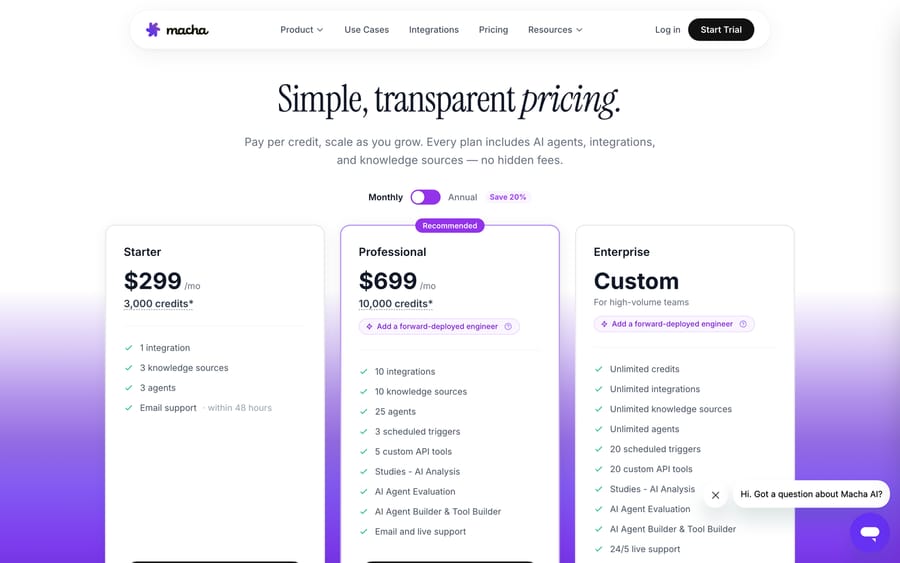
- The model a Macha agent runs on has no effect on the price, since the per-model credits of older pricing were retired on 10 September 2026.
- Macha's fair use limit is 50 messages per ticket; past that the agent asks the person to open a new ticket, which bills separately.
- A team sending 2,000 conversations a month fits Macha's 3,000-ticket tier at $1,199 a month, versus up to $1,980 at Fin's $0.99 per outcome.

Macha bills per ticket, not in credits: each ticket is charged once, and one plan runs from $299 a month for 750 tickets to $3,999 for 10,000, which works out at about $0.40 a ticket. The model an agent runs on, the tools it calls and the number of replies don't change that charge. Two rules cover almost every billing question.
| Question | Answer |
|---|---|
| Billing unit | One ticket: one thread between Macha and one person |
| What counts as a ticket | An email thread with its follow-ups, a live chat, or a Copilot chat |
| Does the model change the price? | No |
| Fair use | 50 messages per ticket, customer and AI combined |
| Starting price | $299/mo for 750 tickets, monthly billing |
| Overages | None: agents pause when the month's tickets run out |
| Trial | $50 of free usage (about 125 tickets), no credit card |
Watch the quick explainer
What counts as one Macha ticket?
A ticket is one thread between Macha and one person, and it's charged once. Not per tool call, not per step in the agent's instructions, not per message in the thread. The whole back-and-forth (read the ticket, search knowledge, call a tool, decide, reply, then handle the customer's follow-up two days later) is one ticket.
That matters because a complex agent that uses five tools and four replies to sort a refund costs the same as a simple one that answers in a line: one ticket. Three things count as a ticket: an email thread (including every follow-up on it), a live chat, and a Copilot chat with one of your own agents. Fair use is 50 messages in a ticket, customer and AI combined; past that the agent asks the person to open a new one, which bills as a new ticket.
Does the AI model change what you pay?
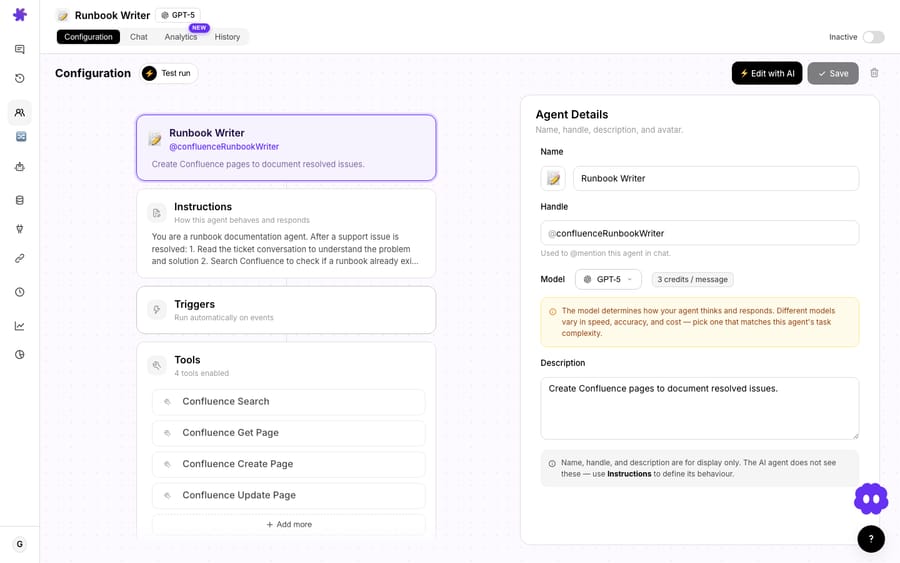
No. This is the part people expect to be complicated. Older Macha pricing charged a different number of credits depending on the model; that was retired when the pricing page moved to one plan on 10 September 2026. Today the model you pick for an agent, a fast one for triage or a stronger one for billing disputes, has no effect on what you pay. Neither does the number of tools the agent calls, nor how long the conversation runs. One ticket, one charge.
So pick the model that does the job well, not the one that looks cheap. You set it per agent on its configuration screen.
How should you pick a model if price isn't a factor?
For most Zendesk workflows (triaging tickets, drafting replies, summarizing content, updating fields) you match the model to the task and stop thinking about it. A high-volume triage agent can run on a fast model because that suits the job, and an agent with a long, detailed set of instructions can run on a stronger one because it needs the reasoning. Neither choice moves your bill.
The number that does move your bill is how many conversations your agents handle. That's the one to watch, and it's the one you already forecast when you plan support headcount.
How many tickets does each Macha plan include?
There's one plan, priced on the number of tickets a month:
- $299/mo: 750 tickets.
- $599/mo: 1,500 tickets.
- $1,199/mo: 3,000 tickets.
- $1,999/mo: 5,000 tickets.
- $2,999/mo: 7,500 tickets.
- $3,999/mo: 10,000 tickets.
- Above 10,000 tickets a month: custom.
That works out at about $0.40 a ticket. Every feature is on every tier: unlimited agents, unlimited team seats, every channel, every integration and knowledge source, custom API tools, and setup and monitoring by the Macha team. Billing is monthly. There are no overages: when the month's tickets are used, the agents pause until the next billing date, and you can move up a tier or add a top-up whenever you want. The pricing page charges only for tickets your agents handle; it lists no separate fee for connecting or indexing knowledge sources.
How do you keep Macha costs predictable?
Because cost is simply "tickets handled × $0.40," there's one lever:
- Decide which conversations the agents take. Point them at the queues where they earn their keep and leave the rest to your team. Agent Analytics shows which agents handle the most tickets, so you can right-size before the renewal rather than after it.
Unlike a per-resolution meter, nothing about your bill depends on whether a conversation ended in a tidy "resolution," a definition the vendor owns and you can't audit. Per-resolution pricing also means the vendor earns more as its bot closes more conversations, whether or not those closures were the ones you wanted automated. A ticket is a thing you can count.
What does a busy month cost on Macha?
Say a support team puts 2,000 conversations a month through Macha: triage, summaries and replies. Some take one reply, some take six, some come back as a follow-up next week. All of it is 2,000 tickets, which sits inside the 3,000-ticket tier at $1,199 a month.
Compare that to a per-resolution tool such as Intercom's Fin, which lists $0.99 per outcome on fin.ai/pricing (checked 24 September 2026). If all 2,000 conversations resolved, that's $1,980, and it climbs every month volume rises. The per-ticket model's advantage isn't only the unit cost; it's predictability: the messy six-reply thread and the one-liner cost the same, follow-ups on an old thread cost nothing extra, and you know your ceiling before the month starts.
Frequently asked questions
How is a Macha ticket charged? Once per thread, not per tool call, per step or per message. An email ticket and all its follow-ups is one ticket; so is a whole live chat, and so is a Copilot chat.
Does Macha still use credits? No. Credits priced per model were retired when Macha moved to one plan priced on ticket volume in September 2026. You buy a monthly ticket allowance instead.
How much is a ticket? About $0.40, from $299/mo for 750 tickets.
Does using more tools cost more? No. A ticket that uses several tools is still one ticket.
Does a more expensive model cost more? No. The model an agent runs on doesn't change the price.
Is indexing my knowledge base charged? The pricing page bills only tickets and lists no separate charge for knowledge sources, which are included on every tier.
What if I run out mid-month? Agents pause until the next billing date. Move up a tier or add a top-up; nothing is charged without you choosing it.
The bottom line
Macha billing is two rules: one charge per ticket, and the model doesn't change it. Pick the model that does the job, point the agents at the queues worth automating, and your bill is a number you can work out in your head: a fixed monthly volume rather than a meter that grows with every outcome someone else defines.
See it for yourself: start free and watch how far real workflows go. $50 of free usage (about 125 tickets), no credit card required. Start free.






