





 Shopify
 Stripe
 Slack
Slack Notion
 Google Workspace
 Confluence

Why Is My Freshdesk Webhook Not Firing? A 2026 Debug Checklist


When a Freshdesk webhook doesn't fire, the automation rule behind it usually never matched, and Show Activities on the ticket will tell you in seconds. If the rule did run, the fault is in the payload, authentication, the endpoint's response code or the hourly rate limit.
Key takeaways
- A Freshdesk webhook usually fails to fire because its automation rule never matched the ticket, which Show Activities on the ticket confirms when the rule name is missing.
- Freshdesk's Trigger Webhook action is available on the Growth, Pro and Enterprise plans, while Trigger API, which reuses the response, starts at Pro.
- Freshdesk automations skip tickets raised by an agent and tickets created with the New Email option, so test webhooks with a non-agent requester and New Ticket.
- Freshdesk counts only HTTP 200 to 299 responses as webhook success and retries a failed call once every 30 minutes, 48 times in total.
- Freshdesk caps webhooks at 1,000 calls per hour, and accounts that consistently exceed the limit can have webhook calls dropped instead of queued.

A Freshdesk webhook usually doesn't fire because the automation rule that holds it never matched the ticket: open the ticket, click Show Activities, and if your rule's name isn't listed, fix the conditions rather than the webhook. If the rule did run, the cause is downstream: a malformed payload, rejected authentication, an endpoint returning anything outside HTTP 200–299, or the 1,000-calls-per-hour limit.
Is the webhook action available on your Freshdesk plan?
Rule out the simplest cause first. Per Freshworks' Using webhooks in automation rules documentation, the Trigger Webhook action is available on the Growth, Pro and Enterprise plans (and on the older Blossom, Garden, Estate and Forest plans), while Trigger API, the variant whose response you can reuse in later actions, is Pro onward. Freshdesk's pricing page no longer lists a free plan: Growth is $19 per agent per month billed annually, Pro $55 and Enterprise $89. So on any current paid plan, Trigger Webhook should be there. If you're on a free account and it's missing, the plan is the reason.
Check it in a minute. Open Admin → Workflows → Automations, pick the Ticket Creation or Ticket Updates tab, click New Rule and open the Actions dropdown. If Trigger Webhook isn't listed, there's nothing to troubleshoot in the rule itself.
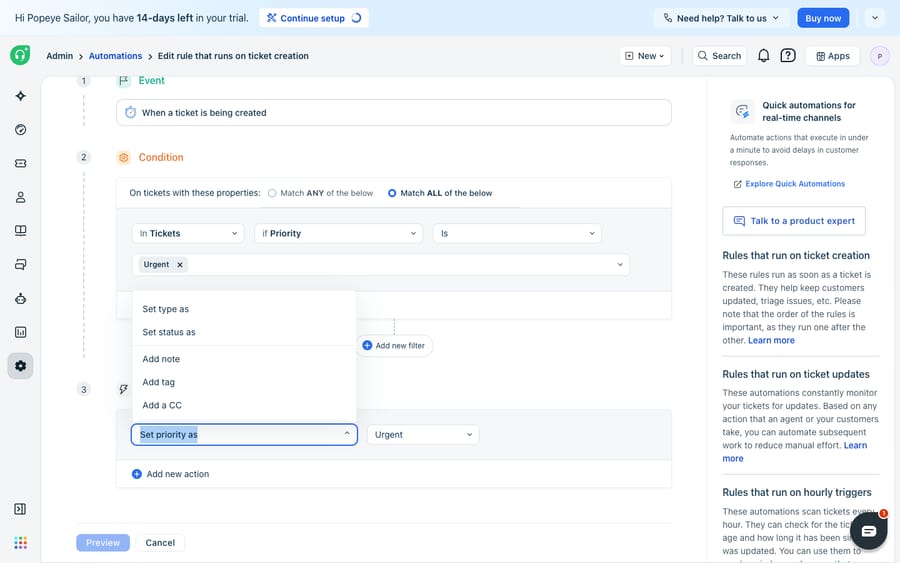
If your plan exposes the action, work down the checklist below in order. It runs from the most common cause to the least.
What causes a Freshdesk webhook to fail, and how do you fix each one?
| # | Symptom / cause | How to confirm | Fix |
|---|---|---|---|
| 1 | Rule conditions never matched | Open the ticket, click Show Activities: the rule name won't appear | Loosen or correct the conditions; watch Contains vs Has any of these words matching |
| 2 | Test ticket raised by an agent, or through New Email | Check who the requester is and how the ticket was raised | Test with a non-agent requester and the New Ticket option; New Email is for outbound mail and doesn't trigger automations |
| 3 | Wrong rule order | Show Activities lists a different rule | Move specific rules to the top, generic ones lower down |
| 4 | Payload malformed or auth rejected | Endpoint logs a 400/401/403; admins get a failure email | Fix the body, toggle Requires authentication, re-add the API key or headers |
| 5 | Endpoint returned a non-2xx status | Failure email states the time and reason | Anything outside 200–299 (300–399 is treated as a redirect) is not a success; fix the endpoint or its response code |
| 6 | Rate limit exceeded | Webhook "dropped" notification | The limit is 1,000 calls per hour; slow the rule or ask Freshdesk support to raise it |
| 7 | Referenced field was deleted | Rule shows as invalid | Recreate the custom field or edit the rule to remove the reference |
The sections below expand the causes that trip people up most.
Did your automation rule actually run?
The most common reason a webhook doesn't fire is that its rule never ran, because the conditions weren't met, so the webhook action inside never got a chance. Freshworks' Why are my automations not working? checklist is the fastest way to confirm it.
- Open an affected ticket and click Show Activities in the top-right of the ticket view. It lists the events on the ticket, including which automation rules ran. If your rule's name isn't there, it never matched. Stop debugging the webhook and fix the conditions.
- Watch your operators. Contains matches partial strings ("cat" matches "catapult"), while Has any of these words needs whole-word matches. A condition that looks right can fail silently on this distinction.
- Confirm the ticket wasn't raised by an agent. Automations don't run when the requester is an agent, which quietly breaks a lot of test tickets.
- Confirm you didn't create the test ticket with the New Email option. Freshdesk treats New Email as an outbound message and doesn't run automations on it; use New Ticket. Tickets that arrive from customers by email still trigger rules normally.
For a broader tour of how these rules evaluate, Freshdesk automations explained covers the three automation types and when each one runs.
Could another rule have run first?
Freshdesk runs rules in the order they're listed, top to bottom. On the Ticket Creation tab, if the list is set to run only the first matching rule, evaluation stops at that first match, so a broad rule near the top will swallow tickets meant for your more specific webhook rule further down. Even when all matching rules run, a generic rule above yours can change a field your conditions depend on. Freshworks' own advice: put specific rules at the top and catch-all rules at the bottom. If Show Activities shows a different rule fired instead of yours, this is almost certainly why.
Is the payload, authentication or response code the problem?
If Show Activities confirms your rule ran but the receiving system got nothing, the problem has moved to the request itself. Check three things, in order:
Encoding and payload. Freshdesk supports JSON, XML and XML-encoded request bodies. Make sure the body is valid for the content type you picked; a stray comma in a JSON payload is enough to get it rejected at the other end.
Authentication. If your endpoint expects credentials, toggle Requires authentication and supply the API key, or add custom headers in the X-Sample-CustomHeader1: VALUE format. A 401 or 403 on the receiving side is the classic sign of a missing or malformed auth header.
The response status code. This is the one people miss. Freshdesk treats HTTP 200–299 as success and 300–399 as a redirect; anything else counts as a failure. An endpoint that returns a 500 because it choked on your payload is a failed webhook even though the request physically arrived. When a webhook fails, account administrators get an email stating the time and the reason. That email is your best single diagnostic, so check the admin inbox.
Do failed Freshdesk webhooks retry, and what are the rate limits?
A failed webhook is retried automatically once every 30 minutes, for 48 calls in total, which covers roughly a day. A briefly-down endpoint will usually catch up on its own. A permanently broken one will keep generating failure emails until you fix or disable the rule.
Rate limits are the other silent failure. The limit is 1,000 webhook calls per hour; requests over it wait until capacity frees up after the hour resets. If you consistently exceed it, webhooks can be dropped rather than queued. If you see drop notifications, slow the rule down or email Freshdesk support to request a higher limit. High-volume workflows are where this bites; how to automate Freshdesk with AI covers patterns that keep call volume down.
One related gotcha: if the webhook's job is to change a status and that status misbehaves downstream, the webhook may not be at fault. Freshdesk ticket statuses explained covers how custom and default statuses interact.
How do you confirm the fix before trusting it in production?
Don't trust a "fixed" webhook until you've seen the payload land. Point it at a request bin, a free, throwaway URL from a service like Webhook.site or RequestBin that captures and displays every incoming HTTP request.
- Create a fresh bin URL and paste it into the webhook action's Request URL.
- Trigger the rule with a real qualifying ticket (non-agent requester, New Ticket option).
- Watch the bin. If the payload appears, your rule, conditions and payload are correct, and any remaining failure is on your production endpoint, not Freshdesk.
- Once the bin shows a clean request, swap the URL back to your real endpoint.
This one step separates "Freshdesk isn't sending" from "my server is rejecting," the ambiguity that wastes the most debugging time.
When is a webhook the wrong tool?
Freshdesk's webhook engine covers a lot: three encodings, authentication, automatic retries and admin failure alerts. For fire-and-forget integrations, such as pinging a CRM or notifying a Slack channel, it does the job predictably.
It has limits, though. The response-reusing Trigger API action needs Pro or above. Webhooks are one-directional and rule-bound: a webhook sends a fixed payload when conditions match, but it can't reason about the ticket, decide what data to fetch or adapt its call to what it finds. And when you chain webhooks out to external scripts, you inherit a relay where every dropped call, auth rotation and 5xx becomes something you have to monitor.
That's where an AI agent layer fits, alongside the broader category of AI agents for customer service. Macha is one such layer: it runs on top of the Freshdesk you already use as a native connector and doesn't replace your help desk, automations or webhooks. You connect Macha to Freshdesk with your subdomain and API key, and it reads and writes the same tickets your rules touch. Where a webhook fires a static payload, a Macha agent calls your REST endpoints through a custom tool, choosing which call to make based on the ticket, using the response to draft a grounded reply, and doing it inside the ticket instead of relaying out to a script you have to watch. (Macha's connector is for Freshdesk specifically, not Freshchat, Freshservice or Freshcaller. Billing is per ticket, not per resolution: one conversation, charged once however many calls the agent makes inside it, from $299 a month for up to 750 tickets; see pricing.)
Keep Freshdesk's webhooks for the simple notifications they handle well, and use an agent when the integration needs to read the ticket before it acts.
FAQ
Why isn't my Freshdesk webhook firing at all? Most often the automation rule that contains it never matched. Open an affected ticket, click Show Activities and check whether your rule name appears. If it doesn't, the conditions are the problem, not the webhook. Also confirm the test ticket was raised by a non-agent through the New Ticket option, since agent-raised tickets and tickets created with New Email don't trigger automations.
Is the Trigger Webhook action available on every Freshdesk plan? It's available on Growth, Pro and Enterprise, which are all the paid plans Freshdesk currently lists. Trigger API (whose response you can reuse) is Pro onward. If the action doesn't appear in the automation dropdown, check whether your account is on a free or legacy plan.
Freshdesk says my webhook failed. How do I read the error? Account administrators receive an email stating the time and reason. Freshdesk treats HTTP 200–299 as success and 300–399 as a redirect; 4xx and 5xx responses are failures. Check the status your endpoint actually returns.
Do failed Freshdesk webhooks retry? Yes. A failed webhook retries once every 30 minutes, 48 times in total, so a briefly-down endpoint usually recovers on its own. A permanently broken endpoint keeps sending failure emails until you fix or disable the rule.
Can I add AI to Freshdesk without replacing my webhooks? Yes. An AI agent layer like Macha connects to Freshdesk as a native connector and runs on top of your existing help desk, automations and webhooks. Instead of relaying a static payload to an external script, an agent can call your APIs through custom tools, reason about the ticket and act inside it.
Ready to replace fragile webhook relays with agents that read your tickets? Start a free trial of Macha and connect it to your Freshdesk in minutes.






