



 Intercom
 Shopify
 Stripe
 Slack
Slack Notion
 Google Workspace
 Confluence

How Do Freshdesk Automations Work? Dispatch'r, Observer, Supervisor and Scenarios (2026)


Freshdesk runs its automation through three rule types, Dispatch'r, Observer and Supervisor, and each one is defined by when it runs rather than what it does. Scenario Automations add a fourth kind that agents fire by hand, and the hourly rules carry quirks that cause most duplicate-email complaints.
Key takeaways
- Freshdesk automations use three rule types defined by timing: Dispatch'r fires once at ticket creation, Observer fires on any ticket update, and Supervisor sweeps tickets every hour.
- The Freshdesk pricing page shows no free plan and lists Growth at $19, Pro at $55 and Enterprise at $89 per agent a month billed annually.
- Freshdesk's hourly Supervisor sweep is not punctual: Freshworks' own example says a five-hours-since condition may run only after five hours and 58 minutes.
- Freshdesk hourly rules only process tickets updated in the last 30 days, so closing very old tickets needs a bulk action or an API script.
- A documented Freshdesk auto-close recipe sets tickets to Closed when Status is Resolved and Hours since resolved is greater than 48.

Freshdesk automations are three rule types that differ by when they run: Dispatch'r (Ticket creation) fires once when a ticket arrives, Observer (Ticket updates) fires on every change, and Supervisor (Hourly triggers) sweeps tickets once an hour. All three live under Admin → Workflows → Automations, and Scenario Automations add a fourth kind that agents run by hand. The hourly sweep is not punctual, it skips tickets not updated in the last 30 days, and the documented trick for making a time trigger fire only once is the build the busiest thread in the Freshworks automation forum reports failing.
What is Freshdesk automation?
Freshdesk automation is a rules engine that watches your tickets and acts on them without an agent lifting a finger. Each rule is a plain if this, then that statement: a set of conditions (the priority is Urgent, the subject contains "refund", the ticket has gone eight hours without a reply) paired with a set of actions (assign it to a group, set the priority, send an email, add a tag, close it).
What confuses people at first is that Freshdesk organizes these rules not by what they do but by when they run. That single design choice is the key to the whole engine: a rule that fires the instant a ticket is created is a different type from one that fires on every update, which differs again from one that runs on a clock. Get those three timings straight and the rest falls into place.
What is the difference between Dispatch'r, Observer and Supervisor?
Here are the three engines Freshdesk veterans still name out loud:
- Dispatch'r — runs once, the moment a ticket is created. This is your front door. Use it for intake triage: set the initial priority, route the ticket to the right group, tag it by product, or fire an autoresponder. It sees a ticket exactly once, so it's the wrong tool for anything that needs to react to later changes.
- Observer — runs on any update to a ticket. A customer replies, an agent adds a note, a field changes, the status flips — the Observer wakes up and evaluates its conditions against that event. Use it for reactive workflows: reopen-and-reassign when a customer replies to a resolved ticket, notify a manager when priority is bumped to Urgent, or nudge a follow-up when a status changes.
- Supervisor — runs on a schedule, sweeping your tickets every hour. Unlike the other two, nothing a customer or agent does triggers it; time does. Use it to catch tickets that have gone quiet, auto-close resolved tickets after N days, or escalate a ticket that has sat unassigned too long.
The mental model: Dispatch'r is at birth, Observer is on change, and Supervisor is on the clock.
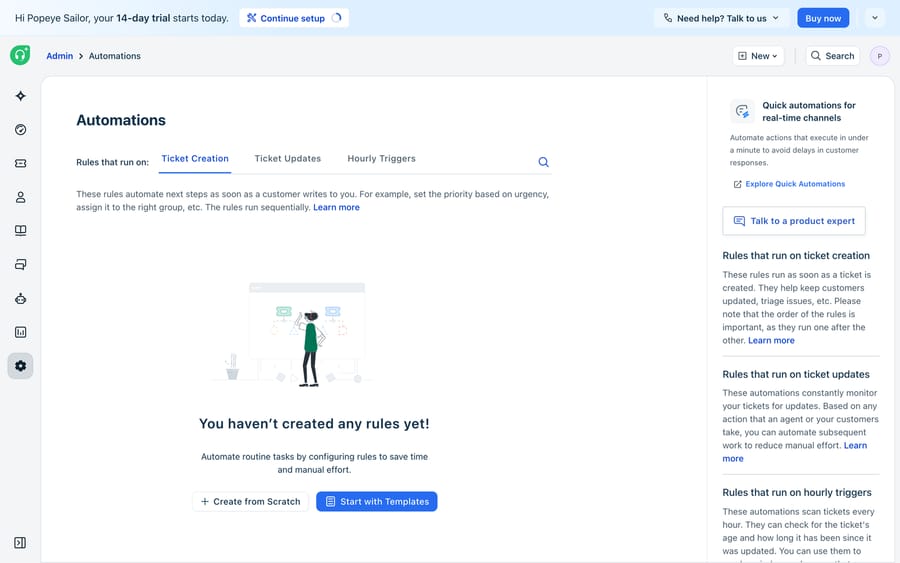
In the current Admin → Workflows → Automations UI, Freshworks has folded all three into a single module organized by three categories that map one-to-one onto the classic names — Ticket creation (Dispatch'r), Ticket updates (Observer), and Hourly triggers, often labelled Time triggers (Supervisor). The old vocabulary is still everywhere in community threads and in the muscle memory of experienced admins, so it's worth knowing both.
All three categories are on every current Freshdesk plan, though the specific conditions and actions you can reach vary by tier. Freshworks' Overview of Automation Rules still lists availability as "Free, Growth, Pro, and Enterprise." The pricing page shows no free plan: it publishes Growth at $19, Pro at $55 and Enterprise at $89 per agent a month billed annually, with a 14-day Enterprise trial (checked 24 September 2026). Freshworks does run a separate Free program covering up to 2 agents for 6 months, which is the only route to a $0 Freshdesk today.
One thing to clear up. If you've read about a drag-and-drop Workflow Automator or an Orchestration Center, those are Freshservice features (Freshworks' IT service-desk product), not native Freshdesk — an easy mix-up given the shared branding. In Freshdesk for customer support, your automation toolkit is these three rule types, plus Scenario Automations, SLA policies, and Freddy AI.
When-triggered vs time-triggered: a decision table
The single most common setup mistake is reaching for the wrong tab. Use this to decide:
| Question | Ticket creation (Dispatch'r) | Ticket updates (Observer) | Hourly triggers (Supervisor) |
|---|---|---|---|
| When does it fire? | Once, at ticket creation | On any update — reply, note, field change | Every hour, on the clock |
| What triggers it? | A new ticket arriving | A human or customer action | The passage of time |
| Best for | Intake triage, routing, tagging | Reopen-on-reply, change-based escalation | Auto-close, aging, follow-ups |
| Example | Route "billing" tickets to Finance | Notify lead when priority → Urgent | Close tickets Resolved > 48h |
| Sees a ticket… | Exactly once | Every time it changes | Repeatedly, until conditions stop matching |
The rule of thumb: if the trigger is an event, you want Ticket creation or Ticket updates; if the trigger is elapsed time, you want Hourly triggers. Get that right and most of your rules land in the correct tab on the first try.
How do you build a ticket-creation (Dispatch'r) rule?
Say every urgent email should be flagged and routed the moment it lands. Per Freshworks' guide to automation rules that run on ticket creation, the flow is:
- Go to Admin → Workflows → Automations and open the Ticket creation tab. Click New rule and give it a descriptive name like "Flag and route urgent tickets."
- Set your conditions. Pick the field type from the dropdown (ticket, contact, or company), then the specific field. For example: Subject or Description contains "outage" or "down" or "can't log in."
- Choose your match logic. Decide whether ALL conditions must match or just ANY one. Freshdesk also supports nested AND/OR condition blocks, so you can express "all of block 1 AND any of block 2" without spawning five separate rules.
- Define the actions. Set Priority = Urgent, Assign to Group = Tier 2, Add tag
urgent-intake, and optionally send an email using placeholders for the ticket fields. - Preview and save. Freshdesk auto-generates a plain-language summary of the rule, which you can edit into the description, then click Save and enable.
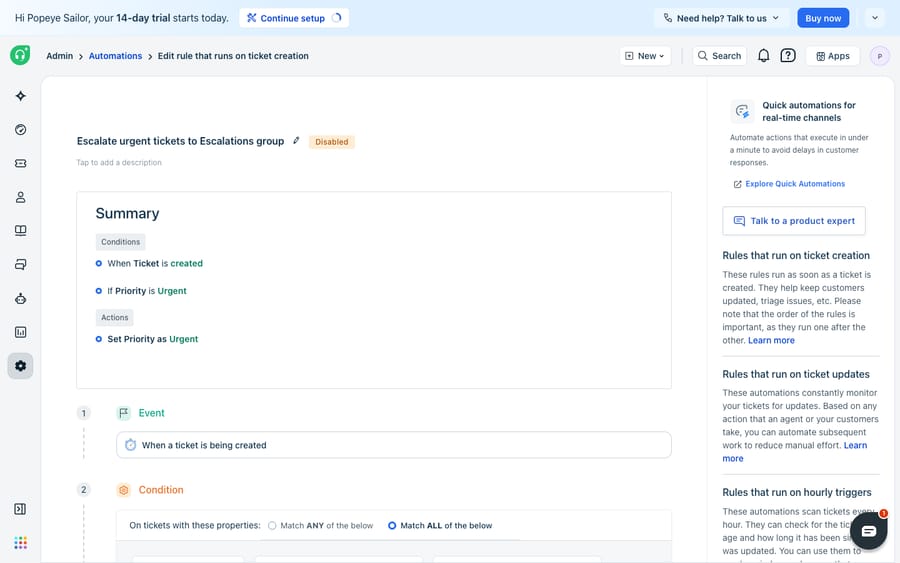
That single rule means an "Authentication failure" email is already prioritized and routed before a human sees it.
Rule order matters, and only on this tab can you change what "matching" means. Enabled rules run top to bottom, so your most specific rules belong at the top. For Ticket creation you get a choice between running only the first matching rule and running all of them — the gear icon above the rules list flips it. Ticket updates and Hourly triggers have no such switch: all matching rules always execute, top to bottom. That asymmetry is worth internalising, because a duplicate action on an update rule usually means two rules matched, not that one rule fired twice.
How do you build an hourly (Supervisor) rule?
Now the housekeeping half. A ticket that has been Resolved for two days rarely gets reopened; leaving it Resolved just clutters the view. Following Freshworks' doc on automation rules that run on hourly triggers:
- Go to Admin → Workflows → Automations and open the Hourly triggers (Time triggers) tab. Click New rule and name it "Auto-close resolved tickets."
- Set the conditions. Combine a status condition with a time condition: Status is Resolved AND Hours since resolved is greater than 48. Time-based fields such as "hours since an agent responded" and "hours since first response is due" are what make this tab distinct.
- Set the action. Set Status = Closed. You could also send a satisfaction survey or notify the requester in the same rule.
- Preview and save, then Save and enable.
Every hour, Freshdesk sweeps and closes anything Resolved for more than 48 hours. The same pattern powers escalations, covered in how to set up ticket escalations in Freshdesk.
What catches people out with the hourly sweep?
The hourly tab has behaviours that catch people out, and all three are in Freshworks' own documentation:
- It isn't punctual. The sweep runs on calendar hours, not business hours, and the doc's own worked example says a "5 hours since" condition "may execute only after five hours and 58 minutes." If you need to-the-minute timing, use an SLA policy, not a time trigger.
- It only looks back 30 days. Per the doc, "only tickets updated within the last 30 days will be processed," and resolved or closed tickets idle for more than 30 days are excluded. Automations can't retroactively "close everything ancient"; that takes a bulk action or an API script.
- It re-evaluates every hour. A rule whose conditions still match an hour later fires again. That's the single biggest source of duplicate-email complaints, and the next section is entirely about it.
Which Freshdesk automation recipes should you copy?
1. Auto-close after X days, with a reminder first — and without spamming the customer
This is the most-asked automation in the Freshworks forum and the easiest one to get wrong. The goal: nudge a customer who has gone quiet, then close the ticket if they stay quiet.
The obvious build is two hourly rules:
- The reminder. Status is Pending AND Hours since agent responded is greater than 72 → Send email to requester.
- The close. Status is Pending AND Hours since agent responded is greater than 144 → Set status to Closed.
Rule 1 will email that customer every single hour from hour 72 to hour 144. Freshworks' documented fix is to bound the window — add Hours since agent responded is less than 73 so the rule matches for one sweep only. It's the right instinct, and in practice it is unreliable: the busiest reminder thread in the automations forum (21 replies, opened July 2024, read 20 September 2026) is one admin reporting exactly that build sending "every hour on the hour" past the lower bound, with the upper bound apparently ignored. Any update to the ticket in between also restarts the clock, which quietly re-opens the window.
The pattern the thread converges on — and the one to build — is a gatekeeper field:
- Create a checkbox or dropdown ticket field, e.g.
Reminder sent, and hide it from the portal with a business rule so customers never see it. - Reminder rule: Status is Pending AND Hours since agent responded is greater than 72 AND
Reminder sentis unchecked → Send email to requester, SetReminder sentto checked, Add tagreminded. - Close rule: Status is Pending AND Hours since agent responded is greater than 144 AND
Reminder sentis checked → Set status to Closed. - Reset rule (Ticket updates tab): when the customer replies → Set
Reminder sentto unchecked, Remove tagreminded.
The gatekeeper survives clock resets, because it records what you actually did rather than inferring it from elapsed time. A tag works the same way if you'd rather not add a field; the field is tidier because it's filterable and reportable. Rule 4 is the part people forget, and without it a customer who replies and goes quiet again never gets a second reminder.
2. Auto-close Resolved tickets on a delay
The simpler cousin, and the safe one: Status is Resolved AND Hours since resolved is greater than 48 → Set status to Closed. There's no re-fire problem here because the action changes the status, so the condition stops matching on the next sweep. Pick the delay from how often your customers actually come back — and remember that in Freshdesk a Closed ticket reopens if the customer replies, so a short delay is less risky than it sounds. The full behaviour is in Freshdesk ticket statuses explained.
3. Chase an unassigned ticket before it goes stale
Straight from Freshworks' own hourly trigger examples: Hours since created is greater than 1 AND Assigned agent is None AND Agent interactions is 0 → Send email to the group. It's the cheapest safety net in the product, and it catches the intake failures your Dispatch'r rules missed. Add the same gatekeeper field from recipe 1 if you don't want an hourly nag.
4. Reopen and reassign when a customer replies to a Resolved ticket
An Observer job, not a time trigger: when the customer replies AND Status is Resolved → Set status to Open, Assign to the last agent, Notify the group. Freshdesk already reopens the ticket on a customer reply; what this rule adds is putting it back on a specific person's plate rather than into the general Open pile.
Custom statuses in rules
If you've added custom statuses — "Waiting on third party," say — they're available as both conditions and actions in all three tabs, which is the point of adding them. Two things to watch. First, a custom status has its own setting for whether the SLA clock keeps running in it, and a rule that parks tickets in a status where the clock runs will quietly burn your SLA. Second, time conditions such as "hours since resolved" key off the system status behind your custom one, so test a custom-status rule on a real ticket before you trust it. If a rule involving a custom status doesn't fire at all, Freshdesk automations not firing works through the usual causes.
What are Scenario Automations in Freshdesk?
The three rule types run themselves. Scenario Automations are the fourth kind: a saved bundle of actions an agent applies in one click, for the multi-step responses that need a human's judgment about when to run them.
Freshworks' example is the canonical one — a refund ticket where you always tag it Refund, assign it to the Refunds group and set the status. Instead of three clicks every time, that's one scenario. Setup is under Admin → Agent Productivity → Scenario Automations → New Scenario: name it, describe it, then add the actions in the order they should run. You choose who sees it — just you, your group, or all agents — and agents can build their own personal scenarios alongside the admin-built ones.
Running one: open a ticket, then More actions → Execute scenarios, search, hover and click Execute. You can also apply a scenario to many tickets at once from the ticket list — select the tickets, click Scenarios in the quick-access pane, and it runs on all of them (using bulk actions and scenario automations). That bulk path is the one to reach for when a batch of tickets needs the same treatment and writing a rule for it would be overkill.
What can't Freshdesk automation rules do?
Freshdesk's rules engine is fast, reliable, and free of surprises. That's its strength and its ceiling. Every rule is deterministic keyword-and-field matching: it can see that a subject contains "refund", but it can't tell that "I was double-charged and want my money back" means refund. It can route a ticket, but it can't read the knowledge base and draft the answer, or decide from the content of a conversation whether an issue is genuinely resolved. Anything requiring language understanding, judgment, or looking things up in another system falls outside what conditions-and-actions can express.
That seam is where an AI agent layer fits, and the broader category of AI agents for customer service exists precisely for the reasoning-heavy work rules can't do. Macha is one such layer: it runs on top of the Freshdesk you already use as a native connector — it doesn't replace your help desk, it extends it. You connect it with your subdomain and API key, and it reads and writes the same tickets your rules already touch: posting public replies, adding internal notes, updating priority, status and tags, and assigning tickets — the AI-driven equivalents of the Dispatch'r and Observer actions above, except grounded in what the customer actually said. The connector is for Freshdesk specifically, not Freshchat, Freshservice or Freshcaller. For account or order lookups mid-conversation, a custom tool turns one of your REST APIs into something the agent can call.
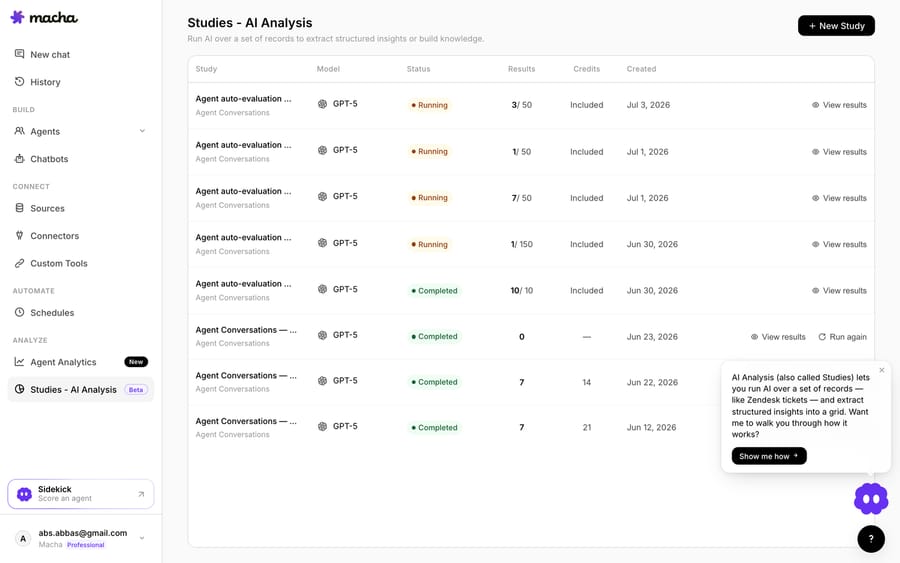
Because agents are non-deterministic, you can batch-grade a candidate agent against your real historical tickets before it touches a live queue — so you ship with evidence rather than hope. Pricing is one plan on monthly ticket volume, from $299 a month for up to 750 tickets, about $0.40 a ticket at every tier, with setup and monitoring by the Macha team included and $50 of free usage to try it. For a step-by-step on wiring this up, see how to automate Freshdesk with AI.
The practical division of labour: keep your Freshdesk rules for what they're great at — instant, predictable routing, SLA timers and tidy housekeeping — and layer an agent on top for the parts that need reading and judgment.
Frequently asked questions
What's the difference between Dispatch'r, Supervisor, and Observer in Freshdesk? They differ by when they run. Dispatch'r runs once, at ticket creation (intake triage). Observer runs on any update to a ticket — a reply, a note, a field change (reactive workflows). Supervisor runs on a recurring hourly sweep, to catch stale tickets and do housekeeping. In the current UI these are labelled Ticket creation, Ticket updates, and Hourly triggers.
How do I set up an automation in Freshdesk? Go to Admin → Workflows → Automations, pick the tab that matches when you want the rule to fire, click New rule, set conditions on ticket, contact or company fields, choose ALL or ANY match logic (or nest AND/OR blocks), define the actions, then Preview and Save → Save and enable.
Is Freshdesk automation available on the free plan? The Freshdesk pricing page shows no free plan: it lists Growth, Pro and Enterprise only. Freshworks runs a separate Free program covering up to 2 agents for 6 months. All three automation categories are on every current plan; the specific conditions and actions you can reach vary by tier. The support article's availability list still prints a Free column.
How do I auto-close Freshdesk tickets after X days? Build an hourly trigger: Status is Resolved AND Hours since resolved is greater than your threshold → Set status to Closed. It's safe from re-firing because the action stops the condition matching. If you want to warn the customer first, add a separate reminder rule gated on a hidden checkbox field so it can only send once.
Why is my Freshdesk reminder automation emailing the customer every hour? Because hourly rules re-evaluate every sweep, and a rule whose conditions still match fires again. Bounding the window with an upper limit is the documented fix but is widely reported as unreliable, partly because any ticket update restarts the elapsed-time clock. The dependable pattern is a hidden checkbox or a tag the rule sets when it sends, and checks before it sends, with a Ticket-updates rule clearing it when the customer replies.
Why isn't my time-triggered automation firing on time? Time triggers run hourly on calendar hours, not business hours and not to the minute — Freshworks' own example says a "5 hours since" condition can take five hours and 58 minutes. They also only process tickets updated in the last 30 days. For precise timing, use SLA policies instead.
Do Freshdesk automation rules run in order? Yes, top to bottom, so put specific rules first. For Ticket creation you can choose between "first matching rule only" and "all matching rules" via the gear icon above the list. Ticket updates and Hourly triggers always run every matching rule.
What is a Scenario Automation, and how is it different from a rule? A scenario is a saved bundle of actions an agent applies by hand in one click, from More actions → Execute scenarios, or in bulk from the ticket list. Rules run themselves on a trigger; scenarios wait for a person to decide the moment is right. Set them up under Admin → Agent Productivity → Scenario Automations, and agents can create personal ones too.
Is the Freshdesk Workflow Automator the same as these rules? No. The drag-and-drop Workflow Automator and the Orchestration Center are Freshservice features (Freshworks' IT service-desk product), not native Freshdesk. In Freshdesk, your toolkit is the three rule types, plus Scenario Automations, SLA policies, and Freddy AI.
Can I add AI to Freshdesk automations without replacing Freshdesk? Yes. An AI agent layer like Macha connects to Freshdesk as a native connector — it runs on top of your existing help desk, not as a replacement. It reads and writes the same tickets your rules do (replies, notes, priority, status, tags, assignment) but acts on the meaning of a conversation rather than keyword matches, grounded in your knowledge base. See Macha on Freshdesk and the pricing page.
How should you split work between Freshdesk rules and an AI agent?
Freshdesk automation is three rule types separated by timing, plus scenarios your agents fire by hand. Dispatch'r sorts the mail at the door, Observer keeps conversations moving, Supervisor makes sure nothing rots in the queue, and a scenario collapses a five-click routine into one. The parts that bite are all on the hourly tab: it isn't punctual, it skips tickets not updated in the last 30 days, and it will happily repeat itself until you build a gatekeeper. Get those straight and the engine is genuinely dependable — and for the tickets it can route but can't read, start a trial and put an agent layer on top.
Admin paths, plan availability and hourly-trigger behaviour verified against Freshworks' support documentation and pricing page, 24 September 2026. Freshworks updates its product periodically — confirm specifics in your own account.
Sources: Overview of automation rules, Setting up automation rules to run on ticket creation, Setting up automation rules to run on hourly triggers, Examples for hourly trigger automations, Setting up scenarios, Using bulk actions and scenario automations, Freshdesk pricing, Reminding requester to reply (Freshworks community).
Add AI agents to your Freshdesk
Macha reads the ticket, drafts the reply and takes the action, inside the Freshdesk you already run.





