



 Intercom
 Shopify
 Stripe
 Slack
Slack Notion
 Google Workspace
 Confluence

How Does the Gorgias Ticketing System Work? Channels, Statuses, Merge and Pricing (2026)


Gorgias turns email, chat, social, SMS and phone conversations into one ticket type in one queue, each ticket Open, Closed or Snoozed. Here is how the lifecycle, merging and the per-interaction AI Agent pricing work in practice.
Key takeaways
- The Gorgias ticketing system creates one ticket type for every channel, with email, chat, social and help center on every plan and Voice and SMS as add-ons.
- Every Gorgias ticket is Open, Closed or Snoozed, and snooze offers quick options from 1 hour to 1 week or a custom date.
- Gorgias automatically reopens a closed ticket when the customer replies, but tickets moved to Trash stay closed and are deleted after 30 days.
- Gorgias bills its AI Agent per automated interaction: $1.00 on Starter, $0.90 on Basic and Pro, and $0.85 on Advanced, on top of the helpdesk plan.
- Macha runs on top of Gorgias through a native connector and bills per ticket, starting at $299/month for up to 750 tickets with setup included.

The Gorgias ticketing system turns every customer message, whether email, live chat, Facebook, Instagram, SMS or a phone call, into one type of ticket in one queue, and every ticket carries one of three statuses: Open, Closed or Snoozed. A customer reply reopens a closed ticket automatically, duplicates can be merged, and helpdesk plans run from $10/month for 50 tickets to $900/month for 5,000 tickets on monthly billing (gorgias.com/pricing, checked 24 September 2026).
| Part of the model | How Gorgias handles it |
|---|---|
| Ticket object | One ticket type for every channel, tied to the customer |
| Channels | Email, chat, social and help center on every plan; Voice and SMS are add-ons |
| Statuses | Open, Closed, Snoozed (plus Spam and Trash views) |
| Snooze options | 1 hour, 3 hours, 6 hours, 1 day, 3 days, 1 week, or a custom date |
| Customer replies to a closed ticket | Reopens automatically |
| Duplicates | Manual merge or admin-enabled auto-merge |
| Event history | Last 12 months kept on the ticket |
| Trash | Deleted permanently after 30 days |
| AI Agent | $1.00 per automated interaction on Starter, $0.90 on Basic and Pro, $0.85 on Advanced |
Does Gorgias create a separate ticket for each channel?
No. The core idea behind the Gorgias ticketing system is that there is only one ticket type. Per Gorgias' Handle incoming tickets documentation, "when a customer reaches out with a support inquiry, Gorgias creates a ticket and routes it to your team, regardless of which channel the request originated from." There's no separate inbox for email and another for chat. It's all one object, sitting in one queue.
The channels that feed that queue are:
- Email: the classic support channel, threaded into a ticket.
- Live chat: the on-site widget; each conversation becomes a ticket.
- Social: Facebook and Instagram comments and DMs.
- SMS: text conversations, including replies to shipping and marketing texts, through the SMS add-on.
- Voice: phone calls, through the Voice add-on rather than the base plan.
Gorgias prices both add-ons by call and text volume rather than listing a flat rate on its pricing page, so budget for them separately.
The payoff of this model is continuity. A customer can email on Monday, chat on Tuesday and call on Friday, and because Gorgias ties conversations to the customer, your rep sees the history in one place instead of three disconnected records. For an ecommerce team fielding WISMO ("where is my order"), returns, refunds and subscription changes across half a dozen surfaces, that unified view is the whole point. For the wider tour of what the product is and who it's for, what is Gorgias sets the scene; this piece stays on the ticket itself.
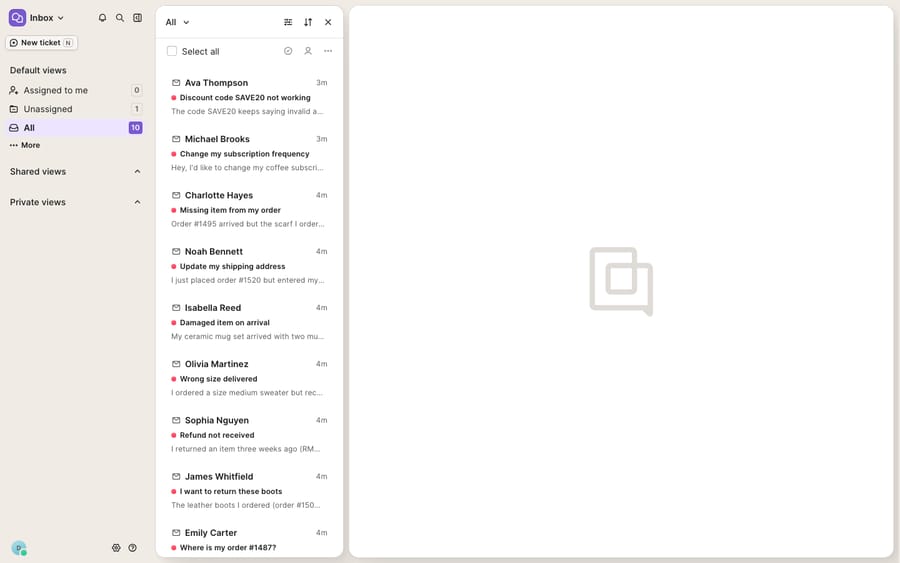
What are the Gorgias ticket statuses?
Every ticket lives in one of three working statuses. The Gorgias docs put it plainly: "a ticket can be in one of three statuses: open, closed, or snoozed." Alongside these, the system carries Spam and Trash views for tickets you've filtered out.
- Open means the ticket needs attention and is live in someone's queue.
- Closed means it's resolved, or doesn't need a reply, and has moved out of the working view.
- Snoozed means you've set it aside on purpose while you wait on the customer, a restock or a supplier, and it will resurface later.
How do you close, snooze and reopen a Gorgias ticket?
You close a ticket with the Close button in the ticket header, or by choosing Send & Close when you send a reply, and you can close at any point, with or without replying. Snooze lives in the header too, with quick options of 1 hour, 3 hours, 6 hours, 1 day, 3 days or 1 week, or a date and time you pick from the calendar. When the snooze ends, the ticket comes back to Open.
The behavior worth internalizing: if a customer replies to a closed ticket, Gorgias automatically reopens it. A "resolved" refund thread won't silently die when the customer writes back with one more question; the reply drags it back into the queue on its own. The exception is Trash: Gorgias' docs note that customer replies don't reopen deleted tickets.
How do you merge tickets in Gorgias?
Ecommerce customers are prolific. The same shopper will email about a delayed order, then two hours later start a chat about the same delayed order because they forgot they'd emailed. Now you have two tickets for one problem. Merge fixes that.
Per Gorgias' Other ticket management features documentation, you merge from the three-dots icon in the ticket header, combining "tickets about the same issue from the same customer to keep the conversation flow easier." Merges can be done manually one at a time, and an admin can enable auto-merge so qualifying tickets from the same customer combine without an agent lifting a finger.
That same three-dot menu holds the rest of the tidy-up tools:
- Mark as read/unread: a per-agent flag, so what you've reviewed is personal to you.
- Show all events: the chronological audit of the ticket (status changes, assignments, tags, rule runs, merges, satisfaction surveys), covering the last 12 months.
- Mark as spam: moves the ticket to the Spam view, and future messages on it won't notify you.
- Move to trash: sends it to Trash, where it sits for 30 days before permanent deletion.
- Print ticket: opens a printable version in a new tab.
How do rules, macros and views move tickets through the queue?
A status model is only half the story; the other half is how tickets move through it. Two native features do most of that work. Macros are saved actions: a templated reply that can also change status, add tags and assign the ticket, all in one click. They're the backbone of consistent, fast responses, and we go deep on them in Gorgias macros explained. Rules are the automation engine that reacts to incoming tickets (tag a WISMO question, route a wholesale email to a specific agent, auto-close an order confirmation).
Layer on Views, saved and filtered slices of the queue like "unassigned chat" or "returns waiting on customer," and the flat one-queue model becomes something a team of ten can work without stepping on each other. Live chat has its own considerations around availability and routing, covered in Gorgias chat explained.
Where does the Gorgias ticket model stop?
The ticketing core is good. One object per conversation, a clean three-status lifecycle, auto-reopen and merge together solve the organization problem better than most help desks that were never built for ecommerce. If your bottleneck is "our channels are scattered," Gorgias fixes it out of the box.
But notice what the ticket model does and doesn't do. It organizes and routes conversations; it doesn't, by itself, answer them. A ticket sitting in the Open view is a well-labeled unit of work waiting for a human to read it, look up the order and write the reply.
How much does the Gorgias AI Agent cost per ticket?
Gorgias' own answer to the answering problem is the AI Agent, now included on every plan and billed per automated interaction. The pricing page lists $1.00 per automated interaction on Starter, $0.90 on Basic and Pro and $0.85 on Advanced, on top of the helpdesk plan ($10, $60, $360 and $900 a month on monthly billing, for 50, 300, 2,000 and 5,000 tickets). Helpdesk overage past the included tickets is $0.40 per ticket on Starter and Basic and $0.36 on Pro and Advanced.
Two billing details are worth checking before you scale. First, eesel's analysis (eesel sells a competing AI tool) reports that a clean AI resolution can count as both an automated interaction and a helpdesk ticket unless a human touches it within 72 hours; we couldn't confirm that on Gorgias' own pricing page, so ask Gorgias how your plan counts it. Second, Voice and SMS sit behind add-ons, and the richest self-service order actions lean on your Shopify connection, so they aren't part of the base ticket model. None of that makes the AI Agent bad. Per-interaction pricing means Gorgias earns more as automation volume grows, so price it at your real ticket mix.
Can you add an AI agent to Gorgias without replacing it?
Yes. This is the seam where an AI agent layer fits, and it's worth understanding the wider AI agents for customer service category before you commit to any single approach. Macha is one such layer: it runs on top of the Gorgias you already use through a live native connector, and it doesn't replace Gorgias, your inbox, your macros or your rules. You connect Macha to Gorgias, and it reads and writes the same tickets your team already works: drafting or sending grounded replies across channels, triaging by intent, and looking up live order or subscription status through a custom tool that turns your store's API into something the agent can call. The details live in the Macha–Gorgias integration guide.
The contrast is in the billing model. Gorgias' AI Agent is priced per automated interaction. Macha bills per ticket: one conversation, charged once however many drafts, lookups and replies it takes, on one plan priced by volume that starts at $299/month for up to 750 tickets, with setup and monitoring by the Macha team included. The ticket is a unit you can count in advance, which makes the bill more predictable than one that depends on how an automated interaction is defined. Neither is universally cheaper; see the pricing page for the full tiers. For a line-by-line teardown of Gorgias' own numbers, read Gorgias pricing explained and Gorgias AI Agent explained.
The clean division of labor: keep Gorgias' ticketing as the system of record for what's open, closed or snoozed and who owns it, and add an agent layer for the part the status model can't do, which is writing the answer fast enough that the ticket closes itself.
FAQ
How many ticket statuses does Gorgias have? Three working statuses: Open, Closed and Snoozed. Open needs attention, Closed is resolved or needs no reply, and Snoozed is set aside until a time you choose. The system also has Spam and Trash views for tickets you've filtered out.
Does Gorgias create separate tickets for email, chat, and SMS? No, that's the core of the model. Email, chat, social (Facebook and Instagram), SMS (via the SMS add-on) and phone (via the Voice add-on) all create the same kind of ticket in one queue, tied to the customer, so a rep sees one continuous history.
What happens when a customer replies to a closed Gorgias ticket? Gorgias automatically reopens it. You can close a ticket at any time with or without a reply, and a later customer message pulls it back into the Open queue. Tickets in Trash are the exception and don't reopen.
How do I merge tickets in Gorgias? Use the three-dots icon in the ticket header to merge tickets about the same issue from the same customer. Merges can be manual, or an admin can enable auto-merge so qualifying tickets combine automatically.
Can I add AI to Gorgias tickets without replacing Gorgias? Yes. An AI agent layer like Macha connects to Gorgias through a native connector and runs on top of your existing tickets, statuses, macros and rules. Gorgias' AI Agent charges per automated interaction ($0.85 to $1.00 depending on plan), while Macha bills per ticket, charged once however many messages it takes.
Ready to put an answering layer on top of your Gorgias queue instead of just organizing it? Start a free trial of Macha and connect it to your Gorgias in minutes.
Add AI agents to your Gorgias
Macha reads the ticket, drafts the reply and takes the action, inside the Gorgias you already run.





