Intercom
 Shopify
 Stripe
 Slack
Slack Notion
 Google Workspace
 Confluence

How Does the Gorgias AI Agent Work in 2026? Sources, Handover, AI Agent 3.0 and Cost


The Gorgias AI Agent is a paid add-on to the Gorgias help desk that answers shoppers from your Shopify store and written knowledge, takes actions such as canceling an order, or hands the conversation to a person. It is billed per automated interaction on top of the help desk ticket, and it runs on chat, email, SMS, the contact form, the help center, Instagram and Facebook.
Key takeaways
- The Gorgias AI Agent costs $190 a month on the Pro plan for 190 included automated interactions, with each interaction past that billed at $1.50.
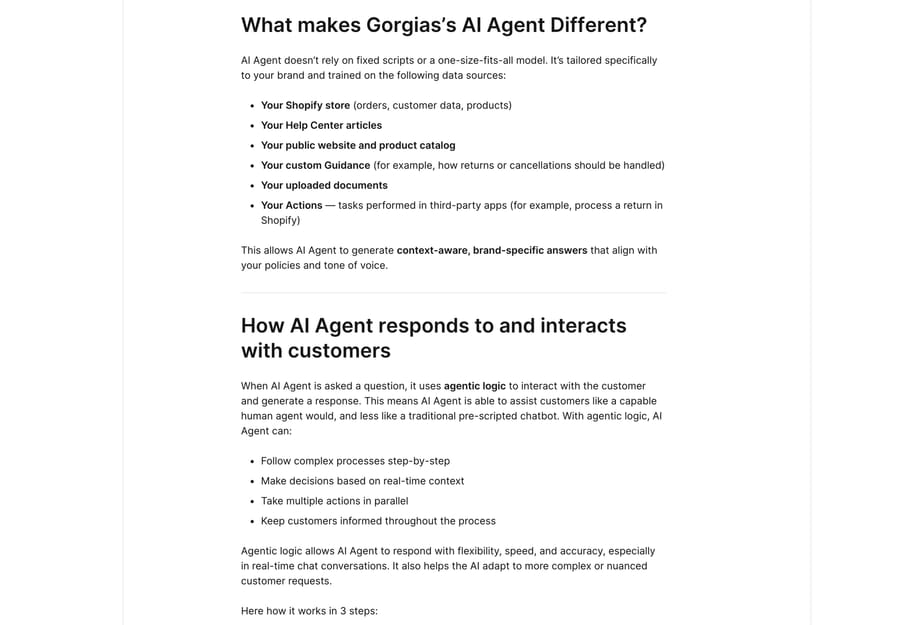
- Gorgias AI Agent draws on six sources: the Shopify store, Help Center articles, the public website and catalog, custom Guidance, uploaded documents, and Actions in third-party apps.
- Gorgias Guidance is capped at 100 enabled items of 30,000 characters each, and images inside uploaded PDF, DOCX, PPTX or XLSX documents are not processed.
- An AI-resolved Gorgias conversation is billed as a help desk ticket and as an automated interaction, unless a human steps in within 72 hours.
- Gorgias reports its AI Agent 3.0 release delivered 45% faster response time, 10% more conversations resolved end to end and 7% more 5-star tickets, from its own accounts.

The Gorgias AI Agent is a paid add-on to the Gorgias help desk that answers shoppers from six knowledge sources, takes actions such as canceling an order, and hands the conversation to a person when its own quality check fails. On the Pro plan it costs $190 a month for 190 automated interactions, then $1.50 for each one past that.
| Question | Short answer |
|---|---|
| What it reads | Shopify store, Help Center, website and catalog, Guidance, documents, Actions |
| How it decides | Screens for spam and exclusions, picks knowledge or an Action, sends only above a confidence threshold |
| Where it runs | Chat, email, SMS, contact form, help center, plus Instagram and Facebook since 3.0 |
| Price | $30 a month on Starter and Basic, $190 on Pro, $530 on Advanced, $1.50 per extra interaction |
| Billing unit | Automated interaction, charged on top of the help desk ticket |
We checked every path and limit below against Gorgias' own documentation on 20 September 2026, re-checked the prices on 24 September, and we read the plan prices off gorgias.com/pricing with the Monthly/Annual toggle and the Add AI Agent switch in both positions. We have no Gorgias tenant, so none of the screens here are ours.
What does "Gorgias AI" mean in 2026?
Two layers still share the brand. Automate is the older rule-based suite: Flows, Quick Responses, Order Management and Article Recommendations, all of which resolve a request by matching a pattern you configured. AI Agent is the language-model layer that reads the question instead. When someone says "Gorgias AI" now they almost always mean AI Agent, and the bill treats it as one thing: the AI Agent line covers both, because an automated interaction counts whether it came from AI Agent or from Flows, Order Management or Article Recommendations.
The admin's order of operations for configuring all of it is in how to set up and tune Gorgias AI Agent. The verdict on whether the AI is any good is in our Gorgias AI Agent review. This post is the mechanism.
What does the Gorgias AI Agent read?
Gorgias names six sources: your Shopify store (orders, customer data, products), your Help Center articles, your public website and product catalog, your custom Guidance, your uploaded documents, and your Actions in third-party apps (How Gorgias's AI Agent works).
Everything except the store connection is managed in one place: dropdown menu › AI Agent › Knowledge, where Create content offers Guidance, a help center article, a URL or a document, and Store website auto-syncs from a connected Shopify store (Add your brand's content for AI Agent). Owner, Admin and Lead can edit it.
The limits are worth writing down before you plan a knowledge project:
| Source | Limit | Notes |
|---|---|---|
| Guidance | 100 enabled at once, 30,000 characters each | Internal only, never shown to shoppers |
| Help Center articles | No stated cap | Customer-facing, so they do double duty |
| Store website | Auto-syncs | Requires a Shopify connection |
| Single URLs | One URL per sync | Subpages each need their own sync |
| Documents | pdf, docx, pptx, xlsx | Images inside documents are not processed |
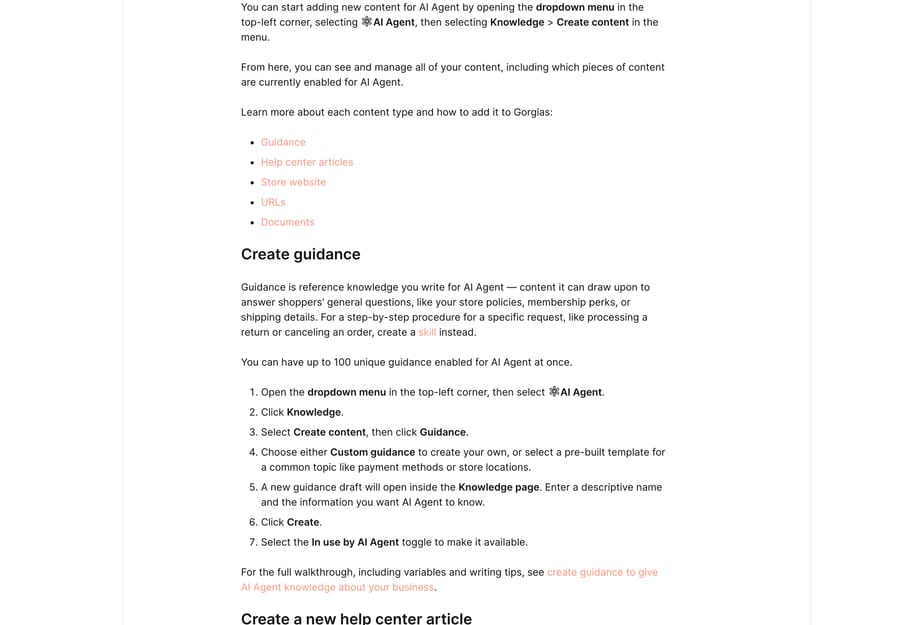
The two rows that catch teams out are URLs and documents. A URL sync takes one page, so a 40-page policy site is 40 syncs, and there's no shortcut in the UI. And a PDF whose shipping matrix is a screenshot contributes nothing, because the images inside it are not read.
Should you write Guidance, a Skill or a Help Center article?
This is the most-asked question in Gorgias' own AI Agent community, and it has a clean answer now. Guidance is reference knowledge, retrieved by relevance, for general information that applies across many conversations. A Skill is a procedure, triggered by intent, that tells the agent how to handle one type of request every time it comes up, written as a WHEN condition with IF/THEN branches (Best practices for writing skills). Help Center articles are the customer-facing version of the same knowledge, and the agent reads them too.
Gorgias' docs are direct about the split: write policies and perks as Guidance, and write "processing a return or canceling an order" as a Skill. Guidance can be converted into a Skill rather than rewritten.
A community thread from a Gorgias user named Andie Herrera describes the failure mode this split was built to fix: the agent kept answering from Help Center articles even where Guidance existed, through repeated testing and repeated feedback (Guidance vs Help Center). If you're seeing that, the modern answer is that a relevance-matched Guidance is not a priority override, and the thing that fires reliably on a specific request is a Skill.
Gorgias' own customer quote on the 3.0 page puts a number on that: Billy Burke, Customer Operations Manager at David Protein, says that on the topics their Skills cover, "automation jumped more than 40%". That's Gorgias' selected customer on Gorgias' launch page, so treat it as a best case rather than a benchmark.
How does the AI Agent decide whether to reply?
Three steps, in order. First an evaluation pass that screens for malicious activity, phishing and spam, and applies your Prevent AI from answering rules. Second, it works out whether to use knowledge, perform an Action, or start a sales playbook. Third, a quality check: in Gorgias' wording, "Responses are only sent if they meet a high confidence threshold", and otherwise the conversation goes to a human.
That third step is the part most admins don't know is running. The agent drafts a reply, reviews it, and hands over if it judges its own draft unreliable. So a low automation rate often reads as "the AI said nothing" when the mechanism is "the AI drafted, failed its own check, and escalated", which is a knowledge-coverage problem rather than a switch that's turned off.
When does it hand over to a human, and can you force it?
Gorgias lists the automatic triggers as detected anger or frustration, an explicit request for a human, sensitive topics (self-harm, threats of violence, legal threats, financial details), your configured handover topics, and insufficient answer quality (Customize how AI Agent hands over to your team).
The one you're in charge of is handover topics, at AI Agent › Settings › Handover and exclusion › Handover topics, then + Add Topic and a plain-language description. Gorgias' own examples are billing disputes, legal inquiries and requests from high-value customers, and its advice is to write each topic the way a customer would raise it, because the agent matches your description against the conversation.
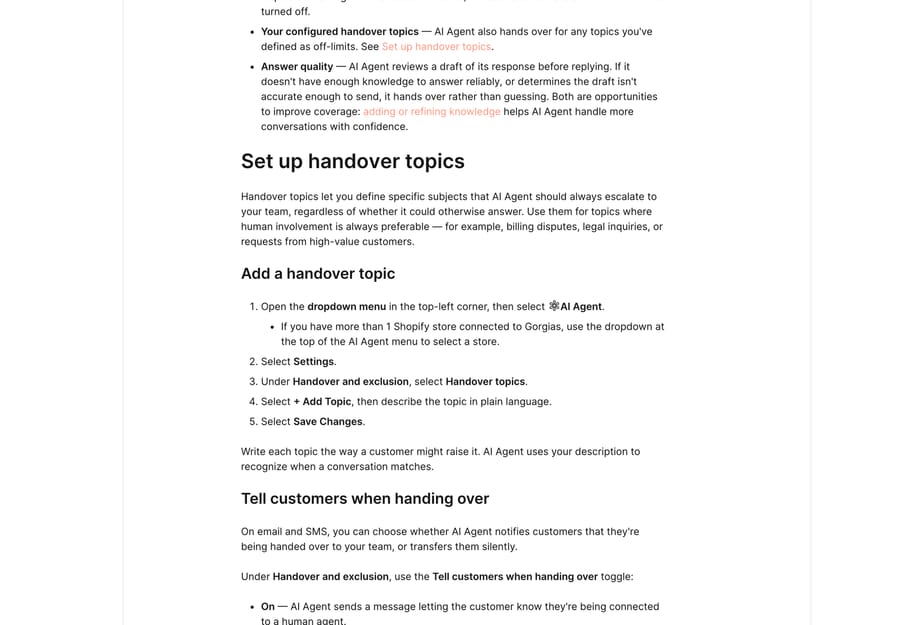
Two defaults are worth changing deliberately. On chat, handover defaults to asking the shopper to confirm before transferring. On email and SMS, the Tell customers when handing over toggle is off by default, which means a silent transfer. Only Owner, Admin and Lead roles can change either.
A 2024 community thread from Jane Westmoreland reports hitting what she took to be a cap of 10 handover topics (AI Handover Topics). The current documentation describes the flow without naming a number, so treat the cap as unconfirmed, and check it in your own account before you plan a long list.
What did AI Agent 3.0 change?
The summer 2026 release is the reason your screenshots from last year look wrong. On Gorgias' launch page the headline pieces are (AI Agent 3.0):
- Gaia, a conversational setup assistant. You tell it what is wrong ("resolve conflicts across my knowledge base") and it diagnoses the gap, drafts a fix in your voice, and ships it once you approve.
- Skills, the intent-triggered procedures described above, alongside Guidance.
- An Actions screen listing what the agent may do in connected apps, with each action marked Enabled, Disabled or Not in use, and a column showing which Guidance and Skills use it.
- Image understanding in chat. The agent reads photos shoppers send, so a damaged item or a confusing product can be handled without escalating, and recommendations are matched on product images rather than only product text.
- Instagram and Facebook, which the launch page adds to the channels the agent acts on.
- A first-party MCP server, so you can query the help desk from Claude, ChatGPT, Cursor or another MCP-compatible tool.
Gorgias' own numbers for the release are 45% faster response time, 10% more conversations resolved end to end and 7% more 5-star tickets. Those are the vendor's figures from the vendor's own accounts, and there's no published methodology, so they set an expectation rather than a benchmark.
Which channels does the AI Agent run on?
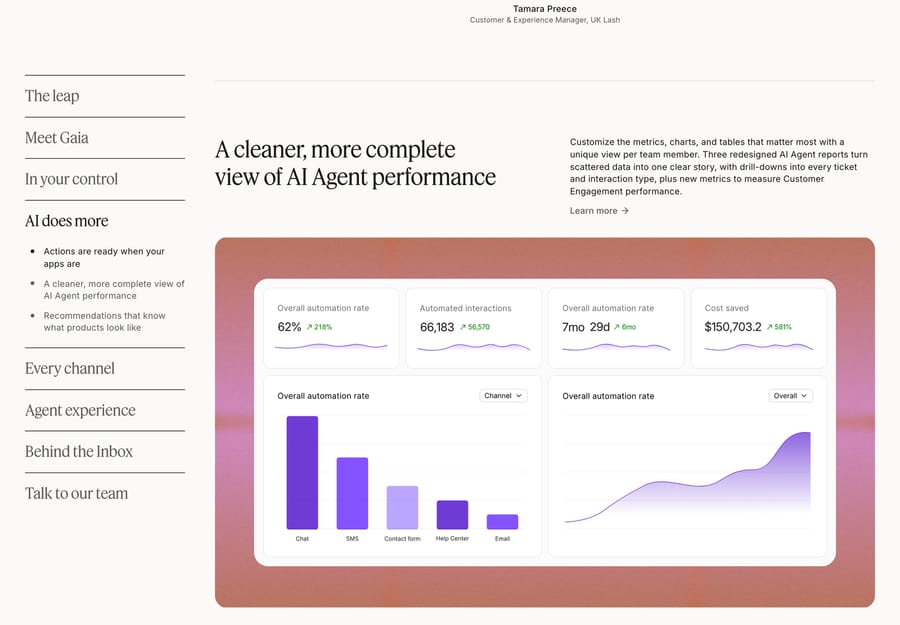
The reporting screen on the same page breaks automation rate down by chat, SMS, contact form, help center and email, and test conversations let you simulate email, chat and SMS (Preview AI Agent responses with test conversations). With Instagram and Facebook added in 3.0, the practical read is that the agent covers the written channels and that voice is a separate product line.
Test conversations live at AI Agent › Playground. They do not create tickets, do not deliver messages, do not touch reporting and are not billable, which makes them the right place to check a Skill before it meets a customer. Actions are disabled in the Playground by default, and enabling them touches real customer data, which is exactly the warning you'd want on that switch.
How much does the Gorgias AI Agent cost?
Gorgias sells the help desk and the AI Agent as two line items on one plan card. Read off gorgias.com/pricing on 20 September 2026:
| Plan | Helpdesk (monthly) | Tickets | AI Agent (monthly) | Automated interactions | Past the limit |
|---|---|---|---|---|---|
| Starter | $10 | 50 | $30 | 30 | $1.50 each |
| Basic | $60 | 300 | $30 | 30 | $1.50 each |
| Pro | $360 | 2,000 | $190 | 190 | $1.50 each |
| Advanced | $900 | 5,000 | $530 | 530 | $1.50 each |
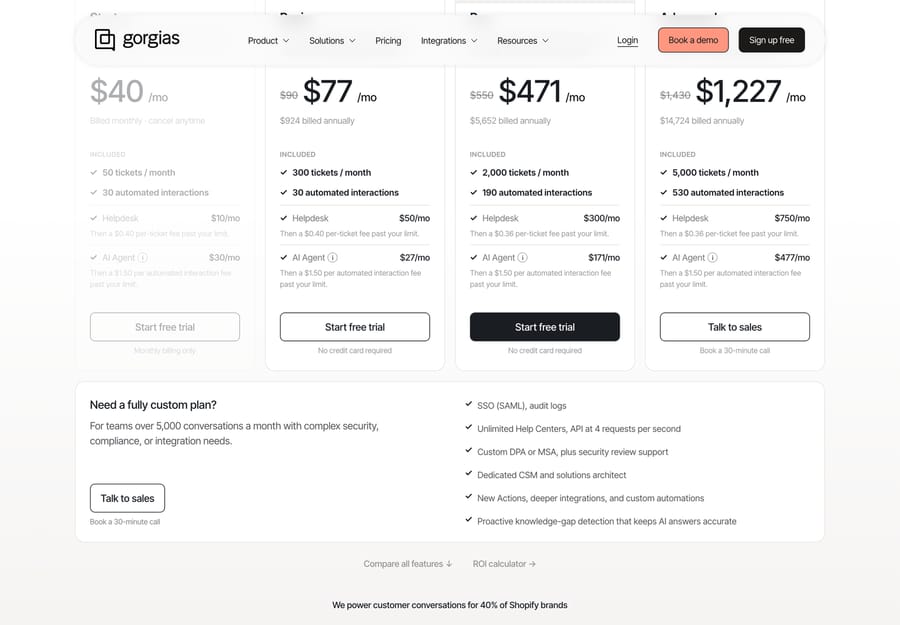
Starter is sold on monthly billing only. On annual billing the AI line drops to $27 a month on Basic, $171 on Pro and $477 on Advanced. Gorgias' own pricing FAQ puts each included interaction at $1.00 on monthly plans and $0.90 on annual plans, which is the included allowance divided out; the $1.50 applies only past it.
Two definitions decide the bill. A ticket is billable once at least one message in it is sent from your help desk, whether by a person, a Rule or AI Agent. An automated interaction "occurs when a customer issue or request is fully handled by AI Agent or another automation feature including Flows, Order Management and Article Recommendations", and only if the customer doesn't need a human within 72 hours (How you're billed for using Gorgias).
Put together, an AI-resolved conversation is charged twice: once as a ticket against your help desk allowance, once as an automated interaction against your AI allowance. The 72-hour rule is the fair half of the design, because Gorgias only earns the automation fee on work that stayed done, and a reopened conversation costs you the ticket alone. The incentive that is less friendly is the one hiding in the allowance: on Basic you get 30 included interactions against 300 included tickets, so any store automating even a fifth of its volume is buying overage at $1.50 a go, which is more than four times the $0.36 that the same conversation costs as a ticket on Pro. Our arithmetic at three volumes is in Gorgias pricing explained.
What does the Gorgias AI Agent get wrong?
Two public threads describe the two failure modes worth planning for. In r/gorgias, a store reports that "the AI agent told a customer a discontinued serum was restocking soon and offered a shade that has never existed", which is a catalog-freshness problem: the agent answers from knowledge that outlived the product. In r/shopify, a merchant writes that "the Gorgias AI would not work for us because it can't communicate with some of the third party platforms we use, like Practice Better", which is the Actions boundary: if the system holding the answer has no Action, the agent can describe a policy but cannot do the thing.
Both are fixable in configuration rather than by waiting for a model upgrade. The first one's a knowledge-hygiene job: retire Guidance when you retire a product, and prefer the auto-syncing store website over a hand-written product list. The second is an inventory question to answer before you buy, by listing the systems your top ten ticket reasons touch and checking each against the Actions screen.
Where does an AI agent layer fit alongside it?
Gorgias' AI Agent is strongest on the requests its Actions already cover: order status, returns, cancellations, address changes, subscription edits. It's weakest where the answer lives in a system it has no action for, or in the last two years of your own resolved tickets.
That second gap is where Macha sits. Macha is an AI agent layer that runs on top of the help desk a team already uses, Gorgias included, and it never replaces the help desk. It suits teams whose volume is repetitive but not templated, where answers exist across docs, past threads and another system, and it's the wrong choice if your queue is pure WISMO that Order Management is already deflecting. One plan, priced on monthly ticket volume from $299 a month for 750 tickets, about $0.40 a ticket at every tier, setup and monitoring by the Macha team included, and a $50 free-usage trial with no credit card. See Macha on Gorgias, or the numbers at /pricing.
Gorgias AI Agent is one of the 14 products we score on the same 30-point rubric in our roundup of the best AI chatbots for customer service.
Frequently asked questions
What is the Gorgias AI Agent? It's the language-model layer inside the Gorgias help desk. It reads a shopper's message, draws on your Shopify store, help center, website, Guidance, uploaded documents and configured Actions, then answers, performs an action such as canceling an order, or hands the conversation to a person.
What is Gorgias AI Agent 3.0? The summer 2026 release. It added Gaia, a conversational assistant that diagnoses and drafts fixes to your setup, Skills as intent-triggered procedures alongside Guidance, an Actions screen showing what the agent may do in each connected app, image understanding in chat, Instagram and Facebook as channels, and a first-party MCP server.
How much does the Gorgias AI Agent cost? It's a separate monthly line on your plan: $30 on Starter and Basic, $190 on Pro and $530 on Advanced, including 30, 30, 190 and 530 automated interactions respectively, with $1.50 per automated interaction past the limit. Starter is monthly only; annual billing brings the AI line to $27 on Basic, $171 on Pro and $477 on Advanced.
What is a Gorgias automated interaction? Gorgias defines it as a customer issue or request fully handled by AI Agent or another automation feature including Flows, Order Management and Article Recommendations, and it only counts if the customer doesn't need a human within 72 hours of the interaction.
Does an AI resolution get billed twice? Yes, as two different units. The conversation counts as a billable ticket against your help desk allowance and as an automated interaction against your AI allowance. If a person has to step in within 72 hours, it is charged as a ticket only.
What's the difference between Guidance and a Skill in Gorgias? Guidance is reference knowledge retrieved on relevance, for information that applies across many conversations, capped at 100 enabled items of 30,000 characters each. A Skill is a procedure triggered by intent, written as WHEN plus IF/THEN, for one type of request such as a return. Existing Guidance can be converted into a Skill.
How do I stop the Gorgias AI Agent from answering certain topics? Add handover topics under AI Agent › Settings › Handover and exclusion › Handover topics, described in the words a customer would use. The agent also escalates on its own for detected frustration, explicit requests for a human, sensitive topics, and drafts that fail its internal quality check.
Can I review AI Agent replies before they send? Not as a blanket approval queue. The supported way to check behavior before it reaches customers is the Playground, where test conversations simulate email, chat and SMS without creating tickets, delivering messages, affecting reporting or being billed. Actions are off there by default.
Sources:
- How Gorgias's AI Agent works: data sources, agentic logic, three-step response decision
- Add your brand's content for AI Agent: Knowledge paths, source types, limits, roles
- Create guidance to give AI Agent knowledge: 100-guidance cap, 30,000-character limit, publishing flow
- Best practices for writing skills: WHEN/IF/THEN structure, what Skills cannot do
- Customize how AI Agent hands over to your team: handover triggers, topics path, defaults, roles
- Preview AI Agent responses with test conversations: Playground behavior and limits
- How you're billed for using Gorgias: billable ticket and automated interaction definitions
- Gorgias pricing: plan and AI Agent prices, allowances, overage, checked 20 September 2026
- AI Agent 3.0: Gaia, Skills, Actions, image understanding, channels, vendor metrics
- Guidance vs Help Center and AI Handover Topics: the two admin questions this post answers
Add AI agents to your Gorgias
Macha reads the ticket, drafts the reply and takes the action, inside the Gorgias you already run.