



 Intercom
 Shopify
 Stripe
 Slack
Slack Notion
 Google Workspace
 Confluence

What Is Gorgias Chat (gorgias.chat)? Setup, Settings, Cost and Fixes in 2026


Gorgias Chat is the live chat channel inside the Gorgias help desk, and its conversations land in the same inbox as your email, SMS and social tickets with the shopper's store data attached. If you saw gorgias.chat in a network tab, a content security policy error or an ad blocker log, that is the domain Gorgias serves the widget's config and assets from, not a separate product.
Key takeaways
- gorgias.chat is the domain Gorgias serves the chat widget's configuration and assets from, including config.gorgias.chat, assets.gorgias.chat and us-east1-898b.gorgias.chat, not a separate product.
- Gorgias Chat has no separate price and is included on every Helpdesk plan, which starts at $10 a month for 50 tickets, while AI Agent starts at $30 a month for 30 interactions.
- Gorgias Chat is set up via Settings, then Channels, Chat and + New chat, a four-step wizard covering Basics, Branding, Order management and Installation.
- Gorgias reports the chat widget costs 3 Lighthouse performance points after cutting its font file from about 256KB to 93KB and its MP3 from 27KB to 3.5KB.
- The first fix Gorgias support checks when a chat widget will not show is outdated Shopify app permissions, followed by the visibility toggles in the Preferences tab.

Gorgias Chat is the live chat channel built into the Gorgias help desk, and gorgias.chat is the domain Gorgias serves that widget's config and assets from (config.gorgias.chat, assets.gorgias.chat and us-east1-898b.gorgias.chat), not a separate product. Chat has no price of its own: it is included on every Helpdesk plan, which starts at $10 a month for 50 tickets, and you set it up under Settings › Channels › Chat › + New chat.
| Question | Short answer |
|---|---|
| What is gorgias.chat? | The domain for the chat widget's config and static assets |
| Where do you set chat up? | Settings › Channels › Chat › + New chat (owner and admins only) |
| What does chat cost? | Nothing extra; included on every Helpdesk plan from $10/mo for 50 tickets |
| What does AI Agent add? | An optional line from $30/mo for 30 automated interactions, then $1.50 each |
| How heavy is the widget? | 3 Lighthouse performance points, by Gorgias' own measurement |
| First fix when it won't show? | Update the Gorgias app's permissions in Shopify |
We checked everything below against Gorgias' own docs and pricing page on 24 September 2026, reading the plan prices with the Monthly/Annual toggle and the Add AI Agent switch in both positions. We have no Gorgias tenant of our own, so the admin paths come from Gorgias' current documentation rather than our own screen, and we say so again where it matters.
What is gorgias.chat?
Three of the five domains Gorgias asks you to allowlist sit on gorgias.chat, and that is the whole mystery. In Gorgias' allowlist article the list is config.gorgias.chat, assets.gorgias.chat, config.gorgias.io, us-east1-898b.gorgias.chat and storage.googleapis.com, with api.gorgias.work added for Automate subscribers and *.shopify-checkout.config.gorgias.chat if you put chat on Shopify checkout and thank-you pages (Add Gorgias Chat domains to your allowlist).
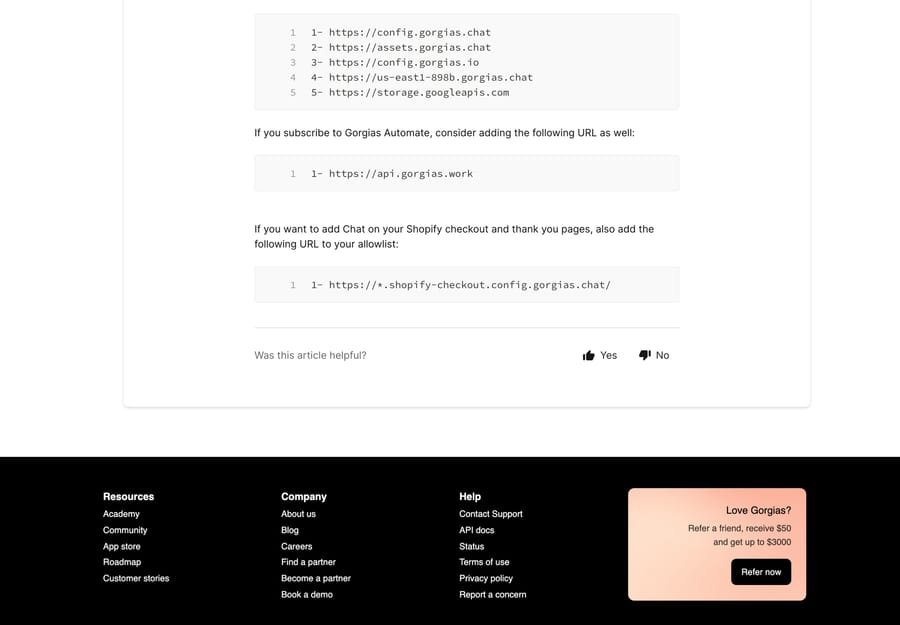
So a shopper seeing "gorgias.chat" in a cookie banner, and an admin seeing it blocked in a CSP report, are looking at the same thing: the widget's config and static assets. If your store runs a strict content security policy, those hostnames are what you add, and a missing entry is one of the more common reasons a correctly configured widget never draws itself.
How does Gorgias Chat fit into the help desk?
Chat is a channel, not an app. A shopper's message opens a ticket in the same Gorgias inbox that handles email, Instagram, Facebook, TikTok, WhatsApp and SMS, and an agent answers it the way they answer anything else, with the customer's order history in the sidebar.
That has a consequence worth being clear about before you start configuring. Gorgias Chat fits teams that already run their whole support operation in Gorgias and want the chat lane to share automation, macros and store data with every other lane. If you only want a chat bubble on a storefront whose support lives somewhere else, this is more platform than the job needs, and the setup below will feel heavy for what you get.
How do you set up Gorgias Chat?
Chat is available on all Helpdesk plans, and only the account owner and admins can configure it. The path is the settings icon in the bottom-left corner, then Channels › Chat › + New chat (Set up Gorgias chat integrations). The wizard runs in four steps:
- Basics. Give the integration a Chat title, pick a Default language, and add more with + Add language. Choose whether it installs on Ecommerce platforms or Any other website, pick the store under Connect a store if it is the former, then choose Allow live chat messages or Allow only offline capture messages.
- Branding. Set Brand color from the swatch or a hex value, upload a Home page logo, and set Launcher position with its pixel offsets.
- Order management. One toggle, on or off. This is the self-service order lookup shoppers use without an agent, and it needs an AI Agent subscription.
- Installation. Either Quick install for Shopify, which is one click, or Install manually, which gives you snippet instructions for Shopify, another website, or Google Tag Manager.
Two things about installation catch people out. The Shopify quick install carries the visibility rules described below, and Google Tag Manager is a separate tab inside the manual drop-down rather than a variant of the Shopify flow. If you are unsure which applies, open your storefront, inspect the page, and search the source for googletagmanager.
For the Shopify path specifically, our walkthrough is at how to set up Gorgias chat on Shopify.
Which settings are on the Preferences tab?
Preferences is where the widget's behavior lives, at Settings › Channels › Chat › [your integration] › Preferences. It is available on all Helpdesk plans, and again only the owner and admins can change it (Chat: Configure chat preferences).
Chat availability has three options, and they differ by what controls them:
| Setting | Controlled by | What shoppers get |
|---|---|---|
| Live when agents are available | Agent availability | Chat goes offline when no agent is available in Gorgias |
| Always live during business hours | Business hours | Offline mode activates automatically outside your hours |
| Offline (capture messages only) | Manual | Only the offline capture form, until you change the setting |
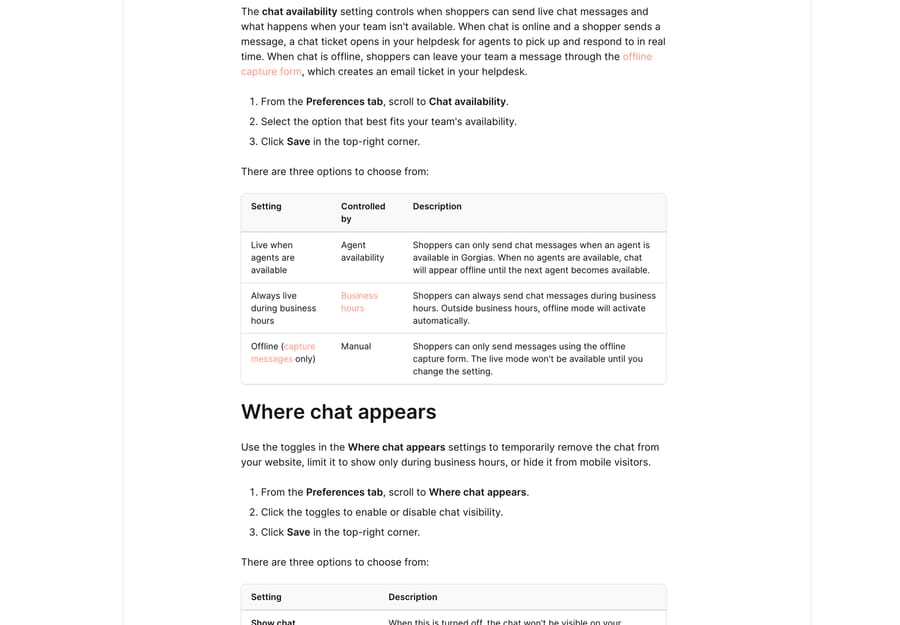
Where chat appears is a separate block of three toggles: Show chat, Show chat outside of business hours, and Show on mobile. These are the first place to look when a widget disappears, because turning chat off here removes it from the site without touching the installation.
The rest of the tab is small but load-bearing. Share wait time with shoppers offers a dynamic estimate or two fixed messages ("In a few minutes", "In a few hours"). Collect shopper emails can be optional or required, which decides whether a shopper who leaves mid-conversation is reachable afterwards. And the shopper-experience settings control the transcript and the CSAT survey.
One more visibility control sits on the Installation tab rather than Preferences. Open the 1-click installation accordion and you can set conditions for the URLs chat shows or hides on, updated at any time without reinstalling. Gorgias' own announcement notes two limits: it is Shopify stores only, and it does not apply to Shopify checkout pages (Show or hide the chat on preferred URLs).
For the widget's appearance options in more depth, see Gorgias chat widget explained.
Does the Gorgias chat widget slow down your store?
Gorgias publishes its own numbers here, which is unusual enough to be worth repeating. Its docs put the widget's effect on a Lighthouse performance score at 3 points, after a round of work that cut a font file from about 256KB to 93KB, an MP3 from 27KB to 3.5KB, and the network calls in the snippet from four to two, with the message window deferred until the first interaction (Chat size and weight information).
Take the 3-point figure as the vendor's own measurement on the vendor's own test page. It is a reasonable starting estimate and a bad substitute for running Lighthouse against your storefront with the widget on and off.
What can you automate in Gorgias Chat?
Before any AI, chat inherits the help desk's automation. Macros drop pre-written replies with dynamic variables. Rules route, tag, set priority or auto-reply based on message content. Flows are button-driven journeys that resolve "track my order" and "start a return" without an agent.
On top of that sits AI Agent, which reads the question instead of matching a button. Gorgias' summer 2026 release, AI Agent 3.0, added two things that matter in the chat lane specifically: the agent now reads and replies to images shoppers share in chat, and product recommendations are matched against product images rather than only product text (AI Agent 3.0). The same page claims 45% faster response time, 10% more conversations resolved end to end and 7% more 5-star tickets, all of which are Gorgias' figures from Gorgias' own accounts.
What AI Agent is, how Guidance and Skills feed it, and where it hands over, is covered in Gorgias AI Agent explained.
How do Gorgias chat campaigns work?
Campaigns are the widget opening the conversation. They fire on who the visitor is, where they are and what they are doing, and they come in two tiers: Light Campaigns on all plans, triggering on the page URL and time on page, and Convert Campaigns as a paid add-on that targets on Shopify data such as cart value, purchase history and customer tags. Campaigns live under Convert › [chat integration] › Campaigns.
The billing rule is the useful part. Showing a proactive message is free. It only becomes a billable ticket if the shopper replies, which means an aggressive campaign that nobody answers costs nothing and a well-targeted one that starts conversations shows up on the invoice.
How much does Gorgias Chat cost in 2026?
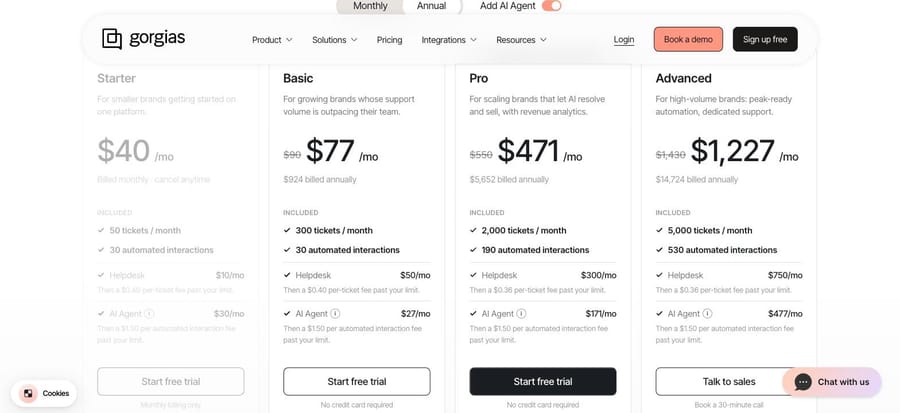
Gorgias now prices the help desk and AI Agent as two line items on the same plan card, and chat has no separate price at all. Read off gorgias.com/pricing on 24 September 2026, with the Add AI Agent switch flipped both ways:
| Plan | Helpdesk (monthly) | Tickets included | Per-ticket overage | AI Agent (monthly) | Automated interactions included |
|---|---|---|---|---|---|
| Starter | $10 | 50 | $0.40 | $30 | 30 |
| Basic | $60 | 300 | $0.40 | $30 | 30 |
| Pro | $360 | 2,000 | $0.36 | $190 | 190 |
| Advanced | $900 | 5,000 | $0.36 | $530 | 530 |
Past the AI allowance every plan charges $1.50 per automated interaction. Annual billing cuts the combined figure: Basic is $77/mo ($924 billed annually), Pro $471/mo ($5,652) and Advanced $1,227/mo ($14,724), while Starter is monthly billing only at $40 with AI Agent added. Above 5,000 conversations a month the page points you at a custom plan.
The two definitions that decide what you actually pay are in Gorgias' billing doc. A ticket "is considered billable when at least one message in the ticket is sent from your Gorgias helpdesk", whether that message comes from a human agent, AI Agent or an automatic reply from a Rule, and it is counted once per conversation however many messages it holds. An automated interaction "occurs when a customer issue or request is fully handled by AI Agent or another automation feature including Flows, Order Management and Article Recommendations", and it only qualifies if the customer does not need a human within 72 hours (How you're billed for using Gorgias).
Read those two together and the incentive is legible. The 72-hour clause means Gorgias earns the automation fee only on conversations that stayed closed, which is a better-aligned unit than a flat per-reply charge. The part that is not aligned is the double count: an AI-resolved chat is an automated interaction and a billable ticket, so a month where AI handles more work does not reduce the ticket line. The overage rates going the other way (from $0.40 to $0.36 at Pro) also mean a store that spikes past its tier pays more per ticket on the small plans, which is where peak-season bill surprises come from. Our fuller breakdown sits in Gorgias pricing explained.
Why won't the Gorgias chat widget show?
Gorgias' own community post on this, written by a Gorgias specialist in February, lists the checks in the order their support team uses them (Why your Chat widget isn't showing). We have reordered nothing:
- Shopify app permissions are out of date. The first check, and the one that silently breaks a widget that used to work. Update the Gorgias app's permissions in Shopify.
- Chat is hidden in Preferences. Go to Settings › Channels › Chat › Preferences and read the visibility toggles. Someone turning off "Show chat" during a sale and forgetting is the boring, frequent cause.
- Google Tag Manager is in the path. If your site loads scripts through GTM, the widget has to be installed through the GTM tab under Settings › Channels › Chat › Installation › Manual installation, not the plain snippet.
- A strict content security policy is blocking the assets. Add the gorgias.chat and related domains listed above.
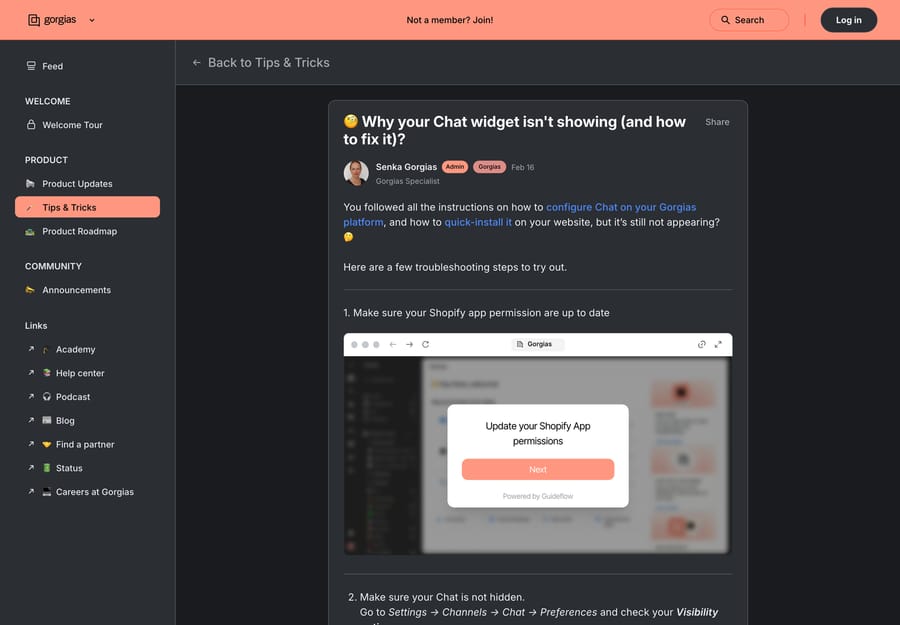
The post ends by pointing at support, and that is the right escalation: after those four, the remaining causes are usually theme-specific. Our longer version of this, with the Shopify theme cases, is Gorgias chat widget not showing.
Where does an AI agent layer fit alongside Gorgias Chat?
If you are configuring chat partly to automate more of it, the useful distinction is between deflection and resolution. Flows and Order Management deflect: they answer a question whose answer is a template or a store lookup. The harder middle is a ticket that needs an answer assembled from your docs, past conversations or another system, and then written into the thread.
That middle is what Macha does. Macha is an AI agent layer that runs on top of the help desk a team already uses, including Gorgias, and it never replaces the help desk itself. It suits teams whose chat and email volume is repetitive but not templated, where the answer exists somewhere and nobody has time to go and get it. Pricing is one plan on monthly ticket volume, from $299 a month for 750 tickets, about $0.40 a ticket at every tier, with setup and monitoring by the Macha team included and a $50 free-usage trial with no credit card. If your volume is 50 chats a month, Gorgias' own AI Agent at $30 is the cheaper answer and you should use it. See Macha on Gorgias for how the layer sits alongside AI Agent, or start at /pricing.
Frequently asked questions
What is Gorgias Chat? Gorgias Chat is the live chat channel built into the Gorgias help desk. It puts a chat widget on your storefront, and every conversation becomes a ticket in the same inbox as your email, SMS and social tickets, with the shopper's store order history in the sidebar.
What is gorgias.chat? It is the domain Gorgias serves the chat widget's configuration and assets from. Gorgias' allowlist article names config.gorgias.chat, assets.gorgias.chat and us-east1-898b.gorgias.chat, alongside config.gorgias.io and storage.googleapis.com. If you are running a strict content security policy, those are the hostnames to allow.
Is Gorgias Chat free? Chat has no separate price. It is included on every Helpdesk plan, and those start at $10 a month for 50 tickets. What costs money is the ticket a chat becomes once a human, a Rule or AI Agent replies to it.
What's the difference between Gorgias Chat and AI Agent? Chat is the channel: the widget, the inbox and the ticket. AI Agent is an optional add-on that answers and resolves conversations on its own, billed as a separate monthly line with an included allowance of automated interactions and $1.50 each beyond it. You can run chat with humans only.
Where do I change the Gorgias chat widget settings? Settings icon at the bottom left, then Channels › Chat, pick the integration, then the Preferences tab for availability and visibility, the Appearance tab for color, logo and position, and the Installation tab for the snippet and the URL rules.
Why is my Gorgias chat widget not showing? In the order Gorgias' own support checks: Shopify app permissions out of date, chat hidden by the visibility toggles in Preferences, a Google Tag Manager setup that needs the GTM installation path, and a content security policy blocking the gorgias.chat domains.
What are Gorgias chat campaigns? Proactive messages the widget opens with, based on the visitor and the page. Light Campaigns are on all plans and trigger on page URL and time on page. Convert Campaigns are a paid add-on that targets on Shopify data such as cart value and customer tags. A campaign only becomes a billable ticket if the shopper replies.
Does Gorgias Chat work with Shopify? Yes, and it is the path Gorgias optimizes for. There is a one-click Shopify install, the sidebar carries order and shipping data, agents can act on orders in the conversation, and chat can be added to Shopify checkout and thank-you pages with an extra allowlist entry.
Sources:
- Set up Gorgias chat integrations: admin path, wizard steps, plan and role requirements
- Chat: Configure chat preferences: availability modes, visibility toggles, wait time, email capture
- Add Gorgias Chat domains to your allowlist: the gorgias.chat domains
- Chat size and weight information: Lighthouse impact and asset sizes
- How you're billed for using Gorgias: billable ticket and automated interaction definitions
- Gorgias pricing: plan prices, allowances and overage rates, checked 24 September 2026
- AI Agent 3.0: image understanding in chat, recommendation changes, vendor metrics
- Why your Chat widget isn't showing: troubleshooting order
- Show or hide the chat on preferred URLs: URL visibility rules and their limits
Add AI agents to your Gorgias
Macha reads the ticket, drafts the reply and takes the action, inside the Gorgias you already run.





