Intercom
 Shopify
 Stripe
 Slack
Slack Notion
 Google Workspace
 Confluence

How Do You Build a Macha Agent with Claude Code or Codex?


Give Claude Code or Codex a scoped Macha API key and the llms-full.txt docs, and it can discover your connectors and create the agent with one POST to /api/v1/agents. The API is free on every plan, and you pay per ticket only once the agent goes live.
Key takeaways
- Claude Code or Codex can build a Macha agent from a scoped API key by reading llms-full.txt and the OpenAPI spec, then calling POST /api/v1/agents.
- Macha API keys start with the mka_live_ prefix, carry explicit resource:action scopes such as agents:write, and are shown only once because Macha stores a bcrypt hash.
- The Macha API v1 gives full create, update and delete on agents and custom tools, create and delete on sources, and read-only access to triggers and conversations.
- Every Macha API POST or PATCH honors an Idempotency-Key header, replaying the cached response on retry for 24 hours so a retry cannot create duplicate agents.
- Macha's API rate limits are 1,000 requests per minute and 10,000 per hour per key, and building agents over the API costs nothing on every plan, including the trial.

To build a Macha agent with Claude Code or Codex, create an API key under Settings → API Keys with agents:write and connectors:read scopes, export it as MACHA_API_KEY, and tell the coding agent to read https://www.getmacha.com/llms-full.txt and the OpenAPI spec, then call POST /api/v1/agents. The API has been public since June 25, 2026, it is free on every plan including the trial, and you pay the normal per-ticket price only once the agent starts working tickets.
| Resource | API access in v1 |
|---|---|
| Agents | List, get, create, update, delete |
| Custom tools | List, get, create, update, delete |
| Sources | List, get, create, delete |
| Conversations and messages | Read |
| Connectors | Read |
| Triggers, chatbots, team, analytics, organization | Read |
| Chat turns, billing, Studies, Sidekick | Dashboard only |
Macha builds AI agents that take real actions on top of the help desk and tools you already use. You used to build those agents in the dashboard, by hand. Now you can hand your API key to an AI coding agent like Claude Code or Codex and have it build the Macha agent for you.
That works because three things shipped together: a public REST API covering the full read and write surface, API keys you generate and scope yourself, and AI-ingestible documentation (an llms.txt index, a full-text dump, and a machine-readable OpenAPI 3.1 spec). The docs aren't just for humans anymore. A coding agent can read the entire contract, authenticate with your key, and write working code against it without you ever opening the reference.
What does the Macha API include?
Three pieces, all live now:
1. A public REST API at /api/v1
The base URL is https://dashboard.getmacha.com/api/v1. Every endpoint lives under it, every request is authenticated with a Bearer token, and every response is JSON in a consistent envelope. The API Reference documents every endpoint: its request body, query parameters, response shape, status codes, required scope, and a copy-paste cURL example.
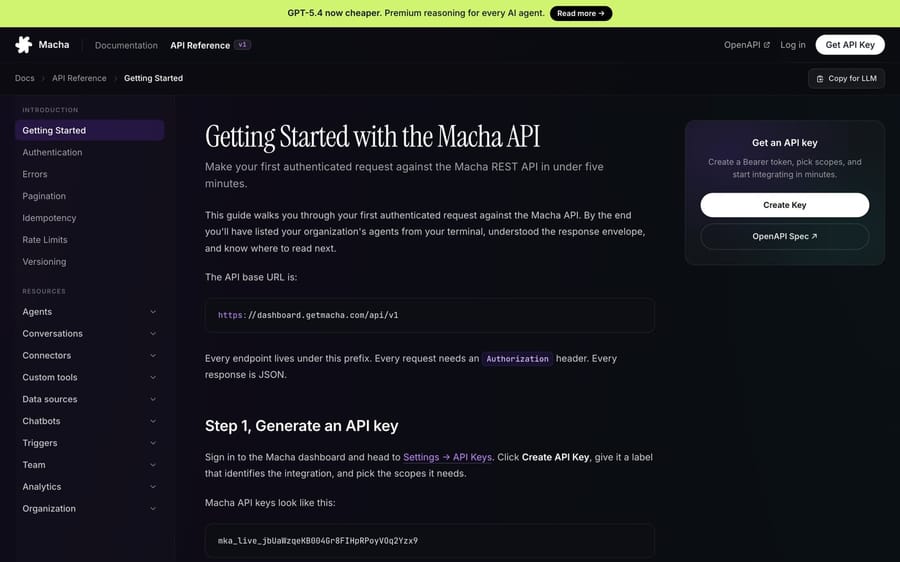
The surface covers what you actually need to build and operate agents programmatically:
- Agents: full CRUD. List, retrieve, create, update, delete.
- Custom tools: full CRUD. Wire any HTTP endpoint up as a tool your agents can call.
- Sources: list, retrieve, create, delete. Manage the knowledge an agent reads from (v1 has no update endpoint, so you delete and re-create a source to change it).
- Conversations: read. Pull your conversation history and full message threads into your own analytics stack.
- Connectors: read. Discover the tools each connected integration (your help desk, Shopify, Slack, Stripe and the rest) exposes, so you know what to assign to an agent.
- Triggers, chatbots, team, analytics, organization: read.
Being honest about the edges: in v1, triggers are read-only (you list and inspect them via the API, but you set up webhook and scheduled triggers in the dashboard, because wiring a webhook involves the third party's own config UI). And a few things stay dashboard-only by design: running a live chat turn through an agent (the streaming chat loop), billing actions, Studies, and Sidekick. The API is for building and wiring agents and reading their data, not for impersonating the chat UI.
2. API keys you scope yourself
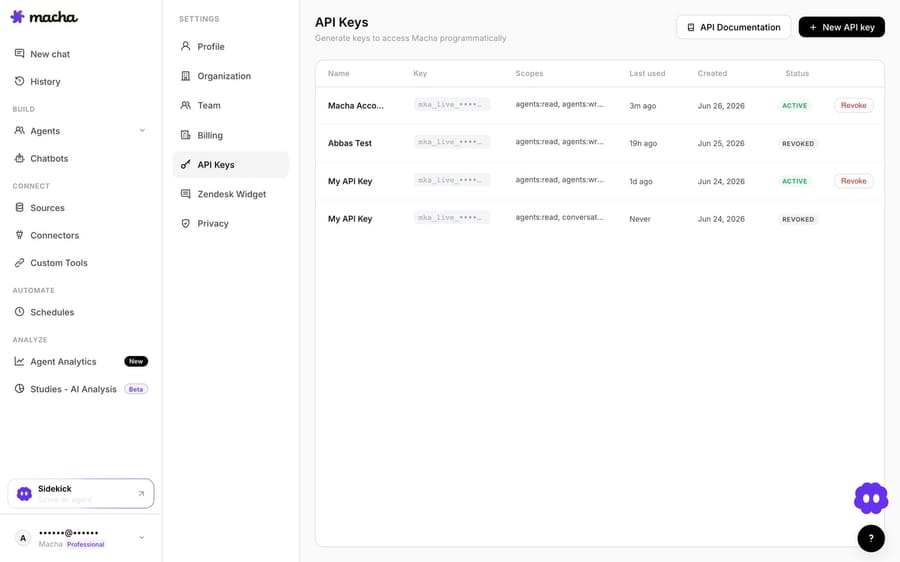
Keys are generated from Settings → API Keys in the dashboard. They look like this:
mka_live_jbUaWzqeKB004Gr8FIHpRPoyVOq2Yzx9A few properties worth knowing before you generate one:
- Organization-scoped. A key issued for your org cannot read, write, or even discover data in any other org, no matter what IDs you put in the URL.
- Scope-restricted. Every key carries an explicit list of
{resource}:{action}scopes —agents:read,agents:write,conversations:read, and so on. There is no super-scope. A key withagents:readdoes not silently gainagents:write. - Shown once. The full token appears exactly once, at creation. Macha stores a bcrypt hash, not the key, so it can verify every request without ever being able to hand the key back to you. Copy it into a secrets manager immediately.
- Revocable and auto-protected. Revoke takes effect on the next request. And because every key starts with the
mka_live_prefix, secret scanners (GitHub, GitGuardian) recognise it — Macha scans public GitHub and auto-revokes leaked keys.
3. Docs that an AI can read: llms.txt + OpenAPI
This is the piece that turns "read the docs yourself" into "let the agent read them." Macha now publishes its knowledge base following the llmstxt.org convention:
/llms.txt— a short, structured index of every doc page and API endpoint./llms-full.txt— the full prose content of the docs, concatenated into one file an agent can ingest in a single read./api/v1/openapi.json— the full OpenAPI 3.1 specification. Every operation, request and response schema, and the exact required scope exposed underx-required-scope.
So a coding agent can ingest llms-full.txt for the narrative ("how do I create an agent, what fields does it take"), and the OpenAPI spec for the precise types and scopes. Crawlers like Claude, ChatGPT, and Perplexity can ingest the same files too, so when you ask an assistant how to do something with Macha, it can answer straight from the same contract your code uses.
Why can a coding agent use the Macha API without getting lost?
It is not just that the docs exist. The API was designed to be predictable, which is exactly what an autonomous agent needs to not get lost:
- One response envelope, everywhere. Every success looks like
{ "data": ..., "meta": { "request_id", "next_cursor" } }.datais your payload (object for single resources, array for lists). The agent never has to guess where the payload is. - Stable error codes. Errors are
{ "error": { "code", "message", "request_id" } }. Thecodeis stable and machine-switchable (insufficient_scope,agent_handle_taken,rate_limited); themessageis for humans. A coding agent branches oncode. - Scopes are discoverable. A
403 insufficient_scopetells the agent precisely what it's missing, and the OpenAPI spec lists the required scope per operation, so a good agent warns you before it makes a call it can't complete. - Writes are safe to retry. Every
POST/PATCHhonours anIdempotency-Keyheader — pass a UUID and Macha replays the cached response on retry within 24 hours. An agent that retries on a flaky network won't create three duplicate agents.
How do you build an agent with Claude Code, step by step?
Here's the actual workflow. It takes about five minutes, and most of it is the AI doing the typing.
Step 1 — Generate a scoped key
In the dashboard, go to Settings → API Keys, click Create API key, and give it a descriptive label like "Claude Code — agent builder". For a build session you'll want write access, so grant:
agents:read
agents:write
connectors:read
custom_tools:read
Copy the mka_live_… token. You'll hand it to your coding agent as an environment variable, never pasted inline into a file that could get committed.
Step 2 — Point the coding agent at the docs and the key
Set the key in your shell, then tell Claude Code (or Codex) where the docs are and what you want. A prompt as simple as this is enough:
export MACHA_API_KEY=mka_live_your_key_hereRead https://www.getmacha.com/llms-full.txt and
https://dashboard.getmacha.com/api/v1/openapi.json so you understand
the Macha REST API.
Then, using the MACHA_API_KEY env var, build me a "WISMO" agent that
answers "where is my order" questions from my Shopify store and posts
the reply back to the Zendesk ticket. First list my connectors to find
the right tool names and connector IDs, then create the agent.The agent reads the contract, authenticates with your key, and goes to work. You didn't open the reference once.
Step 3 — Let it discover your connectors
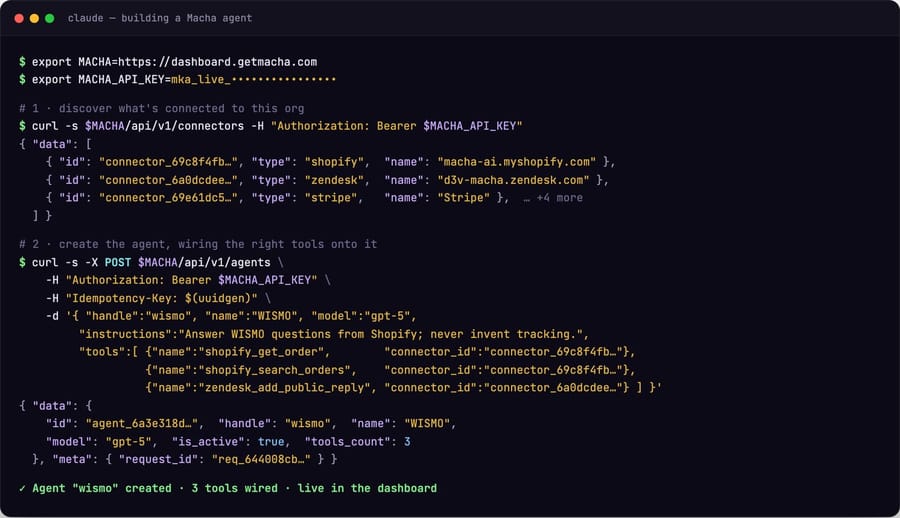
To wire tools onto an agent, it needs your connector IDs and the exact tool names. That's a read call it can make on its own:
curl https://dashboard.getmacha.com/api/v1/connectors \
  -H "Authorization: Bearer $MACHA_API_KEY"
It retrieves each connector to see the tool surface (shopify_get_order, zendesk_add_public_reply, and so on) and picks the ones it needs.
Step 4 — It creates the agent
This is the one write call that matters. The agent assembles the body from what it learned and POSTs it, with an idempotency key so a retry can't duplicate the agent:
curl -X POST https://dashboard.getmacha.com/api/v1/agents \
  -H "Authorization: Bearer $MACHA_API_KEY" \
  -H "Content-Type: application/json" \
  -H "Idempotency-Key: $(uuidgen)" \
  -d '{
    "handle": "wismo",
    "name": "WISMO",
    "instructions": "Answer Where Is My Order questions using the Shopify order tool. Never make up tracking info.",
    "model": "gpt-5",
    "tools": [
      { "name": "shopify_get_order",        "connector_id": "connector_abc..." },
      { "name": "shopify_search_orders",    "connector_id": "connector_abc..." },
      { "name": "zendesk_add_public_reply", "connector_id": "connector_def..." }
    ]
  }'
Macha returns the created agent:
{
  "data": {
    "id": "agent_6a39a4f1c0ef2ec711ef6dc1",
    "handle": "wismo",
    "name": "WISMO",
    "model": "gpt-5",
    "is_active": true,
    "tools_count": 3,
    "sub_agents_count": 0,
    "created_at": "2026-06-25T10:42:00.000Z",
    "updated_at": "2026-06-25T10:42:00.000Z"
  },
  "meta": { "request_id": "req_a0b88aa084bac0f7" }
}
Step 5 — Verify in the dashboard
Open the Agents page and the new agent is right there, with its model, tools, and connector logos, exactly as if you'd built it by hand. From here you add the autonomous trigger (new-ticket webhook or a schedule) in the dashboard, give it a test conversation, and ship it.
What else can a coding agent do with the API?
Once an AI agent can drive the API, the interesting workflows aren't one-off creations, they're the repetitive things you'd never want to click through:
- Agents-as-code. Keep your agent definitions in a Git repo and have a CI job
PATCHthem into Macha on merge. The dashboard becomes a view, not the source of truth. - Bulk wiring. "Create a triage sub-agent for each of my six product lines, each scoped to its own knowledge source." A loop, not an afternoon.
- Custom tools from your own API. Point the agent at your internal REST docs and have it register them as Macha custom tools (
POST /api/v1/custom_tools) so your agents can call your systems. - Conversation data into your warehouse. A nightly job that pages through
GET /api/v1/conversationsand lands every thread in BigQuery for your own analytics.
Is it safe to let an AI write to your Macha account?
Letting an AI write to your account sounds risky until you look at what's protecting you:
- Least privilege by default. The key only does what you scoped it for. Don't grant
agents:deleteto a build session and the agent literally cannot delete anything. - Idempotency. Retries replay a cached response for 24 hours instead of duplicating work.
- Rate limits per key. 1,000 requests/minute and 10,000/hour, applied per key, so one runaway script can't starve your other integrations. A
429comes with aRetry-Afterheader. - Soft delete. If an agent does get deleted, it lands in a 30-day Trash with one-click restore, triggers, instructions, sub-agent links and all. Mistakes are reversible.
- Auditability. Every API-created resource is logged as "created via API key <label>," and every response carries a
request_idyou can hand to support. - Leak protection. The
mka_live_prefix is scannable; commit a key to public GitHub and Macha revokes it for you.
What does the Macha API cost?
The API itself is free. Generating keys and using them to manage your account — creating and editing agents, wiring up connectors and tools, syncing knowledge sources, reading your conversation data — costs nothing. There's no per-call charge and no API metering of any kind, and it's available on every account, including trials.
That's because the API is a management layer, not an execution one. You can't run an agent or process a ticket through your API key — the API builds and configures agents on your Macha dashboard; it doesn't execute them. Everything you do with a key ultimately lands as an agent (plus its tools, triggers, and knowledge) sitting in your dashboard, exactly as if you'd clicked it together by hand.
Billing only enters the picture when an agent actually runs — when it fires on a trigger or works a ticket. That's the normal Macha runtime cost: per ticket, one conversation charged once however many steps the agent takes and whichever model it runs on, from $299 a month for 750 tickets, and it's entirely separate from the API and identical whether the agent was built by hand or by Claude Code. So build and wire as many agents as you like over the API — agents and seats are unlimited — and you only pay once they go live and start working tickets.
How do you get started?
If you've got a Macha account, generate a key at Settings → API Keys, paste the prompt above into Claude Code or Codex, and watch it build. Prefer to build from the dashboard instead? Macha's in-product copilot does the same job — see Build with Sidekick. If you don't have an account yet, you can start a free trial — no credit card — and the full API Reference is open to read (or to hand to your favourite coding agent).
Resolve tickets automatically with AI agents
Macha's AI agents work on top of the help desk you already use — no code.