



 Intercom
 Shopify
 Stripe
 Slack
Slack Notion
 Google Workspace
 Confluence

What Can an AI Agent Do in Gorgias? The Macha Gorgias Integration (2026)


Macha's Gorgias connector gives an AI agent 15 tools and 4 triggers to read, reply to, tag and route Gorgias tickets, and the same agent can look up Shopify orders or Stripe charges before it answers. It sits on top of Gorgias rather than replacing it, and it is priced per ticket from $299 a month for 750 tickets.
Key takeaways
- Macha's Gorgias connector, live since 23 June 2026, adds 15 tools and 4 triggers so an agent can read tickets, reply, tag, route to teams and search Gorgias macros.
- Gorgias's own AI Agent is billed per automated interaction, with $1.50 charged for each interaction past the plan's bundle, and a resolved interaction also counts as a helpdesk ticket.
- Macha bills per ticket rather than per resolution, starting at $299 a month for 750 tickets, about $0.40 a ticket, with setup by the Macha team and a dedicated success manager included.
- Connecting Gorgias to Macha needs a REST API key from Gorgias Settings, the Gorgias subdomain and the login email, entered under Connectors, Support, Gorgias in Macha.
- Macha ships three Gorgias agent templates, Gorgias Ticket Triage, Gorgias Reply Assistant and Gorgias + Docs Context, that teams adjust instead of building an agent from scratch.

Macha's Gorgias connector gives an AI agent 15 tools and 4 triggers inside Gorgias: it can read tickets, customers and macros, post public replies or internal notes, set priority, status, tags and fields, and assign tickets to a user or team. Macha isn't a help desk and it doesn't replace Gorgias. It's an AI agent layer that runs on top of the help desk you already use (Zendesk, Freshdesk, Gorgias, Front, HubSpot or Intercom), and because the same agent can also connect to Shopify, Stripe, Slack and your knowledge base, it can complete the request behind a ticket instead of only suggesting text.
| Question | Answer |
|---|---|
| Tools added | 15 (8 read, 7 write), each labeled Read or Write |
| Triggers | Ticket Created, Ticket Updated, New Message Added, Custom Webhook |
| Authentication | Gorgias REST API key, subdomain and login email |
| Templates | Gorgias Ticket Triage, Gorgias Reply Assistant, Gorgias + Docs Context |
| Macha price | Per ticket, from $299 a month for 750 tickets (about $0.40 each), setup and a dedicated success manager included; $50 free trial, no card |
| Live since | 23 June 2026 |
Below: the tools, what you can automate with them, how setup works, and where the connector overlaps with Gorgias's own AI Agent and where it doesn't.
How did we check this?
Macha is our product, so the screenshots here come from the real dashboard, not a marketing mockup. The tool list, trigger list and setup flow match the live Gorgias connector as listed on our integrations page. For Gorgias itself we've kept to claims we could check on Gorgias's own pages in September 2026, and we point out plainly where Gorgias already does something itself.
What can a Macha agent do inside Gorgias?
Connecting Gorgias adds 15 tools to any Macha agent. Macha labels each one Read or Write. Write tools (anything that changes a ticket or messages a customer) ask for confirmation in chat and can be gated behind activation advisories when an agent runs autonomously.
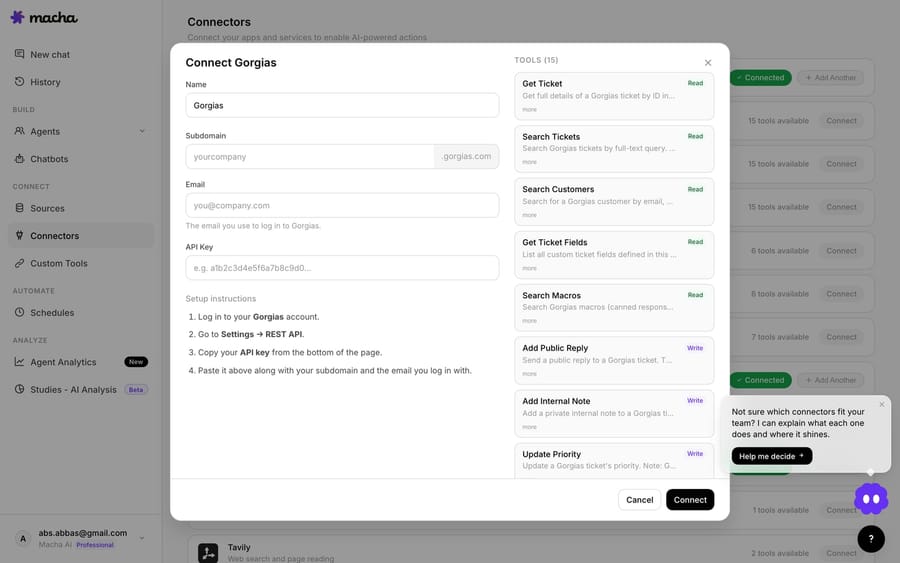
The tools fall into four groups:
- Read the conversation and the customer: Get Ticket (the full message thread, customer, assignee and tags), Search Tickets (full-text), Search Customers (by email, phone or name), Get Ticket Fields (your custom field definitions and options), List Agents and List Teams, plus Read Attachment for PDF, DOCX, XLSX, CSV and TXT files. This is how an agent learns who the customer is and what the ticket already contains before it acts.
- Reply and annotate: post a public reply through the ticket's channel, or add an internal note only your team sees. The split matters: an autonomous agent can quietly leave a note for a human to review, or answer the customer directly. You choose per agent.
- Triage and route: update priority (low, normal, high, urgent) and status (open, pending, resolved, closed), set tags (the tool replaces the tag set, so tell the agent to keep existing tags it needs), write custom field values, and assign the ticket to a user, a team or both. This is the unglamorous work that eats a support team's morning, and it's where an agent is most useful.
- Reuse what you already wrote: search your Gorgias macros so the agent answers in your established voice and policy instead of improvising.
Because these are separate tools rather than one "AI reply" button, you decide which ones a given agent can touch. A triage agent might get only the read tools plus tagging and assignment. A front-line resolution agent gets the reply and macro tools too.
How do agents run automatically on new Gorgias tickets?
Tools are half of it. The connector also registers four triggers so an agent runs the moment something happens in Gorgias: Ticket Created, Ticket Updated (status, priority, assignment or tags change), New Message Added, and a Custom Webhook that gives you a URL to attach to any Gorgias HTTP integration, so you decide exactly which tickets fire. That's what turns Macha from a chat helper into automation: a new ticket lands, the trigger fires, and the agent reads it, decides and acts (tagging, routing, replying or escalating) without anyone clicking anything.
You can add a debounce so a burst of rapid messages batches into one agent run instead of several, and triggers switch themselves off after repeated failures so a broken connection can't spam your customers.
Which Gorgias workflows can you automate?
This is where the cross-tool part earns its keep. The patterns teams set up first:
- "Where is my order?" answered from the live order. A WISMO ticket lands, the agent reads it, looks up the order in Shopify, posts the tracking status as a public reply, then tags and closes the ticket. It isn't guessing from a macro.
- Refund and duplicate-charge requests, triaged or resolved. The agent checks Stripe or Shopify for the charge, leaves an internal note with what it found, and routes to your billing team, or, if you allow it, processes the refund with confirmation.
- Clean triage on every new ticket. Categorize by topic, set priority, apply tags and assign to the right Gorgias team, so your people open a queue that's already sorted.
- Knowledge-grounded replies. Point the agent at your help center, Notion or uploaded docs, and it answers policy questions in your wording and cites what it used.
- Escalations that arrive with context. Instead of "customer is upset," the human gets the summary, the order, the relevant policy and what the agent already tried.
The common thread: the agent acts across tools, and Gorgias is where the conversation lives.
What does a resolved WISMO ticket look like step by step?
A customer emails "Where's my order #1043? It's been a week." It lands in Gorgias and the Ticket Created trigger fires:
- The agent reads the ticket with Get Ticket and recognizes a shipping-status question.
- It calls Search Customers to confirm the requester, then looks up order #1043 in Shopify (a separate connector on the same agent) and finds it shipped two days ago with a tracking number.
- It pulls phrasing from a Gorgias macro via Search Macros so the reply matches your tone, and posts it with Add Public Reply.
- It applies the
wismotag and sets the ticket to resolved.
No human touched it, and every step is a tool call you can see in the conversation log. If the order hadn't shipped, the same agent can take a different branch: leave an internal note and assign the ticket to a person instead of replying.
How do you connect Gorgias to Macha?
Setup uses an API key and takes a few minutes:
- In Gorgias, go to Settings → REST API and create or copy your API key (Gorgias documents this in its REST API credentials guide).
- In Macha, open Connectors → Support → Gorgias.
- Enter your Gorgias subdomain (the
yourcompanyinyourcompany.gorgias.com), the email you log in with, and the API key, then save. Macha validates the credentials before storing them. - Add the Gorgias tools you want to an agent, or start from a built-in Gorgias template, and switch on a trigger when you're ready to run autonomously.
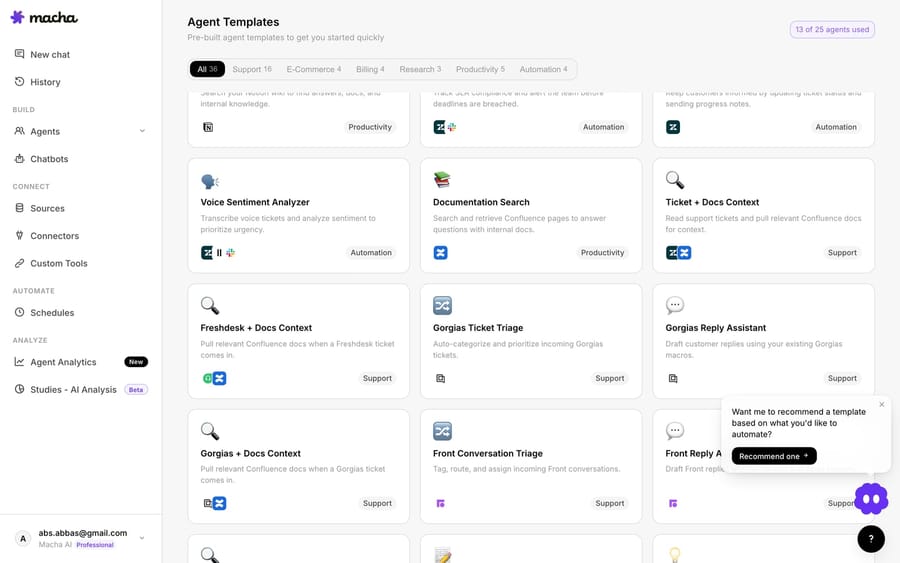
You don't have to start from a blank agent. The template gallery includes three Gorgias-specific templates, Gorgias Ticket Triage, Gorgias Reply Assistant and Gorgias + Docs Context, which you can drop in and adjust:
If you'd rather not wire it by hand, Sidekick, Macha's in-dashboard agent builder, can do it from a sentence: describe the agent ("triage new Gorgias tickets, tag by topic, route billing to the Payments team") and it assembles the tools, instructions and trigger. Or skip the wiring entirely: on the trial and every plan, the Macha team analyzes your past tickets, builds the knowledge base and the agent on Gorgias, tests it on a sample of those tickets, and runs it in safe mode, with drafts as internal notes, until the drafts are right. After go-live, a dedicated success manager who handles your changes afterwards: new categories, instruction changes, new tools.
Should you use Macha or Gorgias's own AI Agent?
Gorgias already ships automation: Rules, Macros and its own AI Agent, an ecommerce agent that answers common questions and runs Shopify actions. Gorgias's AI Agent page headlines a 60% average automation rate across five brands, which is a vendor figure rather than something we measured. If your needs sit entirely inside Gorgias and Shopify, those native tools are good and worth using.
Macha is for the cases that reach past Gorgias:
- Actions in tools Gorgias doesn't own: reading and writing Stripe and Notion through their connectors or your internal APIs through custom tools, and posting to Slack, all within one agent run.
- One agent design on every help desk: if you run Gorgias for one brand and Zendesk or Freshdesk for another, the same Macha agent design works on both. You don't relearn a separate automation builder per platform.
- Configurable, inspectable agents: you choose the model, see every tool call and result, require confirmation on writes, and test on real tickets before going live.
It isn't Macha or Gorgias automation. Plenty of teams keep Gorgias rules for the simple routing and add Macha for the multi-step, cross-tool resolutions.
The pricing models differ, and the difference shows who carries the risk:
| How it's priced | |
|---|---|
| Gorgias AI Agent (native) | Per automated interaction. Each plan bundles a set number (30 on Starter, 190 on Pro, 530 on Advanced) at roughly $0.90 to $1.00 each, and interactions past the bundle cost $1.50. Gorgias's billing docs say an interaction the AI resolves also counts as a helpdesk ticket (Gorgias pricing). |
| Macha (this integration) | Per ticket: one conversation, charged once however many messages it takes, from $299 a month for 750 tickets (about $0.40 a ticket), with setup done for you by the Macha team and a dedicated success manager included. Not per resolution. See the pricing page; the trial is $50 of free usage with no credit card. |
| Third-party Gorgias apps | Vary, often per resolution or per seat. |
Neither model is cheaper in every case. Per-resolution pricing ties the bill to the vendor's own definition of a resolution, and the vendor earns more each time the AI closes a conversation. Per-ticket pricing charges once for the whole conversation, which suits multi-step work where one resolution spans several lookups and writes. One thing to budget for: a reply Macha posts through Gorgias still lands on a Gorgias ticket, so Gorgias's own ticket billing applies as usual.
How do you keep the agent from doing something wrong?
Everything that writes back to a customer is gated. Write tools ask for confirmation in chat; high-impact tools and triggers show an activation advisory before you can switch them on autonomously; and you can keep an agent in internal-note-only mode while you build trust, so it annotates tickets for your team without ever replying to a customer. You can also Test Run an agent on real Gorgias tickets and see exactly what it would do before it does anything live.
FAQ
Does Macha replace Gorgias? No. Macha is an AI agent layer that runs on top of Gorgias. You keep Gorgias as your help desk; Macha adds configurable agents that read and act across Gorgias and your other tools.
How does Macha connect to Gorgias? With an API key: your Gorgias subdomain, login email and a REST API key from Settings → REST API. Credentials are validated before they're saved and encrypted at rest.
Can the agent reply to customers automatically? Yes, if you let it. The Add Public Reply tool posts to the customer through the ticket's channel; you can also keep an agent in internal-note-only mode so it never replies without a human. Write actions are confirmation-gated by default.
Does it work with Shopify data? Yes. Connect Shopify alongside Gorgias and one agent can read orders and customers and post the answer back into the Gorgias ticket. That cross-tool action is the main reason to add Macha.
What about Zendesk or Freshdesk? Same agent model. Macha runs on Zendesk, Freshdesk, Gorgias, Front, HubSpot or Intercom, so one agent design can work across every help desk you operate.
How do you try it?
If you're on Gorgias and want to watch an agent triage and resolve a real ticket, connecting takes a few minutes. Start free with $50 of usage and no credit card, connect Gorgias under Connectors → Support, and point an agent at a queue, or have the Macha team build it for you. Browse all Macha integrations or read the connector docs to go deeper.
Add AI agents to your Gorgias
Macha reads the ticket, drafts the reply and takes the action, inside the Gorgias you already run.





