



 Intercom
 Shopify
 Stripe
 Slack
Slack Notion
 Google Workspace
 Confluence

How Do You Build an AI Agent: From Scratch or on a Platform? (2026)


An AI agent is a loop where a model calls tools until a task is done, and that loop is about fifteen lines of code. What decides whether you build it yourself or on a platform is the production work around it: integrations, hosting, evaluation and upkeep.
Key takeaways
- Building an AI agent from scratch takes about fifteen lines of Python for the loop, but a production version needs an engineer for roughly 4 to 8 weeks.
- A production agent built from scratch needs eight layers around the loop: tool clients, grounding, triggering, guardrails, 24/7 hosting, observability, evaluation and maintenance.
- A from-scratch agent costs roughly $15k to $30k of loaded engineering time for a v1, then 15 to 20% of an engineer to maintain.
- Anthropic's Managed Agents hosts the agent loop and sandbox, but the team still builds every integration to its help desk, order system and billing tools.
- Macha is one plan priced by ticket volume, from $299 a month for 750 tickets to $3,999 for 10,000, with the model and setup included.

You can build an AI agent from scratch in about fifteen lines of Python for the loop, but a production version takes an engineer roughly 4 to 8 weeks plus ongoing upkeep, while a platform gets the same agent live in days. The loop is the cheap part. The expensive part is the eight layers around it: tool clients, grounding, triggering, guardrails, hosting, observability, evaluation and maintenance.
| Path | What you own | Time to production | Typical cost |
|---|---|---|---|
| From scratch (your code, an SDK like the Claude Agent SDK or OpenAI Agents SDK) | The loop, every tool client, hosting, evals, maintenance | About 4 to 8 weeks to a solid v1 | Roughly $15k to $30k of engineering time, then 15 to 20% of an engineer |
| Hosted harness (for example Anthropic's Managed Agents) | Tools, prompts, integrations to your systems | Days to weeks | Model usage plus your integration work |
| Agent platform (for example Macha) | Instructions, which tools, escalation rules | Days | A subscription, $299 to $3,999 a month on Macha by ticket volume |
What is an AI agent, actually?
Strip away the hype and an AI agent is a loop: a model that, given a goal, repeatedly decides to either call a tool (fetch data, take an action) or finish. You give it instructions and a set of tools; it reasons about which to use, you run the tool and hand back the result, and it continues until the task is done. That's it. A customer-support agent reads a ticket, calls tools to look up the customer and search your docs, drafts a reply or escalates, and stops. A research agent searches, reads, and summarizes. Same loop, different tools.
Everything hard about "building an agent" is either (a) giving it the right tools wired to your systems, or (b) making that loop reliable enough to trust in production. The model is the easy part.
What are the two ways to build one?
- From scratch: you write the loop, wire every tool, and own all the infrastructure to run it. Maximum control; weeks of work plus ongoing maintenance.
- On a platform: you bring the agent's design (its instructions and tools) and the platform runs it. Faster to production; you trade some control for not owning the plumbing.
There's a middle option now too. Anthropic's Managed Agents hosts the agent loop and its sandbox for you, but you still build every integration to your own systems. Neither end is "better." The right choice depends on what you're building and what you want to own.
How do you build an AI agent from scratch?
The loop (the easy 20%)
Every framework is a wrapper around the same loop. In Python with the Anthropic SDK it's about fifteen lines: call the model, run any tool it asks for, feed the result back, repeat:
while True:
    resp = client.messages.create(model=MODEL, system=SYSTEM,
                                  tools=TOOLS, messages=messages)
    if resp.stop_reason != "tool_use":
        break                                  # the agent has a final answer
    messages.append({"role": "assistant", "content": resp.content})
    results = []
    for block in resp.content:
        if block.type == "tool_use":
            out = run_tool(block.name, block.input)   # your function
            results.append({"type": "tool_result",
                            "tool_use_id": block.id, "content": out})
    messages.append({"role": "user", "content": results})
Anthropic's tool-use tutorial builds exactly this loop by hand (it runs while stop_reason is "tool_use") and then swaps it for the SDK's Tool Runner. Higher up, the Claude Agent SDK (Python and TypeScript) and the OpenAI Agents SDK give you the loop plus extras: handoffs, guardrails, sessions and tracing on the OpenAI side; subagents, hooks, permissions and MCP on the Claude side. Either way, the loop is the easy part.
What does production add on top of the loop?
Getting from that loop to something you'd trust with real users means owning all of this:
- Tools wired to your systems: each tool becomes a real API client: auth and token refresh, pagination, rate limits, and error handling. Every system the agent touches (your help desk, orders, billing) is another client you build and maintain.
- Grounding (RAG): if the agent answers from your knowledge, you chunk and embed your docs, run a vector store, back a
searchtool, and re-embed when content changes. - Triggering: the agent has to run when something happens: a webhook endpoint (with signature verification and idempotency) or a queue consumer.
- Guardrails: grounding checks, PII handling, action limits (don't let it refund $10,000 unattended), prompt-injection defenses (user input is untrusted), and a clean human-escalation path.
- Hosting 24/7: a cloud host, secrets management, a job queue with retries and a dead-letter queue, and autoscaling for load spikes.
- Observability: log every run's full trace (tools called, context, decision), plus latency, cost, and alerting.
- Evaluation: a harness over real historical cases with automated scoring, run as a regression before every prompt or model change. Without it you're shipping on vibes.
- Maintenance: models get deprecated, APIs change, embeddings drift, frameworks ship breaking changes. Someone owns this permanently.
Budget weeks to a solid v1 and ongoing upkeep after. Coding agents like Claude Code, Codex, and Cursor compress the writing of steps 1 to 4 a lot, but they don't make the design decisions or run steps 5–8 for you.

Which design decisions separate good agents from demos?
Beyond the checklist, three choices determine whether your agent is actually good:
Memory and state. An agent that forgets between turns feels broken. You give it short-term memory (the running message history, trimmed to fit the context window) and, for anything spanning sessions, long-term memory: persisting state keyed by the customer or ticket so a follow-up picks up where the last message left off. You decide what to remember, where to store it, and when to forget.
One agent or many. A single agent with a handful of tools is simplest and handles most cases. As scope grows, a multi-agent design, where a triage agent hands off to specialists (billing, shipping, technical), stays more accurate and debuggable than one agent juggling twenty tools. Anthropic's Building Effective Agents guide and OpenAI's practical guide to building agents both recommend starting simple and adding orchestration only when a single prompt gets unwieldy.
Which model. Match the model to the job: the strongest for the reasoning step, a faster, cheaper one for high-volume classification or drafting. Most production agents mix models by task to balance quality and cost, and re-benchmark when a new model ships. There's no universal "best"; test on your data.
What does building on a platform change?
A platform inverts the ratio: you spend your time on the 20% that's your product (which tools, what instructions, when to escalate) and it owns the 80% of undifferentiated plumbing. Macha is a platform for exactly this — you bring the agent design and your choice of model, and it handles connect, run, observe and grade. It runs on Zendesk, Freshdesk, Gorgias, Front, HubSpot or Intercom, and the Macha team does setup and monitoring as part of the plan:
- Tools without clients: Custom Tools turn any REST API into a tool by describing it (steps 1–3), with your help desk as a native connector.
- Runs itself: the agent runs in the cloud, triggered by events, with hosting, queues, and retries handled (steps 4–5).
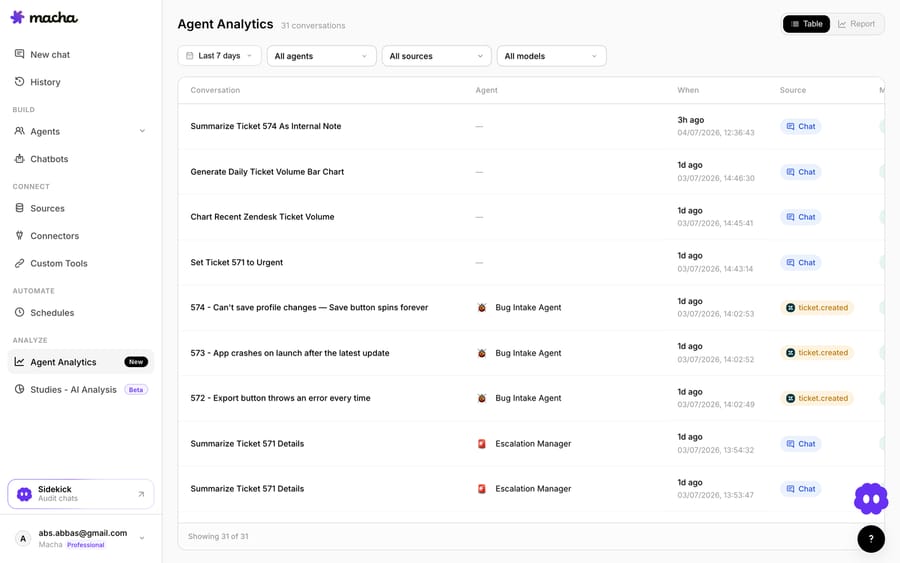
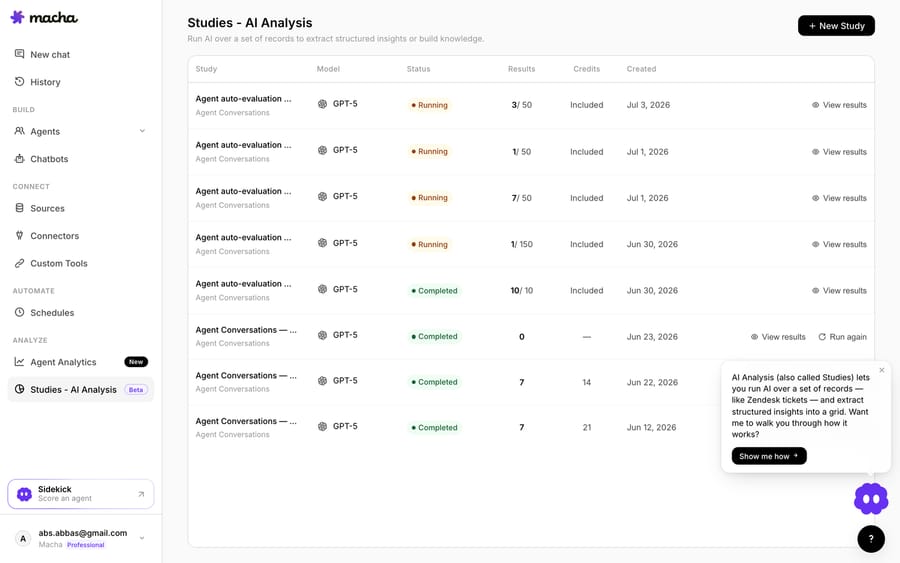
- Observable and gradable: Agent Analytics trace every run (step 6); Studies and simulations replay the agent against a batch of real past tickets (step 7).
The trade is control for speed: from scratch is weeks plus maintenance; a platform is live in days with the infrastructure owned for you. Notice the incentive, too. A platform that bills per ticket earns more as volume grows, so it has a reason to keep the agent working; a framework vendor earns nothing from your uptime.
Should you build from scratch or on a platform?
| Build from scratch | Build on a platform | |
|---|---|---|
| The loop | You write it (or use an SDK) | Built in |
| Tools / integrations | You build every client | Describe an API / native connectors |
| Hosting, queue, retries | Your infrastructure | Handled |
| Observability + evals | You build both | Built in |
| Time to production | Weeks + ongoing | Days |
| Control | Total | High, within the platform |
| Best when | The agent runtime is your product; on-prem/data-residency; custom orchestration | The outcome is the goal; you want it live and measurable fast |
Build from scratch if you're a platform/AI team where the agent's architecture is the product, you have hard constraints (on-prem, strict data residency, a bespoke orchestration model), or you simply want to own every layer. Use a platform if the agent is a means to an end (resolving support, automating a workflow) and you'd rather spend engineering time on the tools and prompts that make it good than on hosting and dashboards you'll maintain forever.
What does each path cost?
The from-scratch "$0 license" is misleading: the cost is engineering time. A directional total-cost-of-ownership view for a mid-size team:
- From scratch: the software is free, but budget an engineer for ~4–8 weeks to a solid v1 (call it $15k–$30k of loaded time), then ~15–20% of an engineer ongoing for maintenance, plus hosting and model/API bills. The bill never really ends, because it's people.
- On a platform: a subscription with the build-and-run cost absorbed, and model bills often included in the plan. Macha, for example, is one plan priced by ticket volume: $299 a month for up to 750 tickets, up to $3,999 for 10,000, with the model included and one charge per ticket however many messages it takes (pricing).
Rule of thumb: unless the agent runtime is your product, a platform is usually cheaper once you price in the engineering time from-scratch keeps consuming. (These are directional. Model them against your own rates and ticket volume.)
Which model, framework, or tool?
The path above is model- and tool-agnostic: the loop and the production checklist are the same regardless. If you've picked a specific tool, we have a focused, code-level how-to for each:
- By model / SDK: Claude, ChatGPT / OpenAI, Gemini, or plain Python.
- By framework: LangChain / LangGraph.
- By builder: no-code, n8n, or an AI IDE like Cursor.
Each walks the from-scratch build on that tool and where a platform picks up. For the support-agent use case specifically, see our guide to AI agents for customer service.
So, how should you build your AI agent?
Start by being honest about what you're actually building. If it's a learning project or the agent is your product, build from scratch: understanding the loop and owning the runtime is worth it, and coding agents make the code fast. If it's a means to a business outcome and you want it reliable and measurable soon, a platform gets you there without a hosting-and-eval stack to maintain. The model is the same foundation either way; the real decision is how much of the surrounding 80% you want to own. You can start a Macha trial with $50 of free usage (about 125 tickets, no credit card) to see where that line is for you.
FAQ
Do I need to code to build an AI agent? Not necessarily. A from-scratch build is code; a no-code platform lets you build a capable agent by describing it and connecting your systems. The choice depends on how much control and customization you need.
How long does it take to build an AI agent? The working loop is an afternoon. A production agent from scratch is typically weeks (most of it integration, hosting, observability, and evals, not the model), plus ongoing maintenance. On a platform it's days.
What's the hardest part of building an agent? Not the model or the loop. It's the production 80%: wiring tools to your systems, hosting it reliably, and knowing whether it's actually good (evaluation). That's exactly what platforms exist to handle.
Which is cheaper, from scratch or a platform? From scratch has no license fee but real engineering and maintenance cost; a platform has a subscription but removes the build-and-run cost. For most teams whose product isn't the agent runtime, the platform is cheaper in total cost of ownership.
What is Anthropic Managed Agents? A hosted harness from Anthropic that runs the agent loop in a managed or self-hosted sandbox, configured through the Claude API. It removes the hosting layer but not the integrations to your help desk, orders or billing.
Can I start on a platform and move to custom later (or vice versa)? Yes. Many teams prototype on a platform to validate the agent, then decide whether owning the runtime is worth it. Because the agent design (tools, instructions) transfers, you're not locked in either direction.
Resolve tickets automatically with AI agents
Macha's AI agents work on top of the help desk you already use — no code.





