





 Shopify
 Stripe
 Slack
Slack Notion
 Google Workspace
 Confluence

How Do You Build an AI Support Agent with n8n? (2026)


An n8n support agent is a Webhook trigger feeding the AI Agent node, which calls tool sub-nodes to look up orders and help-center articles, then posts a reply back to the ticket. It suits teams already running n8n, especially self-hosted, and leaves grounding, hosting and evals for you to build.
Key takeaways
- An n8n support agent starts from a Webhook node fired by the help desk, then runs the AI Agent node with a chat model and at least one tool sub-node attached.
- Postgres Chat Memory with its Session Key set to the ticket ID keeps context across separate webhook calls, while Simple Memory fails in production workflows on queue-mode instances.
- n8n's self-hosted Community Edition is free, and n8n Cloud starts at €20 a month billed annually for 2,500 workflow executions.
- n8n leaves grounding, hosting and support-specific evaluation for the team to assemble, since it has no turnkey help-center connection or ticket-resolution grading.
- Macha connects natively to the help desk, turns REST APIs into agent tools with Custom Tools, and costs from $299 a month for up to 750 tickets.

To build an AI support agent in n8n, you trigger a workflow from a help-desk Webhook, send the ticket to n8n's AI Agent node with a chat model and at least one tool sub-node attached, keep thread context in Postgres Chat Memory keyed by the ticket ID, and post the reply back through an HTTP request. n8n's self-hosted Community Edition is free; n8n Cloud starts at €20 a month billed annually for 2,500 workflow executions (n8n.io/pricing, checked 24 September 2026).
| Concern | n8n | Macha |
|---|---|---|
| Best fit | Agent as a step in a bigger automation; self-hosted/private | A help-desk-native support agent |
| Price | Community Edition free (self-hosted); Cloud from €20/month for 2,500 executions | From $299/month for up to 750 tickets |
| Help-desk connection | Generic nodes you wire | Native connector |
| Grounding | DIY vector-store node | Attach a Source |
| Tools | HTTP Request nodes | Custom Tools (describe an API) |
| Hosting | Self-host or n8n Cloud | Runs in the cloud |
| Support evals | Build your own | Studies and simulations |
What does a support agent need to do?
The loop: understand the ticket, fetch context (customer, orders, the right help-center article) via tools, act (reply, tag, escalate), and hand off when unsure. In n8n, that loop lives inside the AI Agent node, and the tools are other nodes wired to it. (Weighing build-vs-buy first? See our AI agents for customer service overview.)
How do you build the agent as an n8n workflow?
The AI Agent node is part of n8n's LangChain integration, and it's the heart of the build. n8n's docs say you must connect a chat model and at least one tool sub-node. Since n8n 1.82.0 every AI Agent node works as a Tools Agent; the old agent-type setting is deprecated.
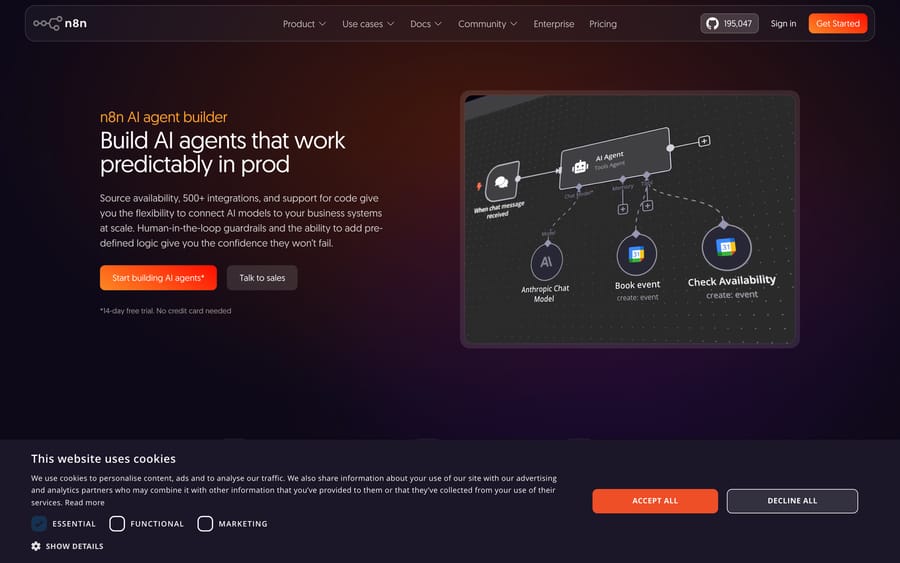
A support workflow for our Acme agent looks like this:
- Trigger: for a support agent you want a Webhook node (fired by your help desk when a ticket is created), not the Chat Trigger node (which is for interactive chat UIs). The webhook passes the ticket text and ID into the flow.
- AI Agent node: wire in a Chat Model sub-node (Claude, GPT, or Gemini) and set the system prompt: "You are Acme's support agent. Answer from the help center; escalate refunds over $100."
- Tools: attach tool sub-nodes the agent can call: an HTTP Request Tool to look up an order, a vector store (e.g. the Postgres PGVector or Pinecone node) over your embedded help center, and another HTTP Request Tool to post the reply. The agent picks which to call per ticket.
- Memory: attach a memory sub-node so multi-turn threads keep context. Simple Memory is fine for testing, but n8n's docs warn it doesn't work in an active production workflow when your instance runs in queue mode. Use Postgres Chat Memory with its Session Key set to the ticket ID, so context survives across separate webhook calls on the same ticket. Most tutorials skip this detail.
- Output: route the agent's reply to a node that posts it back to the ticket, with an IF node sending the over-$100 refunds to a human queue instead.
Because it's n8n, the whole thing is visual, exportable as JSON for version control, and you can self-host it. That matters if data residency or privacy is a hard requirement. The n8n advanced-AI docs are the reference, and Claude Code or Codex can help you draft the workflow JSON and the HTTP tool configs.
What does n8n leave you to build and run yourself?
n8n gives you the loop, the tools, and the triggers. The remainder for a support agent:
- You build and maintain the workflow. The agent is a graph of nodes you assemble and keep working as APIs and needs change. It's yours to own, node by node.
- Grounding is DIY. There's no turnkey "connect your help center"; you stand up a vector store node, embed your docs, and keep it fresh.
- Hosting is on you (or n8n Cloud). Self-hosting means running and scaling it. n8n Cloud prices by workflow executions: Starter covers 2,500 a month and Pro covers 10,000 a month at €50 billed annually. Either way the agent's uptime is your concern.
- No support-specific evals. n8n won't tell you whether the agent is resolving tickets. You build your own way to grade it against real cases.
- Not help-desk-native. n8n connects to your help desk via generic nodes; it doesn't live inside it the way a support tool does.
None of that is a knock. n8n is excellent when the agent is one step in a bigger automation you're already running there. It's just more assembly than a purpose-built support agent needs.

When does a dedicated support platform fit better?
If the goal is specifically a support agent rather than a general automation, Macha is built for it, and it's model-agnostic so you keep your choice of model:
- Help-desk-native: connect Zendesk, Freshdesk, Gorgias, Front, HubSpot or Intercom; the agent reads and replies to tickets where your team already works, with no webhook workflow to build.
- Grounding and tools without assembly: attach your help center as a Source; turn any REST API into a tool with Custom Tools by describing it. There's no vector-store node to maintain.
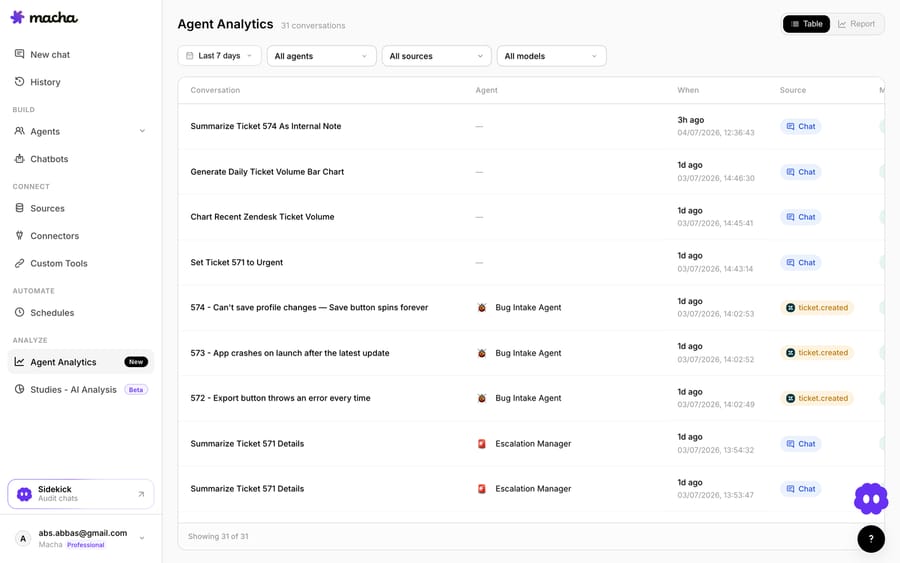
- Run and grade: it runs in the cloud with every run visible in analytics, simulations replay past tickets against the agent, and Studies check its output against its instructions so you know it's ready.
- Priced per ticket: one plan from $299 a month for up to 750 tickets, billed per ticket rather than per message, with setup and monitoring by the Macha team included.
So which should you build?
Use n8n if you're already living in it, you want to self-host for privacy, or the support agent is one node in a larger automation you run there. Its flexibility and openness are real strengths. (Our from-scratch vs. platform breakdown covers the broader trade.) Choose a dedicated platform when you want a support agent that's native to your help desk, grounded, and measurable without assembling and hosting a workflow. You can start free on Macha with $50 of trial usage and no credit card, keep your model, and connect your help desk in minutes.
FAQ
Is n8n's AI Agent node enough for support? Mechanically yes: it runs the tool-calling loop, and it needs a chat model plus at least one tool sub-node. The gaps for support are grounding, help-desk-native connection, and evals, which you assemble yourself in n8n and get out of the box on a dedicated platform.
Can I self-host the whole thing? Yes, and that's n8n's big draw: the Community Edition is free to self-host. If self-hosting for privacy or data residency is a hard requirement, n8n is a strong fit; weigh it against the assembly and upkeep.
Does Claude Code or Codex help build the workflow? They can draft the workflow JSON and HTTP tool configs and explain node wiring, but you still design the agent and own the running instance.
How do I know it's good before it goes live? Grade it against real historical tickets. In n8n you build that harness; on a platform like Macha, simulations replay past tickets and Studies grade the results for you.






