





 Shopify
 Stripe
 Slack
Slack Notion
 Google Workspace
 Confluence

What Is the Best Event Ticketing Software in 2026? 10 Platforms Compared on Fees and Features


On published fees, Ticket Tailor is the best event ticketing software for most organizers in 2026: a 500-ticket event at $40 a head costs the organizer about $1,030 all in, against $2,215 on Eventbrite. This guide compares 10 platforms, with every fee checked on each vendor's own pricing page on 20 October 2026 and a capture of each page, a worked cost for the same event on all of them, G2 ratings and reviewer quotes for the top five, and a stated rubric for the ranking. Where a vendor hides a number, we say "not published" rather than guess.
Key takeaways
- Ticket Tailor ranks first at 86 of 100 because a 500-ticket, $40 event costs $1,030 with every fee absorbed, and free tickets cost nothing up to the 2,000 a year its FAQ allows.
- Eventbrite charges 3.7% plus $1.79 per paid ticket and 2.9% processing per order, so the same 500-ticket event costs the organizer $2,215 if the fees aren't passed to buyers.
- Humanitix passes its 2.1% plus $0.99 booking fee to buyers by default and pays out within 5 business days after the event ends.
- Eventcombo and Bizzabo sell subscriptions rather than per-ticket fees, from $640 a month and $17,999 a year, and neither page prints a payment processing rate.

Event ticketing vs support ticketing: which page do you need?
This page is about selling tickets to events: box offices, seat maps, check-in scanners and payouts. If you're looking for software that turns customer emails into support tickets for a help desk team, you want our best ticketing systems for customer support guide instead.
Which event ticketing platforms did we compare?
| Rank | Platform | Platform fee per paid ticket (checked 20 Oct 2026) | Payment processing | 500 tickets at $40, organizer absorbs all fees | Free events | Score /100 |
|---|---|---|---|---|---|---|
| 1 | Ticket Tailor | $0.85 pay as you go; prepaid credits from $0.30, 500 credits at $0.60 (USD read from the client-rendered page) | Your own Stripe, PayPal or Square account (Stripe US example 2.9% + $0.30) | $1,030 prepaid ($1,155 pay as you go) | Free up to 2,000 a year by its FAQ (the pricing block says 5,000) | 86 |
| 2 | TicketSpice | $0.99 ($0.49 under $5 or at the box office) | 2.9% + $0.30 | $1,225 | Free if you also run paid events | 81 |
| 3 | Tix | $1.50 online, $0.25 box office | None with your own gateway; 5% of ticket price on Tix's merchant account | $1,480 with your own gateway at Stripe's rate; $1,750 on Tix's account | Not stated | 81 |
| 4 | Humanitix | 2.1% + $0.99 (charities and schools 1% + $0.99) | 2.9% + $0.30 | $1,645 | Free | 79 |
| 5 | Eventbrite | 3.7% + $1.79 | 2.9% per order | $2,215 | Free, unlimited | 77 |
| 6 | Universe | 2% + $0.79 on Starter or 2.5% + $1.99 on Standard, each capped at $19.95 a ticket | Not published; "excludes processing fees" | $795 service fee plus an unpublished processing fee (about $1,525 if it matches 2.9% + $0.30) | Free | 64 |
| 7 | RSVPify | 1.95% + $0.90, $0 a month | Separate, charged by your processor | $840 plus your processor's fee (about $1,570 at Stripe's rate) | Free plan to 100 registrations a month | 64 |
| 8 | Brushfire | $1.50 + 1% (Other Events); $0.75 (Attractions, Education) | Stripe or Square at their published rates, no markup | $1,680 | Free on Attractions and Education plans only | 61 |
| 9 | Eventcombo | None; Professional subscription $640 a month, $7,670 billed annually | "Flat payment processing fee," amount not published | $640 plus an unpublished processing fee | Included in the subscription | 55 |
| 10 | Bizzabo | None; $499 per user a month, 3-user minimum, from $17,999 a year | Not published | The $17,999 annual minimum | Not stated | 48 |
Two platforms you may have expected are missing. Cvent's pricing page offers Professional and Enterprise packages with a quote form and no dollar figure, and RingCentral Events, the product that absorbed Hopin, has no pricing page we could find: its old address returns a 404 and the /events/ URL now lands on a listing of RingCentral's own webinars. Neither can be ranked on published fees, so neither is on the list.
The cost column assumes the organizer absorbs every fee, which is the worst case. Every per-ticket platform here lets you pass fees on to the buyer, and three of them (Eventbrite, Humanitix and Tix) treat that as the default or the expected setup. Passing fees on doesn't make them disappear; it moves them into the price your buyer sees, which is why the platforms with the highest fees are also the ones most eager to tell you the buyer pays.
How did we rank them?
Five criteria, weights summing to 100. Each platform scores 1 to 5 on each criterion, and the score is the weighted sum divided by 5.
| Criterion | Weight | 5 points | 3 points | 1 point |
|---|---|---|---|---|
| Published fees | 25 | Every fee that touches your payout is printed with a number | A plan price is printed but the processing rate isn't | Nothing but a quote form |
| Total cost at 500 tickets | 25 | $1,000 or less | $1,101 to $1,500 | Over $2,000 |
| Free-event option | 15 | Free tickets cost nothing, no cap, no plan required | Free tier with limits, free only on some plans, or free only inside a paid subscription | Subscription only, and free events not mentioned |
| Attendee support | 15 | The vendor answers buyers' order questions itself | Organizer-only support; attendees go through you | Nothing on attendee handling |
| Seating and check-in | 20 | Reserved seating and a check-in app both on the pricing page | One of the two | Neither on the pricing page |
For the cost criterion the full scale is: 5 points at $1,000 or under, 4 up to $1,100, 3 up to $1,500, 2 up to $2,000, 1 above that. A platform with an unpublished fee in its total can't score above 3 there, because we can't verify the number is lower, and we score it on the total we get by assuming Stripe's 2.9% + $0.30.
For the free-event criterion the full scale is: 5 when free tickets cost nothing with no cap and no plan; 4 when they cost nothing up to a stated yearly cap, or only if you also run paid events; 3 for a free tier with limits, free only on some plans, or free only inside a paid subscription; 2 for per-ticket pricing with no monthly fee where free events aren't mentioned; 1 for subscription-only pricing where free events aren't mentioned.
| Platform | Published fees (25) | Cost (25) | Free events (15) | Attendee support (15) | Seating and check-in (20) | Score |
|---|---|---|---|---|---|---|
| Ticket Tailor | 5 | 4 | 4 | 3 | 5 | 86 |
| TicketSpice | 5 | 3 | 4 | 3 | 5 | 81 |
| Tix | 5 | 3 | 2 | 5 | 5 | 81 |
| Humanitix | 5 | 2 | 5 | 3 | 5 | 79 |
| Eventbrite | 5 | 1 | 5 | 4 | 5 | 77 |
| Universe | 3 | 2 | 5 | 4 | 3 | 64 |
| RSVPify | 4 | 2 | 3 | 3 | 4 | 64 |
| Brushfire | 5 | 2 | 3 | 3 | 2 | 61 |
| Eventcombo | 2 | 3 | 3 | 3 | 3 | 55 |
| Bizzabo | 3 | 1 | 1 | 3 | 4 | 48 |
Two ties. TicketSpice and Tix sit at 81, and TicketSpice takes second because its computed total is lower ($1,225 against $1,480). Universe and RSVPify sit at 64, and Universe takes sixth on the same rule (about $1,525 against about $1,570, both with the assumed Stripe rate). Ticket Tailor scores 4 rather than 5 on free events because its FAQ puts a 2,000-ticket cap on them, Tix scores 2 because its page prices per ticket and never mentions free events, Bizzabo scores 1 because it sells a subscription and never mentions them, and Eventcombo scores 3 on attendee support because its support page describes no path for attendees.
How we researched this
On 20 October 2026 we read the pricing page of each of the 12 candidates on the vendor's own site and captured the fee block of each of the ten we ranked, in headless Chrome with cookie banners hidden and the capture cropped to the pricing element. Tix blocks headless browsers, so its block was captured in a normal Chrome window. Ticket Tailor's page serves pounds to anything that isn't a browser, so its dollar figures come from the client-rendered page with the currency control set to USD; the calculator screenshot shows the same control. Universe's page showed 2% + $0.59 to a plain fetch and 2% + $0.79 with its currency selector on US Dollar, and we used the US figure. Payout timing comes from Eventbrite's "Get started with event payouts" help article, Humanitix's "When will my event be paid out?" help article, and the pricing pages of the rest.
Ratings and quotes are from each product's G2 reviews page, read on 20 October 2026 and read again on 21 October 2026; the counts are G2's at that moment and the quotes are attributed the way G2 shows them, with the reviewer's own star rating where it differs from the product's. We started a free Ticket Tailor organizer sign-up on 20 October 2026 with a Macha test mailbox and verified the address, but stopped short of finishing the account, so the first-hand Ticket Tailor screen in this post is its public fee calculator with the currency control on USD and the slider at 500 credits, not a configured event. We didn't sell a ticket on any platform.
The worked scenario is 500 paid tickets at $40, one ticket per order, paid by US card, with the organizer absorbing every fee. Gross sales are $20,000.
- Eventbrite: 3.7% of $40 is $1.48, plus $1.79, is $3.27 service fee; 2.9% of $40 is $1.16 processing. $4.43 x 500 = $2,215.
- Ticket Tailor: the page's calculator priced 500 prepaid credits at $0.60 each, $300. Stripe's US rate on the page, 2.9% + $0.30, is $1.46 a ticket, $730. Total $1,030. Pay as you go at $0.85 would be $425 + $730 = $1,155. The calculator's own breakdown showed an "illustrative" $1.31 processing fee on a $40 ticket; we used Stripe's published rate so every platform gets the same processing assumption.
- Humanitix: 2.1% of $40 is $0.84, plus $0.99, is $1.83, $915. Processing 2.9% + $0.30 is $1.46, $730. Total $1,645.
- TicketSpice: $0.99 x 500 = $495. Processing 2.9% + $0.30 is $730. Total $1,225.
- Tix: $1.50 x 500 = $750 online fee. With your own gateway Tix adds nothing, so we used Stripe's published 2.9% + $0.30, $730, for $1,480. On Tix's merchant account processing is 5% of the ticket price, $2 x 500 = $1,000, for $1,750.
- RSVPify: 1.95% of $40 is $0.78, plus $0.90, is $1.68, $840. Processing is charged separately by your processor; at Stripe's rate that's $730, about $1,570.
- Universe: 2% of $40 is $0.80, plus $0.79, is $1.59, $795 on Starter (the $19.95 cap doesn't bite at $40). The page says this "excludes processing fees" and prints no rate, so the total is $795 plus an unknown. If the rate matched the 2.9% + $0.30 most rivals print, add $730 for about $1,525. That's our assumption, not Universe's number.
- Brushfire: $1.50 plus 1% of $40 is $1.90, $950. Stripe online at 2.9% + $0.30 is $730. Total $1,680.
- Eventcombo: the Professional plan is $640 a month, which the page prints as $7,670 billed annually, with "no percentage fee on ticket revenue." The FAQ says there's a "flat payment processing fee" and doesn't give the amount. Total $640 plus an unpublished fee.
- Bizzabo: $499 per user a month, three users minimum, billed annually, which the page summarizes as "starting at $17,999 per year." A single event carries the full annual minimum.
Eventbrite's processing fee is charged per order, so if your buyers average two tickets an order the processing line drops; the service fee is per ticket and doesn't.
What are the 10 best event ticketing platforms?
1. Ticket Tailor: the lowest published fee, and the money never touches them
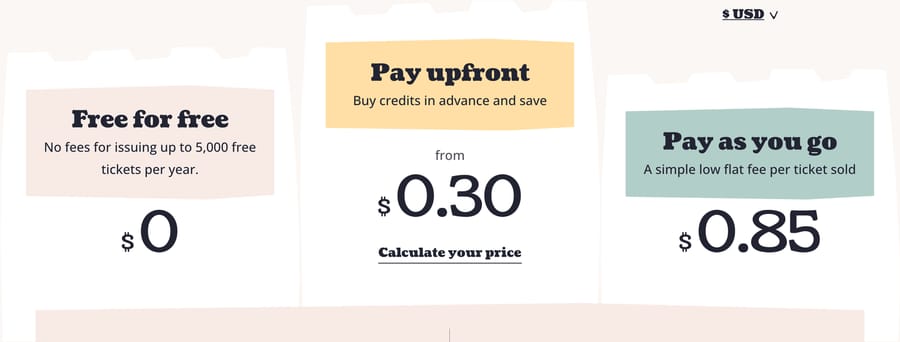
Ticket Tailor charges $0.85 a ticket pay as you go, or less if you buy credits upfront: the pricing calculator quoted 500 credits at $0.60 each, and the page says credits start from $0.30 at larger volumes. Those are the dollar figures the page renders once you switch its currency control to USD; a plain fetch of the page gets pounds (£0.60 and from £0.22). One paid ticket uses one credit, a paid ticket on a seating chart uses two, and credits never expire. Free tickets cost nothing up to 2,000 a year: that is the figure in the FAQ, which says charges can apply above it, while the pricing block in the capture above says 5,000. We use the FAQ's number; ask support before you rely on the larger one.
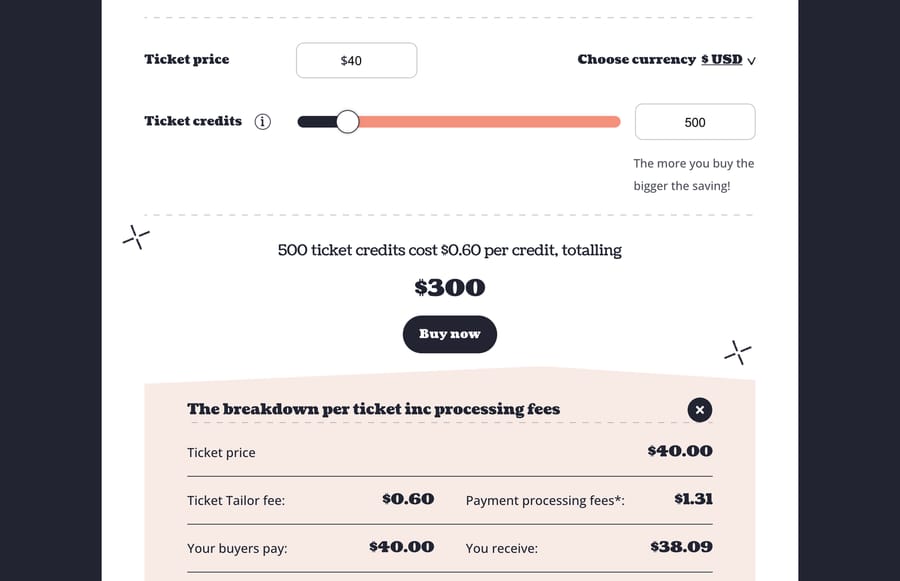
The mechanism that matters is where the money goes. Ticket Tailor doesn't process payments. Your buyers pay into your own Stripe, PayPal or Square account, so the revenue "will appear almost immediately" there, though the page adds that the transfer to your bank can take a week or so, and the only person deciding when you get paid is your processor. The trade is that you need one of those accounts before you sell a ticket, and you pay the processor's fee on top (Stripe's US example on the page is 2.9% + $0.30).
Attendee support is yours to run: refunds happen in your processor, and the pricing page's only support pointer is "Contact support." On G2 it holds 4.8 out of 5 from 198 reviews (read 21 October 2026). Michael V., an executive director at a small nonprofit, wrote on 10 March 2026 that it "helps us keep more of the funds we raise for our programs"; Wesley S., rating it 2.5 on 20 May 2026, described waiting minutes between chat replies and being bounced three times on one significant issue. Ticket Tailor suits teams that want the lowest fee and already run a Stripe account; it's the wrong fit if you want the vendor holding the money and the buyer's inbox.
2. TicketSpice: a flat 99 cents and weekly payouts

TicketSpice is "a flat 99¢ fee per ticket plus basic credit card processing rates of 2.9% + 30¢." Tickets under $5 and box-office sales drop to 49 cents. Payouts are weekly, with fees deducted first. You can also keep 100% of any convenience fee you add yourself, which is the opposite of the Eventbrite model, where the fee the buyer sees is the platform's.
It lists reserved seating, QR scanning, text-message ticket delivery, a box office app for card and cash sales, API access and webhooks. Free events are free only if you also run paid ones; the page prices free-only organizers at 99 cents a ticket. Refund handling isn't described on the pricing page. G2 shows 4.8 out of 5 from 422 reviews (read 21 October 2026); Clayton K., an owner and producer, wrote on 11 September 2026 that "pricing was the initial motivator for moving" and that the web interface "is often buggy" when he runs sales reports, and gave it 3 out of 5.
3. Tix: a $1.50 online fee and a vendor that answers buyers' order questions
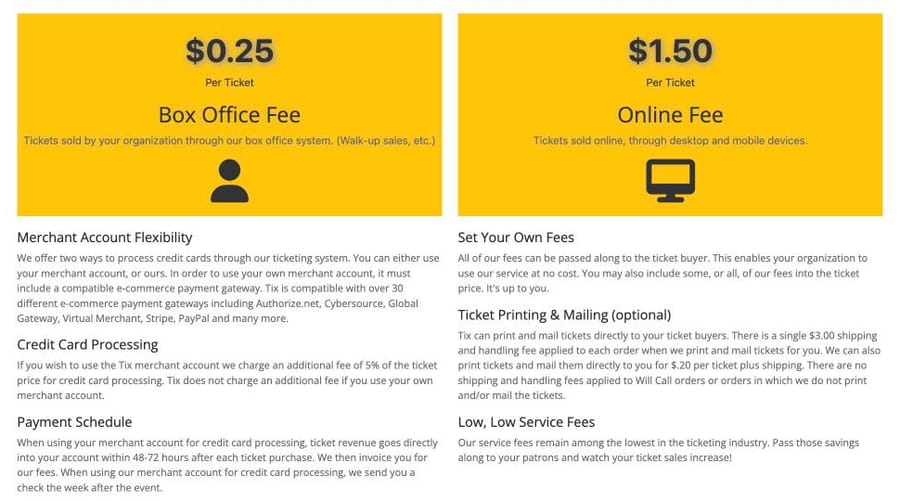
Tix prints two numbers: $1.50 per ticket sold online and $0.25 per ticket sold at your box office, with no setup, monthly or annual fees. Processing depends on whose merchant account you use. On your own gateway (the page names Authorize.net, Stripe, PayPal and others) Tix adds nothing and ticket revenue lands "within 48-72 hours after each ticket purchase," then Tix invoices you. On Tix's account processing is 5% of the ticket price and you get a check the week after the event.
Two things put Tix third despite the higher total. Its site lists a separate "Need Order Help?" address for ticket buyers and "24/7 Service and Support," so buyers with an order problem have somewhere to go that isn't you. And it programs reserved seating charts for you at no cost, which for a theater or a school auditorium is the setup task that eats a week. The page doesn't mention free events, so if you run them, ask first; that silence is why Tix scores 2 on the free-event criterion. G2 lists 4.8 out of 5 from 14 reviews (read 21 October 2026), a small base; Jessica H. wrote on 21 May 2024 that "any queries or concerns are swiftly addressed" by its support team.
4. Humanitix: profits to charity, fees passed to buyers by default
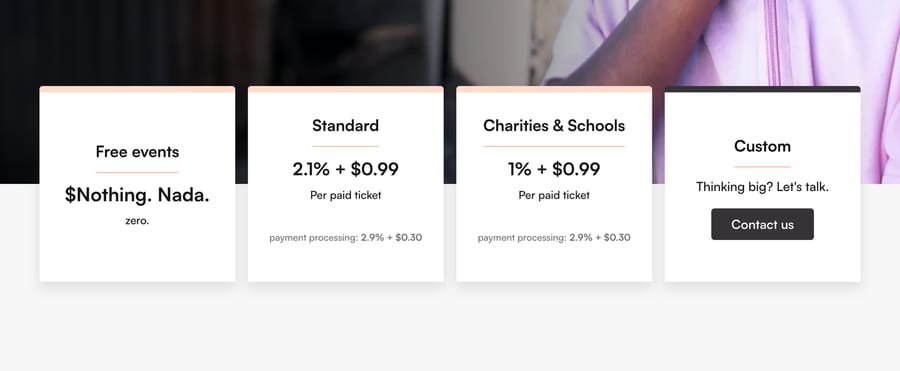
Humanitix charges 2.1% + $0.99 per paid ticket in the US, plus 2.9% + $0.30 processing, and 1% + $0.99 for charities and schools. Free events are free. Its pricing page counts $13,822,038 donated to charity and says all profits go there. The incentive is unusual for this list: a higher fee funds a donation rather than a margin, which is also why its booking fee is passed on to buyers by default (its help center says so), with a setting to absorb or split it.
Payout is "within 5 business days after your event has ended" on its own gateway, with recurring events paid after each date. Reserved seating and a scanning app are included on every plan, and it integrates with Mailchimp, Salesforce and Canva. Buyer enquiries arrive as notifications to the organizer; you answer them. G2 shows 4.4 out of 5 from 21 reviews (read 21 October 2026); Imran A. wrote on 29 June 2026 that "creating, managing events, and tracking ticket sales are super easy" and rated it 4.5.
5. Eventbrite: the most expensive fees here, and the biggest marketplace
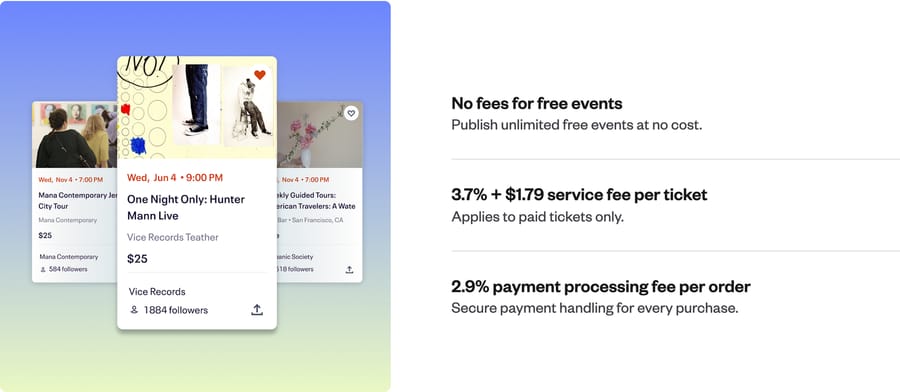
Eventbrite is "3.7% + $1.79 service fee per ticket" and "2.9% payment processing fee per order," paid by the buyer by default, with free events free and unlimited. On our $40 ticket that's $4.43, the highest per-ticket cost on this list by a distance, which the percentage component makes worse as ticket prices rise. Eventbrite earns more on a $100 ticket than on a $40 one for identical work.
What you buy with that is distribution. Eventbrite's marketplace, its ad tools for Facebook, Instagram and TikTok, and its organizer app with mobile check-in are the reason people pay it, and a $69-a-month Premium plan adds email marketing. Payouts arrive "three business days after your event ends," with first-time organizers paid only after the event; Instant Payouts exist for some US organizers. Eventbrite also runs an attendee-facing help center, and 24/7 chat support comes with paid events. On G2 it has 4.3 out of 5 from 914 reviews (read 21 October 2026), the largest base on this list; Sabina K., an IT operations manager, wrote on 1 May 2026 that "the event pages are customizable and simple to build". Pay the $4.43 if you need the marketplace to find your buyers; if your audience already knows you, you're paying it for check-in and a help center.
6. Universe: 2% + $0.79 and buyers who help themselves
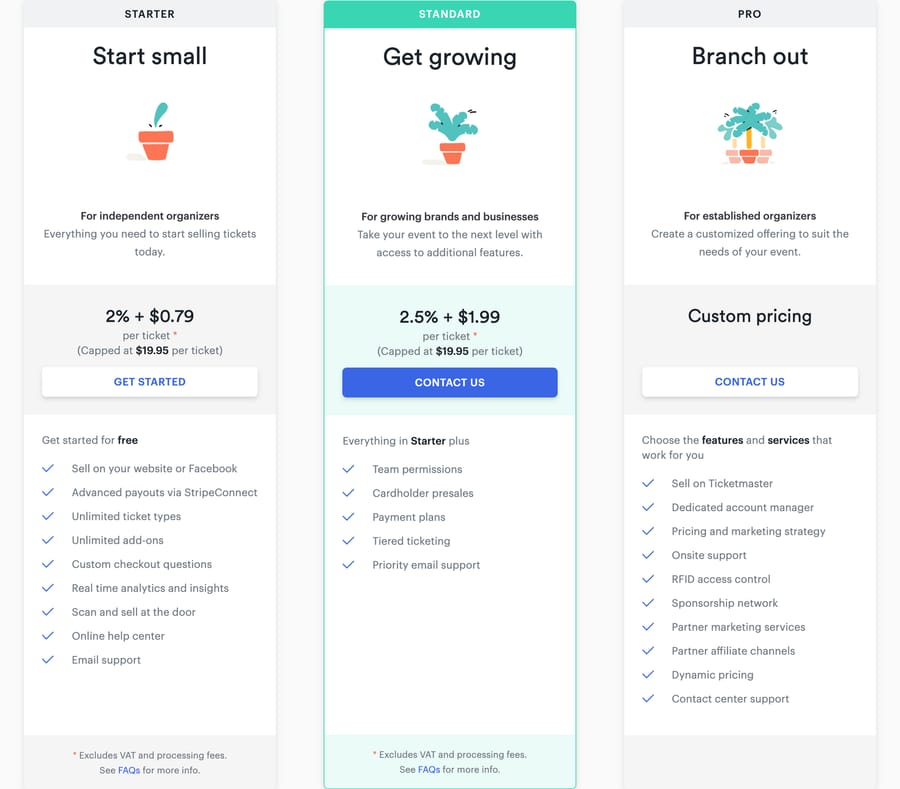
Universe, the Ticketmaster-owned platform for smaller events, prints a service fee of 2% + $0.79 per paid ticket on Starter and 2.5% + $1.99 on Standard, both capped at $19.95 a ticket, and "custom pricing" on Pro, with the currency selector on US Dollar. Free events are free. Its page leaves out the processing rate. The fee line says it "excludes processing fees," no rate is printed, and the FAQ says processing is "included by default" when you use Universe Payments, or charged by Stripe if you connect your own Stripe account. Read plainly, on Universe Payments the $795 for our scenario may already be the whole fee, which would make Universe the cheapest platform here; the page never prints the rate, so we can't score it that way, and that's why Universe scores 3 on published fees despite a low service fee.
Its features page is the strongest on attendee self-service in this group: buyers can "change date and time of their order without contacting support, based on rules you set," and organizers can issue full or partial refunds. The BoxOffice app scans and sells at the door on every tier. Reserved seating isn't mentioned on the pricing or features pages, so timed-entry venues fit better than theaters.
7. RSVPify: $0 a month and a bank transfer every business day
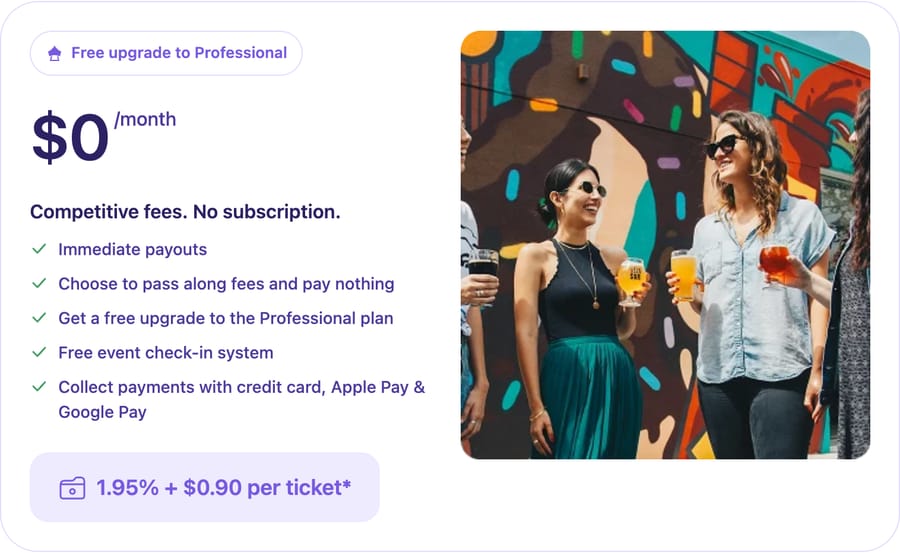
RSVPify sells tickets for "1.95% + $0.90 per ticket" with no subscription; processing is "separate and assessed by your selected payment processor." Selling tickets unlocks its Professional plan free, which otherwise costs $409 a month and includes the check-in suite and seating charts. Payouts: "Funds land in your bank as fast as every business day."
The same company sells registration plans by the month (free up to 100 registrations, then Starter at $39, Plus at $125, Professional at $409), so a free event with more than 100 sign-ups a month moves you onto a plan. Support tiers run from email to live chat to a dedicated manager, all aimed at the organizer. The seating chart is listed on every plan from Starter; selling specific reserved seats isn't spelled out, so check before you rely on it.
8. Brushfire: priced by who you are
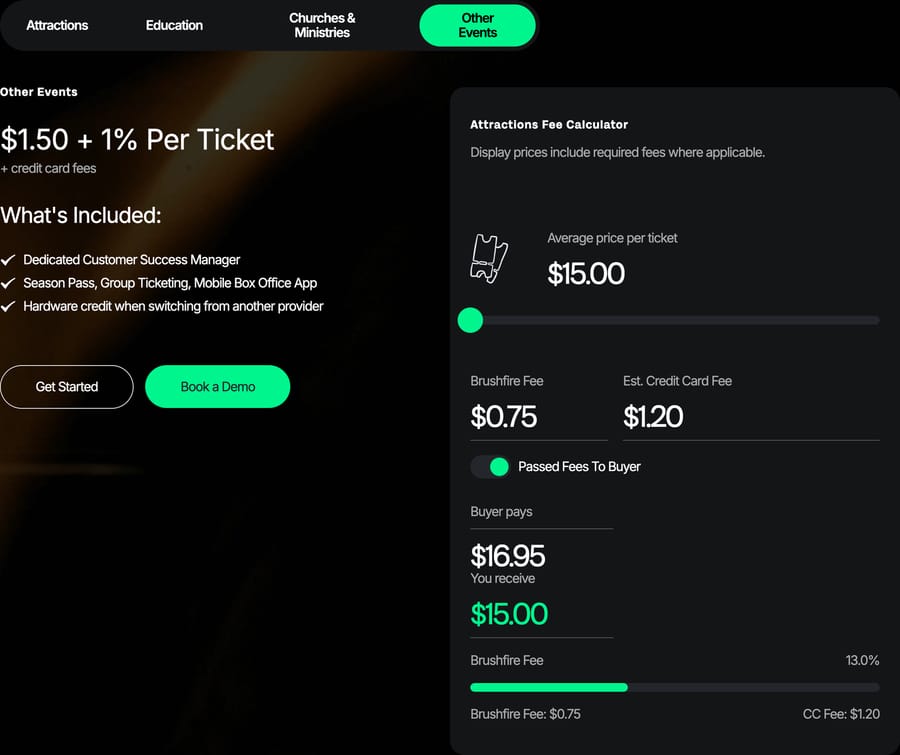
Brushfire prices by organization type. "Other Events" pay $1.50 + 1% per ticket, attractions and schools pay $0.75, large churches pay $1 + 1%, and churches under 1,500 weekly attendance pay $299 a month. Processing is Stripe or Square at their published rates with no markup, every rate printed, and deposits are described as instant.
The pricing page is thorough on fees and thin on everything else: reserved seating, check-in and refunds aren't described there, though a mobile box office app and an on-site support product are mentioned. Free tickets are free on the Attractions and Education plans only. If you're a museum or a school, Brushfire's $0.75 beats everyone but Ticket Tailor's prepaid rate; if you're an "other event," you pay more than seven of the platforms above it.
9. Eventcombo: a subscription for teams that run events all year
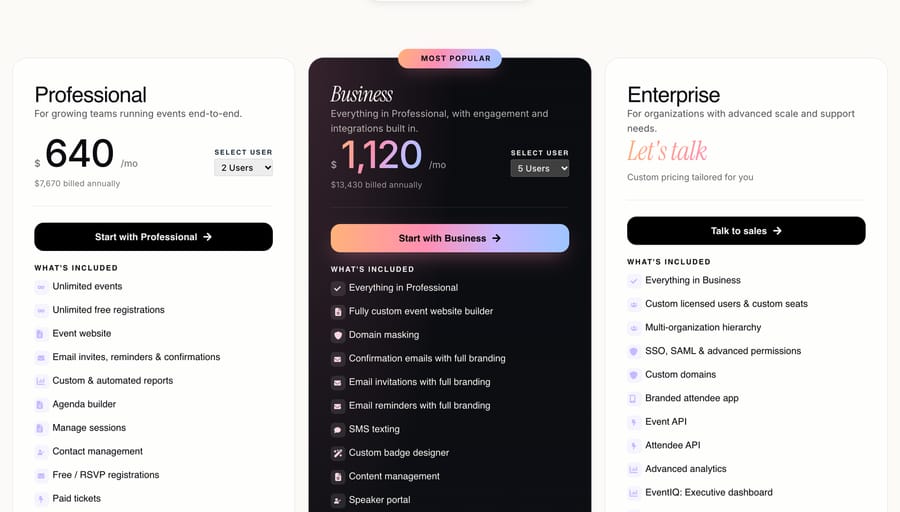
Eventcombo doesn't charge per ticket. Professional is $640 a month, which the page prints as $7,670 billed annually, for two to five users with unlimited events, unlimited free registrations and paid ticketing; Business is $1,120 a month ($13,430 billed annually) and adds check-in software, badging and 250+ integrations including HubSpot, Salesforce, Stripe and PayPal; Enterprise is custom with SSO and APIs. The FAQ promises "no percentage fee on ticket revenue" and "a flat payment processing fee," and the amount of that flat fee is the number the page leaves out.
Its customer-support page is better than most here: a named onboarding specialist, a team "reachable 24/7" by live chat, email or phone, priority during live events, and staff who can see your event's setup. It's written for organizers; the page doesn't describe a path for attendees, which is why it scores 3 rather than 4 on attendee support. At $640 a month, Eventcombo is cheaper than every per-ticket platform here for a team running a 500-ticket event every month, and far more expensive for a team running one a year. Eventcombo is for teams in the first group; it sits ninth because the rubric is built for the second.
10. Bizzabo: enterprise conference software with a published seat price
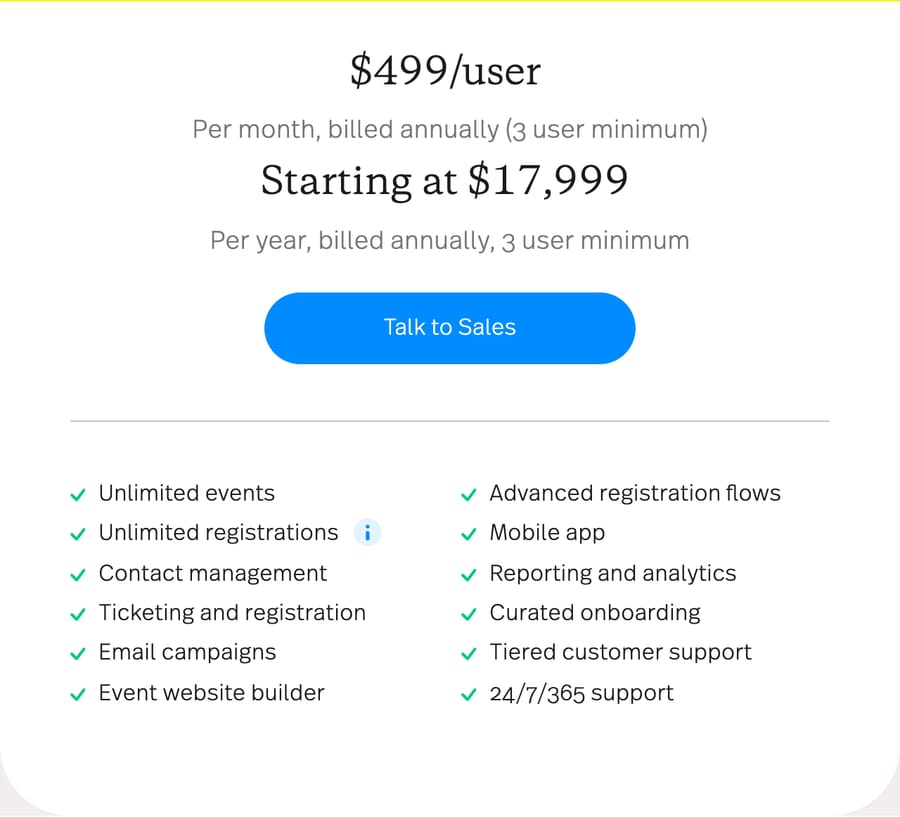
Bizzabo publishes "$499/user per month, billed annually (3 user minimum)," which it summarizes as "starting at $17,999 per year," with unlimited registrations and no per-ticket fee. Onsite check-in is self-service or staffed; badge printing is an add-on, its Klik wearables are priced separately, and CRM integrations with HubSpot, Marketo, Salesforce and Eloqua are add-ons too. Payment processing, payouts, free events and seating aren't on the pricing page.
It's last on a list ranked by ticket fees because it isn't selling ticket fees; it's selling a conference platform, and a $17,999 floor is the wrong shape for a one-off event. It earns a place because it prints a price at all, which is more than Cvent does.
Who handles attendee emails, refunds and check-in on each platform?
Selling the ticket is the short part. The emails start the day sales open: "I bought two tickets and only got one," "can I move to Saturday," "I can't make it, refund me." On eight of these ten platforms, the vendor's support team serves you, the organizer, and the attendee's email comes to you.
| Platform | Who answers the attendee | Refunds | Check-in |
|---|---|---|---|
| Ticket Tailor | You | Through your own Stripe, PayPal or Square | Free check-in app and scanner support |
| TicketSpice | You | Not described on the pricing page | QR scanning plus a box office app |
| Tix | Tix lists a buyer order-help address and 24/7 support | Not described on the pricing page | TixScan barcode app on iOS |
| Humanitix | You, via buyer enquiry notifications | Not described on the pricing page | Scanning app on every plan |
| Eventbrite | Eventbrite's attendee help center, then you | Your refund policy, set per event | Organizer app with mobile check-in |
| Universe | Buyers change date and time themselves under your rules, then you | Organizer issues full or partial refunds | BoxOffice app scans and sells on every tier |
| RSVPify | You, with organizer support by email and live chat | Not described on the pricing page | Check-in suite with QR scanning; self check-in kiosk on Enterprise |
| Brushfire | You | Not described on the pricing page | Not described on the pricing page |
| Eventcombo | You; its 24/7 team supports organizers | Not described | Check-in and badging on Business and above |
| Bizzabo | You | Not described | Self-service or staffed check-in; badge printing is an add-on |
The cheapest platforms (Ticket Tailor, TicketSpice) keep their fee low partly by handing you the attendee inbox, and the one vendor that advertises help for buyers, Tix, charges $1.50 a ticket, roughly twice Ticket Tailor's prepaid rate. Universe's rule-based date changes are the only feature here that removes a category of email rather than routing it.
Where does this fit with support ticketing?
Teams that sell tickets still answer attendee emails, and most do it from a help desk such as Zendesk, Freshdesk, Gorgias, Front, HubSpot or Intercom; Macha runs AI agents on that help desk (its Zendesk integration is the usual starting point) to answer the order, refund and "where is my ticket" emails inside the ticket, and our support ticketing guide covers that side.
Frequently asked questions
What is the cheapest event ticketing platform? On our 500-ticket, $40 scenario with every fee absorbed, Ticket Tailor at $1,030 using prepaid credits, then TicketSpice at $1,225 and Tix at $1,480 with your own payment gateway. Universe's $795 service fee is lower still, but its page doesn't print a processing rate, so the full total is unknown.
Which event ticketing software is free for free events? Eventbrite (unlimited), Humanitix, Universe and Ticket Tailor (up to 2,000 free tickets a year by its FAQ, 5,000 by its pricing block) charge nothing for free tickets. TicketSpice is free for free events if you also run paid ones, Brushfire only on its Attractions and Education plans, and RSVPify's free plan stops at 100 registrations a month.
How much does Eventbrite charge per ticket? 3.7% plus $1.79 per paid ticket in service fees, plus 2.9% per order in payment processing, as of 20 October 2026. Buyers pay these at checkout by default; the organizer can absorb them. On a $40 ticket that's $4.43.
How long do event ticketing platforms take to pay out? Eventbrite pays three business days after the event ends, Humanitix within five business days after the event, TicketSpice weekly, RSVPify as fast as every business day, and Tix within 48 to 72 hours if you use your own merchant account. Ticket Tailor doesn't hold your money at all; it goes to your own Stripe, PayPal or Square account as buyers pay.
Is Eventcombo good for event ticketing? It depends on volume. Eventcombo charges a subscription from $640 a month with no percentage fee on tickets, so a team running events every month can pay less than it would on per-ticket fees. For an occasional event the subscription outweighs any per-ticket platform here, and the flat processing fee its FAQ mentions isn't priced on the page.
Why aren't Cvent and Hopin on this list? Cvent's pricing page offers Professional and Enterprise packages through a quote form with no dollar figure. Hopin's events product became RingCentral Events, whose pricing page returns a 404 and whose /events/ address now shows RingCentral's own webinar listings. We only rank platforms with a published fee.
If the attendee emails behind your events land in a help desk such as Zendesk, Freshdesk, Gorgias, Front, HubSpot or Intercom, you can start a Macha trial with $50 of free usage and no card to handle that queue; the pricing page has the plans after that.
Sources: Eventbrite pricing · Eventbrite event payouts · Ticket Tailor pricing · Humanitix pricing · Humanitix payouts · Eventcombo pricing · Eventcombo customer support · Tix · Bizzabo pricing · RSVPify ticketing pricing · Universe pricing · Brushfire pricing · TicketSpice pricing · Cvent pricing · Ticket Tailor on G2 · TicketSpice on G2 · Tix on G2 · Humanitix on G2 · Eventbrite on G2






