





 Shopify
 Stripe
 Slack
Slack Notion
 Google Workspace
 Confluence

How Do You Build an AI Support Agent with Gemini and Google's ADK? (2026)


You build a Gemini support agent with Google's open-source Agent Development Kit, which wraps your Python functions as tools and runs Gemini's function-calling loop. The help-desk connection, 24/7 hosting and evaluation are still yours to build, or to hand to a platform.
Key takeaways
- Google's Agent Development Kit, installed with pip install google-adk, turns plain functions into tools and runs the Gemini function-calling loop for a support agent.
- Google's ADK ships for Python, TypeScript, Go, Java and Kotlin, and deploys to Cloud Run, GKE or Agent Runtime on the Gemini Enterprise Agent Platform.
- Google now limits the Gemini 2.5 models, including gemini-2.5-pro, to earlier users, so a new ADK support agent should start on a Gemini 3 model such as gemini-3.8-flash.
- A Gemini and ADK support agent still needs a help-desk client, a per-ticket webhook, 24/7 hosting and an evaluation set of real tickets built by your team.
- Macha does not run Gemini: its agents use OpenAI or Claude models with GPT-5.4 as the default, on one plan starting at $299/mo for up to 750 tickets.

To build an AI support agent with Gemini, write it with Google's open-source Agent Development Kit (ADK): pip install google-adk, define Python functions for customer lookup, help-center search and ticket replies, and hand them to an Agent running a model such as gemini-3.8-flash. ADK runs the function-calling loop and multi-agent handoffs; the help-desk connection, the webhook, 24/7 hosting and evaluation are still yours to build or buy.
| Path | What you get | What's left for you |
|---|---|---|
| Gemini app | A chat assistant | Everything: it can't sit on your help desk |
| Gemini API + ADK, self-hosted | Agent loop, tools, multi-agent graphs | Help-desk client, webhook, hosting, evals |
| ADK on Google Cloud (Cloud Run, GKE, Agent Runtime) | Managed deploy, auth, tracing | Help-desk client, webhook, evals, a GCP commitment |
| Support agent platform (Macha) | Help-desk connectors, hosting, analytics, simulations | Instructions and tools; Gemini isn't in Macha's model line-up |
What does a support agent have to do?
The job is a loop: understand the ticket, fetch context (customer, orders, the right help-center article) via function calls, act (reply, tag, escalate), and know when to hand off. Gemini reasons; ADK runs the loop. (Weighing build-vs-buy first? See our AI agents for customer service overview.)
How do you build it with the Agent Development Kit?
Google's ADK is the code-first way to build on Gemini. It ships for Python, TypeScript, Go, Java and Kotlin, with a tool ecosystem and multi-agent orchestration. Install it (pip install google-adk) and a support agent is compact:
from google.adk.agents import Agent

def get_customer(email: str) -> dict:
    """Look up a customer by email."""
    return db.get_customer(email)

def search_kb(query: str) -> list[str]:
    """Return the top help-center passages for a query."""
    return kb.search(query, k=3)

def reply_to_ticket(ticket_id: str, body: str) -> dict:
    """Post a public reply on a ticket."""
    return zendesk.reply(ticket_id, body)

support_agent = Agent(
    name="support",
    model="gemini-3.8-flash",
    instruction=("You are Acme's support agent. Answer from the help center; "
                 "escalate refunds over $100 to a human."),
    tools=[get_customer, search_kb, reply_to_ticket],
)
ADK wraps your plain Python functions as tools automatically, runs the Gemini function-calling loop, and lets you compose a team of agents (a triage agent delegating to billing and shipping specialists). That last part is its real strength. The ADK docs on Google Cloud and Gemini function calling are the primary references.
On the model: Google's models page now limits the 2.5 models, including gemini-2.5-pro, to users who have used them before, so a new build should start on a Gemini 3 model. Gemini 3.1 Pro is still a preview, so a stable Flash model is the safer default. To run the agent on live tickets you still wrap it in a trigger: a webhook your help desk calls for each new ticket.
What do Gemini and ADK still leave you to own?
ADK gives you the loop, tools, and multi-agent orchestration. The remainder:
- Connect your help desk. A production agent needs a real Zendesk, Freshdesk or Intercom client (OAuth, pagination, rate limits) and a webhook that fires per ticket, with signature verification and idempotency. Yours to build.
- Host and run it 24/7. ADK lists three deploy targets: Cloud Run, GKE, and Agent Runtime, the managed option on Google's Gemini Enterprise Agent Platform with built-in auth and Cloud Trace. The managed routes are a Google Cloud commitment (IAM, the GCP bill, the learning curve). Self-hosting is real infra either way.
- Evaluate it. ADK has eval hooks, but you still build the test set of real tickets and decide what "good" means.
- Maintain it. Model updates, help-desk API changes, KB re-indexing. Google also reshapes this stack fast: the docs that sat under Vertex AI Agent Builder now live under Gemini Enterprise Agent Platform, and the managed runtime is now called Agent Runtime.

What does a platform take off your plate?
If the goal is resolving tickets rather than owning an agent framework, a platform replaces the plumbing. One thing to know first: Macha doesn't run Gemini. You pick a model per agent from OpenAI (GPT-5.4 is the default, plus the open-weight GPT OSS models) and Anthropic's Claude, so choosing Macha means leaving Gemini as the reasoning model. What you get in exchange:
- Help-desk-native + any API: connect Zendesk, Freshdesk, Gorgias, Front, HubSpot or Intercom as a native connector. Custom Tools turn any REST API into an agent capability from a sentence, so there's no client or webhook to host. If you've already put a Gemini-powered service behind an HTTP endpoint, a custom tool can call it.
- Run + observe: agents run in the cloud, triggered by tickets, and agent analytics show every run and tool call.
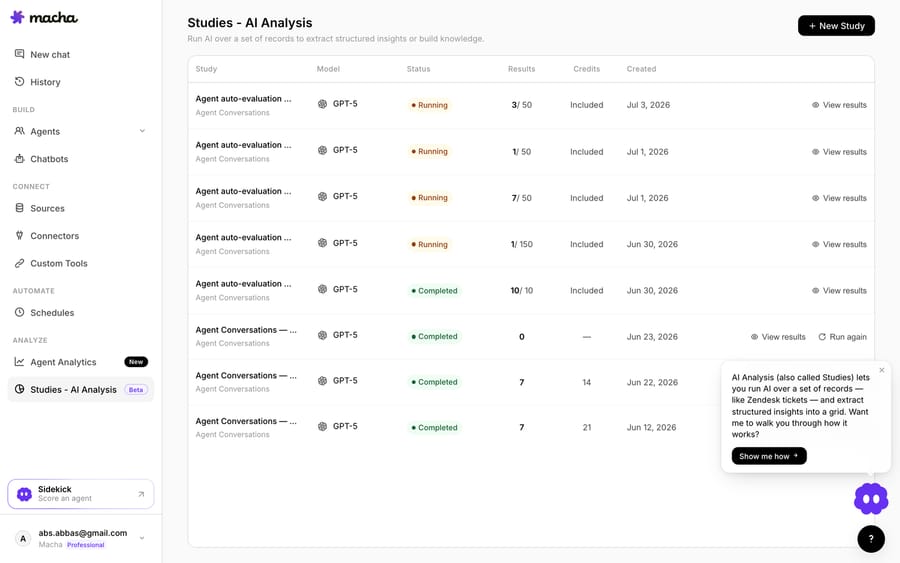
- Test before customers see it: Agent Simulations replay real historical tickets through the agent and score the replies, so a change is measured, not guessed. Studies then track how the live agent performs against its instructions.
How does Gemini + ADK compare with a platform?
| Concern | Gemini + ADK from scratch | Macha |
|---|---|---|
| Model | Gemini | GPT-5.4 by default, or Claude or GPT OSS (no Gemini) |
| Agent loop + multi-agent | ADK (yours to build with) | Built in, with sub-agents |
| Help-desk + API tools | You build the client + webhook | Native connector or Custom Tools |
| Hosting 24/7 | Self-host, or Cloud Run / GKE / Agent Runtime on GCP | Runs in Macha's cloud |
| Observability + eval | ADK eval hooks + your own harness | Agent analytics + Agent Simulations |
| Cost | Gemini API usage + GCP + engineering time | From $299/mo for up to 750 tickets |
So which should you build?
Build with ADK if Gemini is a hard requirement, you want code-first control over multi-agent graphs, or you're already on Google Cloud and want agents governed on the Gemini Enterprise Agent Platform. It does that well. (See our from-scratch vs. platform breakdown.) Choose a platform when resolving support is the goal and you'd rather not own the help-desk plumbing, hosting and eval stack. On Macha that means one plan priced by ticket volume, $299/mo for up to 750 tickets with setup and monitoring by the Macha team included, and you can start free and connect your help desk in minutes.
FAQ
Can I build a support agent in the Gemini app? No. The consumer Gemini app can't sit on your help desk and act on tickets. A real support agent is built on the Gemini API (with ADK) or on a platform.
Do I need Google Cloud / Vertex to use ADK? No. ADK itself is open source and runs anywhere; you only need Google Cloud for the managed deploy targets (Cloud Run, GKE, Agent Runtime) and the platform's governance. You can call Gemini through the API without going all-in on GCP.
Can I run Gemini on Macha? Not today. Macha agents run on OpenAI models (including the open-weight GPT OSS models) or Anthropic Claude, with GPT-5.4 as the default. A custom tool can still call your own Gemini-backed endpoint if you've built one.
Does Claude Code or Codex build the whole ADK agent? They'll scaffold the tools and agent graph fast. They won't make the product decisions or host, monitor and evaluate the agent in production.
How do I know it's good before it touches customers? Grade it against real historical tickets with automated scoring, and re-run before every change: with ADK's eval hooks plus your own harness, or with a platform's ticket replays such as Macha's Agent Simulations.






