





 Shopify
 Stripe
 Slack
Slack Notion
 Google Workspace
 Confluence

How Do You Build an AI Support Agent with ChatGPT and OpenAI? (2026)


A custom GPT only runs when someone chats with it, so an AI agent that works your support queue unattended is built on the OpenAI API with the Agents SDK and Responses API. The model and agent loop are well covered by OpenAI; the help-desk connection, hosting and evaluation are the work that remains.
Key takeaways
- An AI support agent built with ChatGPT's models runs on the OpenAI API's Agents SDK and Responses API, because a custom GPT only runs when someone chats with it.
- The OpenAI Agents SDK provides Agents, Handoffs and Guardrails as core primitives, adds Sessions and built-in Tracing, and uses the Responses API by default.
- An Agents SDK build still leaves the help-desk connection, 24/7 hosting, per-ticket cost tracking and alerting, evaluation on real tickets, and ongoing maintenance to the team.
- Codex, OpenAI's coding agent, can scaffold function schemas, Agents SDK wiring and a help-desk API client, but it does not choose the tools, handoffs or escalation rules.
- Macha runs OpenAI-model agents on a team's existing help desk, grades them with Agent Evaluation and Simulations, and starts at $299 a month for 750 tickets.

To build an AI support agent with ChatGPT's models, build on the OpenAI API, not a custom GPT: the Agents SDK gives you agents, handoffs and guardrails (plus sessions and tracing) and runs on the Responses API by default, and you add function calls to your help desk and file search over your help center. What OpenAI does not give you is the help-desk connection, 24/7 hosting, evaluation and upkeep, which you build yourself or get from a platform.
| Path | What you get | Runs on your help desk unattended? |
|---|---|---|
| Custom GPT in ChatGPT | A chat assistant with instructions, files and actions | No; it only runs when someone chats with it |
| Raw Responses API | Model calls with function calling and built-in tools | Yes, once you build the loop, hosting and webhooks |
| Agents SDK | The agent loop, handoffs, guardrails, sessions, tracing | Yes, once you build hosting, help-desk clients and evals |
| OpenAI models on an agent platform | Help-desk connectors, hosting, analytics, grading | Yes, out of the box |
What does a support agent actually have to do?
A support agent is a loop with four jobs: understand the ticket and its history; fetch context (customer, orders, past tickets, the right help-center article) through tool/function calls; act (draft a reply, tag/route, refund, escalate); and know when to stop — answer confidently or hand to a human. OpenAI gives you strong primitives for the first two; the rest is on you or a platform. (If you're still weighing build-vs-buy, our overview of AI agents for customer service covers the landscape first.)
How do you build it from scratch with the OpenAI Agents SDK?
OpenAI's stack gets you further out of the box than a raw model call. The Agents SDK is a lightweight runtime around the model with three primitives that map onto support: Agents (a model plus instructions and tools), Handoffs (one agent delegates to another, e.g. a triage agent routes billing questions to a billing agent), and Guardrails (validate inputs and outputs). It adds Sessions for conversation memory and built-in Tracing for debugging runs. It uses the Responses API by default, OpenAI's interface that puts function calling and built-in tools (web search, file search, remote MCP servers, shell, computer use and more) into one call. OpenAI even ships an official customer-service demo built on it.
In practice, a from-scratch support agent with OpenAI looks like:
- Define your functions —
get_customer,get_recent_orders,reply_to_ticket,escalate— each a schema the model can call. OpenAI's function calling handles the request/return contract. - Ground it — drop your help-center articles into file search so the agent answers FAQs from your content instead of inventing policy. For anything beyond basic retrieval you'll still build proper RAG.
- Compose agents — a triage agent with Handoffs to specialist agents (billing, shipping, technical) is the SDK's sweet spot for support.
- Add guardrails — validate that the agent isn't leaking PII, answering off-topic, or taking an action it shouldn't.
In code, that's compact — the SDK owns the loop, so you declare agents, tools, and handoffs:
from agents import Agent, Runner, function_tool

@function_tool
def get_customer(email: str) -> dict:
    """Look up a customer by email."""
    ...  # your DB / help-desk API

billing = Agent(name="Billing", instructions="Resolve billing issues.", tools=[refund])
triage = Agent(
    name="Triage",
    instructions="Answer support tickets from the help center; hand off billing.",
    tools=[get_customer, reply_to_ticket],
    handoffs=[billing],
)
result = Runner.run_sync(triage, ticket_text)   # SDK runs the tool loop for you
Because the SDK owns the run-loop, you write far less orchestration than with raw calls. That's real leverage — steps 1–4 above are genuinely faster on OpenAI than hand-rolling. But it's also where the tutorials stop, and it's the smaller part of a production system.
Where does Codex help?
Codex (OpenAI's coding agent, the counterpart to Claude Code) is excellent for the scaffolding: generating the function schemas, the Agents SDK wiring, the help-desk API client, and the tests. Describe the agent — "scaffold an Agents SDK support agent with Zendesk ticket functions and file search over our help center" — and let Codex write the first pass, then refine. It compresses the coding; it doesn't make the design calls (which tools, which handoffs, when to escalate) or run the thing in production.
What do the quickstarts skip?
The Agents SDK handles the loop, handoffs, guardrail primitives and traces, and file search covers basic FAQ grounding. Here's what it does not do, and what you still own:
- Connect your help desk (still yours). The agent needs to read tickets and post replies via Zendesk / Freshdesk / Intercom / your platform's REST API — OAuth and token refresh, pagination, rate limits, and webhooks to trigger the agent on each new ticket (with signature verification and idempotency so a retried webhook doesn't double-reply). Every internal system it touches — orders, billing — is another client you build.
- Host and run it 24/7 (still yours). A quickstart runs locally; a support agent runs always. You need a cloud host, secrets management, a job queue with retries and a dead-letter queue, and autoscaling for ticket spikes.
- Observe it (partly yours). The SDK's built-in tracing records which functions ran and what the agent decided. Tying a trace to the ticket it touched, tracking cost per ticket, and alerting someone when it sends a bad reply overnight is still your code.
- Evaluate it (still yours). The SDK won't tell you if the agent is right. You need an eval harness: real historical tickets, automated scoring (resolution, accuracy, tone, correct escalation), and a regression run before every prompt or model change.
- Maintain it (forever). Models get deprecated, your help desk changes its API, the help center drifts and file search needs re-indexing, and someone owns the pager.
That list is most of the work in a production support agent, and none of it is specific to your business: it's infrastructure every team rebuilds.
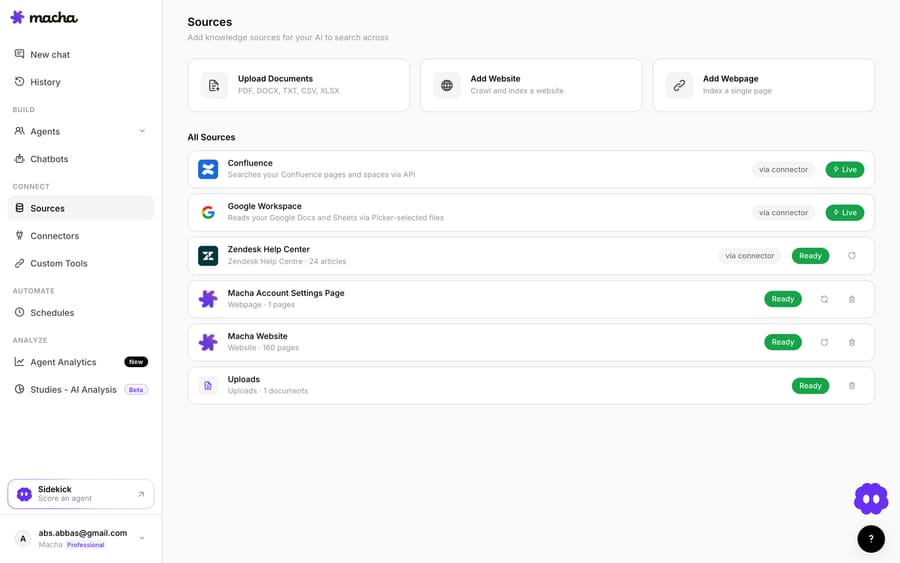
How do you run an OpenAI agent without building the plumbing?
You've built the agent's brain with the Agents SDK. Macha is the layer for the body — the connect → deploy → monitor → grade infrastructure — so you're not rebuilding it:
- Connect your help desk and any API. Macha's Custom Tools turn any REST API into a tool your agent can call — define the endpoint and auth, or describe it in a sentence and the AI tool builder discovers, tests, and creates the tools. Macha runs on Zendesk, Freshdesk, Gorgias, Front, HubSpot or Intercom, each a native connector with ticket read and write tools and triggers; internal systems plug in through Custom Tools, with no client library or webhook plumbing to write.
- Ground it — attach your help-center as a knowledge source; retrieval is handled, so you're not maintaining a file-search index.
- Run and observe — agents run in the cloud, triggered by tickets, with agent analytics showing every run and tool call out of the box.
- Grade it: Agent Evaluation has an AI judge grade the agent's real conversations against your checklist, and Agent Simulations replay past tickets through a changed agent without sending a reply, graded by the same judge, so a prompt or model change is measured, not guessed.
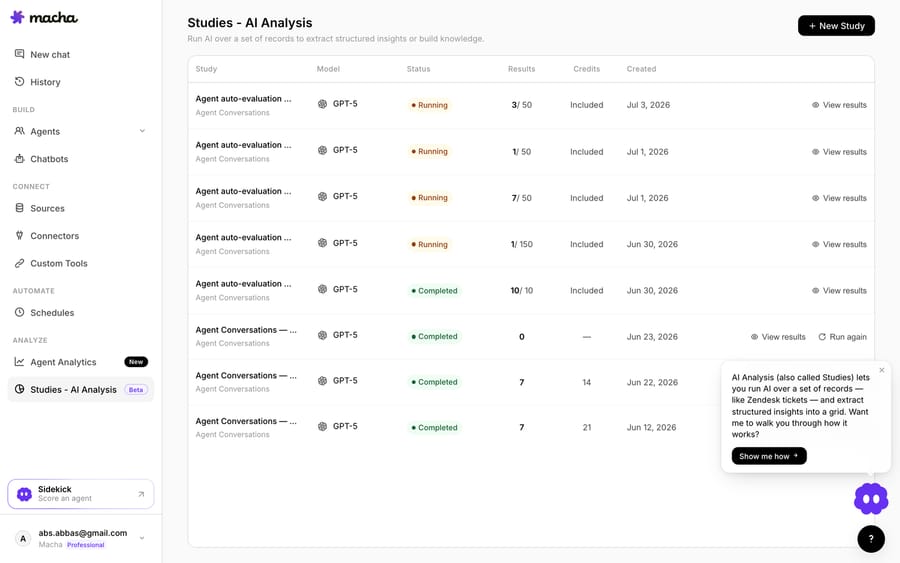
The trade is control for time-to-ship: from-scratch is a well-tooled brain plus weeks of body-building and permanent maintenance; a platform is live this week with the infrastructure owned for you.
How does a from-scratch build compare with a platform?
| Step | OpenAI Agents SDK from scratch | OpenAI + Macha |
|---|---|---|
| Model | GPT (your choice) | GPT (your choice) |
| Agent loop / handoffs / guardrails | Built into the SDK | Built in |
| FAQ grounding | File search (you index) | Attach sources; handled |
| Help-desk + API tools | You build every client + webhooks | Native connector or Custom Tools |
| Hosting 24/7 | Your infra + queue + autoscale | Runs in the cloud |
| Observability | SDK traces; ticket links, cost and alerting you build | Agent analytics |
| Evaluation | You build an eval harness | Agent Evaluation + Simulations |
| Price | OpenAI usage + your infra + engineering time | From $299/mo for 750 tickets, setup included |
| Time to production | Weeks + ongoing | Days |
So which should you build?
Build from scratch if the agent runtime is your product, you need multi-agent orchestration OpenAI's SDK models especially well, or you have constraints (on-prem, data-residency) a SaaS can't meet. (For a fuller side-by-side, see our from-scratch vs. platform breakdown.) Use a platform if resolving support well is the goal: you want it live this week, grounded in your help desk, and measurable from day one, without owning the hosting-observability-eval stack forever. Either way OpenAI is the same strong brain — the question is how much body you want to build. You can start free on Macha with $50 of usage and no credit card, and wire your first tool the same day.
FAQ
Can I build a support agent inside ChatGPT itself (a custom GPT)? Not a real one. Custom GPTs run in ChatGPT's sandbox and can't sit on your help desk and act on tickets unattended. A production support agent is built on the OpenAI API (Agents SDK / Responses API) or a platform — not the ChatGPT product.
Agents SDK or raw Responses API? Use the Agents SDK unless you have a reason not to — it gives you the loop, handoffs, and guardrails so you're not re-implementing orchestration. Drop to raw Responses API only for full control.
Does Codex build the whole thing? Codex is great for the code — schemas, SDK wiring, a first-pass API client, the eval-harness skeleton. It won't make product decisions (tools, handoffs, escalation) or host, monitor, and evaluate the agent in production.
How do I know it's good before it touches customers? Grade it against real historical tickets with automated scoring, and re-run that before every prompt or model change — whether you build the harness or use something like Macha's Agent Evaluation and Simulations.
Does the Agents SDK include tracing? Yes. The SDK has built-in tracing for visualizing and debugging agent runs. What it doesn't do is connect those traces to your help desk tickets, costs per ticket, or alerting; that part you still build.






