Shopify
 Stripe
 Slack
 Notion
 Google Workspace
 Confluence


How Much Does Crisp Cost in 2026? Plans, Seats, Hugo AI Credits and Real Monthly Bills


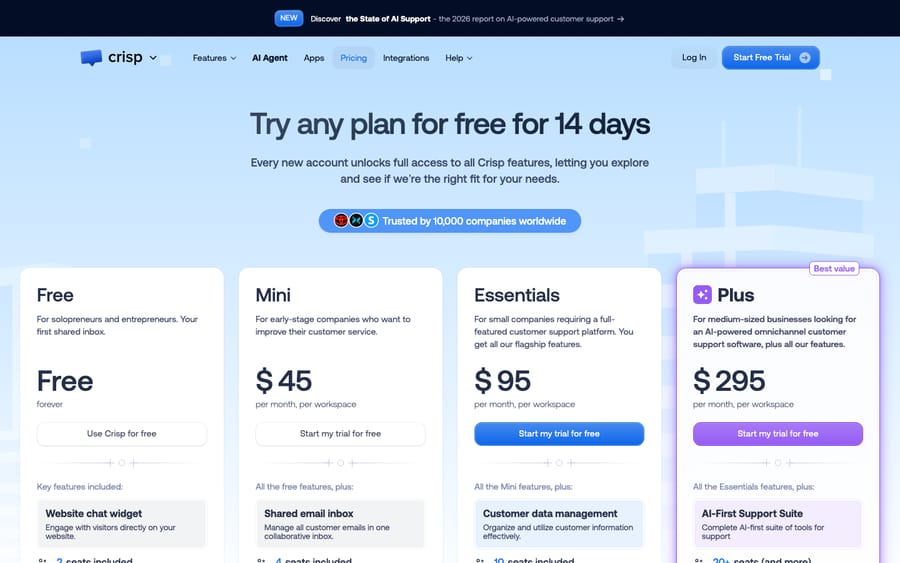
Crisp costs $0, $45, $95 or $295 a month per workspace in November 2026, for the Free, Mini, Essentials and Plus plans, with Enterprise priced on request. Each plan includes a fixed number of seats (2, 4, 10 and 20) and, on paid plans, a monthly Hugo AI credit of $5, $25 or $75. Extra agents are listed at $10 a month each on Plus, and AI usage past the credit runs on pay-as-you-go at a rate Crisp doesn't publish. Below are the plans, what each one unlocks, and four worked monthly bills.
Key takeaways
- Crisp prices its Free, Mini, Essentials and Plus plans at $0, $45, $95 and $295 a month per workspace, not per seat, with 2, 4, 10 and 20 seats included.
- Crisp's pricing page lists additional agents at $10 a month on the Plus plan only, and shows no per-seat add-on for Free, Mini or Essentials.
- Paid Crisp plans include Hugo AI credit of $5, $25 or $75 a month, which Crisp estimates at about 90, 450 and 1,350 automated conversations.
- A 25-person team on Crisp Plus pays $345 a month before any AI overage: $295 for the plan plus five additional agents at $10 each.
- Crisp's billing guide says Hugo stops answering when credits run out unless pay-as-you-go is on, and pay-as-you-go may be unavailable during the 14-day trial.
| Plan | Price a month (per workspace) | Seats | Customer profiles | AI credit | Best for |
|---|---|---|---|---|---|
| Free | $0 | 2 | 100 | None | A website chat widget and nothing else |
| Mini | $45 | 4 | 5,000 | $5 (about 90 AI conversations) | Small teams adding email to chat |
| Essentials | $95 | 10 | 50,000 | $25 (about 450) | Omnichannel inbox, knowledge base, AI chatbot |
| Plus | $295 | 20+ | 200,000 | $75 (about 1,350) | Ticketing, task automations, 100+ integrations |
| Enterprise | Custom | Custom | Custom | Custom | SLA, onboarding, team training |
All figures are from Crisp's pricing page, read November 21, 2026. Prices exclude VAT, and Crisp says EU businesses can enter a VAT number to remove it.
How much does Crisp cost per month?
Crisp charges per workspace. A workspace is one Crisp account with its own inbox, chat widget and settings, and the price covers a bundle of seats rather than one person. That's the main thing that separates Crisp's bill from per-agent help desks: Freshdesk's Growth plan, for comparison, is priced per agent (see our Freshdesk pricing breakdown), so ten agents cost ten times one agent. On Crisp Essentials, one agent and ten agents both cost $95.
The flip side is that you pay for the bundle whether you use it or not. A three-person team on Essentials pays for ten seats. Crisp's incentive is clear from the plan shape: the seat bundles and the profile caps (100, 5,000, 50,000, 200,000 customer profiles) step up together, so the plan you outgrow first, seats or profiles, is the one that moves you up a tier.
Crisp offers a 14-day trial of every feature with no card. There's no annual price on the pricing page. Crisp says you can turn on yearly payment from the Plans page after subscribing, but it doesn't publish the discount, so treat the monthly figures as the list price.
What does each Crisp plan include?
Free at $0
The Free plan covers a website chat widget, a shared inbox, mobile apps, chat SDKs, contact forms, e-commerce integrations and push notifications, for 2 seats and 100 customer profiles. It includes no AI credit. Reviewers on Trustpilot in May 2026 complained that auto-replies, away messages and AI features are locked behind paid plans, which matches the pricing page. If the paid plans are out of reach, our list of free Crisp alternatives covers tools that keep more on a $0 tier.
Mini at $45 a month
Mini adds a shared email inbox, shortcuts, chat triggers, private notes, a custom email domain, unlimited data retention and internal search, for 4 seats and 5,000 profiles, plus $5 of Hugo credit. Crisp's limits article says Free and Mini workspaces must upgrade before they can raise limits, so a fifth teammate on Mini means moving to Essentials rather than buying one seat.
Essentials at $95 a month
Essentials is Crisp's main plan. It adds customer data management, the omnichannel inbox (WhatsApp Business and Instagram DMs alongside chat and email), the workflow automation builder, an omnichannel AI chatbot, a knowledge base, analytics, and routing and assignment rules. It includes 10 seats, 50,000 profiles, 2 sub-inboxes and $25 of AI credit. Crisp's help center says Magic Browse, its co-browsing feature, is available on Essentials and Plus.
Plus at $295 a month
Plus adds what Crisp calls the AI-First Support Suite, unlimited task automations (Hugo running actions through connected tools), a ticketing system, 100+ integrations, white labeling, enhanced API rate limits and advanced analytics with custom dashboards. It includes 20 seats, 200,000 profiles, 5 sub-inboxes and $75 of AI credit. Crisp's limits article says sub-inbox limits can be changed only on Plus.
Enterprise
Enterprise is quote-only, with dedicated onboarding, a personalized SLA and team training. Crisp asks you to book a demo for it.
How much do extra seats and workspaces cost?
Crisp's pricing table lists "Additional agents (per month)" at $10 on Plus, and shows a cross for Free, Mini and Essentials. Crisp's limits and quotas article (updated October 26, 2026) says owners on Essentials or higher can raise limits, including the inbox operators limit, under Settings, Workspace Settings, Data, Limits and Legal, then Limits and Quotas Usage, billed monthly with the subscription. It doesn't publish a price for doing that on Essentials, and the pricing page's FAQ says "more than 20 agents in your inbox" is one of the extras that can cost more.
That gives this seat curve:
| Team size | Cheapest published Crisp setup | Monthly cost at list price |
|---|---|---|
| 1 to 2 | Free | $0 |
| 3 to 4 | Mini | $45 |
| 5 to 10 | Essentials | $95 |
| 11 to 20 | Plus, or Essentials with a raised operator limit (price not published) | $295 on Plus |
| 25 | Plus plus 5 additional agents | $295 + $50 = $345 |
| 40 | Plus plus 20 additional agents | $295 + $200 = $495 |
Divide each plan by its seats when full and the per-seat price isn't monotonic: Mini works out to $11.25 a seat, Essentials $9.50, Plus $14.75, and a 25-seat Plus team $13.80, because each $10 add-on is cheaper than Plus's bundled seats. Essentials is the best value per seat Crisp sells. The jump from 10 to 11 seats is the expensive step in Crisp's pricing: the published route goes from $95 to $295. If your eleventh hire is near, ask Crisp what raising the operator limit on Essentials costs before you upgrade.
Multiple workspaces are priced separately. Crisp offers 20% off for 3 additional workspaces on Essentials and Plus, and a 50% discount for nonprofits and students through its sales chat. A brand that runs separate inboxes for two stores pays for two workspaces.
How much does Hugo AI cost on Crisp?
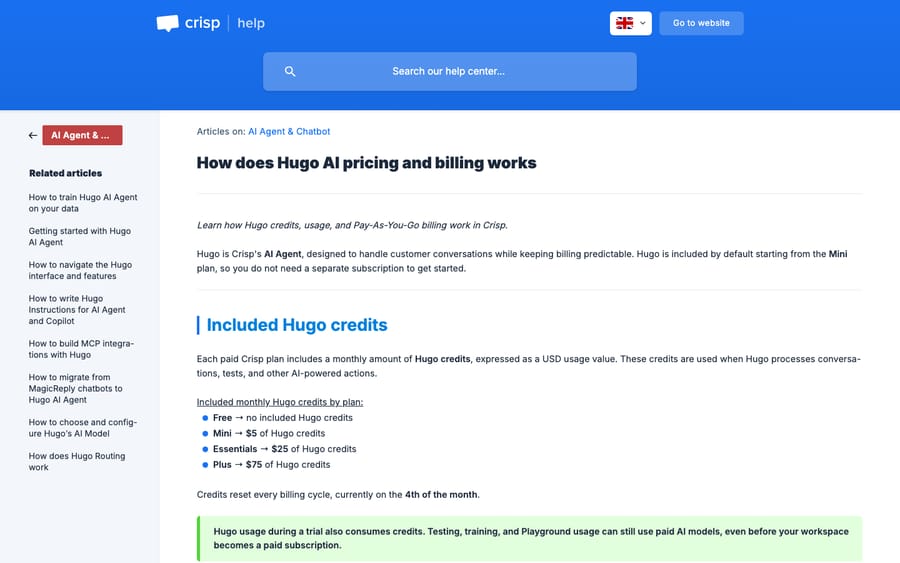
Hugo, Crisp's AI agent, is paid from the plan's monthly credit. Crisp's Hugo billing guide (updated November 1, 2026) says the credits are token-based, that a conversation "is not billed per message," and that a full Hugo-handled conversation averages $0.05 to $0.10. The plan estimates (90, 450, 1,350) all assume about $0.056 a conversation, the low end of that range. Our guide to how Hugo credits are spent walks through what draws them down and how fast.
Four rules from that guide shape the bill:
- Credits reset on the 4th of the month, every billing cycle. The guide doesn't describe carrying unused credit over.
- When credits run out, Hugo stops. Without pay-as-you-go, Hugo stops answering automatically and incoming conversations go to human operators.
- Pay-as-you-go has a limit you set but no published rate. You enable it under AI Agent, Billing, Pay As You Go.
- Testing costs credits. Testing, training and Playground usage can use paid AI models, and pay-as-you-go may be unavailable until a trial ends.
There's a tension in that model worth naming. Crisp's own pricing FAQ asks "Why would we bill based on consumption (as all others do)" and sells unlimited conversations as "peace of mind at the end of the month." Seats and conversations are flat; AI is metered. Crisp's AI costs scale with every token it sends to a model provider, so metering Hugo protects Crisp's margin while the flat plan keeps the headline simple.
Hugo replaced Crisp's earlier MagicReply chatbot blocks; the billing guide now labels a "legacy MagicReply (Deprecated) workflow block" and says it keeps its own workflow behavior.
Workflows built in Crisp's automation builder don't consume Hugo credits, so rules-based routing costs nothing extra. For the full mechanics of Hugo, see our Crisp AI explainer.
What does a Crisp team really pay each month?
Here are four realistic bills. Seat add-ons use the $10 Plus price, and AI usage past the included credit is priced at Crisp's own $0.05 to $0.10 average per conversation, because Crisp doesn't publish a pay-as-you-go rate. Your real overage depends on your model and knowledge size.
| Team | Plan | Seats | Hugo conversations a month | Plan + seats | AI past included credit | Monthly total |
|---|---|---|---|---|---|---|
| 3-person Shopify store, chat only | Mini | 4 included | 80 | $45 | $0 (within $5) | $45 |
| 8-person SaaS team | Essentials | 10 included | 600 | $95 | 150 × $0.05–$0.10 = $7.50–$15 | $102.50–$110 |
| 14-person support team | Plus | 20 included | 1,200 | $295 | $0 (within $75) | $295 |
| 25-person multi-brand team | Plus | 20 + 5 | 3,000 | $345 | 1,650 × $0.05–$0.10 = $82.50–$165 | $427.50–$510 |
AI is a small part of every Crisp bill: even the 25-person team spends at most $165 on Hugo against $345 for the plan and seats. And seats drive the plan more than AI does. The 14-person team pays $295 because it has more than 10 people, and its 1,200 Hugo conversations happen to fit inside Plus's $75 credit (about 1,350 at Crisp's estimate).
The real risk on a Crisp bill is pay-as-you-go being off. The 8-person team uses its $25 credit after about 450 conversations, around day 23 of a 600-conversation month, and every customer after that waits for a person until the 4th.
A few costs sit outside the table. Crisp's FAQ says paid integrations for specific systems and additional contacts can cost extra. WhatsApp and SMS can carry the messaging provider's own fees, which Crisp doesn't list. And yearly payment, which you switch on from the Plans page after subscribing, is paid up front, which matters if you later want out (see the refund note below).
What should you check before buying Crisp?
- Count seats and profiles. The plan you need is set by whichever runs out first: seats (2, 4, 10, 20) or customer profiles (100, 5,000, 50,000, 200,000).
- Check the channel you need. WhatsApp Business and Instagram DMs sit in the Essentials omnichannel inbox, not Mini.
- Decide on pay-as-you-go before launch. Turn it on with a cap you're comfortable with, or accept that Hugo goes quiet when credits run out.
- Budget for Hugo testing. Playground runs draw on the same credit pool as live conversations.
- Ask for the yearly price, and the operator-limit price. Crisp publishes neither an annual discount nor the cost of raising the operator limit on Essentials.
- Read the refund terms. Two Trustpilot reviews from October 2026 describe refused refunds, one on an annual plan with no renewal reminder. Turn on calendar reminders for renewal dates. Our Crisp review covers the wider pattern in what users praise and complain about.
Where does an AI agent layer like Macha fit on Crisp?
Crisp's price is low, and Hugo's $0.05 to $0.10 a conversation is well below Macha's about $0.40 per ticket. Hugo isn't limited to knowledge-base answers either: Crisp's MCP guide lists checking order and subscription status through 1-Click Shopify, PrestaShop, WooCommerce and Stripe integrations, and those conversations spend the same token-metered credit. If you're happy to set Hugo up and tune it yourself, it's the cheaper tool and you should use it.
Macha fits teams already on Crisp that would rather not build, test and maintain the agent themselves, and teams whose answers live in a system Crisp doesn't integrate with, which the Macha team connects through a custom API tool during onboarding. Macha's agent runs inside your Crisp workspace. It reads the conversation and the customer's profile, replies on their channel or drafts the reply as an internal note for review, tags the conversation with segments, changes its state and routes it to an operator or team. It starts when a new conversation opens or a customer sends a new message, which covers the after-hours chat workflow without anyone logged in.

The pricing model is different from Crisp's credits. Macha charges about $0.40 per ticket (full tiers on the pricing page), one charge per conversation however many messages it takes, with plans from $299/month for 750 tickets. That price includes setup by the Macha team and a dedicated success manager on the trial and every plan: the team analyzes your past conversations, builds the knowledge base and the agent, and runs it in safe mode until the drafts are right. There are no overages: if a month's tickets run out, agents pause until you move up a tier or add a top-up, and nothing is charged without you choosing it. See Macha on Crisp, the Crisp connector's tool list and the done-for-you setup, or start with $50 of free usage (about 125 tickets), no credit card, no time limit.
If you're comparing Crisp against other help desks rather than adding AI to it, our Crisp alternatives roundup covers the options. To see how Crisp's AI pricing sits next to Zendesk, Intercom, Gladly and the rest, read our AI agent pricing by help desk comparison, and our roundup of help desk price increases in 2026 shows which vendors moved their prices this year.
Common questions
How much does Crisp cost?
Crisp costs $0 (Free), $45 (Mini), $95 (Essentials) or $295 (Plus) a month per workspace, and Enterprise is custom. Prices exclude VAT.
Is Crisp priced per seat or per workspace?
Per workspace. Each plan includes a bundle of seats: 2 on Free, 4 on Mini, 10 on Essentials and 20 on Plus. Additional agents are listed at $10 a month on Plus only. Crisp's help center says Essentials owners can raise the operator limit, but no price is published for that.
Does Crisp have a free plan?
Yes. The Free plan includes a website chat widget, shared inbox and mobile apps for 2 seats and 100 customer profiles, with no AI credit.
How long is the Crisp free trial?
14 days, with every feature and no card required. Crisp's AI page also mentions up to 30 days if you configure more advanced features.
Is Hugo AI included in Crisp pricing?
Paid plans include monthly Hugo credit: $5 on Mini, $25 on Essentials and $75 on Plus. Usage past that needs pay-as-you-go, otherwise Hugo stops answering until credits reset on the 4th of the month.
How much does one Crisp AI conversation cost?
Crisp's billing guide puts a full Hugo-handled conversation at about $0.05 to $0.10, depending on the model, length and knowledge size.
Does Crisp offer annual billing?
Crisp says you can enable yearly payment from the Plans page after subscribing, but its pricing page doesn't list an annual price or discount.
Does Crisp offer discounts?
Crisp lists 20% off for 3 additional workspaces on Essentials and Plus, and 50% off for nonprofits and students.
How we researched this
Every Crisp price, seat count, profile cap and plan feature comes from Crisp's pricing page, read and captured on November 21, 2026. The seat-limit rules come from Crisp's limits and quotas article (updated October 26, 2026), the AI billing rules from its Hugo billing guide (updated November 1, 2026), and the Magic Browse plan note from its Magic Browse GDPR article. Refund and free-plan complaints come from Crisp's Trustpilot page, read the same day.
The four monthly bills are our arithmetic, not quotes. We used the $10 additional-agent price only on Plus, where Crisp's table shows it, and priced AI usage past the allowance at Crisp's $0.05 to $0.10 average because no pay-as-you-go rate is published. We checked Crisp's public pages; we haven't been billed by Crisp. Macha's capabilities on Crisp come from Macha's own Crisp connector and integration listing.