





 Shopify
 Stripe
 Slack
Slack Notion
 Google Workspace
 Confluence

How do you build an AI customer support agent without code?


You can build an AI support agent without code in five steps on a dedicated agent platform, usually in hours: give it a role, connect your help desk and docs, add tools by describing an API, test on past tickets, and deploy with human approval. You still want a developer for bespoke orchestration, on-prem hosting or systems with no clean API.
Key takeaways
- Building an AI support agent without code takes five steps on a dedicated agent platform and usually hours, compared with weeks for a coded SDK build.
- Zapier Agents, Make AI Agents and n8n's AI Agent node can choose tools, but teams still build the ticket intake, grounding, escalation and testing themselves.
- Replaying 50 past "where's my order" and refund tickets through a simulation shows whether a no-code agent answers correctly and escalates refunds over $100 before customers see it.
- A safe no-code rollout starts in draft/approve mode, where a human approves each reply, and switches a ticket type to autonomous only after tests and live results prove it.
- Macha's trial gives $50 of free usage, about 125 tickets, with no credit card, and paid pricing starts at $299 a month for up to 750 tickets.

Yes, you can build an AI customer support agent without writing code: on a dedicated agent platform the build is five steps (give the agent a role, connect your help desk and docs, add tools by describing an API, test it on past tickets, then deploy with human approval), and it usually takes hours rather than the weeks a coded SDK build takes. The tool category you pick decides whether you get there.
| Tool type | Examples | Good for | Where it stops |
|---|---|---|---|
| Chatbot / flow builder | Scripted support bots | Deflecting FAQs with decision trees | Can't reason over your systems or handle anything unscripted |
| Workflow automator with AI agents | Zapier Agents, Make AI Agents, n8n's AI Agent node | Connecting apps and firing actions, now with agents that pick tools | You build and maintain the ticket intake, grounding, escalation and testing yourself |
| Dedicated AI support-agent platform | Macha and similar | Reading tickets, calling tools, answering from your docs, escalating | Bespoke orchestration and on-prem hosting |
What can a no-code AI agent do, and what still needs code?
No-code AI agent builders have gotten good. The honest boundaries:
You can, no code: define the agent's role and instructions in plain language; connect your help desk and knowledge base by clicking; add capabilities ("look up an order," "send an email") by describing the API instead of coding a client; test on real examples; and put it on live tickets with a human-approval step.
You'll still want code for: deeply bespoke business logic, a custom multi-agent orchestration you want to own, on-prem or strict data-residency requirements, or an integration with an internal system that has no clean API. For a standard "answer support tickets grounded in our docs and systems" agent, none of that applies, which is why no-code fits support so well. (If you're comparing building vs buying at all, see our AI agents for customer service overview.)
Which kind of no-code tool should you use for a support agent?
"No-code AI agent" covers three different kinds of tool, and picking the wrong category is the most common way people hit a wall halfway:
- Chatbot / flow builders (traditional support bots): you draw decision trees and scripted flows. Good for deflecting FAQs, but they're rules, not an agent. They don't reason over your systems or handle anything you didn't script. Fine as a front-line FAQ widget; not a real support agent. Zingtree is the enterprise version of this approach, and it now runs AI agents inside the decision trees' guardrails.
- Workflow automators (n8n, Zapier, Make): no-code glue for connecting apps and firing actions. All three now ship agents too: Zapier Agents, Make AI Agents and n8n's AI Agent node can reason and choose which tools to call. What they don't give you is the support scaffolding. You assemble the ticket intake, the knowledge grounding, the escalation rules and the testing yourself, and you maintain that pipeline.
- Dedicated AI support-agent platforms: built for this exact job, an LLM agent that reads a ticket, reasons, calls tools, grounds answers in your docs and escalates. This is the category Macha is in, and it's the path walked below.
If your need is "deflect FAQs with a scripted widget," a chatbot builder is simpler. If it's "resolve real tickets by reasoning over our help desk and systems," you want the agent-platform category.
How do you build a support agent without code, step by step?
Here's the path on Macha. The shape is similar on any dedicated agent platform.
1. Create the agent and give it a role
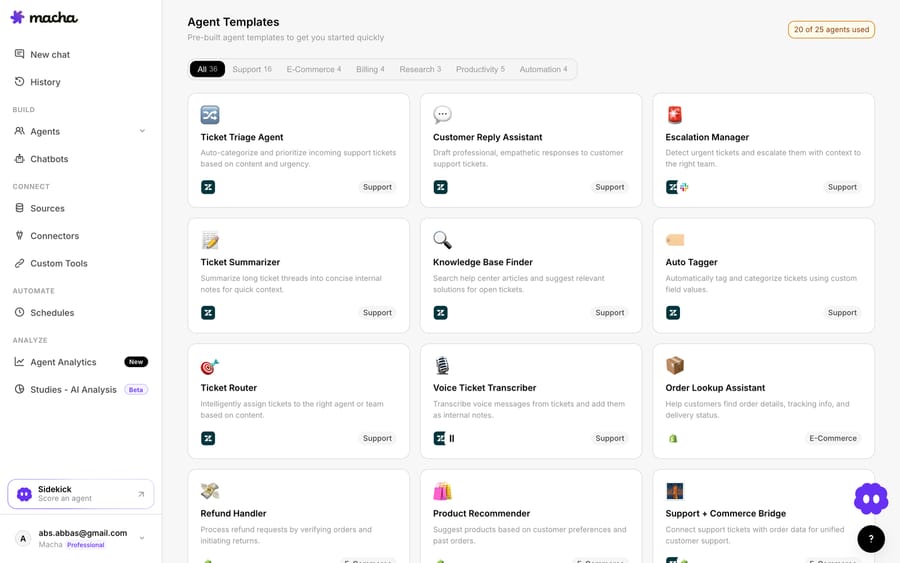
Start from a template, a blank agent, or Macha's Sidekick builder, where you describe the agent and it constructs it. Then write its job in plain language: "You are a support agent for Acme. Answer questions from the help center, look up orders when asked, and escalate anything about refunds over $100 to a human." That instruction is the agent's brain. Macha's docs describe an agent as a junior teammate who knows your tools, so write the rules out explicitly rather than hoping it guesses.
2. Connect your help desk and knowledge
Point the agent at where it works and what it knows. For the Acme agent, that's two clicks: connect Zendesk (an OAuth authorization lets Macha read tickets and post replies) and point Sources at Acme's help center, which Macha indexes so the agent quotes real articles instead of guessing. Macha runs on Zendesk, Freshdesk, Gorgias, Front, HubSpot or Intercom. If your help center is thin, the AI Knowledge Builder drafts a knowledge base from your historical tickets. What was OAuth clients, pagination handling, webhook endpoints and a vector store in a coded build is click-to-connect here.
3. Give it capabilities by describing them
This is the part that used to require a developer. To let the agent do something (check shipping status, issue a credit, look up a subscription) you point Macha's Custom Tools builder at the relevant API and describe what you want: "Connect our orders API and add a tool to get shipping status by order ID." The AI builder creates the tool from that description, and you test it with your credentials. No client library, no code. Common apps such as Shopify, Stripe and Slack are already prebuilt connectors.

4. Test before it touches a customer
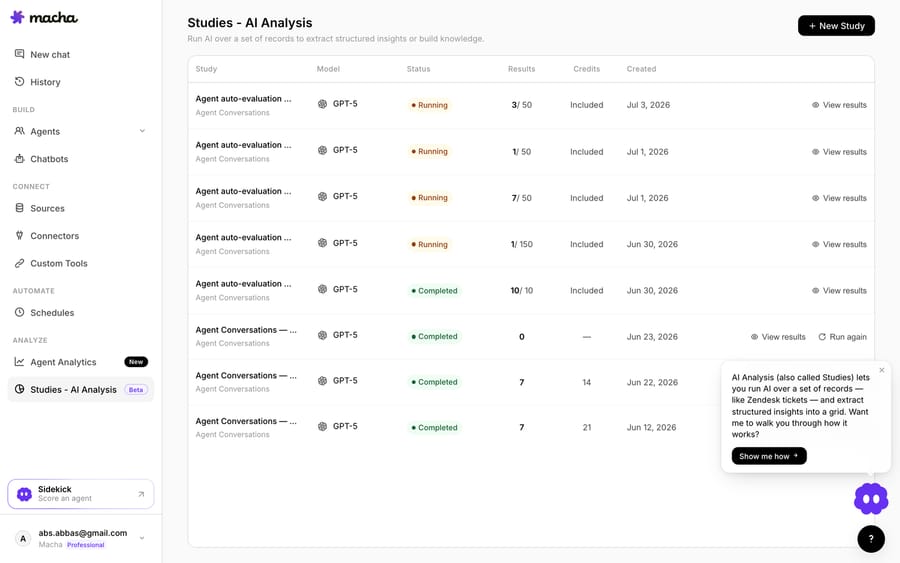
Don't ship on a hunch. Replay a batch of real past tickets through the Acme agent with a simulation, say 50 "where's my order" and refund cases, and check whether it answered correctly and escalated the over-$100 refunds it was told to. Suppose the results show it answered three shipping questions from a stale article: you fix the article, tighten the instruction, and re-run. Once it's live, Studies analyse the agent's performance against its instructions. That's the eval loop a coded build needs a whole test harness for, and here it's a screen.
5. Deploy with a safety net
Start Acme in draft/approve mode: the agent drafts a reply and a human approves it before it sends. Once the simulation and the first live days show it gets shipping questions right, switch those to autonomous while refunds still route to a person. It runs in the cloud, and Agent Analytics shows every run, so you widen its autonomy on evidence, one ticket type at a time.
How does a no-code build compare with coding an agent?
| No-code (e.g. Macha) | Code (SDK / from scratch) | |
|---|---|---|
| Who can build it | Support/ops, no engineer needed | Developers |
| Time to a live agent | Hours | Weeks |
| Connect help desk + docs | Click / describe | Build API clients + retrieval |
| Add a capability | Describe the API | Write + host a tool |
| Custom orchestration / on-prem | Limited | Full control |
| Maintenance | Handled by the platform | Yours forever |
Neither is "better"; they're different jobs. If you need a bespoke runtime you own, write code (our from-scratch vs. platform breakdown covers that path). If you need a support agent live this week that your team can maintain, no-code is the fastest honest route.
What do you actually need to get started?
For a support agent grounded in your help desk and docs, with real lookups and safe escalation: a platform account, your help-center content, and API access to the systems you want the agent to use. No repo, no hosting, no eval harness to build. Macha's trial gives you $50 of free usage (about 125 tickets) with no credit card, and paid pricing starts at $299 a month for up to 750 tickets. You can start free on Macha, connect your help desk, and have a testable agent the same afternoon.
FAQ
Is a no-code agent as capable as a coded one? For standard support (answer from docs, look up and act via APIs, escalate) yes, effectively. The gap shows only in bespoke orchestration, unusual integrations or on-prem constraints, where code wins.
Do I need any technical skill at all? You need to know which of your systems the agent should use and have API access to them (an API key). You don't need to write code; describing the API is enough with an AI tool builder.
Can I start no-code and add code later? Yes. A good platform lets you call your own services as custom tools alongside the no-code ones, so you're not boxed in if one capability needs real code.
How do I make sure it doesn't send a bad reply? Start in draft/approve mode (a human okays each reply), test it against real past tickets first, and only widen autonomy on the ticket types it handles well.
Can Zapier or n8n build a support agent? They can run an AI agent inside a workflow, and Zapier Agents, Make AI Agents and n8n's AI Agent node all choose tools on their own. You still have to build the ticket intake, knowledge grounding, escalation and testing around the agent, which a dedicated support platform provides out of the box.






