





 Shopify
 Stripe
 Slack
Slack Notion
 Google Workspace
 Confluence

How Do You Build an AI Support Agent with Cursor? (2026)


Cursor's Agent can write a customer support agent's tool-use loop, help-desk client and tests inside your own repo in an afternoon. Cursor does not host or run that agent, so production hosting, help-desk webhooks, logging and evaluation stay with you or a platform.
Key takeaways
- Cursor's Agent can scaffold a support agent's tool-use loop, help-desk client and tests in an afternoon, but Cursor does not host or run the agent on live tickets.
- Cursor project rules live in .cursor/rules/ as .mdc files and can pin conventions such as never issuing a refund over $100 without an escalate() call.
- Cursor renamed Background Agents to Cloud Agents, which build and test code in isolated cloud VMs and push the result to a branch for review.
- Cursor Automations start cloud agents on schedules and webhooks for engineering work like PR review, not as a runtime for a customer-facing support agent.
- Running a Cursor-built agent yourself means owning 24/7 hosting, signed help-desk webhooks, run logging and an evaluation harness over historical tickets.

To build an AI support agent with Cursor, open Cursor's Agent (Cmd+I), describe a tool-use loop with tools such as get_customer, search_kb and reply_to_ticket, pin your conventions in a .cursor/rules/ file, and let it write the code and tests in your repo. Cursor then stops: hosting the agent 24/7, triggering it from your help desk, logging it and grading it are yours to build, or a platform's to run.
| Job | Cursor does it? | Who owns it otherwise |
|---|---|---|
| Write the agent loop and tools | Yes (Agent, Rules, MCP) | n/a |
| Write tests and deploy config | Yes | n/a |
| Host it 24/7 on real tickets | No | Your infrastructure or a platform |
| Receive help-desk webhooks | No | Your endpoint or a native connector |
| Log, monitor and grade runs | Writes the code only | You, or a platform's analytics and evals |
What does a support agent built with Cursor actually do?
A support agent is a loop: read the ticket, call tools to fetch context (customer, orders, the right help-center article), act (reply, tag, escalate), and hand off when unsure. Cursor's job is to write that loop and its tools well; running it in production is a separate job. (Weighing build vs. buy first? See our AI agents for customer service overview.)
How do you scaffold the agent with Cursor's Agent?
Cursor's advantage over a plain chatbot is that it's codebase-aware. Agent, Cursor's autonomous editor, searches your repo, edits multiple files and runs terminal commands. You can prompt:
"Build a customer support agent in this repo. Use the Anthropic SDK with a tool-use loop. Add toolsget_customer,search_kb, andreply_to_ticketthat call our existing Zendesk client inlib/zendesk.py. Escalate refunds over $100. Write tests."
Because Cursor reads your repo, it wires the agent into your code, reusing your existing Zendesk client and conventions instead of generating a generic stub. It produces the loop:
def run_agent(ticket_text):
    messages = [{"role": "user", "content": ticket_text}]
    while True:
        resp = client.messages.create(model=MODEL, system=SYSTEM,
                                      tools=TOOLS, messages=messages)
        if resp.stop_reason != "tool_use":
            return resp.content[0].text
        messages.append({"role": "assistant", "content": resp.content})
        results = [handle_tool(b) for b in resp.content if b.type == "tool_use"]
        messages.append({"role": "user", "content": results})
Three Cursor features help with agent work specifically:
- Rules: project rules live in
.cursor/rules/as.mdcfiles (a plain.mdfile there is ignored;AGENTS.mdis the plain-markdown alternative). They pin your conventions so the generated agent matches your codebase, e.g.:
# .cursor/rules/agent.mdc
- All external calls go through lib/http.py with retry + backoff.
- Never let the agent issue a refund > $100 without an escalate() call.
- Log every tool call with the ticket_id.- MCP: connect Model Context Protocol servers so Cursor pulls in external context (your API schemas, your help-desk docs) while building, which produces more accurate tool definitions than guessing from names.
- Cloud Agents (formerly Background Agents): kick off longer builds, like the full agent plus tests, in an isolated cloud VM that can install dependencies and run the test suite while you keep working, then review the branch it pushes.
In an afternoon, Cursor can take you from an empty file to a working, tested agent that fits your codebase. That's real leverage, and it's where Cursor's job ends.
Can Cursor run the agent in production?
No. Everything Cursor gives you is code in your repo. Cursor's own Automations can start cloud agents on schedules and webhooks, but they're built for engineering work (PR review, bug triage, vulnerability scans) and billed on cloud-agent usage; they're not a runtime for a customer-facing agent answering your tickets. To put your agent on real tickets, you own the whole runtime:
- Host it 24/7: a cloud host, secrets, a queue with retries, autoscaling. Cursor writes the handler; you run it.
- Trigger it: a webhook endpoint your help desk calls per new ticket, with signature verification and idempotency.
- Observe it: logging of every run (tools called, decisions), metrics, alerting. Cursor can write a logger; it can't watch production for you.
- Evaluate it: a harness over real historical tickets to show it's actually resolving them, run before every change.
- Maintain it: model and API changes, knowledge-base re-indexing, on-call. Cursor speeds up edits; it doesn't remove the ownership.
Cursor accelerates the building. The running is a different problem: infrastructure every support agent needs and none of it specific to your business.
How do you ship a Cursor-built agent without owning the infrastructure?
Split the work: use Cursor to design and prototype the agent's logic, and a platform to run it. Macha is model-agnostic, so you keep whatever model you built against:
- Help-desk-native + any API: connect Zendesk, Freshdesk, Gorgias, Front, HubSpot or Intercom as a native connector; Custom Tools turn any REST API into a capability the agent can call. These are the same tools Cursor would hand-code, minus the hosting.
- Run + observe: the agent runs in the cloud, triggered by tickets, with every run visible in analytics.
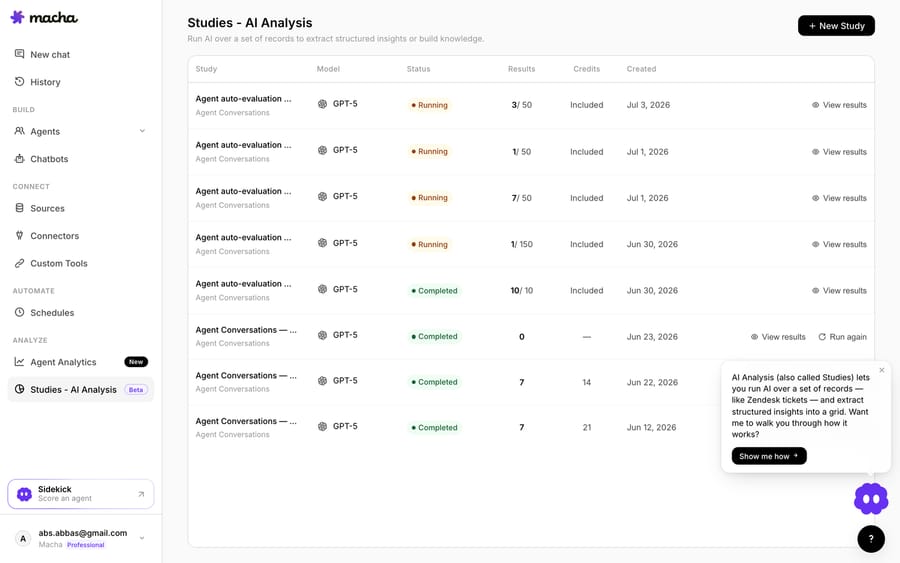
- Grade it: Studies and simulations replay it against real historical tickets and score the outcomes.
Macha bills per ticket, one conversation charged once however many messages it takes, starting at $299 a month for up to 750 tickets, with setup and monitoring by the Macha team included.
How does Cursor alone compare with Cursor plus a platform?
| Concern | Cursor alone | Cursor + Macha |
|---|---|---|
| Write the agent code | Cursor (fast, codebase-aware) | Cursor |
| Tools / help-desk client | Cursor generates; you host | Native connector or Custom Tools |
| Hosting 24/7 | You build and run it | Runs in the cloud |
| Observability + eval | You build both | Agent Analytics + Studies |
| Time to production | Days of code + ongoing infra | Hours |
So which should you build?
Use Cursor to build the whole thing if you want to own the runtime and the code: it's the fastest way to a well-structured, codebase-native agent, and you keep total control. (Our from-scratch vs. platform breakdown covers owning the runtime in full.) Use Cursor to prototype and a platform to run it when resolving support is the goal and you'd rather not own hosting, observability and evals. Either way Cursor makes the building faster; the question is who runs it afterward. You can start free on Macha with $50 of usage and no credit card, and bring the agent you prototyped.
FAQ
Is Cursor different from Claude Code or Codex for this? Same idea, an AI coding tool, but Cursor is a full IDE with deep codebase awareness (Agent, Rules, @-context), so it's especially good at fitting the agent into an existing repo. Like the others, it writes code; it doesn't run the agent.
Can Cursor deploy the agent too? It can write your deploy config and CI, and its Cloud Agents can build and test in a cloud VM, but it doesn't host or operate the running support agent. That's your infrastructure or a platform's.
What happened to Cursor's Background Agents? Cursor now calls them Cloud Agents. They run in isolated cloud VMs, can be started from the desktop app, the web, Slack, GitHub or the API, and push their changes to a branch for review.
Do I need to know how to code to use Cursor for this? Yes. Cursor is a developer tool. If you want to build a support agent without code, a no-code platform is the better path.
How do I know it's good before it touches customers? Grade it against real historical tickets and re-run before every change. Build that harness (Cursor can help write it), or use a platform's batch grading like Macha's Studies.






