





 Shopify
 Stripe
 Slack
Slack Notion
 Google Workspace
 Confluence

How Do You Build an AI Customer Support Agent with Claude? (2026)


Building a Claude support agent means giving a Claude model tools to look up customers, search your docs and reply to tickets, running the tool-use loop, and then adding retrieval, help-desk wiring, guardrails, hosting, observability and evaluation. The model call is the small part, and the rest decides whether the agent ever touches a real customer.
Key takeaways
- A Claude support agent is a tool-use loop: Claude requests tools such as get_customer or reply_to_ticket, your code runs them, and results go back until Claude answers.
- Anthropic suggests starting with Claude Opus 5.5 for most workloads, priced at $4 per million input tokens and $20 per million output tokens.
- The Claude Agent SDK is Claude Code packaged as a Python or TypeScript library, while the Client SDK's beta tool runner loops over tools you define yourself.
- A production Claude support agent has eight steps, from the model and loop through hosting, observability and evaluation, and only one and a half are the actual product.
- Claude Code and Codex can scaffold tool schemas, the loop, a help-desk API client and an eval harness, but they do not host, monitor or evaluate the agent in production.

To build an AI customer support agent with Claude, you give a Claude model (Anthropic recommends starting with Claude Opus 5.5, at $4 per million input tokens and $20 per million output tokens) a set of tools such as get_customer, search_knowledge_base and reply_to_ticket, run the tool-use loop that feeds tool results back until Claude answers, and then add the parts that make it safe to run: retrieval over your docs, a help-desk connection, guardrails, hosting, observability and evaluation. The model call is the small part. A competent team usually needs weeks, not a weekend, to get the rest to production.
Anthropic offers four ways to run that loop, and the choice decides how much you build yourself:
| Approach | Who runs the loop | Who hosts it | Fits when |
|---|---|---|---|
| Client SDK, manual loop (Messages API) | You write it | You | You want full control over every turn |
| Client SDK tool runner (beta) | The SDK, over tools you define | You | Custom tools without hand-writing the loop |
| Claude Agent SDK (Python, TypeScript) | Claude Code's harness, with built-in file, shell and web tools | You | An agent that works on files and commands |
| Claude Managed Agents (beta) | Anthropic | Anthropic, or your own sandbox | You want the loop and sandbox hosted |
We'll do the from-scratch path in real detail first, show where Claude Code and Codex speed it up, and then show the shortcut for the undifferentiated plumbing.
What does a Claude support agent actually have to do?
Strip the hype and a support agent is a loop with four jobs: understand the ticket and its history; fetch real context (customer, orders, past tickets, the right help-center article) via tool use; act (draft a reply, tag/route, refund, escalate); and know when to stop: answer when confident, hand to a human when not. Every section below exists to make that loop safe and reliable in production. (If you're still weighing build-vs-buy at all, our overview of AI agents for customer service covers the landscape and use cases first.)
How do you build a Claude support agent from scratch?
Here's the honest map. None of these steps is optional if real customers are on the other end, and only the first two are "Claude." Budget this as weeks, not a weekend. In our experience a competent team lands a solid v1 in roughly 4–8 weeks and keeps paying maintenance after. That's an estimate, not a benchmark, but plan for it.
1. The model and the agent loop
Every Claude agent is the same loop: call Claude, execute any tools it asks for, feed the results back, repeat until it stops asking. Anthropic's guide to building a tool-using agent walks it on the Messages API. Pick your model here too: Anthropic's models overview lists Claude Opus 5.5 ($4/$20 per million input/output tokens), Claude Sonnet 5 ($2/$10), Claude Haiku 4.5 ($1/$5) and Claude Fable 5.1 ($10/$50) for the hardest reasoning. You define each capability as a tool, a function plus a JSON schema for its inputs:
tools = [{
  "name": "get_customer",
  "description": "Look up a customer by email. Returns plan, status, LTV.",
  "input_schema": {"type": "object",
    "properties": {"email": {"type": "string"}}, "required": ["email"]},
}, {
  "name": "reply_to_ticket",
  "description": "Post a reply. Use only when confident; else call escalate.",
  "input_schema": {"type": "object",
    "properties": {"ticket_id": {"type": "string"}, "body": {"type": "string"}},
    "required": ["ticket_id", "body"]},
}]
With the Client SDK you either let the beta tool runner drive the loop or write it yourself, which looks like this:
while True:
    resp = client.messages.create(model=MODEL, system=SYSTEM_PROMPT,
                                   messages=messages, tools=tools)
    if resp.stop_reason != "tool_use":
        break                                  # Claude has a final answer
    messages.append({"role": "assistant", "content": resp.content})
    results = []
    for block in resp.content:
        if block.type == "tool_use":
            output = dispatch(block.name, block.input)   # your functions
            results.append({"type": "tool_result",
                            "tool_use_id": block.id, "content": output})
    messages.append({"role": "user", "content": results})   # hand results back
That's the whole agent in fifteen lines, but production is the part not shown: parallel tool calls, managing the conversation state and context window as histories grow, retries and backoff for rate limits, and streaming for responsiveness. Anthropic's customer-support use-case guide walks the core pattern; production-hardening it is on you. Decide here too which layer you build on. The Claude Agent SDK is Claude Code packaged as a Python or TypeScript library, with its built-in tools, permissions, sessions and hooks; it suits agents that work on files and commands more than a ticket queue. Managed Agents (beta) has Anthropic run the loop and host the sandbox. Whichever you choose, raw Messages API, tool runner, Agent SDK or something like LangChain, you now own that dependency.
2. Grounding it in your knowledge (RAG)
An agent that answers policy questions from memory will invent policy. So you build retrieval: chunk your help-center articles and macros, embed them, store the vectors (pgvector, Pinecone, etc.), and give the agent a search_knowledge_base tool that returns the top passages for the model to quote. Then you own the un-glamorous half: re-embedding when docs change, tuning chunk size and top-k, and evaluating retrieval quality so the agent isn't grounded on the wrong passage.
3. Connecting your help desk
The agent is useless until it can read tickets and post replies where your team already works. That means an API client for Zendesk, Freshdesk, Intercom or whatever you run: OAuth and token refresh, pagination, rate-limit handling, and webhooks to trigger the agent on each new ticket (with signature verification and idempotency so a retried webhook doesn't double-reply). Every internal system the agent needs (orders, billing, subscriptions) is another API client you write and maintain.
4. Guardrails, safety and escalation
This is what stands between you and an incident. You need grounding checks (don't answer beyond retrieved context), action limits (an agent that can refund must not refund $10,000 unattended), PII handling and redaction, prompt-injection defenses (tickets are untrusted user input), and clear human-in-the-loop escalation: confidence thresholds, and a clean handoff with context so an agent gets a person, not a dead end.
5. Deploy and run it 24/7
A demo runs on your laptop; a support agent runs always. You need hosting (a cloud platform and a long-running service or queue workers), secrets management for keys, a job queue for incoming tickets with retries and a dead-letter queue, and autoscaling so a Monday-morning ticket spike doesn't drop conversations. This is real DevOps, ongoing.
6. Observability
When it sends a bad reply at 2am, "the AI messed up" is not a debuggable statement. You need per-run logging of the full trace (every tool call, the context it had, the decision it made) plus latency and cost metrics and alerting on failures and escalation spikes. Most teams end up building a little internal dashboard just to see what their agent is doing.
7. Evaluation: the step everyone skips
The hardest question isn't "does it reply," it's "is it right." You need an eval harness: a labeled set of real historical tickets with known-good outcomes, automated scoring (resolution, factual accuracy, tone, correct escalation), and a regression run before every prompt or model change so an "improvement" doesn't quietly break 15% of cases. Without this you're shipping on vibes.
8. Ongoing maintenance
It's never done. Models get retired on a schedule (Anthropic publishes retirement dates; Claude Haiku 4.5 is committed only until 15 October 2026) and you re-test prompts on the replacement; your help desk changes its API; the KB drifts and needs re-embedding; prompts need tuning as edge cases surface; and someone owns the on-call pager. Budget for it permanently.
Where do Claude Code and Codex help?
You don't hand-write all of that from a blank file. Claude Code (Anthropic's terminal coding agent) and Codex (OpenAI's) are excellent at the scaffolding: generating the tool schemas and loop wiring (step 1), a first-pass help-desk API client (step 3), the RAG plumbing (step 2), and the eval-harness skeleton (step 7). A realistic flow is to tell Claude Code "scaffold a Claude Agent SDK support agent with Zendesk ticket tools and a pgvector KB search," let it write the first pass, and refine. It compresses the coding. It doesn't make the design decisions (which tools, what guardrails, when to escalate), and it doesn't run, host, monitor, or evaluate the thing in production. Steps 4–8 are still yours.

Can you use Claude without building the plumbing?
Look back at that list. Exactly one and a half of the eight steps are your actual product; the rest is undifferentiated infrastructure every support agent needs. That's the case for a platform. Macha is the layer for the plumbing: you bring the agent design, pick the model per agent (Claude Sonnet 4.5 is on the list), and it handles connect → deploy → monitor → grade. Mapped to the eight steps:
- The loop, hosting, secrets, queue, autoscaling (1, 5): built in. Agents run on Macha's cloud, triggered by new tickets; nothing to host.
- Connecting your help desk and any API (3): Macha's Custom Tools turn any HTTP API into a tool your agent can call: define the endpoint and auth, or describe it in a sentence ("connect our orders API and add a tool to look up an order by ID") and the AI Tool Builder, in Macha's Experiment Labs, discovers, tests and creates the tools. Your help desk is a native connector on Zendesk, Freshdesk, Gorgias, Front, HubSpot or Intercom; your internal systems plug in the same way. No client library to maintain, no webhook plumbing.
- Grounding (2): attach your knowledge sources, or let the AI Knowledge Builder draft a knowledge base from your historical tickets; retrieval is handled, so you're not running a vector store.
- Observability (6): agent analytics show every run, tool call, and handoff out of the box.
- Evaluation (7): agent simulations replay real past tickets against the agent, continuous evaluation scores its output, and Studies analyze performance against its instructions, so a prompt change is a measured decision, not a guess.
- Guardrails and escalation (4): you still design these (they're product decisions), but you configure them instead of building the enforcement machinery.
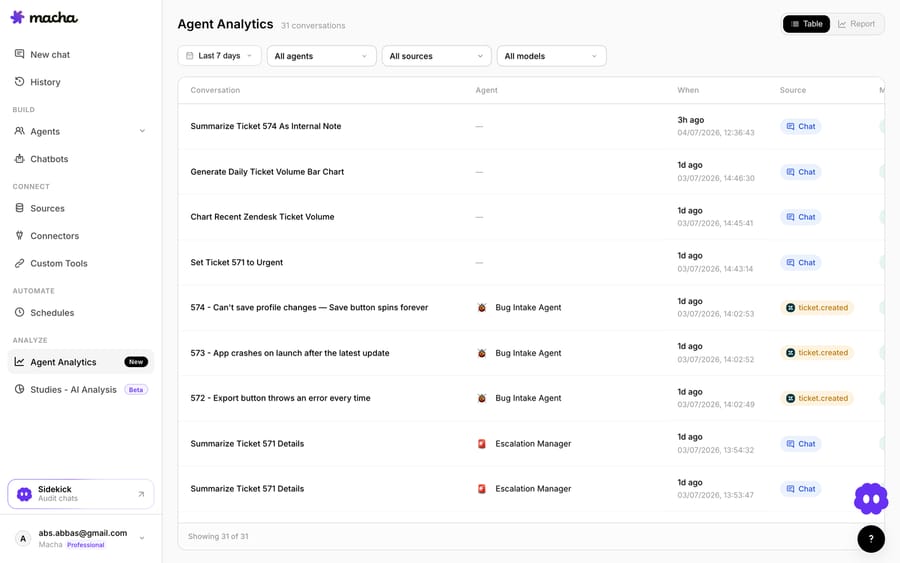
The trade is control for time-to-ship: from-scratch is weeks to production plus permanent maintenance; on a platform the infra is owned for you. Macha is billed per ticket (one conversation, one charge, whichever model runs it), from $299 a month for 750 tickets, and setup and monitoring by the Macha team are included.
How does from scratch compare with a platform, step by step?
| Step | Claude Agent SDK from scratch | Claude + Macha |
|---|---|---|
| Model | Any Claude model you choose | Chosen per agent from Macha's list (includes Claude Sonnet 4.5) |
| Agent loop | You write & maintain it | Built in |
| RAG / grounding | You build + run a vector store | Attach sources; handled |
| Help-desk + API tools | You build every client + webhooks | Native connector or Custom Tools |
| Guardrails / escalation | You build enforcement | You configure it |
| Hosting 24/7 | Your infra + queue + autoscale | Runs in the cloud |
| Observability | You build a dashboard | Agent analytics |
| Evaluation | You build an eval harness | Simulations, evaluation, Studies |
| Time to production | ~4–8 weeks + ongoing | Days |
Should you build from scratch or use a platform?
Build from scratch if the agent runtime is your product, or you have hard constraints (on-prem, a custom orchestration model, strict data-residency) a SaaS can't meet. You'll own eight moving parts, but you'll own them exactly how you want. (For a fuller side-by-side, see our from-scratch vs. platform breakdown.) Use a platform if resolving support well is the goal and the agent is the means: you want it live quickly, grounded in your data and your help desk, measurable from day one, and you'd rather spend engineering time on the tools and prompts that make it good than on hosting and dashboards you'll maintain forever. Claude is the same strong foundation either way; the only question is how much of the surrounding stack you want to own. You can start free on Macha and wire your first tool in a few minutes to feel where that line is for you.
FAQ
Can Claude Code or Codex build the whole agent for me? They're excellent for the code: tool schemas, the loop, a first-pass API client, the eval-harness skeleton. They won't make the product decisions (tools, guardrails, escalation) or run, host, monitor, and evaluate the agent in production. That's either your infrastructure or a platform's.
How long does a from-scratch build really take? Our estimate is 4–8 weeks to a solid v1 for a competent team, most of it in steps 3–8 (integration, hosting, observability, evals) rather than the Claude call, plus ongoing maintenance as models and APIs change.
Do I need RAG? If the agent should answer from your help center or policies, yes. Give it retrieval over your docs so replies are grounded and quotable. For pure "look up this order and reply," tool use alone is enough.
Which Claude model should I use? Anthropic suggests starting with Claude Opus 5.5 ($4/$20 per million input/output tokens) for most workloads. Many support agents use it for the reasoning and decision step and a faster, cheaper model such as Claude Haiku 4.5 ($1/$5) or Claude Sonnet 5 ($2/$10) for high-volume classification. Batch API requests are 50% off for work that isn't time-sensitive.
Is the Claude Agent SDK the same as the tool runner? No. The tool runner is a beta helper in the regular Client SDK that loops over tools you define. The Claude Agent SDK is Claude Code as a library, with built-in file, shell and web tools. Both leave hosting to you; Managed Agents is Anthropic's hosted option.
How do I know it's good before it touches customers? Grade it against real historical tickets with automated scoring, and re-run that before every prompt or model change. Whether you build the harness or use something like Macha's simulations, never ship a change you haven't measured on real cases.






