





 Shopify
 Stripe
 Slack
Slack Notion
 Google Workspace
 Confluence

How Do You Migrate from Gorgias to Freshdesk? What Moves and What You Rebuild (2026)


Moving from Gorgias to Freshdesk means exporting tickets, customers and help center articles, importing them with a migration tool, and rebuilding macros, Rules and Shopify actions by hand. Most teams make the switch for cost, trading Gorgias' ticket-volume pricing for Freshdesk's per-seat pricing.
Key takeaways
- A Gorgias to Freshdesk migration moves tickets, customers and help center articles as data, while macros, Rules, views and dashboards must be rebuilt in Freshdesk.
- Gorgias' CSV export takes up to 1 million tickets, but message content is limited to the most recent 30 days and 100,000 tickets, and internal notes are excluded.
- A Gorgias export download link stays live for 14 days, and exporting 1 million tickets can take up to ten hours.
- Help Desk Migration's free demo moves up to 20 records you choose, so teams can check Freshdesk field mapping before paying for the full transfer.
- Freshdesk's Shopify app, which lets agents cancel and refund orders from the ticket, runs on the Growth, Pro and Enterprise plans but not the Free plan.

To migrate from Gorgias to Freshdesk, you export tickets, customers and help center articles from Gorgias (through its REST API, because the CSV export drops internal notes and caps message history at 30 days and 100,000 tickets), import them into Freshdesk with a migration tool such as Help Desk Migration, and rebuild your macros, Rules, views and Shopify actions in Freshdesk by hand. Most teams move for cost: Gorgias prices its help desk by ticket volume (50 to 5,000 tickets a month, never per agent), while Freshdesk charges per agent seat.
| Stage | What happens | Tool |
|---|---|---|
| Export | Tickets, customers, help center articles leave Gorgias | REST API (CSV export is partial) |
| Prepare | Agents, custom fields, Shopify app set up; automations switched off | Freshdesk admin |
| Import | Records land with history and associations | Help Desk Migration or native import |
| Rebuild | Macros, Rules, views, dashboards, Shopify actions | By hand in Freshdesk |
| Cut over | Delta run for late records; automations back on one at a time | Migration tool, then Freshdesk |
What moves from Gorgias to Freshdesk, and what do you rebuild?
Every artifact in your Gorgias account falls into one of two categories, and the split decides your whole plan.
Records are the historical facts of your support operation — tickets, the people who raised them, the companies they belong to, and your help center articles. These are rows of data, and rows of data move. A migration tool reads them out of Gorgias' API and writes them into Freshdesk's, preserving the relationships between them.
Configuration is the logic that acted on those records — the macros your agents insert, the Rules that auto-tagged and auto-assigned tickets, the views, and the statistics dashboards. This is behaviour, not data, and it does not transfer as working logic. Freshdesk's automation engine is structured differently from Gorgias', so even a rule that does "the same thing" has to be rebuilt in Freshdesk's own grammar. There's no export file that turns a Gorgias Rule into a Freshdesk automation. (Help Desk Migration lists canned responses and automation rules among the Freshdesk objects it can import, so run its demo to see whether any of your macro text comes across; the Shopify Actions and conditions inside a macro still need rebuilding.)
Hold onto that distinction and everything below falls into place. (New to the platform you're leaving? Our what is Gorgias primer and Gorgias pricing explained cover why the volume-based model pushes scaling brands to look elsewhere.)
Step 1: How do you get your data out of Gorgias?
Gorgias gives you two honest ways to extract data, and both matter for a migration.
The native CSV export is the built-in path. Per Gorgias' export documentation, you can include up to 1 million tickets per export, but there are limits worth reading twice. When you export ticket message content from analytics, you're restricted to "the most recent 30 days of data from the selected period, up to a maximum of 100,000 tickets." Only public messages are included — "internal notes, ticket events, Facebook wall posts, Instagram media messages, and Instagram ad media messages aren't included in the export." The download link is live for 14 days, and it can take up to an hour to export 100,000 tickets, up to ten hours for a million. Macros are a separate export: you can pull them out with the Export Macros as CSV option.
The REST API is the fuller path. Because the CSV export drops notes, events, and social conversations, most real migrations reach for Gorgias' API to pull complete threaded history. That's where a migration tool connects, and it's the honest export surface below.
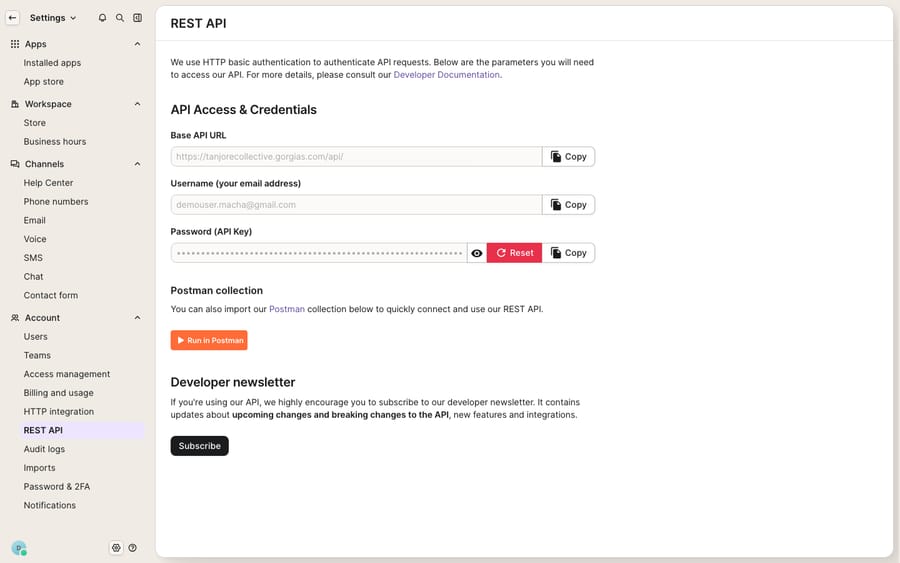
Our deeper guide to exporting data from Gorgias covers the CSV-vs-API tradeoff in full.
Step 2: How do you prepare Freshdesk to receive the data?
Before you import anything, set up the target so records land cleanly:
- Create agent profiles in Freshdesk so tickets attach to the right owners.
- Recreate custom fields you use in Gorgias (order number, subscription status, whatever your ecommerce workflow depends on) so the importer has somewhere to map them.
- Turn off automations and dispatchers before the import runs — this is the single most important prep step, and it gets its own section below.
- Connect your Shopify store to Freshdesk's Shopify app so order context is ready when tickets arrive. The app runs on Freshdesk's Growth, Pro and Enterprise plans, not the Free plan.
Step 3: Which records map cleanly into Freshdesk?
This is the heart of a migration. Here's what actually happens to each artifact when you move from Gorgias to Freshdesk. The record side follows what Help Desk Migration transfers into Freshdesk, the most widely used third-party service and the one on the Freshworks marketplace.
| Artifact | Ports as data? | Ports as working config? | Reality |
|---|---|---|---|
| Tickets & public conversations | Yes | n/a | All statuses incl. closed, with full history + CC |
| Contacts (customers) | Yes | n/a | Matched by email — updates rather than duplicates |
| Companies / organizations | Yes | n/a | Associations to contacts & tickets preserved |
| Agents | Yes | n/a | Profiles come across |
| Attachments & inline images | Yes | n/a | Inline images arrive as attachments |
| Knowledge base (help center) | Yes | n/a | Articles, sections, categories + SEO metadata |
| Tags & custom fields | Yes | n/a | Mapped to Freshdesk fields during setup |
| Internal notes | Partial | n/a | Excluded from CSV; API path needed to preserve |
| Macros | Partial | No | Text may map to canned responses via a paid tool; Shopify Actions and logic rebuild as scenarios |
| Rules (auto-assign, auto-tag) | No | No | Rebuild in Freshdesk automations |
| Views & filters | No | No | Recreate per agent/team |
| Statistics & dashboards | No | No | Reset; historical metrics recompute in Freshdesk |
| Shopify sidebar widget | No | No | Re-establish via Freshdesk's Shopify app |
The macro row is the one that surprises people. Your Gorgias macros are logic plus variables plus, often, embedded Actions that touch Shopify — none of that structure survives a data export as working logic. You rebuild them inside Freshdesk, which is a genuine chance to prune the fifty macros nobody uses down to the fifteen that matter.
Why is rebuilding macros and Rules the real work?
Macros and Rules are why a Gorgias→Freshdesk move is more implementation than copy-paste. In Gorgias, a macro can insert canned text and run Shopify Actions (issue a refund, apply a discount) in one click; Rules can auto-tag by intent and route to the right agent. Freshdesk models this differently — canned responses for the text, automations (the "Supervisor," "Observer," and "Dispatcher" rules) for the behaviour. No importer turns a Gorgias Rule or a Shopify-action macro into a working Freshdesk automation, so budget real time to map each Gorgias Rule to its Freshdesk automation equivalent and each macro to a canned response or scenario. Treat it as a fresh build, not a restore.
Can Freshdesk match Gorgias' Shopify sidebar?
For an ecommerce team, this is the gap that stings if you skip it. Gorgias' whole pitch is a deep, native Shopify sidebar — agents look up orders, issue refunds, cancel shipments, and generate discount codes without leaving the ticket, with the customer's full Shopify profile in view. Freshdesk reaches parity through its Shopify app, but you have to set it up. Per Freshdesk's Shopify integration docs, the app "fetches customers' details and provides instant access to their recent orders, payment status, and shipping information right within Freshdesk," and you can "optionally connect multiple stores or configure the options to allow agents to perform cancellations and refunds directly from the Freshdesk widget." One limit to note: an order can only be cancelled before it is paid or ready to ship; once fulfilled, the cancel option is disabled.
The honest read: the core order-context and refund/cancel actions are available on both, but Gorgias' version is deeper out of the box (discount codes, editing orders, richer templating). Audit which Shopify Actions your team actually uses in Gorgias before you migrate, then confirm each has a Freshdesk equivalent — either native in the app or filled by a custom tool that calls the Shopify API directly. Don't discover the gap after cutover.
Should you use native import or a paid migration tool?
Freshworks supports two paths, and volume plus fidelity decide the right one.
Native CSV/API import is free and brings in contacts and companies cleanly. But reconstructing threaded ticket history, internal notes, timestamps, and attachments from flat CSVs is painful at scale — and remember, the Gorgias CSV export already drops notes, events, and social messages. For a small inbox with no history worth keeping, native import is fine.
A paid migration tool — Help Desk Migration is the marketplace option — automates the ticket-history reconstruction over the API and preserves associations. The free demo migrates up to 20 records you choose, so you can sanity-check field mapping before you pay. It also offers delta migration (transfer only records created or updated after your initial full run) and interval migration (phased transfers), both of which matter when you can't freeze a live ecommerce queue. For years of threaded tickets with attachments, a paid tool almost always pays for itself in engineering time saved.
Will the migration cause downtime?
Good news first: a modern migration is not a lights-out event. Tools read from Gorgias' API and write to Freshdesk's, so Gorgias keeps serving customers while records copy across, and delta migration catches the stragglers created during the run.
The real risk isn't downtime — it's your new Freshdesk automations firing on historical data. Import thousands of old tickets and an active rule can wake up and email customers about orders resolved a year ago. The sequence that prevents it:
- Before import, disable automations — turn off Freshdesk's ticket-creation automations, time triggers, and scenario automations so historical records don't fire notifications.
- If you can't disable them, tag migrated tickets during data mapping and exclude that tag in your rules.
- Verify, then re-enable one at a time — after the import is spot-checked, switch automations back on gradually so you catch a misfiring rule before it hits every ticket.
That "one at a time" discipline on the way back up is what separates a calm cutover from a support team fielding replies to ghosts.
Where does an AI layer fit after you land?
Here's the reframe. The most laborious part of this move is rebuilding all the behaviour — the macros and Rules that ran your Gorgias queue. If you're rebuilding that logic from scratch anyway, it's the ideal moment to ask whether every rule needs to be a brittle if-this-then-that automation, or whether some of that work belongs to an AI agent that reasons over the ticket instead.
Macha is one such layer, and it runs on top of Freshdesk once you've landed — it does not replace your help desk and isn't a Freshdesk alternative. You connect Macha to Freshdesk with your subdomain and API key, and it reads and writes the same tickets you migrated: drafting grounded replies from the knowledge base that came across, triaging by intent so the right team gets the right ticket, and looking up order or refund status through a custom tool that turns Shopify's API into something the agent can call — which happens to be a clean way to fill any Shopify-widget parity gap. If you're weighing whether to stay on Gorgias with AI instead, our Macha–Gorgias integration page covers that path too. Macha bills per ticket — one conversation, charged once however many messages it takes — never per resolution, starting at $299 a month for up to 750 tickets; see the pricing breakdown.
FAQ
Why do teams migrate from Gorgias to Freshdesk? Cost is the usual driver. Gorgias prices its help desk by ticket volume (50 to 5,000 tickets a month, never per agent), so a growing ecommerce inbox can outrun its plan, while Freshdesk charges per agent seat and stays flat as ticket count climbs. Teams that don't need Gorgias' deepest Shopify features often find Freshdesk's economics better at scale.
Do my Gorgias macros and Rules move to Freshdesk? Not as working configuration. Macros, Rules, views, and statistics are behaviour, not records, so they must be rebuilt inside Freshdesk (canned responses for macro text, automations for Rule behaviour). A paid tool like Help Desk Migration may carry some macro text across as canned responses; check it in the free demo. Only historical data — tickets, contacts, companies, agents, knowledge base, and attachments — migrates.
What doesn't come across in a Gorgias export? Gorgias' native CSV export includes only public messages. Internal notes, ticket events, and Facebook/Instagram social messages are excluded, message history is capped at the most recent 30 days of the selected period and 100,000 tickets, and the download link expires after 14 days. To preserve notes and full history, migrations use Gorgias' REST API via a migration tool.
Will migrating cause downtime? Not inherently. A migration tool copies from Gorgias' API to Freshdesk's while Gorgias stays live, and delta migration catches records created mid-run. The bigger risk is Freshdesk automations firing on imported historical tickets — disable them before import and re-enable one at a time.
Can I keep Shopify order actions in Freshdesk? Yes, via Freshdesk's Shopify app, which surfaces recent orders, payment status, and shipping, and can be configured to allow cancellations and refunds from the widget. Audit which Gorgias Shopify Actions your team relies on and confirm each has a Freshdesk equivalent — natively or through a custom tool — before you cut over.
How much does a migration tool demo cover? Help Desk Migration's free demo moves up to 20 records you choose, so you can check field mapping before paying for the full transfer. Its delta migration then catches records created or updated after the main run.
Just moved to Freshdesk and rebuilding your macros from scratch? Start a free trial of Macha and connect it to your Freshdesk in minutes.






