





 Shopify
 Stripe
 Slack
Slack Notion
 Google Workspace
 Confluence

How Do You Export Data From Gorgias? CSV, API and the 2026 Limits


Gorgias gives you three exits for your data: a CSV export, the REST API, and customer deletion for GDPR requests. The CSV is quick but leaves out internal notes, events and older message text, so a migration or full backup needs the API.
Key takeaways
- Gorgias data leaves through three routes: a free CSV export from views or analytics, the REST API for full history, and customer profile deletion for GDPR erasure requests.
- The Gorgias CSV export excludes internal notes, ticket events, Facebook wall posts, and Instagram media and ad media messages, and returns message text for only the most recent 30 days.
- A Gorgias view export cuts off at 1 million tickets, and Gorgias says exporting 1 million tickets can take up to 10 hours.
- The Gorgias REST API returns message bodies through GET /messages rather than GET /tickets, and API-key integrations are limited to 40 requests per 20 seconds.
- Deleting a customer profile in Gorgias does not remove their data from Shopify, Klaviyo or Smile, or any information left in internal notes.

You export data from Gorgias in one of three ways: a CSV export from a view or from analytics (up to 1 million tickets per view export), the REST API for full history including internal notes and events, or customer deletion for GDPR erasure requests. The CSV route is free and self-serve but leaves out internal notes, ticket events and some social messages, and returns message text for only the most recent 30 days of the period you pick.
| Route | Best for | Main limit |
|---|---|---|
| CSV view export | Ticket metadata, CSAT, reporting | No internal notes, events or some social messages; cut off at 1 million tickets |
| Analytics drill-down export | Message text for recent tickets | Most recent 30 days of the period, up to 100,000 tickets |
| REST API | Migrations and full backups | Needs scripting; 40 requests per 20 seconds on an API key |
| GDPR deletion | Right-to-erasure requests | Doesn't touch Shopify, Klaviyo, Smile or text left in internal notes |
What are the ways to get data out of Gorgias?
There is no single "download everything" option in Gorgias, and pretending otherwise is how migrations go sideways. Instead you have three distinct exits, each suited to a different job.
The CSV export is the fast, self-serve route for tickets and their metadata. It lives inside your views and your analytics, it's free, and the account owner, admins and leads can run it. It's right for a spreadsheet of recent tickets, a CSAT pull, or a quick audit, and limited for a full-fidelity archive.
The REST API is the durable, complete route. It reads tickets, messages, customers, tags, and events out of Gorgias programmatically, page by page, without the CSV's content exclusions. It's what migration tools use under the hood, and it's the honest answer when "everything, with structure intact" is the requirement.
GDPR / privacy requests are the compliance route: deleting an individual customer's data on request, or asking Gorgias support about data the standard exports won't produce.
Which one you reach for depends on why you're exporting. So let's take each in turn, starting with the one most people try first.
How do you run the CSV export, and what does it leave out?
The CSV export is the obvious starting point, and for many jobs it's the right one. To run it, open a View (or the Statistics/Analytics area), apply your filters and date range, and use the export action; Gorgias emails you a download link when the file is ready, and the link stays valid for two weeks. Per Gorgias' own export documentation (checked 24 September 2026), a view export carries a useful spread of fields: ticket links and IDs, tags, channels, priority, integrations, subject line, created and closed dates, survey/CSAT data, assignee and customer details, first-response and resolution times, message counts, and your custom fields.
That's plenty for reporting. Where it gets thin is fidelity, and here are the limits Gorgias states plainly:
- It excludes several data types outright. The export does not include internal notes, ticket events, Facebook wall posts, Instagram media messages, or Instagram ad media messages. For an ecommerce team living on social DMs, that last set is a real gap.
- Message content is capped to 30 days. To get the actual message text you export from an analytics drill-down, and that export returns "the most recent 30 days of data from the selected period, up to a maximum of 100,000 tickets." So a two-year date range still only yields message bodies for the most recent 30 days of it.
- There's a hard ticket ceiling. A view export handles "up to 1 million tickets per export; if a view contains more, the export will be cut off at the limit." It's not instant, either: Gorgias notes it "can take up to an hour to export 100,000 tickets" and "up to 10 hours to export 1 million tickets."
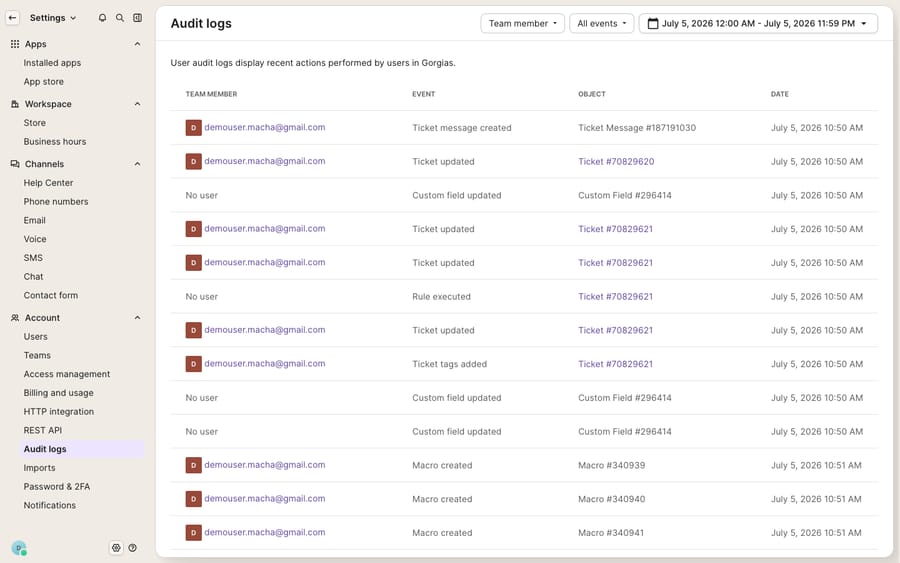
The audit log above is worth a mention precisely because ticket events don't ride along in the CSV. If you need a defensible record of who changed what and when, the kind of thing that vanishes from a flat export, the audit log is where it lives, and it's a surface to reconcile against after any export or migration.
When should you use the Gorgias API instead?
When the CSV's exclusions and caps matter, which is almost always the case for a real migration or a complete backup, the Gorgias REST API is the answer. It's how the serious tooling gets data out.
The API exposes your data as endpoints you page through: GET /tickets lists tickets and their metadata (with a message count, not the message bodies), GET /messages returns the messages themselves, GET /customers returns contacts, and GET /events covers the event history. Internal notes come through as messages, and there's no 30-day message window, so you can walk your entire history with structure and relationships intact. You authenticate with an API key from Settings → Account → REST API, then iterate through cursor-paginated pages of up to 100 records. Gorgias' published rate limits are 40 requests per 20 seconds for an API key and 80 per 20 seconds for OAuth2 apps; go over and you get HTTP 429, so pace a bulk pull.
The tradeoff is effort. The API is the right tool if you're comfortable scripting a pull (or your migration vendor is doing it for you), and overkill if you just need a spreadsheet. This is also the mechanism a third-party migration service like Help Desk Migration uses when it moves you off Gorgias: it reads the API rather than wrestling flat CSVs, which is why a paid tool preserves threaded conversations and associations that a manual CSV import mangles. If a platform move is where this is heading, our Gorgias-to-Freshdesk migration guide walks the full mapping.
What moves cleanly out of Gorgias, and what do you rebuild?
If you're exporting to leave Gorgias, it helps to separate data (which moves) from configuration (which doesn't). Your history is rows in a database and it travels; your rules and macros are behaviour built in Gorgias' grammar, and they have to be rebuilt in the next platform's.
| Artifact | Leaves via CSV? | Leaves via API? | Reality |
|---|---|---|---|
| Ticket metadata (IDs, tags, dates, CSAT) | Yes | Yes | Full field spread in both |
| Message text / conversations | Last ~30 days only | Yes (full history) | CSV caps message bodies at 30 days |
| Internal notes | No | Yes | Excluded from CSV entirely |
| Ticket events / audit trail | No | Yes | CSV excludes; see Audit logs |
| Social (FB wall, IG media/ads) | No | Partial via API | CSV excludes social message types |
| Customers / contacts | Yes | Yes | Matched by email downstream |
| Rules & automations | No | No | Rebuild in the new platform |
| Macros / canned responses | No | No | Recreate manually |
| Stats & reports | Export only | No | Historical dashboards reset |
| Integrations (Shopify, Klaviyo) | No | No | Reconnect on the other side |
The pattern is the same one every migration runs into: records move, logic gets rebuilt. Budget for a reporting cold-start, and treat the rule-and-macro rebuild as a fresh implementation rather than a copy-paste, and it's usually the larger of the two jobs.
How do you handle GDPR and custom data requests?
Not every export is about migration. Some are about compliance, and Gorgias handles these differently.
For an individual customer's right to erasure, Gorgias is self-serve. Per its GDPR requests documentation, you delete the customer's profile, which deletes their customer data from Gorgias; the delete action sits on the Customers page. One important caveat Gorgias flags: deleting a profile in Gorgias does not delete that customer's data in integrated apps like Shopify, Klaviyo, or Smile, or any information left in internal notes. You have to action those separately. A common pattern for ecommerce teams is a rule that watches for phrases like "delete my data" and auto-tags the ticket GDPR-Delete, so requests collect in one view for an agent to process.
For a data access or portability request, the CSV and API routes above cover most of what a customer is entitled to see. If you need something neither produces, ask Gorgias support directly; its public docs don't describe a standard custom-export process, so confirm scope and turnaround with them before you promise a date.
Where does an AI layer fit, and where doesn't it?
One honest note on tooling, because it's relevant to the "why am I exporting" question. If you're exporting because Gorgias' automation felt limited, you don't have to leave the platform to add reasoning to your queue.
Macha is an AI agent layer that runs on top of the help desk you already use, including Gorgias, as a native connector. It is not a Gorgias alternative and it doesn't replace your help desk; it reads and writes the same tickets, drafting or resolving grounded replies, triaging by intent, and looking up order or account status through a custom tool that turns a REST API into something the agent can call. It bills per ticket rather than per resolution (one conversation, charged once however many lookups and replies it takes), starting at $299 a month for up to 750 tickets with setup and monitoring by the Macha team included; the pricing page has the breakdown. Whether you stay on Gorgias or land somewhere new after an export, the agent layer sits above the desk, not in place of it.
The clean division: use the CSV for reporting, the API for a full-fidelity extract, GDPR deletion for erasure requests, and let an AI layer handle the reasoning-heavy work either way.
FAQ
What data does the Gorgias CSV export leave out? The CSV export excludes internal notes, ticket events, Facebook wall posts, and Instagram media and ad-media messages. It also caps exported message text to the most recent 30 days of your selected period (up to 100,000 tickets), and cuts off any view export at 1 million tickets. For notes, events, and full message history, use the REST API instead.
How many tickets can I export from Gorgias at once? A view export handles up to 1 million tickets per export and cuts off beyond that. It's not fast at volume: Gorgias says it can take up to an hour for 100,000 tickets and up to 10 hours for 1 million. To pull the actual message text, the analytics export is limited to the most recent 30 days and a maximum of 100,000 tickets.
How do I export the full message history from Gorgias? The CSV can only return message text for the last 30 days of a period, so for complete conversation history use the Gorgias REST API. GET /tickets lists tickets, and GET /messages returns the message bodies, including internal notes, with no 30-day cap. Budget for the rate limit of 40 requests per 20 seconds on an API key.
How do I handle a GDPR deletion request in Gorgias? Delete the customer's profile from the Customers page, which deletes their customer data from Gorgias. It does not delete their data in connected apps like Shopify, Klaviyo or Smile, or anything written into internal notes, so action those separately.
How long is the export download link valid? Gorgias emails a download link when the file is ready, and the link stays valid for two weeks.
Do my rules, macros, and reports export too? No. Rules, macros, and report configurations are logic, not records. They don't come out in any export and have to be rebuilt in whichever platform you move to. Only your data (tickets, contacts, and the metadata the CSV/API expose) is portable.
Exporting Gorgias data because you want smarter automation, not a new help desk? Start a free trial of Macha and connect it to your Gorgias in minutes.






