



 Intercom
 Shopify
 Stripe
 Slack
Slack Notion
 Google Workspace
 Confluence

How Do Gorgias Rules Work? Triggers, Conditions and Actions (2026)


Gorgias rules follow a WHEN, IF, THEN pattern: one of six ticket events starts the rule, optional conditions filter tickets, and actions such as tagging, routing or replying run automatically. Rules are included on every Helpdesk plan, but they match keywords literally, so intent-reading and order lookups need AI Agent or another AI layer.
Key takeaways
- Every Gorgias rule follows a WHEN, IF, THEN structure built on one of six triggers, including Ticket created, New message in ticket and Satisfaction survey responded.
- AND and OR conditions cannot sit in the same IF statement in Gorgias Rules, so mixed logic needs another IF nested inside the THEN block.
- Gorgias caps accounts at 70 rules and shows a warning once an account reaches 65, so teams that write one rule per edge case hit the ceiling quickly.
- Gorgias runs Ticket Created rules first, then New Message In Ticket, then Ticket Updated, and Ticket Assigned rules last, top to bottom within each trigger.
- Gorgias Rules are included on all Helpdesk plans, while AI Agent is a paid bundle billed per resolved interaction, with $1.50 for each interaction over the bundle.

A Gorgias rule is WHEN/IF/THEN automation: one of six ticket events (WHEN) starts it, optional conditions (IF) filter the tickets, and actions (THEN) such as tagging, assigning or replying run on every match. Rules come with every Gorgias Helpdesk plan at no extra cost, live under Workflows → Tools → Rules, and are capped at 70 per account. They match fields and keywords literally, so reading intent and looking up order data belongs to Gorgias' paid AI Agent or another AI layer. Details below were checked against Gorgias' help center on 24 September 2026.
| Question | Answer |
|---|---|
| Structure | WHEN (trigger) → IF (conditions, optional) → THEN (actions) |
| Triggers | 6: ticket created, new message, ticket updated, ticket assigned, snooze delay ends, satisfaction survey responded |
| Limit | 70 rules per account; warning at 65 |
| Run order | Created → New message → Updated → Assigned; top to bottom within each |
| Who can edit | Owner, Admins and Leads |
| Cost | Included on all Helpdesk plans |
How does a Gorgias rule work?
Every Gorgias rule is built from three parts, and the builder literally lays them out in that order. Per Gorgias' Create rules to take automatic actions on tickets documentation, a rule is a trigger (WHEN), an optional set of conditions (IF/AND/OR/ELSE), and one or more actions (THEN).
The trigger is the event that wakes the rule up. The conditions are the tests a ticket has to pass (channel, keywords, order count, tags, customer fields) for the actions to fire. The actions are what Gorgias does when both line up. A rule with no IF condition runs its actions on every ticket that hits the trigger; add an IF and you narrow it to just the tickets you care about. That's the whole grammar. Everything else is vocabulary.
You'll find the builder by opening the dropdown menu at the top left, then Workflows → Tools → Rules. Rules are available on all Helpdesk plans (they're not a paid add-on), and the Owner, Admins, and Leads can create or edit them.
What triggers can start a Gorgias rule?
A rule can only start on one of six events. Choosing the right one is half the battle, because the trigger also decides when in the ticket's life your logic runs:
- Ticket created: the moment a new ticket lands. This is where most triage lives: auto-tagging, first-touch auto-replies, spam closing.
- New message in ticket: a customer (or agent) adds a message to an existing ticket. Good for re-opening logic or nudging on follow-ups.
- Ticket updated: a field, tag, status, or assignee changes. Useful for reacting to something another rule or an agent just did.
- Ticket assigned to user: fires when a ticket lands on a specific agent, handy for personal auto-notes or workload rules.
- Ticket snooze delay ends: the snooze timer runs out and the ticket wakes back up.
- Satisfaction survey responded: a CSAT response comes in, so you can tag detractors or route a bad score to a lead.
Note what's not here: there's no "X hours after creation" trigger. Per the Rules FAQ, rules can't fire purely on the passage of time; they need a real event. Gorgias' suggested workaround for delayed actions is to snooze the ticket and hang the rule on Ticket snooze delay ends. That constraint shapes a lot of what you can and can't do natively.
How do conditions work in Gorgias rules?
Once a rule triggers, conditions decide which tickets actually get the actions. You build them as IF statements, and you can combine several: AND requires every condition to be true, OR requires at least one. The one gotcha worth memorising is that, per Gorgias' rule builder variables and conditions reference, AND and OR can't live in the same IF statement. For mixed logic like "channel is email AND (body contains refund OR body contains return)" you nest another IF inside the THEN block.
Conditions are where Gorgias' Shopify roots show. Beyond the usual channel, tags, and message-body checks, you can branch on things like Shopify customer orders count is greater or equal to 1, so a rule can treat a repeat buyer differently from a first-timer, or Message from agent is false to make sure an auto-reply only answers real customers, not your own team's notes.
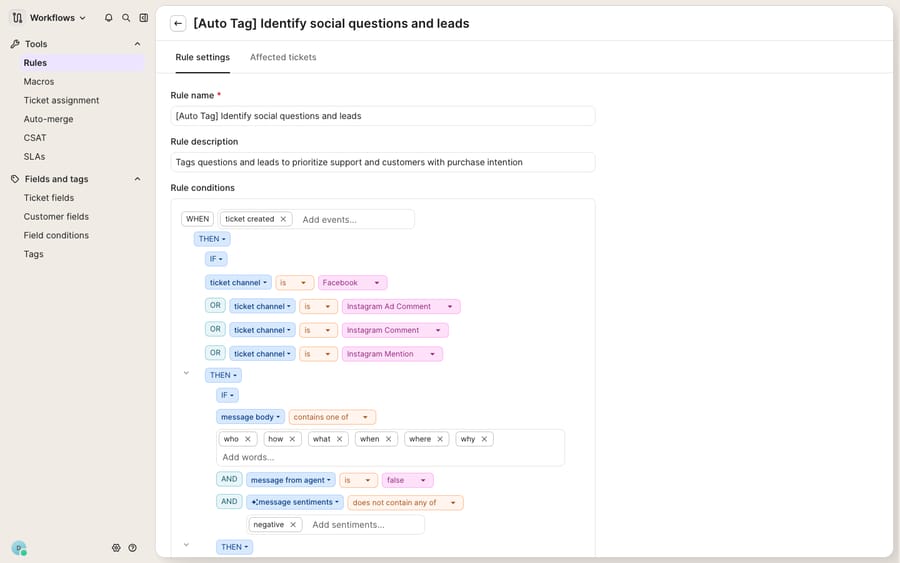
The screenshot above is the real Rule builder. Some Gorgias settings sub-areas render in a narrower ~720px column, which is why the panel looks tighter than a full-width app view. That's normal, not a display bug.
What actions can a Gorgias rule take?
The action menu is long, and it's where Rules earn their keep. Per the Rule Glossary: Actions, the THEN options include:
- Reply to customer and Send email: post a public reply or fire off an email (the basis of any auto-reply).
- Apply macro: run a saved macro as the response, so your canned answers and your automation share one source of truth.
- Add internal note: leave an agent-only note.
- Add tags, Remove tags, Reset tags: the workhorses of triage and reporting.
- Set status, Set priority, Set subject: change the ticket's state.
- Set ticket field / Set customer field: write to your custom data.
- Assign agent, Assign team, Distribute to teams: routing.
- Snooze for a set duration, Delete ticket, Exclude ticket from Auto-Merge, Exclude ticket from CSAT, plus channel-specific ones like Hide Facebook comment.
A common WISMO recipe: WHEN ticket created, IF body contains "where is my order" AND Shopify orders count ≥ 1, THEN apply macro (an order-status template) AND add tag "wismo" AND set priority: low.
In what order do Gorgias rules run?
When several rules could fire on the same ticket, order matters, and Gorgias decides it in two layers. First by trigger: per the Rules FAQ, Ticket Created rules run first, then New Message In Ticket rules, then Ticket Updated rules, and Ticket Assigned rules run last. Second, within a single trigger, rules run top to bottom in the order listed on the settings page, and you reorder them by dragging the six-dot handle.
There is no native per-rule "stop processing further rules" toggle the way some help desks offer. Gorgias runs the matching rules in sequence, which means rules can interact: the FAQ notes, for example, that a generic notification rule "won't work if the ticket is also being assigned to a user via another Rule." Gorgias' fix is to merge the two rules and use the agent's email address instead of the assignee variable. The practical discipline is to keep your highest-stakes rules (VIP handling, spam closing) near the top of their trigger group, and to watch for two rules quietly stepping on each other's actions.
How are Rules different from Flows and AI Agent?
This is where people get tangled, because all three automate, but at different layers.
| Rules | Flows | AI Agent (formerly Automate) | |
|---|---|---|---|
| What it is | Backend if/then logic on tickets | Interactive self-service guides | AI-powered resolution |
| Faces the customer? | Only via auto-reply | Yes: chat widget, help center, contact form | Yes |
| Understands phrasing? | No: literal keyword/field matching | Guided, button-driven | Yes: reads intent |
| Included? | All Helpdesk plans | Part of Gorgias' automation product; check your plan | Paid bundle, offered on every plan |
| Billing | Included | Check your plan | $0.85 to $1.00 per resolved interaction in a bundle; $1.50 over the bundle |
Rules are deterministic backend logic: reliable, transparent, and included with your plan, but literal. Flows are the button-driven self-service journeys customers click through in the widget. AI Agent (the product Gorgias used to sell as Automate; see our AI Agent explainer) is the AI layer that reads free text and resolves conversations. It costs extra: Gorgias' pricing page sells it as a monthly bundle of interactions on every Helpdesk plan, from 30 interactions at $1.00 each on Starter to 530 on Advanced, with $1.50 for each interaction over the bundle. An interaction is billed when the AI resolves a conversation on its own, so it is a per-resolution model. Third-party analysis from eesel covers how workflows and AI Agent overlap. For the full picture of the AI side, see the Gorgias Automate complete guide.
What can't Gorgias rules do, and where does an AI layer fit?
Gorgias Rules are excellent at what they're built for: fast, predictable, no-surprises automation on structured signals. If the input is a tag, a status, an order count, or an exact keyword, Rules will handle it reliably at no extra cost.
The ceiling is right there in the design. Rules match literally: a customer who writes "haven't got my parcel yet" sails past a rule listening for "where is my order." They can't reason about a message they've never seen a keyword for, and they can't fetch data mid-conversation: a rule can tag a ticket as WISMO, but it can't call Shopify, read that order #1182 shipped yesterday, and write that sentence back to the customer. There's also the ceiling of 70 rules per account (Gorgias warns you at 65), which real teams hit surprisingly fast once every edge case becomes its own rule. And macros that contain Shopify, Recharge or webhook actions can't be used in rules at all.
This is the seam where an AI agent layer fits, and it's worth understanding the broader category of AI agents for customer service before reaching for one. Macha is one such layer: it runs on top of the Gorgias you already use through a live native connector. It does not replace Gorgias, your Rules, your macros, or your Flows. You connect it once (see the Macha–Gorgias integration), and it reads and writes the same tickets your rules already touch: understanding a message by intent rather than keyword, looking up live order or subscription status through a custom tool that turns a REST API into something the agent can call, and drafting or sending the grounded reply your rules can only gesture at with a macro. One honest contrast worth naming: Macha bills per ticket, not per resolution: one conversation, charged once however many messages it takes. Plans start at $299 a month for up to 750 tickets, with setup and monitoring by the Macha team included; see the pricing page. Macha runs on Zendesk, Freshdesk, Gorgias, Front, HubSpot or Intercom.
The clean division of labour: keep Rules as the deterministic backbone for triage, routing, and tagging, the jobs they do well, and layer an agent on top for the reasoning-and-lookup work a literal if/then engine was never meant to do.
FAQ
Where do I find Rules in Gorgias? Open the dropdown menu at the top left, then go to Workflows → Tools → Rules. Rules are available on all Helpdesk plans, and the Owner, Admins, and Leads can create or edit them.
What triggers can start a Gorgias rule? Six events: Ticket created, New message in ticket, Ticket updated, Ticket assigned to user, Ticket snooze delay ends, and Satisfaction survey responded. There's no time-based trigger; a rule always needs a real event to fire.
In what order do rules run? Ticket Created rules run first, then New Message In Ticket rules, then Ticket Updated rules, and Ticket Assigned rules run last. Within a single trigger, rules run top to bottom in the order shown on the settings page, which you can drag to reorder.
How many rules can I create? Up to 70 per account. Gorgias shows a warning once you've created 65 or more, so plan for consolidation before you hit the ceiling.
What's the difference between Rules and Automate? Rules are deterministic backend if/then logic included on every Helpdesk plan; they match keywords and fields literally. Automate is now sold as AI Agent, a paid bundle that reads natural language and resolves conversations, billed per resolved interaction ($1.50 each over the bundle). They complement each other rather than compete.
Can a Gorgias rule use a Shopify macro? No. Macros that contain Shopify, Recharge or webhook actions aren't usable in rules, so a rule can apply a text macro but can't, for example, refund or cancel an order.
Want your Gorgias tickets answered, not just tagged? Start a free trial of Macha and connect it to your Gorgias in minutes.
Add AI agents to your Gorgias
Macha reads the ticket, drafts the reply and takes the action, inside the Gorgias you already run.





