Shopify
 Stripe
 Slack
Slack Notion
 Google Workspace
 Confluence

How Do You Set Up the Gorgias AI Agent in 2026? Guidance, Skills, Handover and Testing


Setting up the Gorgias AI Agent takes seven steps in order: knowledge, Guidance or Skills, Actions, handover topics, Playground testing, one channel at a time, then tuning from To Review. Switching it on takes minutes, but getting answers right takes about a week.
Key takeaways
- Setting up the Gorgias AI Agent runs through seven ordered steps, from loading knowledge and choosing Guidance or a Skill per topic to testing in the Playground and deploying one channel at a time.
- Gorgias allows up to 100 Guidance items enabled at once, each capped at 30,000 characters, alongside Help Center articles, an auto-syncing store website, single URLs and documents.
- On monthly billing Gorgias adds the AI Agent as a $30 line on Starter and Basic with 30 automated interactions, $190 on Pro with 190, and $530 on Advanced with 530, then $1.50 each.
- Gorgias charges an AI Agent resolution only as a helpdesk ticket when a human replies within 72 hours, and each automated interaction also counts against the plan's ticket limit.
- The Gorgias AI Agent closes an unanswered snoozed ticket after three days on email, Facebook Messenger and Instagram DMs, or after 10 minutes on chat and SMS.

Setting up the Gorgias AI Agent takes seven steps in a fixed order: load knowledge, choose Guidance or a Skill for each topic, enable the Actions your top tickets need, set handover topics, test in the Playground, deploy one channel at a time, then tune from the To Review view. Switching it on takes minutes; getting it to answer correctly takes about a week, and the order decides how much of that week you spend undoing work. We checked every path, limit, default and price below against Gorgias' documentation and pricing page (paths and limits on 20 September 2026, prices re-read on 24 September 2026). We have no Gorgias tenant, so nothing here was performed by us, and where the docs are silent we say so.
| Step | Where in Gorgias | The limit or default to know |
|---|---|---|
| 1. Load knowledge | AI Agent › Knowledge | 100 Guidance enabled at once, 30,000 characters each |
| 2. Guidance or Skill | AI Agent › Knowledge | Skills are WHEN plus IF/THEN procedures |
| 3. Actions | AI Agent › Actions | No Action means the agent can only describe the policy |
| 4. Handover and exclusion | AI Agent › Settings › Handover and exclusion | Silent handover on email and SMS by default |
| 5. Test | AI Agent › Playground | One draft at a time; Actions off by default; not billed |
| 6. Deploy | AI Agent › Deploy | Per channel; chat first |
| 7. Tune | Inbox › To Review | Giving feedback needs Lead or Admin |
Two companion posts keep this one short. What the agent actually is, what it reads and what AI Agent 3.0 changed is in Gorgias AI Agent explained. Whether it's worth turning on at all is in our Gorgias AI Agent review. This post assumes you've decided and starts at the first screen.
What do you need before you start?
You need an AI Agent subscription, an Owner, Admin or Lead role, and a connected store if you want order-aware answers. Two of the three settings screens below aren't open to everyone: they're restricted to Owner, Admin and Lead, and the feedback loop that makes tuning possible needs Lead or Admin as well.
Have one more thing ready that Gorgias doesn't ask for: a list of your top ten ticket reasons by volume, with the system that holds the answer for each. That list drives every decision in this guide, and building the agent without it is how teams wind up with 40 pieces of Guidance covering the questions nobody asks.
Step 1: What knowledge can the agent read, and what are the limits?
Everything the agent reads, apart from the store connection, lives at dropdown menu › AI Agent › Knowledge. Create content offers Guidance, a help center article, a URL or a document; Store website auto-syncs from a connected Shopify store (Add your brand's content for AI Agent).
The limits are the part to plan around, because two of them change how you organize the work:
| Source | Limit | What it means for your plan |
|---|---|---|
| Guidance | 100 enabled at a time, 30,000 characters each | Plenty of room per topic, a hard ceiling on the number of topics |
| Help Center articles | No stated cap | The same content also serves customers, so it earns its keep twice |
| Store website | Auto-syncs from Shopify | Prefer this over a hand-written product list that will go stale |
| Single URLs | One URL per sync | A 40-page policy site is 40 syncs |
| Documents | pdf, docx, pptx, xlsx; images inside them are not processed | A PDF whose shipping matrix is a screenshot doesn't contribute anything |
Start with the Store website sync and your Help Center, because they already exist. If your Help Center is thin, fixing that is the highest-value hour in this whole guide, and the setup is in Gorgias Help Center explained. Write Guidance only for the policies that are true but written down nowhere, which is usually a shorter list than you'd think: returns windows, exceptions for sale items, what you will and will not promise about delivery dates.
Step 2: Should a topic be Guidance or a Skill?
This is the most-asked question in Gorgias' own AI Agent community, and getting it wrong is the most common reason a well-fed agent still answers badly.
Guidance is reference knowledge, retrieved on relevance, for information that applies across many conversations. A Skill is a procedure, triggered by intent, that tells the agent how to handle one type of request every time it comes up, written as a WHEN condition with IF/THEN branches (Best practices for writing skills). Gorgias' own example of a Skill: "WHEN a shopper asks to return an order: IF the order was placed 15 days ago or less, THEN tell them they're eligible."
Four things a Skill can't do on its own, which matter when you are scoping: ticket actions like internal notes, assignment and tagging (those are Rules), tone adjustments (brand voice settings), sending a macro, and calling an app without a separate Action.
A community thread from Andie Herrera describes exactly what happens when you use the wrong one: the agent kept answering from Help Center articles even where Guidance existed, through repeated testing and repeated feedback (Guidance vs Help Center). Relevance matching isn't a priority override. If a topic has to fire the same way every time, it's a Skill.
Step 3: Which Actions do your real tickets need?
Actions are the tasks the agent performs in connected apps, and they're what separates an agent that explains your returns policy from one that starts the return. The Actions screen lists each one with a status of Enabled, Disabled or Not in use, and a column showing which Guidance and Skills use it.
Go back to your top-ten list. For each reason, ask whether an Action exists that touches the system holding the answer. Where one doesn't, the agent can describe the policy and nothing more, which is the failure a merchant reported in r/shopify: "the Gorgias AI would not work for us because it can't communicate with some of the third party platforms we use, like Practice Better." That's a scoping answer, not a bug.
Step 4: How do you set handover topics and exclusions?
Two different controls, and they're often confused.
Handover topics let the agent see a ticket and decide to escalate it. The path is AI Agent › Settings › Handover and exclusion › Handover topics, then + Add Topic and a plain-language description (Customize how AI Agent hands over to your team). Gorgias' examples are billing disputes, legal inquiries and requests from high-value customers, and the advice is to write each topic the way a customer would raise it, because the agent matches your wording against the conversation.
The agent also hands over on its own for detected anger or frustration, an explicit request for a human, sensitive topics (self-harm, threats of violence, legal threats, financial details), and drafts that fail its own quality check.
Two defaults to set deliberately. On chat, handover asks the shopper to confirm before transferring. On email and SMS, Tell customers when handing over is off, so transfers are silent.
The "Prevent AI Agent from answering" rule is the harder stop: the agent never sees the ticket at all, so there's no response, no handover and no silent close, and the ticket routes straight to your team. Use it for conditions rather than topics, such as a specific sender address, a tag, or a phrase in the message (Why AI Agent closes or snoozes tickets without responding).
A 2024 thread from Jane Westmoreland reports hitting what she read as a cap of 10 handover topics (AI Handover Topics). The current documentation describes the flow without naming a number, so treat that cap as unconfirmed and check it in your own account before you plan a long list.
Step 5: How do you test in the Playground before anyone sees it?
Test conversations live at AI Agent › Playground, and they're the only safe place to find out what your Guidance actually produces (Preview AI Agent responses with test conversations).
What they simulate: the agent's response, the channel (email, chat or SMS), the customer type (new, existing, or via an existing ticket), chat availability online or offline, draft content before you publish it, and Actions if you turn them on.
What they don't: real customer interactions or ticket creation, message delivery, any effect on reporting, and any billing or ticket usage.
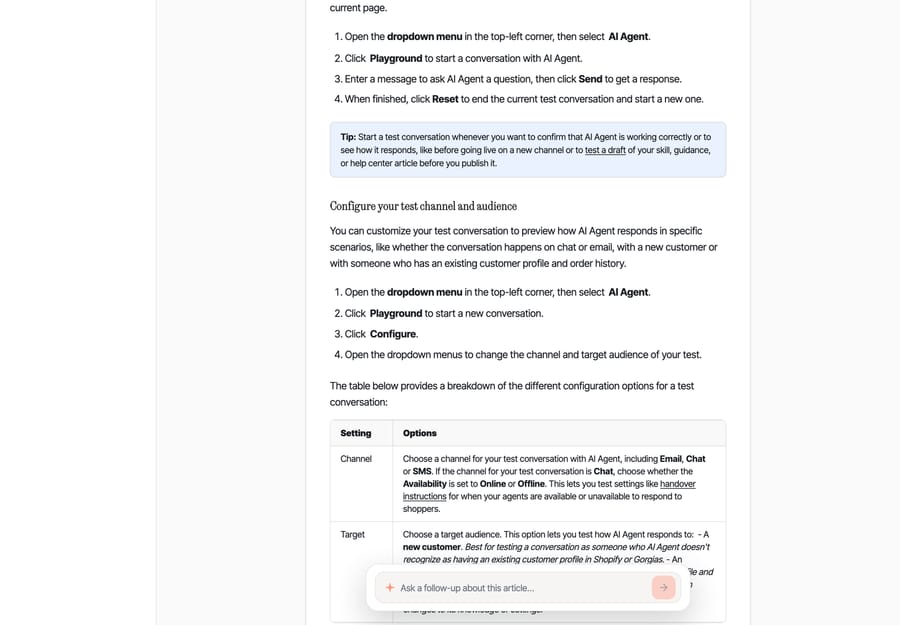
Two limits worth knowing before you plan a test session. Only one draft can be tested at a time, and Actions are disabled by default so a test can't modify real customer data. Enabling them is the right call when you are testing a Skill that has to perform a refund, and it's a real refund, so use a test order.
Run your top ten ticket reasons through it, in the customer's own words rather than yours. A question phrased the way an admin would phrase it isn't a test.
Step 6: Which channel should you deploy first?
Deployment is per channel, from AI Agent › Deploy, and chat is the usual first one because the feedback loop's fastest: the shopper is still there, so a bad answer produces an immediate correction rather than a silent abandonment. Gorgias' own AI Agent reporting breaks automation rate down by chat, SMS, contact form, help center and email, and AI Agent 3.0 added Instagram and Facebook.
Give each channel a week before you add the next one. The point isn't caution for its own sake. It's that the To Review queue from one channel is enough work for a week, and doing two at once means neither gets tuned.
Step 7: How do you tune it from To Review and Give Feedback?
This is the loop that actually improves the thing, and it's the step most teams skip.
The path is dropdown menu › Inbox, scroll to the shared views for AI Agent, then To Review. Open a ticket, click Give Feedback next to a message the agent sent, and the AI Feedback tab opens in the ticket sidebar. Show reasoning underneath any agent message explains why it did what it did (Coach AI Agent and give feedback).
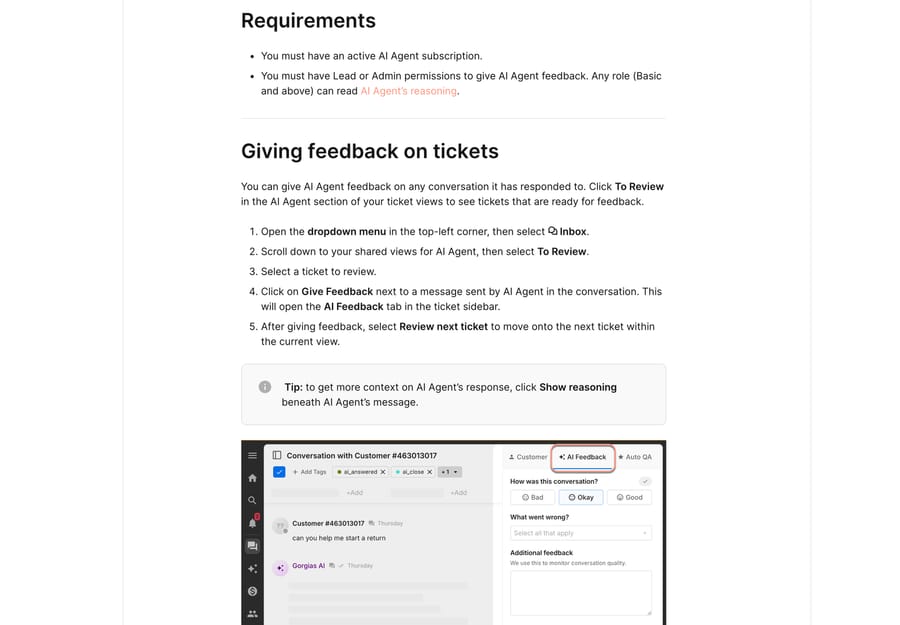
Feedback does two different jobs. Rating a knowledge source thumbs up or down teaches the agent which sources to prefer for similar questions, and suggesting a missing source coaches it to retrieve that one next time. Separately, reading the reasoning tells you whether the problem is the knowledge, the Skill or a missing Action, which is the difference between fixing it in ten minutes and rewriting everything. You can create Guidance or a Help Center article directly from the feedback panel.
Giving feedback needs Lead or Admin permissions. Any role from Basic up can read the reasoning, which makes reasoning a useful thing to show agents who don't trust the AI yet.
Why does it close or snooze tickets without replying?
This is the behavior that generates the most "is it broken?" questions, and it's documented and deliberate.
The agent closes without responding when a message is a simple acknowledgment ("Thanks", "Got it", "OK") with no outstanding question, spam, an auto-reply such as an out-of-office or a bounce, marketing or a newsletter, bot-like scripted copy, or something outside what it is built to handle.
It snoozes when it has sent a response and is waiting: a vague opener like "Hi" or "I have a question", a request for information such as an order number, or a mild deferral like "Maybe later". Snoozed tickets are tagged ai_snooze, and this is the detail that surprises people: snoozing sets the ticket status to Closed and removes it from the Open view. Check the Snoozed tickets view or filter on the tag. If the customer never replies, the agent closes the ticket after three days on email, Facebook Messenger and Instagram DMs, or 10 minutes on chat and SMS.
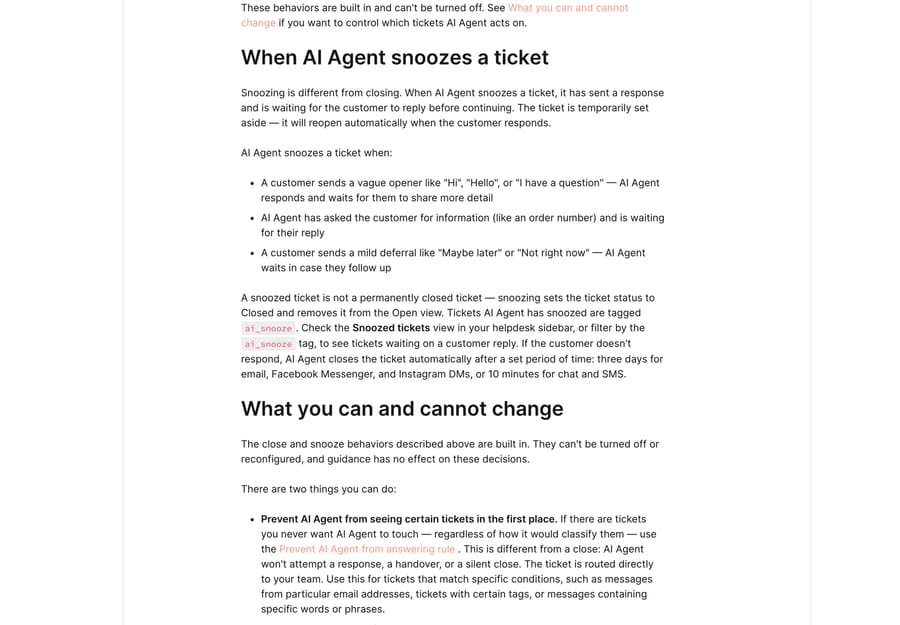
Gorgias is direct about your options here: these behaviors "are built in. They can't be turned off or reconfigured, and guidance has no effect on these decisions." Two levers remain. Keep the agent away from tickets entirely with the Prevent AI Agent from answering rule, and catch its mistakes afterwards with the Re-open low CSAT AI Agent tickets rule. Both are Rules, and our walkthrough of that engine is Gorgias rules explained.
"Can I approve replies before they send?"
Avery Wade asked this in Gorgias' community in 2024, and it's still one of the first questions every admin asks (Screening AI Agent responses before they're sent).
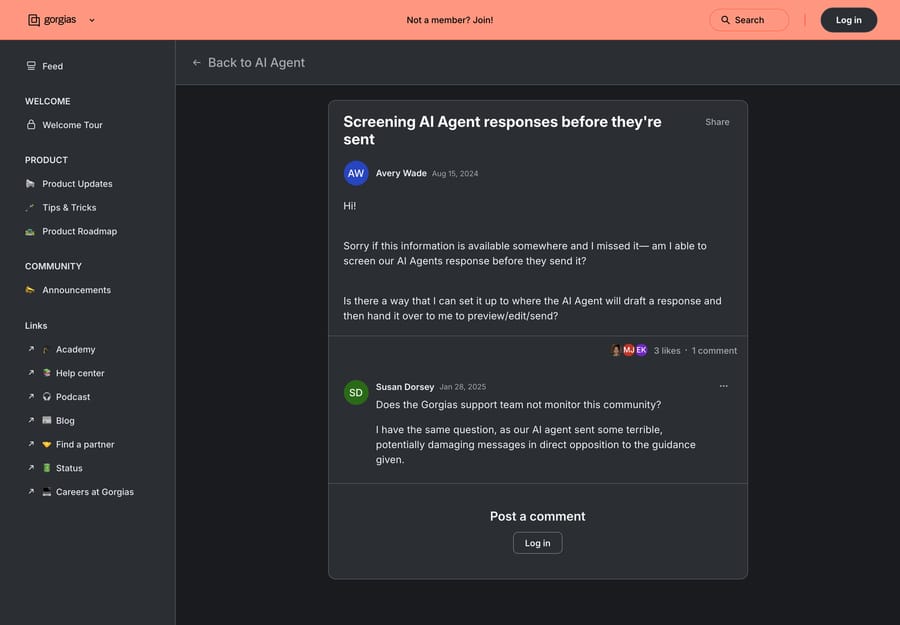
What the documented product gives you isn't a pre-send approval queue. It's three things that together do most of the same job: the Playground, where you test a draft against real phrasings before it goes anywhere near a customer; the internal quality check, where the agent drafts, reviews its own draft and hands over instead of sending when confidence is low; and the To Review view plus the low-CSAT reopen rule, which catch what got through. If your requirement really is that a human signs off every reply, run the agent on a channel where handover is the default outcome and treat its drafts as research, or use a layer that writes internal notes rather than replies.
What does the AI Agent cost while you are tuning?
Tuning isn't free, and the shape of the bill matters while you iterate. Gorgias adds the AI Agent to a helpdesk plan as a separate monthly line, read off Gorgias' pricing page on 24 September 2026:
| Plan (monthly billing) | Helpdesk | AI Agent line | Included automated interactions | Overage |
|---|---|---|---|---|
| Starter | $10, 50 tickets | $30 | 30 | $1.50 each |
| Basic | $60, 300 tickets | $30 | 30 | $1.50 each |
| Pro | $360, 2,000 tickets | $190 | 190 | $1.50 each |
| Advanced | $900, 5,000 tickets | $530 | 530 | $1.50 each |
The plan comparison on the same page puts the included interactions at $1.00 each on Starter and Basic, $0.90 on Pro and $0.85 on Advanced, so the overage rate is 50% to 76% above what you pay inside the allowance. Actions (cancel, discount, apply) aren't on Starter. Each automated interaction also counts as one helpdesk ticket against the plan's ticket limit.
An automated interaction is a request fully resolved without a human, by the AI Agent or another automation such as Flows. If a support agent replies within 72 hours of an AI Agent resolution, Gorgias charges it only as a helpdesk ticket, so a bad week of handovers costs you less than a good one. That's a fairer unit than it first looks, and the incentive points roughly where you'd want: Gorgias earns on work that stayed done. The part to watch is the allowance ratio. Basic includes 300 tickets and 30 automated interactions, so automating even a fifth of a 300-ticket month means buying 30 interactions of overage at $1.50 a go. Budget the tuning period at the overage rate rather than the included rate, and check the arithmetic in Gorgias pricing explained. The Playground itself isn't billable, which is the strongest argument for doing your testing there rather than on live tickets.
When does a second agent layer make sense?
Gorgias' AI Agent is strongest where an Action already exists: order status, returns, cancellations, address changes, subscription edits. After a few weeks of the To Review loop you will have a clear picture of what is left, and it is usually the same two piles: questions whose answer lives in a system with no Action, and questions whose answer is buried in two years of your own resolved threads.
If you are weighing third-party agents against the native one, our guides to Yuma AI and Siena cover the two that plug into Gorgias most often. Macha is an AI agent layer that runs on top of the help desk a team already uses, Gorgias included, and it never replaces the help desk. It suits teams who have already tuned the native agent and want the leftover pile handled, and it's the wrong fit if you haven't yet done Steps 1 to 7, because a second layer on an untuned knowledge base just inherits the same gaps. One plan, priced on monthly ticket volume from $299 a month for 750 tickets, about $0.40 a ticket at every tier, one thread with one person counting as one ticket however many replies it takes, setup and monitoring by the Macha team included, and a $50 free-usage trial with no credit card. See Macha on Gorgias or the tiers at /pricing.
How did we research this?
Every step here is written from Gorgias' own documentation and in-product help for AI Agent, Guidance, Skills, Actions and the To Review queue. On 24 September 2026 we re-read the Gorgias pricing page (plan prices, AI Agent lines, the $1.50 overage and the 72-hour rule) and re-checked the Guidance limit and the snooze windows against the docs; both were unchanged. The community threads are quoted as their authors wrote them and aren't product documentation. Gorgias changes this product often, so confirm limits and prices in your own account before you plan around them.
Frequently asked questions
How do I set up the Gorgias AI Agent? Load knowledge at AI Agent › Knowledge, decide Guidance or Skill per topic, enable the Actions your top ticket reasons need, add handover topics under AI Agent › Settings › Handover and exclusion, test in the Playground, deploy one channel at a time from AI Agent › Deploy, then tune from the To Review shared view in your Inbox.
What's the difference between Guidance and a Skill? Guidance is reference knowledge retrieved on relevance, for information that applies across many conversations, capped at 100 enabled items of 30,000 characters each. A Skill is a procedure triggered by intent, written as WHEN plus IF/THEN, for one request type such as a return. If a topic has to fire the same way every time, it is a Skill.
How many knowledge sources can the Gorgias AI Agent use? Up to 100 Guidance enabled at once, each up to 30,000 characters, plus Help Center articles with no stated cap, an auto-syncing store website, individual URLs one sync at a time, and documents in pdf, docx, pptx or xlsx. Images inside documents are not processed.
How do I stop the Gorgias AI Agent from answering certain tickets? Two controls. Handover topics, under AI Agent › Settings › Handover and exclusion, let it read the ticket and escalate. The Prevent AI Agent from answering rule stops it seeing the ticket at all, so it never responds, hands over or closes, and the ticket routes straight to your team.
Why does the Gorgias AI Agent snooze tickets? Because it has replied and is waiting for the customer: a vague opener, a request for an order number, or a mild deferral. Snoozed tickets are tagged ai_snooze, snoozing sets the status to Closed and removes the ticket from the Open view, and the agent closes it for good after three days on email, Messenger and Instagram, or 10 minutes on chat and SMS.
Why does the Gorgias AI Agent close tickets without responding? For simple acknowledgments with no outstanding question, spam, auto-replies such as out-of-office and bounce messages, marketing and newsletters, bot-like scripted copy, and messages outside what it is built to handle. Gorgias states these behaviors are built in and cannot be turned off, and that guidance has no effect on them.
Can I review Gorgias AI Agent replies before they send? There isn't a pre-send approval queue in the documented product. The supported substitutes are the Playground, where drafts are tested without creating tickets or being billed, the agent's own confidence check that hands over instead of sending a weak reply, and the To Review view plus the Re-open low CSAT AI Agent tickets rule for catching what got through.
How much does the Gorgias AI Agent cost? On monthly billing it's a $30 line on Starter and Basic with 30 automated interactions, $190 on Pro with 190, and $530 on Advanced with 530, then $1.50 per automated interaction past the allowance. If a human replies within 72 hours of an AI resolution, it's charged only as a helpdesk ticket.
How do I improve the Gorgias AI Agent's answers? Use the To Review shared view in your Inbox, click Give Feedback next to an agent message, and rate the conversation and the knowledge sources it used. Thumbs up or down on a source teaches it what to prefer, suggesting a missing source coaches it to retrieve that one, and Show reasoning tells you whether the gap is knowledge, a Skill or a missing Action. Giving feedback needs Lead or Admin permissions.
Sources:
- Add your brand's content for AI Agent: knowledge paths, source types and limits
- Create guidance to give AI Agent knowledge: the 100-guidance cap and 30,000-character limit
- Best practices for writing skills: WHEN/IF-THEN structure and what Skills cannot do
- Customize how AI Agent hands over to your team: handover triggers, topics path, chat and email defaults
- Why AI Agent closes or snoozes tickets without responding: close and snooze reasons, ai_snooze, auto-close windows, the two admin levers
- Preview AI Agent responses with test conversations: Playground behavior, limits and the actions-off default
- Coach AI Agent and give feedback: To Review, Give Feedback, Show reasoning, permissions
- Gorgias pricing: AI Agent line, included automated interactions and the overage rate, checked 20 September 2026
- Community threads: Guidance vs Help Center, AI Handover Topics, Screening AI Agent responses before they're sent