





 Shopify
 Stripe
 Slack
Slack Notion
 Google Workspace
 Confluence

What Is the Gorgias Help Center? Plans, Languages and AI Setup (2026)


The Gorgias Help Center is the hosted knowledge base that comes with every Gorgias Helpdesk plan, where shoppers look up order, return and shipping answers without opening a ticket. The same articles can ground Gorgias AI Agent, though order management and article recommendations only work with a Shopify store.
Key takeaways
- The Gorgias Help Center is a hosted knowledge-base site included on all Gorgias Helpdesk plans, but it can't be created during the 30-day free trial.
- Only the Gorgias account owner, admins and leads can create and manage a Help Center, while everyone can view its published articles.
- The Gorgias Help Center supports 11 languages with browser-language detection and a default-language fallback, and each article's translation is added by hand.
- Gorgias Help Center order management and article recommendations need a Shopify store, while BigCommerce and Magento 2 stores get flows only with an AI Agent subscription.
- Gorgias charges AI Agent at $1.50 per automated interaction past each plan's allowance, while the Help Center itself adds no cost to a Helpdesk plan.

The Gorgias Help Center is a hosted knowledge-base site, included on every Gorgias Helpdesk plan, that you build from articles and categories and can connect to Gorgias AI Agent as its knowledge source. You can't create one during the 30-day free trial, and it supports 11 languages, per Gorgias's own Help Center docs (checked 24 September 2026).
| Question | Answer (Gorgias docs, checked 24 September 2026) |
|---|---|
| Which plans include it? | All Helpdesk plans (from $10/mo for 50 tickets) |
| Free trial? | Can't be created during the 30-day trial window |
| Who can set it up? | Account owner, admins and leads; everyone can view published articles |
| Languages | 11, with browser-language detection and a default-language fallback |
| Layouts | One-page (accordion) or card |
| Imports | CSV, Zendesk, HelpDocs, Re:amaze, Intercom |
| AI features by store | Shopify: flows, article recommendations, order management. BigCommerce and Magento 2: flows only, with an AI Agent subscription |
What is the Gorgias Help Center?
The Help Center is a hosted knowledge-base website that lives on its own subdomain and sits alongside your Gorgias helpdesk. It's built from three nested pieces: articles (the individual answers), categories (the shelves those articles sit on, like "Shipping" or "Returns & Exchanges"), and optional subcategories for deeper structure. Customers land on it, search, and self-serve. The same articles can also feed your on-site chat and AI answers rather than living in a silo.
Per Gorgias's Help Center 101 documentation, the Help Center is available on all Helpdesk plans, with one catch worth flagging up front: it isn't possible to create a Help Center during a free trial. If your account is still in the 30-day trial window, you wait until the trial ends. Management is also permission-gated: only the account owner, admins, and leads can create and manage a Help Center; everyone else can view published articles but can't touch the setup.
Gorgias prices the helpdesk by ticket volume, not by seat. On 24 September 2026 the pricing page listed helpdesk-only plans from $10/mo (Starter, 50 tickets) through $60/mo (Basic, 300 tickets), $360/mo (Pro, 2,000 tickets) and $900/mo (Advanced, 5,000 tickets) on monthly billing, with AI Agent added on top and charged $1.50 per automated interaction past each plan's included amount. So the Help Center itself costs nothing extra; the AI that reads it does.
If you're still getting your bearings on the wider platform, our what is Gorgias overview sets the Help Center in context alongside the inbox, rules, and automation.
How do you create a Help Center, articles, and categories?
You build the Help Center through a four-step setup wizard. Per the Create a Help Center, Article, or Category docs, the path is:
- Go to Settings → Channels → Help Center and click Create help center.
- In Step 1 (the basics), enter a brand name, pick a subdomain, and choose a default language (you can add more languages now or later). Pick a platform type: an ecommerce platform with a connected store, or "any other website."
- In Step 2, add your branding: logos, accent color, font and layout.
- In Step 3, populate it. You can write articles manually, accept AI-generated suggestions, start from Gorgias's article templates, or import existing content. Step 4 turns on AI Agent features.
For imports specifically, you can upload a CSV or pull directly from Zendesk, HelpDocs, Re:amaze, or Intercom, which is handy if you're migrating an existing knowledge base rather than starting cold.
Articles carry a visibility setting that matters for SEO. A Public article is searchable inside the Help Center and may appear in search engine results; an Unlisted article exists publicly but can only be reached by its URL and is excluded from both Help Center search and search engines. That's useful for policy pages you want to link but not advertise. Each article is also assigned a language and, optionally, a category.
Categories and subcategories give the site its shape. You create a category with a title, a URL slug, a description, and an optional grid image; a subcategory is just a category with a parent selected from a dropdown. Multi-level subcategories let brands with deep catalogs nest "Returns → International Returns," for instance, rather than flattening everything onto one shelf.
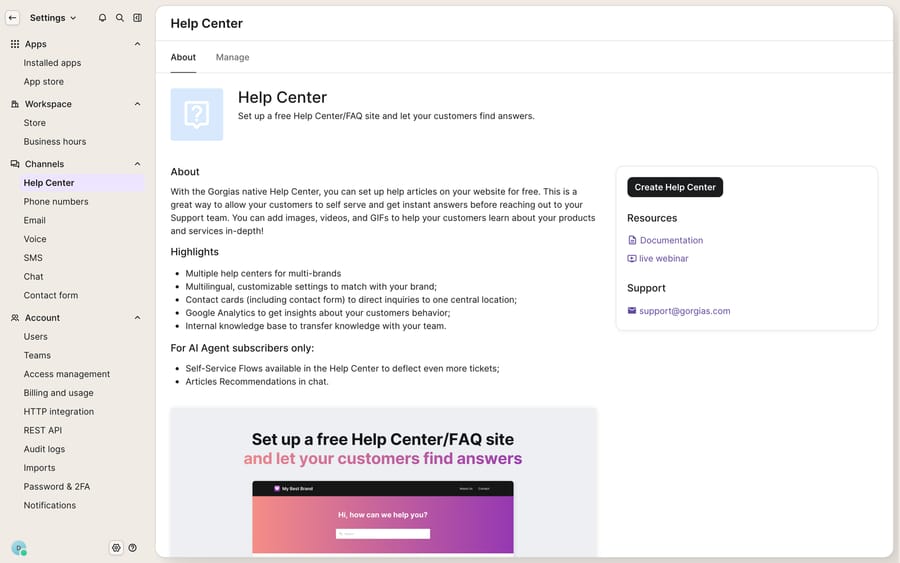
The screenshot above is the admin surface on a fresh trial before any Help Center exists: the About/Manage entry point and a storefront preview, rather than a populated site. Once you complete the wizard, this is where your articles, categories, and appearance settings live.
How do you make the Help Center look like your store?
A knowledge base that looks bolted-on erodes trust, so the Appearance controls are worth the time. Per the Customize Help Center appearance docs, you can set:
- Branding: a brand name, a standard logo, a white logo (for dark backgrounds), and a favicon. The logo container is 180×32px, JPG or PNG, and horizontal logos work best.
- Theme: a light or dark mode.
- Typography: a customizable primary font. Swapping in a custom font changes the pages' overall design.
- Accent color: the color used for icons and hovers.
- Banner: a title, an optional background image, and a toggle to show or hide the search bar.
- Category images: grid thumbnails at a recommended 318×160px (4:2).
The one structural choice that shapes the whole experience is layout. The One-page layout shows article titles as an accordion that expands in place without leaving the page. Articles in it are limited to a 16px maximum font size with no heading styles, and the layout isn't available once you use multiple category levels. The Card layout shows each article as a titled box that opens on its own page. Card layout suits larger knowledge bases; one-page suits a tight FAQ.
One nuance: the appearance editor is no-code, but deeper styling lives in the Help Center's Extra HTML section, where you can inject custom CSS and HTML directly (Gorgias docs). That's a code-level step, not point-and-click.
Which languages does the Gorgias Help Center support?
Gorgias's Help Center preferences doc lists 11 supported languages, the same set as Gorgias Chat: English (US), French (France), French (Canada), Czech, Danish, Dutch, German, Italian, Norwegian, Spanish (Spain) and Swedish. Detection is automatic: the Help Center reads a visitor's browser language and serves that version if you've published one; if there's no match, it falls back to the default language you set in Step 1.
The catch is that translation is per-article work you own. The eesel multilingual guide reports no built-in machine translation: after you enable a language, you add the translated text for each article, chat campaign, and flow yourself. For automated translation, brands typically add a third-party app such as Translation by Lingpad, which is another subscription. So multilingual is supported, but it's localization work, not a one-click toggle.
How does the Help Center feed self-service and AI Agent?
This is where the Help Center earns its keep for ecommerce. Two things read from it:
- On-site self-service and chat. Embedded in your store, the Help Center lets shoppers search answers before they ever message you, and on Shopify it powers article recommendations inside Gorgias Chat.
- AI grounding. Gorgias lets you connect the Help Center to AI Agent's knowledge base, so AI Agent answers from your published articles rather than guessing. That grounding is what turns a static FAQ into an automated first line of support, often wired together with Gorgias Flows for structured resolutions.
What you get in the wizard's Step 4 (turn on AI Agent features) depends on your store platform. With a connected Shopify store, you can switch on flows, article recommendations and order management (letting shoppers look up and act on orders). With BigCommerce or Magento 2, you get flows only, and only with an AI Agent subscription. If you choose "any other website," you embed the Help Center manually and the commerce features aren't available. The incentive is plain: the Help Center is free, and the paid AI Agent is how Gorgias earns on it, at $1.50 per automated interaction past the plan allowance.
Where does the Gorgias Help Center stop, and where does an AI layer fit?
The Gorgias Help Center is a solid, well-integrated knowledge base: it's on every plan, it themes cleanly, it imports from the major platforms, and it can feed AI Agent out of the box. But a knowledge base is a library. It stores answers; it doesn't deliver the resolution. A shopper still has to search, read, and correctly self-diagnose. If they don't find it, or the article is close but not exact, they open a ticket anyway.
The gated bits are worth naming too: you can't create one during the 30-day trial, translation into the 11 languages is manual work, deeper CSS styling is a code-level Extra HTML step, and the highest-value actions (order management, article recommendations) are Shopify-only. The Help Center is the substrate; the reasoning that turns it into resolutions is a separate, paid capability.
This is the seam where an AI agent layer fits. The category of AI agents for customer service exists to read a knowledge base and act on it: understand the shopper's actual question, retrieve the right article, and resolve rather than link. Macha is one such layer, with a live Gorgias connector that reads tickets, replies, updates status and tags, and searches macros. It runs on top of the Gorgias you already use and doesn't replace your helpdesk or its Help Center. Add your published Help Center as a website knowledge source and Macha crawls it, so the agent answers from the same content your shoppers read. Where a question needs live data, such as "where's order #4471?", a custom tool lets the agent call your store's API directly, which also works when the store isn't on Shopify. See the Macha–Gorgias integration for how the connection is wired. Billing is per ticket: one conversation, charged once however many messages it takes, from $299/mo for up to 750 tickets. The pricing page has the tiers.
The clean division of labor: keep the Gorgias Help Center as your canonical, branded knowledge base, and layer an agent on top for the part a static site can't do, which is reading the question and resolving it.
FAQ
Where do I set up the Gorgias Help Center? Go to Settings → Channels → Help Center and click Create help center. The four-step wizard covers the basics (name, subdomain, default language, platform), branding, articles (manual, AI suggestions, templates, or imports), and AI Agent features.
Is the Help Center free / on every plan? It's available on all Helpdesk plans. The one restriction: you can't create a Help Center during the 30-day free trial, so you wait until the trial ends. Flows on BigCommerce and Magento 2 need an AI Agent subscription.
How does multilingual work? Gorgias supports 11 languages with automatic browser-language detection and a default-language fallback. Translation is per-article: you add translated text yourself, or use a third-party app for automated translation.
Can I customize how it looks? Yes: brand name, logos, favicon, light or dark theme, a custom primary font, an accent color, a banner, and a choice between one-page (accordion) and card layouts. The editor is no-code, but you can inject custom CSS and HTML via the Extra HTML section for deeper brand matching.
Can I add AI to my Gorgias Help Center without replacing Gorgias? Yes. An AI agent layer like Macha connects to Gorgias as a live connector and can use your published Help Center as a knowledge source, running on top of your existing helpdesk. Gorgias stays the system of record for your knowledge base and tickets.
Ready to turn your Help Center from a library into resolutions? Start a free trial of Macha and connect it to your Gorgias in minutes.






