





 Shopify
 Stripe
 Slack
Slack Notion
 Google Workspace
 Confluence

What Are Gorgias Flows and How Are They Billed? (2026)


Gorgias Flows are click-through decision trees that answer shopper questions in the chat widget, Help Center and contact form before a ticket exists, and each resolution is billed as an automated interaction. They handle predictable FAQs well, and they stop at anything you didn't script in advance.
Key takeaways
- Gorgias Flows are no-code decision trees built from triggers, button options, messages and ends, and they run in the chat widget, Help Center and contact form.
- Gorgias bills each Flow resolution as an automated interaction, and the Pro plan's AI Agent add-on includes 190 of them for $190 a month.
- Past the included amount, Gorgias charges $1.50 per automated interaction, while a Flow resolution is not also billed as a helpdesk ticket.
- Saving an incomplete Gorgias Flow keeps it as a Draft, so it will not be listed under Channels until it is finished and published.
- On a store-less Gorgias trial, the AI Agent area showed a Shopify-only enablement wall instead of the builder, so confirm your plan and store first.

Gorgias Flows are no-code, click-through decision trees that answer shopper questions in the chat widget, Help Center and contact form before a ticket exists, and Gorgias bills each one that resolves a conversation as an automated interaction. On the Pro plan, AI Agent adds 190 automated interactions for $190 a month ($171 billed annually), then $1.50 for each interaction past that limit.
| Question | Short answer |
|---|---|
| What is a Flow? | A scripted Q&A tree: triggers, button options, messages, ends |
| Where does it run? | Chat widget, Help Center, contact form |
| How is it billed? | As an automated interaction, via the AI Agent add-on; a Flow resolution is not also billed as a ticket |
| Store requirement | Our store-less trial showed "AI Agent is currently available only with Shopify" |
| Where it stops | Anything you didn't script, free-text questions, hand-built API steps |
What is a Gorgias Flow?
Per the Gorgias Flows documentation, Flows are "automated Q&A conversation scenarios that operate across multiple channels and assist shoppers with personalized guides, answers, and recommendations." In plain terms, a Flow is a decision tree. You define a starting question, the buttons a shopper can tap, where each button leads, and how the conversation ends: a returns portal link, a tracking lookup, a handoff to a human.
Because they run before a ticket exists, Flows are Gorgias' first line of deflection. A well-built shipping-policy Flow answers the same question a hundred times a day without an agent touching it. They're multichannel too: a Flow you build once can surface in the chat widget, the Help Center and the contact form, so customers meet it wherever they reach for help.
How does the Flow Builder work?
The Flow Builder is a no-code visual canvas with a tree layout that shows the separate paths you build for each topic. You drag and connect blocks, and the tree fans out as you add branches. The core building blocks are:
- Triggers: what starts the Flow (the entry point a shopper sees).
- Options: the decision branches. Each option is a button, and each button routes to a different sub-path. This is where "Do you want to track an order or start a return?" splits into two different conversations.
- Messages / Quick Responses: the text, links and answers the Flow shows along the way.
- Ends: how a branch concludes: a link out, a resolved conversation, or an escalation to your team.
One practical detail from the Flow Builder docs: using Save on an incomplete Flow keeps it as a Draft, so it won't be listed under Channels until you finish and publish it. That's your safety net for building on a live account without exposing a half-finished tree to customers. Keep trees short; every extra tap is another point where a shopper gives up and asks for a human.
What is a Quick Response Flow?
Not every question needs a tree. A Quick Response is a one-step Flow that gives an instant answer to a frequent question: the shopper taps "Shipping times" and gets your shipping-policy blurb, no branching. These are the fastest wins: high-volume, low-complexity FAQs (returns window, sizing, order cutoff times) resolved in a single tap. The chat widget shows a limited number of Flows at once, so most stores put their top FAQ Quick Responses up front and reserve multi-step trees for returns and order lookups.
Can a Flow call an external API?
Yes. Simple Flows are static: button in, canned answer out. The Advanced step type opens an editor where a Flow can fire an HTTP request to an external API, including apps Gorgias doesn't natively integrate, capture the response, and store fields from it as JSONPath variables the rest of the Flow can reference. Gorgias' own examples include calling Klaviyo, LoyaltyLion and Recharge.
That's a lot of capability for a no-code tool: a returns Flow can ask for an order number, hit your returns platform's API, branch on whether the order is inside the returns window, and route accordingly, all inside the tree. It's also where the ceiling starts to show. For the broader picture of how self-service, macros and rules fit together, what Gorgias is and the self-service overview are the right primers; and because Flows live in the chat widget, how Gorgias Chat works is worth reading alongside this.
What do Gorgias Flows cost, and what do they require?
Gorgias now sells two products on one bill: the Helpdesk, priced by ticket volume, and AI Agent, an add-on available on every plan. Per Gorgias' billing documentation, an automated interaction is any customer request "fully handled by AI Agent or another automation feature including Flows, Order Management and Article Recommendations." So a Flow that ends with "Yes, that was helpful" is a billable automated interaction.
| Gorgias plan | Helpdesk (monthly) | Tickets / month | AI Agent add-on (monthly) | Automated interactions |
|---|---|---|---|---|
| Starter | $10 | 50 | $30 | 30 |
| Basic | $60 | 300 | $30 | 30 |
| Pro | $360 | 2,000 | $190 | 190 |
| Advanced | $900 | 5,000 | $530 | 530 |
Prices are from gorgias.com/pricing on 24 September 2026. Past the included amount, Gorgias charges $1.50 per automated interaction and $0.40 or $0.36 per extra ticket depending on plan. Annual billing lowers both lines (Pro's AI Agent drops to $171).
The billing detail that matters: when a Flow resolves a request, Gorgias charges only the automation fee. When AI Agent resolves one, the docs say one ticket can count toward both your helpdesk tickets and your automated interactions. Gorgias earns on every resolution either way, so its incentive is to count as many conversations as "automated" as it can.
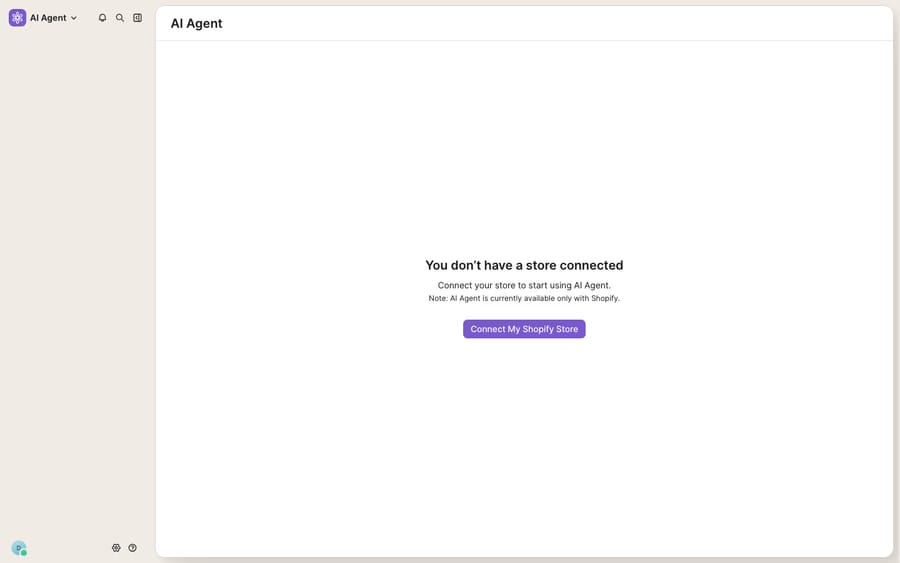
The second requirement is the store. On a fresh Gorgias trial without a connected store, opening the AI Agent area doesn't reach the builder at all. It hits the wall shown above: "You don't have a store connected… AI Agent is currently available only with Shopify," with a Connect My Shopify Store button. Before planning a self-service strategy around Flows and AI Agent, confirm that your plan includes AI Agent and that your store is connected, and check with Gorgias what works on BigCommerce, Magento or WooCommerce.
Where do Flows stop working?
Flows are good at what they're for: for high-volume, predictable questions, a well-built Flow is fast, cheap and deterministic, and the customer gets an answer in one tap. Keep them. But a decision tree is a tree you drew in advance, and that's where it runs out of road:
- It only answers what you scripted. A Flow can't reason about a question you didn't anticipate. Anything off the branch falls through to a human or a dead end.
- Free-text questions don't fit buttons. Shoppers who type "the sweater I ordered last Tuesday came with a hole and I need a replacement before the weekend" won't tap through a button tree.
- Every real integration is a hand-built HTTP step. You're wiring, testing and maintaining API calls and JSONPath variables by hand, per Flow.
- The store gate is real. If your store isn't connected Shopify, the AI Agent area that houses the richest automations may not open for you at all.
How does an AI agent layer work alongside Flows?
This is the gap an AI agent layer is built for, and it's worth understanding the whole AI-agents-for-customer-service category before reaching for one. Macha is one such layer: it runs on top of the Gorgias you already use through the live Macha↔Gorgias connector, and it doesn't replace Gorgias, your Flows or your help desk. Keep your Quick Response Flows deflecting the top FAQs at the widget, and let Macha's agents take the free-text, reasoning-heavy tickets that fall off the tree: the customer with the damaged sweater, the multi-part subscription question, the order-status request that needs a real lookup. Macha fits teams already running Zendesk, Freshdesk, Gorgias, Front, HubSpot or Intercom who want agents acting inside the ticket.
Two contrasts matter. First, integrations: instead of hand-wiring an HTTP step per Flow, Macha reaches your systems through a custom tool that turns a REST API into something an agent can call and reason over. Second, billing: Macha bills per ticket, not per resolution or per interaction. One conversation is charged once however many messages it takes, from $299 a month for 750 tickets, so a conversation is never billed as both an "interaction" and a "ticket" (the tiers are on the pricing page). For the mechanics of connecting the two, see the Macha–Gorgias integration guide and the Gorgias AI Agent explainer; the Gorgias pricing breakdown covers the add-on math.
The division of labor: Flows own the predictable, button-shaped deflection at the front door, and an AI agent layer owns the free-text, integration-heavy work the tree can't reach. You don't pick one. You stack them.
FAQ
What are Gorgias Flows? Flows are automated, click-through Q&A conversations you build in Gorgias' no-code Flow Builder. A shopper taps a button, follows a decision branch, and reaches a scripted resolution (a returns link, a tracking lookup, or a handoff), usually in the chat widget, Help Center or contact form, before a ticket is created.
Where do I build a Flow in Gorgias? In the Flows area of Gorgias' automation settings, using the visual Flow Builder: a tree-layout canvas of Triggers, Options (decision branches), Messages/Quick Responses and Ends. Saving an incomplete Flow keeps it as a Draft, so it won't go live under Channels until you publish it.
Do Gorgias Flows require an add-on or Shopify? Gorgias bills Flow resolutions as automated interactions, which come with the AI Agent add-on (for example 190 a month for $190 on Pro). On our store-less trial, the AI Agent area showed "AI Agent is currently available only with Shopify" instead of the builder, so confirm your plan and store before planning around Flows.
What's the difference between a Flow and a Quick Response? A Quick Response is a one-step Flow: tap once, get an instant FAQ answer (shipping times, returns window). A full Flow is a multi-step decision tree with branching. The chat widget shows a limited number of Flows at once, so most stores lead with Quick Responses and reserve trees for returns and order lookups.
Does a Flow count as a Gorgias ticket? No. Per Gorgias' billing docs, when Flows, Order Management or Article Recommendations resolve a request, you pay only the automation fee. An AI Agent resolution can count toward both your helpdesk tickets and your automated interactions.
Can I add AI to Gorgias without replacing it? Yes. An AI agent layer like Macha connects to Gorgias through the live native connector and runs on top of your help desk and Flows. Flows keep deflecting the predictable FAQs; Macha handles the free-text tickets that fall off the tree, billed per ticket rather than per resolution.
Want AI on top of your Gorgias Flows instead of rebuilding them? Start a free trial of Macha with $50 of free usage and no credit card, and connect it to your Gorgias.






