





 Shopify
 Stripe
 Slack
Slack Notion
 Google Workspace
 Confluence

Is Front a CRM? Front Contacts, Custom Fields and CRM Sync Explained (2026)


Front builds a contact record the moment someone emails you, with fields, notes, past threads and an account link, which makes it feel like a CRM. It is a context layer rather than a revenue system: there are no deals or pipelines, and HubSpot and Salesforce data only syncs one way, into Front.
Key takeaways
- Front is a light CRM inside a shared inbox: it has contact records, custom fields and accounts, but no deals, pipeline stages or forecasting.
- Front's HubSpot and Salesforce contact syncs are one-way into Front, so edits made to a synced field inside Front never reach the CRM.
- Both CRM contact syncs need Front's Professional plan, listed at $49.40 a seat a month billed annually or $65 monthly on Front's pricing page.
- Front ships eight default contact fields, all of type Text, and only a company admin can create additional contact custom fields.
- An email address or phone number can belong to only one Front contact record, which stops the same customer splitting into duplicate records.

Front is not a full CRM: it is a shared inbox with a light CRM built in, meaning contact records, custom fields and accounts, but no deals, pipeline stages or forecasting. Its HubSpot and Salesforce contact sync runs one way, from the CRM into Front, and needs the Professional plan ($49.40 a seat a month billed annually, $65 monthly) or above.
| Question | Short answer |
|---|---|
| Does Front keep contact records? | Yes: shared, private and auto-created contacts |
| Default contact fields | Eight, all of type Text; admins add custom fields |
| Accounts (companies)? | Yes, contacts belong to accounts, both carry custom fields |
| HubSpot / Salesforce sync | One-way into Front, Professional plan or above |
| Deals, pipeline, forecasting | No |
What does a Front contact record actually hold?
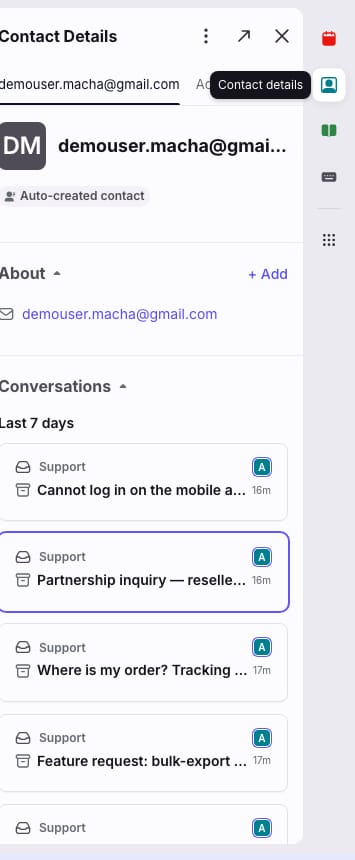
A Front contact is a shared customer record that lives inside your inbox. Per Front's Understanding Front contacts documentation, each record can hold a name, one or more email addresses, one or more phone numbers, X (Twitter) handle(s), an account association, custom fields, a profile photo, and free-text notes, plus the conversations you've had with that person. The email address or phone number acts as the unique identifier. Front is explicit that "an email address or phone number cannot be associated with multiple contact records," which keeps the record from fragmenting across duplicates.
There are three flavours of contact, and the distinction is Front-specific:
- Shared contacts are visible to your entire company, the default for anyone your team collaborates on.
- Private contacts are visible only to you, for sensitive relationships you don't want the whole team browsing.
- Auto-created contacts are generated automatically from incoming and outgoing messages. Teammates only see an auto-created contact if they had access to the conversation that spawned it.
That auto-creation is the reason Front feels CRM-ish out of the box: you don't have to manually enter anyone. The person emails in, the record exists, and their whole history is one click away. You open it from the Contact Details plugin in the right-hand sidebar of any conversation (or by clicking the contact's name in a message), or browse everyone from the Contact Manager via Relationships in the left navigation.
How do custom fields work on Front contacts?
Out of the box, Front ships eight default contact fields (Name, Email, Phone number, Twitter, Twitter DM, Custom channel, Description, and Link), all of type Text. The CRM feel comes from contact custom fields, where you store the attributes your team actually cares about: NPS score, plan tier, renewal date, account owner, lifetime value.
Creating them is an admin job: you must be a company admin. Per Front's Contact custom fields guide, the path is:
- Click the gear icon to open company settings.
- Select Custom fields from the left sidebar.
- Open the Contacts tab.
- Click Create contact custom field, then give it a name, description, and data type, and click Create.
Once a field exists, it does three useful things. It shows up as a column in the Contact Manager so you can sort and filter your book of business. It becomes a variable you can drop into message templates and signatures (so a reply can auto-fill the customer's plan or account name). And, most importantly for automation, it becomes a target for rules. If you're not already using them, Front's automation engine is worth understanding on its own terms; we cover it in Front rules explained.
Custom fields can be populated four ways: manually, via the Front API, via a CSV import, or automatically through a third-party integration, which is where CRM sync comes in.
How do accounts group contacts by company?
Front also has a layer above contacts. Per Use accounts and contacts in rules, accounts represent the companies or organizations your team works with, and contacts belong to an account. This is the B2B mental model most CRMs use, and it unlocks routing logic that pure inbox tools can't do.
Because both accounts and contacts carry custom fields, you can automate on them. Front documents conditions like "Account/contact custom field contains" and actions like "Assign based on account/contact custom field." In practice that means a conversation from anyone at an enterprise account can auto-route to that account's dedicated owner, or a message from a customer in a particular revenue tier can be tagged on arrival. That kind of segmentation makes Front tags far more useful than a flat label list.
How does Front sync contacts from HubSpot and Salesforce?
Front isn't trying to be your system of record for the whole customer relationship. It's trying to bring that record into the inbox, and the mechanism is CRM sync. Per Front's HubSpot contacts sync documentation, you go to Contacts → Import → from HubSpot, log in to HubSpot, turn on contacts sync, choose synced accounts or a specific list as the source, map the HubSpot fields you want to Front custom fields, and hit Sync. Front matches records first by externalId (the HubSpot contact ID), then by shared handles like email or phone, and creates a new contact when nothing matches.
Here is the gotcha that catches teams: the sync is one-way, HubSpot into Front only. Front states it plainly: "Contacts are synced one-way from HubSpot to Front." Changes you make in Front do not flow back to HubSpot. If you edit a synced field in Front, you're editing a local copy; the source of truth stays in your CRM, and the interface surfaces an "Edit in HubSpot" option when you hover over a synced field. The Salesforce contacts sync works the same way: "Contacts are synced one-way from Salesforce to Front," and the data powers tagging, assignment, routing and contact auto-suggestion inside Front.
That one-way design is a reasonable choice, since it keeps your CRM as the authoritative record and avoids two systems fighting over the truth, but you have to plan around it. If your reps update customer details from inside the inbox expecting HubSpot to reflect it, they'll be disappointed. One more thing to note: both the HubSpot and Salesforce contacts syncs are available on Front's Professional plan or above. On Front's pricing page, Professional is $65 a seat a month billed annually or $85 monthly, against $25 annual or $35 monthly for Starter, so on Starter you're relying on manual entry, CSV import, or the API instead.
Is Front a CRM? The honest verdict
Front is a light CRM built into a shared inbox, and it's good at that. If your definition of CRM is "every teammate can see who a customer is, what they've said before, and the key facts about their account, without leaving the conversation," Front nails it. Contact records, custom fields, account grouping, and rule-based automation off that data are all real, native, and useful.
Where it stops being a full CRM:
| Capability | Front | A full CRM (HubSpot / Salesforce) |
|---|---|---|
| Contact & account records | Yes, native | Yes |
| Custom fields | Yes (admin-created) | Yes, extensive |
| Conversation history in-context | Yes, the standout strength | Partial |
| Deals / pipeline / opportunity stages | No | Yes |
| Reporting, forecasting, dashboards | Minimal | Yes |
| Two-way sync back to your CRM | No, one-way in only | Yes |
| Marketing automation, sequences to nurture | Limited | Yes |
The short version: Front is a context layer, not a revenue system. It answers "who is this person and what have we said to them?" very well. It does not answer "what's this deal worth, what stage is it in, and what's my forecast?", and it doesn't try to. Most teams run Front alongside HubSpot or Salesforce, using CRM sync to pipe the important fields down into the inbox where agents actually work. That's the intended design, and it's the sensible setup. (If you're still getting oriented on the platform itself, start with what Front app is and how the Front shared inbox works.)
Where does an AI layer pick up from Front's contact data?
Front's contact and account data is only as valuable as what your team does with it. A field that says "Enterprise, renewal in 30 days" is useful context, but a human still has to read it, understand the customer's question, and write the reply. That reasoning is exactly the seam where an AI agent layer fits, and it's the broader promise behind AI agents for customer service.
Macha is one such layer. It runs on top of the Front you already use through a live native connector. It does not replace Front, and it isn't a CRM competing with HubSpot or Salesforce. Once connected, Macha reads the same contact and account fields Front maintains and uses them to draft grounded, context-aware replies inside the conversation: pulling the customer's plan tier into the answer, checking order status through a custom tool that turns a REST API into something the agent can call, and routing by intent rather than a static rule. You keep Front as the inbox and context layer, keep your CRM as the system of record, and add reasoning on top. We break the setup down in the Macha–Front integration guide and walk through connecting Front to Macha to route conversations with AI. (Macha bills per ticket, from $299/month for up to 750 tickets: one conversation, charged once however many messages it takes, never per resolution.)
FAQ
Is Front a CRM? Front is a light CRM built into a shared inbox. It has native contact records, custom fields, account grouping, and rule-based automation off that data, but it lacks deals, pipeline stages, forecasting, and dashboards, and its CRM sync is one-way. Most teams use it as a context layer alongside a full CRM like HubSpot or Salesforce, not as a replacement for one.
Does Front sync two-way with HubSpot or Salesforce? No. Front's contacts sync is one-way: data flows from HubSpot (or Salesforce) into Front only. Changes made inside Front do not push back to your CRM; you edit those fields in the CRM itself, and the interface offers an "Edit in HubSpot" option. Both syncs require Front's Professional plan or above.
How do I create custom fields for contacts in Front? As a company admin, click the gear icon to open company settings, choose Custom fields from the left sidebar, open the Contacts tab, and click Create contact custom field. Once created, fields appear as Contact Manager columns, as variables in templates and signatures, and as targets for rules.
What's the difference between contacts and accounts in Front? Contacts are individual people; accounts are the companies or organizations your team works with. Contacts belong to accounts, and both can carry custom fields, so you can, for example, auto-assign every conversation from an enterprise account to that account's owner.
Where is the Contact Manager in Front? Select Relationships in the left navigation menu to open the Contact Manager. Inside a conversation, open the Contact Details plugin in the right-hand sidebar, or click a contact's name in a message for basic details.
Can I add AI on top of Front's contact data without replacing Front? Yes. Macha connects to Front as a native connector and runs on top of your existing inbox. It reads the contact and account fields Front already maintains and uses them to draft grounded replies. It doesn't replace Front or your CRM.
Ready to turn your Front contact data into real answers? Start a free trial of Macha and connect it to your Front in minutes.






