



 Intercom
 Shopify
 Stripe
 Slack
Slack Notion
 Google Workspace
 Confluence

How Do You Connect Front to an AI Agent and Route Conversations? (Macha, 2026)


Connecting Front to Macha takes a scoped API token from Front's Settings, Developers, API Tokens screen and about ten minutes, after which an agent can tag, assign and comment on every new conversation. Front's rate limit is shared per company, at 50, 100 or 200 requests a minute depending on plan.
Key takeaways
- Connecting Front to Macha takes about ten minutes: an admin creates a scoped API token under Settings, Developers, API Tokens, then pastes it into Macha's Connectors page to enable 15 tools.
- Front enforces its API rate limit per company rather than per token, defaulting to 50 requests per minute on Starter, 100 on Professional and 200 on Enterprise.
- Four triggers start a Macha agent in Front: Conversation Created, New Message Added, Conversation Assigned, and a Custom Webhook added to any Front rule's Send a webhook action.
- Macha bills per ticket regardless of model or message count, starting at $299 a month for 750 tickets, about $0.40 each, with setup by the Macha team and a dedicated success manager included.
- Front's own Autopilot AI agent is priced from $0.05 per conversation, while Macha's Front agents can also read Shopify, Stripe and Notion in the same run.

To connect Front to an AI agent, create a scoped API token in Front under Settings → Developers → API Tokens (admins only), paste it into Macha's Connectors page, and give an agent the Conversation Created trigger plus the Update Tags and Assign Conversation tools. The whole setup takes about ten minutes, and from then on the first pass on every new conversation (read, classify, tag, assign) happens automatically. Macha sits on top of Front rather than replacing it: your inbox, channels and team structure stay where they are, and the agent acts through Front's own API to tag, assign, post an internal comment with an @mention, set a status, or draft and send a public reply.
The Front connector went live on 23 June 2026, alongside Gorgias. The walkthrough below covers the three steps: generate the token, connect it to Macha, and build an agent that triages and routes conversations the moment they land.
What can a Macha agent do once Front is connected?
What Macha can do inside Front decides which agents are worth building. The connector exposes 15 tools, the verbs your agents call:
| Category | Tools |
|---|---|
| Read | Get Conversation (full message + comment thread, contact, assignee, tags), Search Conversations, Search Contacts, Get Custom Fields, List Tags, Read Attachment (PDF, DOCX, XLSX, CSV, TXT) |
| Reply | Add Public Reply (email, chat, SMS, via the conversation's channel), Add Internal Comment (supports @mentions) |
| Route & update | Assign Conversation (to a teammate, or unassign), Update Tags (diffs against current and adds/removes), Update Status (archive/close, reopen, trash), Update Fields (custom fields) |
| Org structure | List Teammates (with availability), List Teams, List Inboxes |
Four triggers decide when an agent runs:
- Conversation Created: a new conversation lands in Front.
- New Message Added: an inbound customer reply or message hits an existing conversation.
- Conversation Assigned: a conversation is assigned or reassigned.
- Custom Webhook: Macha generates a webhook URL you drop into any Front rule's "Send a webhook" action, so you control exactly which conversations fire an agent.
For routing, the pattern is short: Conversation Created fires, the agent reads the conversation, classifies it, checks who's available with List Teammates, then calls Update Tags and Assign Conversation. Optionally it leaves an Internal Comment explaining the call, so the person picking it up has context.
Step 1: How do you create a Front API token for Macha?
Macha authenticates to Front with an API token that you create inside Front. You need to be a Front admin: only admins can create or manage API tokens, per Front's developer docs.
In Front:
- Go to Settings → Developers.
- Open the API Tokens tab.
- Click Create API token.
Front lets you scope the token across three dimensions. Set them deliberately rather than granting everything:
- Features: what the token can do. The options are Access resources, Auto-provisioning, Application triggers and MCP server. Macha needs only Access resources (conversations, contacts, inboxes, tags).
- Namespaces: where it applies. Global covers company-wide resources like teams and tags, Shared covers specific workspaces and their shared inboxes, and Private covers individual teammates' personal inboxes. Most routing agents need Shared for your team inboxes plus Global for tags and teammates.
- Granular permissions: Read, Write, Delete and Send per resource type. A triage-and-route agent needs Read + Write (to tag and assign). Add Send only if the agent will post public replies.
Figure: Creating a scoped API token in Front (Settings → Developers → API Tokens). Set Features to "Access resources," select the Shared and Global namespaces your inboxes and tags live in, and grant Read + Write, adding Send only when an agent will reply to customers.
After you create it, use Reveal or Copy on the token's page to get the value. Before you scale up, know how Front meters the API: its rate limit is enforced per company, not per token. The default ceiling is 50 requests per minute on Starter, 100 on Professional and 200 on Enterprise, with a burst allowance equal to half your plan's limit. Adding tokens doesn't raise it. Moving up a plan does, or buying Front's API Rate Limit Increase add-on at $200 a month per extra 100 requests a minute (front.com/pricing, September 2026). A real-time routing agent sits comfortably under any of those limits, but a backfill across a large archive should be paced against your plan's ceiling.
A note on least privilege: scope the token to the inboxes and actions the agent needs. If your first agent only tags and assigns, don't grant Send. You can issue a second, broader token later when you add a reply agent, and you can revoke any token from the same screen if something looks off.
Step 2: Where do you add the Front connector in Macha?
In your Macha dashboard, open Connectors. Front lives under the Support category, next to the other help desks Macha runs on.

Click Front, paste the API token from Step 1, and connect. Macha validates the token and pulls in your workspace context (inboxes, tags, teammates and custom fields), so your agents reference real values instead of guessing.
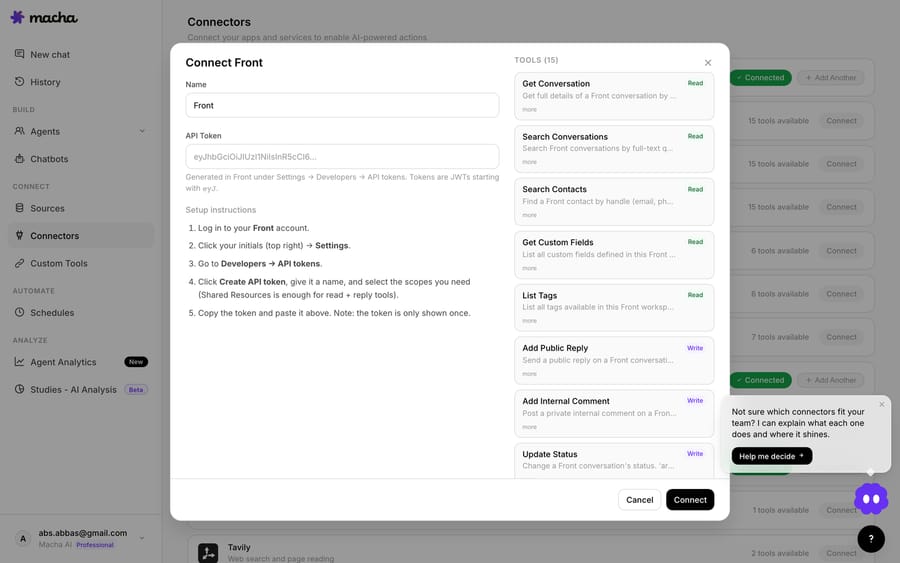
That's the entire connection. There's no app to install from Front's App Store and no OAuth flow: a scoped token goes in, and Macha can read conversations and act on your behalf.
Step 3: How do you build an agent that routes Front conversations?
A connector on its own does nothing. The work happens in an agent: a set of instructions, a trigger, and the tools it's allowed to use. Macha ships built-in agent templates for the Front connector, so you don't start from a blank page.
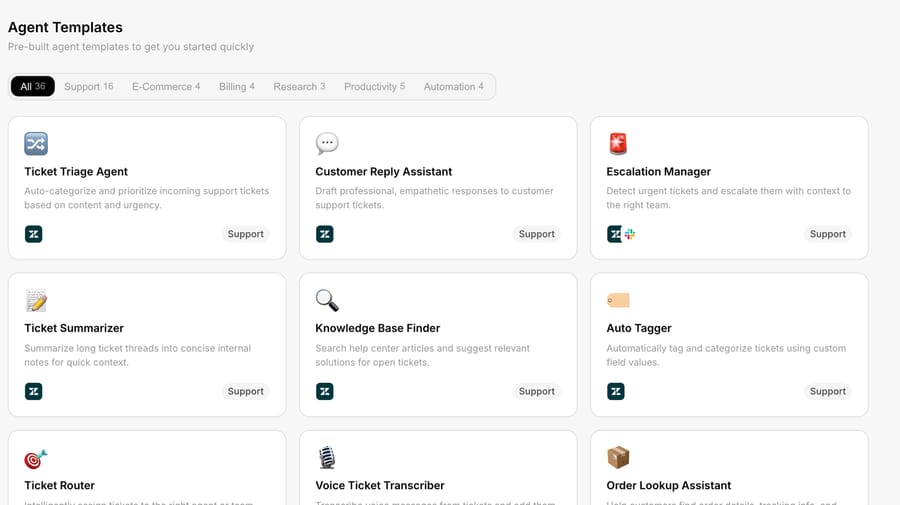
Here's how I'd configure a triage-and-route agent for a shared inbox:
Trigger: Conversation Created. The agent runs once, the moment a new conversation appears, before anyone touches it.
Tools: Get Conversation, List Tags, List Teammates, Update Tags, Assign Conversation and Add Internal Comment. Read what came in, see the available tags and people, then act.
Instructions (roughly what I'd write):
Read the new conversation. Classify it into exactly one of: Billing, Shipping, Returns, Technical, Sales. Apply the matching tag using the existing tag list; never invent a new tag. Then assign the conversation to an available teammate on the team that owns that topic (use List Teammates to check availability; if no one on that team is available, assign to the team lead). Post a one-line internal comment stating the category and why you chose it. Do not send a public reply.
How do you test the agent before it runs live?
Instructions on a page are easy. What matters is whether the agent takes the right actions on a live conversation, so run it once first. Macha's builder has a Test run that executes the agent against a real (or sample) Front conversation and shows each tool call it made: the classification it landed on, the Update Tags call and the Assign Conversation call. You confirm the routing decision before it ever runs unattended.
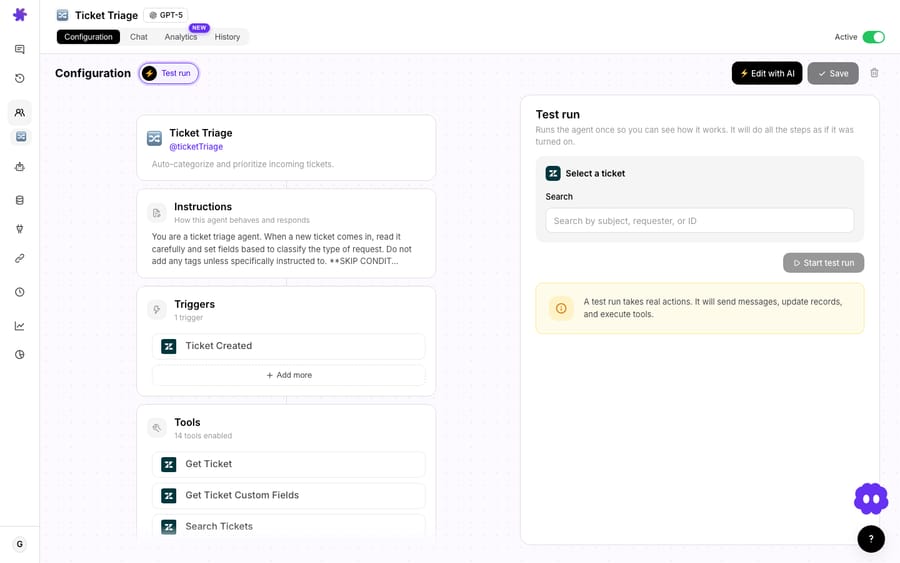
Figure: A test run in the Macha builder. The agent reads the conversation, classifies it, then fires its tool calls. For a routing agent that's Update Tags to apply the matching tag and Assign Conversation to route it to an available teammate, with an internal comment explaining the call. Every action in the trace is a real Front API call you can verify on the conversation itself.
Open that conversation in Front and the tag and assignee are there, with the agent's internal comment explaining why. That's the audit trail you want before switching an agent on for a live queue.
Two things make this reliable. First, the agent works from your real Front data (the actual tag names and teammate list), so it tags with values that exist, and Update Tags diffs against the current set, so it won't pile on duplicates. Second, because routing is high-stakes, you can keep the agent internal-only: no Send permission, no public replies, just tag, assign and comment. A human still writes the first customer-facing word.
If you want the agent to handle simple, unambiguous conversations end to end ("where's my order," a password reset, a known FAQ), give it Add Public Reply and connect a knowledge source (Notion, Confluence, a help center) plus a commerce tool like Shopify or Stripe, so it looks up the real order or charge before replying. That's the difference between deflection (sending a canned answer) and resolution (taking the action the customer needed), and it's where the layer-on-top model pays off: the agent reasons across Front and your other systems in one run.
Which model should a Front routing agent use?
The model doesn't change what you pay. Macha bills per ticket: one conversation, charged once however many messages and tool calls it takes, whichever model the agent runs on. So pick for the job, not the invoice. For a high-volume triage agent that only classifies and routes, a smaller, faster model is usually right: it keeps up with a busy inbox and handles a five-way classification easily. Save the larger models for agents that draft nuanced replies or follow strict multi-step rules, where the extra reasoning earns its latency. Pricing starts at $299 a month for 750 tickets (see the pricing page for every tier).
When should you use the Custom Webhook trigger instead?
The three event triggers cover most cases, but if you already run a tight set of Front rules, the Custom Webhook trigger is the precise option. Macha generates a webhook URL; you add a "Send a webhook" action to any Front rule and point it at that URL. Now Front's rule logic decides which conversations reach the agent (VIP senders only, one inbox, conversations matching a keyword), and the agent runs only on those.
This is the clean way to scope an expensive or sensitive agent. Let Front's rules do the cheap filtering they're already good at, and send only the conversations that need judgment to the agent, since each one it handles counts as a ticket.
When shouldn't you use an AI agent for Front routing?
Routing is exactly where over-automation bites:
- Don't auto-send replies on ambiguous queues from day one. Start internal-only (tag, assign, comment) and watch the agent's calls for a week before you give it
Send. The internal-comment trail makes that review easy. - Simple, deterministic routing doesn't need AI. If "anything to billing@ goes to the Finance inbox" is a fixed rule, build it as a native Front rule: it's free, instant and never wrong. Use a Macha agent when the decision needs reading and judgment (what is this conversation actually about?), not a lookup.
- Mind the per-company rate limit. Front's API limit is shared across your whole company: 50 requests a minute on Starter, 100 on Professional and 200 on Enterprise. A real-time routing agent runs well under that, but if you plan to run a Study or backfill thousands of historical conversations, pace it so Macha's calls don't compete with your other integrations for the same budget.
- Scope the token tightly. A token with company-wide Delete permission is a liability. Grant the narrowest set that lets the agent do its job, and revoke tokens you're not using.
Macha doesn't replace Front's own automation. Front rules, SLAs and assignment logic stay in charge. Macha adds the judgment layer on top: the reading, classifying and cross-system lookups that rules can't do.
How does Macha compare to Front's own AI and App Store tools?
AI in Front splits into a few buckets. Front's own Autopilot is its native AI agent, priced from $0.05 per conversation, and Copilot drafts replies for $20 a seat a month as an add-on (included on Enterprise), per Front's pricing page in September 2026. Third-party tools like eesel AI install from the Front App Store and answer tier-1 conversations from your knowledge base. Both work well in a Front-only world.
Macha differs in one specific way: it's an agent layer that reasons across Front and your other systems in a single run. A native or App Store tool answers from your help center; a Macha agent can read the Front conversation, look up the actual order in Shopify, check the payment in Stripe, search your Notion runbook, then tag, assign and reply. The same agent design also runs on Zendesk, Freshdesk, Gorgias, Front, HubSpot or Intercom if you operate more than one help desk. If your routing decisions depend on data that lives outside Front, that's the gap Macha fills. It's also set up for you: on the trial and every plan, the Macha team analyzes your past conversations, builds the knowledge base and the agent on Front, and runs it in safe mode, with drafts as internal comments, until the calls are right. That's included at about $0.40 a ticket, along with a dedicated success manager who handles your changes afterwards, such as a new routing rule, an instruction change or a new tool.
FAQ
Does Macha replace Front? No. Front stays your shared inbox and source of truth. Macha is an AI agent layer that connects to Front with an API token and acts inside it: tagging, assigning, commenting, replying. Your channels, teams and rules don't move.
How does Macha authenticate to Front? With an API token you create at Settings → Developers → API Tokens in Front (admins only). You scope it by features, namespaces and Read/Write/Delete/Send permissions, so grant only what the agent needs.
Can the agent send replies to customers, or only route internally? Both, and it's your choice. Give the token and agent the Send permission plus a knowledge or commerce source to draft and send public replies; withhold it to keep the agent internal-only (tag, assign, comment) while humans own the customer-facing reply.
What triggers an agent in Front? Four options: Conversation Created, New Message Added, Conversation Assigned, and a Custom Webhook you wire into any Front rule to control exactly which conversations fire.
How much does it cost to run? Macha bills per ticket: one conversation, charged once, however many messages, lookups or tag updates it takes, and whichever model it runs on. A triage agent that classifies and routes a conversation costs the same one ticket as one that also drafts the reply. Pricing starts at $299 a month for 750 tickets, about $0.40 each, and that includes setup by the Macha team and a dedicated success manager who handles your changes afterwards; see pricing for every tier.
Will it create duplicate or wrong tags? The Update Tags tool diffs against the conversation's current tags and only adds or removes what's needed, and a well-instructed agent picks from your existing tag list rather than inventing new ones.
What happens if the agent hits Front's rate limit? Front throttles requests once the company-wide limit is reached (50, 100 or 200 requests a minute by plan, plus a burst of half that). Routing new conversations one at a time stays far below it; large backfills are the case to pace.
How do you get started?
If you run Front and routing still depends on a person reading every new conversation, this ten-minute setup takes the first pass off their plate. Generate the API token, add the Front connector, start from a built-in agent template, and keep the first agent internal-only until you trust its calls. Start a free trial ($50 of usage, no credit card required) and build it yourself or have the Macha team set it up for you, or read the Connectors docs for the full reference. For the routing pattern itself, the triage-and-route use case walks through the same logic on a help desk queue.
Written by Abbas (Customer Support & AI, Macha) · Reviewed by Ankeet Guha (Co-founder & CTO) · Published 2026-06-24 · Last updated 2026-09-24.
Add AI agents to your Front
Macha reads the conversation, drafts the reply and takes the action, inside the Front you already run.





