



 Intercom
 Shopify
 Stripe
 Slack
Slack Notion
 Google Workspace
 Confluence

How Does the Macha × Front Integration Work? AI Agents for Shared-Inbox Teams (2026)


Macha connects to Front with an API token and gives AI agents 15 tools to read conversations, reply, comment with @mentions, tag, update fields and assign teammates. It runs on top of your shared inbox and acts in tools Front doesn't own, like Shopify and Stripe.
Key takeaways
- The Macha Front connector adds 15 tools and 4 triggers to any Macha agent, covering reading, replying, commenting, tagging, custom fields and teammate assignment.
- Macha's Add Internal Comment tool supports @mentions, so an agent can leave its findings on a Front conversation and notify the exact teammate who should take over.
- Connecting Front to Macha needs an API token that a Front admin creates under Settings, Developers, API tokens, scoped to Shared resources for read and reply tools.
- Front prices Autopilot from $0.05 per conversation on top of its seats, while Macha bills per ticket starting at $299 a month for 750 tickets, with setup by the Macha team and a dedicated success manager included.
- Front triggers in Macha fire on a new conversation, a new message, an assignment, or a custom webhook sent from any Front rule.

The Macha × Front integration connects with a Front API token and adds 15 tools and 4 triggers to any Macha agent, so the agent can read a conversation and its contact, post a public reply or an internal comment that @mentions a specific teammate, set status and tags, update custom fields and assign the conversation, while also acting in tools like Shopify, Stripe and Slack. Macha is not a help desk and it isn't a Front replacement; it's an AI agent layer that runs on top of the inbox you already use, and it bills per ticket from $299 a month for 750 tickets.
| Question | Answer (checked 24 September 2026) |
|---|---|
| How it connects | Front API token from Settings › Developers › API tokens (admin only) |
| Tools | 15: 9 read, 6 write, write tools confirmation-gated |
| Triggers | Conversation Created, New Message Added, Conversation Assigned, Custom Webhook |
| Front-native detail | Internal comments with @mentions |
| Macha pricing | Per ticket, from $299 a month for 750 tickets |
| Setup | Done for you by the Macha team, with a dedicated success manager, included |
| Front's own AI | Autopilot from $0.05 per conversation; Copilot $20 per seat a month or included in Enterprise |
Front runs differently from a ticket queue: email, chat, SMS and social flow into one shared inbox where teammates assign, comment, @mention and reply together. Macha fits that model rather than fighting it. Below is what the Front connector actually does (it shipped on June 23, 2026), how to set it up, and where it fits next to Front's own rules and AI.
How did we write this?
The screenshots and tool list here come from the real Macha dashboard and the live Front connector, not a marketing page. For Front itself we've stuck to what's plainly true: it's a shared-inbox platform built for collaborative support, with teammate assignment, internal comments and @mentions as core concepts. Front prices come from front.com/pricing, read on 24 September 2026, and we say clearly where Front already automates things itself.
What can a Macha agent do in Front?
Connecting Front adds 15 tools to any Macha agent, each labelled Read or Write, with write tools confirmation-gated.
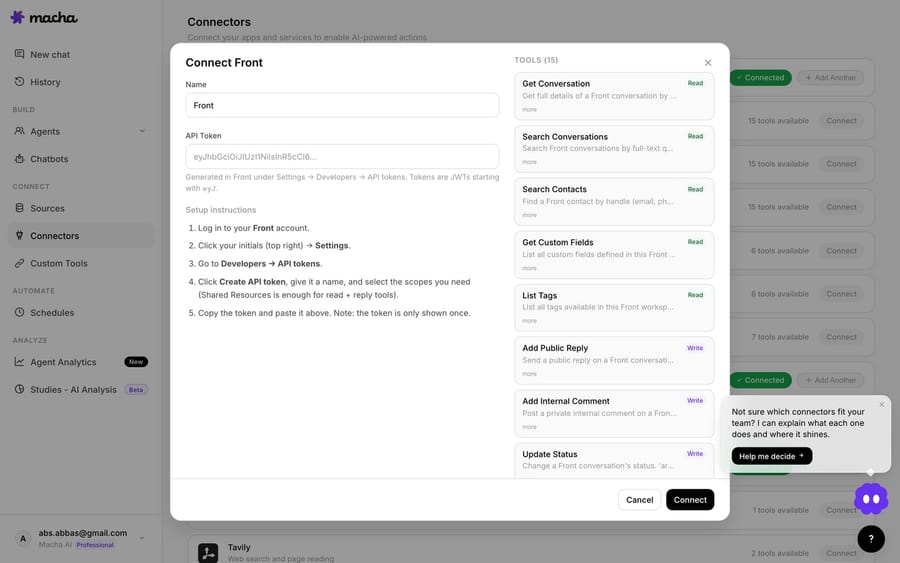
Grouped by what they do:
- Read the conversation and the contact: Get Conversation (the message thread, internal comments, contact, assignee and tags), Search Conversations by full-text query, Search Contacts by handle or name, and Read Attachment for PDF, DOCX, XLSX, CSV and TXT files. The agent builds context before it acts.
- Reply and collaborate: Add Public Reply sends to the customer on the conversation's channel; Add Internal Comment is the Front-native part. It supports @mentions, so an agent can drop a note and notify the exact teammate who should pick it up.
- Route and resolve: Update Tags, Update Status (archive, reopen or trash), Update Fields for custom field values, and Assign Conversation to a teammate, so conversations land in the right place and close cleanly.
- Know who's who: List Tags, Get Custom Fields, List Teammates, List Teams and List Inboxes, so the agent uses your real taxonomy and routing instead of inventing one.
Because these are discrete tools, you choose what each agent can touch. A routing agent might read, tag and @mention only; a front-line agent gets reply and status tools too.
How do Front triggers start an agent automatically?
The connector has four triggers: Conversation Created, New Message Added, Conversation Assigned, and a Custom Webhook that gives you a URL to use in any Front rule's "Send a webhook" action, so your own rule decides exactly which conversations fire. A message comes in, the trigger fires, the agent reads the thread, and it acts: tagging, replying, updating status, or @mentioning a teammate to escalate. You can set a debounce so a quick back-and-forth batches into a single agent run instead of firing on every message, and triggers auto-disable after repeated failures as a safety backstop.
What can you actually automate with Macha and Front?
The cross-tool action is where this earns its place:
- Order questions, answered from the source. A "where's my order?" message arrives, the agent looks it up in Shopify, posts the tracking status as a public reply, then tags and archives the conversation.
- Billing questions, triaged with context. The agent checks Stripe, leaves an internal comment with what it found, and @mentions your billing teammate so the handoff is instant and complete.
- Tidy routing on every new conversation. Categorize by topic, tag, set status and assign to the owning teammate, so the inbox stays organized without anyone triaging by hand.
- Knowledge-grounded replies. Connect your help center, Notion or uploaded docs and the agent answers in your wording, citing what it used.
- Escalations that arrive ready. The human gets a comment with the summary, the order, the relevant policy and what the agent already tried, not just a flag.
What does a triaged billing question look like?
Here's what "automate" means in Front's collaborative model. A customer messages "I was charged twice for order #882." A new message arrives, the trigger fires, and:
- The agent reads the thread with Get Conversation and identifies a possible duplicate charge.
- It checks Stripe (a separate connector on the same agent) and finds two captures against the same order.
- Rather than reply directly, it adds an internal comment summarizing what it found, with the two charge IDs and the refund link, and @mentions your billing teammate so the right person is notified at once.
- It tags the conversation
billingfor reporting and leaves the status open for the human to finish.
The customer never gets an unreviewed reply on a money question, but your teammate opens a conversation that's already been investigated. The agent does the legwork and hands off, the way your team already collaborates in Front.
How do you connect Front to Macha?
Front uses an API token (a JWT), and setup takes a few minutes:
- In Front, open Settings.
- Go to Developers, select the API tokens tab and click Create API token. You must be an admin (Front's docs). Give it a name and choose the namespaces it can reach: Shared resources covers workspace conversations for the read and reply tools, and Global resources covers company-level items.
- Click Reveal or Copy on the token's details to get its value.
- In Macha, open Connectors → Support → Front, paste the token, and save. Macha validates and encrypts it before storing.
- Add the Front tools to an agent (or start from a built-in template) and switch on a trigger when you're ready.
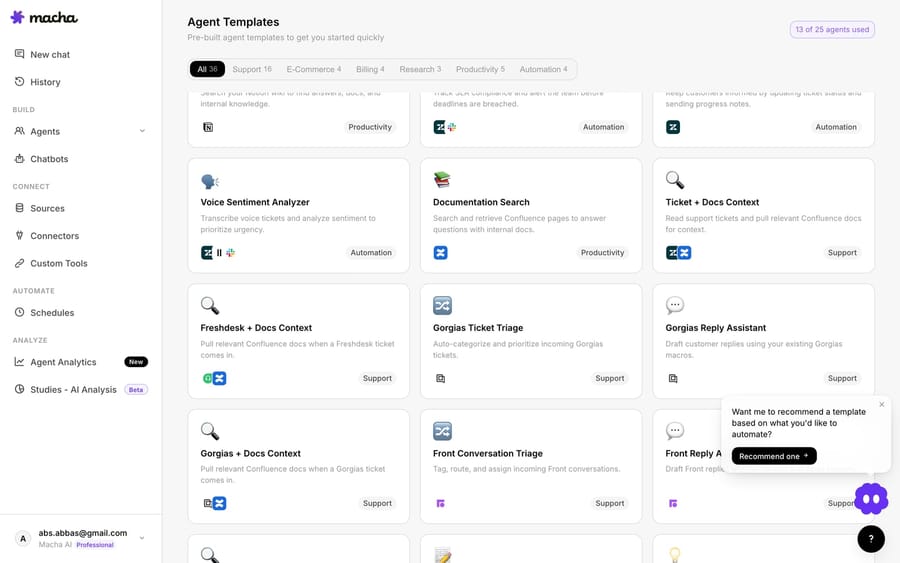
You can also start from Macha's gallery of pre-built agent templates rather than a blank slate, including two Front-specific ones, Front Conversation Triage and Front Reply Assistant:
Prefer not to wire it manually? Sidekick, Macha's in-dashboard agent builder, assembles the agent from a plain-language description such as "triage new Front conversations, tag by topic, and @mention the right team."
Or leave the build to us. On the trial and every plan, the Macha team analyzes about a month of your past Front conversations, builds the knowledge base and the agent, tests it on a sample of those conversations, and runs it in safe mode, with drafts as internal comments, until the drafts are right. Your part is the token above plus the tools your answers come from, about 15 minutes, and it goes live in under a week.
How does Macha compare with Front's own Copilot and Autopilot?
Front has its own AI, and it's good. Copilot gives teammates real-time AI help drafting replies, and Autopilot automates customer work across email, chat and Slack, using Playbooks you define once. Add Rules for triage and routing. If everything you need lives inside Front, those native features are solid and you should use them.
On cost, Front prices Autopilot as a usage-based add-on starting at $0.05 per conversation, bought on top of the seat plan, while Copilot is $20 per seat a month or included in Enterprise (Front pricing, checked 24 September 2026). The seats underneath run $25 on Starter, $65 on Professional and $105 on Enterprise, per seat a month billed annually. Macha instead bills per ticket: one conversation, charged once however many messages it takes, from $299 a month for 750 tickets, about $0.40 a ticket, which includes setup by the Macha team and a dedicated success manager who handles your changes afterwards (see the pricing page). Autopilot's "starting at" price tells you the floor, not what your mix will cost, so price both against a month of your real volume.
Macha isn't competing with Front AI on its home turf. It adds action across the tools Front doesn't own: reaching into Stripe to confirm a duplicate charge, pushing a row to Notion, or hitting your internal order API. That cross-tool reach, plus running the same agent design across every help desk Macha supports (Zendesk, Freshdesk, Gorgias, Front, HubSpot or Intercom, with Macha on Zendesk as the longest-running), is where Macha sits.
Macha is for what reaches past Front:
- Action across tools Front doesn't own: reading and writing in Shopify, Stripe, Notion, internal APIs via custom tools, and posting to Slack, inside one agent run.
- One agent design across every inbox you run: multi-platform teams don't rebuild automation per tool.
- Configurable, inspectable agents: pick the model, see every tool call and result, gate writes behind confirmation, and test on real conversations first.
It isn't Macha or Front's rules. Plenty of teams run Front's native automation for the simple cases and add Macha for the cross-tool, multi-step resolutions.
How does Macha keep Front writes safe?
Writes are gated. Public replies require confirmation in chat; high-impact tools and triggers show an activation advisory before you arm them; and you can keep an agent in internal-comment-only mode so it collaborates with your team, tagging and @mentioning, without ever replying to a customer until you trust it. Test Run lets you watch an agent work a real Front conversation before it touches anything live.
FAQ
Does Macha replace Front? No. Macha is an AI agent layer on top of Front. Front stays your shared inbox; Macha adds agents that read and act across Front and your other tools.
How does Macha connect to Front? With a Front API token created by an admin under Settings → Developers → API tokens, scoped to Shared resources for the read and reply tools. Copy the value with Reveal or Copy and paste it into Macha, which validates and encrypts it.
Can an agent notify a specific teammate? Yes. The Add Internal Comment tool supports @mentions, so an agent can comment and ping the exact person who should take over, the way your team does it manually. It can also assign the conversation outright with Assign Conversation.
Can it reply to customers automatically? If you let it. Add Public Reply posts to the customer; you can also keep an agent in internal-comment-only mode. Writes are confirmation-gated by default.
What about Zendesk, Freshdesk, or Gorgias? Same agent model on all of them: one design runs on Zendesk, Freshdesk, Gorgias, Front, HubSpot or Intercom.
How much does it cost compared with Front Autopilot? Front lists Autopilot from $0.05 per conversation as an add-on to its seats. Macha bills per ticket from $299 a month for 750 tickets, about $0.40 a ticket, which includes setup by the Macha team and a dedicated success manager who handles your changes, with a $50 free-usage trial and no credit card.
How do you try Macha on Front?
If your team lives in Front and you want an agent that triages and resolves real conversations, connecting takes a few minutes. Start a free trial ($50 of usage, no credit card required), add Front under Connectors → Support, and the Macha team builds your first agent and runs it in safe mode until the drafts are right. You can also browse all Macha integrations or read the connector docs.
Add AI agents to your Front
Macha reads the conversation, drafts the reply and takes the action, inside the Front you already run.





