





 Shopify
 Stripe
 Slack
Slack Notion
 Google Workspace
 Confluence

How Much Does HubSpot Service Hub Cost in 2026? Plans, Fees and Real Costs


HubSpot Service Hub costs $7, $90 or $150 per seat a month on annual billing, with a free tier for up to 2 users. The real total also includes one-time onboarding fees on Professional and Enterprise and Breeze AI credits.
Key takeaways
- HubSpot Service Hub has four tiers on annual billing: Free for up to 2 users, Starter at $7 a seat, Professional at $90 and Enterprise at $150.
- HubSpot Service Hub charges one-time onboarding fees of $1,500 on Professional and $3,500 on Enterprise, and neither fee is optional.
- Since April 14, 2026, Breeze Customer Agent bills 50 credits per resolved conversation, which HubSpot puts at $0.50, down from $1.00 per conversation.
- HubSpot bundles 500 credits with Starter, 3,000 with Professional and 5,000 with Enterprise, and sells extra credits at $9 per 1,000 on annual billing.
- A worked example for 10 agents on HubSpot Professional with about 1,000 AI resolutions a month comes to roughly $17,376 in year one against a $900 monthly sticker price.

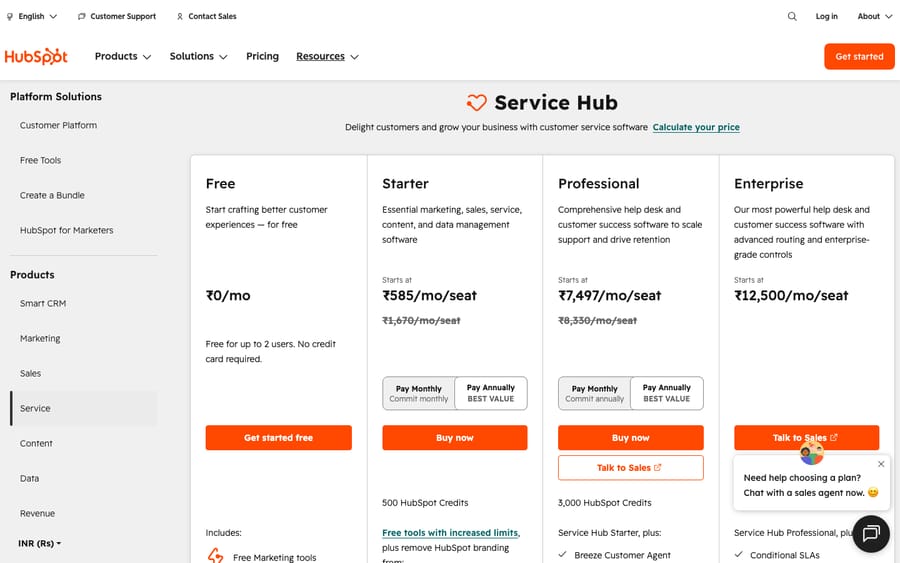
HubSpot Service Hub costs $0 for up to 2 users on Free, $7 per seat a month on Starter, $90 on Professional and $150 on Enterprise, all billed annually, according to HubSpot's Service pricing page on 24 September 2026. Professional and Enterprise add one-time onboarding fees of $1,500 and $3,500, and the Breeze Customer Agent bills 50 HubSpot Credits per resolved conversation on top. Monthly billing costs more: $20 a seat on Starter and $100 on Professional.
How much does each HubSpot Service Hub plan cost?
Service Hub has four tiers. Here's the 2026 lineup, per seat, billed annually:
| Plan | Price (billed annually) | Onboarding fee | Best for |
|---|---|---|---|
| Free tools | $0 — up to 2 users | None | Trying it out / tiny teams |
| Starter | $7 / seat / month ($20 monthly) | None | Small teams wanting basic ticketing and a knowledge base |
| Professional | $90 / seat / month ($100 monthly) | $1,500 (one-time) | Growing teams needing automation + reporting |
| Enterprise | $150 / seat / month | $3,500 (one-time) | Larger orgs needing governance and scale |
Prices read from hubspot.com/pricing/service on 24 September 2026. HubSpot has run Starter at $7 on annual billing for most of 2026; older guides that quote about $15 describe a previous rate.
Two things to flag immediately. First, monthly billing costs more: Professional is $100/seat/mo month to month versus $90 annually, and Starter nearly triples from $7 to $20. Enterprise pricing routes you to sales. Second, several third-party 2026 pricing guides report a 10-seat minimum on Enterprise, which would put its floor at $1,500/month (10 × $150). HubSpot's pricing page does not state a minimum, so ask for it in writing.
How does HubSpot's seat model work?
The single most important thing to understand about HubSpot pricing is the seat model, because it's different from a traditional help desk where everyone who touches a ticket needs a paid license.
HubSpot bills for core seats (sometimes just called "paid seats"). A core seat is what an agent needs to actually do the work — reply to tickets in the help desk workspace, use sequences and playbooks, run automation, make calls. You pay the per-seat rate for each of these.
Alongside those, paid portals get free / view-only seats that are unlimited. A free-seat user can sit in the CRM, view records and reports, get assigned simple admin tasks, and collaborate — but can't use the paid productivity tooling. This is genuinely useful: managers, execs, or occasional collaborators who only need visibility don't add to your bill.
The practical upshot: count the people who will actively work tickets, not your whole company. That's your paid-seat number. Everyone else can usually live on a free seat. It's a more forgiving model than per-named-agent help desks for organizations where lots of people need to see support data but only a few need to work it.
What does each Service Hub tier include?
Free tools: $0 (up to 2 users)
Surprisingly capable for $0: ticketing, shared inbox, live chat, basic conversational bots, email templates, canned snippets, and simple reporting dashboards. The catch is HubSpot branding on customer-facing assets and tight limits. Fine for validating the workflow or a two-person team, but you'll hit ceilings fast.
Starter: $7/seat/month
The first paid tier adds the basics that make support feel organized: simple ticket pipelines, conversation routing, basic automation, 500 calling minutes, and one knowledge base with up to 2,000 articles. It includes 500 HubSpot Credits for AI and automation usage. Removing HubSpot branding is listed only on Professional and Enterprise. Starter is a reasonable entry point for a small team that wants branded, organized support without the Professional jump.
Professional: $90/seat/month
This is the big leap — both in price and capability — and where most serious Service Hub deployments land. Professional unlocks the full Help Desk Workspace, advanced ticket automation, SLA management, skill-based routing, up to 100 knowledge bases, branding removal, customer feedback/CSAT surveys, Breeze Customer Agent (HubSpot's AI agent, billed separately by credits — more below), custom reporting, and phone support. It includes 3,000 HubSpot Credits. The honest read: the jump from $7 to $90 on annual billing is steep, roughly 13x, and it comes with a one-time $1,500 onboarding fee that's mandatory, not optional.
Enterprise: $150/seat/month
The governance-and-scale tier: everything in Professional plus advanced permissions, hierarchical teams, custom objects, advanced reporting, conversation intelligence, and the highest limits. It includes 5,000 HubSpot Credits and a one-time $3,500 onboarding fee, and third-party guides report a 10-seat minimum. For most support teams, Enterprise is justified by org-wide governance and CRM customization needs rather than support features alone.
What onboarding fees does HubSpot charge?
This is the cost that most surprises teams: HubSpot requires paid onboarding on its upper tiers, charged once at purchase.
- Professional onboarding: $1,500 (one-time)
- Enterprise onboarding: $3,500 (one-time)
These are real line items on your first invoice, not optional services. They cover guided setup, but they meaningfully change the first-year math — a 10-agent Professional deployment pays $1,500 before a single ticket is answered. (Some HubSpot Solutions Partners can onboard you in lieu of the direct fee, but that's a separate negotiation; assume the fee unless told otherwise in writing.)
How much does Breeze AI cost in HubSpot credits?
HubSpot's AI is branded Breeze, and it runs on a credit model. Credits are bundled with each tier (500 / 3,000 / 5,000 for Starter / Professional / Enterprise) and sold beyond that at $9 per 1,000 credits when you pay annually.
The headline AI for support is Breeze Customer Agent — HubSpot's customer-facing AI agent that resolves tickets and chats. As of April 14, 2026, HubSpot moved it to outcome-based pricing: you're charged 50 credits per resolved conversation, which HubSpot's announcement puts at $0.50 per resolution, down from $1.00 per conversation before. You only pay when the agent actually resolves the issue, not for every conversation it touches. Breeze Customer Agent is available on Professional and Enterprise plans, and buying one Professional or Enterprise seat gets you 14 days of unrestricted free use.
This is worth modeling carefully. At, say, 1,500 AI-resolved conversations a month, that's 75,000 credits. On Professional, 3,000 are bundled, so you buy 72,000 more: about $648/month at $9 per 1,000, on top of seats. The resolution-only billing is genuinely more buyer-friendly than per-conversation models, but "resolved" is defined by HubSpot, so it's still a variable line item that scales with volume.
| AI item | What it does | Cost model | Rate (2026) |
|---|---|---|---|
| Breeze Customer Agent | Customer-facing AI resolution (Pro & Enterprise) | Credits per resolved conversation | 50 credits ($0.50) each |
| HubSpot Credits | Power Breeze features & automation | Bundled, then pay-as-you-go | $9 / 1,000 credits (annual) |
Why does the CRM bundle make HubSpot costs compound?
Service Hub doesn't live in a vacuum — it sits on HubSpot's Smart CRM, shared across Marketing, Sales, Service, Content, and Operations Hubs. That's the genuine strength (one customer record, no stitching tools together) and the genuine pricing trap.
Two ways costs compound beyond your Service seats:
- Contacts and marketing tiers. If you also use Marketing Hub, pricing scales by marketing contacts, and those tiers step up sharply as your database grows. A support team that "just" wants Service Hub can find the bill ballooning once marketing contacts cross a tier threshold elsewhere in the account.
- Multi-Hub bundles. HubSpot heavily nudges toward the Customer Platform bundle (all Hubs together). It can be good value if you'll use the breadth — but if you only need support ticketing, you may be paying for a CRM suite to get a help desk.
The takeaway: Service Hub's per-seat price is only part of the story if you're (or will be) a broader HubSpot customer. Map which Hubs and how many contacts you'll actually use before you read the Service seat price as your total.
What does a 10-agent team really pay for Service Hub?
Sticker math says "10 agents on Professional = $90 each = $900/month." Here's a more honest 2026 first-year estimate, all on annual billing:
| Line item | Calculation | First-year cost |
|---|---|---|
| Professional seats (10) | 10 × $90 × 12 | $10,800 |
| Professional onboarding | one-time | $1,500 |
| Breeze Customer Agent (~1,000 resolutions/mo) | (50,000 − 3,000 bundled credits) × 12 at $9 per 1,000 | $5,076* |
| Estimated year 1 total | ~$17,376 |
Assumes the 3,000 bundled Professional credits all go to the Customer Agent; any other Breeze feature that draws credits pushes this line up.
So the "$900/month" plan is closer to ~$17,376 in year one once you add mandatory onboarding and meaningful AI usage, and year two is ~$15,876 without the onboarding fee. If your AI agent only resolves 300 conversations a month, the Breeze line drops to about $1,296/year; if it resolves 3,000, it reaches about $15,876/year on its own. Model your resolution volume before your seat count — the AI line is the swing factor, just as it is on most modern help desks.
What hidden costs should you budget for?
- Onboarding is mandatory on Pro/Enterprise — $1,500 / $3,500, one-time, on your first invoice.
- Annual vs monthly. Headline prices are annual; monthly billing runs higher ($100 vs $90 at Pro, $20 vs $7 at Starter) and Enterprise goes through sales.
- Enterprise seat minimum. Third-party guides report 10 seats, a $1,500/month floor before add-ons; confirm it in your quote.
- AI is credits, not included. Breeze Customer Agent bills per resolved conversation once bundled credits are gone — budget it as a separate, volume-driven line.
- CRM/marketing tiers compound. Marketing contacts and multi-Hub bundles can dwarf your Service seat cost if your HubSpot footprint grows.
- Starter's low rate is annual only. The $7 rate needs a yearly commitment; month to month it is $20, so check which one your quote uses.
- Discounting exists but varies. Multi-year and bundle discounts are common in HubSpot quotes — but so are renewal increases. Get the renewal terms in writing.
How does Service Hub's billing compare with an AI agent layer?
One reason buyers scrutinize Service Hub's numbers is that the total is a blend of per-seat + onboarding + per-outcome AI credits + CRM tier — several meters running at once. HubSpot's shift to charging per resolved conversation is a real improvement over per-conversation billing, but it still means your AI spend tracks volume rather than headcount.
It's worth noting that AI add-on layers price this differently depending on the desk you run. To be upfront: Macha is an AI agent layer that connects to Zendesk, Freshdesk, Gorgias, Front, HubSpot or Intercom. It isn't a replacement for Service Hub — it's a layer that reads and writes your Service Hub tickets. The reason it belongs in this section is the billing contrast: Macha bills per ticket — one conversation, charged once however many replies, tags or lookups it takes — rather than per resolution, so the bill never hangs on an outcome definition you don't control. One plan starts at $299 a month for 750 tickets, with setup and monitoring by the Macha team included. If you're committed to Breeze, its credit system is what you'll be budgeting against. You can see how the layer works on your help desk, starting with $50 of free usage and no credit card.
If you're weighing HubSpot against other support tools, our best HubSpot Service Hub alternatives guide goes deeper, and our help desk software pricing compared piece puts these numbers side by side with Zendesk, Freshdesk, and others.
Is HubSpot Service Hub worth it?
For the right team, yes — with eyes open. If you already run (or plan to run) HubSpot's CRM, Service Hub's value is the unified customer record: support, sales, and marketing on one platform with no integration glue. The free seats for view-only users are genuinely generous, and the outcome-based Breeze pricing is buyer-friendly.
Where to be cautious: Service Hub is not the cheapest standalone help desk. The Professional jump is steep, onboarding fees are mandatory, and the credit-based AI plus CRM-tier compounding make the all-in total harder to predict than a flat per-agent ticketing tool. If you want just a help desk and aren't invested in the HubSpot ecosystem, you may be paying CRM-suite economics to get ticketing. If you're already all-in on HubSpot, it's often the path of least resistance.
Frequently asked questions
How much does HubSpot Service Hub cost per seat? In 2026, annual per-seat pricing is $7/seat/mo (Starter), $90/seat/mo (Professional), and $150/seat/mo (Enterprise), plus a free tier for up to 2 users. Monthly billing costs more ($20 at Starter, $100 at Professional), and third-party guides report a 10-seat minimum on Enterprise.
Does HubSpot Service Hub charge onboarding fees? Yes. Professional carries a one-time $1,500 onboarding fee and Enterprise a one-time $3,500 fee. These are mandatory on those tiers and appear on your first invoice. The Free and Starter tiers have no onboarding fee.
What's the difference between paid (core) seats and free seats? You're billed only for core/paid seats — the agents who actively work tickets and use paid tools. Free / view-only seats are unlimited on paid portals and let people view records, reports, and do light admin without adding to your bill. Count active agents, not your whole company.
Is Breeze AI included in Service Hub pricing? Partially. Each tier bundles HubSpot Credits (500 / 3,000 / 5,000 for Starter / Professional / Enterprise), but heavy AI use costs extra. Breeze Customer Agent is billed at 50 credits ($0.50) per resolved conversation (Professional and Enterprise only), with extra credits at $9 per 1,000 on annual billing.
Why does my HubSpot bill grow faster than expected? Usually the CRM-bundle dynamics: marketing-contact tiers step up as your database grows, and multi-Hub bundles add cost beyond Service seats. AI credit usage and the mandatory onboarding fee also push the real first-year total well above the per-seat sticker.
Does HubSpot offer annual discounts? Yes. Headline prices are the annual rate, and monthly billing runs higher: $20 instead of $7 on Starter, $100 instead of $90 on Professional. Multi-year and bundle discounts are common in quotes, but renewal increases are too, so confirm renewal terms before signing.
What will you actually pay for HubSpot Service Hub?
HubSpot Service Hub pricing reads simply — Free, Starter ($7), Professional ($90), Enterprise ($150) per seat/month annually, but the real total is a blend of seats, mandatory onboarding fees ($1,500 / $3,500), credit-based Breeze AI ($0.50 per resolved conversation), and CRM/marketing tiers that compound as you grow. Our 10-agent worked example shows a "$900/month" plan landing near ~$17,376 in year one. The forgiving seat model (free view-only seats) and outcome-based AI billing are real positives; the steep Professional jump and ecosystem-driven costs are the watch-outs. Count your active agents, model your AI resolution volume, map your wider HubSpot footprint, and you'll land close to your real number.
Pricing verified against HubSpot's official Service pricing page on 24 September 2026. The Enterprise seat minimum comes from third-party 2026 pricing guides. HubSpot revises pricing often, so confirm exact figures in a quote before you commit.






