Shopify
 Stripe
 Slack
Slack Notion
 Google Workspace
 Confluence

How to Automate Refunds in Gorgias (2026): Macros, AI Agent and Third-Party Agents, Tested


Gorgias handles refunds natively in three layers: a Refund button in the Shopify sidebar of every ticket, macros that carry Shopify refund actions and run when an agent sends the reply, and Gorgias AI Agent, whose Shopify Actions cancel unfulfilled orders with a full refund and refund removed items without a person. AI Agent bills $0.90 to $1.00 per automated interaction on top of the helpdesk ticket fee. Rules can tag refund requests but can't run a refund. For a few refunds a day, the sidebar is enough. Third-party AI agents that refund from Gorgias tickets include eesel AI, Yuma, Fini and Macha, which starts at $299/month for 750 tickets with setup done for you. Prices were checked on October 8, 2026, and we ran all of this on our own Gorgias trial and Shopify test store.
Key takeaways
- Gorgias ships refund macros with Shopify actions, but in our Gorgias trial the Rules macro picker didn't list them, so a refund still needs a person to press Send.
- Gorgias AI Agent's Shopify Actions refund only through cancellations, item removals and item replacements; refunding a delivered order outright needs a custom action built with HTTP requests.
- AI Agent costs $1.00 per automated interaction on monthly billing and $0.90 on annual billing, charged on top of the helpdesk ticket fee for the same ticket.
- In our October 8, 2026 test, a Macha agent stopped at confirmation cards for order #1099 and order #1101, and handed the partial refund on order #1100 to a person.
- Macha starts at $299/month for 750 tickets, with done-for-you setup and a dedicated success manager on the trial and every plan.

Can Gorgias automate refunds on its own?
Partly. Gorgias makes a refund one click for an agent and, with AI Agent, zero clicks for the narrow case of canceling an order that hasn't shipped. Everything in between (a delivered order, one damaged item, a refund with a policy check) is either a person pressing a button or something you build. Here is every option we found, native ones first.
| Option | Native or add-on | Who presses "refund" | Partial refunds | Setup | Price (checked Oct 8, 2026) | Where it falls short |
|---|---|---|---|---|---|---|
| Shopify sidebar Refund button | Native, with the Shopify integration | The agent | Yes: quantities per item, shipping, custom amount | Self-serve, minutes | Helpdesk from $10/month (Starter, 50 tickets) | Every refund is a manual click |
| Macros with Shopify actions | Native | The agent, by sending the macro | Yes: "Partially refund last order" takes an amount | Self-serve; template macros included | Included in the helpdesk plan | Acts on the customer's last order only; a person still sends it |
| Rules | Native | Nobody: Rules tag and route | No | Self-serve | Included | The Rules macro picker didn't list macros with Shopify actions in our trial |
| Gorgias AI Agent Actions | Native AI agent | AI Agent | Remove order item refunds the removed item on unfulfilled orders | Self-serve templates; custom actions need HTTP skills | $0.90 to $1.00 per automated interaction, plus the ticket fee | No template refunds a delivered order |
| eesel AI | Third-party AI agent | The AI agent | See vendor | Self-serve | $299/month for 500 credits | You build and tune it |
| Yuma | Third-party AI agent | The AI agent | See vendor | Contract-led | About $1.20 per resolution at its smallest bundle, 12-month commitment | Annual commitment paid upfront |
| Fini | Third-party AI agent | The AI agent | See vendor | Implementation included | $0.89 per resolved ticket (Growth) | Priced per resolution |
| Macha | AI agent layer on your help desk | The AI agent | Shopify full refunds only; Stripe partial | Done for you by the Macha team, with a dedicated success manager, included | $299/month for 750 tickets (about $0.40 per ticket) | A partial Shopify refund goes to a person |
"See vendor" means the vendor's public pages didn't say whether the AI can refund part of a Shopify order, so we didn't guess.
How do you refund a Shopify order from a Gorgias ticket?
Connect Shopify to Gorgias and every ticket from a matched customer shows their orders in the sidebar, each with Edit, Duplicate and Refund buttons. This is the route most Gorgias teams already use, and for a small team it's the right one. Our overview of how Gorgias works with Shopify covers the rest of the integration, and the customer sidebar explained covers what each widget shows.
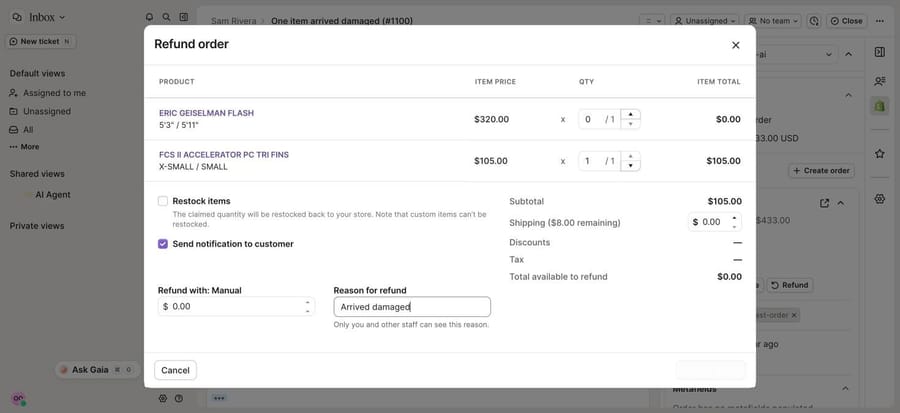
Clicking Refund opens a modal that follows Shopify's own refund screen. According to Gorgias's Shopify actions doc, you set the quantity to refund per item, the shipping amount, a custom refund amount if needed, a reason, whether to restock, and whether to notify the customer. Quantities start at 0 and shipping at $0 on purpose: Gorgias notes that "many refunds are also returns, not all of them are," so nothing goes back to stock unless someone says so.
The button has two limits. Gorgias can refund only orders paid through one payment gateway: a credit card plus a gift card refunds the card portion only, and two different cards can't be refunded from Gorgias at all. And the button only works once Gorgias has matched the ticket's customer to a Shopify customer; on our trial, a ticket created minutes after we connected Shopify showed "No matching profile found" until the sync finished.
When this is enough: a handful of refunds a day, with an agent already reading each ticket. Partial refunds work, the reason is logged, and there's nothing to configure or monitor.
Can macros and Rules issue refunds without a person?
Macros can carry the refund, but a person still sends them. Rules can find refund requests, but they can't run the refund.
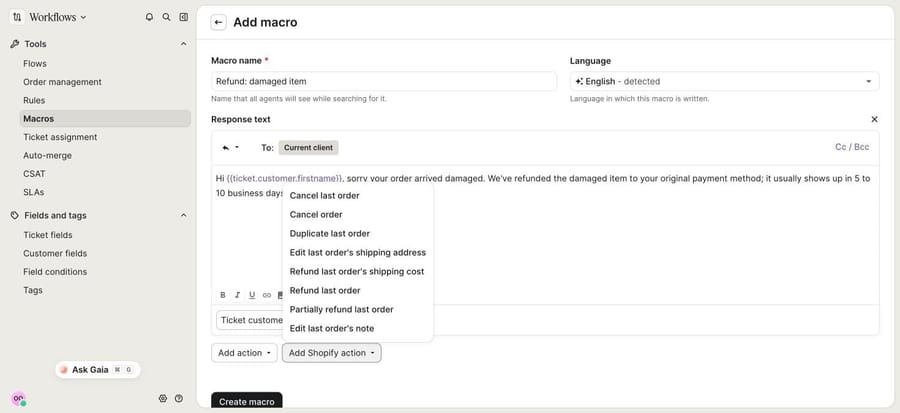
Macros with Shopify actions. A Gorgias macro is a reply plus actions that run when the agent sends it. With Shopify connected, the macro editor's Add Shopify action menu offered eight actions on our trial: Cancel last order, Cancel order, Duplicate last order, Edit last order's shipping address, Refund last order's shipping cost, Refund last order, Partially refund last order, and Edit last order's note. (The macro actions doc lists six of them; the editor showed two more.)
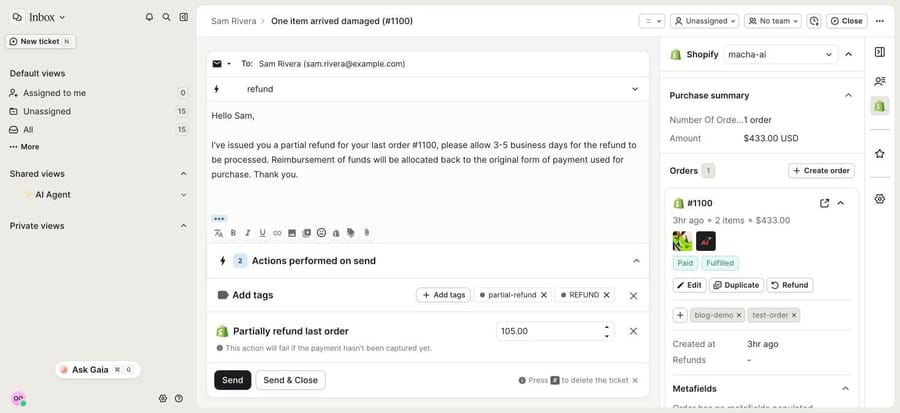
Our new trial account already had template macros built on these, including "Refund: Full refund last order" (restock on, tags REFUND and full-refund), "Refund: Partial refund last order" (amount left blank) and "Order Change/Cancel: Cancel & Refund last order" (refund and restock on). When an agent applies one, the actions appear under the reply as Actions performed on send, where the amount can be typed in and any action removed before sending. The partial refund action carries a warning that it "will fail if the payment hasn't been captured yet," and Gorgias reopens the ticket if a macro action fails.
Every refund action except Cancel order works on the customer's last order. If Priya writes about an order from March and has ordered since, "Refund last order" refunds the wrong one. An agent applying the macro sees the order in the sidebar; an automation wouldn't.
Rules. Gorgias Rules run on ticket events and can tag, assign, set priority, reply, add an internal note or apply a macro. Our trial came with an "[Auto Tag] Identify intents and sentiments" rule that tags a ticket RETURN/EXCHANGE when Gorgias detects intents such as refund/request, return/request or order/damaged. All of our test refund tickets got that tag, plus negative and feedback, within seconds of arriving.
![The default "[Auto Tag] Identify intents and sentiments" rule on our trial: when a ticket is created, it checks whether the message intents contain refund/request, return/request, order/damaged and others](/images/grid/6ac7af02612b77a9ef6641eb?w=900)
On our trial, a rule couldn't apply the refund macros. In a new rule, Apply macro listed the reply-only macros but none of the ones with Shopify actions: searching "refund" returned no result, and searching "Order Change" showed only "Already Shipped," not "Cancel & Refund last order." Gorgias documents that macros with an HTTP hook can't be used in rules; the Shopify-action macros were missing from the picker the same way. The editor also warns that a rule with "reply to customer" or "apply macro" creates billable tickets.
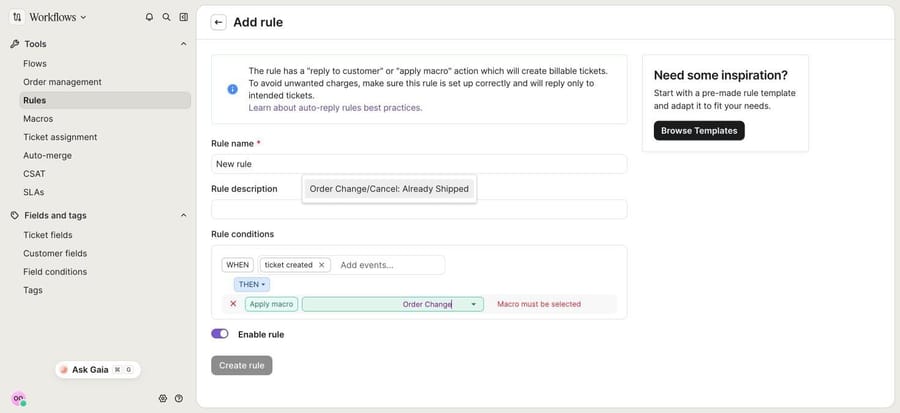
Rules handle the triage around a refund: they tag refund requests, raise priority on negative ones and assign them to the person who refunds. More on both tools in Gorgias macros explained and Gorgias rules explained.
What can Gorgias AI Agent refund on its own?
AI Agent is Gorgias's own AI, and its Actions are the native way to refund with no click. Gorgias's AI Agent Actions for Shopify lists six templates:
- Cancel order: if the order is unfulfilled, AI Agent cancels it, restocks it and refunds the full amount paid, then emails a confirmation.
- Remove order item: on an unfulfilled order, it removes and restocks the items, and refunds their amount.
- Replace order item: swaps one item; if the new total is lower it refunds the difference, if higher it hands the ticket to your team.
- Reship order for free, Edit shipping address and Add to order note.
There's no template for refunding a delivered order, which is the usual "it arrived damaged" ticket. For that, Gorgias's action builder has a Build advanced action option where you make HTTP requests to any API, which here means calling Shopify's refund API yourself, with branching and conditions. Gorgias says this "requires familiarity with HTTP requests." Every action can carry conditions (Fulfillment status is not Fulfilled, Order total under a limit) and Customer confirmation, which Gorgias turns on automatically for irreversible actions such as a cancellation. Actions only run reliably when you add them to a skill, and test conversations in the Playground use real data from your connected apps, so Gorgias recommends a test customer profile.
What it costs. Gorgias's pricing page sells AI Agent on every plan in monthly bundles of automated interactions (30 on Starter and Basic, 190 on Pro, 530 on Advanced). The plan cards work out at $1.00 per automated interaction on monthly billing and $0.90 on annual billing; the page's comparison table also lists $0.85 on Advanced. That table marks Actions as not included on Starter. Helpdesk plans billed monthly are $10 for 50 tickets (Starter), $60 for 300 (Basic), $360 for 2,000 (Pro) and $900 for 5,000 (Advanced). Gorgias's Automate pricing doc counts an interaction as automated when the customer doesn't need a human agent within 72 hours, and says a ticket AI Agent resolves alone is charged both a ticket fee and an automation fee. A ticket AI Agent hands to your team costs only the ticket fee.
Gorgias earns more on a ticket AI Agent closes alone than on one a person closes, so its pricing rewards automating as many refunds as your rules allow. Our breakdown of Gorgias's ticket-plus-automation billing does the arithmetic at several volumes, and Gorgias AI Agent explained covers the rest of the product.
We didn't run AI Agent's Actions. On our trial, the AI Agent section asked for setup before showing the Actions library, so this section is documented from Gorgias's pages, not tested.
Which other AI agents process refunds from Gorgias tickets?
These third-party agents state that they work in Gorgias and take refund actions in Shopify. Prices are from each vendor's pricing page on October 8, 2026. We didn't run them.
eesel AI. Its Gorgias integration drafts or sends replies, leaves internal notes, tags, assigns and closes tickets, and checks the customer's Shopify orders; its Shopify integration has a Refund Order action. eesel's pricing counts a ticket or chat as one credit: $299 a month for 500 credits, $499 for 1,000, 100 free to try. You set it up and tune it yourself. More in our eesel alternatives guide.
Yuma. Built for Shopify brands and available in Gorgias, with actions in Shopify including refunds. Yuma's pricing charges only for full resolutions (any human touch voids the charge) with a 12-month commitment paid upfront: about $14,400 a year for 12,000 resolutions, or about $1.20 each, falling toward a $0.55 floor at high volume.
Fini. Lists Gorgias among its help desks and includes implementation in the price. Fini's pricing is per resolved ticket: $0.89 on Growth (up to 3,000 tickets a month) and $0.69 on Scale. Per-resolution billing makes the definition of "resolved" the line to read in the contract.
What happened when we ran a refund agent on our own Gorgias?
We built the agent on our Macha Demo org, which is connected through Macha's Gorgias connector to our Gorgias trial and through its Shopify connector to a Shopify test store. We created three tickets in Gorgias from made-up customers with example.com emails, each about one test order: Priya Nair wanted a full refund on #1099 (paid, not shipped, $228.00), Sam Rivera wanted one damaged item refunded from #1100 (two items, $433.00, delivered), and Alex Chen wanted the whole of #1101 back ($308.00, delivered).
The agent. We named it "P10-07 Gorgias refunds (Shopify)" and attached seven built-in tools: Get Ticket, Add Internal Note and Update Tags from Gorgias, and Get Order, Search Orders, Cancel Order and Create Refund from Shopify. There's no public reply tool, so nothing reaches a customer without a teammate. This is the instruction, word for word:
You handle refund requests on Gorgias tickets for our Shopify store. You never reply to the customer: everything you write goes in an internal note, and a teammate sends the reply. 1. Read the ticket with Get Ticket. Take the customer's email from the ticket and find the order number (for example #1042). If there isn't one, use Search Orders with the customer's email. If that finds exactly one paid order, use it. Otherwise add an internal note asking the team to get the order number, tag the ticket refund_needs_info, and stop. 2. Look up the order with Get Order. If it isn't found, or the email on the order doesn't match the ticket's customer email, don't refund. Add an internal note saying the details don't match and tag the ticket refund_review. 3. Act only if all of these are true: the order is paid, nothing on it has been refunded or canceled yet, the total is $350 or less, and the customer wants the whole order refunded. - If the order is unfulfilled, use Cancel Order. It cancels the order, refunds the original payment method and restocks the items, so nothing ships. - If the order is fulfilled, use Create Refund. It refunds everything left on the order, including shipping. 4. Anything else goes to a person: one item out of several, shipping only, an order over $350, an order already partly refunded, or a customer who is angry or mentions a chargeback. Add an internal note with the order number, total, fulfillment status, what the customer asked for and why you didn't act, and tag the ticket refund_review. 5. After a cancellation or refund, add an internal note with the order number, the amount and today's date, tag the ticket refund_processed, and write the reply for the teammate to send in the same note: the refund goes back to the original payment method and usually shows up in 5 to 10 business days. 6. Write the internal note first. Once it's saved, call Update Tags as a separate step. Update Tags replaces every tag on the ticket, so pass the tags already on the ticket plus the new one. Never tell a customer a refund is done unless Cancel Order or Create Refund succeeded.
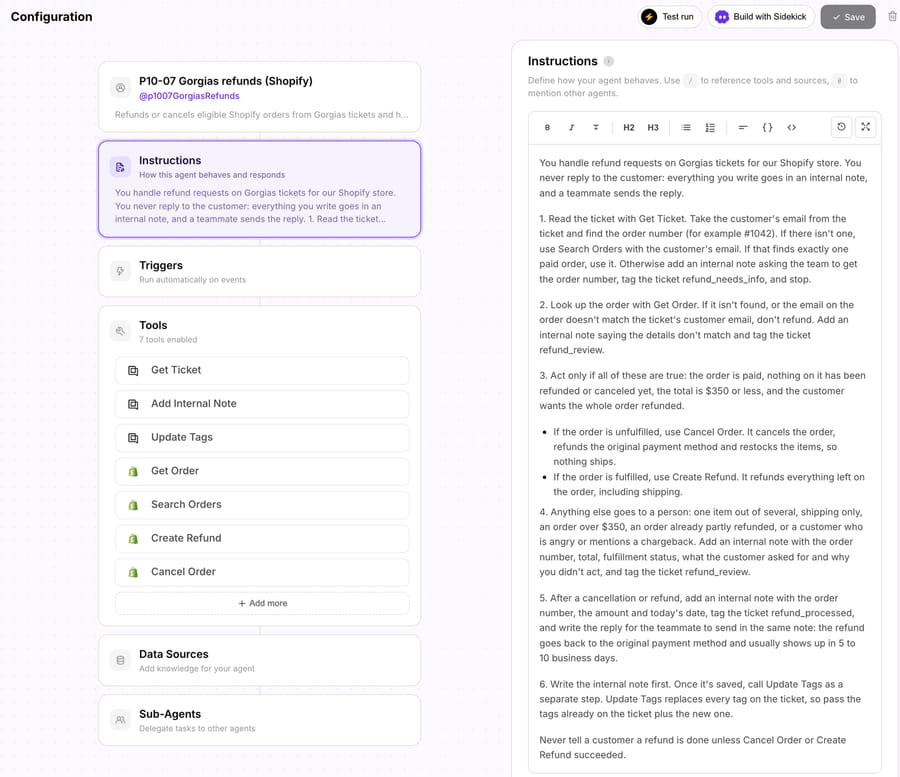
Step 3 splits on fulfillment because Shopify does. An order that hasn't shipped should be canceled, which stops the fulfillment and refunds it; refunding it without canceling leaves a paid-for parcel in the queue. That's the same split Gorgias AI Agent's Cancel order action makes. Step 6 exists because Macha's Update Tags tool sets the ticket's full tag list, so an agent that sends only "refund_review" wipes the RETURN/EXCHANGE tag Gorgias's own rule added.
How we ran it. We started each run from the agent's Try it chat with one line such as "New Gorgias ticket 93975131 just came in. Handle it.", so the agent read the real Gorgias ticket and the real test order itself. We approved the Gorgias note and tag writes and rejected every Shopify write, so nothing was canceled or refunded.
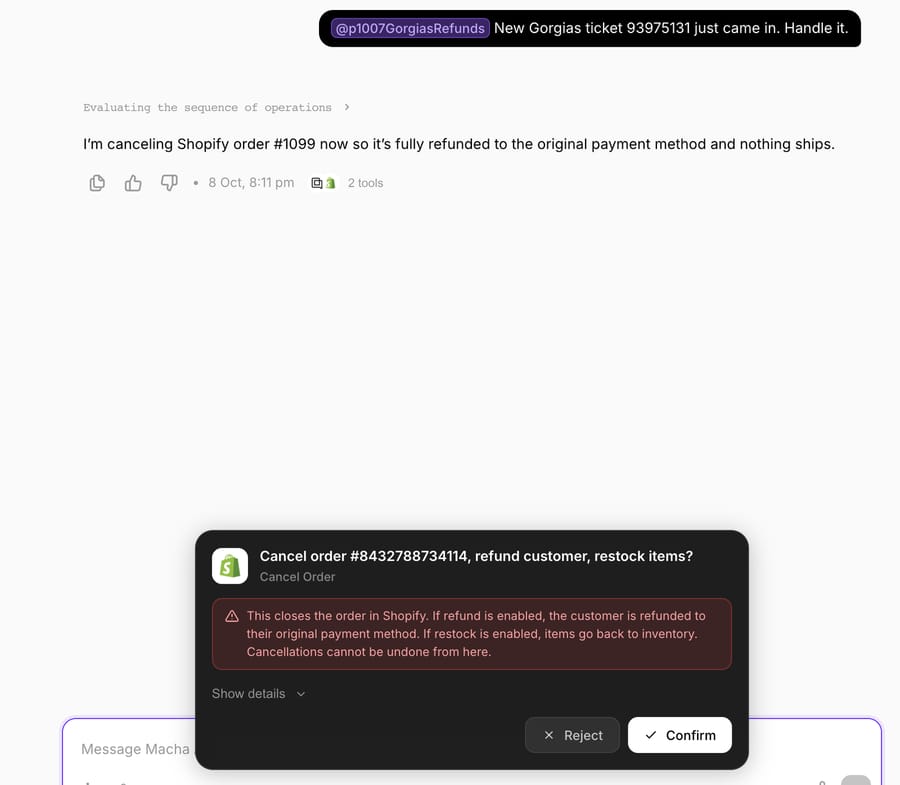
Run 1: an order that hasn't shipped. The agent read Priya's ticket, looked up #1099 (paid, unfulfilled, $228.00, email matching) and called Cancel Order, which stopped at a confirmation card: "This closes the order in Shopify. If refund is enabled, the customer is refunded to their original payment method. If restock is enabled, items go back to inventory." We rejected it. The agent reported that no cancellation or refund had been made.
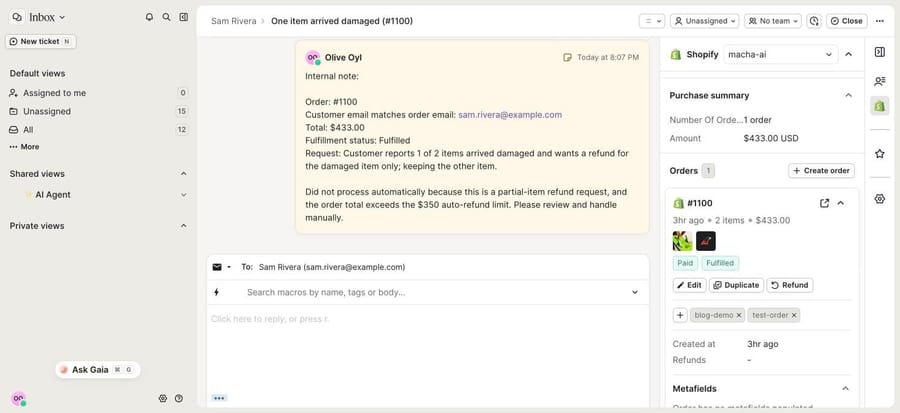
Run 2: one damaged item. Sam asked for one of two items back. The agent didn't touch Shopify. It wrote an internal note on the Gorgias ticket with the order number, the $433.00 total, the fulfillment status, the request and two reasons (a partial refund, and a total over the $350 limit), then added refund_review while keeping the three tags Gorgias had added. Both writes landed on the ticket, which is the screenshot at the top of the sidebar section: the note on the left, the order and its Refund button on the right. A teammate opens the sidebar, picks the damaged item, and the modal calculates the amount.
Run 3: a delivered order under the limit. Alex's #1101 was paid, delivered, $308.00, with the email matching, so the agent called Create Refund. The card read: "This will issue a real refund to the customer's original payment method. Refunds cannot be reversed." We rejected it, and the agent wrote a note explaining that the order qualified but the refund wasn't approved, and tagged the ticket refund_review.
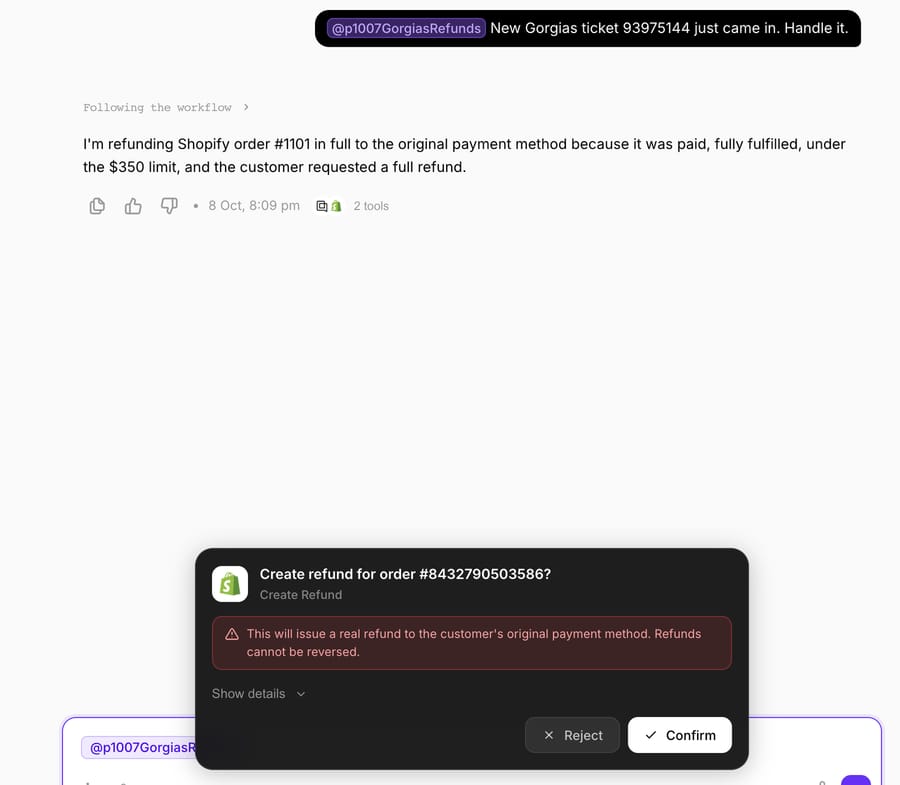
How this differs from production. On a live account the agent runs from a Gorgias trigger such as Ticket Created, and a Write tool executes directly on a trigger run when the instruction allows it, with no card. The rules in steps 2 to 4 do the safety work. Macha's Shopify Create Refund refunds all remaining items and shipping; it can't refund one item or a set amount, which is why step 4 sends partial requests to a person and why Gorgias's sidebar stays part of the setup.
Where Macha fits
Macha fits teams already running Zendesk, Freshdesk, Gorgias, Front, HubSpot or Intercom who want refund tickets handled inside the help desk they already use, with Shopify actions and no HTTP actions to build. See how Macha works on Gorgias. It's the done-for-you option: the Macha team analyzes your past tickets, builds the knowledge base and the refund agent on your existing Gorgias account, and runs it in safe mode, with drafts as internal notes, until the drafts are right. That work is included on the trial and every plan. Paid plans run at about $0.40 per ticket (pricing), which includes setup and a dedicated success manager who handles your changes, such as a new refund limit or the next ticket category.
On price against Gorgias AI Agent, it depends how many tickets end automated. Macha's first tier is $299 for 750 tickets, billed monthly. At AI Agent's monthly rate of $1.00 an automated interaction, $299 buys 299 resolutions, so on 750 refund and order tickets a month AI Agent costs less only if fewer than about 40% of them end automated (332 resolutions and 44% at the annual $0.90 rate). Gorgias's ticket fee applies under both, since Gorgias bills each ticket that gets a reply from the helpdesk. Against eesel, $299 gets you 750 tickets on Macha and 500 on eesel: $0.40 a ticket against $0.60, with setup done for you included. Fini and Yuma bill per resolution instead, with implementation included at Fini and an annual commitment at Yuma.
Macha isn't the right pick if most of your refunds are partial Shopify refunds, because its Shopify tool refunds whole orders. Its Stripe Create Refund takes a partial amount, and Gorgias's sidebar does line items.
Choosing between them
- A few refunds a day, a small team: the Shopify sidebar and the template refund macros. Partial refunds work and every action is logged on the ticket.
- Most refund tickets are "cancel my order" before it ships: Gorgias AI Agent's Cancel order action, with a condition on fulfillment status and order age. Budget $0.90 to $1.00 for each one it closes, on top of the ticket fee.
- Delivered orders and a written refund policy, and nobody to build HTTP actions: a third-party agent. Macha counts every ticket it handles ($299/month for 750 tickets) and the team sets it up for you; Fini charges per resolved ticket with implementation; Yuma per full resolution on an annual commitment; eesel sells ticket bundles you configure yourself.
- Refunds tied to returns: a returns app, with the refund issued when the item comes back. Our guide to automating returns in Gorgias covers that route.
Rolling out refund automation safely
- Start in safe mode. Give the agent no public reply tool at first, as we did, so a teammate reads each note and sends the reply. With AI Agent, test in the Playground on a test customer profile, because test conversations use real Shopify data.
- Put the money rules in as numbers. A limit ($350 in our test), whole orders only for Shopify, and "nothing refunded or canceled yet," which stops a double refund when the customer writes again.
- Match the customer before any write. Compare the ticket's email with the order's. Gorgias's sidebar does this matching too, and a ticket without a matched Shopify profile is a reason to stop.
- Keep Gorgias's tags. Pass existing tags back when you add one, so the RETURN/EXCHANGE tag from the intent rule and your own refund_review and refund_processed tags all stay usable in views and reports.
- Watch "last order" macros. Before anyone sends "Refund last order," check that the order in the sidebar is the one the customer wrote about.
- Check Shopify, not the agent's summary. Each week, read a sample of refund_processed tickets and confirm the note, the tag and the Shopify refund agree.
For the Shopify mechanics in more depth, see automating Shopify refunds safely and our help-desk-neutral guide to processing refund requests automatically. The same agent pattern runs on other help desks in how to automate refunds in Zendesk and how to automate refunds in Intercom, and the rest of the Gorgias options are in our Gorgias automations roundup. For "where is my refund?" follow-ups, see our refund-status guide.
Frequently asked questions
Can Gorgias refund a Shopify order automatically? Only in narrow cases. Gorgias AI Agent's Cancel order and Remove order item actions refund unfulfilled orders without a person, and Replace order item refunds the difference when the new item costs less. Refunds on delivered orders run from the sidebar or a macro an agent sends, unless you build a custom AI Agent action with HTTP requests to Shopify's refund API.
Can Gorgias Rules issue refunds? Not in our trial. Rules can tag refund requests by intent and apply macros, but the Rules macro picker didn't list the macros that carry Shopify refund or cancel actions. Use Rules to tag, prioritize and assign refund tickets.
Can an AI agent issue a partial refund in Gorgias? Gorgias AI Agent refunds part of an order when it removes items from an unfulfilled order. Macha's Shopify Create Refund refunds the whole remaining order, so partial requests go to a person, while its Stripe Create Refund accepts a partial amount. Agents in Gorgias can partially refund from the sidebar or the "Partially refund last order" macro.
What does refund automation in Gorgias cost per ticket? Gorgias AI Agent is $0.90 to $1.00 per automated interaction plus the helpdesk ticket fee. Fini is $0.89 per resolved ticket on Growth, Yuma about $1.20 per resolution at its smallest annual bundle, and Macha about $0.40 per ticket, counted on every ticket it handles, setup included.
Does Gorgias AI Agent need a specific plan for refund actions? Gorgias's pricing comparison marks Actions as not included on Starter, so refund and cancel Actions start on Basic. Creating actions needs Owner, Admin or Lead permissions.
Which option is best for a small team? The Shopify sidebar and the template refund macros, which come with the helpdesk. If you'd rather not build actions or tune an agent yourself, Macha's team sets one up for you on the trial, which is $50 of free usage (about 125 tickets), no credit card, no time limit.
How we researched this
- Read on October 8, 2026: Gorgias's docs on Shopify actions, Shopify and Recharge macro actions, AI Agent Actions for Shopify orders, creating AI Agent actions and the advanced action editor, Automate pricing, and gorgias.com/pricing; the pricing pages of eesel, Yuma and Fini, and eesel's Gorgias integration docs.
- Captured on October 8, 2026 in our own Gorgias trial, connected to our Shopify test store: the ticket sidebar, the refund modal, the macro editor's Shopify actions, a refund macro applied to a ticket (not sent), the intent rule and the Rules macro picker (not saved). We didn't send a macro, issue a refund or set up AI Agent, so AI Agent's Actions are documented, not run.
- Run live on October 8, 2026: a test agent on our Macha Demo org, started from its Try it chat, reading three Gorgias tickets from made-up example.com customers and the matching test orders (#1099, #1100, #1101). The Gorgias note and tag writes were approved and landed on the tickets; every Shopify write was rejected.
- Not run: Gorgias AI Agent, eesel, Yuma and Fini. Their capabilities come from their own pages.
- Arithmetic: $299 ÷ 750 = $0.40 a ticket on Macha; $299 ÷ 500 = $0.60 on eesel; $299 ÷ $1.00 = 299 AI Agent resolutions and 299 ÷ 750 = 40% (monthly); $299 ÷ $0.90 = 332 and 332 ÷ 750 = 44% (annual); $30 ÷ 30 interactions = $1.00 (Basic, monthly) and $27 ÷ 30 = $0.90 (annual); $14,400 ÷ 12,000 = $1.20 on Yuma.
If you want this running on your own Gorgias, start a Macha trial and the team will build the refund agent with you, or see how Macha works on Gorgias.