





 Shopify
 Stripe
 Slack
Slack Notion
 Google Workspace
 Confluence

How Do You Automate Returns in Gorgias? Native Return Flow, Loop Actions and AI Agents Compared (2026)


To automate returns in Gorgias natively, turn on the Return order flow in Order Management and, if you use Loop, AI Agent's Loop actions. This guide covers those steps and costs, the returns apps and AI agents that go further, and a live Macha run that checked return eligibility against a Shopify order on our Gorgias sandbox.
Key takeaways
- Gorgias's native Return order flow checks an order-created or order-delivered window, then sends your automated reply or the Loop portal; it needs an AI Agent subscription and a Shopify store.
- Each return request Gorgias fully automates is billed as an automated interaction: $1.00 on Starter, $0.90 on Basic and Pro, $0.85 on Advanced, as of October 8, 2026.
- Gorgias AI Agent's pre-built return actions send a Loop portal deep link or return shipping status; they hand the eligibility decision to the portal rather than making it.
- In our sandbox run, a Macha agent checked order #1100 against a 30-day window, left an ELIGIBLE note with a draft reply and tagged the ticket, without moving money.
- Macha starts at $299/month for 750 tickets, about $0.40 a ticket, with done-for-you setup and a dedicated success manager on the trial and every plan.

To automate returns in Gorgias natively, turn on the Return order flow in Order Management: shoppers pick an order in chat, the Help Center or the contact form, Gorgias checks it against a window counted from the order's creation or delivery date, and then sends your automated reply or opens the Loop Returns portal. Order Management needs an AI Agent subscription, from $40 a month on Starter, and each fully automated request is billed as an automated interaction at $0.85 to $1.00. AI Agent's return Actions (a Loop portal deep link, Loop and AfterShip return status) start on Basic, at $90 a month. For a Shopify store already on Loop with a plain 30-day policy, that's enough. When returns need item-level judgment or a written decision for your team, add a returns app (Loop, AfterShip Returns, ReturnGO) or an AI agent layer: eesel AI, Siena AI, Yuma or Macha, which starts at $299/month for 750 tickets with setup done for you. Prices were checked on October 8, 2026, and we ran a Macha returns agent on our own Gorgias sandbox.
What are your options for automating returns in Gorgias?
A return has three jobs: decide whether the order qualifies, tell the customer what happens next, and record the return in Shopify or your returns app. Gorgias's native tools are strongest at the second job. Returns apps own the third. The first, the eligibility decision, is where the options differ most.
| Option | Native or add-on | What it does on a return | Write actions | Setup | Price (checked Oct 8, 2026) | Where it falls short |
|---|---|---|---|---|---|---|
| Order Management: Return order flow | Native, needs an AI Agent subscription | Self-service Return button in chat, Help Center and contact form; checks a days-since-created or days-since-delivered window | Sends your automated reply, or redirects to the Loop portal | Self-serve toggle, Shopify stores only | Included with Helpdesk + AI Agent, from $40/month (Starter); a resolved request counts as an automated interaction | One window for every product; no item-level rules; only two return methods |
| Shopify sidebar Refund with quantities | Native | An agent refunds from the ticket and sets QTY so Shopify records the items as returned | Refund, restock, notify the customer | Shopify integration | Included | Manual every time |
| Gorgias AI Agent with Loop or AfterShip actions | Native AI | Answers return questions, sends a personal portal link, reports return shipping status | Sends links and status; Shopify actions such as cancel order | Self-serve, needs a Loop API key or an AfterShip Premium plan | $1.00 per automated interaction on Starter, $0.90 on Basic and Pro, $0.85 on Advanced; Actions aren't on Starter | Hands the decision to the portal; other returns apps need custom HTTP Actions |
| Returns apps in the sidebar (Loop, AfterShip Returns, ReturnGO) | Marketplace apps | Show the return, its status and tracking on the ticket; AfterShip lets agents approve or reject the RMA there | AfterShip: approve or reject RMA; ReturnGO: creates tickets from portal requests | App install plus the app's plan | Loop Essential $155/month or Advanced $340/month for the Gorgias tile; AfterShip Premium or Enterprise; ReturnGO on request | Data on the ticket, but someone still reads it and replies |
| eesel AI | AI agent | Answers and acts on Gorgias tickets with Shopify actions, including Create Return | Create Return, Refund Order, Cancel Order (direct or awaiting approval) | Self-serve | $299/month for 500 credits | You write and tune the agent yourself |
| Siena AI | AI agent | Generates Loop return links, resends labels, cancels returns, tracks return status | Loop actions listed on its integration page | Expert onboarding | $750/month platform fee plus $0.90 per automated ticket | The platform fee comes before the first ticket |
| Yuma | AI agent | Says it resolves returns, refunds and exchanges end to end on Gorgias | Not itemized publicly | Managed, 12-month commitment | Starter bundle $14,400/year, about $1.20 per resolution | Annual contract; pays per resolution |
| Macha | AI agent layer on your help desk | Checks eligibility against the Shopify order, writes the decision and a draft reply as an internal note, tags the ticket | Built in: Gorgias notes, tags, replies; Shopify full-order refund and cancel. Loop or AfterShip: a custom API tool Macha's team builds | Done for you by the Macha team, with a dedicated success manager, included | From $299/month for 750 tickets (about $0.40 a ticket) | Shopify refunds are full-order only; starting a return in a returns app needs that custom tool |
Gorgias's per-interaction rates come from the table on its pricing page. Its AI Agent pricing post (updated May 28, 2026) adds a $1.50 rate for interactions past a plan's bundle on some plans, so check which applies to your contract.
How do you set up Gorgias's native return flow?
The Return order flow lives in Order Management, next to Track order, Cancel order and Report issue. Gorgias's Order Management 101 article (updated January 23, 2026) sets two conditions: you need an active AI Agent subscription, and Order Management only works with Shopify stores, not BigCommerce or Magento 2. Track and Return are switched on automatically. On our sandbox the four buttons were on with "No response configured", and the chat preview asked us to connect a Chat or Help Center first, because the buttons only appear where shoppers can see them.
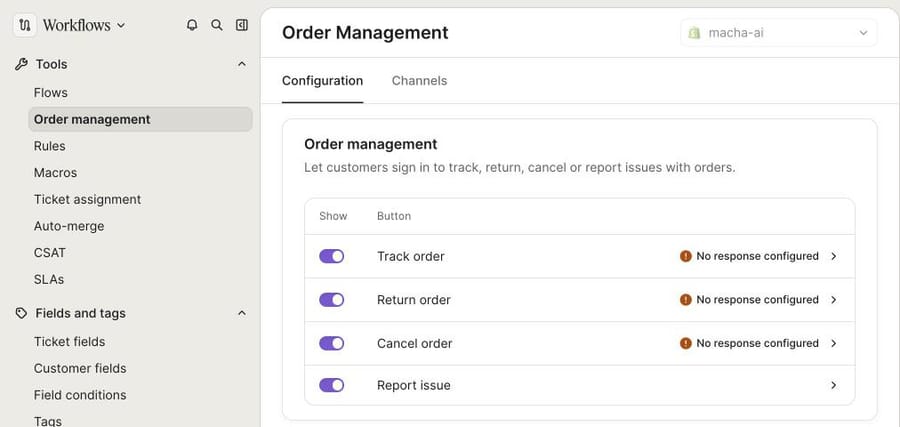
To configure the return flow, following Gorgias's return flow article (updated May 5, 2026):
- Open the menu at the top left and choose Workflows.
- Under Tools, click Order management, then Return order.
- Under Eligibility window, pick a condition. The dropdown offers two: Order created and Order delivered, each with a number of days.
- Under Return method, choose Automated response (write the reply in Response text, up to 1,000 characters) or connect Loop Returns. Those are the only two options in the dropdown.
- Click Save, then check the Channels tab to choose where the button shows.
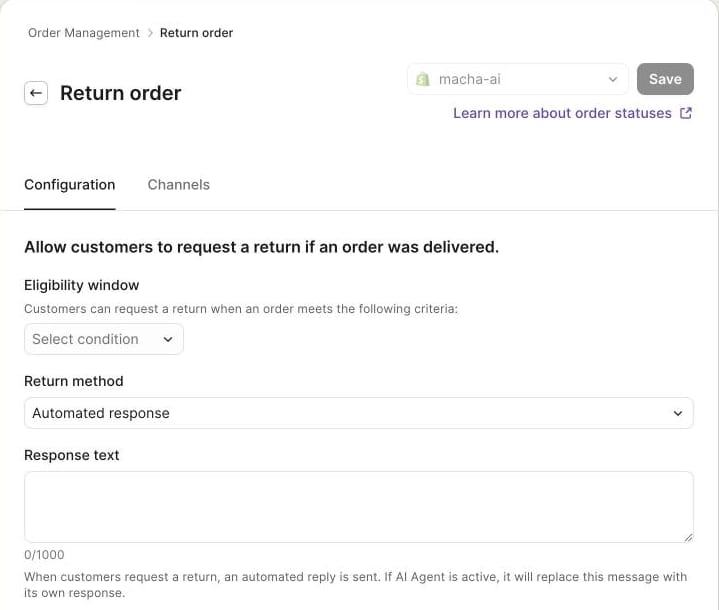
Read the small print under Response text: "If AI Agent is active, it will replace this message with its own response." The settings page header also says the flow lets customers request a return "if an order was delivered". So the native flow is a gate and a message. It doesn't create a return in Shopify, generate a label or judge an item. With Automated response, your team still approves and processes each request afterward. With Loop connected, shoppers land in the Loop portal already logged in, per Gorgias's Loop return flow article, and Loop's own rules take over.
What does the native flow cost?
Gorgias counts a request that's "fully resolved without a human agent, whether by AI Agent or another automation feature such as Flows, Quick Responses, or Order Management" as an automated interaction. If a teammate replies within 72 hours, it's billed as a helpdesk ticket instead. The pricing page on October 8, 2026 listed Helpdesk + AI Agent at $40/month on Starter (50 tickets, 30 automated interactions), $90/month on Basic ($77 billed yearly; 300 tickets, 30 interactions), $550 on Pro ($471 yearly; 2,000 tickets, 190 interactions) and $1,430 on Advanced ($1,227 yearly; 5,000 tickets, 530 interactions).
Here's the arithmetic for a Pro store whose return flow and AI Agent fully resolve 300 return requests a month. The plan covers 190. The other 110 cost $99 at the $0.90 Pro rate, or $165 at the $1.50 rate in Gorgias's AI Agent pricing post. The meter counts a portal link that ends the conversation as resolved, so the incentive favors deflection: the vendor earns the same whether or not the customer's return actually went through.
What about Rules, macros and Flows?
Before Order Management, the usual native setup was a Rule plus a macro. Gorgias's return-request autoresponder Rule detected return intent, replied with a button to your return portal and closed the ticket. Gorgias has retired it: per its retirement notice, it isn't available to accounts created after September 2024, stopped working for older accounts on January 30, 2026, and Shopify brands are pointed to AI Agent instead. Macros still work for the human side: a returns macro can fill in the order number and ship date and link your portal, so an agent answers in two clicks.
Flows give shoppers a guided path in chat or the Help Center. Gorgias's Flows article (updated March 26, 2026) offers a templated Flow for returns and exchanges that explains the policy and sends the shopper to the right process, and it says Flows "is only available to Gorgias Automate subscribers". A Flow explains; it doesn't check the order.
Can agents process a return from the Gorgias sidebar?
Yes, by hand. Gorgias's Shopify Actions article explains that the sidebar Refund modal sets QTY to 0 by default "to avoid accidental returns". Set the quantity of the returned item and Shopify records a return along with the refund, with options to restock and notify the customer. This is the native way to refund one item of two, which matters below: it's the step our Macha run handed to a person.
Which returns apps plug into Gorgias?
The Returns & exchanges category of the Gorgias App Store lists AfterShip, Loop and others. Three come up most:
- Loop Returns. The sidebar widget shows return status, refund and shipping status, items, reasons and tracking. Loop's Gorgias tile needs its Essential plan ($155/month) or Advanced ($340/month) on Loop's pricing page, or the Integrations add-on; the free Checkout+ plan doesn't include it. Our Loop Returns and Gorgias setup guide walks through both halves of the connection.
- AfterShip Returns. The widget shows the RMA number, refund method and amount, reasons and exchange order. Agents can click Approve Return RMA to generate a label or instructions, or Reject Return RMA, from the ticket. AfterShip's help center (updated June 29, 2026) limits this to its Premium and Enterprise plans.
- ReturnGO. Its Gorgias listing says it "instantly creates support tickets when customers request returns or exchanges" through the portal and logs the return details on the ticket. Pricing is on request.
These apps put the return on the ticket. Somebody still has to read it, decide and reply. That reading and deciding is the part an AI agent can take on.
What can Gorgias AI Agent do with returns?
AI Agent answers return questions from your Help Center and Guidance, and it can run Actions. For returns there are four pre-built ones:
- Send Loop Returns portal deep link. A link that opens the shopper's order in Loop with no login. It needs a Loop API key with Order and Return scopes, and you can add conditions; Gorgias's example is "Order Date is less than 14 days ago" (Gorgias).
- Send return shipping status from Loop Returns. Confirms whether the return has arrived and, if not, gives its status and tracking URL (updated June 24, 2026).
- AfterShip Returns: send return shipping status, and send return portal link. Set up from templates in Gorgias with an AfterShip API key, which needs AfterShip's Premium or Enterprise plan.
For other returns platforms, AI Agent can call your API through custom HTTP Actions. Gorgias's pricing table doesn't include Actions on Starter, so the cheapest plan that runs them is Basic.
If your returns live in Loop and your policy is a single window, AI Agent with the deep-link action is the shortest path, and Gorgias deserves credit for making it a toggle rather than a project. What it doesn't do is make the call on a partial return, a sale item or a damaged one. It sends the shopper to the portal and lets Loop's rules decide. For our own deeper look, see Gorgias AI Agent explained.
Which third-party AI agents handle returns on Gorgias?
Three vendors document return work on Gorgias. All three were checked on October 8, 2026.
eesel AI connects to Gorgias and Shopify. Its Shopify docs list Create Return ("Starts a return on an order"), Refund Order and Cancel Order, and each action can run directly or wait for a person to approve it. It's $299/month for 500 credits on eesel's pricing page, where a ticket is one credit. It's self-serve: you write the agent's instructions and test them.
Siena AI lists Loop actions on its Loop integration page: generate return links, resend shipping labels, cancel returns and process return requests, and track return status. It says it "automates responses across every Gorgias channel". Pricing is a $750/month platform fee plus $0.90 per automated ticket, with expert onboarding.
Yuma says its agent "resolves WISMO, returns, refunds, exchanges, subscription changes, order edits" end to end, and lists Gorgias among its help desks. Its pricing page shows a Starter bundle of $14,400 a year paid upfront, about $1.20 per resolution, on a 12-month commitment, and calls the figures illustrative.
Siena and Yuma bill per automated resolution, like Gorgias. eesel and Macha bill per ticket handled, which charges the same whether the agent resolves the ticket or prepares it for a person.
What happened when we ran a Macha returns agent on our Gorgias sandbox?
We connected a Gorgias trial to our Macha Demo workspace, along with a Shopify test store whose orders belong to made-up customers. The store has no returns app, so we built the part that doesn't need one: an agent that checks a return request against the Shopify order and leaves a decision for the team. The agent is inactive, with no trigger, and we ran it from the Test run on existing tickets.
It has five built-in tools: Gorgias Get Ticket, Add Internal Note and Update Tags, and Shopify Get Order and Search Orders. No refund or cancel tool is attached, so it can't move money. These are the instructions, word for word:
You handle return and exchange requests on Gorgias tickets for our Shopify store. You don't reply to the customer and you don't refund anything: you check whether the return is eligible, then leave an internal note with your finding and a draft reply for a teammate to send.

Our return policy: unused items in their original packaging can be returned or exchanged within 30 days of the order being fulfilled. Orders that haven't shipped yet can't be returned; the team can cancel them instead.

1. Read the ticket with Get Ticket. Note the customer's email and the order number (for example #1042). If there's no order number, use Search Orders with the customer's email. If that finds exactly one order, use it. Otherwise add an internal note asking the team to get the order number, tag the ticket return_needs_info, and stop.

2. Look up the order with Get Order. If the email on the order doesn't match the ticket's customer email, stop: add an internal note saying the details don't match and tag the ticket return_review.

3. Check eligibility:
- Unfulfilled: this isn't a return yet. Say the order hasn't shipped and the team can cancel it instead. Tag return_review.
- Fulfilled more than 30 days ago (count the days from the fulfillment date to today): not eligible. Tag return_denied.
- Fulfilled 30 days ago or less: eligible. Tag return_eligible.
- Hand these to a person and tag return_review, even inside the window: the customer says an item arrived damaged or faulty, the order total is over $500, or the customer is angry or mentions a chargeback.

4. Write one internal note, formatted as HTML with each line in its own <p> tag. Start it with ELIGIBLE, NOT ELIGIBLE or NEEDS REVIEW. Then list the order number, fulfillment status and date, days since fulfillment, the items the customer wants to send back, and whether they want a refund or an exchange. Then write "Draft reply:" and the reply for the teammate to send. For an eligible return, the reply says the return is approved, we'll email a prepaid return label within one business day, the items must be unused and in their original packaging, and the refund goes back to the original payment method within 5 to 10 business days of the return arriving (or the exchange ships once the return is scanned). For a return that isn't eligible, explain the 30-day policy kindly. For an unshipped order, offer to cancel it.

5. Update Tags replaces every tag on the ticket, so always pass the tags already on the ticket plus the new one.

Never tell the customer a refund has been issued.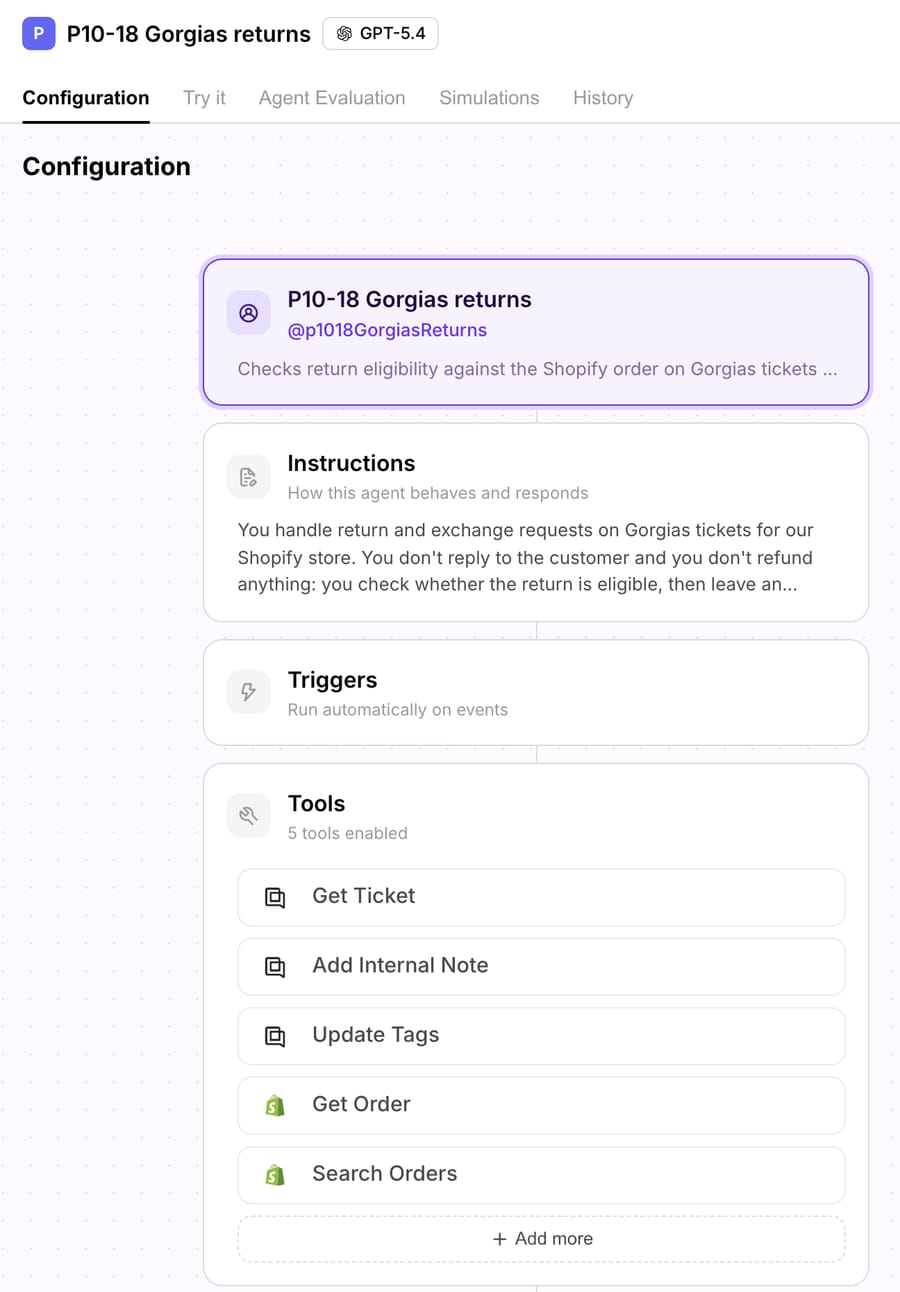
Run 1: a partial return inside the window
Sam Rivera emailed about order #1100, a $433 order with two items that was fulfilled on October 8, 2026: "Can I return just the fins? They are unused and still in the packaging." In the Test run we picked his ticket. The agent read the ticket and pulled the Shopify order, then asked to add an internal note.
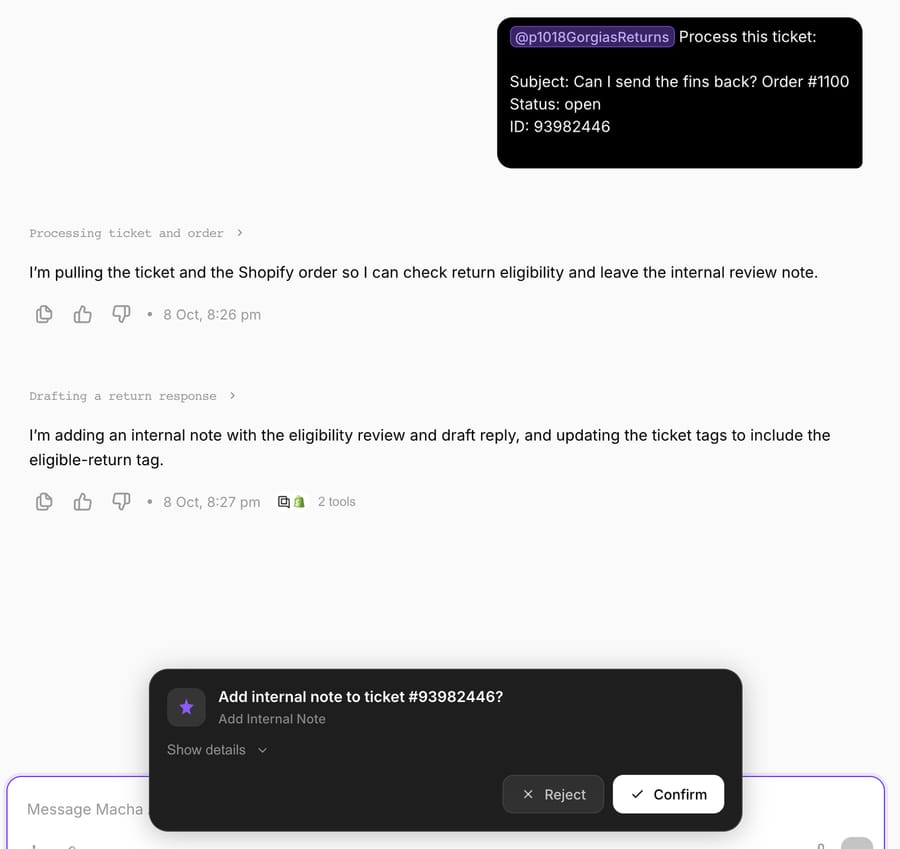
We approved the note and the tag update. On the Gorgias ticket, the note opens with ELIGIBLE, lists order #1100, the fulfillment date, 0 days since fulfillment and the item (the FCS II fins), and ends with a draft reply: the return is approved, a prepaid label follows within one business day, the fins must be unused and in their packaging, and the refund reaches the original payment method within 5 to 10 business days of the return arriving. The ticket gained the return_eligible tag. The Shopify sidebar beside the note shows the same order, Paid and Fulfilled, with the Refund button a teammate would use.
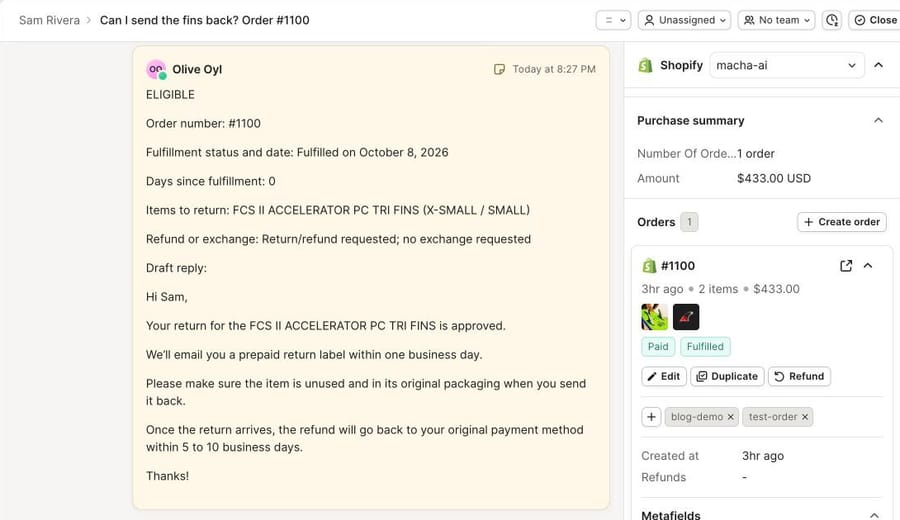
Sam wants a refund for one item out of two, and the agent didn't issue it. Macha's built-in Shopify Create Refund refunds everything left on an order, so it can't refund only the fins. That step belongs to a person using the sidebar Refund with QTY set to 1, or to a returns app. With Loop, the Macha team would add a custom API tool during setup so the agent can create the return or send the portal link itself.
Run 2: a "return" for an order that hasn't shipped
Priya Nair asked how to return order #1099. The agent found it paid but unfulfilled and wrote a NEEDS REVIEW note: not fulfilled yet, days since fulfillment N/A, the two items, refund requested, and a draft reply saying the order hasn't shipped, so it can be canceled instead if she confirms. It tagged the ticket return_review. The native flow's settings describe returns for delivered orders, and its window counts from creation or delivery, so it can't tell Priya to cancel instead; the agent's note tells the team what to do next.
The examples are synthetic: made-up customers at example.com, orders on a Shopify test store and tickets tagged p10_18_test. We didn't run a return label, a portal link or a refund. Those need a returns app or a write tool we deliberately left off.
Where Macha fits
Macha suits teams on Gorgias and Shopify whose returns policy has more than one rule: a window counted from fulfillment, final-sale items, partial returns, damage claims, orders over a value. It reads the ticket through the Gorgias connector and the order through the Shopify connector, applies the written policy and records its decision where your team already works. In safe mode everything lands as internal notes, as in our run. Once the drafts are right, the same agent sends public replies, starts with eligible returns and leaves the exceptions to people.
Macha is the done-for-you option: the Macha team analyzes your past return tickets, builds the knowledge base and the agent on your existing Gorgias, connects Loop or AfterShip Returns through custom API tools, and runs it in safe mode until the drafts are right. That's included on the trial and every plan, at about $0.40 a ticket, which includes setup and a dedicated success manager who handles your changes, such as a new return window for the holidays. Pricing starts at $299/month for 750 tickets. The trial is $50 of free usage, about 125 tickets, with no credit card.
Macha doesn't edit orders or refund part of a Shopify order with its built-in tools. If a partial refund needs to be automatic, that runs through your returns app's API as a custom tool, or stays with a person.
How should you choose a returns setup in Gorgias?
- Loop store with one return window: the native Return flow with Loop as the method, plus AI Agent's Loop deep-link action, covers it. Budget for automated interactions past your plan's bundle.
- Returns on another app, or decided by hand today: start with the sidebar app for visibility (AfterShip Returns lets agents approve from the ticket), then add an AI agent that writes the decision for your team.
- Rules that depend on the item, the fulfillment date or the order value: use an agent that reads the order and applies written instructions, such as eesel AI (self-serve) or Macha (set up for you).
- High volume with a budget for a contract: Siena and Yuma offer onboarding with per-resolution pricing; compare their platform fees and commitments against a per-ticket price.
How do you roll out returns automation safely?
Start with eligibility notes, not actions. Run the agent in safe mode on a week of return tickets and read every note against what your team actually did. Then turn on public replies for the plainest case, an eligible, unused item inside the window, and keep everything else as a note.
Some decisions should stay with people even after that:
- Goodwill and exceptions: out-of-window returns and loyal customers.
- Money above a threshold: large orders and repeat returners.
- Damage and disputes: anything that needs a photo or mentions a chargeback.
- Partial refunds: one item of several, until a returns-app tool handles it.
Tag every outcome (return_eligible, return_denied, return_review) so Gorgias reporting shows how many returns the agent decided and how many it handed over. For more ways to combine Gorgias with AI, see the best Gorgias automations with AI, automating WISMO in Gorgias, and our comparison of returns apps an AI agent can work with. On Zendesk, the same job is covered in automating returns and exchanges in Zendesk.
Frequently asked questions
Can Gorgias automate returns without another app? Partly. The Return order flow in Order Management checks a days-since-created or days-since-delivered window and sends your automated reply, and AI Agent can answer return questions. Creating the return, the label and the refund still happen in Shopify, a returns app such as Loop, or by an agent using the sidebar Refund with quantities.
Does Gorgias Order Management cost extra? It needs an active AI Agent subscription, and it only works with Shopify stores. A return request it fully resolves counts as an automated interaction: $1.00 on Starter, $0.90 on Basic and Pro and $0.85 on Advanced in the pricing table on October 8, 2026, after the interactions your plan includes.
Can Gorgias AI Agent create a return in Loop Returns? Its pre-built Loop actions send the shopper a portal deep link and report return shipping status. The shopper starts the return in the Loop portal. Anything beyond those two needs a custom HTTP Action against Loop's API.
Can an AI agent refund part of a Shopify order in Gorgias? It depends on the tool. Gorgias's sidebar Refund lets a person set quantities per item. eesel AI lists Refund Order and Create Return actions. Macha's built-in Shopify Create Refund refunds the whole remaining order, so partial refunds go to a person or through a returns-app custom tool.
Can AI handle exchanges in Gorgias? Partly. Gorgias AI Agent sends the shopper to Loop, where Loop's exchange options apply. Siena lists Loop return actions, and eesel lists Create Return and Create Draft Order. Macha's built-in tools don't create exchange orders, so a Macha agent writes the exchange decision for your team, or calls your returns app's exchange endpoint through a custom API tool the Macha team builds.
How much does it cost to automate returns in Gorgias with Macha? From $299/month for 750 tickets, about $0.40 a ticket, billed per ticket whether the agent resolves the return or prepares it for your team. Setup by the Macha team and a dedicated success manager are included on the trial and every plan.
Which option suits a small Shopify store? If you're on Loop and your policy is one window, the native Return flow with Loop and AI Agent's deep-link action is the least work. If returns get decided case by case, an agent that writes its decision as a note saves the reading time without giving up the decision.
How we researched this
- Read on October 8, 2026: Gorgias help articles on Order Management 101 (updated January 23, 2026), the return flow with automatic response and with Loop Returns (both updated May 5, 2026), Shopify Actions, and the AI Agent actions for Loop portal deep links and return shipping status (updated June 24, 2026); gorgias.com/pricing and Gorgias's AI Agent pricing post (updated May 28, 2026).
- Returns apps and vendors, same day: Loop Returns pricing; AfterShip's help articles on the Gorgias integration, Gorgias AI Agent actions and approving or rejecting RMAs (updated June 29, 2026); ReturnGO's Gorgias listing; docs.eesel.ai Shopify actions and eesel.ai/pricing; siena.cx Loop integration and pricing; yuma.ai and its pricing page. Loop's Gorgias plan requirement is from Loop's help article, checked September 24, 2026.
- Run live: in our Gorgias trial (Shopify test store connected), we opened the Order Management and Return order settings without saving changes, and created two tickets by API from made-up customers, tagged p10_18_test. On our Macha Demo workspace, an inactive test agent with no trigger ran in a Test run on both tickets; we approved its internal notes and tag updates, and the screenshots show the result.
- Arithmetic: 300 resolved return requests − 190 included on Pro = 110; 110 × $0.90 = $99; 110 × $1.50 = $165. Macha: $299 ÷ 750 tickets = $0.40 a ticket (rounded).
- Documented, not run: Gorgias AI Agent and its Loop and AfterShip actions (our sandbox has no returns app and AI Agent isn't live), the sidebar Refund with quantities, the returns apps, eesel AI, Siena AI, Yuma, and a trigger-fired Macha run.
- All customers, orders and tickets in the examples are synthetic.






