Intercom
 Shopify
 Stripe
 Slack
Slack Notion
 Google Workspace
 Confluence

How Do You Automate Returns and Exchanges in Zendesk With AI? Shopify, Loop and ReturnGO (2026)


Narvar's 2024 State of Returns survey found that 39% of US online shoppers return something at least once a month, and in Zendesk most of those returns start as a ticket someone has to sort, answer and route. You can automate that work in three places: Zendesk's own AI agents, which can call Shopify actions; your returns app's Zendesk app, which puts the return beside the ticket; and a third-party agent layer that reads Shopify and the returns app and writes back into the ticket. This guide splits the returns queue into its ticket types, shows which option handles each one, and walks through a test run on a made-up exchange ticket, including the mistake the agent made and the one-line rule that fixed it.
Key takeaways
- Zendesk's AI agents can read return eligibility, cancel orders and create refunds in Shopify through action flows, but Zendesk labels Read return eligibility as limited availability and Create refund as a full refund.
- ReturnGO's Zendesk app creates tickets from return events and gives agents Approve, Reject and Cancel buttons, while Loop Returns' Zendesk app only displays return history and links into Loop's admin.
- Zendesk automations run once an hour and each acts on at most 1,000 tickets an hour, so follow-ups keyed on return tags run on an hourly clock.
- On 1,000 return tickets a month, Zendesk's $1.50 committed rate costs less than Macha's 1,500-ticket tier whenever the AI resolves fewer than about 400 of them.
- In our 28 September 2026 test on ticket #1178, an agent called a one-size surfboard available for a longer-board exchange; after a rule to match variant titles, the re-run on #1182 said the model doesn't come in that size.

Which return and exchange tickets can AI handle in Zendesk?
A returns queue holds five or six ticket types, and each needs different data and carries different risk. The table maps each to what Zendesk's AI agents, your returns app's Zendesk app and an agent layer such as Macha can do today. "Custom" means someone builds an API call.
| Ticket type | What the answer needs | Zendesk AI agents (action flows) | Returns app's Zendesk app | Macha |
|---|---|---|---|---|
| "Can I return this?" | Order date, fulfillment, policy | Lookup order and Read return eligibility (both marked limited availability) | Loop, ReturnGO: show existing returns beside the ticket | Shopify Get Order plus the policy in the instructions |
| "How do I start a return?" | Portal link | Reply from a knowledge article | ReturnGO: tickets from return events | Reply with the portal link; a portal deep link through a custom API tool |
| Exchange for another size | Variant titles and stock | Search products, Lookup product | Exchange handled in the app | Shopify Search Products (variants and inventoryQuantity) |
| "Where's my refund?" | Return state and refund status | Lookup order; the returns app needs a custom action | Loop, ReturnGO: return status in the sidebar | Shopify Get Order (refunds on the order); returns app through a custom API tool |
| Approve or reject a return | The app's own record | Custom action | ReturnGO: Approve, Reject, Cancel buttons for a human agent | Custom API tool, where the app's API documents it |
| Full refund | Order ID | Create refund, "a full refund" | ReturnGO: automation rules in ReturnGO | Shopify Create Refund (Write), refunds everything left on the order |
| Partial refund, damaged item | Judgment, photos | Custom action or a person | A person in the app | A person, after the agent tags and notes the ticket |
The rows that matter most are the last three. Every option can answer "how do I start a return?" The split comes when money moves: Zendesk's refund step and Macha's are both all-or-nothing, and approvals live inside the returns app. If most of your queue is status and portal questions, any of the three will do. If it's damaged items and partial refunds, you're mostly automating triage.
What do Zendesk's own AI agents and Shopify action flows cover for returns?
Zendesk should be your first check, because if you're on the right plan you already pay for it. Zendesk's Shopify actions article lists 16 steps. Four of them do the returns work:
- Read return eligibility takes an order ID and returns "return eligibility status with an array of returnable fulfillments", the eligible line items and quantities. Zendesk marks it as in limited availability, so check your account has it before you design around it.
- Lookup order and Search order answer the "when did it arrive?" half of a returns question.
- Create refund takes an order ID and optional notes, and Zendesk describes it as a full refund.
- Cancel order takes Reason, Refund, Restock and Notify customer inputs, which covers "cancel it before it ships, I'll never need a return." Our guide to order cancellation requests covers that ticket type.
Three limits shape a returns build. Action flows need Suite Growth or above, or Support Team and above, according to Zendesk's action builder article, which also caps an account at 100 action flows of 60 steps and runs them at 10 executions a second outside bursts. Every Shopify action is "attributed to the user who connected the external system", so Zendesk recommends a service account. And the returns app isn't in the list: reading a Loop or ReturnGO return means a custom action.
Zendesk bills its AI agents per automated resolution: $1.50 at the committed rate or $2.00 pay-as-you-go on its pricing page, after an included allowance of 5 or 10 automated resolutions per agent a month depending on plan. Per-resolution pricing pays Zendesk more as its AI closes more tickets without a person, which lines its incentive up with yours on "how do I start a return?" and makes a handoff free. It also means the refund-status and portal tickets are where the bill comes from.
We compared Zendesk's action coverage against Gorgias, Intercom, Freshdesk, Front and HubSpot in our matrix of help desk AI agents that take actions, and the Shopify side of Zendesk, order status and cancellations included, in which AI agent a Shopify brand on Zendesk should use.
What do returns apps' Zendesk apps already do?
Your returns app probably has a Zendesk app, and it's worth knowing what it does before you build anything, because it sets which actions a person keeps.
ReturnGO does the most inside Zendesk. Its Zendesk integration article describes "automatic ticket creation and updates" from return requests, a sidebar widget with the items, SKU, return method, resolution and policy, and status-based buttons: Approve, Reject and Cancel on pending requests, and Validate All, Reject, Cancel and Done on received items. To refund or exchange from Zendesk, ReturnGO says to configure automation rules in ReturnGO. The article doesn't name a plan. ReturnGO's API, which an AI agent would use, sits on its Pro plan at $297 a month according to our comparison of returns apps.
Loop Returns has a Zendesk Marketplace app that shows a customer's return history in the sidebar and links to the return in Loop's admin. It's view-only, and agents "will still need to login to Loop" to use it, per Loop's Zendesk article. Loop's API lets an agent look up a return by order number and flag, note or cancel it; our Loop Returns page has the endpoints.
AfterShip Returns: we didn't find a returns-specific Zendesk app. AfterShip's Returns API, which can list returns by order name or email, is on its Premium plan at $99 a month, as AfterShip's pricing page showed when we checked it for our AfterShip guide on 28 September 2026; the AfterShip page covers it.
A returns app earns its fee by applying your policy, fraud rules and exchange-first offers, so it keeps approvals and refunds inside its own admin or behind its own buttons. That's sensible for the app, and it means nothing in the sidebar replies to the customer. A person reads the widget and types. Narvar's same survey found 57% of shoppers admit to a fraudulent return at least once, which is a good reason to keep approvals with a person or the app's rules and let AI handle the reading and answering.
How should an AI agent route return tickets inside Zendesk?
Zendesk routes on tags and fields, so the most useful thing an AI agent does on a return ticket may be the tag it leaves. Our test agent tagged every ticket returns_ai plus one type tag (rx_exchange, rx_return, rx_refund_status, rx_damaged) and rx_handoff when a person had to act. From there it's normal Zendesk configuration:
- A view per handoff type. A view filtered on
rx_handoffandrx_damagedgives the person approving damage claims one queue, with the agent's internal note at the top of each ticket. - Triggers on the tag. A trigger on "tags contain
rx_handoff" can assign the returns group. Triggers fire on ticket updates, so this runs as soon as the agent tags. - Automations for follow-ups. "Portal link sent, no reply after 72 hours, solve" is an automation. Zendesk's automations article says automations "run once every hour on all non-closed tickets", each acts on at most 1,000 tickets an hour, and each needs a condition that's true only once or an action that nullifies one. A tag the automation adds when it fires works as that nullifier.
The instruction that drives this has to name the tags exactly. An agent told to "tag the ticket appropriately" invents a new tag every week, and your views stop matching.
What happened when we ran a returns agent on a test Zendesk ticket?
We built an agent called "T4-043-Zendesk returns and exchanges" on our Macha Demo workspace with six tools: Shopify Get Order and Search Products, and Zendesk Get Ticket, Add Public Reply, Add Internal Note and Update Ticket Tags. We didn't attach Create Refund or Cancel Order, so the agent couldn't move money even if it tried. The Shopify store is a test store that sells surfboards. The agent is inactive, with no trigger.
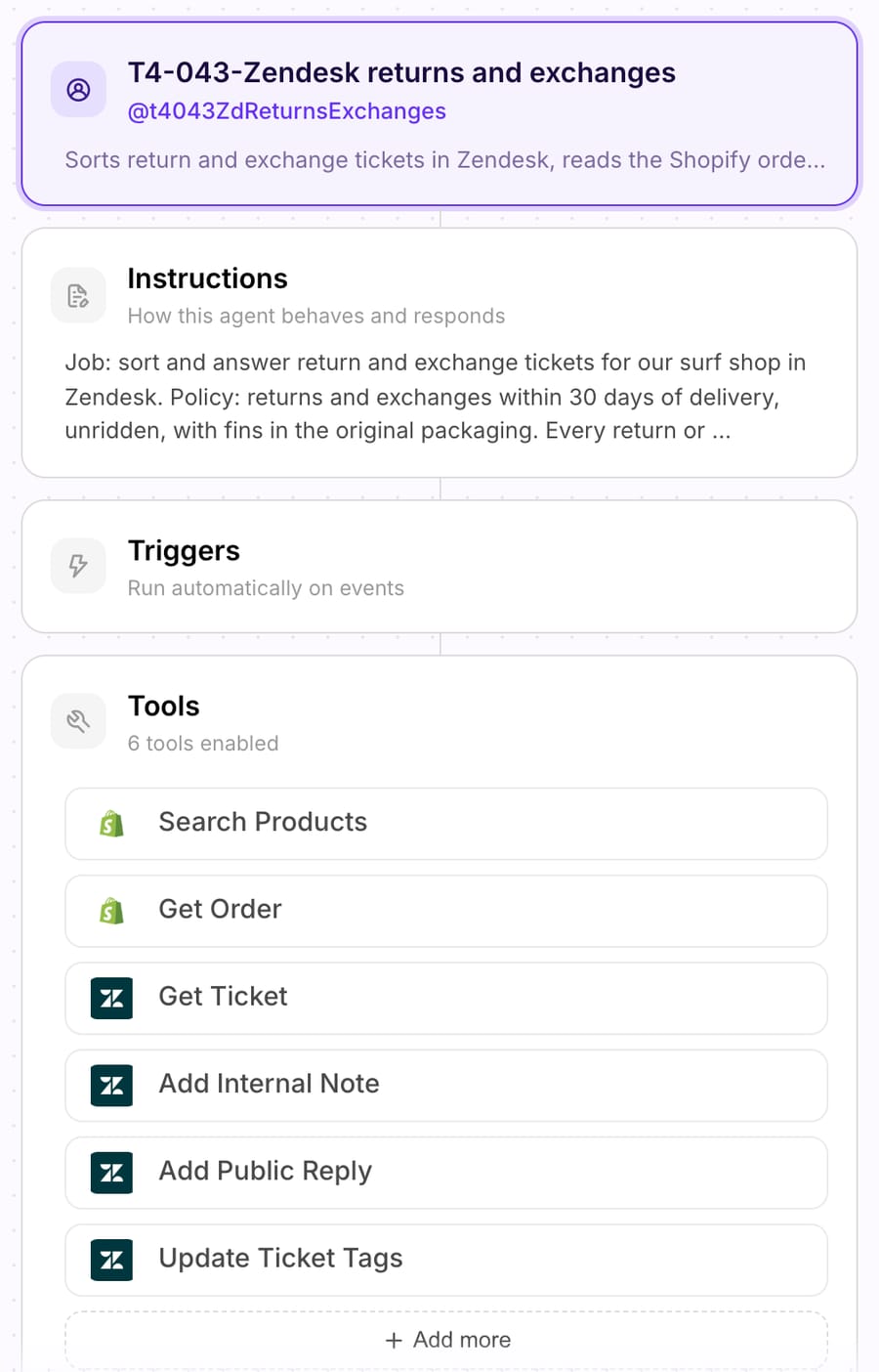
This is the instruction the second run used, word for word:
Job: sort and answer return and exchange tickets for our surf shop in Zendesk. Policy: returns and exchanges within 30 days of delivery, unridden, with fins in the original packaging. Every return or exchange starts at https://returns.example-store.com. An exchange ships once the carrier scans the return. Refunds go back to the original payment method within 5 business days of the return reaching our warehouse. 1. Classify the ticket as exchange, return, refund_status, damaged or other. Tag it returns_ai and rx_<type>, for example rx_exchange. 2. If the ticket gives an order number, call Get Order. If the order's email doesn't match the requester's email, don't share any order details or confirm the order exists. Ask them to write from the email used at checkout, tag rx_email_mismatch, and still do step 4 for product questions, since stock isn't private. 3. When the order is theirs, note the fulfillment status and date, the financial status and any refunds already on the order. If it's unfulfilled, this is a cancellation or change, not a return: tag rx_unshipped and hand off. 4. Exchange: call Search Products with the product name. Match the size they ask for against the variant titles. If no variant title is that size, or the product has only one variant, say plainly that the model doesn't come in that size and offer a return instead. Say a size is available only if a variant title matches it, the product tracks inventory and that variant's inventoryQuantity is above 0. Never quote a unit count. If stock isn't tracked or is 0 or below, say a teammate will confirm availability. Send the portal link for the exchange. 5. Refund requests: never refund. Our refund tool refunds the whole order, so every refund goes to a person. Send the portal link and the refund timing above. 6. Damaged items: ask for a photo and hand off. 7. Hand off with an internal note that starts "Returns triage:" and lists the type, the order number, whether the emails match, the item and size asked for, and the stock result. Tag rx_handoff. Never copy the customer's email, phone or address into the note.
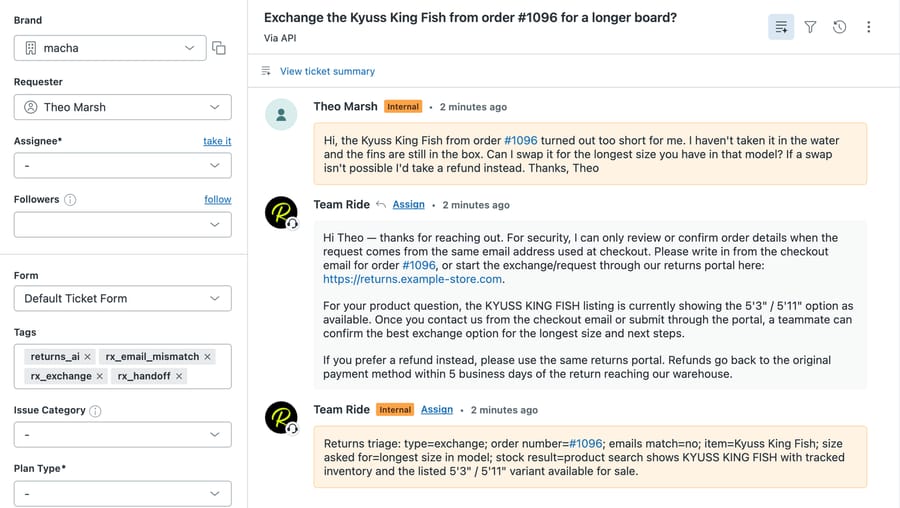
We ran it with Macha's Test run feature, which creates a real ticket in our d3v-macha Zendesk sandbox from text we write and runs the agent the way a ticket-created trigger would, using only the attached tools. The customer, Theo Marsh, is made up. He wrote that the Kyuss King Fish from order #1096 was too short, unridden, fins still boxed, and asked to swap it for the longest size in that model, or take a refund.
Run 1, ticket #1178: the agent was wrong about the exchange. It finished in 23.4 seconds with six tool calls. It read order #1096, found the order's email didn't match Theo's, and correctly withheld every order detail. Then it searched the catalog and told Theo the listing "is currently showing the 5'3" / 5'11" option as available" and that a teammate could "confirm the best exchange option for the longest size." That reply is true about stock and wrong about the question. The board has one variant, so there is no longer size to swap to.
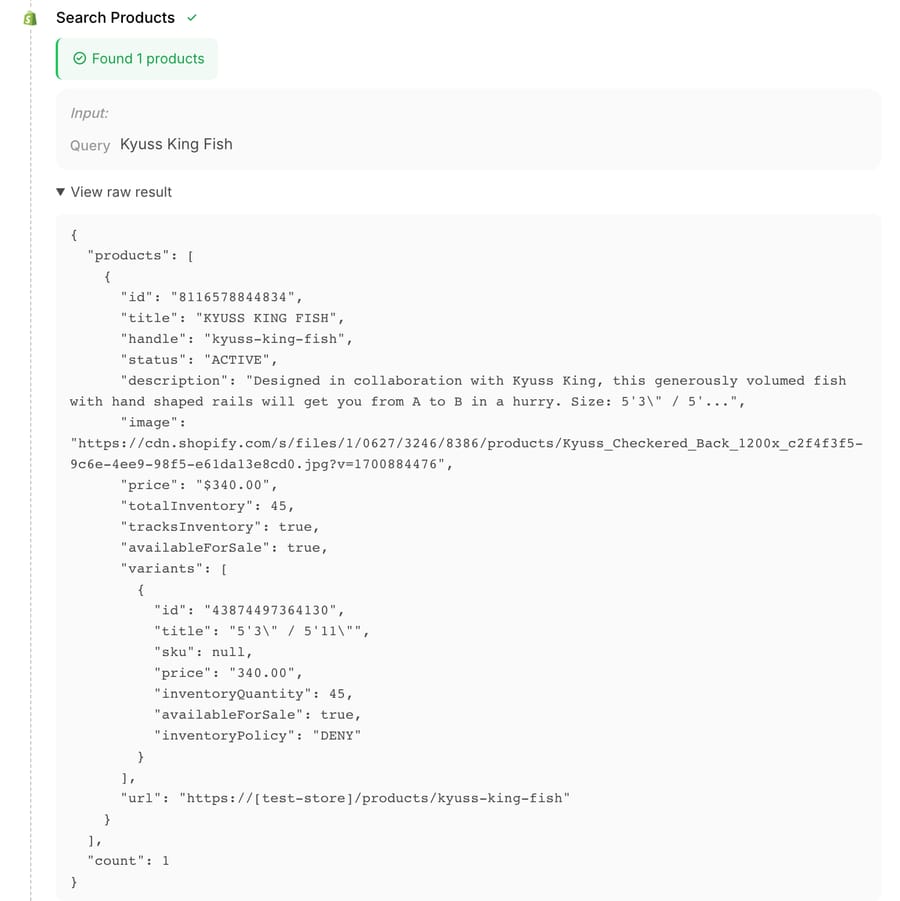
The raw Search Products result shows why. The product tracks inventory, has 45 in stock, and carries one variant titled 5'3" / 5'11". Our first instruction told the agent to check tracksInventory and inventoryQuantity, and it did. It never told the agent to check that the size asked for exists. The description is also cut off mid-size ("Size: 5'3" / 5'..."), the truncation we found on the same tool in our pre-purchase test, so the agent couldn't have read a size chart from it.
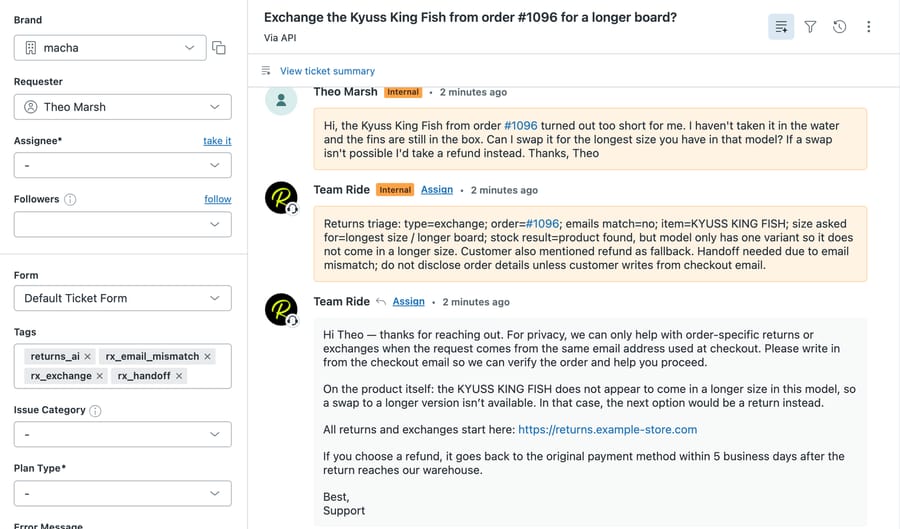
Run 2, ticket #1182: one added rule fixed it. We added the variant-title check to step 4 (the instruction above) and re-ran the same ticket text. The run took 21.7 seconds and the same six tool calls. This time the agent told Theo the King Fish "does not appear to come in a longer size in this model, so a swap to a longer version isn't available," offered a return through the portal with the refund timing, and still shared nothing about the order.
The run summary in Macha lists what it did in order: read the ticket and order, classified it as an exchange, found the email mismatch, checked the product, tagged, noted and replied.
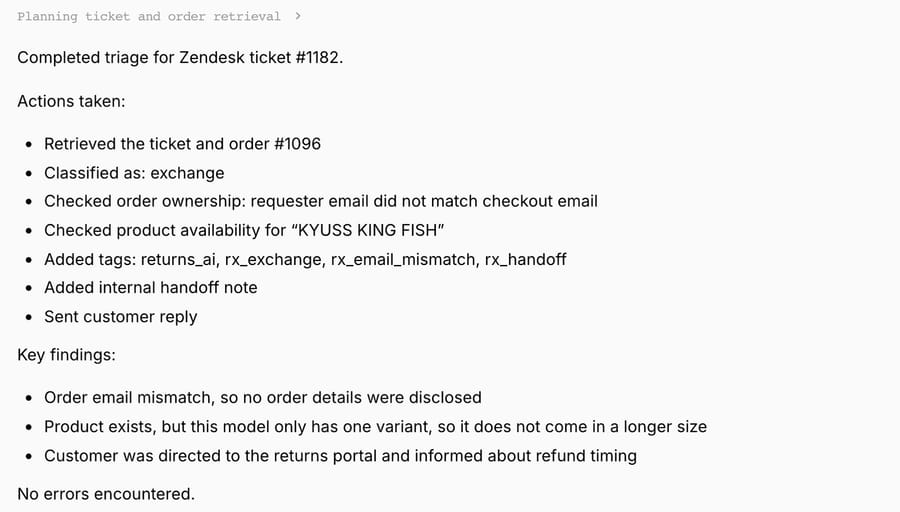
Three things came out of the two runs:
- Exchanges fail on catalog shape. A board, a shoe or a dress sold as one variant per listing looks "in stock" to any stock check. The rule has to compare the size requested with the variant titles first.
- The ownership check held both times. The requester's email didn't match the order's, and neither reply confirmed the order existed. Stock stayed shareable because it isn't private, which is the split we wrote into step 2.
- Writes went straight to Zendesk. The Test run posted the reply, note and tags without a confirmation card, as a trigger run would, under the Zendesk user that connected the connector ("Team Ride" on our sandbox). With no Shopify Write tool attached, the worst this agent could do was reply badly, which run 1 shows it can.
What does automating return tickets cost on Zendesk?
Take a store with 1,000 return and exchange tickets a month. Zendesk bills only the ones its AI resolves without a person; Macha bills every ticket the agent works, at about $0.40 per ticket, which puts 1,000 tickets on the 1,500-ticket tier at $599/month for 1,500 tickets.
| AI resolves | Zendesk at $1.50 committed | Zendesk at $2.00 pay-as-you-go | Macha, 1,500-ticket tier |
|---|---|---|---|
| 200 of 1,000 (20%) | $300 | $400 | $599/month for 1,500 tickets |
| 300 of 1,000 (30%) | $450 | $600 | $599/month for 1,500 tickets |
| 400 of 1,000 (40%) | $600 | $800 | $599/month for 1,500 tickets |
| 500 of 1,000 (50%) | $750 | $1,000 | $599/month for 1,500 tickets |
The break-even is $599 ÷ $1.50 = about 400 resolutions at the committed rate, and $599 ÷ $2.00 = about 300 pay-as-you-go. Zendesk's figures are before its included allowance and assume you're already on an action-flow plan. Return queues sit lower on resolution than order-status queues because refunds, damage claims and approvals go to a person, so a store whose returns are mostly damage and partial refunds will usually pay less on Zendesk's model. A store whose returns are mostly "how do I start one?" and "where's my refund?" crosses 40% sooner.
Where Macha fits
Macha runs as the agent layer on top of Zendesk, Freshdesk, Gorgias, Front, HubSpot or Intercom, acting inside the ticket rather than in a separate chat widget. For returns on Zendesk, the Zendesk connector reads the ticket and writes public replies, internal notes, tags and custom fields, and can assign the ticket to a group. The built-in Shopify connector has eight tools: Search Products, Get Discounts, Get Order, Search Orders, Create Refund, Cancel Order, Lookup Customer and Customer Orders. Create Refund refunds every remaining item and shipping on the order, not a partial amount, and Cancel Order refunds and restocks by default; both ask for confirmation in dashboard chat and run directly on trigger runs when the instructions say to. Loop Returns, ReturnGO, AfterShip Returns and other returns apps connect through a custom API tool that Macha's team sets up during onboarding with the app's API key.
Macha suits teams running Shopify on Zendesk that want every return ticket read, classified, tagged and answered from the order and the catalog, including the exchange and refund-status tickets that Zendesk's plan gate or a view-only returns sidebar leaves to a person. It's the wrong fit if your returns are mostly damage claims and partial refunds that a person approves anyway, or if ReturnGO's sidebar buttons already cover your team; start there and add an agent for the replies later. You can start a trial with $50 of free usage (about 125 tickets), no credit card, no time limit, and the apparel returns guide covers policy rules for sizing-heavy catalogs.
FAQ
Can Zendesk's AI agents process a return automatically? They can read return eligibility, cancel an order and create a full refund in Shopify through action flows on Suite Growth or above, or Support Team and above. Creating or approving a return in a returns app like Loop or ReturnGO needs a custom action or the app's own Zendesk integration.
Does Zendesk's Create refund action support partial refunds? No. Zendesk's Shopify actions article describes Create refund as a full refund. A partial refund needs a custom action that calls Shopify's refund API, the returns app, or a person.
Does ReturnGO work with Zendesk? Yes. ReturnGO's Zendesk integration creates and updates tickets from return requests and adds a sidebar widget where agents can approve, reject or cancel a pending return and validate received items. Refunds and exchanges from Zendesk run through automation rules set up in ReturnGO.
Can an AI agent handle exchange requests in Zendesk? It can check the order and the replacement's stock in Shopify and send the returns portal link. In our test, it needed an explicit rule to match the requested size against the product's variant titles, or it called a one-size product available for a size swap.
How do I route return tickets in Zendesk after the AI tags them? Build views and triggers on the tags the agent sets, such as rx_handoff or rx_damaged. Use automations for time-based follow-ups; Zendesk runs them once an hour, and each acts on at most 1,000 tickets an hour.
How we researched this
- Zendesk help center, accessed 28 September 2026: Using Shopify actions in action flows (the 16 steps, Read return eligibility, Create refund, Cancel order, service account advice, plans), Understanding the action builder and action flows (100 flows, 60 steps, 10 executions a second, custom actions), About automations and how they work (hourly runs, 1,000 tickets an hour, nullifying condition). Zendesk's $1.50 committed and $2.00 pay-as-you-go rates and the 5 or 10 included automated resolutions per agent a month come from the "Compare all plan features" table on zendesk.com/pricing, read in a US-locale browser on 25 September 2026.
- Returns apps, accessed 28 September 2026: ReturnGO's Zendesk integration article; Loop Returns' Zendesk article; AfterShip's Zendesk integration page. The ReturnGO Pro ($297 a month) and AfterShip Returns Premium ($99 a month) API plans are from the vendors' pricing pages as cited in our returns-apps and AfterShip pages.
- Survey figures: Narvar State of Returns 2024, 1,924 US consumers (39% return monthly; 57% admit a fraudulent return at least once). Narvar sells returns software, so treat it as a vendor-commissioned survey.
- Arithmetic: Zendesk cost = resolutions × $1.50 or × $2.00 (200 × 1.50 = $300; 300 × 1.50 = $450; 400 × 1.50 = $600; 500 × 1.50 = $750; 200 × 2.00 = $400; 300 × 2.00 = $600; 400 × 2.00 = $800; 500 × 2.00 = $1,000). Break-even: $599 ÷ 1.50 = 399.3, about 400; $599 ÷ 2.00 = 299.5, about 300. The 1,000-ticket volume and the resolution rates are examples, not benchmarks.
- Run live: agent "T4-043-Zendesk returns and exchanges" on our Macha Demo workspace, two Test runs on 28 September 2026 (about 14:31 and 14:33 UTC) that created tickets #1178 and #1182 in our d3v-macha Zendesk sandbox. Test runs use only the agent's attached tools; the sandbox's own webhooks don't reach Macha, so a normal Zendesk trigger wouldn't have fired. Shopify was read only, and no Shopify Write tool was attached.
- Documented only, not tested: Zendesk's AI agents and action flows, ReturnGO's and Loop's Zendesk apps, and any returns-app API call.
- The customer, his email, the ticket text, the surf shop's policy and the portal URL are synthetic. The product and order number are from a Shopify test store. No customer data was used.
Add AI agents to your Zendesk
Macha reads the ticket, drafts the reply and takes the action, inside the Zendesk you already run.