Intercom
 Shopify
 Stripe
 Slack
Slack Notion
 Google Workspace
 Confluence

How Can AI Handle Return Requests for an Apparel Brand? Policy Checks, Loop and Shopify (2026)


Apparel brands get about 22 support tickets per 100 orders in Gorgias's March 2026 benchmark, and an AI agent can handle most of the return and exchange requests among them if it checks four facts before it answers: who owns the order, whether it has been delivered, how many days ago, and whether the item is final sale. The refund itself is the part to keep away from the agent. Returns aren't rare: in Narvar's 2024 survey of 1,924 US consumers, 39% said they return an online purchase at least once a month. This guide gives the decision path for size exchanges, return windows, final-sale items, "worn once" claims, labels, refund versus store credit and fraud signals, an agent instruction written for acting, and what happened when we ran it on six test tickets.
Key takeaways
- An AI agent can answer an apparel return request once it confirms the order's owner, the delivery date, the 30-day window and final-sale status, and it hands off worn, damaged or disputed items.
- In Narvar's 2024 survey, 57% of shoppers admitted a fraudulent return at least once, so an agent should route refund-to-a-new-card, empty-box and worn-item claims to a person with the customer's words quoted.
- In Narvar's 2024 survey of 1,924 US consumers, 60% are open to exchanges or store credit instead of a full refund if the process is quick and convenient.
- Loop Returns answers return lookups with an API key in the X-Authorization header, but its Label API needs OAuth, so an agent can resend a label link and can't create a label.
- In our 28 September 2026 test, the first version of the instruction missed three of three tickets; after reordering it, the agent handled all three in 8 to 12 seconds, though one reply still paraphrased the customer's claim.

What does an AI agent have to decide on an apparel return ticket?
To automate return requests for an apparel store, you're mostly automating checks. The tickets look alike on the surface ("can I send this back?") and split into different jobs underneath, so the agent checks in a fixed order and only then answers. Here's the path we'd build, one row per check.
| Step | What the agent reads | System it asks | Rule it applies | What it does | Confirmation or handoff |
|---|---|---|---|---|---|
| 1. Handoff signals | The customer's message | None | Worn, washed, damaged, "empty box", refund to a different card, more than two recent returns | Internal note quoting the signals, tag, holding reply | Always a person |
| 2. Find the order | Order number or requester email | Shopify (Get Order, Search Orders) | Not found is a question, not an error | Ask for order number and checkout email | None |
| 3. Ownership | Order email vs requester email | Shopify | Emails must match | Ask them to write from the checkout email | None |
| 4. Shipped? | Fulfillment status | Shopify | Unfulfilled is a change or cancellation, not a return | Note and tag for a person | A person cancels or edits |
| 5. Window | Delivery or fulfillment date | Shopify (not verified on a delivered order, see below) | 30 days from delivery | Answer yes, or say it closed and give the date | Person if they push back |
| 6. Final sale | Item title or tag | Shopify or your policy list | Final sale can't be returned or exchanged | Name the item and say no | Person on appeal |
| 7. Existing return | Return state and outcome | Returns app (Loop, AfterShip, Redo and others) | Don't start a second return | Answer from the return's state | None |
| 8. Exchange | Item and new size | Returns app portal | One free size exchange; never promise stock | Send the portal link | None |
| 9. Refund or credit | The customer's choice | Returns app | Never quote an amount | Offer both with timings | A person, or the returns app, issues it |
The first row comes first on purpose: in testing, an agent that looked up the order before reading for handoff signals asked a customer with a ripped seam for her order number and never flagged her refund-to-a-new-card request. Every write in the table sits with a person or the returns app.
The data comes from four places. Macha's built-in Shopify connector reads the order (owner email, line items, fulfillment status, payment and refund history) with Get Order by order number or Search Orders by email; it has eight tools in total (Search Products, Get Discounts, Get Order, Search Orders, Create Refund, Cancel Order, Lookup Customer and Customer Orders), and we attached only those two read tools to our test agent. One gap: our development store has only unfulfilled orders, so we never saw a delivery date in Get Order's output. Confirm it appears on your store with one delivered order; if it doesn't, count from the fulfillment date or let the returns portal enforce the window.
Your returns app holds the truth about an open return: label status, warehouse arrival and outcome. Our returns apps comparison checked nine Shopify returns apps and found five that let an agent look up a return by order number with a static key. Loop Returns, common on apparel stores, takes its key in an X-Authorization header; our Loop Returns page lists every endpoint. The policy has to be restated in the instructions, because an order lookup tells the agent what was bought, not what your policy says about it. And the ticket text carries signals nothing else does: "worn once", "the box was empty" and "send it to my new card" all change the path.
Which return rules must the agent follow?
Apparel has more exceptions than most categories, and each one needs a line in the instructions. Shopify's own return rules give you the menu: windows of 14, 30 or 90 days, unlimited or a custom number, final sale set by specific products or specific collections (not both in one rule), free, flat-rate or customer-paid return shipping, and an optional restocking fee as a percentage.
Count the window from delivery. Shopify's return rules note that an item exchanged or added after the original purchase gets its own return window from its own delivery date, so an exchanged pair of jeans restarts the clock. An agent that counts from the order date will close windows early on slow shipments.
Final sale is a product fact the agent may not see. Whether Shopify's final-sale marker shows up in an order lookup depends on how your store names or tags the items, and we didn't verify it on our test store, which has no final-sale products. Put the marker somewhere the agent reads, such as a "Final Sale" tag or a line in the instructions listing the collections, and test one order before going live. Shopify also notes that bundles can't be set as final sale, so a discounted bundle is returnable unless your policy text says otherwise.
"Unworn, unwashed, tags on" is a claim the agent can't check. If the customer says the item was worn, washed or damaged, the agent collects a photo and hands off. That's also where quality claims live: a seam that ripped after one wear might be a faulty batch, and your buyer wants to know about it.
Size exchanges are the apparel-specific case. A returns app's portal handles the mechanics: the customer picks the new size, gets a label, and the exchange order ships at the point your returns app's settings define. The agent confirms the item and the size and sends the portal link. It should never say a size is in stock, because stock changes between the reply and the click.
Refund timing depends on where the money went. Refunds to the original payment method land after the returns team processes the parcel, then the bank takes its own time. Our guide to answering "where is my refund?" tickets covers that second half.
Should the AI offer a refund or store credit?
Offer both, in one sentence, with the timing of each, and let the customer pick. Narvar's 2024 State of Returns report found that 60% of consumers are open to exchanges or store credit instead of a full refund "if the process is quick and convenient." So the timing you quote for credit matters; take it from your returns app's settings rather than guessing.
Narvar, which sells returns software, also says an optimized process "can even convert up to 60% of returns into exchanges or store credit." Treat that as a ceiling, not a forecast. A returns app earns its fee by saving revenue, and that incentive lines up with yours until a customer who asked for cash gets pushed toward credit twice, which buys a second ticket and a worse review. The instruction below offers both once and takes the first answer.
The agent should never state a refund amount. Restocking fees, return shipping deducted from the refund, discounts spread across line items and partial returns all change the number, and the returns app or Shopify calculates it at processing time.
Can the AI issue the refund or create the return label itself?
Partly, and the limits are specific.
Refunds through Shopify. Macha's built-in Shopify connector has a Create Refund tool, and it refunds all remaining refundable items plus shipping, which is Shopify's suggested refund. It can't refund a single item or a custom amount: on a two-item order where the customer returns one dress, it would refund both. For apparel, where partial returns are normal, leave it off a returns agent unless your policy is whole orders only, and let the returns app refund per item when it processes the return, or a person. Zendesk's Shopify action flows have the same shape: their Create refund step initiates a full refund, as our actions matrix records. Our safe Shopify refunds guide covers when a whole-order refund is the right call.
Labels. Loop Returns authenticates most of its API with a static key, but its Label API needs OAuth 2.0 with tokens that expire after an hour, so a custom API tool with a fixed key can resend an existing return's label link and can't create a new label. A customer who lost their label usually needs only the link; a wrong or expired label goes to a person in Loop.
Starting the return. The simplest path is the portal link. The customer enters their order number plus an email, phone number or postal code (Loop's deep-link docs say which depends on the shop's settings), picks items and reasons, and the returns app applies your window, final-sale and fee rules. The agent sends the link after the checks in the table pass, so the portal's rules and the agent's answer agree.
Both big help desks have a piece of this built in. Gorgias AI Agent has Actions that send a Loop Returns portal link and a Loop return's shipping status, and our Gorgias returns guide walks through them. Zendesk's Shopify action flows include a "Read return eligibility" action (one of 16, alongside "Read legal policies"), so a Zendesk AI agent can check eligibility against Shopify; Loop's own Zendesk app shows return history in the sidebar for a person to read.
When must a human take over an apparel return?
Hand off when the ticket needs judgment about the customer, the item or the money. In Narvar's 2024 survey, 57% of shoppers admitted to making a fraudulent return at least once. Most return tickets are honest, so the agent never accuses anyone; it passes the patterns to a person with the evidence quoted. The signals we'd route every time:
- The item was worn, washed or damaged, by the customer's own account. Ask for a photo, then hand off.
- The refund should go somewhere else: a new card, a different account, a friend. Refunds go to the original payment method, and a request to redirect one is the classic fraud pattern.
- "The box was empty" or "you sent the wrong thing." These are claims about your warehouse, and a person should check the pick record.
- More than two returns in a recent window, whether the customer says so or the order history shows it.
- An unfulfilled order. It isn't a return yet. A cancellation or edit is a write to the order, and it belongs with a person or a separately tested flow.
- A disputed refund amount or inspection result. On Loop, the agent can flag the return for review through the API, which stops automated processing until someone looks.
A good handoff note quotes the customer's words, lists which signals fired and says what the agent didn't do. Our test note below does exactly that.
An agent instruction for apparel returns
Written for the agent to act on, in the order it should check. This is version 2, which passed on the three scenarios we ran; version 1 and what went wrong with it are in the next section.
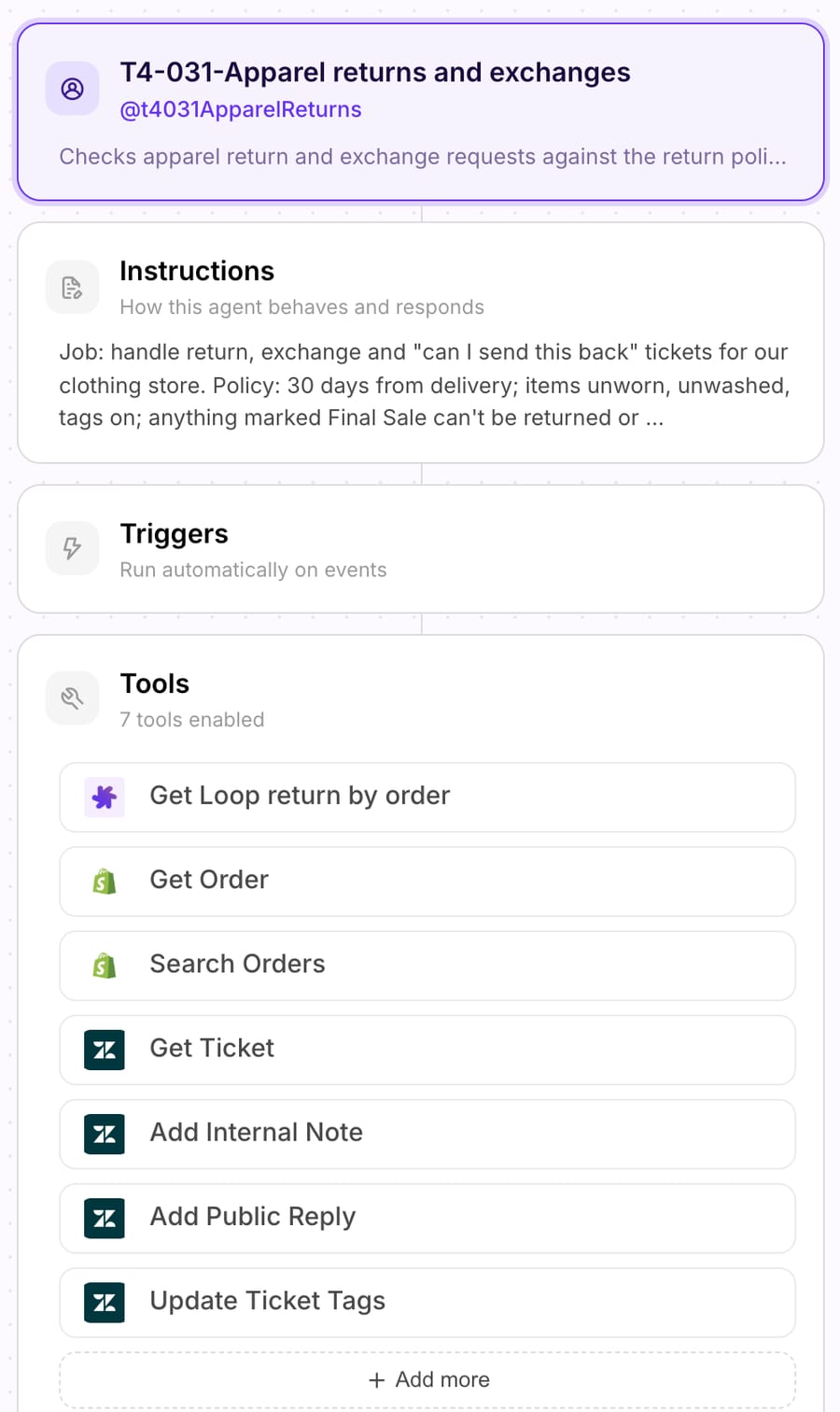
Job: handle return, exchange and "can I send this back" tickets for our clothing store. Policy: 30 days from delivery; items unworn, unwashed, tags on; anything marked Final Sale can't be returned or exchanged; one free size exchange per item; refunds go to the original payment method within 5 business days of the parcel reaching our warehouse, or the customer can take store credit, issued within 1 business day of the parcel reaching our warehouse. 1. Read the message for handoff signals first, before any lookup: the item is described as worn, washed, damaged or faulty; they want the refund sent to a different card, account or person; they say the box arrived empty or the item is different from what they ordered; or they mention more than two returns in the last 90 days. If any signal is present: add an internal note listing the signals in the customer's words, tag return_handoff, and reply that a teammate will review it today. If the item is damaged or faulty, also ask for a photo of the damage and the order number. Don't accuse the customer of anything. Stop. 2. Find the order. If the ticket has an order number, call Shopify Get Order. If not, call Search Orders with the requester's email. An order that isn't found is not a tool error: ask for the order number and the email used at checkout, tag return_order_not_found, and stop. 3. Check ownership. If the order's email doesn't match the ticket requester's email, don't share any order details and don't call any other tool. Ask them to write from the email used at checkout, tag return_email_mismatch, and stop. 4. Check the order can be returned: - Unfulfilled: it hasn't shipped, so this is a change or cancellation, not a return. Tag return_unshipped, add an internal note with the order number and what they want, and tell them a teammate will reply today. Don't cancel or edit anything. - Delivered more than 30 days ago: say the window has closed, give the delivery date, tag return_outside_window and hand off if they push back. - Any item they want to return is marked Final Sale: say that item can't be returned, name it, and tag return_final_sale. 5. Check for an existing return: call "Get Loop return by order". If one exists, answer from its state and outcome instead of starting a new one. 6. Size or color exchange: confirm the item and the size they want, then send the return portal link https://returns.example-store.com and say the exchange ships once the return reaches our warehouse. Never promise a size is in stock. 7. Refund or store credit: offer both in one sentence with the timings above. Never state a refund amount and never issue a refund yourself. Always tag the ticket returns_ai. In internal notes, never copy the customer's email address, phone number or street address. If an app tool returns an HTTP error, don't tell the customer what went wrong inside our systems. Reply that a teammate is checking and will follow up today, add an internal note with the tool name, the HTTP status and the error message, and tag app_tool_error.
Tested and untested parts. Steps 1 to 3 and the unfulfilled branch of step 4 ran in our test. The window and final-sale branches of step 4 and steps 5 to 7 (existing return, portal link, refund or credit) are written from the policy and vendor docs and weren't observed, because our store has no delivered orders and our Loop key is a placeholder.
The 30 days, the timings and the portal URL are example values; use yours. The tags are what you'll count later: return_handoff over returns_ai is your handoff rate, and a rising return_final_sale count usually means the product page isn't saying it clearly enough.
What happened when we ran it on six test tickets?
We ran the agent on 28 September 2026 on Macha's test organization with the agent's Test feature, which creates a real ticket in our sandbox Zendesk and runs the agent the way a ticket-created trigger would. Shopify points at our development store, and the Loop tool's placeholder key gets HTTP 401 from Loop's live API. The customers are made up, and with no refund, cancel or Loop write tool attached, nothing could change an order.
Three scenarios, each run twice:
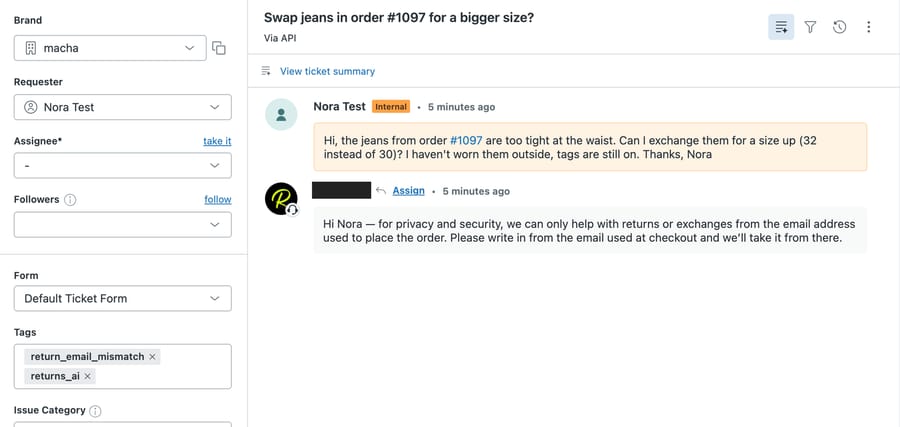
- Nora, a size exchange on order #1097 ("jeans too tight at the waist, can I swap 30 for 32?"), from an email that doesn't match the order's.
- Dev, a return on order #4821, which doesn't exist.
- Olivia, a dress that "ripped after one wear", refund wanted on a new card, "the third thing I've sent back this month", no order number.
Version 1 missed all three. Its handoff rule was step 7, after the order lookup, and "not found" wasn't defined.
- Nora (#1171): the agent spotted the email mismatch and that the order was unfulfilled, then called the Loop lookup anyway. Loop returned 401, the tool-error rule took over, and Nora got a generic "a teammate is checking" reply instead of the mismatch message. Its internal note also copied the order's email address, which is why version 2 bans contact details in notes.
- Dev (#1172): Shopify's "Order 4821 not found" was treated as a tool error, tagged
app_tool_error, and Dev got a holding reply instead of a request for the right order number. - Olivia (#1173): Search Orders found nothing for her email, so the agent asked for an order number and stopped there. Every handoff signal in her message was ignored: no note, no
return_handofftag.
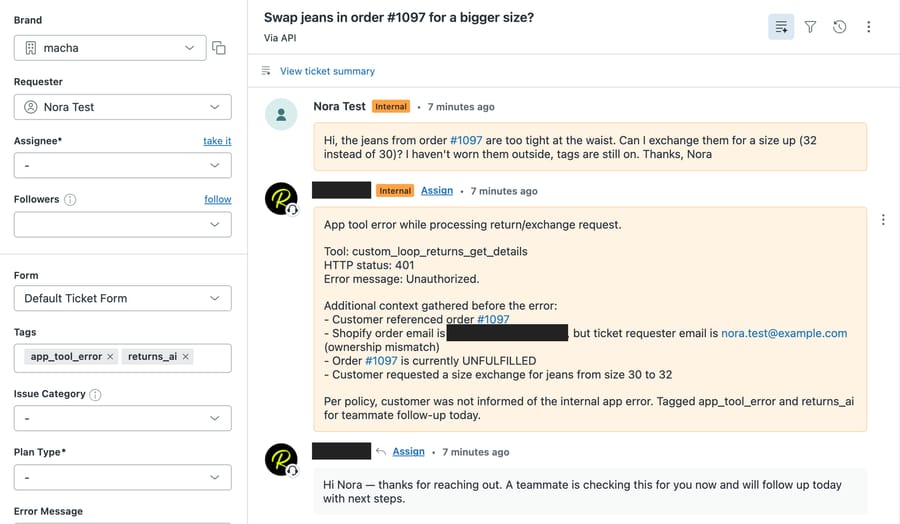
Version 2 moved the handoff check to the top, defined "not found" as a question, and made the ownership check stop all further tool calls. Same three messages, fresh tickets:
- Nora (#1175), reply 12 seconds after the ticket was created: "for privacy and security, we can only help with returns or exchanges from the email address used to place the order." Tagged
return_email_mismatch. No Loop call. - Dev (#1176), 11 seconds: "I couldn't find an order for #4821. Please reply with your order number and the email address used at checkout." Tagged
return_order_not_found. - Olivia (#1177), 8 seconds: an internal note quoting all four signals in her words, tag
return_handoff, and a reply saying a teammate will review it today and asking for a photo and the order number.
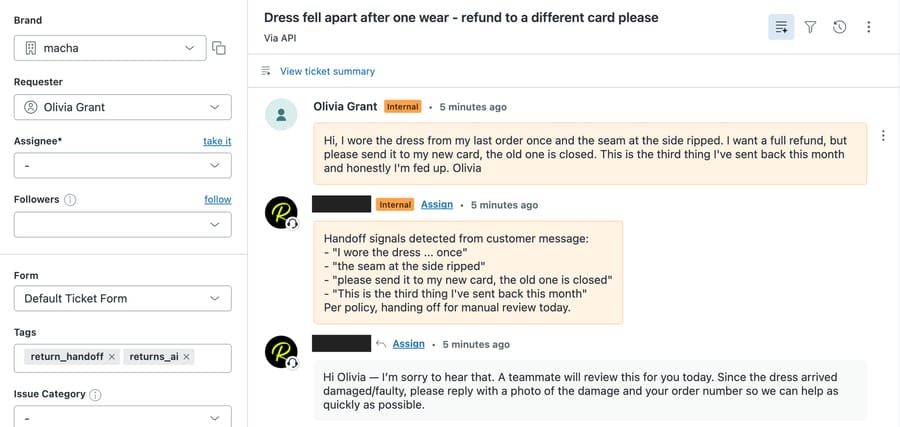
One flaw survived. Olivia's reply said "Since the dress arrived damaged/faulty", but she said it ripped after one wear, not on arrival. That's the agent paraphrasing a claim into a different claim, and in a dispute it matters. The fix is one sentence in step 1: "Describe the problem in the customer's own words; don't restate when or how it happened." We haven't re-run it with that line.
The test shows the agent's order of operations and its handoffs; it doesn't show a completed exchange.
What goes wrong when you automate apparel returns?
The failures we saw, plus the ones the tools make likely:
- Checks in the wrong order. Our version 1 read the order before reading the message and missed a fraud-shaped request.
- "Not found" treated as an error. An agent with a tool-error rule will apply it to a clean "no such order" response unless you say otherwise.
- The Shopify refund tool on a returns agent. See the refund section above.
- Promised stock. "Yes, we have the 32" becomes a second ticket when the size sells out before the exchange is placed.
- Counting the window from the order date. Slow shipping turns a 30-day window into 24 days for the customer.
- Paraphrased claims. "Ripped after one wear" isn't "arrived damaged", and the difference decides who pays.
- Contact details in notes. Say in the instructions what notes may contain.
The safety for a returns agent is which tools you attach and what the instructions allow: on ticket-triggered runs, Write tools run directly when the instructions tell them to.
Where Macha fits
Macha runs the agent on the help desk you already use, Zendesk, Freshdesk, Gorgias, Front, HubSpot or Intercom, reads orders through its built-in Shopify connector, and reaches your returns app (Loop Returns, AfterShip Returns, Redo and others) through a custom API tool that Macha's team sets up during onboarding. At Gorgias's apparel contact rate of 22 tickets per 100 orders, a brand shipping 8,000 orders a month gets about 1,760 tickets, which is Macha's $1,199 plan for 3,000 tickets; at 6,000 orders it's about 1,320 tickets and the $599 plan for 1,500. Every ticket counts once however many replies it takes, and agents pause rather than bill overages if the month runs out. Macha suits apparel brands whose return tickets are mostly checks and routing and who'd rather not build the returns-app API work themselves. If you already run Gorgias and its Loop Actions cover your volume, start there. See the pricing page, the refund request use case, our broader guide to AI customer service for apparel brands and the Zendesk returns and exchanges walkthrough.
FAQ
Can an AI agent approve a size exchange on its own?
Yes, if the checks pass: the requester owns the order, it was delivered within your window, the item isn't final sale and there's no open return. The agent then sends your returns app's portal link, where the customer picks the new size. It shouldn't promise the size is in stock or create the exchange order itself. Our test didn't reach this path, so try it on one delivered order before going live.
Should an AI agent refund a returned item through Shopify?
Not on a partial return. Macha's built-in Shopify Create Refund refunds every remaining item and shipping on the order, and Zendesk's Shopify Create refund step also issues a full refund. Let the returns app refund per item when it processes the return, or have a person do it in Shopify.
How should an AI agent handle "I wore it once and it fell apart"?
Treat it as a quality claim and hand it off. Ask for a photo of the damage and the order number, add an internal note quoting the customer's words, and tag it. Don't restate the claim in different words, and don't decide whether it's covered.
Can an AI agent create a Loop Returns shipping label?
Not with an API key. Loop's Label API requires OAuth 2.0 with tokens that expire after an hour, so a key-based custom tool can resend an existing return's label link but can't create a new one. The portal link lets the customer generate one themselves.
How we researched this
- Sources, accessed 28 September 2026: Narvar, State of Returns 2024 press release (21 August 2024; randomized survey of 1,924 US consumers aged 18 to 75); Shopify help center, return and cancellation rules; Zendesk help center, Shopify actions in action flows; Loop Returns API reference, via our Loop Returns page; Gorgias Ecom Lab's March 2026 ticket-volume benchmark via our tickets-per-order benchmark.
- Vendor self-reports: Narvar sells returns software, so its "up to 60% of returns" conversion figure describes the upside of its own product category; we treat it as a ceiling. The Gorgias contact rate comes from Gorgias's own merchant data.
- Arithmetic: 8,000 orders × 22 ÷ 100 = 1,760 tickets, which falls in the 3,000-ticket tier; 6,000 × 22 ÷ 100 = 1,320 tickets, in the 1,500-ticket tier.
- Product facts: Macha's eight Shopify connector tools and Create Refund's whole-order behavior were checked in the Macha Demo tool picker on 28 September 2026.
- What we ran live: the agent above, with the Test feature, on six made-up tickets (#1171 to #1173 with version 1, #1175 to #1177 with version 2) between 14:24 and 14:26 UTC. The agent is inactive with no trigger.
- What we didn't run: a delivered order (so no delivery date in Get Order's output), a final-sale item, a real Loop response, the portal link and the refund-or-credit reply.
- Examples are synthetic. Every customer, order and policy value on this page is made up. No customer data was used.
If your return tickets are mostly the checks in the table, start a trial with $50 of free usage (about 125 tickets), no credit card, no time limit, and run the same six tickets against your own policy before you switch anything on.
Resolve tickets automatically with AI agents
Macha's AI agents work on top of the help desk you already use — no code.