Intercom
 Shopify
 Stripe
 Slack
Slack Notion
 Google Workspace
 Confluence

How Can AI Answer "Where Is My Refund?" Tickets? Refund Status From Shopify and Stripe (2026)


Stripe says a card refund shows up on the customer's statement about 5 to 10 business days after it's issued, and Shopify Payments says up to 10 business days, so most "where is my refund?" tickets arrive while the money is still moving between banks, on schedule. An AI agent can answer them well, but only if it reads which stage the refund is at: not refunded yet, refunded and in transit, failed, or overdue. This guide covers what a good refund status answer contains, the timing rules from Stripe, Shopify and US card regulation, the fields an agent reads in Shopify, Stripe and a returns app, when a person has to take over, and what happened when we ran an agent on four made-up tickets.
Key takeaways
- Stripe puts a card refund on the customer's statement about 5 to 10 business days after it's issued, and Shopify Payments says up to 10 business days, so an AI agent should count from the refund date, not promise a day.
- Under Regulation Z, a merchant must send a credit card refund to the card issuer within 7 business days of accepting a return, and the issuer must credit the account within 3 business days.
- A Stripe refund has one of five statuses (pending, requires_action, succeeded, failed or canceled), and Stripe says a failed refund can take up to 30 days to come back to the merchant's balance.
- Shopify Payments assigns an Acquirer Reference Number to Visa and Mastercard refunds, and Stripe says an ARN can take up to 7 business days to arrive, so overdue refunds go to a person with that number.
- In our 28 September 2026 test on four made-up tickets, the agent handed off a Stripe 404 correctly but confirmed that a mismatched order existed, so we reworded one rule and the re-run disclosed nothing.

What does a good answer to "where is my refund?" contain?
A good answer names the stage, gives the date the refund was issued and the amount, states the bank's window from that date, and says what happens next. Four stages cover almost every ticket, and each one maps to a field an agent can read:
| Stage | What the agent reads | Rule | What the reply says | Hand off when |
|---|---|---|---|---|
| Not refunded yet | Shopify financialStatus is PAID, refunds list empty; returns app state is open or review | Never promise a refund date the store hasn't set | "The refund hasn't been issued yet; your return is at [state]" | The return shows as received but no refund exists |
| Refunded, in transit | Shopify REFUNDED or PARTIALLY_REFUNDED with a refund date; or Stripe refund succeeded | Count business days from the refund date | Date, amount, "up to 10 business days, your bank controls when it shows" | Never, while inside the window |
| Refund overdue | Same fields, refund older than 10 business days | Don't repeat the window a second time | Short holding reply | Always: a person sends the ARN from the order timeline |
| Refund failed or stuck | Stripe failed, canceled or requires_action; Shopify refund pending past 2 business days | Never tell the customer the money arrived | Short holding reply | Always |
How long does a refund take to reach the customer?
It depends on who is holding the money. Once a store issues a refund, the payment processor sends it to the card network, the network passes it to the card issuer, and the issuer decides when it posts to the customer's account. The store controls only the first step, which is why Shopify's refund troubleshooting page says "the customer's bank controls when the funds are available" and why an agent shouldn't give a single date.
| Source | What it says | Where it applies |
|---|---|---|
| Stripe, Trace a refund | Customer sees the credit "approximately 5-10 business days later, depending upon the bank" | Card refunds through Stripe |
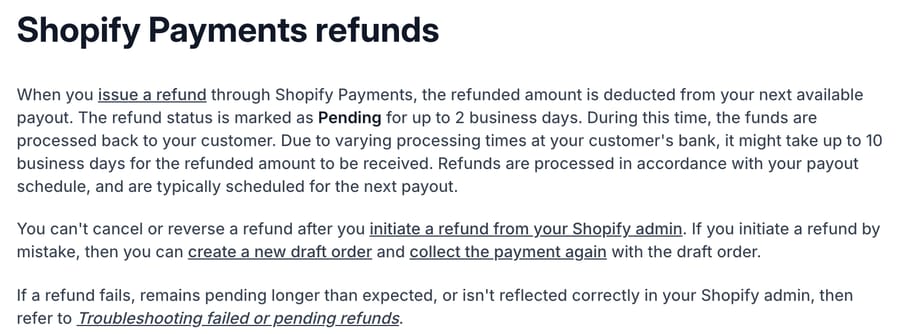
| Shopify Payments refunds | Status is Pending "for up to 2 business days", then "it might take up to 10 business days for the refunded amount to be received" | Shopify Payments stores |
| Regulation Z, 12 CFR 1026.12(e) | Merchant sends a credit statement to the issuer "within 7 business days from accepting the return"; issuer credits "within 3 business days from receipt" | US credit cards only |
| Stripe, Refund and reversal | Refunds issued shortly after the charge can appear as a reversal: "the original charge drops off the customer's statement, and a separate credit isn't issued" | Card refunds soon after purchase |
| Stripe, Handle failed refunds | A failed refund returns to the merchant's balance, which "can take up to 30 days" | Closed accounts, lost or stolen cards |
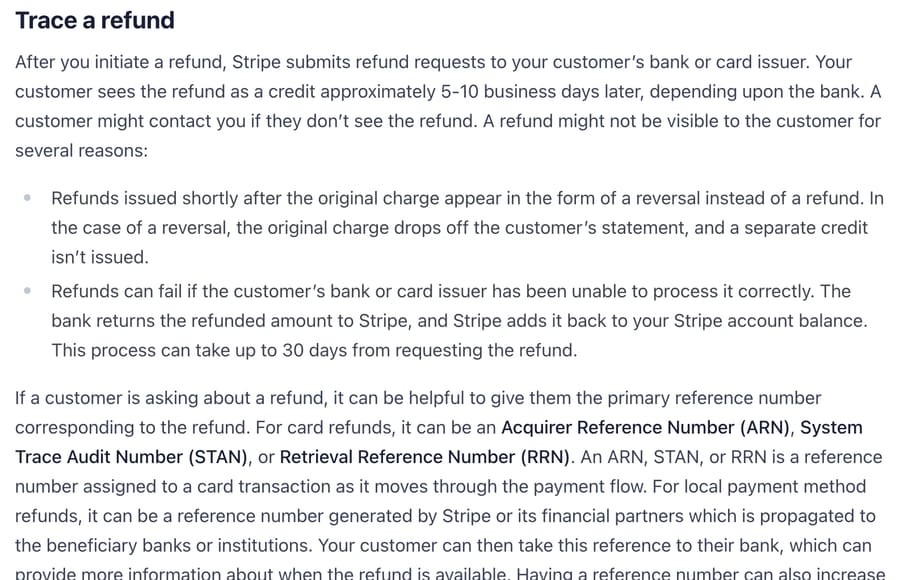
Two rows in that table cause many of the confused tickets. The reversal case means some customers never see a refund line at all: the charge simply vanishes, and they write in because they're looking for a credit that will never appear. And Regulation Z only covers credit cards. Debit cards, PayPal and buy now, pay later plans follow their own timing, so an agent shouldn't quote the 7-plus-3 rule to a debit card customer. Klarna, Afterpay, Affirm and Shop Pay Installments add a payment plan on top of the refund, which we cover separately in how an AI agent should handle BNPL refund questions.
Unclear refund timing also costs sales. In Narvar's 2026 Holiday Shopping Report, 56% of 1,348 US consumers said they had delayed or avoided a purchase because they were unsure how long a refund might take.
What data does the AI need, and where does it come from?
Three systems hold the answer, and a refund status agent reads all of them without writing to any.
Shopify, through the order. On Macha's built-in Shopify connector, Get Order returned financialStatus, a refunded total, a refunds list, fulfillmentStatus, createdAt and the order email in our test. Shopify's Admin API defines eight display financial statuses: AUTHORIZED, EXPIRED, PAID, PARTIALLY_PAID, PARTIALLY_REFUNDED, PENDING, REFUNDED and VOIDED. For this ticket type only three matter often. PAID with no refunds means the store hasn't refunded. PARTIALLY_REFUNDED and REFUNDED mean it has, and the refund date starts the clock. The Acquirer Reference Number, which Shopify assigns to Visa and Mastercard refunds on Shopify Payments, sits in the order timeline under the refund details. Our agent didn't read the timeline, so the ARN step goes to a person.
Stripe, through the payment. Stores that charge through Stripe directly (subscription boxes, custom checkouts, services) keep the refund on the Stripe side. Stripe's Refund object has a status of pending, requires_action, succeeded, failed or canceled, a failure_reason such as expired_or_canceled_card or lost_or_stolen_card, a pending_reason, and, for card refunds, a destination_details.card.reference that holds the ARN once it arrives. Stripe says that reference can take up to 7 business days after the refund is initiated. Macha's built-in Stripe connector has read tools for the payment side: Get Customer (by ID or email), Get Payment, Get Charge and List Payments. We haven't seen them return a Refund object, and Stripe doesn't include refunds on a charge by default, so check one real refunded payment before relying on them for refund status. It also has Create Refund, which takes a full or partial amount, but a refund status agent shouldn't carry it.
The returns app, through a custom tool. When the customer says "I sent it back", the refund usually waits on the return. Loop Returns, for example, returns a state of open, closed, cancelled, expired or review and an outcome from one Get Return Details call by order number, which we documented in the Loop Returns build sheet. Loop and most other returns apps connect through a custom API tool that Macha's team sets up during onboarding, with the app's own API key. Which returns apps expose a key-based API at all is in the returns apps comparison.
Which rules must the agent follow, and when does a human take over?
- Match the customer before sharing anything. An order number isn't proof of identity. The agent only discusses an order whose email matches the requester's. Our test found that this rule needs exact wording, which we cover below.
- Read, never write. A status ticket isn't a refund request. Issuing refunds belongs to a separate, gated flow like the one in automating Shopify refunds safely. The processors are blunt about the stakes: Stripe says its processing fees from the original payment "aren't returned" on a refund, and Shopify says that after you've issued a refund, "it can't be canceled". A duplicate refund can't be undone and costs fees on both.
- Count from the refund date. "Up to 10 business days" means from when the refund was issued, not from when the customer posted the parcel.
- Say the stage, not a promise. The agent can say the refund was issued on a date for an amount. It can't say the money has arrived, because no tool it has can see the customer's bank account.
A person takes over when:
- the refund is older than 10 business days, so someone can send the ARN and ask the customer to call their bank;
- Stripe shows
failed,canceledorrequires_action, or Shopify's refund is still pending after 2 business days; - the return shows as received but no refund exists;
- the customer mentions a chargeback or a dispute with their bank (Shopify lists an open dispute as a reason refunds fail);
- the customer wants a refund, a different amount, or a refund to another card (Stripe says refunds "can only be sent back to the original payment method");
- any lookup fails.
Per-resolution AI pricing earns the vendor a fee when the agent tells a customer to wait 10 business days and the ticket closes. If the refund then fails, the same customer writes back angrier, and the first "resolution" was billed anyway. Per-ticket pricing doesn't stop that failure, but the vendor isn't paid extra for it, and the handoff list above is what prevents it.
What should the agent's instructions say?
These are the instructions our test agent ran, in their final form after one fix. They're written for acting: every branch ends in a reply, a tag or a handoff.
You answer "where is my refund?" tickets. You only read payment data. You never
issue, cancel or change a refund, and you never give a date the data doesn't support.

1. Find the order. If the ticket has an order number, call Get Order with it.
   Otherwise call Search Orders with the requester's email.
2. Only discuss an order whose email matches the requester's email exactly. If it
   doesn't match, don't confirm that the order exists: say you couldn't find that
   order under this email address and ask for the email used at checkout.
3. On a matching order, read financialStatus and the refunds list.
   - REFUNDED or PARTIALLY_REFUNDED: give the refund date and amount. If the refund
     is 10 business days old or less, say the card issuer or bank controls when it
     shows on the statement and that it can take up to 10 business days. If it is
     older than 10 business days, hand off so a teammate can send the refund
     reference number (ARN) from the order timeline.
   - PAID with no refund: the store hasn't refunded yet. If the customer says they
     sent the item back, call Get Loop return by order with the order number
     without the # and tell the customer the return's state. If that lookup fails
     or finds no return, hand off.
   - PENDING, AUTHORIZED, VOIDED or EXPIRED: hand off.
4. If the customer gives a Stripe payment ID (starts with pi_) or charge ID
   (starts with ch_), call Get Payment or Get Charge and look for a refund in the output.
   (We haven't seen these tools return a refund; if the output shows none,
   hand off.)
   succeeded: same timing rule as step 3. pending: say the refund is being
   processed and give no date. failed, canceled or requires_action: hand off.
   If there is no order number and no payment ID, call Get Customer with the
   requester's email. If Shopify and Stripe both find nothing, ask for the order
   number and the email used at checkout.
5. Hand off when: a refund failed; a refund is older than 10 business days; the
   customer mentions a chargeback or a dispute with their bank; the customer asks
   for a refund or a different amount; any tool returns an error. To hand off: post
   a short public reply saying a teammate will check and reply within one business
   day, add an internal note with the order or payment ID, what each tool returned
   and the reason, and add the tag refund_handoff.
6. Add the tag refund_status_ai to every ticket you handle.

Never issue a refund, cancel an order, quote a date the data doesn't show, or tell
the customer the money has arrived.
The 10-business-day line is Shopify's figure and sits at the top of Stripe's 5 to 10 range, so one threshold covers both. If your store uses another processor, replace it with that processor's published window. If you run a different returns app, change the tool name in step 3.
What happened when we ran it on four test tickets?
We built the agent on Macha's demo account on 28 September 2026 and ran it four times with the agent Test feature, which creates a real ticket in our sandbox Zendesk (d3v-macha) and runs the agent against it. The customers, emails and the Stripe payment ID are made up. The attached tools were Zendesk (read ticket, public reply, internal note, tags), Shopify Get Order and Search Orders on our Shopify test store, Stripe Get Customer, Get Payment and Get Charge, and the Loop return lookup with a placeholder key. The demo account's Stripe connector points at a live Stripe account, so we attached no Stripe write tool and left List Payments off.
Ticket #1161, a Stripe payment that doesn't exist. "Jordan" said a subscription box payment was refunded on 12 September and gave a made-up payment ID. The agent searched Shopify by email (no orders), called Stripe Get Payment, got a 404 "No such payment_intent", retried once, got the same 404, and handed off in 18 seconds: a one-line public reply, an internal note listing each tool result and the reason, and both tags.
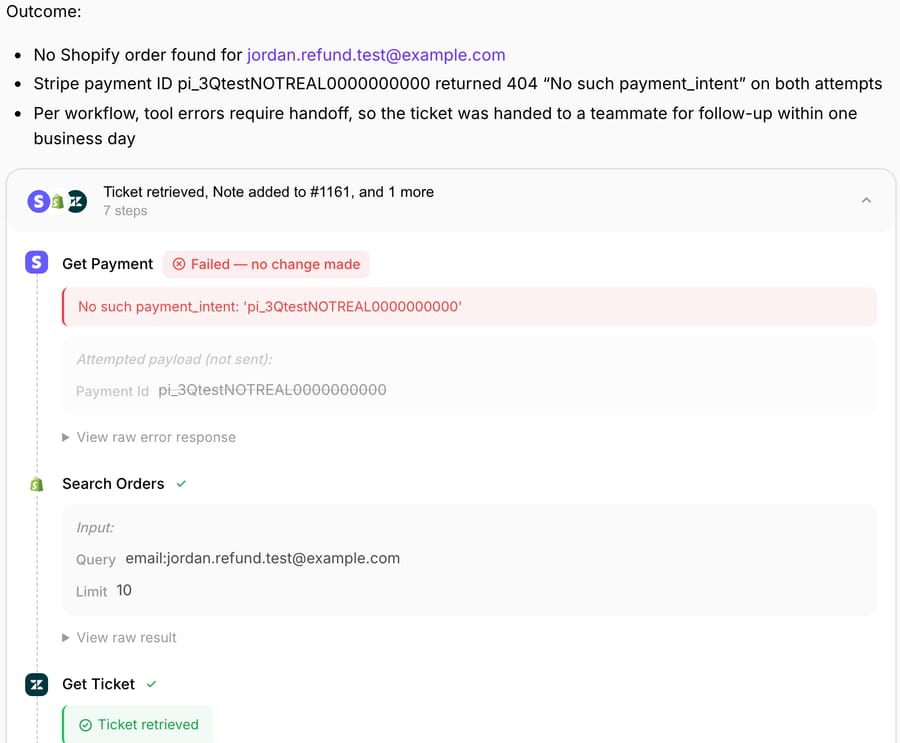
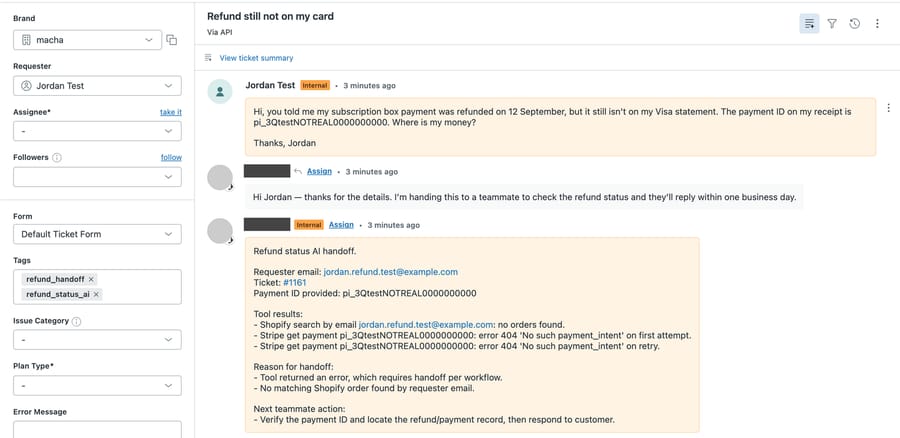
The retry was the model's own choice; the instructions don't mention retries. It's harmless on a read, but it's worth knowing that a failed lookup can cost two calls.
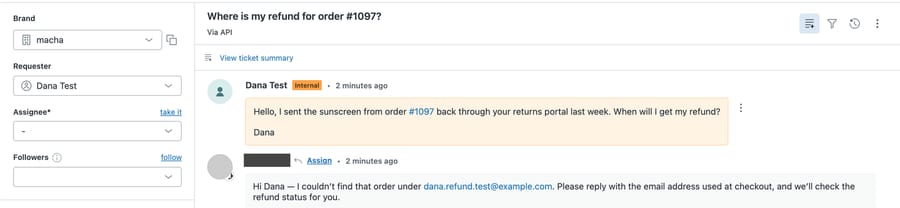
Ticket #1162, a real order number with the wrong email. "Dana" asked about a refund on order #1097, which exists on our test store (paid, unfulfilled, no refunds) under a teammate's email. The agent read the order, saw the mismatch, and asked for the checkout email, which is what we wanted. But its reply opened with "I found an order with that order number, but the email on it doesn't match". That confirms to a stranger that order #1097 exists. Our instruction said "share nothing about the order", and the model didn't count the order's existence as something.
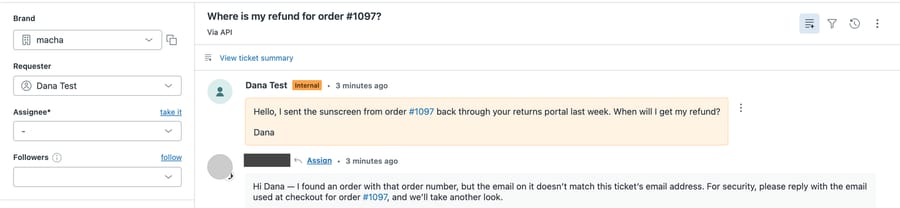
We rewrote step 2 to say "don't confirm that the order exists: say you couldn't find that order under this email address" and re-ran the same message as ticket #1164. The new reply said the agent couldn't find that order under Dana's email and asked for the checkout email. It disclosed nothing about #1097.
Ticket #1163, no order number. "Sam" returned shoes and had no order number. The agent searched Shopify by email (nothing), called Stripe Get Customer by email (no customer) and asked for the order number and checkout email. It tagged the ticket refund_status_ai and didn't hand off, which matches step 4.
What we couldn't test: our test store has no refunded orders and we issue no refunds on it, so the REFUNDED branch, the 10-business-day count and the Loop lookup (which needs a matching order) never ran. The Stripe succeeded and failed branches didn't run either, because we only read made-up IDs from a live account. Those branches are documented from Stripe's and Shopify's references, not observed. In every run the customer's message shows as an internal comment in Zendesk because the Test feature posts it through the API.
How do you set it up on each help desk?
The agent logic is the same on every desk. What changes is how it reaches the order and payment data.
- Freshdesk. Freddy AI Agent's workflow library includes a Shopify Refund Status template, so a Freshdesk team can start there before building anything.
- Intercom. Fin can call Stripe through data connectors in Procedures, so a status lookup is possible once someone configures the connector.
- Zendesk. Zendesk AI agents reach Shopify through action flows with 16 Shopify actions, including Create refund. For a status agent, use only the lookup steps.
- Any desk, through Macha. Macha's Zendesk connector and the other help desk connectors read the ticket and post the reply, note and tags; Shopify and Stripe come through the built-in connectors; the returns app is a custom API tool. Looking up a customer's payment history is the same pattern pointed at Stripe.
Whichever you use, check two things before you switch it on: that the Shopify lookup returns the refunds list, not just the financial status, and that no refund-issuing tool is attached to the status agent.
Five ways refund status answers go wrong
- Leaking order existence. Our #1162 run. "The email doesn't match" tells a stranger the order is real. Word the rule as "couldn't find that order under this email".
- Counting from the wrong date. The customer counts from when they posted the parcel; the bank counts from when the refund was issued. An agent that doesn't read the refund date will say "it should be there by now" too early.
- Missing the reversal case. A refund issued soon after the charge can show as the original charge disappearing, not a credit. Customers searching for a credit line write in, and "it can take 10 business days" is the wrong answer.
- Quoting card timing to BNPL and debit customers. Regulation Z's 7-plus-3 rule is for credit cards. Installment plans adjust the schedule first, as the BNPL refund page explains.
- Treating "refunded" as "arrived". Shopify and Stripe both know when the refund left. Neither knows when the customer's bank posted it, so the agent shouldn't say it has.
Where Macha fits
Macha suits teams on Zendesk, Freshdesk, Gorgias, Front, HubSpot or Intercom who want refund status tickets answered inside the ticket from Shopify and Stripe data, with anything overdue or failed handed to a person with the evidence already in a note. It's the wrong fit if your refund questions are mostly about installment plans, because the payment provider's app holds that schedule, not your store. The built-in Shopify connector provides Get Order and Search Orders, the built-in Stripe connector provides Get Customer, Get Payment, Get Charge and List Payments, and a returns app such as Loop connects through a custom API tool that Macha's team sets up during onboarding. The same account can also issue refunds through a separate, confirmation-gated agent, as in processing refund requests automatically, but that belongs in a different agent from the one answering status questions. Pricing is per ticket, about $0.40 per ticket, so a refund status thread is one charge however many replies it takes. Using the median of 25 tickets per 100 orders from our tickets per order benchmark, a store shipping 5,000 orders a month gets about 1,250 tickets, which fits the $599/month for 1,500 tickets tier on the pricing page. You can try it with $50 of free usage (about 125 tickets), no credit card, no time limit.
How we researched this
- Timing and statuses. Read on 28 September 2026: Stripe's Refund and cancel payments guide and Refund object reference; Shopify's Shopify Payments refunds and troubleshooting failed or pending refunds pages; Shopify's OrderDisplayFinancialStatus enum; and Regulation Z section 1026.12 on the CFPB site.
- Survey figure. Narvar's 2026 Holiday Shopping Report, 1,348 US consumers, a vendor-published survey.
- Help desk capabilities. Freshdesk, Intercom and Zendesk help center pages linked above, as checked for our help desk AI actions matrix on 28 September 2026.
- Arithmetic. 5,000 orders x 25 tickets per 100 orders = 1,250 tickets a month, which is under the 1,500-ticket tier. The 10-business-day threshold is Shopify's published maximum and the top of Stripe's 5 to 10 range.
- What we ran. One agent, "T4-021-Refund status", created on Macha's demo account and left inactive with no trigger, run four times with the Test feature on 28 September 2026 against made-up tickets #1161 to #1164 in our sandbox Zendesk and our Shopify test store. Stripe was read only. Step 2 of the instructions was changed after ticket #1162 and re-run as #1164; the instructions above are the final version. The order's owner details in our test store are a teammate's and were kept out of every screenshot.
- What we didn't run. The REFUNDED, overdue and Stripe
succeeded/failedbranches and the Loop lookup, for the reasons given in the test section. Those are documented, not observed. - All customer names, emails, order messages and payment IDs in the examples are synthetic.
Frequently asked questions
How long does a refund take to show up on a customer's card? Stripe says about 5 to 10 business days after the refund is issued, depending on the bank, and Shopify Payments says up to 10 business days after a Pending status of up to 2 business days. The card issuer decides the exact day.
Can an AI agent tell a customer exactly when their refund will arrive? No. The agent can read when the refund was issued and for how much in Shopify or Stripe, but neither system sees the customer's bank account. The honest answer is the issue date plus the processor's published window.
What is an ARN and when should support send one? An Acquirer Reference Number is a reference assigned to a card refund that the customer's bank can use to trace it. Shopify Payments assigns one to Visa and Mastercard refunds, and Stripe says its ARN can take up to 7 business days to arrive, so support usually sends it when a refund is past the 10-business-day window.
Why can't the customer see a refund line even though we refunded? If the refund went out soon after the charge, Stripe may process it as a reversal: the original charge drops off the statement and no separate credit appears. The customer should look for the charge disappearing.
Should the same AI agent answer refund status questions and issue refunds? Better not. A status agent only needs read tools, and keeping Create Refund off it means a misread ticket can't move money. Issue refunds through a separate agent with its own approval rules.
Does Regulation Z's refund timing apply to debit cards or buy now, pay later? No. Section 1026.12(e) covers credit card accounts: 7 business days for the merchant to send the credit and 3 business days for the issuer to post it. Debit cards and installment plans follow the provider's own timing.
Resolve tickets automatically with AI agents
Macha's AI agents work on top of the help desk you already use — no code.