Intercom
 Shopify
 Stripe
 Slack
Slack Notion
 Google Workspace
 Confluence

What Can an AI Support Agent Do in Loop Returns? Return Status, Portal Links and Flags Through the API (2026)


Loop Returns' API gives an AI support agent eight documented endpoints for return tickets, all reachable with a scoped API key sent in the X-Authorization header: look up a return by Shopify order number, read and add notes, send a return portal link, flag a return for review, cancel it, close it or process it. The one job a key can't do is create a return label, because Loop's documentation says its Label API requires OAuth 2.0. Below is what each endpoint returns, what Loop's own Gorgias and Zendesk apps already cover, and what happened when we pointed an agent at Loop's live API.
Key takeaways
- Loop Returns' API lets an AI agent look up a return by Shopify order number and flag, note, cancel, close or process it with an API key in the X-Authorization header.
- Loop's Label API and Webhooks API require OAuth 2.0, and its OAuth access tokens expire after 1 hour, so an agent can resend a label_url but can't create a new label with a key.
- Loop's Zendesk app only displays return history and links into the Loop admin, and Loop's Gorgias article gates the returns-data integration to Essential or Advanced or an add-on, while its Zendesk article and pricing page list integrations more broadly, so confirm your plan with Loop.
- Loop's API allows 300 requests per minute per key, and its Create Return Note endpoint rejects notes of 255 characters or more.
- In our 28 September 2026 test, a Macha agent answering ticket #1122 got HTTP 401 from Loop twice with a placeholder key, sent a holding reply and wrote the error into an internal note.
Which Loop Returns jobs can an AI agent do through the API?
Every endpoint below sits under https://api.loopreturns.com/api/v1 and takes the key in X-Authorization. We read each page of the Loop API reference on 28 September 2026. "Custom API tool" means Macha's team builds the call during onboarding; Loop Returns has no built-in Macha connector.
| Support job | Endpoint | Key scope | Read / write | Who can do it today |
|---|---|---|---|---|
| "Where's my refund?" / return status | GET /warehouse/return/details?order_name= | Returns | Read | Loop's Gorgias and Zendesk apps (display), Gorgias AI Agent Action, Macha custom tool |
| "How do I start a return?" | POST /order/link (order name + zip) | Orders | Creates a link | Gorgias AI Agent Action, Gorgias Initiate Return, Macha custom tool |
| "My label didn't arrive" | label_url from the details call | Returns | Read | Macha custom tool (resend the existing link); a new label needs the OAuth Label API |
| "The refund amount is wrong" / inspection dispute | POST /warehouse/return/{id}/flag | Returns | Write | Macha custom tool; review by a person in Loop |
| Leave a record for the returns team | POST /warehouse/return/{id}/note | Returns | Write | Macha custom tool |
| "I want to keep it, cancel my return" | POST /warehouse/return/{id}/cancel | Returns | Write | Macha custom tool, with a confirmation rule in the instructions |
| Close a return with no outcome | POST /warehouse/return/{id}/close | Returns | Write | A person |
| Finish the return and issue the refund, exchange or credit | POST /warehouse/return/{id}/process | Returns | Write | A person |
Loop also documents a Return Create API for building a return outside the portal. Loop says it "may not be available on all Loop plans", and it's more steps than a support ticket needs: the portal link gets the shopper to the same place.
What shoppers actually ask about a Loop return
Return tickets cluster into a handful of questions, and each one maps to a field or an endpoint:
- "Did you get my return?" The details call returns
label_status(a delivery status such asout_for_delivery),carrierandtracking_number. - "Where's my refund?" The same call returns
state,outcome(refund,exchange,credit,upsellor a combination such asexchange+refund) and therefundamount. - "Where's my exchange?"
exchange_order_nameholds the new Shopify order, which the agent can look up in Shopify. - "I lost my label."
label_urlis a link to the PDF, so the agent can send it again. - "How do I return this?" A portal deep link drops the shopper into their own order.
In Narvar's State of Returns 2024, 39% of 1,924 US consumers said they return an online purchase at least once a month, and a single return can produce two tickets: one about the label and one when the refund feels slow.
What do Loop's Gorgias and Zendesk integrations already do?
Check these before you build anything, because on Gorgias they cover the two most common questions.
Gorgias. Gorgias AI Agent has two ready-made Actions for Loop Returns: send a Loop Returns portal deep link and send return shipping status. Gorgias says the status Action "can confirm whether the order has been received and, if not, provide the shopper with its status and a tracking url." Both need a Loop API key with the Order and Return scopes. Separately, Loop's returns-data integration for Gorgias puts refund status, shipping status and return reasons in the ticket sidebar, and Loop says it requires "an Essential or Advanced plan or have the Integrations add-on." Loop's Initiate Return feature lets shoppers start a return from the Gorgias chat widget or Help Center, but it also needs Gorgias's Automation Add-On. Our walkthrough of connecting Loop Returns to Gorgias covers the install.
Zendesk. Loop's Zendesk app, installed from the Zendesk Marketplace, shows a customer's Loop return history in the ticket sidebar: submission date, status and items. It's view-only. Reps "can link directly to the return in the Loop admin", but processing, canceling or flagging happens in Loop, and Loop notes that agents "will still need to login to Loop before they can start using the app." That article says integrations are included on all Loop plans, which doesn't match the Gorgias article's plan requirement; ask Loop which applies to your contract.
Loop also lists integrations with Kustomer, Gladly, Zowie and Klaviyo Helpdesk in its help center.
Loop's help-desk apps show the return and send you back into Loop's admin to act on it. That keeps every change inside Loop, where its return policies and fraud rules run, and Loop's own articles disagree on which plans get the Gorgias integration, so check yours before relying on it. It's a sensible design for Loop. It also means that on Zendesk, nothing answers the customer: a person reads the sidebar and types. An agent earns its place on Zendesk for the status and link questions, and on either desk for the jobs no ready-made Action does: combining the Loop return with the Shopify order in one reply, flagging a disputed return, and leaving a note in Loop that says why support touched it.
How does the lookup work, from an order number to the return?
It's one call. Get Return Details accepts any one of three query parameters: return_id, order_id (the Shopify order id) or order_name (the Shopify order name, such as 1097). Most customers quote the order number, so order_name is the one to build on. Add currency_type=presentment if you sell across currencies, so the refund figure matches what the shopper paid.
The fields an agent answers from:
| Field | What it tells the customer |
|---|---|
state | Where the return is. Loop's return data guide lists open, closed, cancelled, expired and review |
outcome | Refund, exchange, store credit, upsell, or a combination |
refund, exchange, gift_card | Amounts for each outcome |
label_status, carrier, tracking_number | Whether the parcel is moving back to you |
label_url | The label PDF, to resend |
status_page_url | Loop's own return status page for the shopper |
exchange_order_name | The new Shopify order for an exchange |
customer_email | Who the return belongs to |
Before telling anyone about a return, the agent should check that customer_email matches the ticket's requester. A customer who types someone else's order number shouldn't get that person's refund amount.
Two things the lookup doesn't give you. Loop doesn't publish a refund-arrival date, so the agent can say the refund was issued, not when the bank will show it. And a return in the review state is held for someone on your team to look at, which the agent should say plainly rather than guess at a timeline.
The portal link needs one more field. Create Return Deep Link takes the order name and a zip, and Loop says that depending on the shop's settings, zip "could be an email, phone number, or postal code." Find out which your shop uses before building the tool. If both fields aren't sent, Loop answers HTTP 422.
Which Loop Returns actions should still need a person?
Loop's own descriptions answer most of this.
- Process Return. It "will archive it in Loop and fulfill any remaining outcomes, such as placing exchange orders or creating gift cards." That's a refund decision. Loop also warns that HTTP 200 with body
true"is an acknowledgement that Loop queued the work. It is not proof that processing completed", so an agent that reported success on that response would be wrong some of the time. Leave it to your returns team. - Close Return. Closing "will not fulfill any outcomes such as exchanges or gift cards, and the items are not able to be used in a new return", and the return is closed in Shopify too. A customer can lose their refund to one wrong call. Person only.
- Remove Line Items. It removes items and immediately processes and closes the return. Person only.
- Cancel Return. Canceling lets the shopper make another return with the same items, so it's reversible from the customer's side. An agent can do it once the customer has said clearly that they want to keep the item. Put that rule in the instructions.
- Flag Return. Loop says flagging "will prevent automated processing and will require a human to go into the merchant admin in Loop and review this return." This is the write we'd give an agent first: it can't send money anywhere, and it stops Loop's automation until someone looks.
For refunds on orders that never went through Loop, the Shopify side has its own rules; our guide to safe Shopify refunds with an AI agent covers the confirmation step, and handling cancellation requests covers orders that haven't shipped.
Can an AI agent create a Loop return label with an API key?
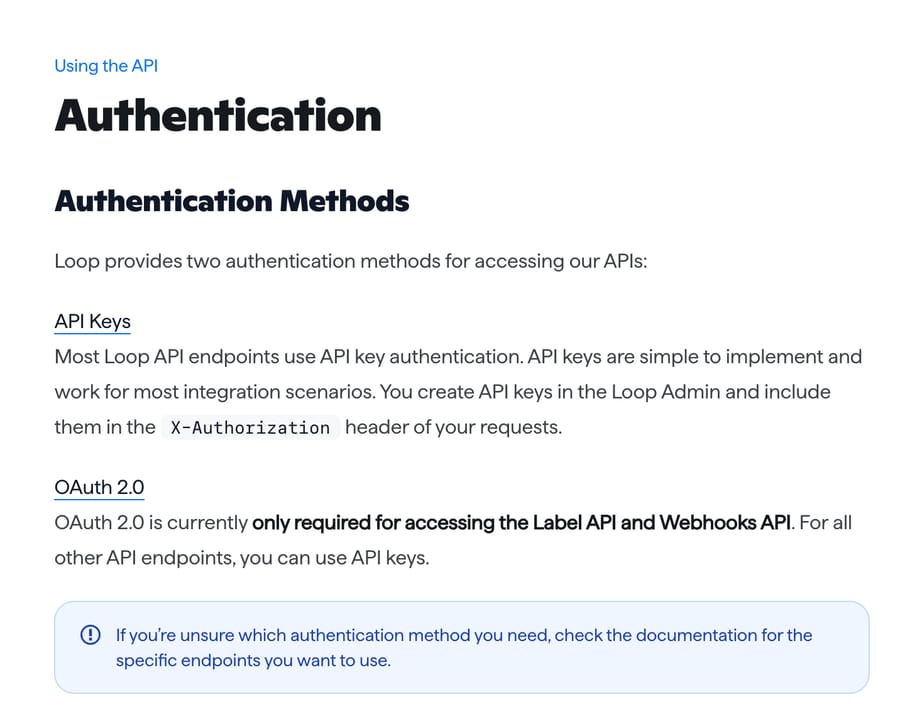
No. Loop's authentication page says "OAuth 2.0 is currently only required for accessing the Label API and Webhooks API." Getting OAuth credentials means applying to Loop through a partner form, running an authorization-code flow, and refreshing tokens that expire after 1 hour. A custom API tool that sends a fixed key can't do that, so creating labels through a Macha custom tool isn't feasible today.
What an agent can do: read label_url from the details call and send the existing label again, or send a fresh portal link so the shopper can start over and let Loop issue the label. If the label itself is wrong (wrong carrier, expired), that's a ticket for a person in Loop.
How does Macha connect to Loop Returns?
Loop Returns connects through a custom API tool that Macha's team sets up during onboarding, using a Loop API key with the Returns and Orders scopes in the X-Authorization header. Custom tools are included on every plan. Loop's help center says the Developers page where you generate keys depends on your plan and points to Loop's pricing page, which on 28 September 2026 listed Checkout+ as free, Essential from $155 a month and Advanced from $340 a month. The Shopify App Store listing showed 4.6 stars from 443 reviews on the same day.
A typical set of tools, in the order we'd build them:
- Get Loop return by order (Read):
GET /warehouse/return/details?order_name={{order_name}}. - Create Loop return portal link:
POST /order/linkwith a body of{"name":"{{order_name}}","zip":"{{zip}}"}. - Flag return for review (Write):
POST /warehouse/return/{{return_id}}/flag, no body. - Add return note (Write):
POST /warehouse/return/{{return_id}}/notewith{"content":"{{content}}"}. - Cancel return (Write), only if you want the agent to handle "I'll keep it" requests.
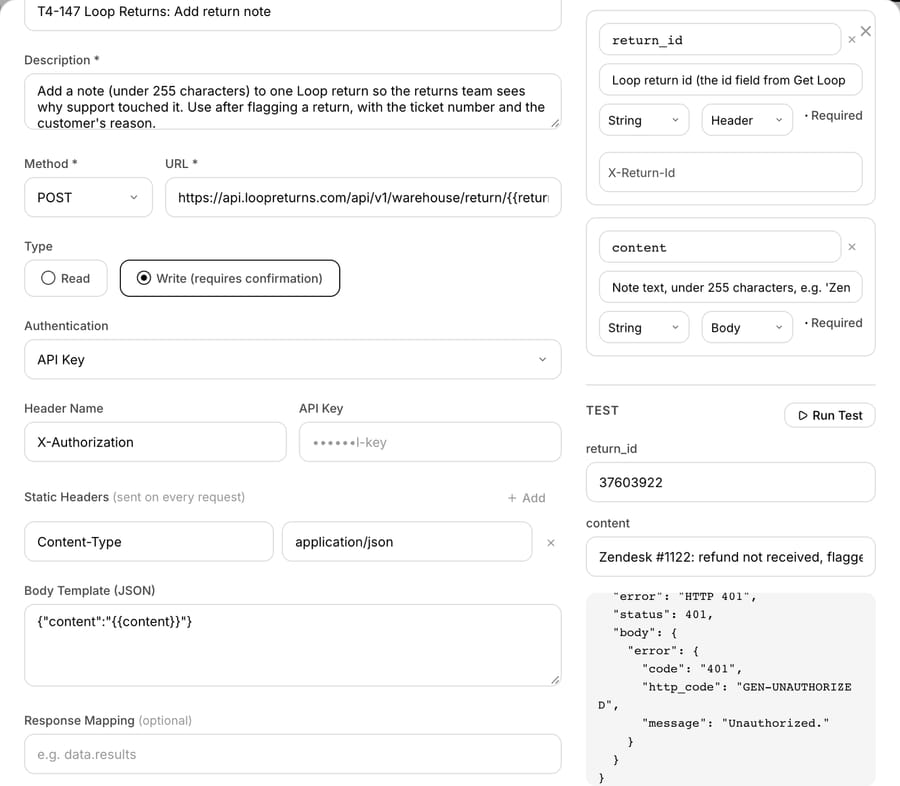
The note tool needs the return id in the URL path and the note text in a JSON body. Macha's team maps return_id as a header parameter (we named the header X-Return-Id), which Macha places into the {{return_id}} slot in the URL, while content fills the body template. That's the shape Macha's team uses whenever a tool has an id in the path and a body at the same time.
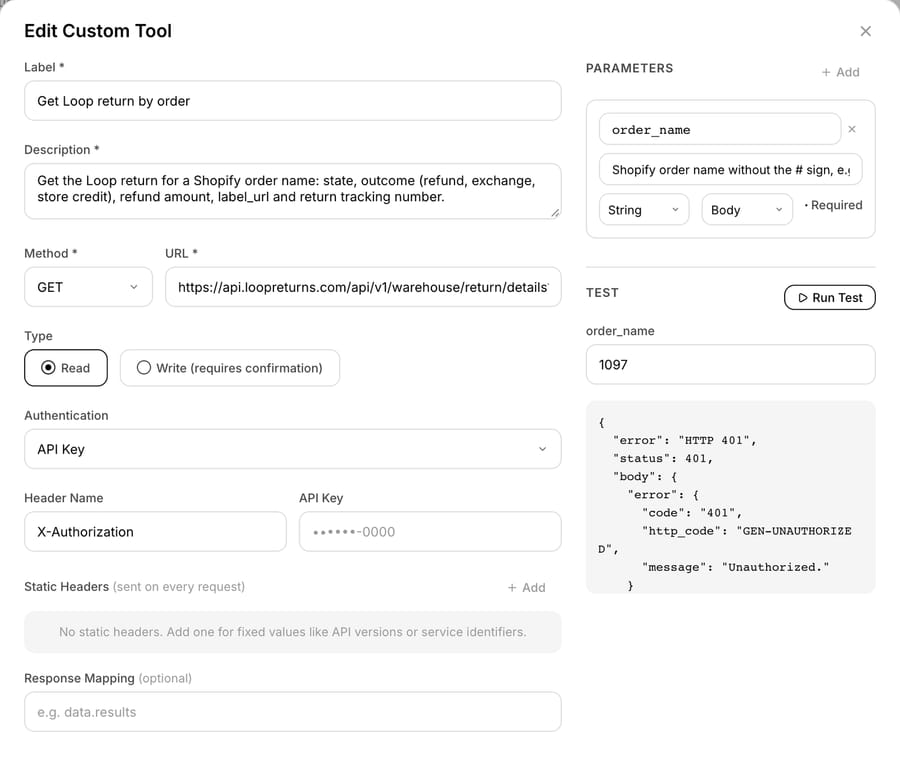
We checked that the URL came out right. Loop answers a note request with no return id in the path (/warehouse/return//note) with an HTML 404 page, and a well-formed path with a JSON 401 when the key is wrong. Our note tool's Run Test came back with Loop's JSON 401, GEN-UNAUTHORIZED, so the id reached the URL.
Tools marked Write in Macha are meant to ask for confirmation in chat, but in a 28 September test a custom Write tool on another app ran in dashboard chat with no confirmation card, so don't rely on one. On ticket-triggered runs, Write tools run directly when the instructions say to. The safety has to live in the instructions: when to flag, when to cancel, and when to hand off.
Loop's rate limit is 300 requests per minute per API key, per its rate-limit page, which is 5 a second, and over the limit Loop returns HTTP 429. An agent making two Loop calls per ticket could work through 150 tickets a minute on its own key. Give the agent its own key rather than sharing Gorgias's, so a returns spike on one integration doesn't throttle the other.
An agent instruction you can adapt
The instruction we'd start from, written for the agent to act on:
Job: answer return and refund questions for a store on Loop Returns. 1. Find the order number in the ticket. If there isn't one, ask for it and stop. 2. Call Get Loop return by order. Ifcustomer_emaildoesn't match the ticket requester, don't share any return details; ask the customer to write from the email on the order and tag return_email_mismatch. 3. If there's no return on the order, create a portal link and send it with one sentence on the return window. 4. If there is a return, answer fromstateandoutcome.openwith alabel_status: tell them where the parcel is and that the refund follows once it's received.closedwithoutcomerefund: say the refund was issued and banks take several business days; never give a date.review: say a teammate is reviewing it and will reply within one business day. 5. If they lost the label and the return isopen, sendlabel_url. Never promise a new label. 6. If they dispute an inspection result or a refund amount, call Flag return for review, then Add return note with "Zendesk #[ticket]: [reason in under 200 characters]", then reply that a teammate will review it within one business day. 7. Never process, close or cancel a return. If they want to cancel, tag return_cancel_request and hand off. If any Loop tool returns an error, don't tell the customer what went wrong inside our systems. Reply that a teammate is checking and will follow up today, add an internal note with the tool name, the HTTP status and the error message, and tag app_tool_error.
The 200-character cap in step 6 leaves room under Loop's 255-character note limit for the ticket number.
What happened when we ran a Loop Returns agent on a test ticket?
We built an agent called "Loop Returns status" on Macha's demo workspace with two Loop tools (get return details and a portal link), Zendesk's reply, note and tag tools, and an earlier version of the instruction above that included the tool-error rule. We don't have a Loop account, so the Loop key was a placeholder. We ran it with Macha's agent Test feature, which creates a real ticket in our d3v-macha Zendesk sandbox and runs the agent the way a ticket-created trigger would.
Ticket #1122, from a made-up customer: "I sent back the jacket from order 1097 two weeks ago. When do I get my refund?" The agent called the Loop lookup for order 1097. Loop's live API answered HTTP 401 Unauthorized.; the agent retried once and got the same. It then replied publicly 11 seconds after the ticket was created ("A teammate is checking your return status now and will follow up with you today."), wrote an internal note with the tool name, the 401 and the error message, and tagged the ticket app_tool_error and returns_ai.
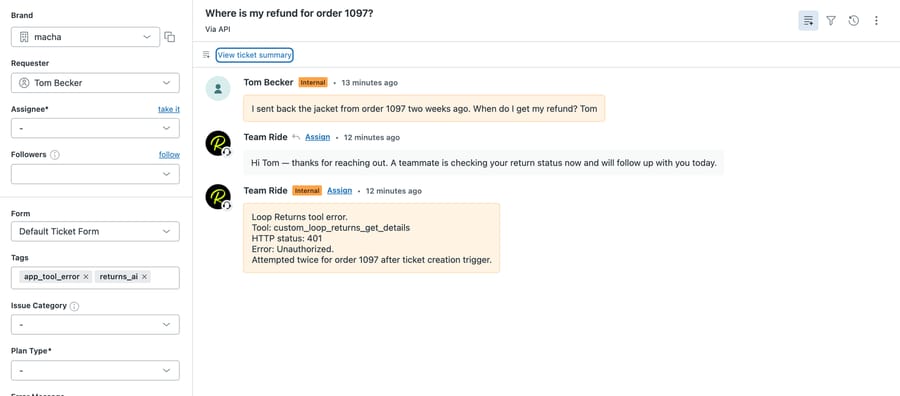
The request left Macha, reached Loop's production API with the right path and header, and was refused at authentication, which is what a placeholder key should produce. The agent didn't invent a return status or a refund date when the tool failed, and it kept the internal error out of the customer's reply. We never saw a successful Loop response, so the branches that read state and outcome are documented, not tested. The customer's text shows as an internal comment in the screenshot because the Test feature posts it through the API.
A separate direct test on the same day ran the Flag return and Add return note tools against a made-up return id. Both came back with Loop's JSON 401.
What goes wrong with a Loop Returns AI integration?
- Missing scopes. Loop returns 401 when a key "lacks the required scopes for the requested endpoint", the same status as a bad key. A key made for a warehouse integration often has Returns but not Orders, so the lookup works and the portal link fails.
- The zip field. If the shop verifies returns by email and the tool sends a postal code, the deep link fails. Check the shop's lookup setting first.
- Order name format. Loop's example is
2222, with no#. Tell the tool to strip it. - Queued processing. If someone later adds Process Return to an agent, the
trueresponse only means queued. Confirm with Loop'sreturn.closedwebhook or by checking the return state again. - Notes too long. Loop answers 422 for 255 characters or more. Cap the note in the instructions.
- Two apps with one name. Loop Returns and Loop Subscriptions are separate Shopify apps from different developers (Loop, and Loop Solutions Inc) with separate APIs and keys. A Loop Subscriptions token won't work here, and vice versa.
Where Macha fits
Macha suits teams at Loop Returns brands on Zendesk, Freshdesk, Gorgias, Front, HubSpot or Intercom that want return tickets answered and routed inside the ticket, especially on Zendesk, where Loop's app only displays returns, and on Gorgias for the jobs its two Loop Actions don't cover: flags, notes, and replies that combine the return with the Shopify order. It's the wrong fit if your team is on Gorgias and your return tickets are mostly "where's my return" and "how do I start one", because Gorgias AI Agent's Loop Actions already do that. Loop Returns connects to Macha through a custom API tool that Macha's team sets up during onboarding with an X-Authorization key; Shopify orders go through Macha's built-in Shopify connector, and the ticket runs through the Zendesk or Gorgias connector. Pricing is per ticket, from $299/month for 750 tickets, so a ticket with a Loop lookup, a flag and a note is one charge. A team with about 1,500 return and order tickets a month would sit on $599/month for 1,500 tickets, with custom tools and setup included on every plan. You can try it on $50 of free usage (about 125 tickets), no credit card, no time limit. For the other returns apps side by side, see the returns apps comparison; for every Shopify app category, the Shopify app map; and for how custom tools are defined, the custom API tools guide.
FAQ
Does Loop Returns have a public API? Yes. Loop documents a REST API at https://api.loopreturns.com/api/v1, authenticated with an API key in the X-Authorization header. Keys are created on the Developers page in the Loop admin with scopes such as Returns and Orders, and access to that page depends on your Loop plan.
Can an AI agent check a Loop return's status by order number? Yes. Loop's Get Return Details endpoint accepts order_name, the Shopify order number without the #, and returns the return's state, outcome, refund amount, label status, tracking number and label link.
Can an AI agent create a return label in Loop Returns? Not with an API key. Loop requires OAuth 2.0 for its Label API, with access tokens that expire after 1 hour. An agent can resend the existing label_url or send a portal link so Loop issues the label.
Does Loop Returns work with Zendesk? Loop has a Zendesk Marketplace app that shows a customer's return history in the ticket sidebar and links to the return in the Loop admin. It's view-only, and agents must be logged in to Loop to use it.
Does Gorgias AI Agent work with Loop Returns? Yes. Gorgias AI Agent has ready-made Actions to send a Loop Returns portal deep link and to send return shipping status. Both need a Loop API key with the Order and Return scopes.
Is Loop Returns the same company as Loop Subscriptions? No. They're separate Shopify apps from different developers, Loop and Loop Solutions Inc, with separate APIs, keys and help centers.
How we researched this
- Loop API reference (docs.loopreturns.com), accessed 28 September 2026: Authentication, Rate limit, Get Return Details, Create Return Deep Link, Create Return Note, Flag Return, Cancel Return, Close Return, Process Return, and the guides Retrieving Return Data and Actioning on Returns.
- Loop help center, accessed 28 September 2026: Zendesk Integration, Gorgias Integration: Returns Data, Gorgias Integration: Initiate Return, Navigating the Developers Page.
- Gorgias help center, accessed 28 September 2026: the two Loop Returns AI Agent Actions linked above.
- Plans and ratings, accessed 28 September 2026: loopreturns.com/pricing and the Shopify App Store listing (4.6 stars, 443 reviews, launched 27 May 2021). These are Loop's and Shopify's own figures. Loop's pricing table lists an "Integrations" row, "Access to Loop API, webhooks, and pre-built integrations", on the Checkout+, Essential and Advanced plans.
- Survey figure: Narvar State of Returns 2024, 1,924 US consumers, a vendor-commissioned survey.
- Arithmetic: 300 requests a minute ÷ 60 = 5 a second; 300 ÷ 2 Loop calls per ticket = 150 tickets a minute. The 1,500-ticket volume is an example, not a benchmark.
- Run live: ticket #1122 in our d3v-macha Zendesk sandbox, via Macha's Test feature on 28 September 2026 (about 09:41 UTC); Run Test on the "Get Loop return by order", "T4-147 Loop Returns: Flag return for review" and "T4-147 Loop Returns: Add return note" tools the same day; and direct requests to Loop's API with a placeholder key to compare responses for a malformed and a well-formed note path. Every Loop call was refused with 401 because we used a placeholder key, and no Loop account was touched.
- Documented only, not tested: every successful Loop response, the portal link, flags, notes and cancellations taking effect, and the Gorgias and Zendesk apps.
- The customer, order number, return id and agent instruction are synthetic. No customer data was used.
Resolve tickets automatically with AI agents
Macha's AI agents work on top of the help desk you already use — no code.