





 Shopify
 Stripe
 Slack
Slack Notion
 Google Workspace
 Confluence

How Do You Integrate Loop Returns with Gorgias? Setup, Sidebar and Deep Links (2026)


Connecting Loop Returns to Gorgias takes two steps: connect the Loop app from the Gorgias App Store, then enable the Gorgias tile in Loop with your subdomain. Once live, return status, refund status and a deep link into the Loop admin sit in the ticket sidebar.
Key takeaways
- Integrating Loop Returns with Gorgias takes two steps: connecting the Loop app from the Gorgias App Store, then enabling the Gorgias tile in Loop and entering the store's Gorgias subdomain.
- The Gorgias tile in Loop requires the Essential plan at $155 a month, the Advanced plan at $340 a month, or the Integrations add-on.
- The Loop widget in the Gorgias sidebar shows return status, refund status, shipping status, tracking numbers, items, reasons and return type, plus a deep link into the Loop admin.
- Loop return data in Gorgias refreshes when a ticket is created, updated or replied to, and an internal note saying Update forces an immediate refresh.
- Submitting a return in Loop doesn't create a Gorgias ticket, except when Loop's Returns Tracking detects a delivery error and that feature is switched on.

To integrate Loop Returns with Gorgias, click Connect App on the Loop listing in Settings → App Store → All Apps in Gorgias, then switch on the Gorgias tile under Returns management → Tools & Integrations → Integrations in Loop and enter your Gorgias subdomain. The Gorgias tile needs Loop's Essential plan ($155 a month), Advanced plan ($340 a month) or the Integrations add-on (Loop pricing and Loop's help article, checked 24 September 2026).
| Question | Answer |
|---|---|
| Where to start in Gorgias | Settings → App Store → All Apps → Loop → Connect App |
| Where to finish in Loop | Returns management → Tools & Integrations → Integrations → Gorgias tile |
| Loop plan needed | Essential ($155/mo), Advanced ($340/mo), or the Integrations add-on |
| Who maintains it | Gorgias ([email protected]) |
| What the sidebar shows | Return status, refund and shipping status, items, reasons, return type, tracking numbers, deep link |
| When data refreshes | Ticket created, updated or replied to, or an internal note saying "Update" |
| Does a return create a ticket? | No, except delivery-error tickets when Loop's Returns Tracking detects them |
What does the Loop Returns integration actually do?
Loop is a returns and exchanges platform built for Shopify brands, and Gorgias is the help desk that fields the tickets those returns generate. The integration wires them together so your support team stops living in two tabs. If you want an AI agent to answer return-status tickets from Loop data, our Loop Returns AI agent guide covers the API and its limits.
Once connected, the Loop widget appears in the right-hand Gorgias sidebar on any ticket from a customer who has a return on file. Per Gorgias' Loop Returns documentation, the widget surfaces refund status, shipping information, return reasons and tracking numbers alongside the ticket, and you can choose which fields display. Loop's own returns-data help article adds the fuller field list you can expect: the return's submission date, return status, shipping data, the items returned, the reason for each return, the return type (return vs. exchange), and the associated customer. Agents get the whole picture without leaving the ticket.
Gorgias maintains the integration, so integration issues go to [email protected] and Loop account questions to [email protected]. It's worth being clear about the plumbing, because it explains a lot of the behaviour below. The integration is essentially a data bridge that Loop pushes into Gorgias's customer sidebar. It isn't a two-way workflow engine. Loop sends the return context in; Gorgias displays it. That design keeps it reliable, but it also draws the line for where an AI layer has to pick up, which we'll get to.
What do you need before you start?
Two accounts and one plan check.
- A Gorgias account with admin access to the App Store.
- A Loop Returns account connected to your Shopify store . The return data comes from your live Loop-plus-Shopify setup.
- The right Loop plan. Loop documents that "to access the Gorgias integration, you will need to be on an Essential or Advanced plan or have the Integrations add-on." On Loop's pricing page today, Essential is $155 a month and Advanced is $340 a month; on the free Checkout+ plan the tile won't be available until you upgrade or add the add-on.
Step 1: How do you connect the app from the Gorgias App Store?
You can kick off the connection from either side; the cleanest starting point is the Gorgias App Store.
- In Gorgias, go to Settings → App Store → All Apps.
- Search for Loop.
- Open the Loop Returns listing and click Connect App, then authorize it when prompted.
This is the screen you'll land on: the Loop integration's connect page inside the Gorgias App Store, before any store data is flowing.
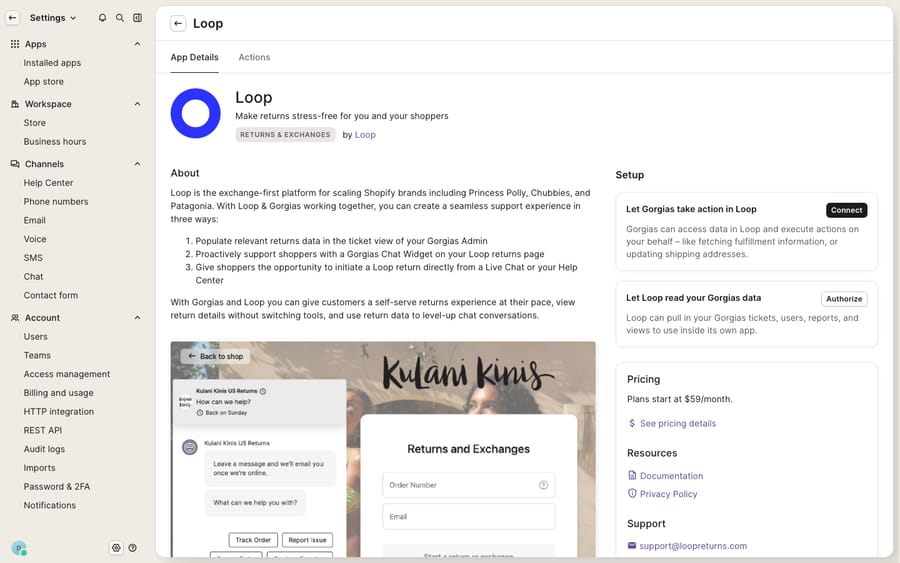
The connect page is exactly what it looks like: the authorization handshake, not the live widget. The populated sidebar with real return statuses only appears on actual tickets once the Loop side is enabled and a connected Shopify store is feeding it order and return data.
Step 2: How do you enable the Gorgias tile inside Loop?
The other half of the handshake happens in the Loop admin, and this is the step that actually binds the two accounts together. Following Loop's returns-data setup guide:
- In Loop, go to Returns management → Tools & Integrations → Integrations.
- Enable the Gorgias tile.
- When prompted, enter your Gorgias subdomain (the
yourbrandinyourbrand.gorgias.com) and click Save. - You'll be redirected to a Gorgias screen to confirm authorization — click Authorize.
- Loop redirects you back to its Integrations page, and the Gorgias tile toggles on to confirm the integration is live.
Running more than one Loop account into the same Gorgias? Loop's guidance is to add each additional account as a separate HTTP Integration, copying the setup of the original HTTP Integration that was created automatically when Loop was first installed , with the exception of a fresh API key.
Step 3: How do you test it with a real return?
Because the widget only renders on tickets tied to a customer with return data, you need a genuine test order to see it work.
- Create a test order in Shopify. Loop specifically advises using an email with a non-Gorgias domain on that test order so the ticket is treated as a real customer, not an internal address.
- Put that order through a return in Loop.
- Have the "customer" open a ticket in Gorgias (email or chat).
- Open the ticket and confirm the Loop widget appears in the sidebar with the return's status and details.
One behaviour to internalize here: a return submitted in Loop does not, on its own, create a Gorgias ticket. Per Loop, "tickets will only be created in Gorgias when the customer reaches out to your support team." The widget enriches tickets your customers start; it doesn't manufacture them. The one exception: if Loop's Returns Tracking with delivery error detection is switched on, Loop creates a ticket for a delivery error.
Step 4: When does the data refresh, and where do deep links go?
The sidebar data isn't a live stream; it refreshes on events. Loop's integration updates the return data when one of three things happens on the ticket: a ticket is created, a ticket is updated, or a ticket is responded to. If you need the freshest state mid-conversation (say a refund just processed), there's a manual trick: add an internal note that says "Update" on any open or closed ticket, and Loop refreshes the returns data to the latest status.
The other quietly powerful piece is deep linking. The widget links each return straight into the Loop admin at a https://admin.loopreturns.com/returns/<return-id> URL, so an agent can jump from the Gorgias ticket into the exact return in Loop to process an exchange, issue a refund, or convert a return-to-exchange, with no searching. Loop's launch announcement frames the payoff plainly: customers "often start a support ticket just to confirm that their return has been processed," and the integration lets teams "quickly find the answer and close out the ticket, because Loop tracks every item that's been returned along with its order status."
What does the native widget do, and what needs an AI agent?
The native integration is excellent at what it's scoped to do, and it's worth naming the boundary clearly. Here's the decision:
| Job to be done | Loop native widget | AI agent layer (e.g. Macha) |
|---|---|---|
| Show return/exchange status in the sidebar | Yes, built for this | Reads the same data |
| Deep link into Loop admin to process a return | Yes | Hands off to agent |
| Refresh data on ticket events / "Update" note | Yes | N/A |
| Actually read the ticket and write the reply | No, a human agent does this | Yes |
| Auto-answer "where's my return?" 24/7 | No | Yes |
| Triage a return ticket by intent before an agent opens it | No | Yes |
The seam is obvious once you see it, and so is the incentive: Loop sells returns software and Gorgias sells seats, so neither vendor's widget is built to write the reply for you. The Loop widget puts the return status in front of an agent, but a human still has to read the ticket, glance at the widget, and type the answer. On a spike (a big drop, a holiday return window) that's a lot of near-identical "yes, your return was received, refund lands in 3–5 days" replies.
This is where an AI agent for customer service earns its keep, and it's the same product philosophy behind every good Gorgias integration: put the data where the work happens. Macha runs on top of the Gorgias you already use as a native connector. It isn't a help desk and it doesn't replace Gorgias or Loop. It reads the same ticket and, through a custom tool pointed at your returns and order data, can answer the return WISMO question directly: confirm the return was received, quote the refund timeline, or tell the shopper their exchange has shipped. For anything that needs a human, such as a policy exception or a damaged-item dispute, it triages by intent and hands off with the context already gathered. Macha connects to Gorgias specifically (see the Gorgias connector overview), and it charges per ticket (one conversation, charged once however many messages and lookups it takes), not per resolution, starting at $299 a month for 750 tickets; the pricing page has the breakdown. Macha also runs on Zendesk, Freshdesk, Gorgias, Front, HubSpot or Intercom if part of your team works elsewhere.
The clean division of labour: let Loop and its Gorgias widget be the source of truth for return state, keep Gorgias as the system of record for the conversation, and let an AI agent do the reading-and-writing the widget was never meant to do. If you're a Shopify brand, this pairs naturally with the rest of your stack — see Gorgias for Shopify for how the order context flows.
FAQ
Where do I connect Loop Returns in Gorgias? In Gorgias, go to Settings → App Store → All Apps, search for Loop, and click Connect App, then authorize. You'll also enable the Gorgias tile from the Loop side under Returns management → Tools & Integrations → Integrations, entering your Gorgias subdomain to complete the handshake.
What return data shows up in the Gorgias sidebar? The Loop widget surfaces the return's submission date, return status, refund status, shipping status, tracking numbers, items returned, return reasons, and return type (return vs. exchange), plus a deep link into the Loop admin for that specific return.
Does submitting a return in Loop create a Gorgias ticket? No. Tickets are only created in Gorgias when the customer reaches out to your support team. The exception is a delivery error detected by Loop's Returns Tracking, which does create a ticket when that feature is on.
How do I refresh the return data if it looks stale? The data updates automatically when a ticket is created, updated, or responded to. To force a refresh mid-conversation, add an internal note that says "Update" on the ticket and Loop will pull the latest returns status.
Can I automate "where's my return?" answers without replacing Gorgias? Yes. An AI agent layer like Macha connects to Gorgias as a native connector and reads the same return context Loop provides, so it can answer return WISMO tickets directly and hand off the exceptions, all on top of your existing Gorgias and Loop setup, not instead of them.
Which Loop plan do I need for the Gorgias integration? Essential ($155 a month), Advanced ($340 a month) or the Integrations add-on. On the free Checkout+ plan you'd need the add-on.
Ready to turn return-status tickets into instant answers? Start a free trial of Macha and connect it to your Gorgias in minutes.






