





 Shopify
 Stripe
 Slack
Slack Notion
 Google Workspace
 Confluence

What Does the Gorgias Customer Sidebar Show? Shopify Order Widget Explained (2026)


The Gorgias customer sidebar holds a ticket's tags, custom fields and customer details, and a connected Shopify store adds an order widget with the customer's 10 most recent orders and in-ticket refund, cancel and edit actions. Without a connected store the order block never appears, and a few jobs, such as split-tender refunds, still have to go through the Shopify admin.
Key takeaways
- The Gorgias customer sidebar shows a ticket's tags and custom fields, a customer block with Customer Type, Note, Email and Phone, and a line saying whether it's the contact's first ticket.
- Once a Shopify store is connected, the Gorgias sidebar's order widget displays the customer's 10 most recent orders along with fulfillment status and order notes synced from Shopify.
- Gorgias' Shopify Actions let an agent refund or cancel an order from the sidebar, with refund quantity and shipping both defaulting to 0, and order edits blocked after 60 days.
- The Gorgias sidebar can only refund orders paid through a single payment gateway, so split-tender orders must be refunded directly in the Shopify admin.
- Gorgias bills its AI Agent per automated interaction, listing $1.50 past a plan's included amount, while Macha bills per ticket from $299 a month for up to 750 tickets.

The Gorgias customer sidebar shows a ticket's tags and custom fields, a customer block (Customer Type, Note, Email, Phone) and a ticket-history line, and once a Shopify store is connected it adds an order widget with the customer's 10 most recent orders, fulfillment status and Shopify actions such as refund and cancel. Without a connected store, there is no order block at all.
| Sidebar block | What it shows | Needs a connected store? |
|---|---|---|
| Ticket details | Tags and custom fields (Contact reason, Product, Resolution) | No |
| Customer block | Customer Type, Note, Email, Phone, ticket history | No |
| Shopify order widget | 10 most recent orders, fulfillment, order notes, lifetime spend | Yes (Shopify) |
| Shopify Actions | Create, duplicate, cancel, refund, edit an order | Yes (Shopify) |
| Recharge widget | Subscriptions; cancel, reactivate, skip, refund a charge | Yes (Recharge) |
What does the Gorgias customer sidebar show?
The right-hand rail on a Gorgias ticket is organized under Ticket details, and it has a few distinct blocks stacked down the page. At the top you'll usually find the ticket's tags and any custom fields your team has configured, such as Contact reason, Product, and Resolution: the structured metadata that turns a free-text conversation into something you can report on and route (we go deeper on the tagging side in Gorgias tags explained).
Below that sits the customer block: the contact's Customer Type, an internal Note field, their Email, and Phone. Beneath that is the ticket history line, which tells an agent at a glance whether they're looking at a brand-new contact ("This is Ava Thompson's first ticket") or someone who's written in before. That single line changes the tone of a reply. The full contact record, with every past interaction, ticket status, and customer field, lives one click away in the customer profile, which we cover separately in Gorgias contacts and profiles explained.
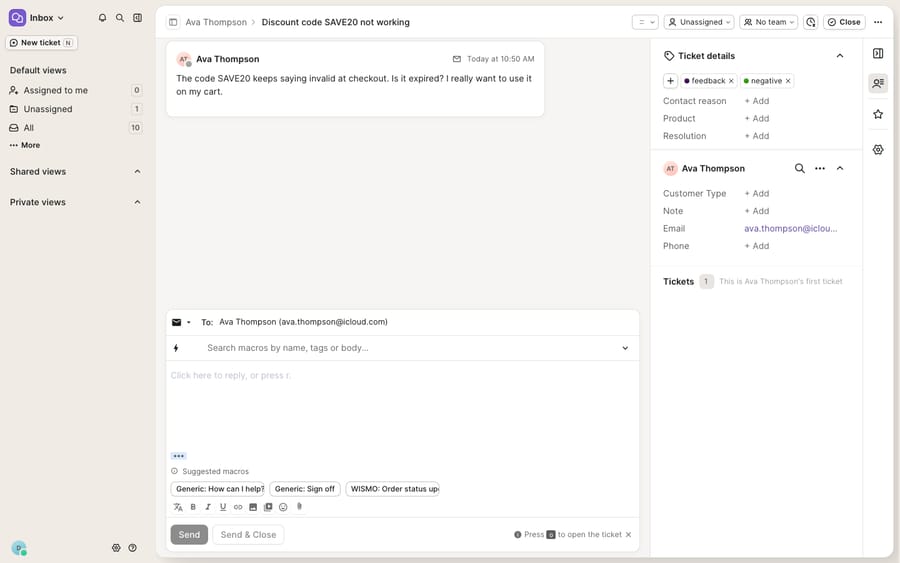
The screenshot above is the real sidebar on a trial account, and it shows a gap. There's no Shopify order widget in it, because no store is connected on this demo. That widget is the headline feature for ecommerce teams, so it's worth being precise about what it adds and when it appears.
What does the Shopify order widget add when a store is connected?
Connect a Shopify store (Gorgias is, first and foremost, a Shopify-native help desk) and the sidebar gains an order widget that renders the shopper's commerce context inline. Per Gorgias' Shopify integration docs, customers with a matching Shopify profile get "their order history, lifetime spend, and tags" in Gorgias, and agents see "an order's fulfillment status and order notes" without leaving the ticket.
Concretely, the widget surfaces:
- Order history: the customer's recent orders, with line items, totals, and status. Gorgias' Shopify FAQ states it "only displays the 10 most recent orders in the customer's sidebar", which is usually plenty for a WISMO reply.
- Fulfillment and tracking: the order's fulfillment status synced from Shopify, so an agent answering "where's my order?" reads the tracking state without leaving the ticket.
- Cart and connected-app data: data from connected apps like Recharge, AfterShip, and Yotpo, so subscription and loyalty context sits next to the conversation.
The agent reads the question, glances right, and has the order in front of them, with no tab-switching into the Shopify admin to answer a routine WISMO.
Which Shopify actions can an agent take from the sidebar?
The widget isn't read-only. Gorgias' Shopify Actions let an agent create, duplicate, cancel, refund, or edit a Shopify order directly from the sidebar, without opening Shopify. Edit is unavailable for archived orders and for orders placed more than 60 days ago.
The refund flow is the one worth understanding in detail, because Gorgias designed it defensively:
- Refund quantity defaults to 0 so nobody accidentally triggers a return with a stray click, and shipping is auto-set to 0.
- You set the quantity, optionally add a custom refund amount, write a reason for your team's record, toggle whether to restock the items back into inventory, and choose whether to notify the customer.
Cancellations follow the same shape: set quantities to refund, specify a shipping refund, add a reason, restock, and notify. For a returns conversation, an agent can process "I want to send back one of the two mugs" as a partial refund with a restock, all inside the ticket.
Subscriptions show up here too. If you run recurring orders through Recharge, its widget displays a customer's subscriptions next to the ticket, and agents can cancel or reactivate a subscription, skip an upcoming charge, or refund a charge in part or in full (Gorgias Recharge docs). A "please pause my monthly coffee subscription" request becomes a two-click job in the sidebar. Handing the same request to an AI agent is covered in how an AI agent should handle skip, pause and cancel requests. One exception: orders fulfilled at checkout have to be canceled in Shopify.
When should you use the sidebar and when the Shopify admin?
For teams weighing how much work to keep in Gorgias versus bouncing to Shopify, here's the split.
| Task | Do it in the Gorgias sidebar | Go to Shopify admin |
|---|---|---|
| Check order status / tracking | Yes, the order widget shows it inline | Not needed |
| Issue a simple refund or cancel | Yes, via Shopify Actions | Not needed |
| Refund a split-tender order (multiple gateways) | No, the sidebar won't process it | Yes, refund in Shopify |
| Manage a Recharge subscription | Yes: cancel, reactivate, skip, refund a charge | Optional |
| Edit an order older than 60 days, or complex fulfillment splits | No; basic edits on recent orders only | Yes, for anything advanced |
| See orders older than the 10 most recent | No, the sidebar caps at 10 | Yes, full history in Shopify |
Keep the routine, high-volume actions in the sidebar where the conversation is, and reserve the Shopify admin for the edge cases the widget deliberately doesn't handle.
What are the sidebar's limits?
The Shopify order widget is one of the best reasons ecommerce teams pick Gorgias: it puts commerce context and safe, scoped actions right where the reply happens. It also has edges.
First, it's store-gated by definition: the widget only appears once a store is connected, which is why the screenshot above has no order block. On a fresh trial with no store, the sidebar is tags, fields, and ticket history. Second, the sidebar shows the 10 most recent orders, so a long-tenured customer's older history isn't there. Third, refunds are limited to orders paid through a single payment gateway; a split-tender order won't refund from the sidebar and has to be handled in Shopify, and gift cards are left out of refund calculations. And Gorgias' AI Agent, which reads this same context, is added on top of a helpdesk plan and billed per automated interaction; the pricing page lists $1.50 per automated interaction past a plan's included amount, so the more the AI closes, the more you pay. Gorgias' docs describe a dedicated AI Agent for each Shopify store you connect.
The widget shows the order and lets a human act on it, but it doesn't read the ticket, decide which action is right, and take it. An agent still has to look, judge, and click. That's where an AI agent layer fits.
How can AI act on the sidebar's order context?
Macha is an AI agent layer that runs on top of the Gorgias you already use rather than replacing it, and it connects the same way to Zendesk, Freshdesk, Gorgias, Front, HubSpot or Intercom. The Macha↔Gorgias connector is live: Macha reads and writes the same tickets your agents do, so it can look at the same Shopify order context the sidebar surfaces and draft or send a grounded WISMO reply, a returns answer, or a subscription-status response before a human opens the ticket. Where the order data lives behind your own systems, a custom tool turns a REST API into something the agent can call and reason over. That's part of why Gorgias, for all its commerce depth, isn't really a CRM and benefits from a layer that can join the dots. You can compare how Gorgias' own AI Agent works alongside it.
Macha bills per ticket: one conversation, charged once however many lookups and replies it takes, never per resolution. Plans start at $299 a month for up to 750 tickets, and there are no overages: when the month's tickets are used, the agents pause rather than billing you more (see the pricing breakdown). Per-interaction AI pricing earns the vendor more with every ticket its AI closes; a ticket-volume plan caps the bill in advance.
Let Gorgias' sidebar stay the source of truth for order context and safe agent actions, and put an AI agent on top for the reading and answering the widget itself can't do.
FAQ
What does the Gorgias customer sidebar show? On any ticket, the right-hand Ticket details rail shows the ticket's tags and custom fields (like Contact reason, Product, Resolution), a customer block (Customer Type, Note, Email, Phone), and a ticket-history line telling you whether it's the contact's first ticket. With a connected Shopify store, it also shows a live order widget.
What does the Shopify order widget display? The customer's Shopify profile (order history, lifetime spend, tags), their latest orders (the sidebar shows the 10 most recent), each order's fulfillment status and notes, and connected-app data such as Recharge subscriptions, all without leaving the ticket.
Can agents issue refunds from the Gorgias sidebar? Yes. Gorgias' Shopify Actions let agents create, duplicate, cancel, refund, or edit an order from the sidebar. The refund modal defaults quantity to 0 and shipping to 0 as a safeguard, with restock and notify-customer toggles and a reason field. It can only refund orders paid through a single payment gateway; split-tender orders must be refunded in Shopify.
Why doesn't my sidebar show a Shopify order widget? Because the order widget requires a connected Shopify store. On a trial or an account with no store integration, the sidebar shows only tags, fields, and ticket history; no order block appears until Shopify is connected.
Can I add AI to my Gorgias sidebar without replacing Gorgias? Yes. Macha connects to Gorgias as a native connector and runs on top of your existing help desk. It reads the same ticket and order context the sidebar surfaces and drafts or sends grounded replies, while Gorgias stays the system of record. Billing is per ticket (one conversation, charged once), not per resolution.
How is Gorgias' own AI Agent billed? Per automated interaction, on top of the helpdesk plan. Gorgias' pricing page lists $1.50 per automated interaction once a plan's included interactions are used.
Ready to let your agents act on order context instead of staring at it? Start a free trial of Macha and connect it to your Gorgias in minutes.






