



 Intercom
 Shopify
 Stripe
 Slack
Slack Notion
 Google Workspace
 Confluence

How Do Gorgias Tags Work? Manual, Bulk, Rule and AI Tagging (2026)


Gorgias tags go on tickets three ways (individually, in bulk from a View, or through a Rule) and then drive your Views, your Rules and the Tags report in Analytics. Keyword Rules miss customers who phrase things differently, which is the gap AI ticket tagging and agent layers try to fill.
Key takeaways
- Gorgias lets agents tag a ticket three ways: the '+ Add tag' control on one ticket, the 'Add Tags' bulk action in a View, or automatically through a Rule.
- Only Admins and Lead agents can create, edit or delete Gorgias tags under Settings, Productivity, Tags, and a tag still used by a Rule cannot be deleted.
- A Gorgias Rule either uses the Add Tag Action, which appends a tag, or the Reset Tag Action, which removes all previous tags before adding the new one.
- The Gorgias Tags report under Analytics, Insights shows the 10 most-used tags for a period plus a table of every tag used at least once, and all roles can view it.
- Gorgias AI ticket tagging needs an active AI Agent subscription and only autofills tags on tickets the AI Agent directly handles, leaving human-handled tickets untouched.

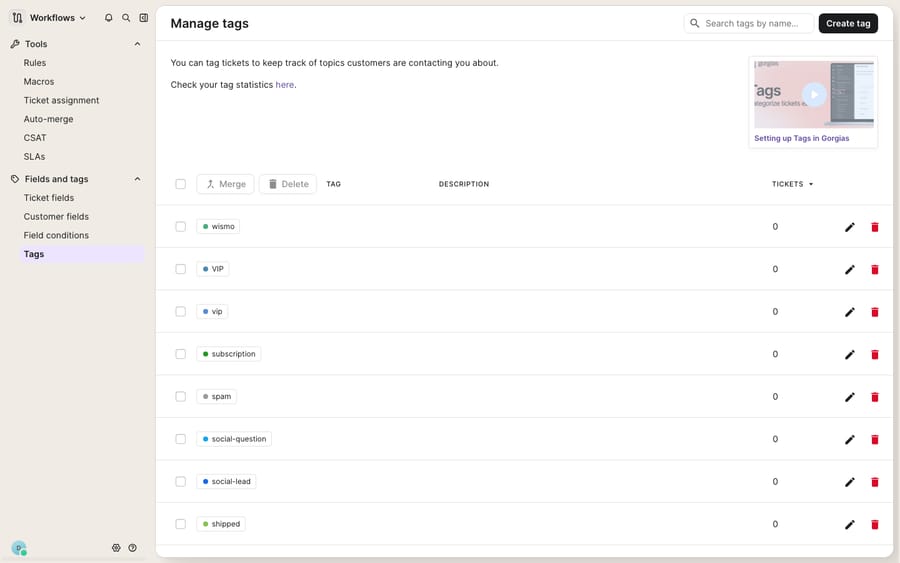
A Gorgias tag is a label on a ticket that you apply in one of three ways (the "+ Add tag" control, a bulk action in a View, or a Rule), and once applied it works as a filter key for Views, Rules and the Tags report in Analytics. Only Admins and Lead agents can create, edit or delete tags, under Settings → Productivity → Tags.
| Method | Where you do it | Best for |
|---|---|---|
| Individually | "+ Add tag" on an open ticket | One-off edge cases |
| In bulk | Select tickets in a View, then "Add Tags" | Relabeling a backlog in one pass |
| Rule | A Rule with an Add Tag or Reset Tag action | Anything repeatable |
| AI ticket tagging | AI Agent → Settings → AI ticket tagging | Intent-based tags, only on tickets the AI Agent handles |
What does a tag actually do in Gorgias?
Per Gorgias' Tags 101 documentation, a tag exists to do two jobs: sort your tickets and automate your workflow. A tag can tell you what a ticket is about (a wismo or return-request label), who it should be assigned to, or which Rule fired on it, all without opening the conversation.
A tag isn't just a sticky note. It's a filter key. Once a ticket carries a tag, that tag can drive a View (a saved, filtered slice of the inbox), feed the Tags report in Analytics, and act as a condition or action inside a Rule. So the label you choose on Monday becomes the routing logic, the dashboard number and the automation trigger for the rest of the quarter. Every sloppy tag is a leaky filter downstream.
Tag management lives under Settings → Productivity → Tags. Per Gorgias' Create, edit, or delete Tags article, "only Admins and Lead agents can access the Tags menu and create, edit, or delete them"; everyone else can only use existing tags. That restriction is what keeps twelve agents from inventing twelve spellings of "refund." One catch the same article flags: you can't delete a tag that a Rule still uses. Edit the Rule first.
What are the three ways to tag a ticket?
Gorgias gives you exactly three ways to get a tag onto a ticket, and knowing when to reach for each is most of the skill.
- Individually. Open a ticket and use the "+ Add tag" control at the top of the conversation. This is for the one-off, the edge-case ticket that doesn't fit any pattern.
- In bulk. Inside a View, tick the checkboxes next to several tickets, click "Add Tags", and choose the tag. This is how you retro-fit a label across a backlog, say tagging every ticket from a botched shipment
carrier-delayin one pass. - Automatically, via a Rule. Create a Rule that watches for a trigger and applies a tag with no human involved. This is where most of the value is, and it gets its own section below.
You remove tags the same two ways: manually, by clicking the "x" next to the tag on a ticket, or automatically, with a Rule (for example, stripping a NEW tag once a customer replies).
How do you auto-tag tickets with Rules?
Manual tags don't scale; Rules do. A Rule in Gorgias performs an action on a ticket when a trigger and a set of conditions match, and "add a tag" is one of its most common actions. Instead of hoping agents remember to label every WISMO ticket, you write one Rule that tags them all.
Gorgias' Auto-tag Rule best practices offers ecommerce templates worth copying:
- "Cancel order": trigger on the phrase, tag
cancellation, and route to your fulfillment agents before the order ships. - "Urgent order edit": catch customers who want to change a recent order and tag it for a fast lane.
- Integration-based: in a multi-brand setup, tag by the source integration so each brand's tickets land in the right View.
- Language: detect the customer's language, tag it, and assign to a matching agent.
One subtlety the docs call out: Rules can either append a tag or reset the tag set. The Add Tag Action appends to whatever is already there; the Reset Tag Action removes all previous tags first. Use reset only when you want a clean slate, because it will quietly wipe context an earlier Rule added.
How do tags feed Views, Rules and reporting?
Tagging is only worth the effort because of what tags feed. Three things consume them.
Views. A View is a saved filter over your inbox, and tags are its most natural filter key. Tag every warranty issue warranty, build a Warranty View filtered on that tag, and your specialists get a self-populating queue instead of digging through the firehose.
Rules. Tags are an output of Rules and also an input. A tag applied by one Rule can be the condition another Rule keys off, so you can chain logic: tag vip on intake, then have a second Rule prioritize anything carrying vip. Pair this with your macros and a tagged ticket arrives pre-sorted with a reply ready to go.
Reporting. The Tags report now sits under Analytics → Insights → Tags. Per Gorgias' Gather ticket insights: Tags article, it "shows how tickets are distributed across your tags over a selected time period": a Top used tags panel with the 10 most-used tags for the period, plus an All used tags table listing every tag used at least once, and you can drill into the tickets behind each count. This is how you answer "how much of our volume is WISMO?" or "are returns trending up after the holiday rush?" All roles can view the report; only the account owner, admins and leads can download the ticket data. If tags are messy, so is every number that depends on them.
What tag hygiene habits actually hold up?
Because tags are load-bearing, a little discipline pays off. A few habits that hold up:
- Adopt a naming convention. Lowercase, hyphenated, prefixed by domain:
order-cancel,order-edit,return-request. Consistency makes tags sortable and searchable. - Prefer a shallow, deliberate set over an organic sprawl. Twenty well-chosen tags beat eighty accidental ones.
- Merge duplicates instead of leaving them. Gorgias' merge flow shows you which old tag is being replaced before you confirm, so consolidating
wismo/WISMO/where-is-my-orderis safe and quick. - Lean on Rules for anything repeatable. Humans forget; Rules don't. Every tag you can automate is a tag you can trust in a report.
- Prune on a schedule. Once a quarter, delete tags nobody uses and merge the ones that drifted. Check the All used tags table first, and remember a tag referenced by a Rule won't delete until the Rule changes.
Where do keyword Rules fall short, and what does AI tagging add?
Gorgias' tagging system is transparent, permissioned, deterministic and wired into Views, Rules and Analytics without any extra tooling. For structured, predictable signals (the source channel, a specific keyword, a language), Rule-based auto-tagging is the right instrument, and you should use it.
Keyword Rules break down on language. A Rule that tags on the phrase "cancel order" will miss "I don't want this anymore," "please stop the shipment," and "can you not send it?": the same intent, none of the same words. Customers don't phrase problems the way your triggers expect, so keyword tagging is either too narrow (it misses variants) or too broad (it false-positives). Tag hygiene fixes spelling; it doesn't fix the fact that language is messy.
Gorgias' own AI ticket tagging closes part of the gap. As documented in Let AI Agent autofill tags and ticket fields, you go to AI Agent → Settings → AI ticket tagging, choose Tags, click "Add Ticket Tags", and describe in plain language when each tag should apply. The AI Agent then reads the conversation on email and chat and picks the most relevant tags from your descriptions, and human agents can override what it fills in. Three caveats from the same page: it needs an active AI Agent subscription, only Lead, Admin or Account Owner users can change the settings, and it only autofills tickets the AI Agent directly handles itself. A ticket that goes straight to a human isn't touched. Gorgias' pricing page puts AI Agent on every plan and charges only when it resolves a conversation, so the economics of "tag everything with AI" and "answer everything with AI" are bundled together: the vendor earns on resolutions, and tagging comes along with the tickets it takes.
There is another way to run the same idea. AI agents for customer service exist to do the reasoning a keyword can't, and an agent layer can tag by intent across your whole queue, not just the tickets it answers. Macha is one such layer: it runs on top of the Gorgias you already use through a native connector, and it doesn't replace Gorgias or its tags. You connect Macha to Gorgias, and its AI agents read the full conversation, classify by what the customer means, and can look up order or subscription status through a custom tool before deciding how to label and reply. The commercial difference: Macha bills per ticket, not per resolution, one conversation charged once however many messages it takes, starting at $299 a month for 750 tickets with setup and monitoring by the Macha team included. You can size it against your own volume on the pricing page. (More on how the two fit together in the Macha–Gorgias integration overview.)
The clean division of labor: keep Gorgias tags as the source of truth for what a ticket is and where it goes, keep Rules for the structured signals they nail, and layer an AI agent on top for the intent-level tagging and answering a keyword match will always miss.
FAQ
Where do I create and manage tags in Gorgias? Under Settings → Productivity → Tags. Only Admins and Lead agents can create, edit or delete tags; other users can only apply existing ones. A tag that a Rule still references can't be deleted until you edit the Rule.
What are the three ways to tag a ticket in Gorgias? Individually (the "+ Add tag" control on a ticket), in bulk (select tickets in a View and click "Add Tags"), or automatically via a Rule that applies a tag when a trigger and conditions match.
How do tags feed reporting? The Tags report under Analytics → Insights shows how tickets are distributed across tags for a period, with the 10 most-used tags in one panel and every used tag in a table. All roles can view it, which makes tags a lightweight self-serve analytics layer, as long as your tag set is clean.
Does Gorgias have AI auto-tagging? Yes. AI ticket tagging lets the AI Agent read email and chat conversations and autofill tags you describe in plain language under AI Agent → Settings → AI ticket tagging. It requires an active AI Agent subscription and only tags the tickets the AI Agent itself handles.
Can I add AI tagging without replacing Gorgias? Yes. An AI agent layer like Macha connects to Gorgias through a native connector and runs on top of your existing help desk and its tags. It classifies tickets by intent across your queue and can draft replies too, while Gorgias stays the system of record for tags, Views and Rules. Macha bills per ticket, one conversation charged once, not per resolution.
Want to tag by intent instead of by keyword, and answer the ticket too? Start a free trial of Macha with $50 of free usage and no credit card, and connect it to your Gorgias.
Add AI agents to your Gorgias
Macha reads the ticket, drafts the reply and takes the action, inside the Gorgias you already run.





