



 Intercom
 Shopify
 Stripe
 Slack
Slack Notion
 Google Workspace
 Confluence

How Much Does Freddy AI Cost on Freshdesk vs an AI Agent Layer? (2026)


Freddy AI Agent looks cheap at about $0.49 a session, but a session is billed whether or not the issue is resolved, and Copilot and seats sit on top. An AI agent layer on Freshdesk bills per ticket instead, and which costs less depends on your volume.
Key takeaways
- Freddy AI Agent costs $49 per 100 sessions, about $0.49 each, after 500 free sessions that Freshworks limits to once per account.
- A Freddy email session is a 72-hour window from the customer's first email and a chat session is a 24-hour window, billed whether or not the issue is resolved.
- Freddy AI Copilot costs $29 per agent a month on Freshdesk Pro and Enterprise only, and Freddy AI Insights is listed on the Enterprise plan only.
- At 3,000 email tickets a month, Freddy AI Agent costs $1,470 in session packs whether it resolves 45% or 65%, and $1,565 with five Growth seats, against $1,294 for Macha on those seats.
- Macha bills per ticket on Freshdesk, one charge per thread however many steps the agent takes, from $299 a month for 750 tickets, with setup by the Macha team and a dedicated success manager included.

Freddy AI Agent costs $49 per 100 sessions (about $0.49 each) once Freshdesk's one-time allowance of 500 free sessions runs out, and a session is counted whether or not the issue gets resolved. An AI agent layer such as Macha bills per ticket instead, one charge per thread, from $299 a month for 750 tickets. Neither is automatically cheaper: the answer depends on how many sessions or tickets your traffic generates and how much of the work you want automated.
| Cost line | Freddy on Freshdesk | AI agent layer (e.g. Macha) |
|---|---|---|
| Seats | Growth $19, Pro $55, Enterprise $89 per agent/mo (annual) | Your existing Freshdesk seats |
| Autonomous AI | Freddy AI Agent: 500 sessions once per account, then $49 per 100 | $299/mo for 750 tickets, up to $3,999 for 10,000 |
| Agent assist | Freddy AI Copilot: $29 per agent/mo, Pro and Enterprise only | Same plan; each Copilot chat counts as one ticket |
| Analytics | Freddy AI Insights: Enterprise plan only | Run-by-run analytics included |
A disclosure: Macha, the company publishing this, sells that kind of AI agent layer, and it connects to Freshdesk as a native integration. We keep the Freddy analysis even-handed and save the aside about where a layer like Macha fits, and where it doesn't, for the second half.
What are the two ways to add AI to Freshdesk?
There are two distinct ways to put AI on top of Freshdesk, and they're priced on different logic.
Freddy is native. It's Freshworks' own AI, built into the Freshdesk product family. Freddy AI Agent is the autonomous, customer-facing bot; Freddy AI Copilot assists your human agents; Freddy AI Insights reports on it all. Because it's first-party, it's the path of least resistance: no connector to configure, no second vendor. Its autonomous agent is billed per session, an interaction window rather than an outcome.
A model-agnostic AI agent layer runs on top. This is a separate product that connects into Freshdesk through its API and runs AI agents against your tickets: reading them, grounding answers on your knowledge base, drafting replies, tagging, routing, calling out to your own systems. It isn't a help desk and it isn't a Freshdesk replacement. Macha, for example, bills per ticket, one charge per thread however many automated steps the agent takes, which is a different shape of bill from Freddy's per-session model.
The right comparison isn't "which unit price is lower" but "how many billable units will my traffic generate, and how much of the work do I want automated?"
What does Freddy AI actually cost on Freshdesk?
Per Freshworks' Freshdesk pricing page, Freddy is three separate products, and that's the first thing that surprises buyers.
Freddy AI Agent (the autonomous, customer-facing bot): per session. Additional sessions cost $49 per 100 (about $0.49 each). Every plan, Growth included, comes with 500 free sessions, but Freshworks' own FAQ says this is "limited to once per account." It's a trial allowance, not a monthly refill.
The catch is the definition of a session. For the email AI Agent, Freshworks defines a session as a 72-hour window starting from the customer's first email; every AI reply inside that window counts as one session. For chat, Freshworks' session FAQ defines a 24-hour window (Freshworks). Nothing in either definition depends on the outcome: if Freddy tries, can't crack it, and a human takes over, you still paid for the session. Previewing an AI Agent while you build it consumes sessions too. Freddy bills for activity, not outcomes.
Freddy AI Copilot (agent assist for humans): per seat. $29 per agent a month, sold on Pro and Enterprise only; Growth can't buy it. You can assign it to a subset of agents.
Freddy AI Insights (analytics): listed on the Enterprise plan only, with proactive insights, root-cause analysis and conversational insights.
Under all three sit the Freshdesk seat plans: Growth $19, Pro $55, Enterprise $89 per agent a month billed annually. So the "cents per session" headline is real, but the bill stacks the seat price, per-session AI Agent usage, and a per-seat Copilot add-on: three meters, not one.
A worked example. Say Freddy handles 3,000 email conversations a month, one session each. After the one-time 500 are gone, that's 30 packs of 100 at $49, or $1,470 a month, before seats or Copilot. The same 3,000 tickets on Macha is the $1,199 tier. Change the assumptions (chat instead of email, repeat contacts after 72 hours, fewer AI-touched conversations) and the gap moves, which is why you should run your own numbers. The next section runs them at two resolution rates.
What does Freddy AI Agent cost at 3,000 tickets a month?
At 3,000 email tickets a month, Freddy AI Agent costs $1,470 a month in session packs whether it resolves 45% or 65% of them, and $1,565 with five Growth seats. That's the property of per-session billing worth understanding before anything else: the resolution rate changes what you get for the money and leaves the bill where it is. Per-session billing pays Freshworks for every conversation Freddy touches, so it has no stake in whether the answer lands.
We ran two resolution rates anyway, because they change the cost per resolved ticket. The range is from Gorgias's Ecom Lab, which reported in April 2026 that "the median brand resolves 45% of AI-touched tickets end-to-end. The top quartile clears 65%" (Gorgias Ecom Lab, 28 April 2026). It's a vendor self-report on Gorgias merchants, not a Freddy figure; Freshworks' own Customer Service Benchmark Report 2025 puts Freddy AI Agent deflection at 53% for retail companies (also a vendor self-report, and deflection rather than resolution), which lands inside that range. We checked the session rules against Freshworks' session FAQ. Assumptions: every ticket is one email session (no reopen after the 72-hour window), the one-time 500 free sessions are already used, and 5 agents on Growth at $19 billed annually.
| Line item (monthly) | 45% resolved (1,350) | 65% resolved (1,950) |
|---|---|---|
| Sessions: 3,000 = 30 packs × $49 | $1,470 | $1,470 |
| Growth seats, 5 × $19 | $95 | $95 |
| All-in on Growth | $1,565 | $1,565 |
| Session cost per resolved ticket | $1,470 ÷ 1,350 = $1.09 | $1,470 ÷ 1,950 = $0.75 |
| If 10% of threads reopen after 72 hours (300 more sessions, 3 packs) | $1,565 + $147 = $1,712 | $1,712 |
| Pro instead, with Copilot for the humans: 5 × $55 + 5 × $29 | $1,470 + $275 + $145 = $1,890 | $1,890 |
| Macha on the same Growth seats: $1,199 + $95 | $1,294 | $1,294 |
| Macha plan fee per resolved ticket | $0.89 | $0.61 |
Freddy and Macha are both activity-priced, so at the same volume the comparison comes down to unit price: about $0.49 a session against about $0.40 a ticket, a $271 monthly gap on 3,000. Two details decide whether that gap holds for you. A session is a time window, so an email customer who replies on day four opens a second billable session, while Macha counts one thread with one person as one ticket however long it runs. And session packs expire with your billing cycle, per Freshworks' pricing page: a quiet month's unused sessions don't carry forward, so buying packs ahead for a seasonal peak has a cost.
Where Freddy wins at this volume: it needs no second vendor, it's inside Freshdesk's own admin, and on Growth you can run it without paying for Pro. Where the layer earns its $1,199: the AI work that needs data outside Freshdesk. Macha fits teams already running Zendesk, Freshdesk, Gorgias, Front, HubSpot or Intercom whose tickets need an order, subscription or account lookup before anyone can answer them. On Freshdesk, Macha's connector searches and updates tickets, adds replies and manages contacts, and Macha's team sets up custom API tools for order, subscription or account lookups during onboarding. Past 3,000 tickets, Macha's next step is $1,999 for 5,000; Freddy just adds packs at $49 per 100. For other volumes, see AI support cost at 1,000 tickets a month.
How do you set Freddy up inside Freshdesk?
Freddy AI Agent is wired to a channel (email, the support portal widget, or chat) and answers incoming tickets from your Freshworks knowledge base. Freddy AI Copilot lives inside the agent workspace, suggesting replies, summarizing threads, and rephrasing drafts for your human team. You configure both from Freshdesk's admin, point them at your solution articles, and set escalation rules so anything the AI can't handle routes to a human queue. Our Freddy AI explainer covers each product in more depth.
For a fuller walkthrough of turning automation on, see how to automate Freshdesk with AI. The budgeting takeaway: Freddy's cost tracks your volume of AI-touched conversations, not your resolution rate, because every session that opens is billable whether it lands or not.
Where does Freddy stop, and what does an AI agent layer add?
Native AI is convenient, but it's scoped to what the help desk vendor wants to support. Freddy answers from your Freshworks knowledge base and follows Freshdesk's automation rules, and it's good at deflecting FAQ-shaped tickets. Where it gets thin is anything that needs to reach outside the help desk: checking an order status in your commerce backend, verifying a subscription in your billing system, or running a multi-step workflow across systems Freddy doesn't natively connect to. You're also tied to Freshworks' model choices.
That's the gap a model-agnostic AI agent layer fills. Macha runs on top of Freshdesk as a native connector. It doesn't replace your help desk; it automates on top of it.
A few concrete extensions:
- Custom tools turn any REST API into an action the agent can call, so an agent can look up an order, issue a refund, or check a license in your systems mid-ticket, not just recite a help article.
- Simulations replay your past tickets against an agent before it goes live, so you're not testing on customers. Studies then analyze how the agent performs against its instructions.
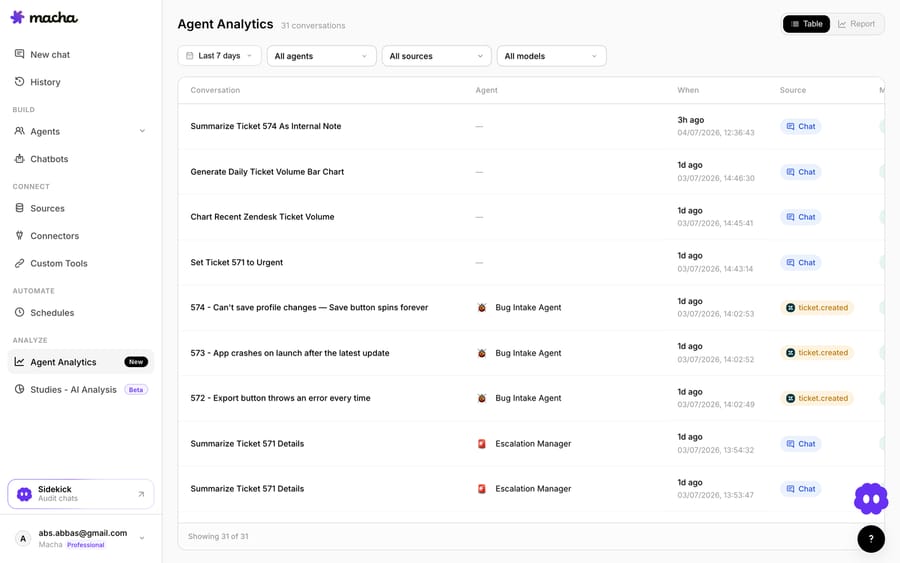
- Analytics log every agent run action by action, which shows exactly what the agent did on every ticket you're billed for.
- Sources ground answers on your actual knowledge (help center, docs, and connected content) rather than a single native KB.
- Model-agnostic means you choose the underlying model instead of inheriting the vendor's.
One scope note: Macha connects to Freshdesk, not to Freshchat, Freshservice, or Freshcaller. If your support lives in one of those other Freshworks products, this comparison doesn't apply cleanly.
On cost: Macha bills per ticket, one charge per thread however many steps the agent takes, on one plan priced by volume, from $299 a month for 750 tickets, about $0.40 a ticket. That price includes the setup: the Macha team analyzes your past Freshdesk tickets, builds the knowledge base and the agent, and runs it in safe mode, with drafts as internal notes, until the drafts are right, and a dedicated success manager who handles your changes stays on after go-live. That maps spend to the tickets the AI works and gives you action-level visibility, but it asks you to forecast monthly ticket volume, the same way per-session pricing asks you to forecast sessions. Per-session pricing has its own incentive: the vendor earns on every AI-touched conversation, resolved or not. A layer isn't automatically cheaper than Freddy; it's a different bill, layered onto the Freshdesk you already run, that reaches workflows Freddy's native scope can't.
If you're weighing this against building your own bot, building an AI agent from scratch vs. using a platform covers the buy-vs-build math, and our overview of AI agents for customer service walks through what these layers do across help desks. The full tier list is on our pricing page.
How do Freddy and an AI agent layer compare side by side?
| Freddy AI Agent | AI agent layer (e.g. Macha) | |
|---|---|---|
| Relationship to Freshdesk | Native, built in | Runs on top via native connector |
| Billable unit | Session (interaction window) | Ticket (one thread) |
| What triggers a charge | AI engages, win or lose | Each ticket the agent works, however many steps |
| Unit definition | Email 72h window; chat 24h window | One thread with one person, however many messages |
| Price | $49 per 100 sessions after 500 free once | From $299/mo for 750 tickets |
| Setup | You configure it in Freshdesk's admin | Done for you by the Macha team, with a dedicated success manager, included |
| Model choice | Freshworks' models | Model-agnostic |
| Reach beyond the help desk | Limited to native connections | Custom tools call any REST API |
| Pre-launch testing | Preview (consumes sessions) | Simulations replay past tickets |
| Separate SKUs | Agent + Copilot + Insights | One plan, priced on ticket volume |
Freddy rates, the 500-session allowance and plan availability are from Freshworks' pricing page and FAQ, read in September 2026; the chat session window is from Freshworks' session FAQ.
Who should use Freddy, and who should add a layer?
- Lean on Freddy if you want the least-friction path, your queries are mostly FAQ-shaped, and they can be answered from your Freshworks knowledge base. Native and predictable by volume is hard to beat for simple deflection.
- Add an AI agent layer if you need agents to reach into your own systems, run multi-step workflows, pick your own model, or be tested against real tickets before launch, and you'd rather pay once per ticket than for every interaction window opened. With Macha you don't build that layer yourself: the Macha team sets it up on the trial and every plan, at about $0.40 a ticket including a dedicated success manager who handles your changes.
- Either way, budget the whole stack. With Freddy that means seat price plus per-session usage plus per-seat Copilot. With a layer it means a monthly ticket tier on top of your existing Freshdesk seats. The unit sticker price is the least reliable number in either quote.
Frequently asked questions
How much does Freddy AI cost on Freshdesk? Freddy AI Agent costs $49 per 100 sessions (about $0.49 each) after 500 free sessions, which Freshworks limits to once per account. Freddy AI Copilot is $29 per agent a month on Pro and Enterprise only, and Freddy AI Insights is listed on Enterprise only. All of that sits on top of Freshdesk seats at $19, $55 or $89 per agent a month.
What counts as a Freddy AI "session"? An interaction window, not an outcome. For the email AI Agent it's a 72-hour window from the customer's first email, and every AI reply in that window counts as one session. For chat it's a 24-hour window. You're billed for the session whether or not the ticket is resolved, so you pay for failed attempts too.
Is an AI agent layer cheaper than Freddy? Not automatically; it's a different shape of bill. A layer like Macha bills per ticket (one charge per thread, from $299 a month for 750 tickets) rather than per session, which maps cost to the tickets the AI works but asks you to forecast monthly ticket volume. At 3,000 AI-handled email conversations a month, Freddy's session packs come to $1,470 before seats, against $1,199 for Macha's 3,000-ticket tier. Macha's price also includes setup by the Macha team and a dedicated success manager who handles your changes.
What does Freddy AI Agent cost at 3,000 tickets a month? About $1,470 a month in session packs (30 packs of 100 at $49), assuming one email session per ticket and the one-time 500 free sessions already used. Five Growth seats add $95. Because Freddy bills per session, the total is the same whether it resolves 45% or 65% of tickets; the cost per resolved ticket falls from $1.09 to $0.75.
Do unused Freddy sessions roll over? No. Freshworks' pricing page says session validity matches your payment cycle, so sessions bought on a quarterly plan expire at the end of the quarter. Size packs to steady volume and top up for peaks rather than buying far ahead.
Does Macha work with Freshchat or Freshservice? No. Macha's native connector is for Freshdesk specifically, not Freshchat, Freshservice, or Freshcaller. If your support runs on one of those other Freshworks products, this comparison doesn't apply directly.
How should you decide?
Freddy's per-session price is low, but it's one meter of three, and a session is an activity window you pay for win or lose. That makes Freddy a good, low-friction choice for FAQ deflection grounded in your Freshworks knowledge base. It runs out of road when a ticket needs to reach outside the help desk, run a multi-step workflow, or use a model you chose. An AI agent layer on top of Freshdesk, billed per ticket, tested on past tickets before go-live, and able to call your own APIs, covers that wider scope for a different bill. Price your real monthly volume on both sides, and confirm every Freshworks rate on the vendor's page before you sign.
Freddy pricing read from Freshworks' pricing page and FAQ in September 2026. Pricing in this category changes often; next review by December 2026.
Add AI agents to your Freshdesk
Macha reads the ticket, drafts the reply and takes the action, inside the Freshdesk you already run.





