





 Shopify
 Stripe
 Slack
Slack Notion
 Google Workspace
 Confluence

What Does a Gorgias Customer Profile Show? Contacts, Timeline, Fields and Merging (2026)


Every Gorgias ticket is tied to a customer profile that holds contact details, internal notes, up to four Customer Fields and a timeline of tickets and Shopify orders. Duplicate profiles can be merged from the ticket sidebar, but a merge is technically irreversible.
Key takeaways
- A Gorgias customer profile holds name, email, phone, internal notes, up to four active Customer Fields, and a Customer Timeline of tickets and Shopify orders.
- Gorgias allows a maximum of four active Customer Fields at a time, only Admins can create them, and every role can fill them in.
- Order data in the Gorgias Customer Timeline is only available for Shopify stores, while the timeline itself is on all Helpdesk plans.
- Gorgias can summarize any open ticket with three or more messages from the Customer Timeline, and generates summaries for closed tickets automatically.
- Gorgias says merging customer profiles is technically irreversible and advises merging a customer in Shopify first when their orders sit under two emails.

A Gorgias customer profile is one record per contact that holds their name, email, phone, internal notes, up to four active Customer Fields, and a Customer Timeline of every ticket plus, for Shopify stores, every order. You open it from the Customers icon in the helpdesk navigation or the Open Timeline button in a ticket's sidebar, and you merge duplicates from that same sidebar.
| Part of the profile | What it holds | Limit or requirement |
|---|---|---|
| Contact details | Name, email, phone, location, ticket count | All Helpdesk plans |
| Internal notes | Free-text context from agents | Editable on the profile |
| Customer Fields | Yes/No, dropdown and other typed properties | Max four active; only Admins create them |
| Customer Timeline | Tickets and orders in one feed, AI summaries | Order data only for Shopify stores |
| Merge | Collapses duplicate profiles | Technically irreversible; merge in Shopify first |
Is Gorgias a CRM, or just a contact list?
"Is Gorgias a CRM?" is a genuine debate, and we cover it separately in is Gorgias a CRM. This post is about the actual feature: the Customers area and the profile Gorgias builds under the hood. Gorgias isn't a sales CRM with pipelines and deal stages. It's a support help desk, but it does keep a real customer record per contact, and that record is where the order-linked history and merged identities live. If you're new to the product overall, what is Gorgias sets the wider scene; here we zoom into the profile itself.
Where do contacts live, and what does a profile show?
You reach the Customers page from the helpdesk navigation menu. Per Gorgias' Manage Customers documentation, you click the Customers icon (or use Search and switch to the Customers tab) to see every contact in your account. Click into any one and you get the customer profile and its timeline.
A profile holds all of a customer's contact information and the record of their conversations. Concretely, that means:
- Name, email address, and phone number: the core identity fields, with an option to add a phone number if one isn't captured yet.
- Internal notes: free-text context your agents leave, editable directly on the profile (useful for "prefers email over phone" or "known chargeback risk").
- Customer Fields: per Gorgias' Create and manage customer fields doc, these are unique properties that let your agents capture additional information about shoppers, and unlike ticket fields or tags they stay with the customer from ticket to ticket. Think VIP status, ring size, or a birthday. The constraint most teams hit: a maximum of four active customer fields at a time, so you archive one before creating a fifth. Admins create them under Settings → Ticket & Customer data → Customer Fields; every role can fill them in.
The four-field cap is a design choice worth noticing. Gorgias wants the profile to stay a glanceable support record, not a place where you model your whole customer. Anything richer, such as subscription plan or lifetime value, has to come from Shopify or a connected app.
Those same details also surface in the right-hand sidebar of any ticket, alongside the customer's location and how many tickets they've submitted, so an agent rarely needs to leave the conversation to know who they're talking to.
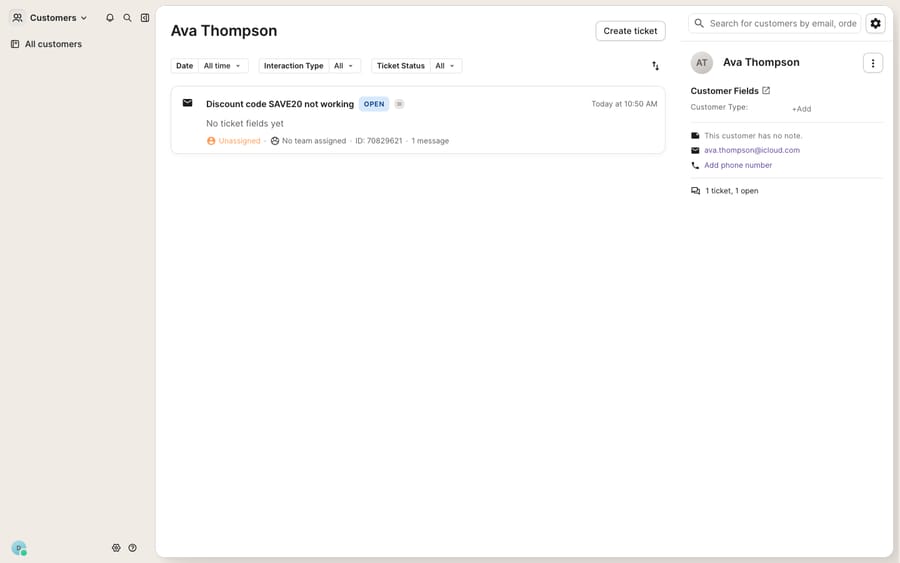
What does the Customer Timeline show?
The profile's most useful surface is the Customer Timeline, a consolidated feed of everything a contact has done with your brand. Per Gorgias' Review customer history documentation (updated January 23, 2026), it's available on all Helpdesk plans and to all roles, and it shows two kinds of events side by side:
- Tickets: every support conversation, with a preview modal so an agent can read prior messages without opening each one, Previous and Next buttons to step through them, and an Expand Ticket button to jump into a ticket and reply.
- Shopify order data: each order's number, status (Paid, Unfulfilled, and so on), date, total, and item count, threaded into the same chronological view. Gorgias is explicit that order data in the timeline is only available for Shopify stores.
Filters sit at the top for date, interaction type (tickets, orders, or both) and status, and you can sort by Last Updated or Created. In a ticket, the Open Timeline button shows blue when the customer has other open tickets and grey when they're all closed, which is a quick tell before you reply.
There's also a Summarize button. You can generate an AI summary manually on any open ticket with three or more messages, and on closed tickets Gorgias generates the summary automatically. This is the part that makes returns and subscription questions fast: an agent handling "where's my refund for order #1043?" sees the order, its status, and every prior message about it without leaving the timeline.
How do you merge duplicate customer profiles?
Here's the problem the profile is quietly solving. Tickets are linked to a contact by email address, but customers don't cooperate. The same shopper emails from a personal Gmail, then reaches out on Instagram (which carries no email at all), then buys again under a work address. Left alone, Gorgias treats those as three different people, and your agent loses the thread.
Merging fixes this by collapsing duplicate profiles into one. Per Gorgias' Merge customers documentation, the manual flow works like this:
- In the ticket's customer sidebar, search for the duplicate by order number, email address, phone number, or name.
- Select the matching profile from the results and start the merge.
- Choose which data to keep. The fields highlighted in blue are the ones that survive the merge.
- Click Merge Customers in the bottom-right, then Confirm.
Gorgias also surfaces suggested merges when it detects likely duplicates, so you're not hunting for them by hand. If a suggestion is wrong, there's no way to mark it incorrect; Gorgias says you can safely ignore it.
What's the Shopify-first rule? If a customer has Shopify order history under multiple email addresses, Gorgias says to merge the customer in Shopify first, then merge their profiles in Gorgias, so both order history and ticket history end up together. And a merge is, in Gorgias' own words, technically irreversible. There's a workaround, but treat merging as a one-way door and confirm you've got the right two profiles first.
Where does the native Gorgias profile fall short?
The Gorgias customer profile is a strong native feature. It's a real, unified record, the merge flow is thoughtful, and the order-linked timeline saves agents a genuine amount of tab-switching. But it's worth being clear-eyed about what it is and isn't.
- The richest profile is Shopify-gated. Order data in the timeline is Shopify-only, and the order widget, live status and refund actions in the sidebar depend on a connected store. Without that connection, the profile is contact info, notes, four custom fields and ticket history: useful, but not the "full customer 360" the marketing implies. Third-party data (Recharge subscriptions, Aftership tracking, Yotpo reviews) each need their own app connection.
- Merging is manual and irreversible. Suggested merges help, but a human still has to confirm each one, remember the Shopify-first rule, and accept there's no clean undo. At volume, duplicates accumulate.
- The profile displays; it doesn't reason. Gorgias will show you the order status and the ticket history, and it can summarize a thread. It won't read them, understand that the customer is asking to change a subscription frequency, and draft the reply. That's still an agent's job.
This last point is the seam where an AI agent layer fits. The broader category of AI agents for customer service exists to do the reasoning-heavy work a static profile can't. Macha is one such layer: it runs on top of the Gorgias you already use through a live native connector. It is not a help desk and does not replace Gorgias or its Customers feature. Connected, Macha reads the same customer profile, timeline, and tags your agents rely on, and can look up an order or subscription through a custom tool that turns your REST API into something the agent can call, then draft or send a grounded reply that already knows who the customer is and what they ordered.
One contrast on cost, because it matters at ecommerce volume. Gorgias' own AI Agent is billed per automated interaction, and when it resolves a ticket on its own Gorgias charges the automation fee on top of the helpdesk ticket fee, per its billing documentation. Macha's pricing works differently: it bills per ticket, not per resolution, one conversation charged once however many steps it takes, starting at $299 a month for up to 750 tickets. For how Gorgias' own agent behaves, the Gorgias AI agent explainer goes deeper.
The clean division of labor: keep Gorgias' customer profile as the source of truth for who the customer is and what they've done, and layer an agent on top for the part the profile can't do: reading that record and answering the question fast.
FAQ
Where do I find contacts and customer profiles in Gorgias? Click the Customers icon in the helpdesk navigation menu (or use Search and switch to the Customers tab) to open the full contact list, then select a customer to open their timeline. From a ticket, click Open Timeline in the right-hand sidebar.
What does a Gorgias customer profile show? Name, email, and phone number, editable internal notes, up to four active Customer Fields, and a Customer Timeline of tickets and, for Shopify stores, order data (number, status, date, total, item count).
How do I merge duplicate customers in Gorgias? In the ticket sidebar, search for the duplicate by order number, email, phone, or name, select the match, choose which fields to keep (the blue-highlighted ones survive), then click Merge Customers and Confirm. Gorgias also suggests likely duplicates automatically. Merging is technically irreversible, so confirm the profiles first.
Do I need Shopify to get order history on the profile? Yes. Gorgias says order data in the Customer Timeline is only available for Shopify stores. If a customer's orders are split across two Shopify emails, merge them in Shopify first, then merge their Gorgias profiles.
How many custom fields can a Gorgias customer profile have? Four active Customer Fields at a time, on every Helpdesk plan. Only Admins can create them, and you archive an active field to make room for a new one.
Can I add AI to Gorgias profiles without replacing Gorgias? Yes. An AI layer like Macha connects to Gorgias as a native connector and runs on top of your existing help desk. It doesn't replace Gorgias or its Customers feature. It reads the same profile, timeline, and tags to draft or send grounded replies, while Gorgias stays the system of record for who the customer is.
Ready to put the customer profile to work instead of just looking at it? Start a free trial of Macha with $50 of free usage and no credit card, and connect it to your Gorgias.






