Shopify
 Stripe
 Slack
 Notion
 Google Workspace
 Confluence


What Are the Most Common Intercom Problems and How Do You Fix Them? (2026)


The Intercom problems admins run into most are a Messenger that won't appear on the site, forwarded emails that never reach the Inbox, closed conversations that reopen when a customer replies "thanks", SLAs that keep counting when they should pause, Fin ignoring content it was given, and a Fin bill bigger than the forecast. Almost every one traces back to a single setting or a single line of Intercom's own documentation, and the table below maps each symptom to the first place to look and our deeper guide on it.
Key takeaways
- When the Intercom Messenger doesn't appear, the ping request in the browser's Network tab decides it: no ping means the snippet isn't running, and a 403 points at trusted domains or JWT security.
- Intercom only accepts email forwarded to the workspace inbound address ending in intercom-mail.com, and it doesn't support forwarding from shared inboxes or Google Groups.
- Replies always reopen a closed Intercom conversation by default, unless you set a day limit under Control inbound volume for the Messenger or Reply settings for email.
- An Intercom SLA pauses only if its Apply SLA step is set to pause on snoozed, waiting on customer, or both, and only one SLA can be active per conversation.
- Fin charges $0.99 per outcome, at most once per conversation, and an assumed resolution, where the customer leaves without asking for more help, counts as billable.

| Symptom | First place to check | Deep dive |
|---|---|---|
| Messenger doesn't show on the site | Network tab ping request; user traffic switch; trusted domains | Messenger not showing |
| Forwarded email never arrives | Provider forwarding rule; source address type; Intercom Spam inbox | Email forwarding not working |
| Closed conversation reopens on "thanks" | Control inbound volume (Messenger); Reply settings (email) | Intercom tickets explained |
| SLA keeps counting or breaches early | The pause options on the Apply SLA step; office hours | SLAs and office hours |
| Fin ignores your content | Content item Live and Fin toggle on; sync history | Fin not answering from content |
| Fin bill above forecast | Outcome types in Fin reports; assumed resolutions | Fin pricing |
| Attachments dropped | Allowed file types; 20 MB email limit | Attachments not working |
| Everything is broken at once | finstatus.com for your hosting region | Is Intercom down? |
How should you troubleshoot Intercom before touching any setting?
Intercom does what its settings and Workflows tell it to. When something "stops working", the cause is usually a setting someone changed, a rule that matches a different conversation than you think, or a piece of plumbing outside Intercom, such as an email provider's forwarding rule or an ad blocker. Three checks rule out most of it in a few minutes:
- Check the region first. Intercom hosts workspaces in the US, the EU and Australia, and the URL you sign in on (app.intercom.com, app.eu.intercom.com or app.au.intercom.com) tells you which. The status page at finstatus.com is split by region, so a green US page tells an EU workspace nothing. Our guide to checking whether Intercom is down walks through it.
- Read the conversation's own history. Intercom stores assignments, tag changes and notes as parts of the conversation, alongside the messages (they're the same parts its API returns). A reassignment you didn't expect, or a note saying attachments were dropped, is often visible there before you open any setting.
- Find out which Workflow touched it. Most surprising behavior in Intercom (a wrong assignment, an SLA that replaced another, Fin answering a conversation you excluded) is a Workflow or a Fin escalation rule doing exactly what it was configured to do. Intercom's SLA article is explicit that when two Workflows apply SLAs, the newer one replaces the older.
Why isn't the Intercom Messenger showing on my site?
This is the problem that sends most people to search, because it looks like the product is down when it isn't. Intercom's Messenger troubleshooting article, read on November 21, 2026, lists the checks in this order, and the order is worth following:
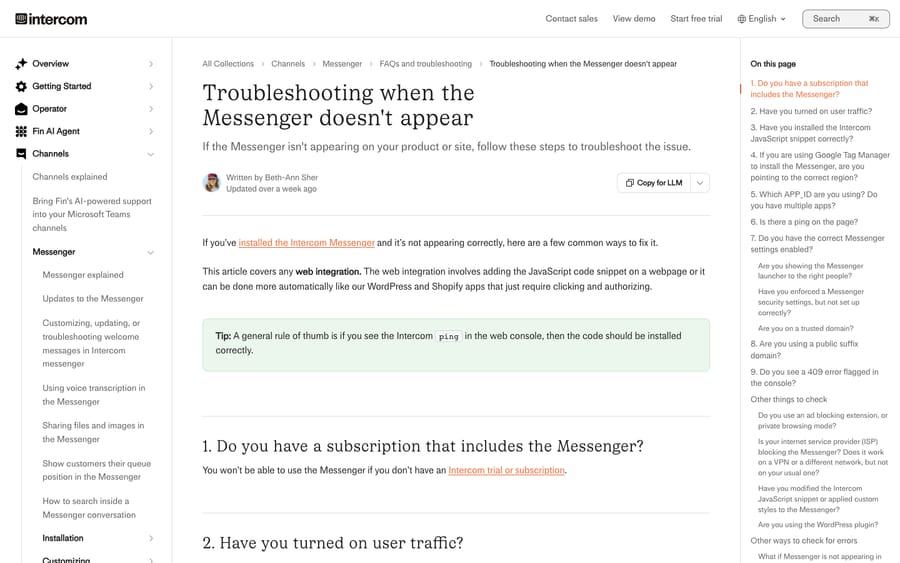
- Subscription and user traffic. The workspace needs an active trial or plan that includes the Messenger, and user traffic must be switched on in the install settings.
- The snippet. It has to be the right snippet for your audience (visitors or logged-in users), with your real app_id filled in, near the closing body tag. Single-page apps must load it before calling the boot command.
- The ping request. Run
Intercom('show')in the console and look for the ping request in the Network tab. No ping means the snippet isn't installed correctly. A ping that returns 403 means a Messenger setting is blocking it. - The settings that return 403. A domain missing from your trusted domains list, or misconfigured JWT security, stops the Messenger loading. If you still use the old user_hash method, our identity verification guide covers the move to JWTs.
- Everything outside Intercom. Ad blockers, private browsing, public suffix hosts such as herokuapp.com, a custom launcher with hide_default_launcher set, duplicate users with the same email (a 409), and in rare cases an ISP blocking the default API address.
If you install through Google Tag Manager on an EU or Australian workspace, the article adds that you must pass the regional api_base value, which is an easy one to miss after a migration. The full nine-cause walkthrough is in our Messenger not showing guide.
Why aren't forwarded emails reaching the Intercom Inbox?
Intercom doesn't read your support mailbox. It reads only what is forwarded to your workspace's single inbound address, whose local part starts with your app ID and whose domain ends in intercom-mail.com. Mail sent to [email protected] reaches the Inbox only if that mailbox forwards it, which is why "emails stopped arriving" usually means a forwarding rule at Google or Microsoft was switched off or edited.
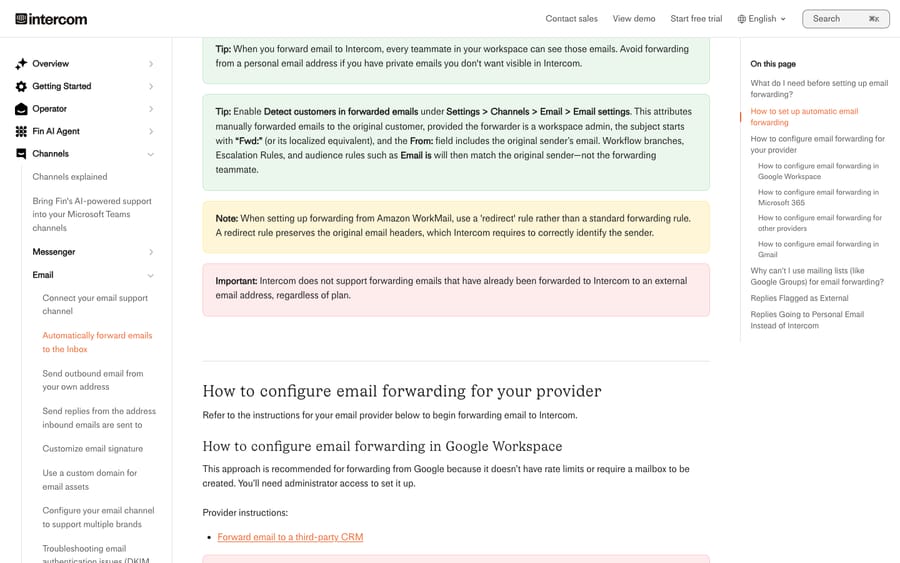
Intercom's forwarding article, read on November 21, 2026, names the cases that fail by design:
- Shared inboxes and mailing groups, including Google Groups, aren't supported. They rewrite the From header, and verification fails.
- Gmail needs two steps. Verifying the address isn't enough; you also have to choose "Forward a copy of incoming mail to" and save.
- Microsoft 365 blocks external forwarding by default. Error 550 5.7.520 means your outbound anti-spam policy needs changing in the admin center, not in Outlook on the web.
- Verification has a clock. The provider's verification email must be forwarded to Intercom within 60 seconds with the x-inbox-verification-code header intact, and it may land in Intercom's Spam inbox.
- Emails over 20 MB, attachments included, are rejected.
Our email forwarding guide has all ten causes in order of how often they show up.
Why does a closed conversation reopen when a customer replies?
Because that's the default. Intercom's Tickets FAQs say any reply to a conversation or ticket will always reopen a closed conversation unless you configure otherwise. A customer who writes "thanks, all sorted" puts the conversation back in someone's queue, and in a busy inbox that's a measurable slice of the open count.
There are two settings, one per channel, and Intercom says both apply to tickets as well:
- Messenger and mobile SDKs: Settings > Channels > Messenger > General > Control inbound volume. Choose Visitors or Users, enable "Prevent visitors/users replying to closed conversations" and set a number of days.
- Email: Settings > Channels > Email > Email settings, under Reply settings. Enable "Create new conversations when customers reply after [X] days."
Tickets follow a related rule. A customer reply to a ticket in Waiting on customer or Resolved moves it to In progress automatically, per Intercom's ticket-state Workflows article (written June 23, 2026). That article also shows the reverse: a "Teammate sends any message" Workflow that sets the state to Waiting on customer, so the state follows the conversation without anyone clicking. Our Intercom tickets guide covers states and ticket types in full.
Why didn't my Intercom SLA pause?
An Intercom SLA pauses only when the Apply SLA step that applied it is set to pause, and you choose between snoozed, waiting on customer, or both. Intercom's SLA article, read on November 21, 2026, adds three behaviors that explain most "the timer is wrong" reports:
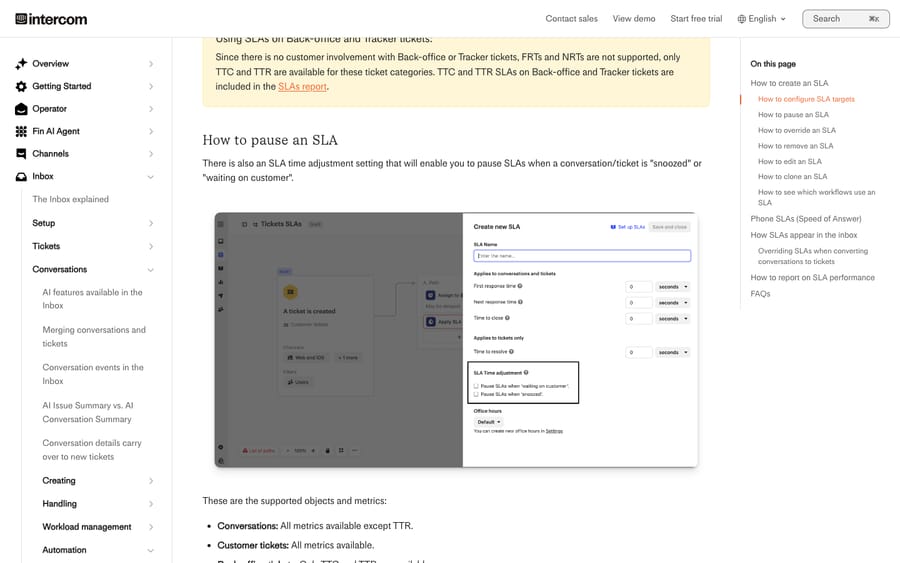
- A teammate reply sent while the conversation is waiting on customer doesn't restart the timer. It stays paused until the customer replies.
- If an SLA is missed while a conversation is snoozed, Intercom unsnoozes and reopens the conversation.
- Only one SLA can be active per conversation. If two Workflows apply SLAs, the newer one replaces the existing one.
The other half is office hours. Intercom's SLA article says "SLA rules take your office hours into consideration," and gives the example of a message received at 5:50pm getting an expected response time of 9:05am on the next working day. A target that looks short on the clock can land the next morning, which surprises people reading the deadline in the Inbox. Our SLA and office hours guide works through the reporting side.
Why is Fin not answering from my content?
When Fin ignores an article, the article is usually not set to Live or has its Fin toggle off under Fin AI Agent > Train > Content. After that, the causes in our Fin content guide run in the order they appear on Intercom's community forum: a website sync that didn't finish, a firewall blocking the crawler, a page that synced without its text, an audience filter that hides the article from that customer, a document Fin can't read, and a stuck ingestion queue. Fin's Preview panel also behaves differently from live Fin, which explains the "it works in Preview" reports.
Content is not always the cause. A Reddit thread from February 2026 in r/CustomerSuccess (source) describes a team with a very large conversation history and hundreds of pages of documentation still struggling to make Fin useful. If Fin is handing off too often or too rarely, the setting lives in Train > Escalations, not in Content, and our Fin handoff guide covers escalation rules and guidance.
Why is my Fin bill higher than I expected?
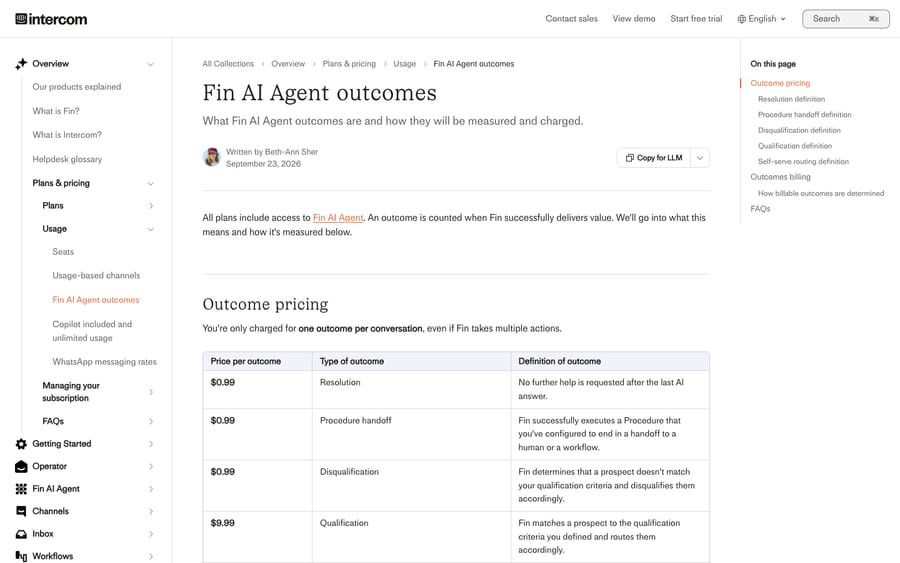
The meter counts more than the conversations Fin visibly solved. Intercom's Fin outcomes article, dated September 23, 2026, sets the price at $0.99 per outcome, and an outcome can be:
- a confirmed resolution, where the customer says the answer helped;
- an assumed resolution, where the customer leaves without asking for more help;
- a Procedure handoff, where Fin finishes a Procedure that you configured to end in a handoff to a human or a Workflow.
Fin charges at most once per conversation, and if a customer returns to a resolved conversation for more help, that resolution is deducted. Escalations from Fin's default behavior (the customer asks for a human, or shows frustration), failed Procedures, spam and abandoned conversations aren't billed.
A per-outcome price earns the vendor more as conversation volume grows, and an assumed resolution is counted from the customer going quiet, which is also what a customer who gave up looks like. A thread in r/SaaS titled "My Intercom billing shot up by 120%, it was because of AI" (source) is the familiar shape. The fix inside Intercom is to read Fin's outcome breakdown by type every month rather than the total. Our Fin pricing breakdown models the bill at several volumes.
Why are attachments being dropped from conversations?
Usually a workspace policy is doing it. Intercom's attachments article, read on November 21, 2026, sets the defaults: customers can send 13 file types (.gif, .jpeg, .jpg, .mov, .mp4, .pdf, .png, .txt, .heic, .oga, .ogg, .dng and .mp3), Messenger uploads can be up to 100 MB each, and an inbound email over 20 MB including attachments is rejected. To allow spreadsheets or Word files, go to Workspace > Security > Attachments, turn on "Allow leads and users to send other file types", and list the extensions. The change applies only to files sent after you save, and executables and password-protected archives stay blocked for every workspace. Our attachments guide covers the other causes, including expired Messenger links and Outlook's winmail.dat. WhatsApp has its own delivery rules, covered in our Intercom WhatsApp setup guide.
Is Intercom down, or is it my setup?
Check finstatus.com for your hosting region before anything else. The old status.intercom.com address redirects there (we checked in September 2026). The company renamed itself Fin on May 12, 2026, per Intercom's announcement, and the help desk product keeps the Intercom name. Salesforce completed its acquisition of Fin, formerly Intercom, on September 10, 2026. Neither event changed the settings above, but the new brand is why some help pages and status emails now say Fin where you expect Intercom.
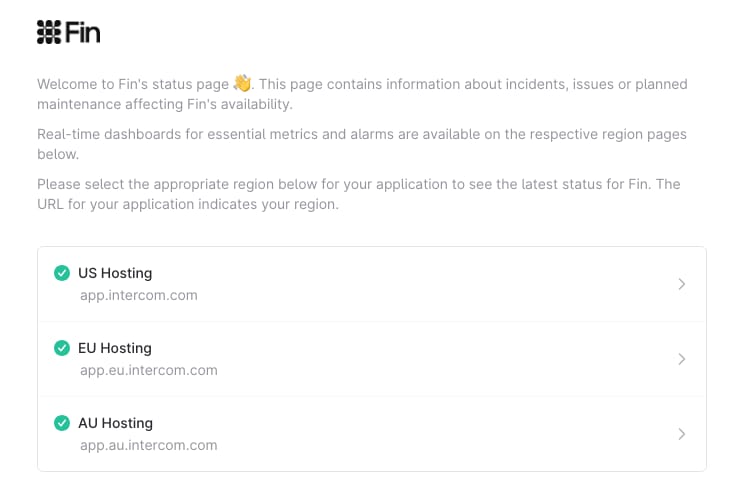
If your region shows "fully operational" and one feature still fails, work back through the checks earlier in this guide: the ping request, the forwarding rule, the Workflow that last touched the conversation.
What can't Intercom's own tools fix, and where does an AI layer help?
Every fix above is a setting. What settings can't do is read the conversation. A Workflow can tag by keyword and route by attribute, but it can't tell a refund request written as a complaint from a complaint about a refund, and it can't look up the order in Shopify before the conversation reaches a person. That part of the queue is reading work, and it's where an AI agent layer fits, whether or not you run Fin.
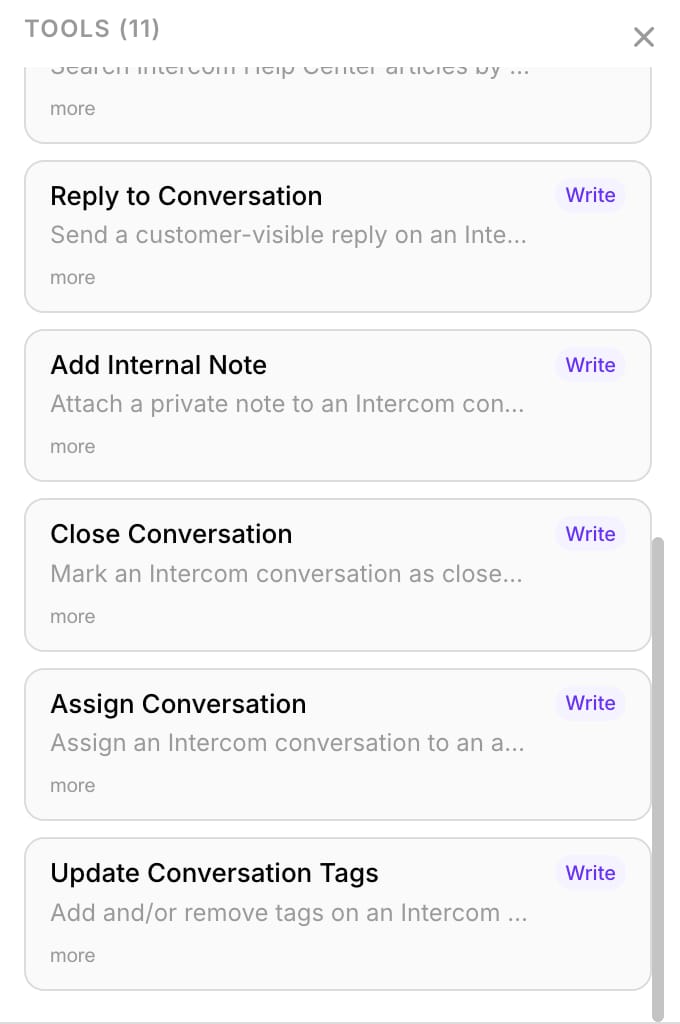
Macha runs AI agents inside the Intercom workspace you already have. Through its built-in Intercom connector, an agent reads conversations and contact profiles, searches your Help Center articles, replies to the customer, adds internal notes, assigns to a teammate or team, updates tags and closes conversations. It starts on Intercom events: the first customer message, every customer message, a conversation being assigned, or one being closed. A typical first agent triages every new conversation: it reads the message and the contact, tags it, routes it, and leaves a note with the context a teammate would otherwise look up by hand.
The safe way to start is safe mode: the agent writes its drafts as internal notes, a person approves them, and nothing reaches a customer until you switch that category to public replies. Macha is the done-for-you option here. The Macha team analyzes your past conversations, builds the knowledge base and the agent on your existing Intercom, and runs it in safe mode until the drafts are right. That's included on the trial and every plan at about $0.40 per ticket, with a dedicated success manager who handles your changes afterward. A ticket is one thread with one person, charged once however many replies it takes, so the meter doesn't grow with assumed resolutions. Macha fits teams on Intercom whose problem is the reading and routing work and who want the agent built and monitored for them. It's the wrong fit if you only need one of the settings above fixed; the deep dives cover that for free. Our Macha on Intercom page has the details, and our comparison of Fin and an AI agent layer covers when you'd run both.
How we researched this
We read each fix on Intercom's own help center on November 21, 2026: the articles on Messenger troubleshooting, email forwarding, Tickets FAQs, ticket-state Workflows (written June 23, 2026), SLAs, attachments and Fin outcomes (dated September 23, 2026). Several of those pages show only "updated over a week ago" rather than a date, so we give the date we read them. The rename comes from Intercom's May 12, 2026 announcement and the acquisition from Salesforce's September 10, 2026 press release. The status-page redirect is from our own check for the is-intercom-down guide in September 2026. Reddit sentiment is from two public threads, paraphrased, with no names.
The Macha capabilities come from Macha's own Intercom connector: the tool list and triggers in our product data, and the connector screen in the Macha demo workspace shown above. We didn't connect a customer's Intercom workspace for this guide, and the behaviors attributed to Intercom are from its public documentation, not from tests on our own account.
Common questions
Why is Intercom not working?
Check finstatus.com for your hosting region first. If the region is operational, the cause is almost always local: the Messenger snippet or trusted domains for chat, the provider's forwarding rule for email, or a Workflow that changed the conversation. The conversation's event trail usually shows which.
Why does the Intercom Messenger not load for some users?
Ad blockers, private browsing and some corporate networks block the Intercom script. Intercom suggests whitelisting js.intercomcdn.com, and for US-hosted workspaces, setting api_base to your workspace-specific address when an ISP blocks the default one.
How do I stop customers reopening closed Intercom conversations?
Set a day limit. For the Messenger it's under Settings > Channels > Messenger > General > Control inbound volume; for email it's Settings > Channels > Email > Email settings, under Reply settings, where you enable "Create new conversations when customers reply after [X] days". After the limit, a reply starts a new conversation instead of reopening the old one.
Does Fin charge for conversations it hands to a human?
Not when the handoff comes from Fin's default escalation behavior or your workspace escalation rules. It does charge $0.99 when Fin completes a Procedure that you designed to end in a handoff, and it charges at most once per conversation.
Is Intercom now called Fin?
The company is. It renamed itself Fin on May 12, 2026, and Salesforce completed its acquisition on September 10, 2026. The help desk and Messenger keep the Intercom name.
Can an AI agent fix Intercom problems for me?
It can't fix settings, but it can take over the reading work that settings can't do: tagging, routing and drafting replies inside Intercom. Macha does that as internal notes in safe mode first, set up by the Macha team. The trial is $50 of free usage (about 125 tickets), no credit card, no time limit, and you can start a trial or see how the done-for-you setup works.